


Last Updated: 17 Nov 2025
I still remember when I first started taking email marketing seriously — two names kept popping up everywhere: Mailchimp and Constant Contact.
Both have been around for more than a decade, both promise “easy email marketing for everyone,” and both are trusted by creators, small businesses, and marketers across the world.
But here’s the funny thing — when you look at their websites, they feel almost identical.
It’s only when you actually start using them that the differences become impossible to ignore.
So over the past few weeks, I put both tools to the test in real campaigns — building lists, designing newsletters, setting up automations, running A/B tests, and tracking performance. My goal was simple: to see which platform actually makes email marketing smoother, faster, and more effective in 2025.
In this hands-on comparison, I’ll break down Mailchimp vs Constant Contact feature by feature — ease of use, templates, automation power, deliverability, support, pricing — everything that matters if you want to send better emails and grow your business.
Email Editor
I always judge an email tool by how it feels the moment I start building an email.
For me, the perfect editor should be simple, quick, and not make me hunt for tiny settings.
So I tested Constant Contact and Mailchimp the same way:
“Let me build a real email and see how easy this actually feels.”
Here’s what happened.
Constant Contact
I started inside Constant Contact’s editor first.

Right away, it felt like stepping into a clean, beginner-friendly space. Nothing complicated. No clutter. Just simple drag-and-drop blocks — text, images, buttons — all right there.
It almost felt like the tool was saying:
“Relax. I’ll keep things simple for you.”
And honestly, it helped.
What I liked:
Editing inside the email felt natural
Drag-and-drop was smooth
I could finish a basic email in minutes
But things changed the moment I tried to design something more creative.
I wanted a more advanced layout… and that’s when Constant Contact quietly reminded me that it’s built mainly for simplicity.
What I didn’t like:
Limited layout options
Not enough advanced design controls
Hard to create anything “unique”
Great for beginners. Not great for custom or complex designs.
Mailchimp
Then I opened Mailchimp’s new builder, and the vibe instantly felt different.
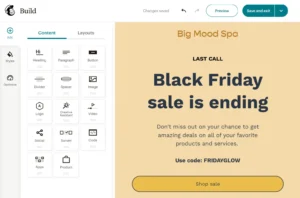
The editor looked more modern and polished — like a tool built for someone who wants more control.
I loved that I could just click any block inside the email and edit it directly.
That alone made the whole process feel smoother and faster.
What helped me:
Click-to-edit saved a lot of time
Adding elements felt clean
The new layout is more powerful
But Mailchimp also did something that annoyed me.
Some settings were still hidden in odd spots.
I had moments where I stopped and thought:
“Wait… where did they move that option now?”
This slowed things down during fine-tuning.
What I didn’t like:
Some options are still “too hidden”
Interface changes too often
Still, it gives more advanced control than Constant Contact.
My Verdict
Both editors helped me in different ways.
Constant Contact makes building simple emails super easy, perfect for beginners.
Mailchimp gives more power and flexibility, even though it hides a few things.
So based on my experience:
✅ Score: Mailchimp 1️⃣ – Constant Contact 1️⃣
(Yes — a fair tie.)
Design & Templates
Templates save a LOT of time.
Whenever I test an email tool, I always ask myself one thing:
“If I’m in a hurry, can I open a template and get a good-looking email out fast?”
So I checked Constant Contact and Mailchimp with that mindset.
Constant Contact
I jumped into Constant Contact first, and honestly, it felt like walking into a big library of ready-made emails.
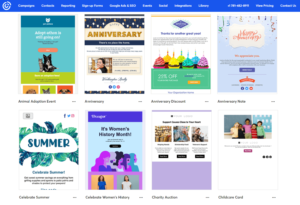
They give you 200+ templates — welcome emails, promo emails, seasonal campaigns, announcements… basically everything you need to get a newsletter out without overthinking.
It felt like Constant Contact was saying:
“Pick a template, change a few things, and you’re done.”
And that helped a LOT.
What I liked:
Huge variety of templates
Most are simple and beginner-friendly
Easy to adjust colors, images, and text
The “branded template” feature was my favorite — it pulled my website colors and logo automatically
But here’s the downside:
What I didn’t like:
Some templates look a bit old
Not many “modern” or high-end styles
Design quality is good… but not premium
Still, for quick newsletters, Constant Contact saves time.
Mailchimp
Then I opened Mailchimp’s template library… and the story changed quickly.

Mailchimp organizes templates into:
Layouts
Themes
Code Your Own
But here’s the part most people don’t know:
On the free plan, Mailchimp gives you only FIVE templates.
And all 5 look outdated, plain, and honestly not something you’d be excited to send.
If you want the nice, modern templates — the ones you actually see in their ads — you MUST upgrade.
There’s no shortcut.
Once I switched to the paid library, designs looked more polished and more stylish than Constant Contact’s.
What helped me:
Layouts give clean starting points
Paid themes look modern and professional
“Code your own” is perfect for custom work
What I didn’t like:
Free plan templates look bad and outdated
The good templates are locked behind paid plans
Smaller library unless you upgrade
Editing still feels stiff in some areas
Mailchimp has the better-looking templates — but only if you pay for them.
My Verdict
Both tools helped me in different ways:
Constant Contact is better if you want LOTS of templates for quick emails.
Mailchimp is better if you want modern, premium-looking designs — but only on paid plans.
So this round ends as:
✅ Score: Mailchimp 2️⃣ – Constant Contact 2️⃣
Email Automation — Which One Actually Runs Your Marketing on Autopilot?
Automation is where real email marketing happens — the part that works while you sleep.
So let’s see who delivers better hands-free performance.
Constant Contact
Here’s the truth most people miss:
👉 Constant Contact does offer automation on its cheapest $12/month Lite plan.
But it’s basic. Very basic.
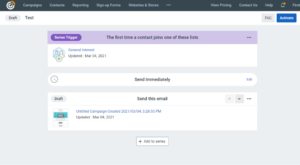
What you get on the Lite plan:
Welcome emails
Simple drip sequences
Basic follow-ups
And that’s pretty much it.
If you want:
complex workflows
branching logic
real eCommerce automation
multi-step behavior sequences
…you’ll need to upgrade to the Standard or Premium plans.
This is why many users feel limited — the basics are there, but the advanced stuff is locked away.
Mailchimp
Mailchimp steps ahead here.
Even on the Standard plan, you get a more polished automation builder with welcome sequences, abandoned-cart flows, behavior-based triggers, product retargeting, and recommendations.
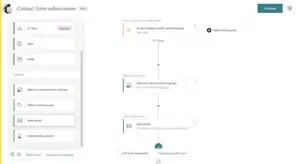
The only drawback? No visual workflow builder.
It works… just not as smoothly as it should.
Winner: Mailchimp
Mailchimp simply offers more automation power, earlier, and with better targeting.
Constant Contact locks its basic automations behind $45/month and still lacks flexibility.
✅ Score: Mailchimp 3️⃣ – Constant Contact 2️⃣
List Management & Segmentation — Who Makes It Easier to Organize Your Audience?
Both platforms help you manage your subscribers, but they take two completely different routes to get there.
Constant Contact
Constant Contact keeps list management extremely straightforward.
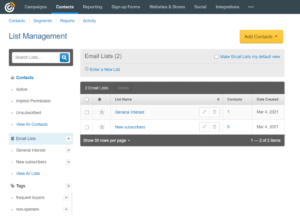
You can add tags, create basic behavior-based segments, and quickly import contacts from Excel, Gmail, Outlook, or even Salesforce.
It’s built for people who want to:
Upload a list
Add some tags
Create simple segments
Start sending
No clutter. No complexity. No 10-step setup.
This is why beginners and busy business owners often gravitate toward it — it just works without forcing you into advanced configurations.
Mailchimp
Mailchimp, on the other hand, treats your audience like a full CRM.
You get more advanced segmentation, deeper filtering options, and analytics that show how different segments perform.
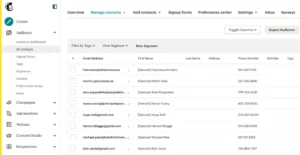
Powerful? Yes.
Beginner-friendly? Not always.
Mailchimp’s audience system often requires multiple steps to set up properly, and navigating its segmentation options can feel overwhelming if you don’t need that much complexity.
However, if you do need deeper targeting (behaviors, engagement levels, purchase activity), Mailchimp has the upper hand.
Winner: Constant Contact
Mailchimp offers more powerful segmentation…
But Constant Contact wins because it’s simple, fast, and practical.
✅ Score: Mailchimp 3️⃣ – Constant Contact 3️⃣
Registration Forms — Who Makes Lead Capture Easier?
Growing your email list starts with one simple thing: a good sign-up form.
If the form builder is too confusing, you lose time.
If it’s too basic, you lose flexibility.
So let’s see how Constant Contact and Mailchimp handle this.
Constant Contact
Constant Contact’s form builder feels like something you can learn in minutes — literally.
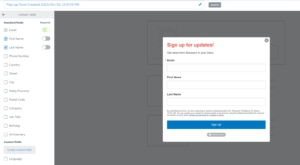
You get all the essential form types:
Pop-up forms to grab attention
Inline forms for embedding inside blog posts
Landing pages for special offers
Facebook Lead Ads to collect leads directly from social media
The editing panel keeps everything simple.
You can:
Change the background
Edit your text
Customize the CTA button
Add standard fields like first/last name, country, or address
Nothing fancy — but nothing confusing either.
The best part?
If you want a form that looks clean and works well, you can build it in 2–3 minutes without feeling lost. That’s why beginners love it.
Mailchimp
Mailchimp’s form builder is more feature-packed, but that also makes it feel a bit heavier.

Here’s what stands out:
More custom fields (great if you need deeper data)
Cleaner control over styling
A Translate It feature that automatically converts your form into different languages — super helpful if you target global audiences
But…
all these options mean you’ll click around more before your form is ready. It’s powerful, yes — but not the fastest tool if you want something simple.
Mailchimp gives you more control, but it’s not as “build it in a minute” friendly as Constant Contact.
My Verdict
Mailchimp offers more customization, but Constant Contact gives you speed, simplicity, and zero confusion.
If your goal is to create clean, functional forms quickly and without overthinking…
👉 Constant Contact wins this round.
✅ Score: Mailchimp 4️⃣ – Constant Contact 4️⃣
Reporting & Analytics — Who Helps You Understand What’s Working?
When you’re sending emails, you don’t just hit “Send” and walk away.
You want to know what happened after that:
Did people open the email?
Did anyone click?
Was it worth your time?
That’s where reporting kicks in — it tells you the real story behind your campaigns.
Let’s see how both platforms handle it in everyday use.
Constant Contact
Constant Contact keeps everything simple and clean, which is great if you don’t want to deal with complicated graphs.
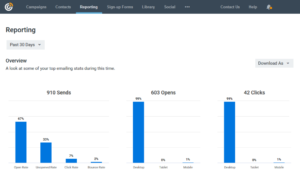
When you open your dashboard, you instantly see:
Opens
Clicks
Bounces
Sends
It also shows you your top stats from the last few days or months, so you can check if your performance is improving or dropping.
One thing I genuinely like?
👉 You can hide the stats you don’t want to see.
So if you want to focus only on “opens” and “clicks,” you can remove the rest and make your dashboard look cleaner.
It’s simple, it’s neat, and it gets the job done.
Mailchimp
Mailchimp shows the usual stats too — opens, clicks, sends, and bounces.
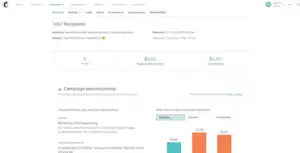
But here’s where it steps up:
👉 You also see your industry average open rate.
This helps you compare your performance with others in your niche.
And the best part?
👉 Mailchimp has a Revenue tab.
If you’re running a store or selling anything, this number tells you exactly how much money your emails made.
Pair it with Google Analytics, and you get a deep, detailed look at your ROI.
The only downside?
❌ You can’t hide or rearrange metrics like in Constant Contact.
You get everything on the screen, whether you want it or not.
My Verdict — Reporting
Mailchimp simply gives you more useful info — especially the revenue tracking — which helps you understand not just what happened, but how much money your emails actually made.
So this round clearly goes to Mailchimp.
Winner: Mailchimp
✅ Score: Mailchimp 4️⃣ – Constant Contact 4️⃣
Deliverability — Who Actually Reaches the Inbox More?
You can write the best email in the world…
But if it doesn’t land in the inbox, it doesn’t matter.
That’s why deliverability is a big deal. It tells you how many of your emails actually reach your subscribers instead of getting lost in spam folders.
Let’s see who performs better in the real world.
Constant Contact
Constant Contact has always been known for strong inbox placement, and the numbers back it up.
Across multiple tests from 2021 to 2024, their deliverability ranged between:
87.7% to 92.1%
With an average of around 90.6%
And 91.7% in the latest January 2024 test
The best part?
👉 The results are consistent.
Constant Contact doesn’t swing too much — their emails almost always land safely in inboxes.
Mailchimp
Mailchimp’s deliverability scores are also solid, but the numbers jump around more.
Across the same testing periods, Mailchimp scored:
85.2% to 95.5%
With an average of around 89.4%
Mailchimp did have one excellent peak (95.5%), but also some lower dips (85.2%).
So the performance is good — but not as steady as Constant Contact.
My Verdict — Deliverability
Both tools do a good job…
But Constant Contact is simply more stable, and its average performance is slightly higher.
So this round goes to Constant Contact.
Winner: Constant Contact
✅ Score: Mailchimp 4️⃣ – Constant Contact 5️⃣
Support — Who Actually Helps When You Need It?
When something breaks in your email tool, you don’t want to wait hours for help. Good support can save your whole campaign, especially when you’re stuck right before an important send.
So let’s see who actually shows up when you need them.
Constant Contact
Constant Contact really puts effort into helping its users.
You get:
A big knowledge base with guides and tutorials
Video lessons, seminars, and webinars
Live chat support
Phone support on all paid plans
Even support through Twitter/X
If you’re new or you just like talking to a real person, Constant Contact makes things very easy.
Mailchimp
Mailchimp’s support is… hit or miss.
If you’re on the free plan, you only get:
Tutorials
Articles
And 30 days of email support
After 30 days, you’re completely on your own unless you upgrade.
If you want:
24/7 email support → You need the Essentials plan
24/7 Chat support → Also requires a paid plan
Phone support → Only for Premium users
So basically:
👉 If you want real help, you have to pay.
My Verdict — Support
Constant Contact clearly cares more about helping users at every level, especially with easy phone and chat access.
Mailchimp does offer support… but only if you pay extra for it.
Winner: Constant Contact
✅ Score: Mailchimp 4️⃣ – Constant Contact 6️⃣
AI Features
Mailchimp: Advanced AI & Machine Learning (Powered by Intuit)
Mailchimp is far ahead when it comes to AI. Since Intuit acquired Mailchimp, they’ve integrated powerful machine learning models into almost every part of the platform — from content generation to predictive analytics.
Here’s what Mailchimp’s AI can actually do:
Content Creation & Copywriting
“Write with AI” generates email copy, subject lines, CTAs, and variations.
The Creative Assistant creates on-brand graphics and email layouts automatically using your brand colors, fonts, and past campaign data.
Can rewrite and optimize email text for clarity, tone, or engagement.
Optimization & Predictive Insights
AI recommends the best time and day to send emails based on audience behavior.
Predictive models show:
Purchase likelihood
Customer lifetime value
Churn probability
Demographic predictions
Helps build ultra-targeted segments using these predictions.
Automation Intelligence
AI assists in building multi-step Customer Journeys with behavioral triggers.
Suggests branches, tags, and paths based on your subscriber activity.
Ideal for advanced marketers who want deep personalization.
Reporting & Recommendations
The AI summarizer reads campaign data and tells you what worked, what didn’t, and what to fix.
Gives actionable recommendations (e.g., subject line tone, design improvements, CTA placement).
Availability
Basic AI is available to all.
But advanced AI (Content Optimizer, predictive analytics, behavioral insights) is typically locked behind Standard & Premium tiers.
Constant Contact: Basic, User-Friendly AI
Constant Contact’s AI feels more “assistant-like” and is mainly designed for simple content creation and support, not data science or deep predictive marketing.
Content Generation (Starter Friendly)
The AI Content Generator writes emails, landing pages, SMS, and social posts from a few keywords.
Helps with writer’s block and quick drafts.
Available even on the Lite plan.
Brand Setup Automation
Pulls brand colors, fonts, and styles directly from your website.
Sets up templates automatically — handy for new users.
Basic Automation Assistance
Can help create simple welcome workflows and recommended starter sequences.
No complex branching, behavioral triggers, or event-based flows driven by AI.
AI Support Assistant
Acts like a help-bot to guide you through features.
Good for beginners learning the platform.
Limitations
No predictive analytics.
No AI-powered send-time optimization.
No deep A/B testing guidance.
No ML-driven segmentation.
In short: Constant Contact’s AI is helpful for beginners, but it doesn’t reach Mailchimp’s depth or intelligence.
✅ Score: Mailchimp 5️⃣ – Constant Contact 6️⃣
Mailchimp clearly wins because its AI is deeper, more intelligent, and more useful for long-term scaling. Constant Contact has good basic AI, but it’s nowhere close to Mailchimp’s machine learning ecosystem
Who Should Use Mailchimp — and Who Should Use Constant Contact?
By now, you’ve seen the differences clearly —
Mailchimp brings stronger AI, smarter automation, and deeper analytics…
while Constant Contact shines in deliverability, support, and overall simplicity.
But which tool is the right fit for you?
Let’s break it down.
Choose Mailchimp if…
You want advanced automation with behavioral triggers, branching logic, and AI-powered customer journeys.
You rely on detailed reports, revenue tracking, and data-driven insights to improve campaigns.
You want a modern interface with next-gen AI tools for content writing and optimization.
You run an eCommerce store and need predictive analytics, product recommendations, or purchase-likelihood scoring.
You don’t mind paying extra for smarter AI, better analytics, and deeper segmentation.
👉 Best for businesses, marketers, and eCommerce brands that want advanced features, AI depth, and data-rich reporting.
Choose Constant Contact if…
You want a simple, beginner-friendly email tool that’s easy to set up and operate.
You prefer strong deliverability and stable inbox placement across campaigns.
You value fast support — with live chat, phone, Twitter, and seminars/webinars.
You want basic AI content generation without dealing with overly complex automation.
You need a reliable email platform for small businesses, local businesses, events, or non-profits.
👉 Best for small businesses and creators who prioritize ease of use, better support, and consistently high deliverability.
✅ Mailchimp vs Constant Contact — Which One Should You Choose?
After comparing Mailchimp and Constant Contact across automation, forms, AI, deliverability, reporting, and support — here’s my honest takeaway:
👉 Mailchimp is the more advanced, AI-driven, analytics-focused platform overall.
Its automation builder is smarter, its reports are deeper, and its AI tools give you a real edge — from writing emails to predicting audience behavior. It’s built for marketers who want data, optimization, and long-term growth.
You can learn using Mailchimp by using this tutorial.
That said, Constant Contact isn’t far behind — and in some areas, it even wins.
If you value higher deliverability, stronger customer support, and a very beginner-friendly interface, Constant Contact makes email marketing feel simple and stress-free. Its consistency and reliability are its biggest strengths.
Here’s the truth from someone who’s actually used both:
If you want advanced automation, AI recommendations, eCommerce insights, and detailed reporting…
→ Go with Mailchimp. Check out some amazing tools like Mailchimp
If you want a simple, dependable email tool with better support and more consistent deliverability…
→ Constant Contact will serve you really well.
But if your long-term goal is to scale with smarter workflows, deeper segmentation, and full AI assistance across your marketing…
👉 Start with Mailchimp. It gives you more power to grow — without outgrowing your platform.
