


Last Updated: 02 Jul 2026
I have tested both of these tools with a real email list.
Not a made-up scenario. Not a demo account. A real list, real subscribers, and real campaigns running through both platforms side by side.
And here is the thing most comparison posts will not tell you: this is not a close fight.
MailerLite used to be the scrappy underdog. Mailchimp used to be the clear leader. In 2026, that gap has flipped — and the pricing difference between them is now hard to ignore.
But it is not a simple “just pick the cheaper one” situation. Mailchimp still does things MailerLite cannot. And if you pick the wrong one, you will feel it.
Let me break down exactly where each tool wins, where each one falls short, and which one is right for how you actually work.
Short on Time? Read This Mailerlite vs Mailchimp Quick summary
The biggest difference between these two platforms comes down to one thing:
MailerLite focuses on giving you the essentials — cleanly, affordably, and without surprises.
Mailchimp focuses on giving you a full marketing suite — with more power, but far higher cost and complexity.
Neither is the right tool for everyone.
Quick Comparison
| If You Want… | Choose |
|---|---|
| The most affordable option with unlimited emails | MailerLite |
| Clean, simple automation without a learning curve | MailerLite |
| A more generous free plan | MailerLite |
| To sell digital products or courses from one place | MailerLite |
| 24/7 live support on any paid plan | MailerLite |
| Advanced ecommerce automation and integrations | Mailchimp |
| SMS marketing built into your email platform | Mailchimp |
| Deep analytics and predictive insights | Mailchimp |
| 800+ app integrations | Mailchimp |
Who Should Choose MailerLite?
MailerLite is built for people who want to send great emails without paying a premium for features they will never use.
You get unlimited email sends on all paid plans, clean automation workflows, landing pages, a website builder, and the ability to sell digital products. All of this comes at a price that does not punish you for growing your list.
It is a strong fit for bloggers, newsletter operators, coaches, creators, and small business owners. If your main goal is to build a list and stay in contact with your audience without a complicated setup — MailerLite was built for you.
Who Should Choose Mailchimp?
Mailchimp is built for businesses that need more than email — and are willing to pay for it.
Its real strength is ecommerce. The integrations with Shopify, WooCommerce, and other store platforms are deep. You get abandoned cart automations, predictive product recommendations, revenue tracking per campaign, and multi-channel marketing that includes SMS.
If you run an online store, need advanced segmentation driven by purchase behavior, or want a tool that connects into 800+ apps out of the box — Mailchimp earns its price at that level.
One Big Warning About Mailchimp Pricing
Mailchimp charges for all contacts in your account — including people who have already unsubscribed.
That means you could be paying for contacts you can no longer email. Unless you manually go in and archive or delete them, they count toward your billing limit and push you into higher pricing tiers.
MailerLite only charges for active subscribers. People who bounced or unsubscribed do not inflate your bill.
This one difference alone can mean hundreds of dollars per year on a mid-size list.
My Final Take
For most small businesses, creators, and newsletter operators — MailerLite is the better choice. It gives you what you actually need at a price that does not hurt.
For ecommerce brands with complex needs, a Shopify store, or a serious need for SMS and predictive analytics — Mailchimp is worth the premium.
Pick the tool that matches your business model. Not the one with the bigger name.
What I Tested and How
I signed up for both platforms using a real email list.
I built campaigns, created automation sequences, tested the editors, and dug into the reporting on both sides. I also went through hundreds of verified reviews on G2, Capterra, and Trustpilot to find the patterns that show up again and again.
Here is what I found.
Ease of Use
MailerLite: Fast, clean, and easy to figure out
The first time I logged into MailerLite, I had a campaign ready to send within 20 minutes.
The dashboard is minimal. Nothing fights for your attention. The drag-and-drop editor is fast — faster than almost any other tool I have used in this space. You can build a clean, professional-looking email without touching any settings you do not understand.
Multiple reviewers on G2 describe it as the tool they wish they had started with. People who come from Mailchimp or other platforms consistently mention how much less time they spend figuring things out.
One Capterra reviewer said they could set up their entire welcome sequence in an afternoon — something that had taken them days on a previous platform. That tracks with what I experienced personally.
For beginners, MailerLite is genuinely one of the easiest email tools to get started with.
Mailchimp: More powerful, but harder to navigate
Mailchimp has gotten more complex as it has added more features over the years.
The interface is not difficult to use if you have some email marketing experience. But for a first-time user, the number of options can be disorienting. The left sidebar has a lot going on — campaigns, automations, audience management, content, integrations, and more.
The automation builder (called Customer Journeys) is more capable than MailerLite’s, but it takes more time to learn. Users on Capterra mention that the platform is great once you know your way around, but the onboarding process can feel overwhelming.
Mailchimp also recently added an AI assistant called Intuit Assist, which helps with content generation and campaign suggestions. That is useful. But it does not make the overall experience feel simpler.
Winner: MailerLite — especially for beginners and anyone who wants to spend less time managing a tool and more time using it.
Email Builder
Both platforms have solid drag-and-drop editors. You can build clean emails without knowing any code.

MailerLite’s editor is fast and minimal. Blocks are easy to move around. Everything you adjust updates in real time. Multiple users describe it as noticeably snappier than Mailchimp’s — especially with longer emails. The editor does not lag, which matters more than people realize when you are editing the same email for the third time.
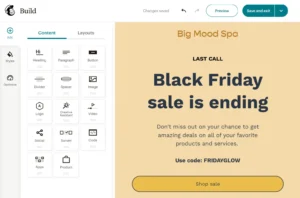
Mailchimp’s editor has more templates. A lot more. They have spent years building a template library, and it shows. The designs are polished and cover a wider range of styles and industries. The editor also has good customization options, though some reviewers mention it can feel sluggish when working with complex layouts or nested content blocks.
One consistent note from Mailchimp users on G2: the template quality is one of the things they love most about the platform. The variety makes it easier to start from something that already looks good.
MailerLite’s template selection is smaller, but the quality is solid and the editor itself feels more modern.
Winner: Mailchimp for template variety. MailerLite for editor speed. Overall, a close category — but if you send a lot of emails, the speed difference adds up.
Design & Templates
Both tools give you a drag-and-drop editor and a library of pre-built templates. But the experience inside each one is different — and for free plan users especially, the gap matters more than you would expect.
MailerLite: Faster editor, consistent experience across the whole platform
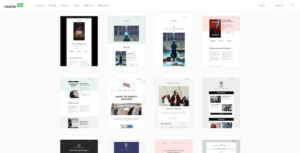
MailerLite gives you 100+ email templates sorted by industry. The editor is fast — noticeably faster than Mailchimp’s when you are working on longer emails. Blocks load quickly, adjustments happen in real time, and nothing lags when you drag things around.
One thing I genuinely liked: the editor uses the same block system as the landing page and form builders. So once you learn how to build an email, you already know how to build a landing page. That consistency is small in theory. In practice it saves you a lot of figuring-out time.
On the Advanced plan you also get an AI writing assistant for headlines and body copy — useful when you are staring at a blank subject line at 11pm.
The honest downside: free plan users get zero templates. You are building from scratch unless you are on a paid plan. That is a real limitation if you are just testing the waters before committing.
Mailchimp: More templates, but with a catch

Mailchimp gives you 220+ templates. More options, more categories, more starting points. The designs are polished and they cover a wide range of industries and campaign types.
But here is the catch most reviews skip over: free plan users only get access to 8 basic templates. The rest are locked behind paid plans. And several G2 users have pointed out that the classic Mailchimp templates — the ones that have been around for years — are not always responsive on mobile. That is a real problem in 2026 when more than half of emails get opened on a phone.
Mailchimp’s editor also tends to feel sluggish with longer emails and nested content blocks. It is not a dealbreaker. But if you send frequently, the slowness adds up.
One Capterra reviewer who manages email for a retail brand said they switched from Mailchimp to MailerLite purely because the editor was faster — not because of pricing, not because of features, just because they were spending too much time waiting for things to load.
Winner: Mailchimp for template variety on paid plans. MailerLite for editor speed and a consistent experience across email, landing pages, and forms.
Segmentation & List Management
How you organize your contacts determines how targeted your campaigns can be. This is one area where the two tools take genuinely different approaches — and where Mailchimp’s structure causes real problems for some users.
MailerLite: Simple, clean, and works the way you expect
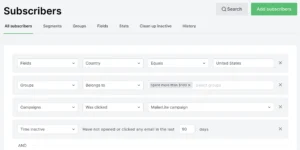
MailerLite runs on a single master list model. Everyone is in one place. You use groups and segments to narrow things down whenever you need to.
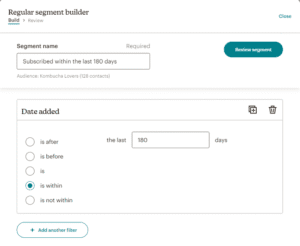
Groups are manual categories you create and add contacts to. Segments are dynamic filters based on contact data or behavior — location, signup source, open history, time zone, and more. The segment updates automatically as contact data changes. You do not have to go in and manually refresh it.
There is also a useful automation rule that removes a subscriber from one group when they join another. Something as simple as moving someone from “Prospects” to “Customers” automatically when they buy — Mailchimp does not have this natively.
A G2 reviewer who manages a list of around 20,000 contacts said the single master list approach was the main reason they stayed on MailerLite. No duplicates, no contacts counted twice, everything in one view.
Mailchimp: More conditions, more complexity, more confusion
Mailchimp gives you audiences, groups, segments, and tags — four different ways to organize the same contacts. In theory, that is flexibility. In practice, it is often just confusion.
The separate audiences model is the biggest issue. If you create two audiences — say, one for your newsletter and one for your customers — the same person in both counts as two contacts on your bill. That is not a segmentation feature. That is a billing trap.
The segments themselves are more powerful than MailerLite’s in terms of the number of conditions you can stack. Mailchimp gives you more criteria to work with, and on Standard and above you get behavioral targeting and predictive segmentation that MailerLite does not offer.
But several Capterra reviewers mention being genuinely confused by the audience vs groups vs tags structure when they first set things up. Some of them ended up with duplicate contacts without realizing it — and paid for it on their next billing cycle.
Winner: MailerLite for simplicity and clean list management. Mailchimp if you need advanced behavioral segmentation and are willing to manage the complexity carefully.
Automation
This is one of the most important categories for any email marketing tool. It is also where Mailchimp has quietly made things harder for budget-conscious users.
MailerLite: Full automation on every paid plan

MailerLite includes multi-step automation workflows on its free plan. You read that right — you can build welcome sequences, lead nurture flows, and conditional logic without paying for anything.
The automation builder is visual and easy to use. You set up triggers, conditions, and actions with a simple drag-and-drop interface. Nothing overly complicated.
For most small businesses and creators, MailerLite’s automation covers everything they need — welcome sequences, post-purchase follow-ups, re-engagement campaigns, and tag-based segmentation.
The one limitation worth knowing: MailerLite caps automation workflows at 100 steps. For 99% of users, that is not a constraint. But if you are building very complex sequences, it is something to be aware of.
Mailchimp: More power, locked behind higher plans
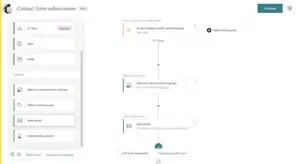
Mailchimp’s Customer Journeys tool is more powerful than MailerLite’s automation builder. You get more granular conditions, more advanced ecommerce triggers, and deeper branching logic.
But here is the problem: the most useful automation features are locked behind the Standard plan.
On the Essentials plan ($13 a month and up), you are limited to basic single-step automations. No multi-step sequences. No conditional logic. No behavioral triggers.
To build a real welcome sequence or a re-engagement campaign, you need the Standard plan at $20 a month — and that is just the starting price before subscriber-based pricing kicks in.
Multiple G2 reviewers mention being surprised by this. They sign up for Essentials expecting full automation and quickly realize they need to upgrade.
Winner: MailerLite — and it is not close when you factor in price. You get full automation for free with MailerLite. With Mailchimp, you are paying for it.
Forms & Landing Pages
Getting people onto your list is just as important as what you send them. Both tools have forms and landing pages built in — but they work differently and serve different types of users.
MailerLite: Generous, flexible, and genuinely useful on all paid plans
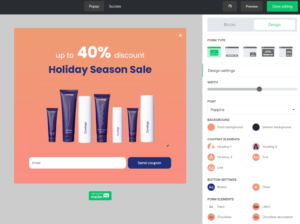
MailerLite gives you unlimited landing pages on every paid plan. Even the $10 a month plan. You also get a website builder included, which means you can build your entire digital presence — website, blog, landing pages, lead capture forms — inside MailerLite without paying for a separate tool.
The landing page builder recently got a full relaunch. You get slick templates and dozens of pre-built drag-and-drop sections that snap together cleanly. There is also an AI-generated landing page option — you describe what you want and it builds a draft. Honest take: the AI version is not as polished as the templates, but it is a fast starting point you can clean up quickly.
For forms, you get embedded forms, pop-ups, and a unique option most tools do not have — promotional pop-ups with links but no signup form. So instead of asking someone to join your list, you can redirect them directly to a product page, a checkout, or a blog post from a pop-up. That is useful for creators who want to drive action without adding friction.
Mailchimp: More form types, more connected to the rest of the platform
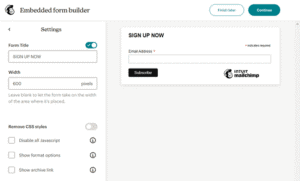
Mailchimp has three separate form builders — which sounds like more choice but actually creates a confusing experience. Each builder works differently. They do not share the same interface. And several reviewers on independent platforms have said that none of the three feel particularly great to use.
Where Mailchimp’s forms pull ahead is the connection to everything else. Forms feed directly into its CRM and analytics engine. If you want to track someone from the moment they fill out a form all the way through to a purchase — and see that full journey in one place — Mailchimp’s infrastructure handles that better than MailerLite’s.
Landing pages are solid on Mailchimp too. But they come with usage limits depending on your plan, while MailerLite gives you unlimited pages from the start.
A Capterra reviewer who runs a lead generation business said they eventually stopped using Mailchimp’s form builders entirely because the three-builder setup was too disjointed — and built their forms in a third-party tool instead. That is not a great sign for a feature that should be core to any email platform.
Winner: MailerLite — unlimited landing pages on all paid plans, a unified builder that works the same way as the rest of the platform, and a more useful pop-up tool. Mailchimp wins only if you need deep form-to-CRM tracking.
Integrations
No email tool exists on its own. You are connecting it to your store, your payment processor, your CRM, or something else. Here is where each tool stands — and where the gap between them becomes obvious.
MailerLite: 130+ integrations, covers what most people actually need
MailerLite connects to over 130 apps. Shopify, WooCommerce, BigCommerce, WordPress, Stripe, Zapier, Make, Canva, and most of the tools that small businesses and creators rely on are all there.
The WordPress and Shopify plugins are worth mentioning specifically. They are native, easy to activate, and sync subscribers automatically without needing to copy any HTML or manage third-party code. For someone who is not technically minded, that matters.
MailerLite also recently launched support for a Model Context Protocol server — which lets you connect MailerLite to external AI tools like ChatGPT or Claude and query your subscriber data conversationally. It is a more developer-focused feature right now, but it is the kind of thing that will matter more as AI tools become a bigger part of how marketers work.
Where MailerLite shows its limits: anything beyond the mainstream. If your tech stack includes a niche CRM, a specialist ecommerce platform, or a less common business tool — you are more likely to need a Zapier workaround than a native connection.
Mailchimp: 300+ integrations, one of the largest ecosystems in email
Mailchimp connects to over 300 apps natively. CRMs, ecommerce platforms, landing page builders, SMS tools, analytics platforms — the list is long. And because Mailchimp has been around for over 20 years, most software companies have built a Mailchimp integration as a default.
For businesses with an existing marketing stack that needs to connect to a lot of things at once — Mailchimp is the safer bet. Less Zapier duct tape, more native connections.
The API is also available for custom integrations if you have a developer. That applies to both platforms, but Mailchimp’s API ecosystem is more mature and better documented.
Winner: Mailchimp — 300+ vs 130+ is a meaningful gap. MailerLite covers the everyday tools well, but if your stack goes beyond the basics, Mailchimp is less likely to leave you building workarounds.
Multi-Channel Marketing
Email is the core of both platforms. But what happens when you want to reach someone somewhere other than their inbox?
Mailchimp: Email, SMS, social ads, and organic social posts
Mailchimp goes further than any other tool in this comparison when it comes to channels.
On top of email, you get SMS marketing (available in 12 countries as an add-on), Facebook and Instagram ads managed directly from the platform, Google remarketing ads, and the ability to post organic social content to Facebook and Instagram without leaving Mailchimp.
The practical value here is real. If you run a small business and want to send an email campaign, follow it up with a Facebook retargeting ad for people who did not open, and reach the same audience with an SMS offer — Mailchimp lets you run that entire sequence from one dashboard.
A G2 reviewer who manages marketing for a local service business said the ability to run email and Facebook ads side by side in one platform saved them time every single week. They had been paying for a separate social media tool before switching to Mailchimp’s Standard plan.
MailerLite: Email first, with some growing extras
MailerLite is primarily an email platform. That is what it does best and where it focuses most of its development.
It does not have built-in SMS. It does not have native social media posting. If those channels are part of your marketing mix, you will need separate tools or Zapier connections to make them work alongside MailerLite.
What MailerLite does have — and this is worth noting — is the ability to sell digital products, run paid newsletters, and collect payments through Stripe directly inside the platform. That is not a multi-channel tool in the traditional sense, but for a creator or course seller it means one less platform to manage.
Winner: Mailchimp — and it is not close. If you need more than email, Mailchimp gives you SMS, social ads, and organic social from one place. MailerLite is email only for most practical purposes.
Reporting & Analytics
The data your platform gives you shapes every decision going forward. This is one category where Mailchimp earns part of its price premium — and where MailerLite is honest about its limits.
MailerLite: Clean, simple, and enough for most businesses
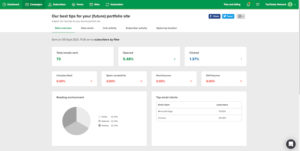
MailerLite gives you the core metrics: opens, clicks, unsubscribes, bounce rates, device breakdowns, and location-based open data. The dashboard is clean and everything is easy to find.
For Shopify and WooCommerce users, you also get purchase tracking — so you can see which campaigns drove actual revenue, not just clicks. That is a meaningful data point for any business that sells products through email.
The A/B testing is solid. You can test subject lines, send times, and content variations, and MailerLite will automatically send the winning version to the rest of your list.
What is missing: email client statistics (what percentage of your list opens in Gmail vs Apple Mail vs Outlook), social media reporting, and any kind of cross-channel attribution. If those things matter to how you measure your marketing — MailerLite will leave gaps.
One G2 reviewer who had been using Mailchimp for three years before switching to MailerLite said the reporting was the one thing they genuinely missed. Not enough to go back, but enough to notice.
Mailchimp: Deeper data, especially for ecommerce and multi-channel

Mailchimp gives you everything MailerLite does — plus email client statistics, social media reporting, native Google Analytics integration for conversion tracking, and on Standard and above, predictive segmentation and behavioral analytics.
The revenue attribution reporting is particularly useful for ecommerce operators. You can see exactly which email campaigns drove sales, what the return was per campaign, and which automations are earning their keep. That level of insight helps you make better decisions about where to spend your time.
On the Premium plan, multivariate testing lets you test multiple variables at once — not just subject line A vs subject line B, but different subject lines, send times, and content blocks tested simultaneously. That is a level of optimization that MailerLite simply does not offer.
The honest note: all the best reporting features are on Standard and above. If you are on Essentials, the analytics are closer to MailerLite’s than most people realize before they sign up.
Winner: Mailchimp — not just in this comparison but across the whole email marketing space, Mailchimp’s reporting is genuinely better. If data drives your decisions, that matters. If you just need the basics, MailerLite’s clean dashboard is more than enough.
Features Unique to Each Tool
What MailerLite has that Mailchimp does not:
Unlimited email sends on all paid plans. Once you are on a paid MailerLite plan, you can send as many emails as you want. Mailchimp caps your monthly sends based on your tier and charges overage fees if you go over.
Digital product selling. MailerLite lets you sell ebooks, courses, templates, and other digital products directly through the platform. It is not as advanced as a dedicated course platform, but it works well for simple digital products. Mailchimp does not have this.
A more useful free plan. Even after the cuts in 2025, MailerLite’s free plan (500 subscribers, 2,500 sends, basic automations) is dramatically more useful than Mailchimp’s (250 contacts, 500 sends, no automations).
Unlimited landing pages. MailerLite includes unlimited landing pages on paid plans. Mailchimp limits them.
24/7 support on all paid plans. MailerLite offers 24/7 email support to Growing Business users and live chat to Advanced users. Mailchimp only offers 24/7 support on Premium ($350 a month). Free and Essentials users get limited support windows.
What Mailchimp has that MailerLite does not:
SMS marketing. Mailchimp has built-in SMS marketing for local businesses and ecommerce stores. It is an add-on, but it is integrated into the platform. MailerLite does not have SMS.
Advanced ecommerce integrations. Mailchimp’s Shopify and WooCommerce integrations are deeper than MailerLite’s. You get abandoned cart flows tied to specific product values, post-purchase upsell logic based on what someone bought, product recommendation blocks, and revenue tracking per campaign.
Predictive analytics. Mailchimp’s Standard and Premium plans include predictive demographics, send-time optimization (what Mailchimp calls smart scheduling), and behavioral targeting based on predicted spending patterns. MailerLite does not have anything comparable.
Social media tools. Mailchimp lets you post to and run ads on Facebook and Instagram directly from the platform. MailerLite keeps its focus on email.
800+ integrations. Mailchimp has one of the largest integration ecosystems in the email space. If you are already using a specific CRM, ecommerce platform, or business tool, the chances of a native Mailchimp integration are high.
Email Deliverability
Independent deliverability testing tells a clear story here.
MailerLite scored 94-95% inbox placement in independent tests — some rounds putting it even higher. Part of the reason is that MailerLite manually reviews new accounts before allowing full sending access. A real person checks your site before you can go live. That review process keeps low-quality senders off the platform, which protects deliverability for everyone.
Mailchimp scored around 82-92% across different testing rounds. The range is wide because Mailchimp handles an enormous volume from millions of accounts — not all of them with clean lists. Their infrastructure is mature and well-respected with major inbox providers like Gmail and Outlook, but the sheer scale means deliverability can vary more from sender to sender.
The practical truth: both platforms will get your emails delivered if you maintain a clean list and follow good sending practices. But MailerLite’s stricter account approval process gives it a structural edge — particularly for new senders building their reputation from scratch.
Winner: MailerLite for new senders and smaller lists. Both platforms are solid for established senders with clean lists.
Customer Support
This is one of the clearest wins in the entire comparison.
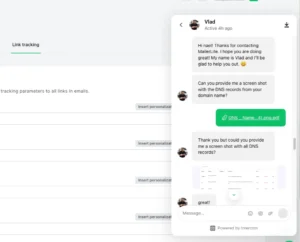
MailerLite gives you 24/7 email support on the Growing Business plan and 24/7 live chat on the Advanced plan. Response times are consistently rated as fast across G2 and Capterra reviews. Multiple users mention getting help within minutes during their first campaigns.
One Reddit user in the email marketing community put it simply: they said MailerLite’s support made them feel like they actually mattered as a customer. Small thing. Real difference.
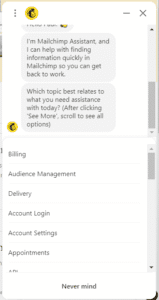
Mailchimp has become less reliable on support as the platform has grown. Free plan users get 30 days of support, then nothing. Essentials and Standard users get email and chat support during limited hours. Only Premium users get 24/7 support and phone access.
Multiple Capterra reviewers mention being frustrated by Mailchimp’s support response times, especially when something breaks right before a campaign needs to go out.
For anyone running a real business where email is a key channel — the difference between “help whenever I need it” and “submit a ticket and wait” matters.
Winner: MailerLite — not close.
Reporting and Analytics
Mailchimp has better reporting. There is no honest way around that.
You get opens, clicks, unsubscribes, bounce rates, and revenue per campaign. On Standard and Premium, you get predictive analytics, social media reporting, and a direct Google Analytics integration that tracks conversions from email sends. You can also run multivariate tests on Premium, which lets you test more variables than a standard A/B test.
Mailchimp also shows you email client statistics — what percentage of your audience opens in Gmail vs Apple Mail vs Outlook. That is genuinely useful data for making design decisions.
MailerLite’s reporting covers the essentials: opens, clicks, unsubscribes, device stats, and heat maps showing where people clicked inside your email. You can do revenue attribution for Shopify and WooCommerce stores and export reports for further analysis.
What MailerLite does not have: email client statistics, social media reporting, and the predictive analytics layer that Mailchimp offers on higher plans.
For most small businesses and newsletters, MailerLite’s reporting is more than enough. But if data is central to how you run your marketing — especially for ecommerce — Mailchimp gives you significantly more to work with.
Winner: Mailchimp
Pricing: What You Actually Pay
This is the section that changes the most minds.
MailerLite Pricing
MailerLite has three main plans: Free, Growing Business (now sometimes called Comfort), and Advanced (now sometimes called Power).
Note: MailerLite updated its plan names and pricing in June 2026. If you see different names in your account, the structure is the same.
The Free plan gives you up to 500 subscribers and 2,500 emails a month. It includes basic automations, one landing page, and a website builder. It has MailerLite branding on your emails.
One important change: in September 2025, MailerLite cut the free plan from 1,000 to 500 subscribers. If you have seen reviews mentioning 1,000 free subscribers, those are out of date. The free plan is now more of a testing ground than a long-term option for most people.
The Growing Business plan (Comfort) starts at $10 a month for up to 500 subscribers. It removes MailerLite branding, unlocks unlimited email sends, adds campaign auto-resend, multivariate testing, and the ability to sell digital products. This is the plan I would recommend to most people starting out who are ready to pay for a tool.
The Advanced plan (Power) starts at $20 a month for up to 500 subscribers. It adds multiple automation triggers, Facebook audience syncing, a custom HTML editor, an AI writing assistant, unlimited users, and live chat support (instead of just email support).
How costs scale by subscriber count on Growing Business:
- 500 subscribers: $10 a month
- 1,000 subscribers: $15 a month
- 2,500 subscribers: $25 a month
- 5,000 subscribers: $35 a month
- 10,000 subscribers: $65 a month
- 25,000 subscribers: $115 a month
One thing worth knowing: MailerLite only charges for active subscribers. Bounces and unsubscribes do not count toward your limit. That said, they do use a cumulative count within each billing cycle — meaning any address that was active at any point during the month counts, even if you deleted it before your billing date. So do not try to game the system by deleting and re-uploading contacts; it will not change your bill for that cycle.
Annual billing saves 10%.
Mailchimp Pricing
Mailchimp has four plans: Free, Essentials, Standard, and Premium.
The Free plan covers just 250 contacts and 500 email sends a month. It has no automation, no scheduling, and no support after the first 30 days. Mailchimp has cut this plan multiple times — most recently in January 2026, when they reduced it from 500 contacts. It is barely useful for a real business. Think of it as a demo, not a starting point.
The Essentials plan starts at $13 a month for 500 contacts. You get up to 5,000 monthly sends, A/B testing, all email templates, and 24/7 chat and email support. What you do not get: multi-step automations, behavioral triggers, predictive segmentation, or send-time optimization. Those are all locked behind Standard.
The Standard plan starts at $20 a month for 500 contacts. This is where Mailchimp actually becomes useful for most businesses. You get multi-step automations, Customer Journeys, behavioral targeting, predictive segmentation, and up to 6,000 monthly sends. For most people comparing Mailchimp vs MailerLite, this is the plan to use as your Mailchimp starting point.
The Premium plan starts at $350 a month for 10,000 contacts. It adds multivariate testing, comparative reporting, phone support, and unlimited seats. This is for large organizations with complex needs.
How costs scale by subscriber count on Standard:
- 500 contacts: $20 a month
- 1,500 contacts: $45 a month
- 2,500 contacts: $69 a month
- 5,000 contacts: $100 a month
- 10,000 contacts: $155 a month
- 25,000 contacts: $270 a month
The biggest Mailchimp pricing problem:
Mailchimp bills for all contacts in your account — subscribed, unsubscribed, and non-subscribed. Unless you manually archive or delete unsubscribed contacts, you keep paying for them.
If you have had a Mailchimp account for a while and never cleaned it, there is a real chance you are paying for hundreds or thousands of contacts you can no longer email.
Mailchimp also counts the same contact twice if they appear in two different audiences. This is more of an issue than it sounds if you have segmented your list across multiple groups.
These are not theoretical edge cases. They are the two most common reasons people report that Mailchimp costs more than they expected.
Side-by-Side at Different List Sizes:
| List Size | MailerLite Growing Business | Mailchimp Standard |
|---|---|---|
| 500 contacts | $10 a month | $20 a month |
| 2,500 contacts | $25 a month | $69 a month |
| 5,000 contacts | $35 a month | $100 a month |
| 10,000 contacts | $65 a month | $155 a month |
At 10,000 contacts, Mailchimp Standard costs more than twice what MailerLite Growing Business costs — and MailerLite includes unlimited email sends while Mailchimp caps you.
That gap only gets wider as your list grows.
What Real Users Are Saying
I went through hundreds of reviews on G2, Capterra, and Trustpilot. Here are the patterns that show up again and again.
On MailerLite’s value:
The most common theme is relief — people who switched from Mailchimp to MailerLite and were surprised by how much money they saved without losing the features they actually used. A Capterra reviewer mentioned they cut their email marketing cost by more than half after switching, and the only thing they missed was a couple of advanced analytics features they rarely looked at anyway.
Another pattern: people praise the editor. Multiple G2 reviewers describe it as the cleanest, fastest email editor they have used. Several say it is the thing that made them stick with the platform.
On Mailchimp’s pricing complaints:
The most consistent complaint across Mailchimp reviews is cost — especially as lists grow. Users on Capterra repeatedly mention being caught off guard by how quickly the monthly bill climbed after getting past a few thousand subscribers. Several mention discovering they were paying for unsubscribed contacts they did not know were still in their account.
A common pattern in longer Mailchimp reviews: people say they love the features but keep questioning whether the cost is justified.
On Mailchimp’s ecommerce strengths:
The users who are happiest with Mailchimp are almost always running online stores. Reviews from Shopify and WooCommerce users consistently praise the depth of the ecommerce integrations — abandoned cart flows, product recommendations, revenue attribution. These users say no other tool at this price comes close for ecommerce-specific email marketing.
On MailerLite’s support vs Mailchimp’s support:
This one comes up so consistently it is hard to ignore. MailerLite users rate support significantly higher — faster, more helpful, and available when they actually need it. Mailchimp users on the lower plans frequently mention long waits and unhelpful responses, especially when billing issues come up.
My Honest Take After Testing Both
Here is where I land after using both tools for real.
MailerLite is the better choice for most people reading this. If you are a blogger, creator, newsletter operator, coach, or small business owner — MailerLite gives you everything you need to build an email list and stay in contact with your audience. The price is fair, the automation works, and the deliverability is excellent.
The free plan cuts in 2025 were disappointing. The price increases on paid plans were real. But even after those changes, MailerLite remains significantly cheaper than Mailchimp at every list size — and it does not punish you for growing.
Mailchimp is the better choice if you run an online store and need the depth of ecommerce features that justify its price. If you are doing advanced segmentation based on purchase behavior, need SMS baked into your campaigns, or rely on the predictive analytics layer — Mailchimp earns it.
But if you are on Mailchimp for any other reason, I would take an honest look at what you actually use. There is a real chance you are paying for features you have never touched — and paying for contacts who have already left your list.
One last honest note: Mailchimp has raised its prices and cut its free plan multiple times in recent years. MailerLite raised its prices in 2025 too, but still comes in well below Mailchimp at comparable list sizes. If pricing trajectory matters to your planning — both tools have shown they will adjust prices over time. Factor that in.
Frequently Asked Questions
Is MailerLite better than Mailchimp?
For most small businesses, yes. MailerLite offers comparable email marketing features at roughly half the price, with better deliverability test scores, 24/7 support on paid plans, and unlimited email sends. Mailchimp is the better choice for ecommerce businesses that need deep store integrations, SMS, and advanced predictive analytics.
Does Mailchimp charge for unsubscribed contacts?
Yes. Mailchimp counts subscribed, unsubscribed, and non-subscribed contacts toward your billing limit. Unless you manually archive or delete unsubscribed contacts, you pay for them. MailerLite only charges for active subscribers.
What is the difference between MailerLite free vs Mailchimp free?
MailerLite’s free plan gives you 500 subscribers and 2,500 monthly emails with basic automations included. Mailchimp’s free plan gives you 250 contacts and 500 monthly emails with no automation and no scheduling. MailerLite’s free plan is significantly more useful.
Does MailerLite have unlimited emails?
Yes, all MailerLite paid plans include unlimited email sends. Mailchimp caps monthly sends based on your plan and contact tier, and charges overage fees if you exceed them.
Which has better deliverability — MailerLite or Mailchimp?
In independent testing, MailerLite has scored 94-95% inbox placement while Mailchimp has ranged from 82-92%. Both are above the industry average, but MailerLite’s stricter account approval process tends to produce more consistent deliverability results, especially for new senders.
Can I switch from Mailchimp to MailerLite easily?
Yes. MailerLite has a direct Mailchimp import tool. You connect your Mailchimp account, select which lists to bring over, and MailerLite handles the contact migration. Tags and groups transfer. Email templates and automations need to be rebuilt from scratch, but MailerLite’s editor and automation builder are simple enough that most people can do this in a day or two.
