


Last Updated: 18 Nov 2025
In this article, we’ll compare Mailchimp and Klaviyo, two popular email marketing tools that help you send emails, grow your list, and stay connected with your audience.
Mailchimp, based in Atlanta, is one of the most well-known email marketing platforms. It’s simple, beginner-friendly, and great for small businesses and bloggers. Many people use it to send newsletters and set up basic email automation.
But after using it myself, I started to wonder — is Mailchimp still the best option for everyone, especially for online store owners?
That’s when I decided to try Klaviyo, a fast-growing company from Boston that focuses more on eCommerce. Klaviyo is known for its smart automations, strong data insights, and deep connections with tools like Shopify and WooCommerce. It helps online stores send personalized emails that actually increase sales.
How We Test Tools
“We test tools the hard way — by actually using them. At Mailotrix, every review comes from real campaigns, broken automations, and late-night experiments. We dig deep so you don’t have to waste time (or money) on tools that only look good in marketing.” for more info about our tools review process read here.
I’ve personally used both Mailchimp and Klaviyo, so this comparison is based on real experience — not just theory.
Both tools have their pros and cons, but they’re made for different kinds of users. So in this post, I’ll compare Mailchimp vs Klaviyo in terms of ease of use, automation, design, integrations, deliverability, and pricing — and share my honest verdict on which one I think is better for your business.
Short on Time? Here’s My Quick Verdict for Mailchimp vs Klaviyo
After testing both tools deeply (and running real email + eCommerce automation flows), here’s the honest takeaway:
Mailchimp is simpler, cleaner, and far easier for beginners — perfect if you want quick setup, easy design, and an all-in-one tool for emails, landing pages, ads, and more.
Klaviyo, on the other hand, is a powerhouse built for eCommerce. Its automation, segmentation, AI, deliverability, and SMS features are miles ahead — but it can feel overwhelming and more expensive.
| Factor | Mailchimp | Klaviyo | Winner |
|---|---|---|---|
| Ease of Use | Beginner-friendly, quick setup | More powerful but harder to learn | Mailchimp |
| Email Editor | Clean, simple, limited control | Advanced, block-level control | Klaviyo |
| Automation | Basic → medium complexity | Deep eCommerce automation | Klaviyo |
| Segmentation | Good but limited rules | Industry-leading segmentation | Klaviyo |
| AI Features | Decent AI writer + suggestions | Predictive AI (churn, LTV, spend) | Klaviyo |
| Pricing | Cheaper for small lists | Expensive but powerful | Mailchimp |
Email Editor
Maybe it’s just me, but I sometimes feel confused when using the backend of an email editor. Too many buttons, unclear menus, and endless options can really slow down my work.
In my opinion, an email editor should be as clean and simple as a well-designed email.
Let’s take a look at both dashboards.
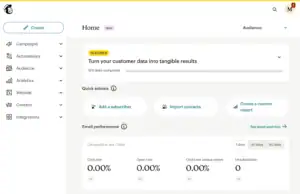
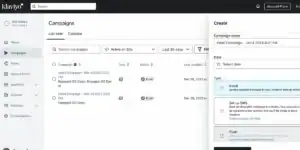
If you’re like me, you’ll probably prefer option A — Mailchimp. It has a cleaner, more user-friendly design.
Mailchimp’s dashboard is simple and easy to move around in. I really like the big “Create” button — it makes it quick to start a new email, automation, or landing page.
You can pick what you want to work on and begin designing right away without wasting time searching through menus.
Klaviyo’s dashboard, on the other hand, feels a bit dull and less inviting. It has a gray layout with long lists and dropdowns. You also have to go through several steps before reaching the actual editor — such as picking a contact list, campaign name, and tags.
Personally, I prefer to do all that after designing the email. Doing it at the start adds unnecessary steps and kills my creative flow.
Once you’re inside the editor, though, both Mailchimp and Klaviyo look great. They both use drag-and-drop tools, making it easy to add or move text, images, or buttons.
You can also preview your emails on desktop and mobile before sending them — which is super helpful.
Both platforms also make it easy to add products from your store into your emails. You can show the same products to everyone or use dynamic content to show different products to different customers based on their past activity.
(Note: Dynamic content is only available in Mailchimp’s Standard Plan.)
Mailchimp also includes a few features that Klaviyo doesn’t have:
You can use ready-made content blocks to send product review requests — no extra setup needed.
You can embed videos directly into your emails, which is great since short videos can really help increase sales.
You can easily add surveys inside your emails to make them more engaging and collect feedback.
With Klaviyo, you’ll need extra apps to add videos or surveys, and you can only create review requests if you use Shopify.
Here’s a quick look at both email builders behind the scenes:
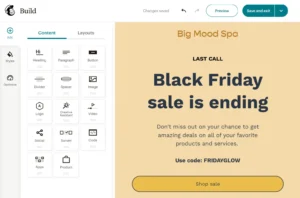
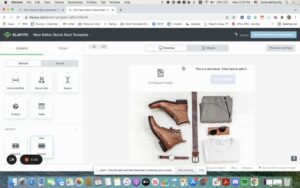
Overall, Mailchimp wins this round with its clean design, simple setup, and quick email creation process. It’s perfect if you want to start fast without dealing with too many steps or settings.
✅ Winner: Mailchimp (0–1 in favor of Mailchimp)
Templates
Both Mailchimp and Klaviyo offer a large number of email templates. Their template libraries are almost equal in both quantity and quality.
Each platform gives you two main types of templates:
Layouts: Simple designs with empty content blocks where you can add your own text and images.
Fully designed templates (Mailchimp): These come ready with colors, fonts, and sample photos — perfect if you want to send beautiful emails fast.
One of the most important things in email design is keeping your brand look the same in every email — same colors, logo, and fonts. Here’s where the big difference between the two platforms shows up.
Mailchimp makes branding super easy with its Creative Assistant. It automatically pulls your brand’s colors, fonts, images, and logo straight from your website and builds a brand kit for you. The best part? It’s available on all plans, even the free one.

Klaviyo, on the other hand, asks you to add everything manually. You have to upload your colors, logos, and images one by one under the Images & Brand tab.
The good thing is, once you set it up, you can use your brand style across all templates — even on the free plan.
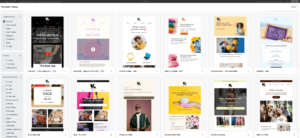
Both tools do a great job, but Mailchimp wins this round for its automatic branding setup and easier interface. It saves time and helps you design professional-looking emails without much effort.
✅ Winner: Mailchimp (0–2 in favor of Mailchimp)
Contact Management and Segmentation
When it comes to managing contacts, both Mailchimp and Klaviyo offer strong tools for organizing and targeting your audience. But they handle contacts — and billing — in very different ways.
Mailchimp uses something called “Audiences” to separate contacts into groups. While this sounds useful, it can actually make things expensive and confusing.
If the same person is on more than one list, Mailchimp counts them twice — meaning you pay extra for the same contact. It’s also not very smooth when you want to move subscribers from one audience to another.
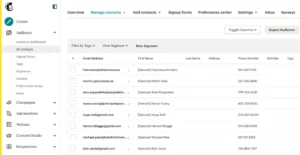
Klaviyo, on the other hand, keeps things simple. You pay per contact, not per list. That means one contact can belong to multiple segments or lists without increasing your costs.
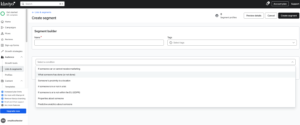
This setup is easier to manage and much more budget-friendly — especially for growing businesses.
When it comes to segmentation, both platforms let you group your contacts based on different conditions like:
Tags
Email engagement
Purchase history
Location
Signup source
But there’s one big difference.
Mailchimp allows you to use up to 5 conditions to create a segment.
Klaviyo, however, has no limit at all — you can create as many detailed rules as you want. This lets you build very specific segments and send highly personalized emails to small groups of people.
Both tools also come with ready-made segments that you can customize easily.
Mailchimp includes:
New Subscribers
Engaged Subscribers
Disengaged Subscribers
Potential Customers
Repeat Customers
Lapsed Customers
Recent Customers
First-time Customers
Klaviyo’s pre-built options are fewer:
Engaged Subscribers
Disengaged Subscribers
New Subscribers
Newsletter Subscribers
However, Klaviyo makes up for it with dynamic segmentation. This means your segments update automatically in real-time as people’s behavior changes — while Mailchimp’s lists are mostly static and need manual updates.
Overall, Klaviyo clearly wins this round. Its contact system is fairer, easier to manage, and allows unlimited, smart segmentation that saves time and money.
✅ Winner: Klaviyo (1–2 in favor of Mailchimp)
Marketing Automation
Both Klaviyo and Mailchimp have great tools for marketing automation — but they work best for different users.
Klaviyo has more than 70 ready-made automation templates that you can easily edit in its flow builder. These help you send automatic emails like welcome messages, abandoned cart reminders, and thank-you emails — without starting from zero.
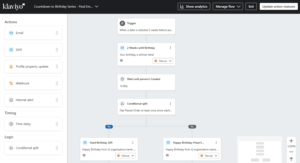
When I first tried Klaviyo’s automation builder, I found it a bit confusing. But now it’s much better because of a new feature called “New Flows Experience.” You can turn it on at the top of the screen, and it makes building automations much easier.
One feature I really like is that Klaviyo skips contacts who got a recent email. So if someone is part of many lists, they won’t get too many messages at once. This keeps your emails from feeling like spam.
Mailchimp also offers strong automation options. It has about 75 pre-made templates, called “Journeys.” You can use them to set up things like cart reminders, price drop alerts, birthday emails, and more.
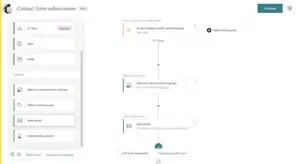
Mailchimp also lets you automate things beyond email — like social media posts and digital ads — which is great if you want to manage everything in one place.
However, there’s one downside: Mailchimp’s automation tools are only available on paid plans. Earlier, you could create a few automations for free, but not anymore.
In short, both tools are good at automation:
Klaviyo is best for online stores that want powerful and smart automations.
Mailchimp is better for small businesses that want simple, ready-made workflows.
✅ Winner: Klaviyo (2–2 tie)
Abandoned Cart Campaigns
Abandoned cart emails are a must-have for every online store. So, I tested this feature in both Mailchimp and Klaviyo to see which one performs better in real-world use.
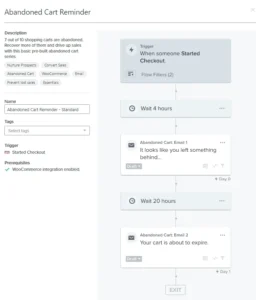
With Klaviyo, you get ready-made abandoned cart templates that work smoothly once your ecommerce store is connected. If your store isn’t linked yet, you won’t see these options in the flow library.
After connecting your store, you can easily create automated cart reminder emails with dynamic product suggestions and personalized discount offers to bring customers back.
On the other hand, Mailchimp also offers abandoned cart emails — but only if you’re on a paid plan. Once upgraded, you can set up one-time reminders or a full email series. You can even create special emails for customers who left behind high-value carts.
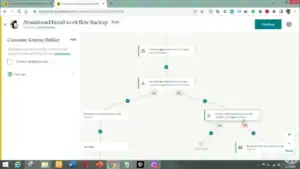
Mailchimp’s Essentials Plan lets you create reminders with up to 4 steps (called “journey points”). If you want more complex automations — up to 100 journey points — you’ll need the Standard Plan.
💡 Pro tip: If your ecommerce platform already sends abandoned cart emails, make sure to turn them off when using Mailchimp or Klaviyo. Otherwise, your customers might get duplicate emails.
Overall, I’d call this one a tie.
Both platforms help you send smart, personalized reminders that boost sales.
Klaviyo is perfect if you love analyzing data and fine-tuning your audience.
Mailchimp is better if you want to manage different marketing channels from one place — as long as you don’t mind paying for it.
✅ Winner: Klaviyo (3–2 in favor of Klaviyo)
Reporting and Analytics
Both Mailchimp and Klaviyo provide good reporting and analytics, but they work a little differently.
Mailchimp offers useful reports even on the free plan. You can see:
How many emails were delivered
How many were opened
Clicks on links
Orders and average order value
A click map showing which parts of your email people clicked
However, if you want to compare results across multiple emails or campaigns, you need the Email Dashboard, which is only available on the Standard Plan or higher.
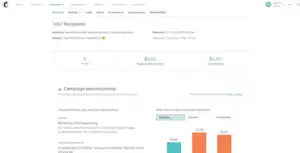
One advantage of Mailchimp is its built-in Google Analytics integration. With this, you can see over 50 types of reports, like page views and visitor engagement. You can even see your email campaign data inside Google Analytics, which is great for tracking overall performance.
Klaviyo, on the other hand, gives detailed analytics for every campaign. You can track conversions, revenue, and customer engagement, and create reports for specific metrics and time periods.
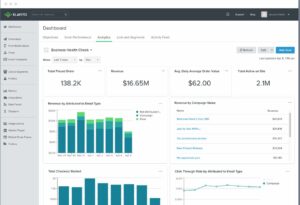
You can also set up alerts for problems, like high spam reports or bounced emails.
A feature we especially like in Klaviyo is its predictive analytics. For online stores with enough data, it can predict:
How much a customer might spend in the future
Which customers might stop buying (churn risk)
When a customer is likely to place their next order
These predictions let you send highly targeted campaigns, like offering a special sale to customers expected to order soon.
Mailchimp also has predictive analytics, but only for Standard Plan users or higher.
The good thing about Klaviyo is that all analytics features are available to free plan users — the only limits are the number of contacts and emails you can send.
Overall, this round is a tie:
Mailchimp is strong if you use the Standard Plan and Google Analytics.
Klaviyo is better for free users who want access to predictive analytics and detailed reports without paying.
✅ Winner: Klaviyo (4–2 in favor of Klaviyo)
Deliverability
Making sure your emails actually reach your customers’ inboxes is just as important as writing great emails. This is called email deliverability, and it depends on more than just whether your emails land in the inbox.
We look at features that help you keep a strong sender reputation, like:
Proper authentication setup
Bounce handling
List cleaning tools
IP warmup
Sender performance tracking
So how do Klaviyo and Mailchimp compare?
| Tool | Star Rating | Notes |
|---|---|---|
| Mailchimp | ⭐⭐⭐ | Covers the basics: authentication, bounce handling, and dedicated IP addresses. But it lacks a deliverability dashboard, sender score, feedback loop access, and built-in list cleaning. These tools are important for long-term success. |
| Klaviyo | ⭐⭐⭐⭐⭐ | Offers a complete deliverability toolkit, including bounce suppression, authentication, sender health metrics, IP warmup, a health score, and a deliverability dashboard — features many other providers don’t have. |
Winner: Klaviyo takes this round comfortably.
While Mailchimp covers the essentials, Klaviyo gives you more control and better insight into your email deliverability. If reaching the inbox reliably is a priority, Klaviyo is the stronger choice.
✅ Winner: Mailchimp (4–3 in favor of Klaviyo)
Integrations
Both Klaviyo and Mailchimp currently support over 300 integrations. For most users, that’s plenty to connect an online store, link social media accounts, and add a few extra apps for extra features.
So which one is better? It depends on what kind of integrations you need.
There are two main types of integrations:
Ecommerce store integrations – These pull your shop data and subscribers automatically. If you don’t want to manually import contacts, this type is essential.
App integrations – These add extra features to your emails. For example, a restaurant could automate customer bookings, or you could add countdown timers to your campaigns.
In the first category, Klaviyo and Mailchimp are tied. Both work with all major ecommerce platforms, including Shopify, Wix, WooCommerce, Ecwid, PrestaShop, and more.
In the second category, Mailchimp is slightly ahead. Even though both have the same number of integrations, Mailchimp connects with more popular apps that you might already use, like Google Analytics, Canva, Vimeo, and QuickBooks. Klaviyo doesn’t have these built-in, though you can work around it using Zapier.
For this round, we give a point to Mailchimp for its ready-to-use integrations with some of the most useful apps.
✅ Winner: Mailchimp (4–4 tie)
Customer Service
When I test any email marketing tool, I always check how good their customer support really is. You never know when you’ll run into a setup issue or need help with an automation flow. So, I reached out to both Mailchimp and Klaviyo’s support teams to see how they handle real user questions.
I asked a few simple but practical questions — like how to move from another email tool, set up an abandoned cart sequence, and what happens if I hit my monthly send limit.
Here’s how my experience went:
Mailchimp replied in about 5 hours.
Klaviyo replied in around 2 hours.
Both were reasonably quick, but Klaviyo’s team responded faster.
Now, when it comes to the quality of support, I noticed a big difference.
Mailchimp’s replies often linked to help articles without actually explaining things clearly.
It felt a bit “robotic,” like they were following a script.
Klaviyo’s support, on the other hand, felt more personal and human. They gave step-by-step guidance and even included short tips that made my setup smoother.
I especially liked that they explained how to set automation conditions based on cart value — something Mailchimp didn’t cover well.
In short:
Mailchimp’s support is okay for basic issues, but you might have to dig through articles to find detailed answers.
Klaviyo’s support gives faster and more hands-on help, especially for eCommerce users.
As for support access:
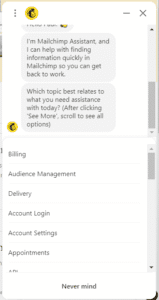
Mailchimp offers 30 days of email support on the free plan, and then you’re left with their chatbot (which isn’t very smart yet).
Klaviyo offers 60 days of email and chat support for free users — and their team actually feels approachable and professional.
✅ Winner: Klaviyo (5–4 in favor of Klaviyo)
Support Access
When it comes to ongoing support, both Mailchimp and Klaviyo give some help to free users — but there’s a clear difference in how long that help lasts.
With Klaviyo, you get email and chat support for 60 days after signing up. After that, you’ll need to move to a paid plan if you want to keep direct support access.
Mailchimp, on the other hand, gives only 30 days of email support on its free plan. Once that time is up, you’re left with their chatbot, which is supposed to be “AI-powered,” but honestly, it’s not very helpful. It struggles to answer even basic questions and often redirects you to articles that don’t fully solve your problem.
So while both tools limit support on free accounts, Klaviyo gives you double the time and more useful human help.
✅ Winner: Klaviyo (6–4 in favor of Klaviyo)
AI Features
AI can be a real time-saver in email marketing, but not all tools use it the same way. I tried both Klaviyo and Mailchimp, and honestly, they feel very different when you actually use them.
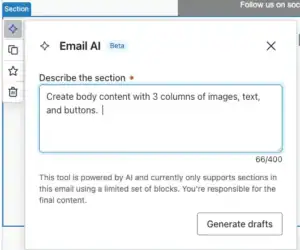
With Klaviyo (K:AI), I could just type a short prompt, and it would generate a complete email — subject line, body text, and even layout suggestions. It made creating campaigns much faster.
I also loved the predictive analytics: it could tell me which customers might buy next, who might stop buying, and even their potential lifetime value.
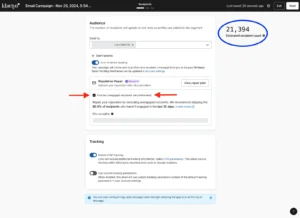
This helped me send super-targeted emails that actually felt personal. Plus, the “Smart Send Time” feature picked the best time to send each email based on how each person interacts with my emails — my open rates went up just from that.
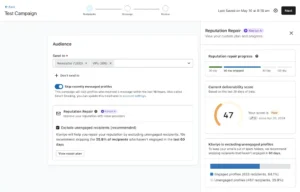
Mailchimp (Intuit Assist) is easier to get started with if you’re a beginner. Its AI helps write subject lines, edit email content, and create templates. I could whip up an email in minutes without overthinking it.
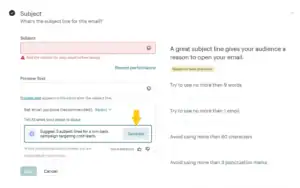
But I felt a bit limited — it doesn’t dive as deep into customer behavior, and advanced segmentation or predictive features aren’t as powerful as Klaviyo’s. For simple emails, it works fine, but for eCommerce, I wanted more control.
For me, Klaviyo wins this round. It’s smarter, more data-driven, and really helps if you want to make your emails more personal and effective. Mailchimp is fine for quick, simple content, but I often felt like I was missing some powerful features.
✅ Winner: Klaviyo (7–4 in favor of Klaviyo)
Spam & Design Testing
Testing how your emails look on different devices and inboxes is super important — you don’t want your perfect email design to look broken on someone’s phone or in Gmail.
Both Mailchimp and Klaviyo let you preview your campaigns before sending, but they handle testing a bit differently.
Mailchimp makes design testing really easy. You can preview your emails on desktop, mobile, and different email clients like Outlook or Gmail. I personally found this feature very handy — it helped me catch small formatting issues before hitting send.
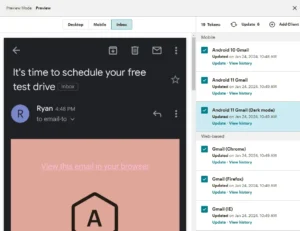
The only downside is that Mailchimp’s full Inbox Preview feature is not free. Paid plans include 25 preview tokens per month, and each test uses one token. If you run out, you’ll need to buy more tokens, and the unused ones don’t carry over.
This can feel a bit limiting if you’re testing multiple email versions in a month.
Mailchimp also includes a Link Checker, which automatically finds broken links before sending, and a Creative Assistant that helps design branded templates using your logo and website colors — perfect for beginners who don’t want to spend hours designing.
Klaviyo’s design tools are a bit more advanced. You can use AI to generate email layouts from simple prompts and run A/B tests with up to four versions at once (different subject lines, send times, or content).
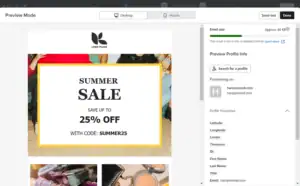
It also gives you detailed previews of your emails with dynamic personalization — so you can see how emails will appear for different customers based on their shopping behavior.
While it doesn’t have as many built-in preview options as Mailchimp, it integrates with Litmus and MailGenius for extra spam and design testing.
Spam Testing
Klaviyo doesn’t have its own built-in spam checker, but it helps improve deliverability through smart features like:
Identifying unengaged contacts to reduce spam complaints
Maintaining consistent sending patterns
Providing clear steps for setting up SPF, DKIM, and DMARC authentication
Mailchimp, on the other hand, includes basic spam diagnostics that automatically scan your content for risky words or layout issues that might trigger spam filters. It’s simpler but great for beginners.
Both platforms do a good job here, but Klaviyo edges ahead with smarter deliverability features and AI-driven testing options.
✅ Winner: Klaviyo (8–4 in favor of Klaviyo)
Transactional Emails
Transactional emails are messages your customers expect, like order confirmations, shipping updates, or password resets. These emails need to go out right away, look professional, and reach the inbox without problems.
When I used Klaviyo, I found it very easy to set up these emails. I could quickly create flows for order confirmations, shipping updates, and abandoned cart messages using their visual builder.
This made it simple to personalize emails with customer data — for example, showing products based on what someone bought or looked at. I didn’t need any coding, and the emails always delivered correctly. It made my work faster and much less stressful.
With Mailchimp, I felt a bit limited. To send proper transactional emails, I had to use their separate service called Mailchimp Transactional Email, which required API setup.
I could send basic order notifications easily, but adding personalized product suggestions or advanced flows needed technical work. While the emails did send reliably, it took me more effort to do what was automatic in Klaviyo.
For my experience, Klaviyo is the better choice. It’s easier to use, works well with Shopify and other eCommerce platforms, and lets me create personalized, automated emails quickly.
Mailchimp works if you’re okay with technical setup, but I felt restricted when trying to do more.
✅ Winner: Klaviyo (9–5 in favor of Klaviyo)
SMS Marketing
SMS marketing lets you reach your customers directly on their phones with updates, promotions, or abandoned cart reminders. Done well, it can drive sales faster than email alone.
When I used Klaviyo, I really liked how SMS is fully integrated into the platform. I could set up multi-step flows that combined email and SMS seamlessly.
I was able to trigger messages based on customer actions like browsing history, purchases, or abandoned carts. The best part was how easy it was to personalize messages with product recommendations or discount codes.
The analytics were detailed too, so I could see exactly how each SMS affected revenue. It made running SMS campaigns smooth and effective.
Using Mailchimp for SMS felt more limiting. SMS is a paid add-on, so I had to submit an application and buy separate credits. I could send basic messages or include SMS in automations, but I couldn’t trigger them based on customer behavior like I could in Klaviyo.
Personalization was basic, and the reporting didn’t show how much revenue each message generated. Overall, it felt more complicated and less powerful for eCommerce.
For my experience, Klaviyo is the winner. It’s easier to use, integrates with email and other channels, and gives me full control over automation, personalization, and analytics.
Mailchimp works for simple messages, but I often felt restricted when trying to do more advanced campaigns.
✅ Winner: Klaviyo (10–5 in favor of Klaviyo)
Pricing
It’s no secret — prices everywhere are going up. And just like groceries, email marketing tools are no exception. Both Mailchimp and Klaviyo have become more expensive over time, and many features that used to be free are now locked behind paid plans.
Let’s take a quick look at what both platforms charge at different contact levels:
| Contacts | Mailchimp | Klaviyo |
|---|---|---|
| 500 | Free plan (very limited features) | Free plan (most features available except AI tools, customer reviews, dynamic recommendations, and predictive analytics) |
| 1,500 | Essentials Plan: $26.50/month Standard Plan: $45/month | Email: $45/month Email + SMS: $60/month |
| 5,000 | Essentials Plan: $75/month Standard Plan: $100/month | Email: $110/month Email + SMS: $125/month |
| 10,000+ | Essentials Plan: $110/month Standard Plan: $135/month | Email: $200/month Email + SMS: $215/month |
A few years ago, Klaviyo’s free plan was a gem — you could test every feature without paying a single rupee (or dollar). Sadly, that’s no longer true.
Today, Klaviyo has started restricting some advanced options like:
AI-powered tools
Customer review collection
Dynamic product recommendations
Predictive analytics
Still, I’d say Klaviyo’s free plan is far more generous than Mailchimp’s. With Mailchimp, even some basic features are paywalled — and frustratingly, upgrading doesn’t always unlock everything you might expect.
For large senders, Mailchimp may look a bit cheaper, but Klaviyo feels more transparent. You always know what you’re paying for, and even on the free plan, you get enough tools to run proper email campaigns.
