

Last Updated: 12 Nov 2025
Choosing an email marketing tool isn’t easy. Flodesk is loved for its stunning designs, while Mailchimp is the old giant with every feature under the sun. But which one is actually worth your time (and money)?
Here’s the thing — we didn’t just skim the features list. We’ve personally used both Flodesk and Mailchimp for our own campaigns, and on top of that, we dug through hundreds of user reviews to see what real marketers think.
The result? This no-nonsense comparison that shows you exactly where each tool shines, where it fails, and which one is the better fit for your business.
Lets start our flodesk vs Mailchimp comparison,
How We Test Tools
“We test tools the hard way — by actually using them. At Mailotrix, every review comes from real campaigns, broken automations, and late-night experiments. We dig deep so you don’t have to waste time (or money) on tools that only look good in marketing.” for more info about our tools review process read here.
Short on Time? Here’s My Quick Verdict
I’ve tested both Flodesk and Mailchimp across email editors, design, automation, forms, pricing, and more. If you don’t want to read the full breakdown, here’s the quick version:
Ease of Use:
Flodesk is cleaner and faster. Mailchimp feels cluttered. → Winner: Flodesk
Opt-in Forms & Landing Pages:
Flodesk offers beautiful, easy-to-use forms + link-in-bio page. Mailchimp is confusing and limited. → Winner: Flodesk
Design & Visual Appeal:
Flodesk’s modern templates beat Mailchimp’s outdated designs. → Winner: Flodesk
Email Editor & Content Blocks:
Flodesk has countdowns, Mailchimp has surveys. Both are useful. → Tie
Segmentation & Targeting:
Mailchimp’s auto-updating segments save time. Flodesk is more basic. → Winner: Mailchimp
Automation & Workflow:
Mailchimp has advanced customer journeys. Flodesk is improving but still limited. → Winner: Mailchimp
Reporting & Analytics:
Mailchimp gives deeper reports and custom insights. Flodesk is basic. → Winner: Mailchimp
Pricing & Plans:
Flodesk offers simple, flat-rate pricing. Mailchimp gets expensive as you scale. → Winner: Flodesk
My Final Take
Choose Flodesk if you value simplicity, modern design, and predictable pricing
Get Flodesk 30 days free trial now
Choose Mailchimp if you need advanced automations, segmentation, and detailed reporting.
👉 Final Score: Flodesk 6 – Mailchimp 4
Ease of Use
When I tested both Flodesk and Mailchimp, my main goal was simple — I wanted to see how easy it is to log in, create an email, and hit send. Both promise “simplicity,” but after using them side by side, I noticed some key differences.
Flodesk’s Email Editor
I started with Flodesk, and honestly, it felt like a breath of fresh air. The interface is clean, minimal, and distraction-free. I didn’t have to hunt around for settings — everything was right where I expected it to be.
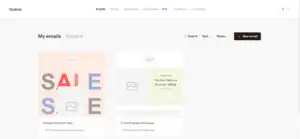
The drag-and-drop builder works smoothly, and the pre-designed templates actually look modern and polished. I could create a beautiful email in just a few clicks without overthinking.
The only drawback? Sometimes the platform can be a little laggy. Not a dealbreaker, but worth mentioning.
Mailchimp’s Email Editor
Mailchimp, on the other hand, felt more complicated from the start. The sidebar is packed with options, and it took me a while to figure out where everything was.
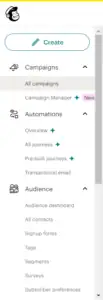
For example:
Signup forms are buried under the Audience tab.
Landing pages are hidden inside All campaigns under the Campaigns tab.
That just feels unintuitive. Both signup forms and landing pages help with list-building — so why are they in completely different sections? And the fact that “Landing Pages” isn’t even listed in the main sidebar makes it easy to miss.
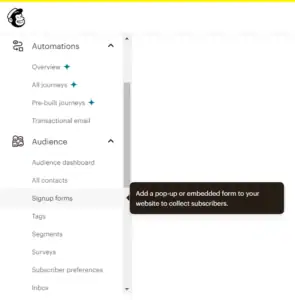
To be fair, Mailchimp offers a lot of flexibility. There are dozens of templates, plus an AI builder that pulls in your brand colors and fonts. But with that flexibility comes complexity — and if you’re a beginner, it can feel overwhelming.
My Verdict on Ease of Use
Flodesk is just simpler, cleaner, and faster to learn. Mailchimp has more features, but the interface feels cluttered and unintuitive at times. If you want a tool that lets you focus on creating emails without the headache of figuring out where things are, Flodesk wins this round.
👉 Winner for Ease of Use: Flodesk (1–0)
Opt-In Forms & Landing Pages
When I tried both tools, I wanted to see how easy it is to set up forms and pages because that’s the first step to getting email subscribers.
Flodesk’s Options
What I like about Flodesk is that it gives you four ways to collect emails: pop-ups, inline forms, full-page forms, and link-in-bio pages. The templates look nice and professional, so I can make a form quickly without spending too much time editing. This helps me focus on writing emails instead of messing with design.
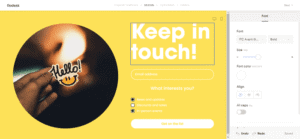
The link-in-bio page is really handy. I can put all my important links — like social media, website, or products — in one place. I don’t need a separate tool for that, which saves me time.
The only small problem is that the editor can be a little slow sometimes. It doesn’t stop me from finishing my work, but it can be annoying if I’m in a hurry.
Mailchimp’s Options
With Mailchimp, I like that they also have many types of forms: pop-ups, embedded forms, and landing pages. It feels like you have a lot of choices.
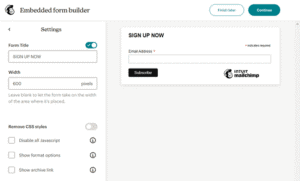
The problem is that each form type has its own editor. Every time I switched, I had to figure out the new layout. It’s confusing and slows me down instead of helping me.
Another issue is that you can only make one form of each type per audience. For example, I can’t make two different pop-ups for the same list. That makes testing harder, which could lower my signups.
My Verdict
I think Flodesk is better here. It’s easier to use, the forms look great, and the link-in-bio page is a useful extra. Mailchimp has a lot of options, but the confusing editors and limits make it harder to work fast.
👉 Winner: Flodesk (2–0)
Design & Visual Appeal
No matter what you’re making — an email, a form, or a landing page — Flodesk’s designs always look amazing. 🤩
For example, I checked out their email templates. There are over 50 in total, and even though I can only show a few here, they all look modern and professional.
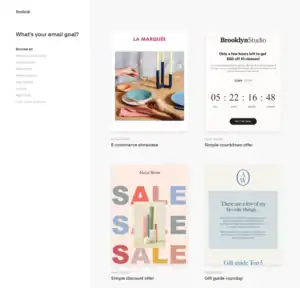
The forms and landing pages are just as nice. The popup forms and full-page templates all feel polished and clean.
Customizing templates in Flodesk is easy. I can change images, text, colors, and fonts just by clicking the part I want to edit. For emails, I can also add content blocks wherever I need them, which gives me flexibility without making it complicated.
Mailchimp’s Designs
Mailchimp’s templates aren’t bad, but compared to Flodesk, they feel a little outdated. Their forms especially look old-fashioned.
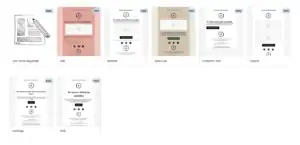
Mailchimp has over 80 email templates, and some look decent, but in my opinion, they still can’t match the clean, modern look of Flodesk’s designs. Landing pages are similar — functional, but not very stylish.
One more thing: the flexibility varies depending on what you’re editing. You can add content blocks to emails and landing pages, but not to popup forms. That limits what I can do if I want to make every part of my campaign look exactly how I want.
My Verdict
For me, Flodesk wins this round. Everything just looks better, and customizing it is straightforward. Beautiful templates make designing emails and pages fun instead of frustrating.
👉 Winner: Flodesk (3–0)
Email Editor & Content Blocks
When I tried both Flodesk and Mailchimp, I noticed their email editors work in almost the same way — and both are pretty easy to use. You just add your content using content blocks, and you can click on any block to change settings.
The standard blocks are there on both platforms: text, buttons, videos, and more. But each platform also has some unique blocks that the other doesn’t have.
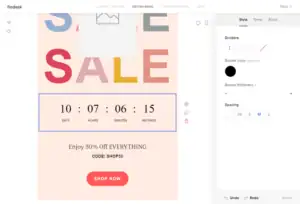
For example, Flodesk has a countdown block. I like this because it’s perfect for limited-time offers — it really nudges customers to act fast.
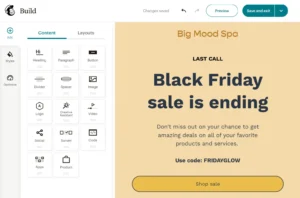
On the other hand, Mailchimp has a survey block. I found it handy when I wanted to ask my contacts for feedback or opinions directly in my emails.
Some other features I noticed:
Flodesk — Frames for changing the shape of product images, which makes visuals look more interesting.
Mailchimp — You can customize your emails separately for desktop and mobile, which helps me make sure everything looks good on any device.
My Verdict
Both editors are easy to use, and each has unique blocks that the other doesn’t. If you know you’ll rely heavily on a specific block, that might influence your choice.
👉 Winner: Tie (Flodesk 4 – Mailchimp 1)
Subscriber Segments & Targeting
Segmentation is all about grouping your subscribers based on shared traits. I like using segments because they help me send the right emails to the right people. For example:
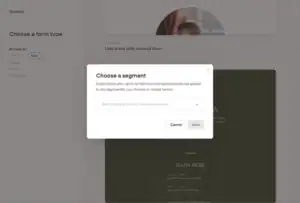
One group could be subscribers from the same city.
Another group could be subscribers who downloaded a specific lead magnet.
Segments make my email list more organized, and they let me tailor emails so people actually engage with them.
Mailchimp’s Segmentation
With Mailchimp, I like that segments update automatically. If someone no longer fits the rules of a segment, they get removed on their own. For example, I can create a segment of subscribers who signed up in the last 180 days. After 180 days, Mailchimp automatically removes anyone who no longer qualifies.
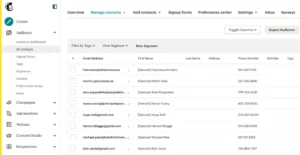
This automation saves me a lot of time because I don’t have to constantly check who belongs in which segment.
Flodesk’s Segmentation
Flodesk is simpler. I like that it can automatically add subscribers to a segment when they sign up or click a link using the Link Action feature.
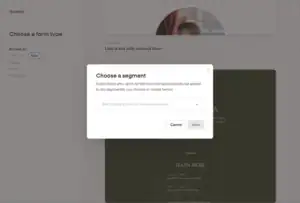
But here’s the tricky part: once subscribers are added, they stay in the segment permanently unless I remove them manually or set up an automation for specific link clicks. That makes managing segments a bit more work compared to Mailchimp.
My Verdict
Mailchimp wins here for me. Its segmentation is more advanced and convenient, and I don’t have to spend extra time manually managing my subscribers. Flodesk works, but it feels more basic and a little clunky for big email lists.
👉 Winner: Mailchimp (Flodesk 4 – Mailchimp 2)
Automations & Workflow
Automations are a huge time-saver for me. They let me automatically do tasks when something happens, like sending a welcome email the moment someone joins my list. This means I don’t have to do everything manually, which saves a lot of time.
Flodesk’s Automations
Flodesk’s automation workflows are simple. I like that I can set up a workflow for when a subscriber joins a segment via a signup form. You can even use multiple segments to trigger the same workflow, which gives some flexibility.
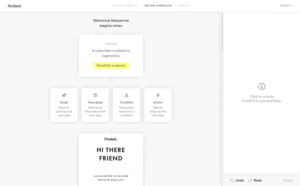
Recently, Flodesk added link actions, which lets me assign automation tasks to links in emails. For example, I can automatically move subscribers into segments or add them to workflows when they click a link. That’s a useful update.
The downside is that Flodesk’s automations are still limited. Apart from sending emails and adding/removing subscribers from segments, there’s not much else you can do. I can’t, for example, update a subscriber’s information automatically.
Mailchimp’s Automations
Mailchimp, on the other hand, feels much more advanced. Their automations — called customer journeys — let me do a lot more.
I can skip contacts who meet certain conditions.
I can run A/B tests by taking different actions for different percentages of my contacts.
I can update subscriber info, send SMS messages, unsubscribe contacts, and more.
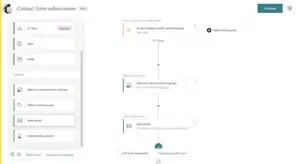
This makes Mailchimp much more flexible for anyone who wants to run more complex campaigns or test different strategies.
My Verdict
Mailchimp wins this round for me. Flodesk is getting better with link actions, but Mailchimp’s customer journeys are more powerful and give me more control over what happens automatically.
👉 Winner: Mailchimp (Flodesk 4 – Mailchimp 3)
Reporting & Analytics
Tracking how your emails are performing is important, and both Flodesk and Mailchimp offer reporting tools.
Flodesk’s Reports
Flodesk gives me the basics I need to see how my campaigns are doing. I can check things like:
Subscriber growth
New subscribers by source
Subscriber engagement
Email sends, delivery, opens, and clicks
Email deliverability
Subscriber activity in automations
Form activity
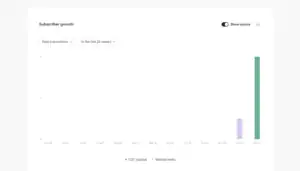
These reports help me understand what’s working and what isn’t, but they feel a bit limited when I want more detailed insights.
Mailchimp’s Reports
Mailchimp takes reporting to the next level. I like that it gives me much more data, such as:
How many times an email was forwarded
How many times a forwarded email was opened
The last time an email was opened or clicked
Average revenue generated by an automation
Top locations of my subscribers
Top email clients my subscribers use
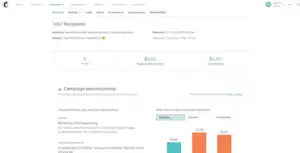
On top of that, I can create custom reports to track exactly what I care about. That level of detail makes it easier for me to tweak campaigns and improve results.
My Verdict
For me, Mailchimp wins this round. Its reports are more detailed and flexible, giving me insights that Flodesk just can’t match.
👉 Winner: Mailchimp (Flodesk 5 – Mailchimp 4)
Pricing & Plans
Pricing is always an important factor for me, especially as my email list grows.
Flodesk’s Pricing
I like that Flodesk doesn’t charge more as your subscriber list gets bigger. Its main email marketing plan is $35/month if you pay annually. If you want to use Flodesk Checkout to sell products, it’s an extra $24/month on annual billing.
The best part? Flodesk doesn’t take a cut of your sales. You only pay the 3% + $0.30 fee that Stripe charges for payment processing. That’s really simple and transparent, and I don’t have to worry about hidden fees.
Flodesk doesn’t offer a free plan, but you can try it for 30 days for free, which is great for testing it out before committing.
Mailchimp’s Pricing
Mailchimp follows the usual model: the more subscribers you have, the higher your bill. They have a free plan for up to 500 contacts and 1,000 monthly emails, but it’s very limited. You can’t schedule emails or use customer journeys on the free plan.
After that, their Essentials plan starts at $13/month for up to 500 contacts. The price increases as your list grows, which can get expensive quickly if your audience grows fast.
My Verdict
For me, Flodesk is the winner here. I like that the pricing is simple, predictable, and doesn’t punish me for having a larger list. It’s much easier to plan my budget compared to Mailchimp’s tiered pricing.
👉 Winner: Flodesk (Flodesk 6 – Mailchimp 4)
Tushar’s Story: Why He Left Mailchimp for Flodesk
Tushar is a creator at heart. All he ever wanted was a simple way to write his newsletter and connect with his audience.
He wasn’t running an e-commerce empire. He wasn’t chasing hundreds of integrations. He just wanted to hit “send” and share his thoughts.
But as his audience grew, Mailchimp started to weigh on him—not just with cost, but also with complexity.
The dashboard felt cluttered, the features overwhelming, and every small task seemed buried under layers of options. On top of that, the bill kept climbing higher.
Tushar realized he was paying for advanced e-commerce modules, integrations he didn’t need, and automation paths he never planned to use—all silently adding weight to his pocket and his workflow.
“Why am I paying for things I don’t even use?” he asked himself.
That’s when he discovered Flodesk. No confusing dashboards. No paying for unused features. Just simplicity—a flat price, unlimited subscribers, and beautifully designed templates that let his words shine without distraction. For Tushar, it felt like stepping into a tool made for creators, not corporations.
Today, instead of wrestling with complexity and costs, he spends his time writing, connecting, and growing his community—the way he always wanted.
Final Thoughts: Flodesk vs Mailchimp
After testing both tools and weighing the pros and cons, here’s how things ended up: Flodesk 6 – Mailchimp 4.
That makes Flodesk the overall winner in this head-to-head battle. 🚀
I really enjoyed using Flodesk because of its:
Clean and simple interface that makes email building a breeze
Beautiful forms and landing pages that actually look modern
Handy Checkout feature for creators and small businesses selling online
Straightforward pricing that doesn’t go up as your list grows
You can even try Flodesk free for 30 days (and get 50% off your first year if you decide to stick with it).
That being said, Mailchimp isn’t a bad choice either. It might fit better if you:
Rely heavily on advanced segmentation and automations
Want detailed reporting to track every metric
Or need strong ecommerce integrations like WooCommerce or BigCommerce
Mailchimp also offers a forever-free plan, so it’s worth testing if you’re on a tight budget. these Mailchimp Alternatives are worth your time to have a look
👉 My advice: If you want simplicity and design-first emails, go with Flodesk. If you want power features and deeper analytics, Mailchimp is the safer bet.
And if neither of these feels like “the one,” don’t worry — I’ve also reviewed plenty of Mailchimp alternatives that might be a better fit for your needs.
