

Last Updated: 18 Nov 2025
I’ve always been curious about one thing in email marketing — which platform truly performs better: ActiveCampaign or Mailchimp?
Both names kept popping up everywhere.
Mailchimp — the old, trusted name that almost every beginner starts with.
And then there’s ActiveCampaign — the advanced tool that serious marketers can’t stop talking about.
For years, I kept hearing the same debates:
“Mailchimp is easier to use.”
“ActiveCampaign has better automation.”
“Mailchimp is cheaper.”
“ActiveCampaign drives more conversions.”
At one point, I got tired of hearing opinions. I wanted proof.
So I decided to test both tools myself — running real campaigns, automations, and email sequences using the same audience, same goals, and same offers.
And what I found was honestly surprising — in ways I didn’t expect.
Some things worked exactly as I imagined… and others completely changed my perspective on what makes an email marketing platform “the best.”
In this hands-on comparison, I’ll break down ActiveCampaign vs Mailchimp feature by feature — from ease of use and templates to automations, segmentation, deliverability, and pricing — so you can confidently decide which tool fits your business (and your marketing style).
How We Test Tools
“We test tools the hard way — by actually using them. At Mailotrix, every review comes from real campaigns, broken automations, and late-night experiments. We dig deep so you don’t have to waste time (or money) on tools that only look good in marketing.” for more info about our tools review process read here.
Short on Time? Here’s My Quick Verdict for Mailchimp vs ActiveCampaign
After testing both tools across real campaigns, automations, and deliverability setups — here’s the honest, no-fluff takeaway:
ActiveCampaign is the clear winner for serious marketers and growing businesses.
It gives you deeper automation, stronger list management, smarter tagging, CRM workflows, advanced AI, and far better deliverability tools.
Mailchimp wins only in simplicity and pricing (for beginners).
It’s easier to learn, looks cleaner, and offers a solid free plan — but once you start scaling, you’ll feel the limits quickly.
| Feature | Mailchimp | ActiveCampaign | Winner |
|---|---|---|---|
| Ease of Use | Simple, beginner-friendly | More advanced | Mailchimp |
| Automation | Basic workflows | Powerful, behavior-based | ActiveCampaign |
| Templates | Decent designs | More modern & flexible | ActiveCampaign |
| List Management | Confusing, double-charges | Clean tagging + no duplicates | ActiveCampaign |
| CRM | Very limited | Full CRM built-in | ActiveCampaign |
| Deliverability Tools | Good but minimal | Strong spam & inbox tools | ActiveCampaign |
| Pricing | Cheaper for beginners
| Better long-term value
| ActiveCampaign |
🏆 Final Winner: ActiveCampaign (12–5)
If you want serious marketing automation, smarter workflows, better segmentation, and stronger deliverability — ActiveCampaign wins outright.
If you just want something simple, beginner-friendly, and budget-friendly — Mailchimp still works.
Ease of Use
Let’s start with something every marketer cares about — how easy these tools are to actually use.
Back in the early days, Mailchimp’s biggest selling point was simplicity. It entered the market when most email tools were built for enterprises — complex, expensive, and intimidating for everyday users. Mailchimp changed that.
It gave marketers a breath of fresh air — a clean, drag-and-drop editor, simple navigation, and an interface that just made sense.
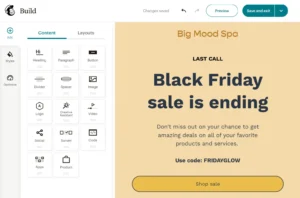
Honestly, I think Mailchimp helped set the standard for what we now consider a user-friendly email builder.
Even today, that ease of use remains one of its strongest traits. Creating campaigns feels familiar, even if you’ve never used an email tool before.
However, it’s not perfect.
One small annoyance I found was that landing pages aren’t clearly placed in the main navigation — you have to dig a bit to find them after creating one.
And when it comes to forms and automations, things can start to feel slightly messy. (We’ll get to that part later.)
Now, moving over to ActiveCampaign — a tool known for its power and advanced features. You’d expect a steep learning curve here… but surprisingly, it’s not that intimidating.
The interface feels modern, polished, and responsive.
Their drag-and-drop email editor is smooth, and you get plenty of flexibility with design elements and styling options.
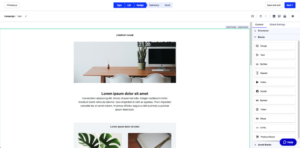
Still, ActiveCampaign’s depth can make it a bit overwhelming for beginners.
Building simple emails is easy — but once you dive into automations and CRM workflows, you’ll definitely need a little time to get comfortable.
If you’re someone who loves tinkering with advanced features, you’ll probably enjoy the control it gives you.
But if you just want to log in, create a campaign, and hit send without thinking too much — Mailchimp feels a lot more natural.
Winner:
Both tools are user-friendly in their own way, but when it comes to ease of use, Mailchimp clearly takes the win.
ActiveCampaign is fantastic once you get the hang of it — but Mailchimp is simply easier to master, especially if you’re just getting started.
Design & Flexibility
When it comes to design, both Mailchimp and ActiveCampaign gave me very different experiences.
Starting with Mailchimp —
I really liked how simple and clean its email editor is. It’s easy to use, and I could create a nice-looking email in just a few minutes without touching any code. For beginners, that’s a big plus.
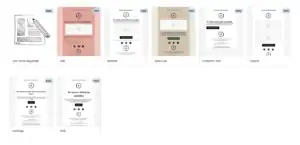
But here’s what I didn’t like — the good designs are only available in the higher plans.
When I used the Free and Essentials plans, most templates looked old and plain. If you want access to the better, modern templates or want to upload your own HTML designs, you’ll need the Standard plan, which costs $20/month for up to 500 contacts. That felt a bit restrictive because creative freedom should be available to everyone, not just premium users.
Now coming to ActiveCampaign —
It immediately felt more open and flexible. You get 250+ ready-made templates, and they all look modern and mobile-friendly. The drag-and-drop editor works smoothly, and I could easily change fonts, layouts, and spacing the way I wanted.
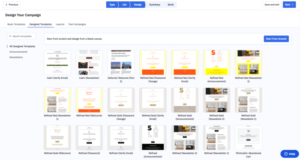
What really impressed me is that even the lower plans give access to all these templates. And when I tried the Plus plan, they even designed a custom email template for me for free — which made my emails look more professional without any extra effort.
Still, it’s not perfect.
Sometimes the editor slows down a bit when you add too many elements, especially with a weak internet connection. Not a big issue, but something to know.
My opinion:
Mailchimp is simpler and easier for beginners.
But if you want more design options and full control over your email look, ActiveCampaign clearly wins here.
✅ Winner: ActiveCampaign
Current Score: 1–1
List Management
Now let’s talk about one thing that can make or break your email marketing — how these tools handle your contacts and lists.
Starting with Mailchimp, I honestly found their list management a bit confusing.
Here’s the issue — every list in Mailchimp is completely separate.
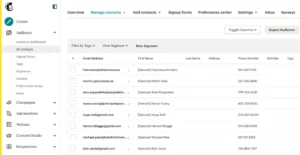
That means if you have the same subscriber in two different lists, you’ll actually be charged for them twice. And since Mailchimp charges per subscriber, that adds up fast.
This setup might make sense if you’re running multiple businesses or totally different projects, but for one brand, it’s just messy and expensive.
Another thing that bothered me is how they organize contacts. Besides lists, you also have tags, groups, and segments — and at first, it’s not clear what does what. It took me a while to fully understand how all these work together, and honestly, it just feels more complicated than it needs to be.
Now, switching over to ActiveCampaign, the experience was much smoother.
Their lists are flexible — you can easily send one campaign to contacts across different lists without any extra hassle. I also loved how you can organize your contacts with tags and custom fields, like location or interests.
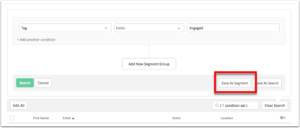
What really impressed me was the automation part — you can automatically add or remove tags based on what people do. For example, if someone clicks a specific link in your email, they can be tagged automatically or even moved to another list.
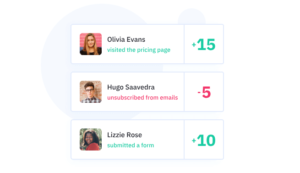
And then there’s lead scoring, one of my favorite features. You can assign points to subscribers based on actions they take — like opening emails or visiting your website. It helps you see who’s really engaged and ready to buy.
Mailchimp’s system works fine for simple email lists, but if you want flexibility and smarter organization, ActiveCampaign is way ahead.
✅ Winner: ActiveCampaign
Current Score: 1–2
Automation & Workflows
Now let’s talk about the part that really separates average email tools from the pros — automation.
Mailchimp likes to call itself a “powerful marketing automation platform,” but honestly, after using both tools in real campaigns, I feel that’s a bit of a stretch.
Yes, Mailchimp does offer automation — things like abandoned cart emails, welcome sequences, and order confirmations. These are useful and easy to set up, especially after they updated their automation editor (it’s much cleaner now).
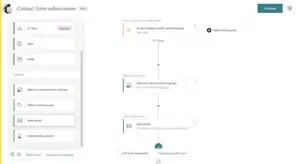
But once you want to build something advanced — like multi-step workflows or custom triggers — things start to feel limited fast. You can’t get too creative with the flow, and the logic options are quite basic.
Now, when I switched to ActiveCampaign, I instantly saw the difference.
Their automation builder is on another level — it’s visual, powerful, and gives you full control. You can combine triggers, actions, and conditions in so many ways that it almost feels like you’re building your own custom system.
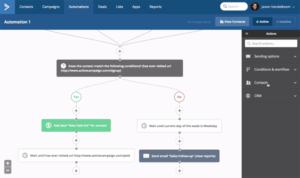
For example, I set up automations that:
- Sent different emails based on subscriber behavior
- Added tags automatically when someone clicked certain links
- Scored leads based on how engaged they were
- Even triggered CRM follow-ups for my sales outreach
And that’s the beauty of ActiveCampaign — it connects directly with their built-in CRM, so your marketing and sales automations work together seamlessly.
Mailchimp’s automation is good for basic needs — like a simple welcome email or cart reminder. But if you want deep control, personalization, and real automation magic, ActiveCampaign blows it away.
✅ Winner: ActiveCampaign
Current Score: 1–3
Registration Forms
Creating signup forms sounds like a small thing, but it actually makes a huge difference in how smoothly your email list grows. So I tested both tools to see how easy it is to make and manage forms.
Starting with ActiveCampaign, I really liked how flexible their form builder is. You can create inline forms, floating bars, floating boxes, or pop-ups (modals) — all using a clean, visual editor.

Adding new fields takes just a click, and everything is responsive, so it looks great on both desktop and mobile.
What I found even more useful is how easily you can connect these forms to your setup. You can embed them on your website, link directly to them, or even add them to WordPress or Facebook if those integrations are active.
Plus, you can attach forms to specific lists, tags, or deals, which helps you organize new leads automatically. For example, I used one form for my newsletter and another one for lead magnets — each tagging contacts differently.
Now, when I switched to Mailchimp, things got a bit messy.
They do let you create embedded and pop-up forms, but I didn’t find the process as smooth. For some reason, Mailchimp uses different editors for different form types — one for embedded forms, another for pop-ups — and it’s confusing at first.
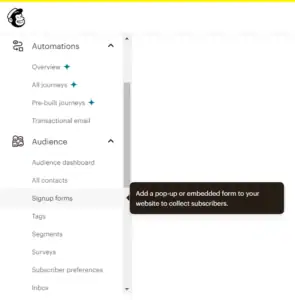
Also, not all Mailchimp forms are fully mobile-responsive, which can be a big drawback since most users sign up through their phones these days.
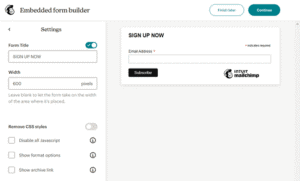
To be fair, the actual form editor is simple enough once you get inside it, but the overall setup process just isn’t as beginner-friendly as ActiveCampaign’s.
So, while both tools get the job done, ActiveCampaign makes it faster, cleaner, and a lot more flexible.
✅ Winner: ActiveCampaign
Current Score: 1–4
CRM (Customer Relationship Management)
Now, this is where the difference between both tools becomes crystal clear.
Let’s start with Mailchimp.
Mailchimp doesn’t really have a full CRM — even though they like to say you can “use Mailchimp as a CRM.”
Technically, yes, you can see your contact info, revenue reports, and connect your store to get eCommerce data. That’s useful if you just want a quick overview of who’s buying and how they interact with your emails.
But when I tried to manage deals, track leads, or organize follow-ups, it quickly hit a wall. It doesn’t have dedicated pipelines or deal tracking features, which makes it hard to manage sales workflows or clients properly.
Now, when I tested ActiveCampaign, it felt completely different.
Their CRM is built-in and made for real business use. You can create sales pipelines, assign deal owners, and even automate entire sales processes — like sending reminders, follow-ups, or updating deal stages automatically.
It’s not just a marketing tool — it’s a full system that connects your marketing and sales together.
I loved how easily I could see where each lead was in the sales funnel, what emails they opened, and what actions they took. It gave me a complete view of every contact in one place.
The CRM comes as part of the Plus plan and higher, and honestly, it’s worth every bit if you’re serious about running sales and marketing in one tool.
So while Mailchimp gives you some contact data, ActiveCampaign gives you a full CRM powerhouse.
✅ Winner: ActiveCampaign
Current Score: 1–5
Spam & Design Testing
Before I hit send on any email campaign, I always like to double-check two things — how my emails look and whether they’ll land in the inbox or spam folder. So, I tested both tools for that.
Starting with Mailchimp, I have to say they’ve done a pretty good job here.
You get the usual desktop and mobile previews, so you can easily see how your email looks on different screens.
But the real gem is their Inbox Preview feature — it lets you see how your email will appear in different email clients (like Gmail, Outlook, or Yahoo).
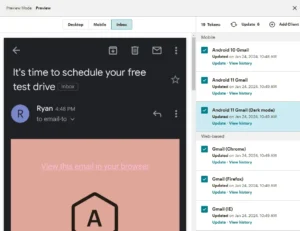
If you’re on a monthly plan, you get 25 Inbox Preview tokens each month for free — and if you need more, you can buy extra. It’s really handy when you want to make sure your design looks perfect everywhere.
Mailchimp also includes a link checker, which automatically catches missing or broken links, and a mobile app that lets you preview your emails right from your phone.
The only missing piece? Spam testing. Mailchimp doesn’t check if your email might get flagged as spam before sending, which is a bit of a drawback.
Now over to ActiveCampaign — they do the opposite.
They include a built-in spam check (powered by SpamAssassin), which automatically scans your email before sending and gives you a score. That helped me fix a few things in my campaigns that could’ve triggered spam filters — a small feature, but really useful.
However, design previews are more limited. You only get desktop and mobile views by default. If you want to see how your email looks in specific email clients (like Gmail or Apple Mail), you’ll need to buy extra credits — and at $5 for 5 tests, it’s not exactly cheap.
So, both tools shine in different ways here:
Mailchimp is great for design testing, while ActiveCampaign is better for spam safety.
✅ Winner: It’s a tie
Current Score: 2–6 (ActiveCampaign still in the lead)
Reports & Analytics
When it comes to reports, both Mailchimp and ActiveCampaign did a really solid job. I love digging into numbers to see how my campaigns perform, and both tools gave me plenty of insights to work with.
Let’s start with what they both do well —
Each platform gives you detailed stats on email performance, including open rates, clicks, bounces, and unsubscribes. You also get link tracking, geolocation data, social performance, and even automation reports that show how your automated emails are doing.
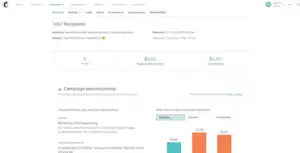
Both also include eCommerce reports, which are super helpful if you’re running an online store. You can track how much money your campaigns are bringing in and which products are performing best.
Now, here’s where they differ slightly.
In ActiveCampaign, you get access to deal reports if you’re using their CRM. These show data like deals over time, funnel overviews, and performance by deal owner.
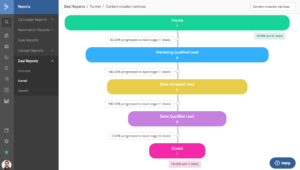
I found this really useful for tracking how my email campaigns actually turn into sales opportunities.
Meanwhile, Mailchimp gives you a bit more coverage in eCommerce reporting — it connects with more platforms by default. ActiveCampaign’s deep data reporting works best with Shopify, BigCommerce, and WooCommerce, but Mailchimp supports a wider range of store integrations.
So in short:
- ActiveCampaign gives you stronger sales and CRM-related reports.
- Mailchimp gives you broader eCommerce insights if you use multiple store platforms.
Both are powerful in their own way — it just depends on what kind of data you care about most.
✅ Winner: It’s a tie
Current Score: 3–7 (ActiveCampaign still leading)
Deliverability
We’ve compared ActiveCampaign vs Mailchimp on features, but now let’s talk about something that really matters — actually getting your emails into inboxes.
At the end of the day, it doesn’t matter how beautiful your emails look if they end up in spam. Deliverability is the heart of email marketing, and both tools take it seriously — though one clearly does it better.
At Mailotrix, we’ve spent years testing the deliverability of top email marketing providers. Previously, we used bi-annual seed list tests to track inbox placement, but in 2025, a more practical evaluation method was introduced. Now, deliverability is rated based on the actual tools and features that help you maintain strong inbox placement — things like authentication, complaint handling, and list hygiene.
Here’s how the two stack up:
| Provider | Star Rating | Comment |
|---|---|---|
| ActiveCampaign | ⭐⭐⭐⭐☆ | Strong tools like FBL data and third-party list-cleaning integrations. Lacks a deliverability dashboard or sender health score. |
| Mailchimp | ⭐⭐⭐☆☆ | Covers the basics but lacks key tools like FBL data, a deliverability dashboard, or list hygiene features. |
Both platforms support deliverability fundamentals such as bounce suppression, IP warmup, and authentication (SPF, DKIM, DMARC). However, ActiveCampaign pulls ahead with a more complete feature set. It offers FBL (Feedback Loop) data, stricter list quality controls, and seamless integration with third-party list-cleaning services — all of which help protect your sender reputation and boost inbox rates.
Mailchimp, on the other hand, gets the basics right but misses several critical deliverability tools. There’s no dedicated reputation dashboard, no FBL data access, and no built-in list hygiene system — meaning you’ll need to handle those parts manually or through third-party tools.
If reliable inbox placement is your top priority, ActiveCampaign is the clear winner here in 2025.
✅ Winner: ActiveCampaign
Current Score: 8–3
Landing Page Builder
Most email marketing tools offer a landing page builder these days — and both ActiveCampaign and Mailchimp have joined the party.
Interestingly, Mailchimp was one of the first to introduce this feature, while ActiveCampaign took a little longer to jump on board. The biggest difference between the two?
Mailchimp lets you create landing pages for free, while ActiveCampaign keeps this feature locked behind its Plus plan or higher.

Of course, for that price, you’d expect ActiveCampaign’s landing pages to be a bit more advanced — and they are. You can create personalized web experiences by dynamically hiding or removing certain elements,

which is perfect for tailored marketing funnels. The templates are versatile, easy to customize, and can be hosted on your own custom domain or subdomain.
Mailchimp’s landing page builder, on the other hand, is simple and beginner-friendly. You can even sell products directly from your landing page, which is a nice touch for creators and small business owners.
However, it’s worth noting that Mailchimp only offers 10 templates, which feels a little restrictive compared to other tools.
✅ Winner: Mailchimp
Despite its limited design library, Mailchimp earns this round simply because it allows users to build and publish landing pages for free — something ActiveCampaign still charges extra for.
Current Score: 8–4
Integrations
Both ActiveCampaign and Mailchimp are well-known tools, so it’s no surprise that they each offer a solid range of integrations with popular business platforms.
Mailchimp connects with over 300 tools, including all major CRMs, ecommerce platforms like Shopify, popular CMS and website builders, and even social media networks. It also integrates with Zapier, which means you can easily connect it to thousands of other apps if needed.
ActiveCampaign, however, goes a step further — offering over 850 integrations. Just like Mailchimp, it connects with Zapier, so you can link it to almost any tool you already use.
✅ Winner: Both
While ActiveCampaign technically supports more integrations, both platforms offer everything most users need — from ecommerce and CRMs to social and automation tools. So, this round is a draw.
Current Score: 9–5
Support
Both ActiveCampaign and Mailchimp offer similar support options — including email, live chat, detailed knowledge bases, and plenty of tutorials to help you get started.
However, since ActiveCampaign is a bit more advanced to learn, they go one step further by offering one-on-one training sessions and even a community forum where users can ask questions and share tips.
We also found ActiveCampaign’s support much easier to reach. You can contact their team from any screen using the handy Help icon in the bottom corner. In contrast, Mailchimp makes you go through their knowledge base before you can access their email or chat support — which can be a little annoying when you need quick help.
✅ Winner: ActiveCampaign
With more support options and easier access, ActiveCampaign clearly wins this round — bringing the score to 10–5.
Pricing & Value for Money
By now, it’s pretty clear that ActiveCampaign has been leading the race with its deeper automation and advanced features.
But here’s the real question — does all that power come with a crazy price tag?
Surprisingly, not really. When you compare ActiveCampaign to other high-end marketing automation tools like HubSpot, it’s actually quite budget-friendly.
Let’s break down the numbers 👇
| Subscribers | ActiveCampaign (Starter) | Mailchimp (Essentials) |
|---|---|---|
| Free plan | ❌ Not available | ✅ 500 contacts for free (1,000 emails/month) |
| 1,000 | $19 | $26.50 |
| 2,500 | $49 | $45 |
| 5,000 | $99 | $75 |
| 10,000 | $189 | $110 |
| 50,000 | $759 | $385 |
At first glance, Mailchimp looks cheaper, especially if you’re working with a smaller list. And their Forever Free plan is a great way to start if you just want to test the waters.
However, once you start growing and need more advanced tools, Mailchimp’s costs climb fast — and even then, some of the best features like advanced segmentation, multivariate testing, and comparative reports are locked behind their Premium plan ($299/month), which honestly doesn’t feel worth it.
With ActiveCampaign, the entry-level Starter plan already gives you strong automation, better segmentation, and overall more control. You’ll miss out on some extras like CRM and deep data integrations (which come in higher plans), but the core email marketing tools are much more powerful for the price.
💡 Tip: You can also save up to 20% by paying annually — which makes ActiveCampaign even more affordable long-term.
✅ Winner: ActiveCampaign
While Mailchimp is cheaper on paper, ActiveCampaign offers more value for what you pay. Mailchimp’s free plan is great for beginners, but if you’re serious about growing and automating your business, ActiveCampaign clearly gives you more bang for your buck.
Final Score: 11–5 — and the crown goes to ActiveCampaign. 🏆
AI Features
AI has become a big part of email marketing lately — helping you write faster, send smarter, and automate better.
Both Mailchimp and ActiveCampaign use AI, but they do it in very different ways.
Let’s look at how they compare 👇
ActiveCampaign: Advanced and Autonomous AI
I’ll be honest — if you love powerful, data-driven tools, ActiveCampaign’s AI will blow your mind.
It’s not just there to “assist” you; it actually helps build campaigns, automate workflows, and optimize performance on its own.
Here’s what stood out for me:
- 💡 AI Agents & Autonomous Marketing: You can literally tell ActiveCampaign what your business goal is — and the AI will imagine, activate, and validate entire campaigns for you. It feels like having a marketing assistant that actually does the work.
- ⚙️ AI Automation Builder: This feature is a time-saver. You give it an objective, and it builds complete automations with the right triggers and actions automatically.
- 🧠 Predictive Analytics: I really like the predictive sending tool — it uses data to send emails at the exact time each contact is most likely to open. Plus, features like win probability and sales forecasting make it great for businesses with sales pipelines.
- 🎯 Smart Segmentation: The AI studies your audience data and helps you target high-value leads or re-engage inactive ones.
- 🌍 Multilingual AI Translation: This is a game-changer — it can translate entire campaigns into over 75 languages while keeping your tone consistent. Perfect if you have a global audience.
If you’re running a big or fast-growing business, these features can seriously level up your marketing.
Mailchimp: Practical and User-Friendly AI
Mailchimp, on the other hand, takes a more beginner-friendly approach. Its AI tools are powered by Intuit Assist, and I like how easy and useful they are for everyday marketers.
Here’s what I noticed:
- ✍️ “Write with AI”: I like this one a lot — it helps you write subject lines, headings, and even full email copy based on your brand voice. It saves time and removes writer’s block.
- 🎨 Creative Assistant: This tool automatically designs branded templates using your logo, colors, and fonts. I found it super handy when I wanted to create on-brand visuals quickly.
- ⏰ Send-Time Optimization: Just like ActiveCampaign’s predictive sending, this feature recommends the best time to send emails for higher engagement — and it works well.
- 📊 Content Optimizer: This AI checks your emails and gives suggestions for better readability, CTA placement, and design balance. I like how it guides you to improve your content before sending.
- 💰 Revenue Intelligence: For e-commerce users, this predicts who’s most likely to buy again — a great feature for targeting high-value customers.
Mailchimp’s AI isn’t as deep or autonomous as ActiveCampaign’s, but it’s simple, fast, and perfect for small businesses that just want to create and send good-looking emails without getting too technical.
✅ Winner: ActiveCampaign (Score: 12–5)
Both platforms do AI well, but ActiveCampaign takes it to the next level with its automation builder, predictive analytics, and AI agents that actually do the work for you.
Mailchimp is still great if you want easy, practical tools — but for advanced, data-driven marketers, ActiveCampaign is miles ahead.
ActiveCampaign vs Mailchimp — Which One Should You Choose?
After testing both tools inside out, I can confidently say this:
Mailchimp is still the friendly, easy-to-use email tool it’s always been — but ActiveCampaign is the smarter, more powerful platform for marketers who want to go beyond “just sending emails.”
Here’s the quick breakdown 👇
- Ease of Use: Mailchimp wins — it’s simple, clean, and beginner-friendly.
- Design & Flexibility: ActiveCampaign wins — modern templates and full access across all plans.
- List Management & Automations: ActiveCampaign absolutely crushes it here.
- CRM, Segmentation & AI: ActiveCampaign again — it’s built for businesses that want to grow fast.
- Pricing: Mailchimp looks cheaper on the surface, but ActiveCampaign gives way more value for the money.
- Overall Score: ActiveCampaign 12 – Mailchimp 5
If you’re just starting out and want something simple to create emails, send campaigns, and grow your list — Mailchimp is still a great choice. these Mailchimp Alternatives are worth your time to have a look
It’s intuitive, affordable for beginners, and helps you get your first campaigns live fast.
You can learn using Mailchimp by using this tutorial
But if you’re serious about automation, personalization, and scaling your email marketing, go for ActiveCampaign without thinking twice.
It’s more advanced, more flexible, and its automation + AI tools give you the edge to run smarter campaigns that actually convert.
At the end of the day, it depends on what kind of marketer you are:
- If you want simple and quick, go with Mailchimp.
- If you want power and control, ActiveCampaign is your tool.
👉 My pick: ActiveCampaign — it’s the better all-rounder for 2025.
