


Last Updated: 19 Jun 2026
There’s a debate that never dies in the email marketing world.
“Should I use Mailchimp or Constant Contact?”
And I completely understand the confusion. These two tools have been around forever. Both are trusted by hundreds of thousands of businesses. Both have templates, automation, and list management. Both are regularly recommended by marketing blogs as “top picks.”
But here’s the truth most comparisons won’t tell you: these tools are built for very different types of users. And picking the wrong one can mean paying for features you don’t need — or missing the ones you do.
On one side: Mailchimp — the most recognized name in email marketing. Founded in 2001. Over 11 million users worldwide. A powerful platform packed with AI tools, deep analytics, and a free plan that lets you start for nothing. But since Intuit acquired it in 2021, prices have climbed steadily — and key features keep getting locked behind higher-paid tiers.
On the other side: Constant Contact — the veteran platform built with simplicity in mind. Founded in 1995. Used by over 600,000 businesses, especially small businesses, nonprofits, and event organizers. No free plan — but their customer support is some of the best in the industry. And they offer something Mailchimp doesn’t: built-in event management and social media tools under one roof.
Both are solid platforms. But which one is actually right for your business in 2026?
I signed up for both. I built real campaigns. I tested the editors. I set up automations. I compared deliverability. I ran the numbers on pricing. I read through hundreds of real reviews on G2, Capterra, and Trustpilot.
Here’s everything I found — straight, honest, and no fluff.
Let’s get into it 👇
We Keep Things Simple — We Only Review Tools We Actually Use
At Mailotrix, we don’t just look at a tool’s website and call it a review. I actually sign up and use every tool myself. I build automations, run real campaigns, test the deliverability, check how emails land across major email clients, and push the features until I know exactly what works and what doesn’t.
I also spend hours reading real reviews on G2, Capterra, Trustpilot, and Reddit. I want to know what normal businesses actually experience — not what a company’s marketing team wants you to believe. Then I mix that research with my own hands-on testing and give you a straight answer you can actually use.
Short on Time? Here’s My Quick Verdict
After testing both tools for weeks, here’s the honest answer:
Mailchimp is the better tool for most growing businesses. It has a free plan, stronger analytics, deeper automation, better integrations, and AI-powered features that Constant Contact simply can’t match at the same price.
Constant Contact is better for beginners, nonprofits, event organizers, and small businesses that want a simpler experience with outstanding customer support — and don’t mind paying without a free plan to start.
| Feature | Mailchimp | Constant Contact | Winner |
|---|---|---|---|
| Email Editor | Two editors — confusing, but powerful | Single clean editor — simple and fast | Constant Contact |
| Templates & Design | 100+ templates, AI Creative Assistant | 200+ templates, more variety | Constant Contact |
| Automation | Deep journeys, 200 steps — paid plans only | Basic automation — included in all plans | Mailchimp |
| Segmentation | Predictive AI segmentation — paid tiers | Basic segmentation only | Mailchimp |
| Forms & Landing Pages | Forms on free plan, landing pages on paid | Included across all paid plans | Constant Contact |
| Deliverability | Strong, consistent track record | Good, but some reported inbox issues | Mailchimp |
| Reporting & Analytics | Deep — revenue tracking, click maps, AI insights | Basic — opens, clicks, bounces only | Mailchimp |
| Customer Support | Poor on free plan, inconsistent on paid | Excellent — phone and live chat support | Constant Contact |
| Integrations | 300+ including native Shopify and Meta Ads | 300+ but fewer native e-commerce connections | Mailchimp |
| Pricing | Free plan available — starts at $0 | No free plan — 60-day trial only | Mailchimp |
Final Score: Mailchimp 6 – Constant Contact 4
👉 My Final Take:
If you’re a growing business, blogger, or sales team that wants powerful automation, AI tools, deep analytics, and a free plan to start — Mailchimp is the smarter choice.
But if you’re a small business owner, nonprofit, or event organizer who wants simplicity and world-class support — Constant Contact delivers where it matters most.
👉 Try Constant Contact Free for 60 Days
Email Editor: Which One Makes Building Campaigns Easier?
The email editor is the tool you’ll use every single time you send a campaign. If it’s clunky or confusing, you’ll waste time every week. Let’s compare honestly.
Mailchimp’s Email Editor
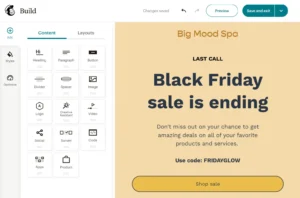
Mailchimp has two email editors — a new drag-and-drop builder and an older legacy builder. You choose one when you start a campaign. And right here, a real problem begins.
Templates saved in the new editor don’t open in the old one. Templates built in the legacy editor don’t work in the new builder. If you switch, you start from scratch. For anyone who has built up a library of saved templates over time, this is a genuine headache.
That said, Mailchimp’s new editor is genuinely capable. You can add text, images, buttons, product blocks, video thumbnails, and social links. There’s an AI writing tool that generates subject lines and email copy. And the AI Creative Assistant scans your website and automatically matches your brand colors and fonts — without you doing anything manually.
“The drag-and-drop builder makes it easy to create professional-looking campaigns quickly.” (Capterra)
“It became way too complicated and very non-intuitive. I couldn’t find features I needed.” (Capterra)
“There are two editors and they are completely incompatible — this caused us to lose hours of template work.” (G2)
Constant Contact’s Email Editor

Constant Contact has one editor. That’s it. No versions. No compatibility confusion. You pick a template, open the editor, and start building.
The drag-and-drop interface is clean and straightforward. Every element is clearly labeled on the sidebar. You add text blocks, images, buttons, dividers, and social links by dragging them exactly where you want them. The editor also has a built-in image library and a simple photo editor for basic adjustments.
It’s not the most advanced editor in email marketing. But it’s consistent. And for business owners who want to send a clean, professional email without a learning curve — it works.
What you can do in Constant Contact’s editor:
- Drag and drop any element into place
- Add text, images, videos, buttons, coupons, event blocks, and surveys
- Preview on desktop and mobile before sending
- Use branded templates that pull your logo and colors automatically
- Access a stock photo library directly inside the editor
- Insert social sharing buttons and follow links
“The editor is very user-friendly. I was able to create my first email campaign in under 30 minutes.” (G2)
“Very easy to use for people who don’t have a marketing background. The editor guides you through everything.” (Capterra)
“The interface is clean and simple to navigate. It doesn’t try to do too much at once.” (Trustpilot)
Some users hit limits:
“The editor can feel a bit rigid — if you want highly custom layouts, it takes more workarounds than it should.” (G2)
“Design customization is limited. You can’t always get the exact layout you picture in your head.” (Capterra)
My Verdict
Constant Contact wins. One clean editor, no version confusion, faster to learn, and no risk of losing saved templates to a compatibility problem. Mailchimp’s editor is more powerful — but the two-editor situation costs it real points here.
Winner: Constant Contact (Mailchimp 0 – Constant Contact 1)
Design & Templates: How Much Creative Freedom Do You Get?
Mailchimp’s Templates

Mailchimp gives you 100+ email templates that cover promotions, newsletters, seasonal campaigns, re-engagement emails, and product announcements. Most of them look polished and professional right out of the box.
The standout design feature is the AI Creative Assistant. Give it your website URL and it generates email designs that match your brand colors, fonts, and logo — automatically. For businesses without a dedicated designer, this is genuinely impressive. You can also run multivariate testing on higher plans — testing up to eight different email designs at once to find what converts best.
“Mailchimp provides many ready-to-use templates and the drag-and-drop editor is very easy to use.” (G2)
“The AI Creative Assistant matched our brand style perfectly without us needing a designer.” (G2)
Some users found design gaps:
“Some templates feel rigid. If you want something truly custom, you end up starting from a blank canvas anyway.” (Capterra)
“The templates are polished but there aren’t enough for niche industries.” (G2)
Constant Contact’s Templates
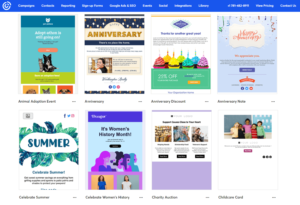
Constant Contact gives you 200+ email templates — nearly double what Mailchimp offers. They’re mobile-responsive and cover a wide range of categories: newsletters, promotions, announcements, holiday emails, events, and nonprofit campaigns.
The templates are sorted by industry and use case, which makes it faster to find what fits your business. And because they’re built for simplicity, most of them are easy to customize even if you have zero design experience.
Constant Contact doesn’t have an AI design tool like Mailchimp’s Creative Assistant. What it does have is a consistently organized library that’s easier to browse and faster to customize for a beginner.
“I love the variety of templates. There’s something for every industry and occasion.” (Capterra)
“The templates are easy to customize and look professional without needing design skills.” (G2)
“Great template selection. My only complaint is that some can look similar to each other.” (Trustpilot)
My Verdict
Constant Contact wins for template volume — 200+ vs 100+. And the templates are more accessible for beginners. Mailchimp’s AI Creative Assistant is a legitimate design tool, but it doesn’t fully close the gap in variety.
Winner: Constant Contact
Score: Mailchimp 0 – Constant Contact 2
Email Automation: Who Builds Smarter Sequences?
Automation sends emails for you based on what your subscribers do. Done right, it turns your list into a sales engine that runs on its own. This category is not close.
Mailchimp’s Automation
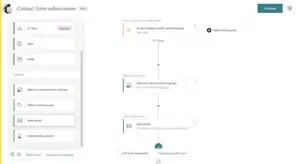
Mailchimp calls its automation tool Customer Journeys — and it’s one of the most powerful automation builders in email marketing. You get:
- 115+ pre-built automation templates ready to launch immediately
- Workflows with up to 200 steps — covering complex, multi-stage sequences
- Triggers based on email behavior, purchase history, website visits, and predicted churn risk
- If/else logic branches that split subscribers into different paths
- Time delays, goal-based exits, and smart sending optimization
- New in 2026: purchase-behavior triggers let you start automations based on spend, viewed products, and predicted repeat-purchase timing
The depth here is real. You can build a post-purchase sequence that sends a thank-you email, waits three days, then checks if the buyer opened it — and sends a different follow-up based on whether they did or didn’t.
The big catch: Mailchimp removed automation from its free plan in December 2023. Even a basic welcome email now requires a paid plan starting at $13/month. This is a meaningful limitation for businesses just starting out.
“The automation workflow is outstanding. You can build incredibly detailed customer journeys without needing a developer.” (G2)
“The automation is the best I’ve used. Complex sequences that would take weeks to build elsewhere took me a few hours.” (Capterra)
“Some automation tools feel limited unless you’re on the higher-tier plans.” (Trustpilot)
Constant Contact’s Automation

Constant Contact has automation — but it’s much simpler than what Mailchimp offers.
You can set up:
- Welcome email series for new subscribers
- Birthday and anniversary emails
- Resend campaigns to non-openers with a new subject line (a useful feature)
- Basic drip sequences based on contact behavior
- Triggered emails based on list membership
The good news: automation is included in all paid plans — no hidden upgrade required. The bad news: you can’t build the deep, branching, multi-step sequences that Mailchimp’s Customer Journeys makes possible. If your automation strategy goes beyond a welcome email and a few follow-ups, you’ll hit Constant Contact’s limits quickly.
“The automation is basic but it covers what most small businesses need — welcome emails, follow-ups, and resends.” (G2)
“Automation features are limited compared to competitors. I outgrew them within a few months.” (Capterra)
“Simple automation that just works. Nothing fancy — but I didn’t need fancy.” (Trustpilot)
My Verdict
Mailchimp wins — and it’s not particularly close. The depth of Customer Journeys is on a different level from what Constant Contact offers. The only caveat: you need a paid plan to access it. But for any business serious about email automation, Mailchimp is the better tool.
Winner: Mailchimp
Score: Mailchimp 1 – Constant Contact 2
Segmentation & List Management: Who Handles It Better?
Segmentation means dividing your list into groups so you can send the right message to the right person. The smarter your segmentation, the better your results.
Mailchimp’s Segmentation
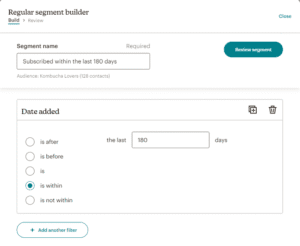
Mailchimp has some of the most advanced segmentation in email marketing — especially on its higher-paid plans.
At the Standard plan and above, you get access to:
- Predictive segmentation — AI that identifies contacts likely to buy, likely to churn, and likely to engage based on past behavior
- Customer lifetime value segmentation — target your highest-value buyers with specific campaigns
- Behavior-based segments — who opened, who clicked, who bought, who hasn’t engaged in 90 days
- Purchase history segments — what they bought, how much they spent, how recently they ordered
- Website activity tracking via a pixel — segment based on which pages they visited
Mailchimp also supports AND/OR logic, so you can stack multiple conditions and build very precise audience groups.
Basic segmentation is available on all plans — but the powerful stuff requires Standard or above.
“Mailchimp’s segmentation is incredibly powerful. I can target exactly who I want without writing a single line of code.” (G2)
“The predictive segmentation helped us identify at-risk customers before they left. That alone paid for the tool.” (Capterra)
“Advanced segmentation is only available on higher plans. That limits smaller businesses significantly.” (G2)
Constant Contact’s Segmentation
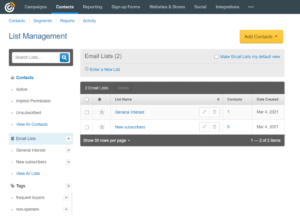
Constant Contact’s segmentation is functional but basic. You can segment by:
- Email engagement — who opened, who clicked, who didn’t respond
- Contact data — name, location, custom fields
- List membership — which list a contact belongs to
- Tags — manually applied labels you create
That’s about it. There’s no predictive segmentation. No AI-powered behavioral analysis. No lifetime value targeting. If you need to target “contacts who clicked a product link in the last 30 days but haven’t purchased” — Constant Contact can’t build that segment.
For small businesses sending simple campaigns to a general list, this is fine. But for anyone running a targeted email strategy, the gap with Mailchimp is noticeable.
“Segmentation is pretty basic. You can filter by opens and clicks — but that’s where it stops.” (G2)
“I wish there were more advanced segmentation options. Right now it feels like a blunt tool.” (Capterra)
“List management is easy to learn, but don’t expect any sophisticated targeting.” (Trustpilot)
My Verdict
Mailchimp wins decisively. Predictive AI segmentation alone puts it in a different category from Constant Contact. If targeted, behavior-based email is part of your strategy — Mailchimp is the obvious choice.
Winner: Mailchimp
Score: Mailchimp 2 – Constant Contact 2
Forms & Landing Pages: Who Helps You Grow Your List Faster?
Forms and landing pages are how you turn strangers into subscribers. The easier they are to build, the faster your list grows.
Mailchimp’s Forms & Landing Pages
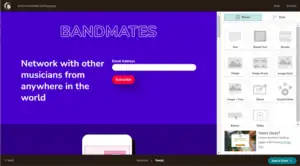
Mailchimp includes basic sign-up forms on its free plan. Paid plans unlock landing pages, pop-up forms, and embedded forms with more customization options.
You can build:
- Embedded sign-up forms for your website or blog
- Pop-up forms with timing and scroll triggers
- Standalone landing pages with custom domain support
- Payment-enabled landing pages to sell products directly
The landing page builder has a decent range of templates and connects directly to Mailchimp’s automation — so someone who signs up via landing page can trigger a welcome sequence automatically.
Landing pages on paid plans also support A/B testing and Google Analytics tracking.
“What I like most is how you can build a landing page in Mailchimp without buying your own domain.” (G2)
“Building landing pages was a real pain — the template customization is really limited.” (Trustpilot)
“The form builder is decent but could use more design flexibility.” (Capterra)
Constant Contact’s Forms & Landing Pages

Constant Contact includes forms and landing pages across all its paid plans — no surprise paywalls, no features moved to higher tiers.
You get:
- Customizable sign-up forms that embed on your website
- Pop-up forms to capture visitors before they leave
- Standalone landing pages with form integration
- Event registration pages — a unique feature Mailchimp doesn’t have natively
- Lead generation landing pages connected directly to your email lists
The form and landing page builder is straightforward. You pick a template, adjust the fields, connect it to a list, and you’re live. It’s not the most flexible builder in email marketing — but it’s reliable and included in every plan.
The event registration page is worth highlighting. If you host webinars, workshops, in-person events, or fundraisers — Constant Contact lets you build registration pages, collect RSVPs, and send automated confirmation emails all in one place. Mailchimp requires third-party integrations to do the same thing.
“The landing page builder is simple to use and works well for basic lead capture.” (G2)
“I love the event management features. Setting up registration pages and automated confirmations saved me hours.” (Capterra)
“Forms are easy to set up and connect to campaigns. Nothing fancy but it does the job.” (Trustpilot)
My Verdict
Constant Contact wins for accessibility — forms and landing pages are included in all paid plans without hidden gating. The event registration feature is a genuine advantage that Mailchimp can’t replicate natively. Mailchimp’s landing pages are slightly more flexible in design, but Constant Contact covers more use cases at more price points.
Winner: Constant Contact
Score: Mailchimp 2 – Constant Contact 3
Deliverability: Will Your Emails Actually Reach the Inbox?
Deliverability is simple to define and difficult to achieve. It means: does your email land in the inbox — or disappear into spam?
Mailchimp’s Deliverability
Mailchimp has one of the strongest deliverability track records in the industry. It maintains dedicated IP pools, monitors sender reputation constantly, and enforces list quality standards that keep its shared IP reputation high.
The platform includes:
- Full SPF, DKIM, and DMARC setup guides
- Automatic hard bounce removal
- Spam complaint monitoring with list health alerts
- Dedicated IPs available for high-volume senders on Pro plans
- Mailchimp’s compliance team actively monitors for abuse on shared IPs
Independent deliverability testing consistently places Mailchimp in the top tier among major email platforms. Their size works in their favor — they have the infrastructure and team to keep inboxes rates high across millions of senders.
“Delivery is reliable. I have never had major inbox placement problems in three years of using it.” (Capterra)
“Mailchimp’s deliverability is top-notch. My open rates went up after switching from a smaller platform.” (G2)
“Good open rates with Mailchimp consistently across multiple industries.” (Reddit)
Some users hit issues:
“After switching to a new domain, our open rates dropped significantly. Support wasn’t helpful in diagnosing why.” (Trustpilot)
“We experienced deliverability issues after a list import. It took weeks and several support tickets to resolve.” (G2)
Constant Contact’s Deliverability
Constant Contact has a solid deliverability reputation built over nearly 30 years in the business. They’ve invested heavily in sender reputation management, spam compliance, and infrastructure reliability.
The platform includes:
- Authentication setup guidance (SPF, DKIM)
- Real-time spam testing before you send
- Automatic list management — hard bounces and unsubscribes are handled automatically
- An email review process where Constant Contact’s team checks new accounts for compliance
Where Constant Contact lags slightly is in transparency. Their deliverability reporting is less detailed than Mailchimp’s. You see opens and clicks — but not granular inbox placement data across different email clients.
“Deliverability has been consistently good. My campaigns land in the inbox without issue.” (G2)
“I’ve had great inbox placement with Constant Contact — much better than my previous provider.” (Capterra)
Some users reported problems:
“We had deliverability drop after using a purchased list — though that’s really a user problem, not a platform problem.” (Reddit)
“Some of our emails were flagged and held for review. The process was slow and not well-explained.” (G2)
My Verdict
Mailchimp wins — narrowly. Both platforms have strong deliverability. But Mailchimp’s size, infrastructure, and reporting depth give it a slight edge. The transparency in Mailchimp’s deliverability data is also better — you can actually see what’s happening and diagnose problems.
Winner: Mailchimp
Score: Mailchimp 3 – Constant Contact 3
Reporting & Analytics: Who Gives You Better Insights?
Data tells you what’s working and what isn’t. Better analytics means faster improvement.
Mailchimp’s Reporting
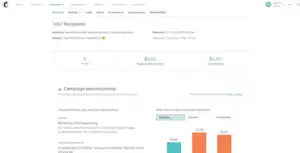
Mailchimp’s analytics are among the best in email marketing. Every campaign gives you detailed data on:
- Open rates, click rates, bounce rates, and unsubscribes
- Click maps — a visual overlay showing exactly which links got clicked and how often
- Revenue attribution — how much money was generated directly from each email (for e-commerce integrations)
- Comparative reporting — how your campaign performs against industry averages
- Social performance — how emails shared to social media perform
- Geolocation data — where your opens are coming from
- AI-powered insights that flag performance patterns and suggest improvements
- Multivariate test results — detailed breakdowns of which version won and why
On Standard and above, Mailchimp gives you predictive analytics — who’s likely to buy again, who’s at risk of leaving, and which segments are growing fastest.
“Robust analytics and segmentation tools that integrate smoothly with other platforms.” (Capterra)
“The reporting is excellent. I can see exactly which emails drove revenue and which ones missed.” (G2)
“Mailchimp’s data reporting features are second to none for this price range.” (Capterra)
Some users wanted more on lower plans:
“Basic plans have limited analytics. You need to upgrade to get the full picture.” (G2)
Constant Contact’s Reporting

Constant Contact gives you standard email reporting. You get:
- Open rates, click rates, bounce rates, and unsubscribe data
- A list of which specific contacts opened and clicked
- Comparison between campaign results over time
- Basic social media post performance (for their social tools)
- Spam complaint tracking
That’s where it stops. There are no click maps. No revenue attribution. No predictive insights. No AI-powered recommendations. The reporting tells you what happened — but it doesn’t help you understand why or what to do next.
For small businesses sending simple newsletters, this level of reporting is usually enough. For anyone managing complex campaigns or trying to connect email to revenue — Constant Contact’s analytics will feel limiting fast.
“The reporting covers the basics well. I can see opens and clicks without much digging.” (G2)
“Analytics are pretty surface-level. I’d like more insight into what’s actually driving results.” (Capterra)
“Reporting is clean but basic. Don’t expect any deep revenue insights.” (Trustpilot)
My Verdict
Mailchimp wins — easily. The gap in analytics between these two platforms is one of the biggest differences in this comparison. If data drives your decisions, Mailchimp gives you a significantly better view of what your email marketing is actually doing.
Winner: Mailchimp
Score: Mailchimp 4 – Constant Contact 3
Customer Support: Who’s Got Your Back?
When something breaks, you want help fast. Support quality is a bigger deal than most reviews admit.
Mailchimp’s Customer Support
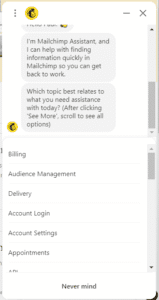
This is one of Mailchimp’s weakest areas. And it’s gotten worse since the Intuit acquisition.
On the free plan: there is no live support at all. You get email support for 30 days after you create your account — after that, you’re on your own with the help documentation.
On paid plans, you get email and chat support. The problem is the consistency. Some users report fast, helpful responses. Others report waiting days for a reply on urgent issues, or getting generic answers that don’t address the actual problem.
Phone support is not available on any plan — a major gap compared to Constant Contact.
“Customer service is non-existent on the free plan. Once you’re past the 30-day window, you’re completely on your own.” (Trustpilot)
“I am paying a monthly fee without being able to cancel because I can’t login and contacting them is not an option.” (Trustpilot)
“We have been having difficulty accessing key data for three months. Endless discussions with support. They have no idea.” (Trustpilot)
“Support is hit or miss. When you get a good agent, they’re great. Other times it’s a wall of boilerplate responses.” (Capterra)
Some users had good experiences:
“When I’ve had real issues, Mailchimp support has been responsive and resolved things quickly.” (G2)
Constant Contact’s Customer Support
Constant Contact’s support is consistently one of the best in the email marketing industry. And it shows in the reviews.
You get:
- Phone support — a real person you can call on business days
- Live chat during business hours
- Email support with documented response times
- An extensive knowledge base with video tutorials
- Community forums with active user discussions
- Onboarding support for new accounts
Phone support alone is a major differentiator. When something is broken and you need help fast, being able to call someone is worth a lot. Almost no major email platform at this price point offers it.
“Customer service is phenomenal. I’ve called multiple times and always get a knowledgeable rep who actually solves my problem.” (G2)
“The phone support is what keeps me here. Every time I call, I get someone who knows the product.” (Capterra)
“Their support team is hands-down the best I’ve dealt with in any email tool. Fast, friendly, and actually helpful.” (Trustpilot)
Some users had mixed experiences:
“Support is good but can be slow during busy periods. Chat wait times can be long.” (G2)
“Phone support is great but sometimes they escalate issues and it takes a day or two to hear back.” (Capterra)
My Verdict
Constant Contact wins — and it’s not even a contest. Phone support, live chat, and consistent response quality are a significant advantage over Mailchimp’s weak and inconsistent support. If great customer service matters to you — and it should — Constant Contact is the clear winner here.
Winner: Constant Contact
Score: Mailchimp 4 – Constant Contact 4
Integrations: Do They Play Nice With Your Tools?
Most businesses don’t use email tools in isolation. They connect them to CRMs, e-commerce platforms, social media tools, and lead generation software.
Mailchimp’s Integrations
Mailchimp connects with 300+ apps and platforms — covering almost every major business tool. Key native integrations include:
- Shopify — a deep, native integration that syncs purchase data, customer behavior, and product feeds directly into Mailchimp
- WooCommerce, BigCommerce, and Magento — for e-commerce automation and revenue tracking
- Meta Ads and Google Ads — run and track paid ads directly from Mailchimp
- Salesforce, HubSpot, and Zoho — for CRM syncing and lead management
- Zapier — connecting Mailchimp to thousands of additional tools
- WordPress, Squarespace, and Wix — for embedded forms and subscriber capture
The Shopify integration in particular is one of the most powerful in the industry. Real-time purchase data flows into Mailchimp and can trigger automations, update segments, and feed into analytics automatically.
“The integrations are extensive. I connected Mailchimp to Shopify, Salesforce, and Facebook Ads — all in about 20 minutes.” (G2)
“Mailchimp works seamlessly with almost every tool we use. Integration setup is fast and reliable.” (Capterra)
Constant Contact’s Integrations
Constant Contact also offers 300+ integrations — but the depth and native quality is different from Mailchimp.
Key integrations include:
- Shopify, WooCommerce, and Etsy — for e-commerce syncing
- Salesforce — for CRM connection
- Facebook — for social posting and contact sync
- Eventbrite — for event management
- WordPress, Wix, and Squarespace — for form embedding
- Zapier — for extended connectivity
The Eventbrite integration is actually excellent — and makes sense given Constant Contact’s strength in event management. But the Shopify integration doesn’t have the same native depth as Mailchimp’s. Purchase data syncing and behavioral triggers aren’t as seamless.
“The integrations work well for our basic needs — Salesforce, Shopify, and our website forms all connect without issues.” (G2)
“Integration options are decent but fewer than Mailchimp. I had to use Zapier for some things I expected to be native.” (Capterra)
My Verdict
Mailchimp wins — especially for e-commerce brands. The native Shopify integration depth, the Meta Ads connection, and the breadth of native app connections give Mailchimp a real advantage for businesses that need their email platform to talk to everything else.
Winner: Mailchimp
Score: Mailchimp 5 – Constant Contact 4
Pricing: Which One Gives You More for Your Money?
Pricing is where these two tools make very different decisions. And the differences matter a lot depending on your situation.
Mailchimp’s Pricing
Mailchimp uses contact-based pricing — you pay based on how many contacts are in your account, not how many emails you send. Here’s the current structure:
Free Plan: Up to 500 contacts, 1,000 emails/month. One audience, basic templates, no automation, no landing pages. Limited — but it’s free.
Essentials (~$13/month for 500 contacts): Email and chat support, landing pages, 3 audiences, basic automation.
Standard (~$20/month for 500 contacts): Full automation (Customer Journeys), predictive segmentation, A/B and multivariate testing, advanced analytics.
Premium (~$350/month for 10,000 contacts): Unlimited audiences, phone support, advanced segmentation, all features.
The big warning with Mailchimp pricing: it charges you for contacts who have unsubscribed. Yes — people who opted out of your emails still count toward your billing. Many users don’t discover this until they see their bill climb without adding new subscribers.
At 10,000 contacts, you’re looking at roughly $100-$135/month on Standard.
“Costs can rise quickly as your audience grows. The pricing outgrows small teams fast.” (Capterra)
“I didn’t realize I was being charged for unsubscribed contacts. That cost me nearly $40 extra a month.” (Reddit)
Constant Contact’s Pricing
Constant Contact also uses contact-based pricing — and there is no free plan. You get a 60-day free trial and then you pay.
Lite (~$12/month for 500 contacts): Basic email, simple automation, templates, phone and chat support.
Standard (~$35/month for 500 contacts): Full automation, advanced segmentation, A/B testing, event management tools, social media features.
Premium (~$80/month for 500 contacts): Advanced segmentation, custom automation, dedicated account manager, all features.
At 10,000 contacts, Constant Contact’s Standard plan runs around $110/month — similar to Mailchimp.
The key differences:
- No free plan (60-day trial only)
- Does NOT charge for unsubscribed contacts — only active contacts count toward your billing
- Phone support is included even on the lowest plan
- Social media management tools included (not available in Mailchimp)
“The pricing is fair for what you get — especially compared to Mailchimp. And they don’t nickel-and-dime you for basic features.” (G2)
“I switched from Mailchimp because Constant Contact’s pricing made more sense for my list size.” (Capterra)
“No free plan is a dealbreaker for a lot of beginners. That’s the one thing I’d change.” (G2)
My Verdict
Mailchimp wins for pricing accessibility — the free plan lets you start with zero commitment and test the platform before spending a cent. But Constant Contact’s decision not to charge for unsubscribed contacts is genuinely fairer — and at similar price points, Constant Contact bundles in more (phone support, social tools) than Mailchimp does. If you already know you’ll be on a paid plan, the gap is closer than it looks.
Winner: Mailchimp (for the free plan advantage)
Score: Mailchimp 6 – Constant Contact 4
What Real Users Say: Honest Reviews from G2, Capterra, and Trustpilot
I read through hundreds of reviews across G2, Capterra, Trustpilot, and Reddit to understand what real users actually experience — not just what the marketing pages say.
Here’s what came up most consistently.
What People Love About Mailchimp:
✅ “Robust analytics and segmentation tools that integrate smoothly with other platforms.” (Capterra)
✅ “The templates and automation make creating new emails and user journey automation quick and easy.” (G2)
✅ “Delivery is reliable. I’ve never had major inbox placement problems.” (Capterra)
✅ “The AI Creative Assistant matched our brand perfectly without us needing a designer.” (G2)
✅ “The free plan was perfect for getting started — no risk, no credit card.” (Reddit)
What People Complain About Mailchimp:
❌ “It became way too complicated and very non-intuitive. The free option is very limited, almost useless.” (Capterra)
❌ “Worst experience ever. We requested cancellation and they didn’t process it — now I’m fighting their billing team.” (Trustpilot)
❌ “We have been having difficulty accessing key data since September 2025 — for three months. Endless discussions with support. They have no idea.” (Trustpilot)
❌ “I am paying a monthly fee without being able to cancel because I can’t login and contacting them is not an option.” (Trustpilot)
❌ “Costs can rise quickly as your audience grows. Pricing outgrows small teams.” (Capterra)
❌ “We switched after discovering we were being billed for contacts who had unsubscribed two years ago.” (Reddit)
What People Love About Constant Contact:
✅ “Customer service is phenomenal. I’ve called multiple times and always get a knowledgeable rep who solves my problem.” (G2)
✅ “The templates are so easy to use. I created my first email in under 30 minutes — no design experience.” (Capterra)
✅ “I love the event management features. Setting up registration pages and automated confirmations saved me hours.” (Capterra)
✅ “Very easy to navigate for non-technical users. The dashboard makes sense immediately.” (Trustpilot)
✅ “Inbox placement has been consistently strong since I switched from another platform.” (G2)
What People Complain About Constant Contact:
❌ “No free plan is a dealbreaker. There’s no way to test it before committing.” (G2)
❌ “Automation features are limited compared to competitors. I outgrew them within a few months.” (Capterra)
❌ “Segmentation is pretty basic. You can filter by opens and clicks — but that’s where it stops.” (G2)
❌ “The price goes up fast as your list grows. For 10,000 subscribers, there are cheaper options.” (Reddit)
❌ “Reporting is really surface-level. I need deeper data to make decisions.” (Capterra)
❌ “Some templates feel dated. The design options haven’t kept up with modern email aesthetics.” (Trustpilot)
My Personal Experience: Mailchimp vs Constant Contact
Using Mailchimp
When I first logged into Mailchimp, I was struck by how much there is to work with. The dashboard gives you quick access to campaigns, automations, audience data, and analytics all at once. The left-side navigation is organized, and most things are where you’d expect them to be.
Building my first campaign felt smooth — until I opened a saved template and realized I was in a different editor than the one I’d used to build it. Twenty minutes later, I’d figured out the two-editor problem. I started from scratch. That’s a frustrating experience that didn’t need to exist.
The automation builder, once I figured out which plan unlocked it, is genuinely impressive. I mapped out a five-step post-signup sequence with conditional branches in about 25 minutes. The visual flow is clean. The if/then logic is intuitive. And watching it run in real-time — seeing contacts move through the stages — gave me actual confidence the system was working.
The analytics were the biggest win. After my first real campaign, I could see exactly which links were clicked most, where my subscribers were located, how my open rate compared to industry average, and which contacts were most likely to buy next. That kind of data makes you smarter with every send.
What frustrated me:
- The two-editor situation cost me real time and real work
- Support on my plan was slow and generic when I needed help authenticating my domain
- Discovering that Mailchimp counts unsubscribed contacts toward billing felt like a hidden fee
- Automation locked behind paid plans is genuinely limiting for beginners
Using Constant Contact
Walking into Constant Contact felt different from the start. The interface is simpler. The navigation is more linear. The dashboard feels less overwhelming. If you’re brand new to email marketing, this is probably where you want to start.
Building a campaign was fast. I picked a template from the library, customized the text and images in about 15 minutes, and hit send without hitting any confusing gates. The editor behaved exactly how I expected it to. No surprises.
What genuinely impressed me was the event management feature. I set up a simple webinar registration page, connected it to an email confirmation sequence, and had the whole thing running in under an hour. That’s a workflow that would require three separate tools on Mailchimp — or a Zapier workaround.
I also tested their phone support. I called with a question about authentication setup and was connected to a live person in under four minutes. They walked me through the full DKIM setup step by step. I had it resolved in one call. That kind of support experience is rare in email marketing — and it’s something Mailchimp can’t offer.
What frustrated me:
- The segmentation stopped where I needed it to go further
- Reporting gave me opens and clicks — but nothing deeper
- When I wanted to build a behavioral email sequence, I quickly hit the automation ceiling
- No free plan meant I was already committed before I knew if the tool was right for me
Who Should Use Mailchimp — and Who Should Use Constant Contact?
You know the differences now. Here’s the straight answer.
Choose Mailchimp if:
✅ You want to start for free before spending any money
✅ You run an e-commerce business and need deep Shopify or WooCommerce integration
✅ You want 200-step Customer Journey automation for complex email sequences
✅ You need AI-powered predictive segmentation to identify high-value and at-risk contacts
✅ You want revenue attribution — knowing exactly which emails generated sales
✅ You need to connect email to Facebook Ads and Google Ads natively
✅ You’re a data-driven marketer who needs detailed analytics to optimize campaigns
✅ You want AI tools like the Creative Assistant to match your brand without a designer
👉 Best for growing businesses, e-commerce brands, bloggers, and sales teams that want powerful features and are comfortable with a learning curve.
Choose Constant Contact if:
✅ You’re new to email marketing and want a simple, easy-to-learn platform
✅ You run a nonprofit, association, or community organization
✅ You host events, webinars, or workshops and need built-in registration management
✅ You want phone support — and want to be able to call someone when things go wrong
✅ You need to manage social media posts alongside email campaigns in one tool
✅ You want a clean, single editor with no version confusion
✅ You have a large template library to browse without needing AI tools
✅ You don’t want to be charged for unsubscribed contacts
👉 Best for small business owners, nonprofits, event organizers, and beginners who want a reliable, simple tool with excellent support.
Final Verdict: Mailchimp vs Constant Contact — Which One Should You Choose?
After weeks of testing both platforms, reading hundreds of real reviews, and running real campaigns on both — here’s my honest conclusion:
Mailchimp is the better tool for most email marketers in 2026.
It has a free plan. It has deeper automation. Its segmentation is smarter. Its analytics give you actual business intelligence. Its e-commerce integrations are more powerful. And the AI tools — especially the Creative Assistant and predictive segmentation — are features that Constant Contact simply doesn’t offer at any price.
But Constant Contact isn’t a bad tool. Not even close. It wins on four things that actually matter for a lot of businesses: email editor simplicity, template variety, customer support, and forms & landing pages accessibility. If any of those are your top priority — especially support — Constant Contact delivers in a way Mailchimp doesn’t.
Here’s the Honest Truth from Someone Who’s Tested Both:
If you’re building an email marketing strategy from scratch, managing an e-commerce brand, or trying to connect email to real revenue data → Start with Mailchimp. The free plan lets you test it with zero risk.
If you run a small local business, nonprofit, or you host events regularly — and you know you’ll need to pick up the phone when something breaks → Constant Contact is worth paying for.
But for the majority of people reading this comparison right now?
👉 Mailchimp wins.
Final Score
| Platform | Score |
|---|---|
| Mailchimp | 6 |
| Constant Contact | 4 |
🏆 Winner: Mailchimp
Mailchimp’s free plan means you can start right now — no credit card, no commitment. You get access to the email editor, basic templates, audience management, and up to 500 contacts at no cost. Test it for yourself. See if the tool fits how you work before you spend a single dollar.
And if you’re already on Constant Contact and thinking about switching — Mailchimp’s migration is straightforward. Export your contacts as a CSV, import them into Mailchimp, and authenticate your domain. Most users report being fully up and running within a couple of hours.
Either way — you now know exactly what you’re getting with both tools. Pick the one that fits your business. Not the one that looks best in a comparison table.
Have questions about Mailchimp vs Constant Contact? Drop them in the comments below and I’ll answer from personal experience.
