


Last Updated: 18 Nov 2025
I’ve always been curious about one thing in email marketing — which platform actually delivers better results: GetResponse or Mailchimp?
Both names have been around for ages.
Mailchimp — the go-to platform every beginner seems to start with.
And GetResponse — the underdog that promises powerful automation, AI tools, and conversion-focused features.
For years, I kept hearing the same debates:
“Mailchimp is simpler.”
“GetResponse has better funnels.”
“Mailchimp’s design tools are top-notch.”
“GetResponse is built for serious marketers.”
Eventually, I got tired of hearing everyone’s opinions — I wanted to see the truth myself.
So I tested both tools side by side — same email list, same goals, same campaigns — to find out which one actually performs better.
And what I discovered was surprising. Some things confirmed the hype, while others completely flipped my expectations about what really matters in an email marketing platform.
In this post, I’ll share my real, hands-on experience using both GetResponse vs Mailchimp — not just features, but how they feel to use, how they perform in real campaigns, and which one might be the smarter choice for your business.
Short on Time? Here’s My Quick Verdict for Mailchimp vs GetResponse
After testing both tools across real campaigns, here’s the honest takeaway:
Mailchimp is beginner-friendly, clean, and great for simple campaigns — perfect if you want something quick and easy without too many settings.
GetResponse, on the other hand, is more flexible, more powerful, and better for long-term growth — with stronger automation, better deliverability tools, and far more customization.
| Feature | Mailchimp | GetResponse | Winner |
|---|---|---|---|
| Email Builder | Simple but limited design freedom | Modern, flexible, creative control | 🏆 GetResponse |
| Templates & Design | 137+ templates, many locked on higher plans | 230+ templates, full access on every plan | 🏆 GetResponse |
| Automation | Easy for beginners, limited depth | Advanced workflows & behavior triggers | 🏆 GetResponse |
| Forms & Landing Pages | Basic, restricted customization | A/B testing, popups, AI pages | 🏆 GetResponse |
| List Management | Confusing audiences, double billing | Clean, flexible, no duplicate charges | 🏆 GetResponse |
| Deliverability | Good inbox rate, manual setup | Better anti-spam tools & list cleaning | 🏆 GetResponse |
| Reports & Analytics | Deeper analytics & GA integration | Simple, visual dashboards | 🏆 Mailchimp |
| Pricing | Costly as you scale | More affordable long-term | 🏆 GetResponse |
| AI Features | Good AI writer & recommendations | AI builder + spam checker | 🤝 Tie |
🏆 Final Verdict
Score: Mailchimp 2️⃣ – GetResponse 7️⃣
Winner: GetResponse — more flexible, scalable, and better for growth.
Try Mailchimp Free
👉 Clean UI, easy for beginners
Try Mailchimp for Free
Try GetResponse Free
👉 Better automation, templates & deliverability
Try GetResponse for Free
Email Editor
Mailchimp
My first stop was Mailchimp, simply because most marketers try it at least once.
The builder itself is clean and easy to use — drag, drop, edit, done. Adding images, buttons, and product blocks feels smooth, and connecting an online store makes inserting product recommendations effortless.
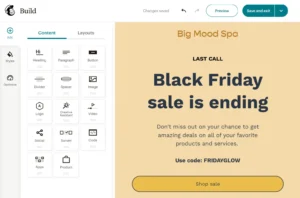
Mailchimp also offers helpful extras like:
Optimize button to fix layout issues
AI content writer (only on paid plans)
Around 80+ templates — though many look a bit dated
But it’s not perfect. Design freedom is limited, and you’ll notice small lags while building heavier emails. Also, some features feel oddly tucked away, especially on the free plan.
Overall, Mailchimp’s editor is ideal if you want something simple, stable, and beginner-friendly without playing with too many settings.
GetResponse
GetResponse’s editor feels more modern and flexible right from the start.
You get full control over layout, plus the ability to add advanced elements like videos, countdown timers, products, or even course blocks.
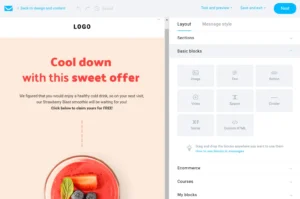
A few things really stood out:
Reusable content blocks (huge time-saver)
Mobile controls — hide or rearrange sections for phones
AI writing assistant, spam checker, and dark-mode preview
Clean interface that gives more creative freedom
Of course, more power means a bit of a learning curve. Long emails sometimes lag, and the templates — while responsive — don’t look as polished as Mailchimp’s designs.
Still, for creators and power users who like flexibility, GetResponse feels more versatile overall.
My Verdict
Mailchimp works well for beginners who want a quick, no-fuss email builder.
But GetResponse offers a smoother, more flexible editing experience once you get the hang of it.
Though if we’re being fully honest — MailerLite still has the easiest editor among all three.
✅ Score: Mailchimp 0️⃣ – GetResponse 1️⃣
Templates: First Impressions Matter
Good templates save time — especially if you’re not a designer. Both Mailchimp and GetResponse offer ready-made options, but they perform very differently.
Mailchimp gives around 137 templates that look clean and modern. They’re easy to edit — you can swap images, change colors, and rearrange sections quickly.
Perfect for quick campaigns.

However, customization is limited. You can’t tweak every little detail, and the free plan only includes 7 basic templates, which feels restrictive if you’re just getting started.
GetResponse, on the other hand, offers 230+ templates for all types of campaigns — from sales and webinars to newsletters and re-engagement emails.

The best part? All templates are available on every plan, even the free one. They’re also fully customizable — you can move blocks, edit layouts, or design from scratch. When I used them, I liked how flexible they felt compared to Mailchimp.
Winner: GetResponse
While both make designing easy, GetResponse wins with more templates, full access on every plan, and greater design freedom — ideal for both beginners and pros.
✅ Score: Mailchimp 0️⃣ – GetResponse 2️⃣
Email Automation
Automation is where both Mailchimp and GetResponse really show what they can do. It’s the feature that keeps your emails running, even when you’re not.
Mailchimp
Mailchimp’s Customer Journey Builder is super beginner-friendly. I quickly built a welcome series, thank-you email, and re-engagement flow in minutes — no confusion at all.

It also includes 100+ pre-built automation templates (like welcome emails, abandoned cart reminders, and re-engagement campaigns) categorized by goals, which makes setup easy.
But when I tried to create more advanced workflows — like branching based on clicks — I hit some limits. It’s great for simple, time-saving automations but not ideal for complex strategies.
Best for: Small businesses and creators who want quick, no-fuss automation.
GetResponse
GetResponse’s visual workflow builder takes a bit more learning, but it gives full control once you get used to it.
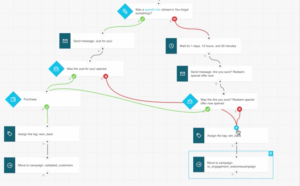
You can automate based on user behavior — for example, send a follow-up if someone opens your email or a reminder if they don’t.
It also comes with 42 ready-made templates for funnels, lead scoring, and post-purchase flows, plus strong segmentation and multi-channel automation (email, SMS, push, webinars). I found it more powerful and flexible for long-term marketing setups.
Best for: Marketers who want advanced, behavior-based automation and more control.
Winner: GetResponse
Mailchimp is simpler to start, but GetResponse offers far more flexibility, deeper targeting, and better multi-channel workflows — perfect for users who want automation that truly drives results.
Forms & Landing Pages
Forms and landing pages are where visitors become subscribers — so I tested how both tools handle this part of lead generation.
Mailchimp
Mailchimp keeps things simple with embedded forms, popups, and signup landing pages. The builder is easy to use, but most templates aren’t mobile-friendly, and you can’t create pages from scratch — only edit existing layouts.
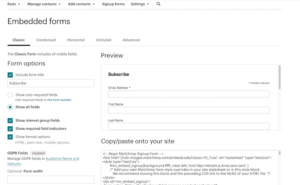

When I tried it, it worked well for basic signup pages but felt slow and limited for detailed designs. Also, finding these tools under the “Audience” tab was a bit confusing.
What I liked: Quick setup for simple forms.
What I didn’t: Limited customization and slower editor.
Best for: Beginners who just want basic signup pages.
GetResponse
GetResponse gives you far more flexibility. You can create popups, signup forms, and bars triggered by actions (scroll, exit intent, etc.) with 186 professional templates.

I liked how easy it was to add videos, timers, and promo codes — plus, the landing page builder supports A/B testing, product boxes, and AI-generated pages for faster setup. When I tested it, an exit popup doubled my signups in a week.
What I liked: Great customization, templates, and conversion tools.
What I didn’t: Slight lag when adding too many elements.
Best for: Marketers who want design control and real conversion power.
🏆 Winner: GetResponse
Mailchimp is fine for basics, but GetResponse clearly wins — with better design freedom, A/B testing, and smart tools like AI landing pages that help you grow faster.
Score: Mailchimp 0️⃣ – GetResponse 4️⃣
List Management
Managing your contacts properly can make or break your email marketing — and this is where Mailchimp and GetResponse take very different paths.
Mailchimp
Mailchimp gives you tools like tags, segments, and groups to organize subscribers. Sounds flexible, but it can feel confusing at first — I had to watch a few tutorials just to get it right.
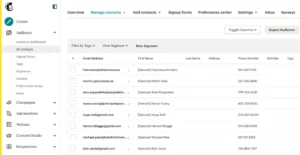
It also uses “Audiences” as separate lists, and here’s the catch — if one person appears in multiple audiences, you’re charged for each. I learned that the hard way when my bill unexpectedly spiked.
On the bright side, its segmentation is great. I’ve targeted users by location and purchase behavior — even sent cart recovery offers that performed well. Plus, the preference center feature lets subscribers choose what emails they want, which helps engagement.
Still, it can get pricey and a bit rigid if you don’t manage your lists carefully.
GetResponse
GetResponse gives you far more freedom. You can easily move, copy, or delete contacts between lists, which saves time when testing campaigns.

I love the Engagement Score — it shows how active your subscribers are so you can clean your list and focus on the right people.
I also like how flexible its segmentation is; for one campaign, I built a list of users who opened three emails and clicked one link last month — that level of control is awesome.
The interface looks a bit data-heavy at first, but once you get used to it, it’s powerful and efficient.
🏆 Winner: GetResponse
GetResponse clearly wins. It’s more flexible, doesn’t double-charge contacts, and gives you smarter tools to manage and clean your list — perfect for anyone planning long-term growth.
Deliverability
Reports & Analytics
Tracking your performance is where you truly see what’s working in your campaigns. Both Mailchimp and GetResponse offer great analytics — but they approach it differently.
Mailchimp
Mailchimp gives you detailed insights like opens, clicks, bounces, and unsubscribes.

Its click map is handy for seeing exactly where readers click, and it integrates smoothly with Google Analytics for tracking sales and eCommerce results.
The only downside? Advanced reports like comparative and custom analytics are locked behind higher-tier plans.
GetResponse
GetResponse keeps things visual and simple. All your key stats appear on one clean dashboard, and it automatically groups contacts by behavior (opened, clicked, didn’t open).

I love how easy it is to send quick follow-ups to those who clicked but didn’t buy — something that takes extra setup in Mailchimp. It also includes eCommerce and custom reports, though it’s not as deep in Google or social analytics.
Winner: Mailchimp (Slight Edge)
Mailchimp wins because it offers deeper tracking and better Google Analytics integration.
But GetResponse is still easier and faster for beginners who want simple reporting.
✅ Score: Mailchimp 1️⃣ – GetResponse 6️⃣
Spam & Design Testing
When I tested both GetResponse and Mailchimp, I quickly realized how differently they handle spam control and design.
This part really matters to me because even the best-looking email is useless if it lands in the spam folder — or looks broken when people open it.
Spam Testing & Deliverability
Spam testing is important because it helps you avoid the spam folder before you send your email.
GetResponse
GetResponse is much more helpful here.
It has a built-in spam checker that scans your email and warns you if:
Your subject line looks spammy
Your content might trigger filters
You added something risky
This tool saved me many times before sending.
GetResponse also keeps your list clean. It:
Counts only active subscribers
Removes fake or bouncing emails automatically
This keeps your deliverability strong.
Mailchimp
Mailchimp doesn’t have a spam checker.
Instead, it offers Inbox Preview (through Litmus), which shows how your email looks, but does not warn you about spam issues.
However…
Mailchimp does have slightly better inbox placement overall:
Mailchimp: ~92.6% inbox rate
GetResponse: ~89.7%
So if you want a tool that “just works” without too much tweaking, Mailchimp feels easier.
Winner: GetResponse
Mailchimp delivers slightly better,
but GetResponse wins because it gives you more control, better spam tools, and automatic list cleaning.
✅ Score: Mailchimp 1️⃣ – GetResponse 7️⃣
💰 Pricing
Pricing is one of the biggest deciding factors when choosing between GetResponse and Mailchimp.
Both platforms look affordable at first — but the difference becomes clear as your list grows.
Mailchimp
When I first started testing Mailchimp, I loved that it offered a free plan. It’s great for beginners or small creators sending a few campaigns each month.
But once my subscriber count started increasing, the costs went up faster than expected.
Mailchimp also charges for unsubscribed and inactive contacts, which means you end up paying for people who don’t even receive your emails.
You can learn using Mailchimp by using this tutorial.
GetResponse
GetResponse doesn’t have a forever-free plan, but I found it much fairer in the long run. It only charges for active subscribers, which saves a lot once your list crosses a few thousand.
Even better, GetResponse includes automation, landing pages, and funnels in its lower-tier plans — things that Mailchimp usually locks behind higher pricing.
Here’s a quick look at how their pricing compares 👇
GetResponse vs Mailchimp Pricing (2025)
| Subscribers | GetResponse (Email Marketing Plan) | Mailchimp (Essentials Plan) |
|---|---|---|
| 500 | Free with 2,500 emails/month | Free with 1,000 emails/month |
| 2,500 | $29/month | $45/month |
| 5,000 | $54/month | $75/month |
| 10,000 | $79/month | $110/month |
| 50,000 | $299/month | $385/month |
| 100,000 | $539/month | $800/month |
Winner: GetResponse
If you want to grow your list and use automation,
GetResponse gives way better value for the money.
Mailchimp’s free plan is good for starting out,
but once your audience grows, GetResponse becomes the smarter and more affordable choice.
✅ Score: Mailchimp 1️⃣ – GetResponse 8️⃣
Who Should Use Mailchimp — and Who Should Use GetResponse?
By now, you’ve seen that Mailchimp keeps things simple and beginner-friendly, while GetResponse gives more power, more control, and better tools for growing fast.
But which one is right for you? Here’s the easy breakdown.
Choose Mailchimp if…
You want a simple tool that’s easy to set up and use from day one.
You need clean templates and a smooth drag-and-drop editor.
You like Mailchimp’s free plan for sending basic newsletters.
You don’t need very advanced automation or funnels.
You prefer a platform that “just works” without too many options.
You want solid analytics and good inbox placement.
👉 Best for beginners, small creators, and anyone who wants a simple, stress-free email marketing tool.
Choose GetResponse if…
You want advanced automation with full control over your workflows.
You need landing pages, funnels, popups, and email tools in one place.
You want strong deliverability tools like spam testing, list cleaning, and authentication.
You plan to grow your list fast without paying extra for inactive contacts.
You want more templates, more customization, and more flexibility.
You want A/B testing, segmentation, SMS, and multi-channel automation.
👉 Best for marketers, growing businesses, and anyone who wants powerful tools that help scale faster.
