

Last Updated: 31 Jul 2026
Vinayak Sharma | April 12, 2026 | Email marketing tool, Brevo, Mailchimp
Last Updated: April 12, 2026
There’s a question I keep seeing in every email marketing group, forum, and comment section.
“Should I use Brevo or Mailchimp?”
And I get why people are confused. These two tools seem very similar on the surface. Both send emails. Both have automation. Both have a free plan. Both are used by hundreds of thousands of businesses around the world.
But here’s what most people don’t know: the way these two tools charge you is completely different. And that one difference alone can save you — or cost you — hundreds of dollars a year.
On one side: Mailchimp — the most famous name in email marketing. It’s been around since 2001. Over 11 million users. A full marketing suite with AI tools, advanced analytics, and deep e-commerce features. But since being bought by Intuit, prices have gone up — multiple times.
On the other side: Brevo (formerly Sendinblue) — the affordable, multi-channel platform that charges you based on how many emails you send, not how many contacts you have. Over 500,000 businesses use it. It includes email, SMS, WhatsApp, live chat, transactional email, and a built-in CRM — all in one place.
Both are solid tools. But which one is actually better for your business?
I signed up for both. I built real campaigns. I tested the editors. I set up automations. I checked how emails reach inboxes. I compared support. I ran the numbers on pricing. And I read through hundreds of real reviews on G2, Capterra, and Trustpilot.
Here’s everything I found — no fluff, no bias, just the truth.
Let’s get into it 👇
We Keep Things Simple — We Only Review Tools We Actually Use
At Mailotrix, we don’t just look at a tool’s website and call it a review. I actually sign up and use every tool myself. I build automations, run real campaigns, check if emails land in the right inbox, and test everything until I know exactly what works and what doesn’t.
I also spend hours reading real reviews on G2, Capterra, Trustpilot, and Reddit. I want to know what normal people think — not just what the company says about itself. Then I mix that with my own experience and give you a straight, honest answer you can actually use.
Short on Time? Here’s My Quick Verdict
After testing both tools for weeks, here’s the simple truth:
Brevo is the better tool for most small and mid-sized businesses. It’s more affordable, includes multi-channel marketing, and gives you advanced features like automation and segmentation on every plan — including the free one.
Mailchimp is better for larger businesses and e-commerce brands that need deeper analytics, more polished design tools, and a wider range of app integrations — and have the budget to afford it.
| Feature | Brevo | Mailchimp | Winner |
|---|---|---|---|
| Email Editor | Clean drag-and-drop, intuitive, fast | Good but two-editor confusion causes problems | Brevo |
| Design & Templates | 48+ templates, Brand Library, modern look | 100+ templates, AI design tools, polished | Mailchimp |
| Automation | On ALL plans including free, multi-channel | Locked behind paid plans, no free automation | Brevo |
| Segmentation | Advanced on ALL plans including free | Advanced only on higher-paid plans | Brevo |
| Forms & Landing Pages | Landing pages locked behind Standard plan | Available across all paid plans | Mailchimp |
| Deliverability | Good but some fluctuation reported | Strong, consistent track record | Tie |
| Reporting & Analytics | Solid but less depth than Mailchimp | Deep — purchase tracking, click maps, AI insights | Mailchimp |
| Customer Support | Generally responsive, good Trustpilot score | Poor on free plan, mixed on paid | Brevo |
| Integrations | 150+ integrations | 300+ integrations | Mailchimp |
| Pricing | Email-volume based, unlimited contacts, far cheaper | Contact-based, charges for unsubscribed contacts | Brevo |
| Multi-Channel Marketing | Email + SMS + WhatsApp + live chat + transactional | Email only (SMS is a paid add-on, no WhatsApp) | Brevo |
Final Score: Brevo 6 – Mailchimp 4
👉 My Final Take:
If you’re a small business, startup, or growing team that wants powerful email marketing plus SMS, WhatsApp, and CRM at a price that won’t hurt — Brevo is the smarter choice.
But if you’re a larger business or e-commerce brand that needs polished design tools, deep analytics, and 300+ integrations — Mailchimp has the depth for you.
Email Editor: Which One Makes Creating Emails Easier?
The email editor is where you build every campaign. If it’s clunky or confusing, you’ll dread using it. Let’s compare.
Brevo’s Email Editor
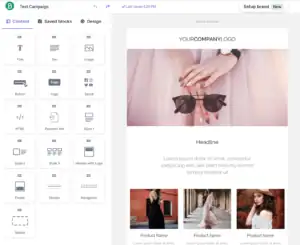
Brevo’s drag-and-drop editor is clean, fast, and easy to learn. When I opened it for the first time, everything made sense right away. The blocks on the left panel are clearly labeled. Dragging things into place felt smooth. I built a professional-looking email in about 10 minutes without needing any help.
What you can do in Brevo’s editor:
- Drag and drop any element anywhere on the page
- Add text, images, buttons, video thumbnails, dividers, and social links
- Use the built-in image editor to crop, resize, and adjust photos without leaving the tool
- Apply your brand colors and fonts instantly using the Brand Library — set it once, and every template automatically uses your brand style
- Preview on desktop and mobile before sending
- Use the AI writing assistant to generate subject lines and email copy
One thing that helps a lot: Brevo’s editor only has one version. You pick it, you use it, you stay in it. No version confusion.
Real users love the simplicity:
“Brevo is easy to use and rather intuitive to get started with. It does not overwhelm you when sending out marketing emails.” (G2)
“The platform makes it easy to create email campaigns and basic automations without a steep learning curve.” (Capterra)
“The drag-and-drop email editor and automation workflow builder regularly get thumbs up.” (EmailVendorSelection)
Some users mentioned design limits:
“The design editor works well for standard emails but can feel limiting when trying to create more custom or highly branded layouts.” (G2)
“Some templates may not be enough, and complex automation may require some time to grasp.” (G2)
Mailchimp’s Email Editor
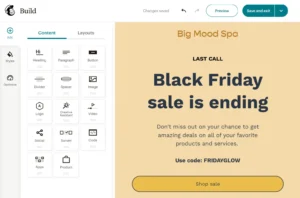
Mailchimp has two email editors — the new drag-and-drop builder and the older legacy builder. You pick one when you start. And this is where a big problem starts.
Templates built in the new editor don’t work in the old one. Templates built in the old editor don’t work in the new one. If you switch builders, you start from scratch. This causes a lot of wasted time and confusion — especially for people who’ve built up a library of saved templates.
The new builder itself is solid. You can add text, images, buttons, product blocks, and social links. There’s also an AI content generator that writes email copy and suggests subject lines. And Mailchimp’s AI Creative Assistant can match your brand style based on your website.
But the two-builder problem frustrates users constantly:
“It became way too complicated and very non-intuitive.” (Capterra)
“I found it too difficult to use and I just couldn’t navigate it well enough to find or do what I wanted.” (Capterra)
“The drag-and-drop builder makes it easy to create professional-looking campaigns quickly.” (Capterra)
My Verdict
Brevo wins. One clean editor, no version confusion, brand library built in, and a smoother overall experience. Mailchimp’s two-builder problem is an unnecessary headache.
Winner: Brevo (Brevo 1 – Mailchimp 0)
Design & Templates: How Much Creative Freedom Do You Get?
Brevo’s Templates
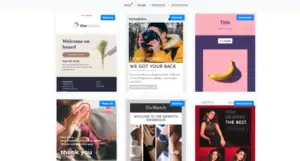
Brevo gives you 48+ pre-designed email templates. They’re modern, mobile-responsive, and cover common use cases — newsletters, promotions, events, and welcome emails.
The real standout here is the Brand Library. You set your brand colors, fonts, and logo once. After that, every template automatically updates to match your brand. You don’t have to manually re-apply your brand style every time you start a new campaign.
Brevo also has a new image editing tool built right into the editor — no switching to Canva or Photoshop for simple adjustments.
However, 48+ templates is noticeably fewer than what Mailchimp offers. And some users wish there were more variety:
“Some advanced customization options can be limited, which may restrict more complex workflows.” (G2)
“48 pre-made email templates — less than how much other providers have.” (EmailVendorSelection)
Mailchimp’s Templates
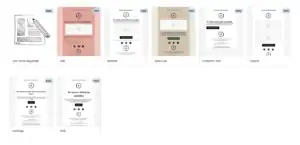
Mailchimp gives you 100+ email templates — more than double what Brevo offers. They cover e-commerce promotions, seasonal sales, re-engagement emails, announcements, newsletters, and more. Most of them look polished and professional.
Mailchimp’s biggest design advantage is its AI Creative Assistant. Give it your website URL and it automatically generates email designs that match your brand colors, fonts, and logo. For businesses that want a consistent branded look without a designer, this is genuinely impressive.
Mailchimp also supports multivariate testing on higher plans — meaning you can test up to eight different email designs at the same time to find what works best.
“Mailchimp provides many ready-to-use templates and its drag-and-drop editor is very easy to use.” (G2)
“The templates and automation make creating new emails and user journeys quick and easy.” (G2)
Some users ran into design issues:
“Some of the newsletter templates are too rigid in their design. If I want something truly unique, I have to use blank templates.” (Capterra)
“Some of the templates aren’t very intuitive to use.” (Capterra)
My Verdict
Mailchimp wins for sheer template variety and AI-powered design tools. Brevo’s Brand Library is very useful, but Mailchimp’s 100+ templates and Creative Assistant give it more design flexibility overall.
Winner: Mailchimp
Score: Brevo 1 – Mailchimp 1
Email Automation: Who Makes It Easier (and Smarter)?
Automation sends emails on its own based on what people do — no manual work needed. This is one of the biggest differences between these two tools.
Brevo’s Automation
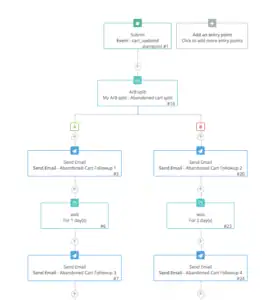
Brevo includes automation on every plan — including the completely free one. That’s a big deal. You can set up welcome sequences, drip emails, re-engagement flows, and abandoned cart reminders without paying a cent.
What you can automate in Brevo:
- Welcome emails and onboarding sequences
- Emails triggered by website behavior (using a tracking code on your site)
- Abandoned cart recovery
- Purchase follow-ups
- Re-engagement campaigns for cold subscribers
- SMS or WhatsApp messages as part of an email automation flow
- Lead scoring triggers (send different emails based on how engaged a contact is)
Brevo’s visual automation builder is clean and easy to understand. You map out a flow with if/else conditions, time delays, and triggers — all on one screen. Multi-channel automations (where an email is followed by an SMS and then a WhatsApp message) are something almost no other tool at this price can do.
Real users appreciate how accessible it is:
“Drag-and-drop automations make setting up onboarding flows quick without any help from support.” (G2)
“You can build quite sophisticated workflows using if/else conditions and track contact behaviour.” (EmailVendorSelection)
“Speed and ease of use. The perfect automation for email campaigns to clients and leads.” (Capterra)
Some users wanted more depth:
“Some advanced automation and segmentation features feel limited compared to more robust platforms.” (Capterra)
“Automation can feel rigid in some areas — it’s not always as intuitive when building complex workflows.” (Software Advice)
Mailchimp’s Automation
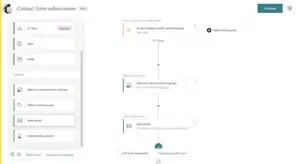
Mailchimp’s automation goes deeper on higher plans. It has 115+ pre-built automation templates — called Customer Journeys — covering welcome emails, abandoned cart recovery, re-engagement, birthday emails, product follow-ups, and more.
You can build workflows with up to 200 steps, which makes complex multi-stage customer journeys possible. And Mailchimp added new purchase-behavior triggers in February 2026 — meaning you can start automations based on what someone spent, which product they viewed, or even if they’re at risk of churning.
But here’s the big problem: Mailchimp removed automation from its free plan in December 2023. Even a basic welcome email sequence now requires a paid plan starting at $20/month. This is a major disadvantage compared to Brevo, where automation is available for free.
“The templates and automation make creating new emails and user journey automation quick and easy.” (G2)
“Some advanced features such as automation and segmentation are only available in higher plans.” (G2)
“Some automation tools feel a bit limited compared to other platforms.” (Trustpilot)
My Verdict
Brevo wins. Automation is included on the free plan — Mailchimp locks it behind paid tiers. Brevo also lets you combine email, SMS, and WhatsApp in one automation flow, which Mailchimp simply can’t match.
Winner: Brevo
Score: Brevo 2 – Mailchimp 1
Segmentation & List Management: Who Handles It Better?
Segmentation means splitting your list into groups so you can send the right email to the right person.
Brevo’s Segmentation
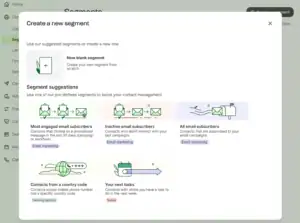
One of Brevo’s biggest strengths is that it gives you advanced segmentation on every single plan — including the free one. You don’t need to upgrade to target specific groups of people.
You can segment Brevo contacts based on:
- Email behavior — who opened, who clicked, who didn’t open
- Contact data — location, language, custom fields
- Website activity — which pages they visited (using Brevo’s tracking code)
- Purchase history — what they bought, how much they spent
- Engagement level — how active or inactive a contact is
- SMS and WhatsApp interactions
Brevo also uses AND/OR logic when building segments — meaning you can combine multiple conditions to create very specific groups. For example: “show me contacts who opened the last email AND clicked a product link AND haven’t bought in 60 days.” That’s powerful targeting.
“Brevo lets you segment contacts based on data like email behavior, purchase history, and website activity.” (Omnisend)
“Segmentation in Brevo is quite impressive. Combine contact attributes with campaign and transactional email engagement in your filters.” (EmailVendorSelection)
“It’s easy to launch campaigns quickly, yet it still offers the depth you need for segmentation, automation, and performance tracking.” (G2)
Mailchimp’s Segmentation

Mailchimp’s segmentation is powerful — but you need to pay for the best of it. Basic segmentation is available on all plans. But advanced behavioral segmentation and predictive segmentation are locked behind the Standard plan and above.
That said, when you do have access to Mailchimp’s full segmentation toolkit, it’s excellent. You can target by:
- Email behavior
- Purchase history connected to Shopify or WooCommerce
- Predictive behavior — who’s likely to buy again, who’s at risk of leaving
- Customer lifetime value
- Website activity via tracking pixel
Mailchimp’s AI-powered predictive segmentation is genuinely impressive — it uses data from your audience to predict what they’ll do next. This is something Brevo doesn’t have at the same level.
“Mailchimp users find it well-suited for detailed analytics and advanced segmentation.” (Capterra)
“Advanced segmentation is only available in higher plans — that’s a real limitation for smaller budgets.” (G2)
My Verdict
Brevo wins — because it gives you advanced segmentation on every plan, including the free one. Mailchimp’s segmentation is more powerful at the top tier, but most users can’t access it without paying significantly more.
Winner: Brevo
Score: Brevo 3 – Mailchimp 1
Forms & Landing Pages: Who Helps You Grow Your List Faster?
Forms and landing pages are how you turn website visitors into email subscribers.
Brevo’s Forms & Landing Pages
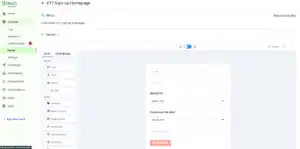
Brevo has a solid form builder. You can create:
- Embedded forms for your blog or website
- Pop-up forms with exit intent, scroll, and time-based triggers
- Standalone landing pages
The forms are GDPR-compliant with double opt-in built in. You can drag and drop the elements you want, connect forms directly to your automations, and segment subscribers based on which form they signed up through.
However, there’s an important change from 2025 that you need to know: Brevo moved landing pages and pop-ups to the Standard plan — they’re no longer available on the entry-level Starter plan. This is a noticeable step backwards for users who relied on these tools on cheaper plans.
Brevo also doesn’t give you pre-designed form templates — you build them from scratch, which takes more time.
“Form creation is a piece of cake. It follows a step-by-step sequence without redirecting to a new page.” (Moosend comparison)
“The downside is that you don’t get additional form templates. The landing page builder is only for more expensive plans.” (Moosend comparison)
Mailchimp’s Forms & Landing Pages
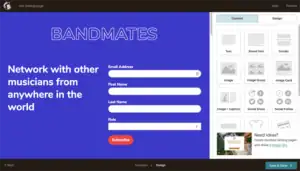
Mailchimp offers landing pages and forms across all paid plans — and even the free plan includes basic sign-up forms. The landing page builder has more templates and more design options than Brevo’s, and supports:
- Custom domains for landing pages
- Integrated payment buttons on landing pages
- A/B testing for landing pages (on Standard and above)
- Forms that sync automatically across all campaigns
- Multi-step pop-up forms
Mailchimp’s landing pages also connect to its full ecosystem — so a sign-up on a landing page can automatically trigger an automation, update a contact’s data, and add them to a specific audience segment all at once.
“What I like most is how you can make a landing page in Mailchimp without buying your own domain.” (G2)
“Mailchimp offers a polished landing page builder with numerous templates tailored for ecommerce, events, and lead gen.” (Sender)
Some users found limitations:
“Building landing pages was a real pain, and the template customisation is really limited.” (Trustpilot)
“The ‘by audience’ setup is particularly problematic when working with landing pages that serve multiple lists.” (G2)
My Verdict
Mailchimp wins. Forms and landing pages are available on all paid plans, the builder is more polished, there are more templates, and Brevo’s 2025 decision to move landing pages behind the Standard plan hurt its standing here.
Winner: Mailchimp
Score: Brevo 3 – Mailchimp 2
Deliverability: Will Your Emails Actually Reach the Inbox?
Deliverability means: do your emails land in the main inbox or end up in spam?
Brevo’s Deliverability
Brevo has invested heavily in deliverability infrastructure. The platform includes:
- Full SPF, DKIM, and DMARC setup guidance
- A setup wizard that walks you through authentication step by step
- IP warmup support for new senders
- Automatic removal of hard bounces from your contact list
- Dedicated IP addresses available for high-volume senders
- A team of deliverability experts monitoring server reputation
Brevo’s free plan limits you to 300 emails per day — which is actually a smart move for deliverability. It prevents new users from blasting huge cold lists, which protects the shared IP reputation for everyone on the platform.
Real users generally report solid inbox placement:
“I switched to Brevo from MailChimp because MailChimp had become too expensive. Brevo offered much more affordable pricing and the high email deliverability ensures campaigns reach recipients reliably.” (Capterra)
“High email deliverability — that’s one of the main reasons I recommend it.” (Capterra)
But some users have hit problems:
“Brevo has an overly sensitive algorithm. My campaigns were suspended even though the open rate was between 25–41%.” (Capterra)
“Deliverability was good but the reporting was really poor — they failed to notify us of the real stats while reporting the fluff stats.” (Trustpilot)
“Awful. Blocked my account for no reason and didn’t tell me why, just told me to go elsewhere.” (Trustpilot)
Mailchimp’s Deliverability
Mailchimp has one of the strongest deliverability track records in the industry — built over more than two decades of sending. Independent tests consistently put Mailchimp in the low-to-mid 90% inbox placement range, often slightly ahead of Brevo.
What Mailchimp does for deliverability:
- Full email authentication (SPF, DKIM, DMARC)
- Engagement-based sending — automatically suppresses unengaged contacts to protect sender reputation
- Pre-send spam checking built into the campaign builder
- Email preview across 90+ different email clients
- Dedicated IP addresses on Standard plans and above
However, Mailchimp’s biggest deliverability problem is one that sneaks up on users: they charge you for unsubscribed and inactive contacts. This means you might keep old, cold contacts in your account longer than you should — which actively hurts your sender reputation over time.
Real users praise the consistency:
“Delivery is reliable. I’ve never had major inbox placement problems.” (Capterra)
“Good for starters, but we switched after open rates dropped once we hit 20,000 contacts.” (Reddit)
My Verdict
Both platforms have strong deliverability when used correctly. Mailchimp has historically scored slightly higher in independent tests, but Brevo’s setup wizard, IP warmup support, and strict account controls make it competitive. Brevo’s account suspension problem and Mailchimp’s inactive-contact billing problem both hurt their users in different ways.
This is a genuine tie.
Tie — no points awarded
Score: Brevo 3 – Mailchimp 2
Reporting & Analytics: Who Gives You Better Insights?
Brevo’s Reporting
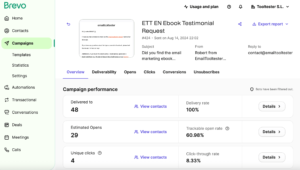
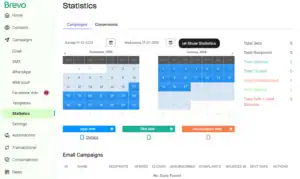
Brevo gives you real-time reports that cover:
- Open rates, click rates, bounce rates, and unsubscribes
- Click heat maps — shows exactly where people clicked inside your email
- A/B test results for subject lines
- Send-time optimization recommendations
- Real-time stats as your campaign goes out (not delayed)
- Revenue tracking when connected to an e-commerce store
- Subscriber growth trends over time
Brevo’s reporting is clean and includes heat maps right out of the box — something Mailchimp charges you more to access. Real-time stats are also a nice touch for people who want to see campaign performance as it happens.
But some users felt the reporting could go deeper:
“Reporting is another area that could be stronger. The core metrics are there, but the dashboards aren’t as visual or flexible as some other platforms.” (G2)
“Documentation and analytics can feel limited — I’d love more flexibility in filtering and additional reporting options.” (G2)
“Deliverability was good but the reporting was really poor — they failed to notify us of the real stats.” (Trustpilot)
Mailchimp’s Reporting
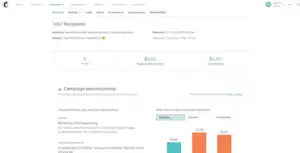
Mailchimp’s reporting goes much deeper — especially for businesses connected to an e-commerce store:
- Open rates, click rates, bounce rates, and unsubscribes
- Click maps showing exactly where people clicked inside the email
- Revenue attribution — which emails drove which sales and how much
- Comparative reports — compare multiple campaigns side-by-side at once
- AI Smart Recommendations — Mailchimp looks at your data and tells you what to send next, who to send it to, and when
- Purchase history and customer lifetime value connected to your Shopify store
- Multivariate testing — test up to 8 variations of an email simultaneously
G2 users rate Mailchimp 4.3/5 for ease of use but only 3.6/5 for value — the reporting is genuinely good but users feel they pay too much to access it.
“It makes designing emails and automations quick and easy, with robust analytics and segmentation tools that integrate smoothly.” (Capterra)
“Mailchimp’s reports are much easier to read, making it the better choice for users who want clear, accessible data.” (EmailTooltester comparison)
My Verdict
Mailchimp wins for reporting depth — especially the revenue attribution, comparative reports, AI recommendations, and e-commerce data. Brevo’s reports are solid and include real-time stats, but they don’t reach Mailchimp’s level of detail.
Winner: Mailchimp
Score: Brevo 3 – Mailchimp 3
Customer Support: Who’s Got Your Back?
When something goes wrong at the worst possible moment, who actually helps you?
Brevo’s Support
What Brevo offers:
- Free plan: Email support (response within 24 hours typically)
- Starter plan: Email support
- Business plan: Priority email and phone support
- Enterprise: Dedicated account manager
Brevo also has a help center, tutorial videos, and a community forum. Their multilingual support team covers six languages — useful for international businesses.
Real users are generally positive about Brevo’s support — it stands out as one of the most consistently praised things about the platform:
“In spite of the fact that I have the Free account, the support staff responded to my issue in less than 24 hours and resolved it immediately.” (Trustpilot)
“Brevo has been a genuine lifesaver. Their free plan punches well above its weight — and when I had a question, the support was right there.” (Trustpilot)
“We had an issue on non-reception of mails from our website. Their help desk was efficient, with clear explanations and methods to resolve quickly.” (Trustpilot)
“A responsive, knowledgeable, and helpful support team — that’s one of the main reasons I recommend Brevo.” (Capterra)
“Brevo is commended for fast, efficient support via email, chat, and social media, which eases onboarding and ongoing use.” (Software Advice)
Some users had bad experiences:
“Awful. Blocked my account for no reason and didn’t tell me why, just told me to go elsewhere.” (Trustpilot)
“Some instructions are unclear and documentation could use a mild tune-up.” (Capterra)
Mailchimp’s Support
What Mailchimp offers:
- Free plan: Email support for 30 days only — after that, nothing
- Essentials plan: 24/7 email and live chat
- Standard and above: 24/7 email, live chat, and phone support
The free plan support situation is a real problem. After your first 30 days, Mailchimp expects you to figure things out from the knowledge base alone. For beginners, that can be rough.
Even on paid plans, Mailchimp’s support has gotten very mixed reviews — especially for billing and account problems:
“Worst experience ever. We requested cancellation and they didn’t process it — now I’m fighting their billing team.” (Trustpilot)
“We have been having difficulty accessing key data since September 2025 — for three months. Endless discussions with support. They have no idea how to fix it.” (Trustpilot)
“I submitted a ticket. I have received zero follow-up for days. This is a data loss incident caused by Mailchimp’s own process.” (Trustpilot)
Some paid plan users had good experiences:
“Mailchimp’s support team is helpful and responsive on the paid plan.” (G2)
“They walk you through issues step by step when you can actually reach someone.” (Capterra)
My Verdict
Brevo wins clearly. Consistent support even on the free plan, fast response times, and a multilingual team that users praise across every review platform. Mailchimp’s free plan support disappears after 30 days, and even paid users report serious problems getting real help.
Winner: Brevo
Score: Brevo 4 – Mailchimp 3
Integrations: Do They Play Nice With Your Tools?
Brevo’s Integrations
Brevo connects with 150+ tools including:
- Online stores: Shopify, WooCommerce, Magento, PrestaShop, BigCommerce
- Website builders: WordPress, Wix, Webflow
- CRM tools: Salesforce, HubSpot, Pipedrive
- Payments: Stripe
- Analytics: Google Analytics
- Zapier and Make for connecting to thousands more tools
Brevo also has a well-documented API — useful for developers who want to build custom connections or trigger transactional emails from their own apps.
One thing to note: Brevo’s Shopify app was rebuilt in August 2025. The old app was replaced by a new PushOwl/Brevo integration. Some users during the migration period ran into problems, though the new version is reportedly more capable.
“Brevo connects seamlessly with 150+ leading digital tools.” (Brevo)
“I primarily use Brevo for transactional emails through WordPress sites — it’s outstanding for that.” (Capterra)
Mailchimp’s Integrations
Mailchimp connects with 300+ tools — almost double what Brevo offers natively. This makes it the stronger choice if you use a wide range of marketing, CRM, analytics, or e-commerce tools.
Notable connections:
- Online stores: Shopify, WooCommerce, BigCommerce, Magento, Squarespace Commerce
- CRM: Salesforce, HubSpot, Pipedrive, Zoho
- Social ads: Facebook Ads, Instagram Ads, Google Ads (native — not just Zapier)
- Analytics: Google Analytics, Mixpanel
- Customer support: Zendesk, Freshdesk, Intercom
- Zapier for anything not natively covered
Mailchimp’s native Facebook and Google Ads integration stands out — you can manage email campaigns and social ads together in one dashboard and sync email segments directly to ad audiences.
“Mailchimp integrates smoothly with other platforms — WordPress, Shopify, Gmail, Google Analytics.” (Capterra)
“The integration with our Shopify store is seamless. Email and purchase data in one place.” (G2)
My Verdict
Mailchimp wins — 300+ integrations vs Brevo’s 150+. The native social ad management is something Brevo doesn’t have built in, and for businesses that rely on a wide range of tools, Mailchimp’s larger app library is a real advantage.
Winner: Mailchimp
Score: Brevo 4 – Mailchimp 4
Pricing: Which One Gives You More for Your Money?
This is where the two tools are most different — and where Brevo has its strongest argument.
Brevo’s Pricing
Brevo uses an email-volume pricing model — you pay based on how many emails you send per month, not how many contacts you have. This is a fundamentally different and better deal for businesses with large lists that don’t email constantly.
Free Plan
- Unlimited contacts (up to 100,000 for campaigns)
- 300 emails per day (about 9,000/month)
- Drag-and-drop editor ✅
- Automation builder ✅
- Basic segmentation ✅
- Transactional emails via SMTP ✅
- ⚠️ Brevo branding in email footer
- ⚠️ No landing pages or pop-ups
Starter Plan: $9/month
- Everything in free
- 5,000 emails/month
- No daily sending limit
- Basic reporting
- Remove Brevo branding for extra $12/month
Business Plan: $18/month
- Everything in Starter
- Marketing automation (full features)
- A/B testing
- Landing pages and pop-ups
- Multi-user access
- Advanced statistics
How prices grow with email volume (Business Plan):
| Emails per Month | Brevo (Business) |
|---|---|
| 20,000 | $25/month |
| 40,000 | $35/month |
| 60,000 | $49/month |
| 100,000 | $69/month |
| 250,000 | $152/month |
Real users love the pricing model:
“I switched to Brevo from MailChimp because MailChimp had become too expensive. Brevo offered a much more affordable pricing structure for the volume I needed.” (Capterra)
“Attractive pricing compared to similar platforms — especially for large-scale email sending.” (Capterra)
“Brevo is 72% cheaper than Mailchimp, with unlimited contacts.” (EmailVendorSelection)
Some complaints:
“I want to be able to add multiple users to the account without additional fees.” (Capterra)
“To remove Brevo branding, users need to pay an extra $12/month.” (Moosend comparison)
Mailchimp’s Pricing
Mailchimp uses a contact-based pricing model — you pay based on how many contacts you have. And here’s the most frustrating part: Mailchimp charges you for unsubscribed contacts and people who haven’t confirmed opt-in. Your bill grows even as your active audience stays the same.
Free Plan
- Only 500 contacts
- Only 1,000 email sends per month (cut again in January 2026)
- ⚠️ No automation
- ⚠️ No email scheduling
- ⚠️ No A/B testing
- ⚠️ Email support for 30 days only
Essentials Plan: $20/month for 500 contacts
- Email templates and A/B testing
- Limited automation
- 24/7 live chat and email support
Standard Plan: $45/month for 500 contacts
- Full automation builder
- Advanced segmentation
- Customer journey builder
Full side-by-side pricing comparison:
| Contacts / Volume | Brevo (Business) | Mailchimp (Standard) | Savings with Brevo |
|---|---|---|---|
| 500 contacts | ~$18/month | $45/month | $27/month ($324/year) |
| 5,000 contacts | ~$25/month | $75/month | $50/month ($600/year) |
| 10,000 contacts | ~$35/month | $110/month | $75/month ($900/year) |
| 25,000 contacts | ~$49/month | $230/month | $181/month ($2,172/year) |
Real users are frustrated with Mailchimp’s pricing:
“Costs can rise quickly as your audience grows. Pricing outgrows small teams fast.” (Capterra summary)
“Good for starters, but once you need advanced features, the price jump is painful.” (Reddit)
“I faced top-up charges for reasons I never fully understood — Mailchimp was counting my unsubscribed contacts.” (Capterra)
My Verdict
Brevo wins by a landslide. Email-volume pricing instead of contact-based means your costs don’t spike as your list grows. Unlimited contacts. No charges for unsubscribers. And you save anywhere from $324 to over $2,000 per year at the same list size.
Winner: Brevo
Score: Brevo 5 – Mailchimp 4
Multi-Channel Marketing: Who Does More Than Just Email?
This is the category that makes Brevo genuinely different from almost every other email tool — and it’s the main reason so many businesses are switching to it.
Brevo’s Multi-Channel Features
Brevo is not just an email tool. It’s a full customer communication platform. In one dashboard, you can manage:
- Email marketing — campaigns, automation, transactional
- SMS marketing — send text messages as part of campaigns or automations
- WhatsApp marketing — reach subscribers on WhatsApp (add-on)
- Live chat — add a live chat widget to your website and reply to visitors directly from Brevo
- Chatbot — automate chat responses for common questions
- Transactional emails — receipts, password resets, shipping notifications, all sent through the same platform as your marketing emails
- Facebook Ads — run and manage Facebook ad campaigns from inside Brevo
- Built-in CRM — track deals, contacts, and sales pipeline, completely free
- Phone marketing — call statistics and basic call tracking
And all of these channels can work together inside one automation flow. Someone fills out a form, gets a welcome email, then an SMS follow-up two days later, then a WhatsApp message if they haven’t engaged — all set up once, runs on its own.
“I find Brevo to be the most complete product in the category. Even just the transactional email option solves a lot of problems.” (G2)
“Brevo enables the management of email campaigns as well as consumer communication in the same place — streamlining tasks and facilitating connection with consumers.” (G2)
“Having email campaigns, Facebook Ads, SMS, and WhatsApp covers most of the channels small ecommerce stores need.” (EmailVendorSelection)
Mailchimp’s Multi-Channel Features
Mailchimp is primarily an email tool. It has added some multi-channel features over time, but most of them cost extra or are limited compared to Brevo:
- SMS marketing — available as a paid add-on on Standard plans and above
- Social ads — manage Facebook and Instagram ads from within Mailchimp
- Landing pages — available on all paid plans
- Postcard campaigns — physical direct mail (U.S. only)
- Transactional emails — charged separately as a paid add-on (not included in any marketing plan)
Mailchimp does NOT include live chat, WhatsApp, a built-in CRM, or phone marketing. If you need any of those, you’d need separate tools — and separate monthly fees.
“Brevo supports chat widgets, phone, and WhatsApp as marketing channels — it trumps Mailchimp for cross-channel marketing.” (Omnisend comparison)
“To send transactional emails with Mailchimp, this service is charged as a paid add-on on top of your monthly plan.” (Brevo comparison)
My Verdict
Brevo wins easily. Email + SMS + WhatsApp + live chat + transactional + CRM — all in one platform, most of it included. Mailchimp is primarily email, with SMS and transactional email costing extra. If you want a single platform to handle all your customer communication, Brevo is the clear choice.
Winner: Brevo
Score: Brevo 6 – Mailchimp 4
My Personal Experience: Brevo vs Mailchimp
Using Brevo
When I first signed up for Brevo, I was struck by how fast I was up and running. The dashboard is clean and well-organized. The left-side menu shows everything clearly — campaigns, contacts, automations, conversations, deals. No hunting for features.
The email editor was smooth and intuitive. I applied my Brand Library settings once and every template immediately matched my colors and fonts. That saved me real time.
What surprised me most was the automation builder. I set up a three-step welcome sequence with an email, a two-day delay, then an SMS follow-up — all in one automation flow — in about 20 minutes. On most tools, combining email and SMS automation requires two separate platforms and a Zapier connection. Brevo just… does it.
The pricing was the other big win. I have a list of about 12,000 contacts — but I only email them twice a month. On Mailchimp, I’d be paying based on having 12,000 contacts. On Brevo, I’m paying based on sending about 24,000 emails per month. That’s a very different bill.
What frustrated me:
- The account suspension sensitivity is real. I got flagged once for a campaign that had perfectly normal engagement
- Landing pages require the Business plan — that was a surprise
- Reporting, while clean, doesn’t give me the revenue attribution detail that Mailchimp can
Using Mailchimp
Walking into Mailchimp felt like walking into a well-stocked workshop. Everything is there — 100+ templates, AI tools, deep analytics, hundreds of integrations. The Creative Assistant matched my brand style without me doing anything, and the multivariate testing let me test three versions of an email at once.
But the experience got frustrating fast.
The two-editor problem hit me on day two. I saved a template in the new builder, then couldn’t find it when I started a new campaign. Took me 20 minutes to figure out why — I’d accidentally opened the old builder.
Setting up the customer journey automation required the Standard plan. On the Essentials plan, which I started with, I couldn’t even build a basic welcome sequence. That felt like paying to hit a wall.
And the pricing math started to bother me. My 12,000-contact list would cost $110/month on Mailchimp’s Standard plan — even for the contacts who hadn’t opened an email in a year and had technically unsubscribed. Mailchimp still counts them.
For a business with a dedicated marketing team, deep Shopify integration, and a budget that supports Mailchimp’s price tag — the tool delivers. But for most small and mid-sized businesses? Brevo does 90% of what Mailchimp does at a fraction of the cost.
Final Verdict: Brevo vs Mailchimp — Which One Should You Choose?
After weeks of testing both tools, reading hundreds of real user reviews, and running real campaigns on both platforms — here’s my honest answer:
Brevo is the better tool for most businesses in 2026.
It’s more affordable. It covers more channels. It includes automation and advanced segmentation on the free plan. The support is more consistent. The pricing model is fairer. And the multi-channel capabilities — email, SMS, WhatsApp, live chat, CRM, and transactional emails under one roof — are something Mailchimp simply can’t match at any price.
Mailchimp still wins in four real areas: design templates, landing pages, reporting depth, and integrations. If those things are at the top of your priority list and you have the budget to match, Mailchimp delivers.
But for the vast majority of businesses reading this — especially small teams, startups, and businesses with growing lists — Brevo gives you 90% of what Mailchimp does at a fraction of the cost, with bonus features Mailchimp doesn’t have at all.
Here’s the Honest Truth from Someone Who’s Tested Both:
If you want multi-channel marketing, automation on your free plan, unlimited contacts, and a pricing model that actually makes sense → Go with Brevo.
If you need the deepest analytics, the most polished templates, and the widest integration library — and you have the budget — → Mailchimp is worth considering.
But for most businesses looking at this comparison right now?
👉 Brevo wins.
Final Score
| Platform | Score |
|---|---|
| Brevo | 6 |
| Mailchimp | 4 |
🏆 Winner: Brevo
The best part? Brevo’s free plan lets you start right now — no credit card needed. You get the drag-and-drop editor, automation builder, basic segmentation, transactional emails, and up to 300 emails per day completely free. With unlimited contacts.
And if you’re already on Mailchimp and thinking about switching, Brevo makes migration easy. Export your Mailchimp list, import it into Brevo, and you’re up and running — most users report doing it in under an hour.
If you’re on the fence, just start with the free plan. Worst case? You learned exactly what you need. Best case? You found a more affordable, more capable platform that handles every customer channel your business needs.
Have questions about Brevo vs Mailchimp? Drop them in the comments below and I’ll answer from personal experience.
