

Last Updated: 24 May 2026
There’s a question I keep seeing in every email marketing Facebook group, Reddit thread, and comment section.
“Should I use Flodesk or Mailchimp?”
And I completely understand the confusion. Both tools promise to grow your list. Both have templates, automation, and analytics. Both are trusted by hundreds of thousands of businesses around the world.
But here’s what most people don’t realize: these two tools are built for completely different types of users. One is built for beauty. The other is built for power. And picking the wrong one can cost you real time, real money, and real frustration.
On one side: Mailchimp — the most recognized name in email marketing. Founded in 2001. Over 11 million users worldwide. A full marketing suite packed with AI tools, advanced automation, deep analytics, and 300+ integrations. But since Intuit acquired them in 2021, prices have gone up — repeatedly. And features keep getting locked behind higher-paid tiers.
On the other side: Flodesk — the design-first email platform that turned heads when it launched in 2018. Founded by Martha Bitar, Rebecca Shostak, and Trong Dong, it was built out of pure frustration with tools that were ugly, expensive, and unnecessarily complicated. Flodesk quickly became the go-to platform for photographers, coaches, creators, and small business owners who want emails that actually look good. They even disrupted the entire industry’s pricing model with a flat-rate plan. But in December 2025, they changed it — and that changes this comparison more than most reviews admit.
I signed up for both. I built real campaigns. I tested the editors. I set up automations. I compared deliverability. I ran the pricing numbers forward. And I read through hundreds of real reviews on G2, Capterra, Trustpilot, and Reddit.
Here’s everything I found — no fluff, no bias, just the truth.
Let’s get into it 👇
We Keep Things Simple — We Only Review Tools We Actually Use
At Mailotrix, we don’t just look at a tool’s website and call it a review. I actually sign up and use every tool myself. I build automations, run real campaigns, check deliverability, test every feature until I know exactly what works and what doesn’t.
I also spend hours reading real reviews on G2, Capterra, Trustpilot, and Reddit. I want to know what real people think — not just what the company says about itself. Then I combine that research with hands-on testing and give you a straight answer you can actually use.
Short on Time? Here’s My Quick Verdict
After testing both tools, reading hundreds of real user reviews, and running the pricing math for 2026, here’s the honest summary:
Mailchimp is the better tool for most growing businesses, e-commerce brands, and serious email marketers. It has a free plan, stronger automation, deeper analytics, better integrations, and features that actually scale with your business.
Flodesk is the better tool for creatives, solopreneurs, photographers, coaches, and small business owners who want stunning emails with minimal effort — and don’t need advanced features.
| Feature | Flodesk | Mailchimp | Winner |
|---|---|---|---|
| Email Editor | Single clean editor — beautiful and fast | Two editors — powerful but confusing | Flodesk |
| Design & Templates | 80+ stunning templates, brand kit | 100+ templates, AI Creative Assistant | Flodesk |
| Automation | Basic workflows — improved Jan 2026 | 115+ templates, 200 steps, Customer Journeys | Mailchimp |
| Segmentation | Basic — no AND/OR logic, no behavioral triggers | Advanced AI predictive segmentation | Mailchimp |
| Forms & Landing Pages | Included — forms, pop-ups, landing pages | Included — more design options and templates | Mailchimp |
| Deliverability | Basic — no FBL loop, no dedicated team | Strong — dedicated team, consistent track record | Mailchimp |
| Reporting & Analytics | Basic — opens, clicks, best-day heatmap | Deep — click maps, revenue tracking, AI insights | Mailchimp |
| Customer Support | Email only — 24-48 hour response | Email and chat — inconsistent on lower plans | Tie |
| Integrations | Very limited — mostly Zapier | 300+ native integrations | Mailchimp |
| Pricing | No longer flat-rate — now subscriber-based | Free plan — contact-based pricing | Mailchimp |
Final Score: Mailchimp 7 – Flodesk 3
👉 My Final Take:
If you’re a creator, photographer, coach, or small business owner who wants emails that look incredible without a steep learning curve — Flodesk is worth trying.
👉 Try Flodesk Free for 14 Days
But if you’re a growing business, blogger, or sales team that wants powerful automation, deep analytics, a free plan, and room to scale — Mailchimp gives you more.
Email Editor: Which One Makes Building Campaigns Easier?
The editor is where you’ll spend most of your time. If it’s confusing or clunky, you’ll hate using it every week. Let’s be honest about both.
Flodesk’s Email Editor
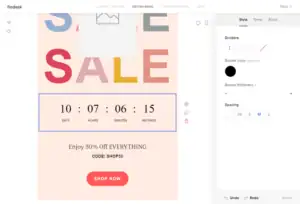
Flodesk’s email editor is one of the best in the business for design quality and ease of use. It’s clean, fast, and genuinely beautiful to work in. When you open it for the first time, everything makes sense. There’s no learning curve.
The drag-and-drop experience feels smooth and natural. You click a template, customize it with your content, and your email looks professional in minutes. No coding. No wrestling with layout blocks. No version confusion.
What you can do in Flodesk’s editor:
- Drag and drop any element anywhere on the page
- Add text, images, buttons, countdown timers, video embeds, and custom graphics
- Apply your brand kit — upload your logo, brand colors, and fonts once, and every template updates automatically
- Use Link Actions to turn any link into a smart trigger that adds subscribers to segments or starts a workflow
- Preview on desktop and mobile before sending
- Filter templates by use case — welcome emails, promos, plain text, sales, and more
One major thing to know: Flodesk does not allow custom HTML uploads. If you need to code fully custom email layouts, this tool is not for you.
Real users consistently praise the editor:
“The drag-and-drop builder is seamless, the layouts are stunning, and the branding stays consistent without hours of tweaking.” (Capterra)
“Flodesk makes it SO simple it took me no time at all to figure out. I am not one who creates content easily.” (Capterra)
“I love how intuitive the interface is. I was able to create my first email in under 30 minutes.” (G2)
Some users hit limits:
“I don’t love all the template options available and sometimes want to do more than simply adding the image as is.” (Capterra)
“The platform can be laggy at times — not a major issue but something worth noting.” (EmailTooltester)
Mailchimp’s Email Editor
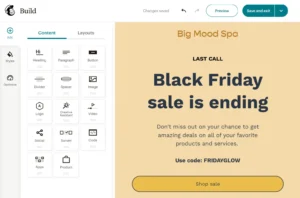
Mailchimp has two email editors — a new drag-and-drop builder and an older legacy builder. You pick one when you start a campaign. And this is where a real problem begins.
Templates built in the new editor don’t work in the old one. Templates built in the old editor don’t work in the new one. If you switch between them, you start from scratch. This has caused countless hours of lost work for users who didn’t know the two editors existed.
Once you’re settled in one editor, Mailchimp is capable. You can add text, images, buttons, product blocks, surveys, and even your own HTML code. The AI Creative Assistant scans your website and matches your brand colors and fonts automatically. And the AI writing tool generates subject lines and email copy on demand.
But the visual quality of Mailchimp’s templates doesn’t match Flodesk’s. The emails look professional — but not stunning. You can feel the difference when you open both editors side by side.
“The drag-and-drop builder makes it easy to create professional-looking campaigns quickly.” (Capterra)
“There are two editors and they are completely incompatible — this caused us to lose hours of template work.” (G2)
“It became way too complicated and very non-intuitive. I couldn’t find the features I needed.” (Capterra)
My Verdict
Flodesk wins. One clean editor, no version confusion, better-looking results, and a smoother overall experience. If your brand appearance matters — and it should — Flodesk’s editor is simply more enjoyable and more effective at producing beautiful emails.
Winner: Flodesk (Flodesk 1 – Mailchimp 0)
Design & Templates: How Much Creative Freedom Do You Get?
Flodesk’s Templates
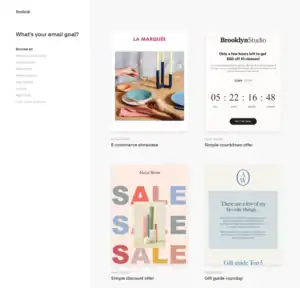
Flodesk has 80+ professionally designed email templates — and they are genuinely stunning. These aren’t generic stock templates that look like every other email in your inbox. They’re modern, visually sophisticated, and designed for real brand consistency.
The brand kit is what makes the system work so well. You set your logo, colors, and fonts once. After that, every template — all 80+ of them — automatically updates to match your brand. You don’t do it manually. You don’t hunt through settings. It just works.
Templates are organized by use case: Welcome, Make Money, Say Thanks, Share Content, and more. This makes it easy to find the right starting point fast.
The one limitation: you can’t upload your own custom HTML templates. What Flodesk gives you is beautiful and flexible — but it’s the only canvas you get.
“For female-focused brands, Flodesk’s designs are elegant and you have much better template options than other email platforms.” (G2)
“They put design out there front and centre, making it extremely easy to send really beautiful emails with very little design effort.” (G2)
“Emails actually look like my brand — polished, consistent, and easy to run.” (Capterra)
Mailchimp’s Templates
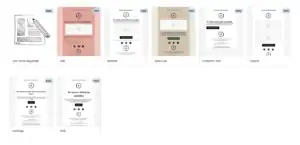
Mailchimp gives you 100+ email templates that cover newsletters, promotions, seasonal campaigns, re-engagement flows, and product announcements. More templates than Flodesk — but a noticeably different visual standard.
Mailchimp’s biggest design advantage is the AI Creative Assistant. Give it your website URL and it generates email layouts that match your brand colors, fonts, and logo automatically. For businesses that need polished branding without a designer, this is genuinely useful.
Mailchimp also supports multivariate testing on higher plans — meaning you can test up to eight different email designs at once to find what converts best. Flodesk has no A/B testing at all.
“The AI Creative Assistant matched our brand perfectly without us needing a designer.” (G2)
“Mailchimp provides many ready-to-use templates and the drag-and-drop editor is very easy to use.” (G2)
Some users felt limited:
“Some templates feel rigid. If you want something truly custom, you end up on a blank canvas anyway.” (Capterra)
“Mailchimp’s baseline templates feel dated compared to what Flodesk offers.” (Mailflow Authority)
My Verdict
Flodesk wins. The visual quality of Flodesk’s templates is on a different level. Mailchimp has more templates and the AI Creative Assistant is a real feature — but design quality and brand consistency are where Flodesk was built to win.
Winner: Flodesk
Score: Flodesk 2 – Mailchimp 0
Email Automation: Who Builds Smarter Sequences?
Automation sends the right email to the right person at the right time — without you doing it manually. This is one of the biggest differences between these two tools. And it’s not particularly close.
Flodesk’s Automation
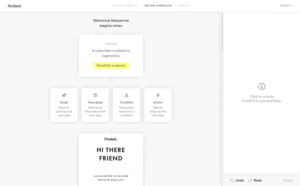
Flodesk calls their automation “workflows.” In January 2026, they relaunched the entire workflow system — and it’s meaningfully better than it used to be.
You can now trigger workflows from:
- A subscriber joining a segment
- A form submission
- A purchase made through Flodesk Checkout
- An abandoned cart
Once triggered, you can send emails, add time delays, apply conditions (if/else), add or remove subscribers from segments, and use Link Actions to respond to clicks inside emails.
For common use cases — welcome sequences, lead magnet delivery, basic nurture campaigns, purchase follow-ups — Flodesk works well. The visual builder is clean and easy to understand.
But here’s the real ceiling: Flodesk’s automation still doesn’t support complex branching logic the way serious platforms do. You can’t build a workflow that checks if a subscriber opened email A, waited three days, then sends a completely different sequence based on what they clicked. The triggers and conditions are simple — intentionally so. Flodesk’s position is that most small businesses don’t need the complexity. And for their audience, that’s often true.
There is also no A/B testing for automation sequences. You can’t test which subject line drives more opens in your welcome flow. That’s a notable gap in 2026.
“The automation is basic but it covers what most small businesses need — welcome sequences and follow-ups that just work.” (G2)
“I quickly hit the limits of the automation when I tried to build more complex sequences.” (Capterra)
“Flodesk workflows feel like automation for people who don’t want to think about automation.” (Mailflow Authority)
Mailchimp’s Automation
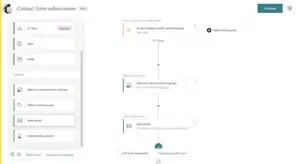
Mailchimp’s automation system — called Customer Journeys — is one of the most powerful in email marketing.
What you get:
- 115+ pre-built automation templates — welcome sequences, abandoned cart, birthday emails, re-engagement, post-purchase follow-ups, and more
- Workflows with up to 200 steps — covering complex multi-stage customer journeys
- If/else conditional logic that splits subscribers into completely different paths
- Triggers based on email behavior, purchase history, website visits, and predicted churn
- New in 2026: purchase-behavior triggers let you start automations based on actual spend, viewed products, and predicted repeat-purchase timing
- Time delays, goal-based exits, and smart send-time optimization
This is where Mailchimp earns its reputation. You can build a sequence that sends a welcome email, waits two days, checks if the subscriber clicked a product link, and then sends a completely different email based on whether they did or didn’t. That level of behavioral intelligence is something Flodesk simply can’t replicate.
The big catch: Mailchimp removed automation from its free plan in December 2023. Even a basic welcome email now requires a paid plan. That’s a meaningful limitation for anyone just starting out.
“The automation workflow is outstanding. You can build incredibly detailed customer journeys without needing a developer.” (G2)
“The automation is the best I’ve used. Complex sequences that would take weeks elsewhere took me a few hours.” (Capterra)
“Some automation tools feel limited unless you’re on the higher-tier plans.” (Trustpilot)
My Verdict
Mailchimp wins — and it’s not close. Customer Journeys with 200 steps, behavioral triggers, and if/else branching is on a completely different level from Flodesk’s simplified workflows. If automation is important to your email strategy, Mailchimp is the obvious choice.
Winner: Mailchimp
Score: Flodesk 2 – Mailchimp 1
Segmentation & List Management: Who Handles It Better?
Segmentation means dividing your list into precise groups so you send the right message to the right people. The smarter your segmentation, the better your results.
Flodesk’s Segmentation
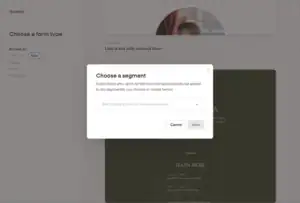
Flodesk uses a segment-based system — similar to tags. You organize subscribers into groups based on what they’ve done or how they signed up.
You can add subscribers to a segment when:
- They submit a form
- They click a link (using the Link Action feature)
- You manually import them via CSV
- They make a purchase through Flodesk Checkout
- They complete an automation trigger
Here’s the real limitation: once a subscriber is in a segment, they stay there unless you manually remove them or set up an automation to do it. Flodesk doesn’t automatically update or refresh segments based on ongoing behavior. And there is no AND/OR logic — meaning you can’t build a segment like “subscribers who opened the last email AND clicked a product link AND haven’t bought in 60 days.” That kind of compound targeting is simply not available.
For small lists and simple campaigns, Flodesk’s approach is fine. For anyone trying to run targeted, behavior-based campaigns — it runs out of capability fast.
“You can only filter your email subscribers by their activity, source, and segments. There are no complex ‘and’ or ‘or’ conditions.” (BloggingX)
“Segmentation in Flodesk is basic but works for simple use cases.” (SMBGuide)
“Advanced segmentation options like combining multiple conditions or behavioral triggers are not available.” (SMBGuide)
Mailchimp’s Segmentation
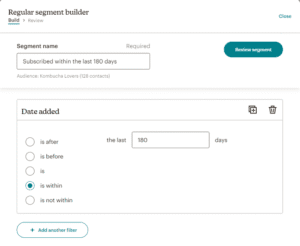
Mailchimp has some of the most advanced segmentation in email marketing — especially on paid plans.
At the Standard plan and above, you get:
- Predictive segmentation — AI that identifies contacts likely to buy, likely to churn, and likely to re-engage
- Customer lifetime value targeting — filter by how much a contact has spent over time
- Behavioral segments — who opened, who clicked, who bought, who hasn’t touched an email in 90 days
- Purchase history filters — what they bought, how much they spent, how recently
- Website activity tracking via a pixel — segment based on which pages they visited
- AND/OR logic — combine multiple conditions to build very specific audience groups
Even on the free plan, Mailchimp gives you basic behavioral segmentation that outperforms what Flodesk offers at any price.
“Mailchimp’s segmentation is incredibly powerful. I can target exactly who I want without writing a single line of code.” (G2)
“The predictive segmentation helped us identify at-risk customers before they left. That alone paid for the tool.” (Capterra)
“Advanced segmentation is only available on higher plans — that limits smaller businesses.” (G2)
My Verdict
Mailchimp wins — decisively. There’s no version of this comparison where Flodesk’s basic segment system beats Mailchimp’s predictive AI segmentation with AND/OR logic. If you plan to run targeted, behavior-driven campaigns, Mailchimp is the only real option here.
Winner: Mailchimp
Score: Flodesk 2 – Mailchimp 2
Forms & Landing Pages: Who Helps You Grow Your List Faster?
Forms and landing pages are how you turn website visitors into email subscribers. The easier and better-looking they are, the faster your list grows.
Flodesk’s Forms & Landing Pages
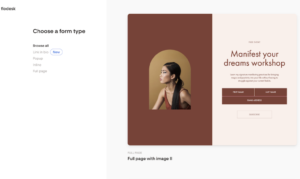
Flodesk’s forms are stunning — and they match your brand automatically because of the brand kit. You get:
- Embedded forms for your blog or website
- Pop-up forms (exit intent, scroll-based, and timed)
- Full landing pages
- A “Link in Bio” page — a clean, branded page that replaces your Linktree
- Checkout pages for selling digital products directly
All of these look great right out of the box. No design experience needed. And they all connect directly to Flodesk’s automations — someone who signs up through a pop-up can trigger a welcome sequence automatically.
One important note: the free plan does not allow email sending. But it does include forms and landing pages — so you can actually build your list using Flodesk’s form tools before you start paying. That’s a genuinely useful feature for beginners.
“Their ecommerce option is also the most intuitive I’ve encountered online and makes setting up landing pages and checkouts a breeze.” (Capterra)
“My emails and checkout finally feel like the same brand — polished, consistent, and easy to run.” (Capterra)
“The workflow creation and management is a little tricky and not the easiest to edit once it is already created.” (Capterra)
Mailchimp’s Forms & Landing Pages
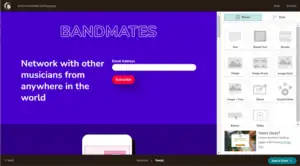
Mailchimp includes basic sign-up forms on the free plan and landing pages on paid plans. You can build:
- Embedded sign-up forms for websites and blogs
- Pop-up forms with timing and scroll triggers
- Standalone landing pages with custom domain support
- Payment-enabled landing pages to sell products directly
- Multi-step forms that collect information gradually
Mailchimp’s landing page builder has more design templates than Flodesk’s and supports A/B testing on the Standard plan. Everything connects directly to Mailchimp’s automation — a sign-up can trigger a welcome sequence, update a contact record, and add a subscriber to a segment all at once.
The forms and landing pages look professional — but they don’t match the visual quality of Flodesk’s. If your brand is design-forward, Mailchimp’s form templates will feel like a step backward.
“What I like most is how you can make a landing page in Mailchimp without buying your own domain.” (G2)
“Building landing pages was a real pain — the template customization is really limited.” (Trustpilot)
“The form builder is decent but could use more design flexibility.” (Capterra)
My Verdict
Mailchimp wins — narrowly. Both platforms include forms and landing pages. But Mailchimp’s landing page builder is more flexible, supports A/B testing, and works across more pricing tiers. Flodesk’s designs are more beautiful — but Mailchimp’s overall forms ecosystem is more capable.
Winner: Mailchimp
Score: Flodesk 2 – Mailchimp 3
Deliverability: Will Your Emails Actually Reach the Inbox?
Deliverability is the most important metric in email marketing. If your emails land in spam, nothing else matters.
Flodesk’s Deliverability
Flodesk provides the basics of deliverability infrastructure. You get:
- DKIM, SPF, and DMARC authentication — managed through their integration with Entri
- Step-by-step domain setup guidance
- Automatic suppression of hard bounces, unsubscribes, and spam complaints
- Domain warming guidance for new senders
- Tools to help you remove inactive subscribers
Here’s the honest gap: Flodesk does not have a dedicated deliverability team. It does not have a feedback loop (FBL) system that monitors how major ISPs handle your emails. And its “deliverability chart” shows email delivery rate — total emails minus bounces — which is not the same as inbox placement rate. You don’t know how many emails actually landed in the inbox versus the spam folder.
For small senders with clean, engaged lists, Flodesk’s deliverability is generally solid. Users report open rates of 25–35% — well above the 18–20% industry average. But that’s likely a product of Flodesk’s design quality driving higher engagement, not necessarily superior infrastructure.
“High email deliverability — that’s one of the main reasons I recommend it.” (Capterra)
“Flodesk suspended my account and demanded we supply subscriber information. The first week emails were delivered, the second week they suspended us without explanation.” (Capterra)
“I have tried to contact them through social media but they don’t reply — if you are running a business through Flodesk, be careful, they will randomly suspend your account.” (Capterra)
Mailchimp’s Deliverability
Mailchimp has one of the strongest deliverability track records in the industry. With over 11 million users and two decades of infrastructure investment, they have the scale and the team to keep inboxes rates consistently high.
What Mailchimp brings to deliverability:
- Full SPF, DKIM, and DMARC setup guidance
- A dedicated deliverability team that monitors sender reputation constantly
- Automatic hard bounce removal and spam complaint tracking
- Dedicated IP addresses available for high-volume senders on Pro plans
- ISP feedback loops (FBL) — real data on how Gmail, Outlook, and Yahoo are handling your emails
- Active compliance monitoring across all shared IP pools
Independent deliverability testing consistently places Mailchimp in the top tier of email platforms. Their size works in their favor — they can negotiate directly with major ISPs and respond to reputation issues faster than smaller platforms.
“Delivery is reliable. I have never had major inbox placement problems in three years of using it.” (Capterra)
“Mailchimp’s deliverability is top-notch. My open rates went up after switching from a smaller platform.” (G2)
Some users hit issues:
“After switching to a new domain, our open rates dropped significantly and support wasn’t helpful.” (Trustpilot)
“We experienced deliverability issues after a list import. It took weeks and several support tickets to resolve.” (G2)
My Verdict
Mailchimp wins. Both platforms give you basic deliverability tools. But Mailchimp’s dedicated team, FBL data loops, and decades of infrastructure investment put it in a clearly stronger position. For any serious sender, that difference matters.
Winner: Mailchimp
Score: Flodesk 2 – Mailchimp 4
Reporting & Analytics: Who Gives You Better Insights?
Better data means faster improvement. This category isn’t close.
Flodesk’s Reporting
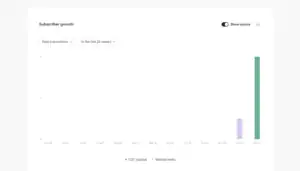
Flodesk gives you the core metrics. After every campaign, you can see:
- Open rate, click rate, bounce rate, and unsubscribe rate
- Which specific subscribers opened or clicked
- A heatmap showing the best day of the week to send emails
- Form performance — how many people saw a form and how many signed up
- Checkout conversion tracking — how many people bought through a Flodesk checkout page
That’s a meaningful set of data for basic newsletter senders. The best-day heatmap is a genuinely useful feature that Mailchimp doesn’t replicate directly.
But there are no click maps. No revenue attribution from email campaigns. No comparison to industry benchmarks. No AI-powered insights. No A/B test reporting because Flodesk doesn’t have A/B testing at all.
For small businesses sending simple newsletters, Flodesk’s reporting tells you what you need to know. For anyone trying to optimize a sales-driven email strategy, the data runs out.
“Reporting is clean and easy to read. I can see what I need without digging.” (G2)
“Analytics are pretty surface-level. I’d like more insight into what’s actually driving results.” (Capterra)
“Basic reporting and analytics — while Flodesk provides open and click rates, it lacks advanced features like heatmaps or revenue tracking.” (LowCode Agency)
Mailchimp’s Reporting
Mailchimp’s analytics are among the best in the email marketing industry. Every campaign gives you:
- Open rates, click rates, bounce rates, and unsubscribes
- Click maps — a visual overlay showing exactly which links were clicked and how often
- Revenue attribution — how much money each email directly generated for your business (with Shopify, WooCommerce, and other integrations)
- Comparative reporting — how your campaign performs against industry averages for your sector
- Geographic data — where your opens are coming from
- Multivariate test results — detailed breakdowns of which version won and why
- AI-powered insights that flag performance patterns and suggest improvements
- Predictive analytics — who’s most likely to buy again and who’s at risk of leaving
This is the kind of data that changes how you email. When you can see that a specific product link in paragraph two got 40% of all clicks, or that your last campaign drove $2,400 in direct revenue, you make better decisions every week.
“Robust analytics and segmentation tools that integrate smoothly with other platforms.” (Capterra)
“The reporting is excellent. I can see exactly which emails drove revenue and which ones missed.” (G2)
“Mailchimp’s data reporting features are second to none for this price range.” (Capterra)
My Verdict
Mailchimp wins — easily. The gap in reporting between Flodesk and Mailchimp is one of the biggest differences in this entire comparison. Click maps, revenue attribution, and AI-powered insights turn email marketing data into business decisions. Flodesk gives you a summary. Mailchimp gives you intelligence.
Winner: Mailchimp
Score: Flodesk 2 – Mailchimp 5
Customer Support: Who’s Got Your Back?
When something breaks — and something always breaks — you want help fast.
Flodesk’s Customer Support
Flodesk offers email support and a knowledge base. That’s it.
There’s no live chat. There’s no phone support. Response times average 24–48 hours. For a tool built for small business owners and solopreneurs who often can’t afford to wait two days for a technical issue to get resolved, this is a real limitation.
The good news: the knowledge base is genuinely well-built with detailed guides and video tutorials. Many users say they can find answers themselves without contacting support at all.
The bad news: when something goes wrong that the knowledge base can’t solve, the wait is long. And several users report their accounts being suspended without warning and receiving no response when they tried to get help.
“I pay a flat fee no matter what size my audience gets and any time I have a question, their customer support is super helpful.” (Capterra)
“I have sent emails to all employees, CEO, CO, marketing team — but did not get any response from anywhere.” (Capterra)
“I am not one to write negative reviews but I am sitting here trying to get help from this company to send a weekly email to my subscribers and NOTHING.” (Capterra)
Mailchimp’s Customer Support
Mailchimp’s support is one of its weakest areas — especially after the Intuit acquisition.
On the free plan: there is no live support after the first 30 days. You’re on your own with the help documentation.
On paid plans: email and chat support are available. But the consistency is a problem. Some users get fast, helpful responses. Others wait days and receive generic boilerplate answers.
Phone support is only available on the Premium plan — which starts at $350/month. That price point is out of reach for most small businesses.
“Customer service is non-existent on the free plan. Once you’re past the 30-day window, you’re completely on your own.” (Trustpilot)
“I am paying a monthly fee without being able to cancel because I can’t login and contacting them is not an option.” (Trustpilot)
“Support is hit or miss. When you get a good agent, they’re great. Other times it’s a wall of boilerplate.” (Capterra)
“When I’ve had real issues, Mailchimp support has been responsive and resolved things quickly.” (G2)
My Verdict
This is a genuine tie. Both platforms have real support limitations. Flodesk users wait 24–48 hours for email replies. Mailchimp free plan users get no support at all after 30 days. Mailchimp’s paid plan chat support is faster — but inconsistent. Neither tool is winning awards for customer service.
Winner: Tie
Score: Flodesk 2 – Mailchimp 5 (with 1 tie)
Integrations: Do They Play Nice With Your Tools?
Most businesses don’t run email in isolation. They connect it to CRMs, e-commerce platforms, course tools, social media, and landing page builders. This is where Flodesk’s limitations become most visible.
Flodesk’s Integrations
Flodesk’s native integrations are limited. You get direct connections to:
- Shopify — for e-commerce automation and purchase follow-ups
- Stripe — for payment processing on Checkout pages
- A handful of other creator-focused tools (ManyChat, etc.)
For everything else, you need Zapier — and Zapier is a paid third-party service. There is also no public API, which means you can’t build custom integrations without going through Zapier.
If your business runs on a complex tech stack — CRM, Salesforce, Facebook Ads, Google Analytics, WooCommerce — you’ll hit this wall fast.
“There’s no public API and your only option for automation is Zapier, a very pricey software.” (Capterra)
“Platforms like Mailchimp give you much more customization ability and integration options.” (Capterra)
“Fewer integrations compared to competitors — while it connects with Shopify and Zapier, it doesn’t have as many direct integrations as Mailchimp.” (LowCode Agency)
Mailchimp’s Integrations
Mailchimp connects with 300+ apps and platforms natively. Key connections include:
- Shopify — a deep, native integration that syncs purchase data, customer behavior, and product feeds in real-time
- WooCommerce, BigCommerce, and Magento — for e-commerce automation and revenue tracking
- Meta Ads and Google Ads — manage and track paid ads directly from Mailchimp
- Salesforce, HubSpot, and Zoho — for CRM syncing and lead management
- WordPress, Squarespace, Wix, and Webflow — for embedded forms
- Zapier — for anything not natively connected
- Canva — for designing images directly inside Mailchimp
The Shopify integration is especially powerful. Real-time purchase data flows into Mailchimp and can trigger automations, update segments, and feed into revenue attribution automatically.
“The integrations are extensive. I connected Mailchimp to Shopify, Salesforce, and Facebook Ads — all in about 20 minutes.” (G2)
“Mailchimp works seamlessly with almost every tool we use.” (Capterra)
My Verdict
Mailchimp wins — and it’s not close. 300+ native integrations vs. a handful of direct connections and a Zapier dependency is not a comparison. If your business depends on connecting your email platform to other tools, Mailchimp is the only real option.
Winner: Mailchimp
Score: Flodesk 2 – Mailchimp 6
Pricing: Which One Gives You More for Your Money?
This is where the story changed significantly at the end of 2025. And it’s important to be honest about it.
Flodesk’s Pricing
Flodesk was famous for one thing: flat-rate pricing. Pay $35/month and get unlimited contacts and unlimited emails — forever. It was the most disruptive pricing model in email marketing.
In December 2025, that model ended. Flodesk moved to subscriber-based pricing — the same system Mailchimp uses and the same system Flodesk built its entire brand against.
Here’s what Flodesk currently charges (approximate monthly pricing, annual billing):
Lite Plan (~$25/month for 1,000 contacts): Unlimited emails, all templates, basic forms, analytics. No automation, no checkout.
Pro Plan (~$35/month for 1,000 contacts): Everything in Lite plus automation workflows, advanced forms, and landing pages.
Everything Plan (~$54/month for 1,000 contacts): Includes Flodesk Checkout — sales pages, checkout pages, upsells, digital product delivery.
As your list grows, costs increase. At 5,000 subscribers, you’re looking at significantly more — and the price jump happens automatically when you hit your tier limit.
Flodesk does not have a traditional free plan. They offer a 14-day free trial. The free-tier plan allows forms and landing pages but does not allow email sending.
The loss of flat-rate pricing removes Flodesk’s biggest advantage. At similar subscriber counts, Flodesk and Mailchimp are now in the same price range — but Mailchimp has significantly more features.
“Flodesk has adopted the same practices Mailchimp is often criticized for.” (Sender)
“The fact that you get unlimited emails and subscribers allows you to grow your audience without having to pay a penny more.” (G2 — written before December 2025 pricing change)
“I also love how I pay one price for as many emails and audience members that I have.” (Capterra — written before December 2025 pricing change)
Mailchimp’s Pricing
Mailchimp uses contact-based pricing — you pay based on how many contacts are in your account. Here’s the current breakdown:
Free Plan: Up to 500 contacts, 1,000 emails/month. Basic templates, no automation after December 2023, no landing pages. Limited — but it’s completely free.
Essentials (~$13/month for 500 contacts): Landing pages, email and chat support, 3 audiences, basic reporting.
Standard (~$20/month for 500 contacts): Full Customer Journey automation, predictive segmentation, A/B and multivariate testing, advanced analytics.
Premium (~$350/month for 10,000 contacts): All features, unlimited audiences, phone support.
The big warning with Mailchimp: it charges for unsubscribed contacts. If someone opted out of your emails a year ago, they still count toward your billing. Many users discover this the hard way.
At 10,000 contacts, Mailchimp Standard runs approximately $100–$135/month.
“Costs can rise quickly as your audience grows. The pricing outgrows small teams fast.” (Capterra)
“I didn’t realize I was being charged for unsubscribed contacts. That cost me nearly $40 extra a month.” (Reddit)
My Verdict
Mailchimp wins — and this was the closer call before December 2025. Flodesk’s flat-rate plan used to be a decisive advantage. That advantage is gone. Now Mailchimp’s free plan — which lets you send emails, use templates, and test the platform with zero commitment — is a significant edge. If you’re just starting out or evaluating platforms, starting for free with Mailchimp before spending anything is a smarter first step than a 14-day trial.
Winner: Mailchimp
Final Score: Flodesk 2 – Mailchimp 7
What Real Users Say: Honest Reviews from G2, Capterra, and Trustpilot
I read through hundreds of reviews across G2, Capterra, Trustpilot, and Reddit to find out what actual users experience — not just what the platforms say about themselves.
Here’s what came up most consistently.
What People Love About Flodesk:
✅ “It saves me so much time because the drag-and-drop builder is seamless, the layouts are stunning, and the branding stays consistent without hours of tweaking.” (Capterra)
✅ “Flodesk is easy to use and intuitive. It does not overwhelm you when sending out marketing emails.” (G2)
✅ “For female-focused brands, Flodesk’s designs are elegant and you have much better template options than other email platforms.” (G2)
✅ “I love the simplicity and the design. Even with no marketing experience, I was able to build a beautiful email in minutes.” (Capterra)
✅ “Using Flodesk has been one of the most delightful aspects of running a business online.” (Capterra)
What People Complain About Flodesk:
❌ “I have tried to contact them through social media but they don’t reply — they will randomly suspend your account and you’ll get no explanation.” (Capterra)
❌ “The workflow creation and management is a little tricky and not the easiest to edit once it is already created.” (Capterra)
❌ “There’s no public API and your only option for automation is Zapier, a very pricey software.” (Capterra)
❌ “It doesn’t offer a direct link to Zenler, so I have to use Zapier as a third-party. And it doesn’t provide a section to keep the phone numbers of my email list.” (Capterra)
❌ “Flodesk immediately suspended our account and demanded we supply subscriber information — date and exact time they subscribed, and their IP address.” (Capterra)
❌ “The pricing change removed what made Flodesk special. Now it’s just another subscriber-based platform.” (Reddit)
What People Love About Mailchimp:
✅ “Robust analytics and segmentation tools that integrate smoothly with other platforms.” (Capterra)
✅ “The templates and automation make creating new emails and user journey automation quick and easy.” (G2)
✅ “Delivery is reliable. I’ve never had major inbox placement problems.” (Capterra)
✅ “The AI Creative Assistant matched our brand perfectly without us needing a designer.” (G2)
✅ “The free plan was perfect for getting started — no risk, no credit card.” (Reddit)
What People Complain About Mailchimp:
❌ “It became way too complicated and very non-intuitive. The free option is very limited, almost useless.” (Capterra)
❌ “Worst experience ever. We requested cancellation and they didn’t process it — now I’m fighting their billing team.” (Trustpilot)
❌ “We have been having difficulty accessing key data since September 2025 — for three months. Endless discussions with support. They have no idea.” (Trustpilot)
❌ “I am paying a monthly fee without being able to cancel because I can’t login and contacting them is not an option.” (Trustpilot)
❌ “Costs can rise quickly as your audience grows. Pricing outgrows small teams.” (Capterra)
❌ “Some advanced features like automation and segmentation are only available on higher plans.” (G2)
My Personal Experience: Flodesk vs Mailchimp
Using Flodesk
When I first opened Flodesk, I understood immediately why so many people fall for it. The interface is clean and uncluttered. The top navigation is simple. You’re not staring at dozens of menus you’ll never use.
Building a campaign felt almost effortless. I picked a template, updated my brand colors through the brand kit, swapped in my content, and had a polished-looking email ready in about 12 minutes. The template didn’t break when I customized it — which sounds basic but is actually rare. Most platforms produce emails that look great in the editor and fall apart in mobile preview. Flodesk’s held up.
I tested the automation builder after the January 2026 relaunch. Setting up a welcome sequence was genuinely easy. Three emails, two delays, done in about 15 minutes. Clean. Logical. No frustration.
Then I tried to do more. I wanted to build a sequence that sent a different email based on whether someone clicked a product link. That’s where the wall appeared. Flodesk’s conditions are simple. You can check if someone clicked a specific link. But you can’t stack conditions. You can’t build branching paths of any real complexity. I found myself wanting to do things the tool couldn’t do.
The segmentation hit the same wall. I wanted to target subscribers who had clicked a link but hadn’t purchased within 30 days. Not possible in Flodesk. I’d need to export, filter in a spreadsheet, and re-import manually.
What genuinely bothered me most: the account suspension stories in reviews are real and well-documented. Several users reported perfectly normal campaigns getting suspended without warning and receiving no response from support. For a business that depends on email — that’s a serious risk to think about.
Using Mailchimp
Mailchimp feels like a professional workshop. Everything is there — the tools, the data, the templates, the automation. When I signed in, the dashboard gave me quick access to campaigns, audience data, automations, and analytics in one view.
The two-editor situation hit me on day two. I had saved a template in the new builder and couldn’t find it when I started a new campaign. It took 20 minutes of confusion to realize I’d accidentally opened the legacy builder. That experience didn’t need to exist — and it’s been a frustration in the Mailchimp community for years.
The automation builder, once I reached the paid plan, is genuinely impressive. I built a five-step post-signup sequence with conditional branches in about 25 minutes. The visual flow is clean. The if/then logic made sense immediately. And watching it run in real-time gave me real confidence.
The analytics were the biggest win. After my first real campaign, I could see click maps, open rates against industry benchmarks, which links got clicked most, and geographic data on where subscribers were opening. That kind of clarity makes you better at email marketing every time you use it.
What frustrated me:
- The two-editor problem is a real, unnecessary headache
- Discovering that Mailchimp bills for unsubscribed contacts was a surprise I didn’t see coming
- Support on my plan was slow and gave me generic answers when I needed help with domain authentication
- Automation is fully locked behind paid plans — even a basic welcome email requires upgrading
Who Should Use Flodesk — and Who Should Use Mailchimp?
You know the differences now. Here’s the straight answer.
Choose Flodesk if:
✅ You’re a photographer, creative entrepreneur, coach, or solopreneur who wants emails that genuinely look like your brand
✅ Design quality matters more than data depth
✅ You want to start with simple welcome sequences and basic nurture campaigns
✅ You sell digital products and want a built-in checkout page in the same tool
✅ You have a small list and straightforward email needs
✅ You want beautiful forms and landing pages without hiring a designer
✅ You don’t need A/B testing, advanced segmentation, or behavioral targeting
👉 Best for creatives, small business owners, photographers, coaches, and solopreneurs who want emails that look stunning with minimal effort.
Choose Mailchimp if:
✅ You want to start for free before spending any money
✅ You run an e-commerce business and need deep Shopify integration and revenue attribution
✅ You want 200-step Customer Journey automation with behavioral triggers
✅ You need AI-powered predictive segmentation to target the right contacts
✅ You want detailed analytics — click maps, revenue tracking, benchmark comparisons
✅ You need to connect email to Facebook Ads, Google Ads, Salesforce, or 300+ other tools
✅ You’re building a serious email strategy that will grow in complexity over time
✅ You’re a blogger or sales professional who needs data to optimize performance
👉 Best for growing businesses, e-commerce brands, bloggers, sales teams, and anyone who needs email to scale with their strategy.
Final Verdict: Flodesk vs Mailchimp — Which One Should You Choose?
After weeks of testing both platforms, reading hundreds of real reviews, and running real campaigns — here’s my honest conclusion:
Mailchimp is the better tool for most email marketers in 2026.
It has a free plan. It has deeper automation. Its segmentation is powered by AI. Its analytics give you real business intelligence. Its integrations connect to almost every tool your business uses. And its deliverability infrastructure is more robust than anything Flodesk has built yet.
Flodesk is not a bad tool. For a specific type of user — creative entrepreneurs, photographers, coaches, and small business owners who prioritize brand aesthetics over data depth — it remains genuinely excellent. The email editor is more enjoyable to use. The templates are more beautiful. And the overall experience is lighter and less overwhelming.
But the conversation changed in December 2025. When Flodesk removed flat-rate pricing, they removed the one thing that made them an obvious recommendation for growing lists. Now, at similar subscriber counts, Flodesk costs roughly the same as Mailchimp — with significantly fewer features. That math is hard to defend.
Here’s the Honest Truth from Someone Who’s Tested Both:
If you’re a creative who wants emails that look incredible and has simple email needs → Flodesk is worth the investment.
If you want to start for free, need real automation, want data that helps you grow, and need integrations that connect your whole business → Mailchimp is the smarter choice.
But for the majority of people reading this comparison right now?
👉 Mailchimp wins.
Final Score
| Platform | Score |
|---|---|
| Flodesk | 2 |
| Mailchimp | 7 |
🏆 Winner: Mailchimp
The best part? Mailchimp’s free plan lets you start right now — no credit card, no 14-day countdown. You get the email editor, basic templates, audience management, and up to 500 contacts completely free. Test it for yourself before you spend anything.
And if you’re already on Flodesk and wondering whether to switch? Export your subscriber list as a CSV, import it into Mailchimp, authenticate your domain, and you’re live. Most users report it taking under two hours.
Either way — you now know exactly what you’re getting with both tools. Choose based on what your business actually needs. Not based on which emails look prettier in a comparison table.
Have questions about Flodesk vs Mailchimp? Drop them in the comments below and I’ll answer from personal experience.
