

Last Updated: 08 Jul 2026
I have used both Kit vs beehiiv on real newsletters.
Not a quick demo. Not a five-minute feature tour. Real emails sent to real subscribers, real growth tools tested, and real money evaluated on both sides.
And here is the honest truth most comparisons will not tell you upfront: Kit and Beehiiv are not the same type of product wearing different clothes. They are built for the same person — a creator who wants to build an audience through email — but they solve completely different problems for that person.
Kit is built for creators who want to sell things. Courses, digital products, paid newsletters, coaching packages — if your email list is the foundation of a business where you sell directly to subscribers, Kit was designed around that.
Beehiiv is built for creators who want to grow an audience and make money from it through ads, sponsorships, and paid subscriptions. If your newsletter is the product — not just the channel — Beehiiv was built around that.
Pick the wrong one and you will either pay for automation features you never touch, or spend a year on a platform that cannot monetize the audience you are building the way you actually planned to.
Let me break down every area that matters — honestly, without spin.
Short on Time? Read Kit vs beehiiv summary
Beehiiv is the better tool for most newsletter creators in 2026.
It is cheaper from 5,000 subscribers onwards, has better growth tools, zero transaction fees on paid subscriptions, stronger analytics, and a built-in ad network that brings sponsors directly to you.
Kit is more powerful on automation and digital product selling — but it has raised prices more than 100% since 2024 and those features only matter if you are actively selling courses or running complex funnels through email.
| Feature | Kit | Beehiiv |
|---|---|---|
| Free plan subscribers | 10,000 | 2,500 |
| Automation depth | ✅ Best in class | ❌ Basic only |
| Digital product selling | ✅ Yes | ✅ Yes |
| Transaction fees | ❌ Yes | ✅ Zero |
| Built-in ad network | ❌ No | ✅ Yes |
| Referral program | ❌ No | ✅ Yes |
| SEO-optimized publication pages | ❌ No | ✅ Yes |
| Price at 10,000 subscribers | $135/month | $79/month |
| Price at 25,000 subscribers | $199/month | $119/month |
The one honest warning: Kit raised its prices over 100% since 2024. The Creator plan went from $15 to $33 a month at 1,000 subscribers. If you are not actively using the automation depth or selling products through email every month — you are overpaying for features sitting idle.
What I Tested and How
I signed up for both platforms and used them with real newsletters.
I tested the editors, built automation sequences, explored the growth tools, checked the monetization options, and went through hundreds of verified reviews on G2, Capterra, Reddit, and independent creator communities. I specifically looked for reviews from people who had been using each tool for six months or more — because those are the reviews that tell you what a platform is actually like to live with, not just what it promises.
Here is everything I found.
Ease of Use
Kit: Clean interface, but the tag logic takes getting used to
Kit’s dashboard is minimal and focused. When you first log in, you see your subscribers, your broadcasts, your sequences, and your automations. Nothing fights for your attention. For a creator who just wants to write and send — the basics are fast to figure out.
The complexity shows up when you go deeper. Kit does not use traditional lists. Everyone lives in one pool and tags describe who they are. That approach is powerful once you understand it, but it requires you to think about your audience differently than most email tools do.
Multiple G2 reviewers describe loving Kit once the tag logic clicked — and describe a period of confusion before it did. One reviewer said the sequences and tags work beautifully together once you figure them out, calling it their favorite email tool of all time. Another said the jump from the free plan to paid felt steep not just in price but in the complexity that opened up.
For someone who just wants to write a newsletter and send it — Kit has more going on underneath than the clean surface suggests.
Beehiiv: Fast to start, slightly confusing to navigate
Beehiiv’s interface is modern and well-designed. When you first log in the dashboard puts newsletter creation, list management, and analytics right in front of you. You can write and send your first newsletter in under 30 minutes.
There are two things that confuse new users. First: Beehiiv calls emails “Posts” instead of emails or newsletters. If you come in expecting to find an “Email” tab, you will spend a few minutes looking for it. Second: as Beehiiv has added more features over the past two years, the sidebar navigation has gotten more crowded. Everything is there, but it takes time to learn the logic of how it is organized.
A creator on Reddit who switched from Kit to Beehiiv said the interface was a game changer — that writing their newsletter felt enjoyable again in a way it had not on their previous platform. That sentiment shows up consistently in Beehiiv reviews. The writing experience is genuinely good.
Winner: Beehiiv for the initial writing experience and the day-to-day feel of sending a newsletter. Kit once you need to build complex subscriber logic and automation sequences.
Email Builder and Writing Experience
This matters more than most comparison posts give it credit for. If you send a newsletter every week, the editor is where you spend most of your time. A frustrating editor adds up fast.
Kit: Plain text first — by design
Kit’s email editor is not a drag-and-drop builder. It is a writing interface with three template styles: text-only, classic, and modern.
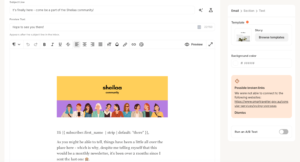
Kit made this choice deliberately. The belief is that creator emails should feel like they came from a real person, not a marketing department. And for the type of newsletter Kit serves — personal essays, content-driven sends, one-to-one feeling communication — that philosophy holds up. Text-focused emails from creators tend to get strong open rates and high engagement.
The limitation shows up the moment you want visual design. Multiple columns, image grids, branded promotional sections, a newsletter that looks like a media publication — Kit’s editor resists all of this. You are not going to build a Morning Brew-style newsletter inside Kit’s editor.
Kit does give you pre-designed email templates as a starting point, which gives you slightly more variety than a blank page. But the design ceiling is low compared to Beehiiv.
Beehiiv: The better visual editor — built for media-style newsletters
Beehiiv’s editor is built for publication-style newsletters. You can add multiple sections, embed images, insert dividers, use different text sizes and styles, and build a newsletter that looks like a real media product rather than a plain text email.
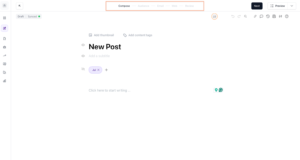
Multiple independent reviewers describe the Beehiiv editor as meaningfully more advanced than Kit’s. One comparison article put it simply: you can design much better looking emails in Beehiiv than in Kit.
The honest learning note: Beehiiv’s editor is not a traditional drag-and-drop “what you see is what you get” builder. It takes a session or two to feel natural. Some reviewers mention the formatting can be finicky compared to something like a Google Doc. But once you get comfortable with it, the quality of what you can produce is noticeably higher than Kit.
Winner: Beehiiv — not close for anyone who wants their newsletter to look like a polished media publication. Kit if plain-text personal newsletters are what you send and all you will ever need.
Template Library
Kit: A small but functional set of starting points
Kit gives you a small collection of email templates — roughly 15 to 20 options, all built around the plain-text-first philosophy. There are no elaborate multi-section newsletter designs. No product launch templates with image grids. The templates are intentionally minimal because Kit believes personal feels better than designed for creator audiences.
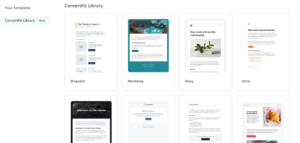
For the creator sending a weekly essay or a content-driven email, the templates are fine starting points. For the creator who wants a branded newsletter that looks visually distinct — the library will frustrate you quickly.
Beehiiv: Fewer traditional templates, but a smarter approach to design
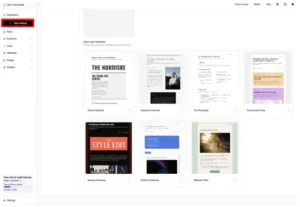
Beehiiv takes a different approach to templates. Rather than a large library of pre-built designs, it offers a flexible content block system where you build the look of your newsletter from reusable sections. Headers, body text blocks, image sections, dividers, call-to-action buttons, and referral blocks can be arranged and saved as your default layout.
In practice, this means you build your newsletter template once — the way your newsletter always looks — and then you write inside that consistent structure every week. That is more useful than picking from a library of generic designs.
Beehiiv also recently launched an AI website builder that generates a branded publication homepage from your newsletter content automatically. That goes beyond what any email template library does.
Winner: Tie — Kit for ready-made starting points. Beehiiv for a more sophisticated approach to consistent newsletter design. Neither has a large traditional template library and neither needs one for what they are built to do.
Automation
Automation is where the gap between these two tools is most stark — and where Kit wins the most clearly.
Kit: Best-in-class automation for creators
Kit’s visual automation builder is the most powerful in the creator space. The tag-based system is the core of how it works. You tag subscribers based on what they do — which emails they opened, which links they clicked, which products they bought, which lead magnet they downloaded — and then you build sequences that react to those tags.
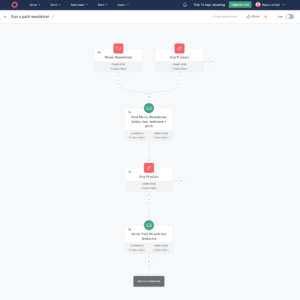
The result is automation that feels personal without manual effort. Someone clicks your course link three times but never buys? They automatically enter a follow-up sequence. Someone buys your introductory product? The upsell sequence starts and the prospect sequence stops. Someone has been on your list for 90 days without opening anything? A re-engagement campaign fires automatically.
Multiple G2 reviewers with large lists describe Kit’s automation as the feature that made them stay despite the price increases. One described the tag-based logic as some of the most powerful they had ever used — saying you can do incredibly specific things with it that other platforms simply cannot match.
Kit’s free plan includes one automation and one sequence — enough to understand the system but not enough to run a real business on. The full automation capability requires the Creator plan.
Beehiiv: Getting better, but still not in the same league
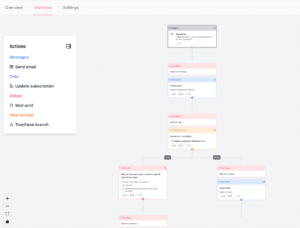
Beehiiv has added automation features over the past two years and continues to improve. You can set up welcome sequences, time-based sends, and basic behavioral triggers. For a newsletter creator who needs simple flows — send this email when someone subscribes, wait three days, send the next one — Beehiiv handles that.
What Beehiiv cannot do well: complex multi-branch logic, overlapping sequences that run simultaneously based on different tag combinations, and the kind of sales funnel automation that Kit handles natively. Multiple independent reviewers describe Beehiiv’s automation as “simple” or “newsletter-focused” — which is accurate but also means it has real limits for creators who need it to do more than the basics.
One creator who switched from Kit to Beehiiv on Reddit said the one thing they genuinely missed after the switch was the advanced automation. Beehiiv keeps things simple — and sometimes that simplicity is a ceiling.
Winner: Kit — by a wide margin. If automation is important to how your business works, this one category might settle the decision on its own.
Segmentation and List Management
Kit: Tag-based, flexible, and powerful for complex subscriber management
Kit keeps everyone on one master list. Tags describe who they are and what they have done. Segments are built by filtering on tag combinations and behavior.
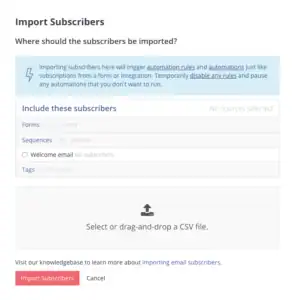
This approach is more flexible for creators running multiple content lines. You can segment by which lead magnet someone downloaded, which product they bought, how long they have been on your list, and whether they have engaged in the last 30 days — all at once, in any combination.
For a creator with a complex business — multiple products, multiple audiences, multiple content tracks — Kit’s tagging system is significantly more capable than Beehiiv’s.
Beehiiv: Solid for newsletter segmentation, less powerful for complex business logic
Beehiiv lets you segment subscribers by engagement level, subscription status, location, custom fields, and which specific posts they have opened or clicked. For a newsletter that sends the same content to everyone and wants to understand how different segments engage with it — Beehiiv’s segmentation is enough.
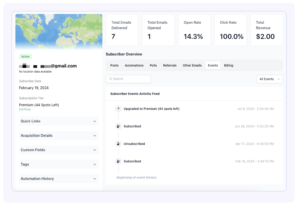
Where it shows limits: building complex multi-condition segments that combine purchase behavior, engagement history, and custom field data the way Kit can. Beehiiv’s segmentation is built around understanding your newsletter audience. Kit’s is built around running a business through email.
Winner: Kit for complex audience segmentation. Beehiiv for simple newsletter-focused subscriber management that does not require deep logic.
Growth Tools
This is where Beehiiv has built its biggest competitive advantage — and where Kit genuinely cannot match it.
Beehiiv: Built specifically to grow your newsletter
Beehiiv was founded by people who grew Morning Brew to four million subscribers. They know what it takes to build a newsletter audience at scale. And they built those tools directly into the platform.

The referral program lets subscribers earn rewards for bringing in new subscribers. This is the same mechanic that powered Morning Brew’s growth — readers recruit other readers because there is something in it for them. Setting it up inside Beehiiv takes minutes. On other platforms, you would need a separate tool and a custom integration.
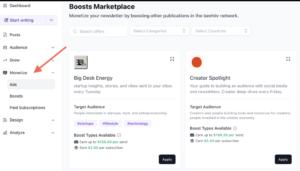
The recommendation network (called Boosts) lets you get paid to recommend other newsletters to your subscribers — and lets other newsletters recommend yours. When someone subscribes to your list, they see recommendations for other newsletters they might enjoy. You get paid per active subscriber you deliver. Other creators get paid when they send you active subscribers. It is a cross-promotion marketplace built directly into the platform.
The SEO-optimized publication pages turn every newsletter you publish into a web page that can rank in search results. Your newsletter archive becomes a content library that drives organic traffic over time. Kit has a newsletter archive, but it is not optimized for search discovery in the same way. For a newsletter with years of back issues, the compounding value of search-friendly archives is real.
Kit: More traditional growth tools that are still genuinely useful
Kit’s Creator Network is its answer to Beehiiv’s growth tools. When someone subscribes to your newsletter, they are shown recommendations for other Kit creator newsletters they might enjoy. Other creators’ subscribers see yours. It is the same cross-promotion loop concept as Beehiiv’s Boosts.

The honest difference: multiple independent reviewers describe Beehiiv’s Boosts as paying around twice as much per subscriber recommended compared to Kit’s Creator Network. Kit’s network is useful. Beehiiv’s is larger and more lucrative for most creators who use it.
Kit’s landing page builder and opt-in forms are solid. The forms connect directly to automation sequences, so a new subscriber immediately enters the right welcome flow. The landing page designs are functional but described by multiple reviewers as feeling dated compared to Beehiiv’s more modern design tools.
Winner: Beehiiv — and it is not close. The referral program, the Boosts network, and the SEO publication pages are meaningfully better growth tools than anything Kit has built. If growing your list is the priority, Beehiiv has the better infrastructure for it.
Monetization
Both tools let you make money from your newsletter. But they approach it differently — and the fee structures are meaningfully different.
Kit: Built for selling products to your list
Kit’s monetization is built around commerce. You can sell digital products — ebooks, templates, presets, files. You can run a paid newsletter with monthly, quarterly, or annual subscriber pricing. You can accept tips. You can sell courses and coaching packages.
The Kit Creator Network also drives cross-promotion revenue — you earn money when other creators’ subscribers convert to yours through recommendations.
The honest catch: Kit takes a transaction fee on paid subscriptions and digital product sales. The fee is around 3.5% plus $0.30 per transaction on the free plan, and drops on paid plans. It is not enormous — but it is there, and it adds up on high-volume sales.
Beehiiv: Built for making money from your audience through ads
Beehiiv’s monetization is built around the newsletter as a media property.
The ad network is the centrepiece. Beehiiv connects you directly with sponsors who want to place ads in newsletters like yours. You do not need to pitch anyone, build a media kit, or negotiate deals on your own. You join the network, set your preferences, and relevant sponsor opportunities appear. Hundreds of brands advertise through the Beehiiv network.
Paid subscriptions are available and work cleanly. The big difference from Kit: Beehiiv takes zero transaction fees on paid subscriptions. What your subscribers pay is what you receive, minus payment processing fees from Stripe.
Beehiiv also has Boosts — where other newsletters pay you per active subscriber you send them. At larger list sizes, this can generate meaningful passive income just from the cross-promotion activity that happens alongside your regular sends.
For a creator whose monetization plan is ads and sponsorships rather than digital products — Beehiiv is structurally better for that model.
Winner: Kit if you sell digital products and courses. Beehiiv if your revenue model is sponsorships, ads, and paid subscriptions with zero platform transaction fees.
Website and Publication Pages
This is a category that rarely gets enough attention in newsletter comparisons — but it matters a lot for long-term audience building.
Beehiiv: A full website builder built for newsletter creators
Beehiiv gives you a full website and publication page optimized for search engines. Every newsletter you send becomes a public web page with its own URL. Over time, your newsletter archive becomes a searchable content library that drives organic traffic from Google.
The AI website builder generates a branded homepage from your newsletter content automatically. You can customize it, add your branding, and have a professional creator website without paying for a separate tool like WordPress or Squarespace.
For a creator who wants to be found through search and turn their newsletter archive into a long-term content asset — this is a genuine advantage that compounds over time.
Kit: Landing pages and a basic creator profile
Kit’s web tools are more limited. You get landing pages for list growth and a basic creator profile page. The newsletter archive exists, but it is not built to attract search traffic. The landing page templates are functional but multiple reviewers describe them as feeling dated compared to more modern tools.
For a creator whose main discovery channel is search — Kit’s web presence tools are a real gap.
Winner: Beehiiv — the publication-first web experience is one of its most underrated advantages. For creators building a long-term content business, turning every newsletter into a searchable web page is genuinely valuable.
Analytics and Reporting
Beehiiv: The better analytics for newsletter creators
Beehiiv’s analytics are built specifically around what newsletter creators actually need to know. You get open rates, click rates, and unsubscribe rates — but also subscriber growth trends, 30/60/90 day engagement rates, segmented performance by subscriber cohort, and upgrade tracking for paid subscriptions.
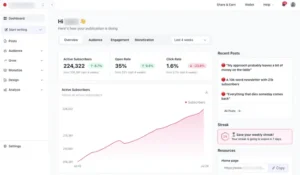
The dashboard shows you the health of your newsletter at a glance. Multiple reviewers describe being able to see all their metrics in one view in a way that Kit does not match. One creator who switched platforms said Beehiiv made it 100 times easier to see all metrics in one glance compared to their previous tool.
Advanced analytics — cohort analysis, deliverability reporting, and revenue attribution — are available on the Scale and Max plans.
Kit: Adequate but not deep
Kit gives you open rates, click rates, unsubscribe rates, and subscriber growth. For basic newsletter tracking that is enough. For serious data-driven newsletter operators who want to understand subscriber lifetime value, cohort behaviour, and long-term engagement trends — Kit’s analytics feel thin.
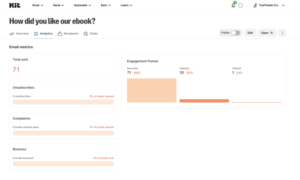
Advanced reporting including revenue attribution and cohort analysis requires the Creator Pro plan at $79 a month. On the base Creator plan at $33 to $39 a month — the data you get is limited.
Multiple long-term Kit users mention tracking additional metrics in a separate spreadsheet because Kit’s built-in reporting does not give them the full picture they want. That is a consistent complaint in reviews from creators who have been on the platform for more than a year.
Winner: Beehiiv — stronger newsletter-specific analytics at more plan tiers without needing to upgrade to access the data that actually helps you make decisions.
Integrations
Kit: 90+ integrations built for the creator ecosystem
Kit connects to over 90 apps natively. Teachable, Gumroad, Shopify, Thrivecart, Podia, Kajabi, and most tools that creators building content businesses actually use are there. The integration is deep enough that events in connected tools can trigger Kit automations — someone completes a course module on Teachable and Kit sends them the next email in a sequence automatically.
Zapier and Make expand the connection options significantly for anything not covered natively. The overall ecosystem feels well-built for the creator who runs a multi-tool online business.
Beehiiv: Fewer integrations, but growing
Beehiiv’s integration library is smaller than Kit’s. The native connections cover the most common tools creators use — Zapier, Stripe, and some creator platforms — but it does not have the same breadth as Kit when it comes to connecting email automation to outside tools.
Beehiiv is designed to be more of a self-contained platform where growth, monetization, and analytics all live inside it. That reduces the need for integrations to some degree. But for creators who have an existing tech stack they want to connect — Kit is the more flexible choice.
Winner: Kit for integration depth and flexibility. Beehiiv if you want to keep most of your newsletter operations inside one platform and do not need deep connections to outside tools.
Deliverability
This is the number that matters more than any feature on this page. If your emails do not reach the inbox, nothing else works — not the beautiful editor, not the automation, not the referral program.
Both platforms take deliverability seriously. But they approach it differently.
Kit: Strong deliverability with a structural advantage
Kit publishes its own deliverability reports publicly — something most platforms do not do. Their claimed delivery rate sits at 99.8%, which is one of the highest self-reported numbers in the creator email space.
The structural reason Kit performs well here is the plain-text-first email philosophy. Text-heavy emails with minimal images trigger spam filters far less often than heavily designed HTML emails. A Kit newsletter that reads like a personal message from a real person gets treated like one by Gmail, Apple Mail, and Outlook. That is not a coincidence — it is a design decision that has deliverability benefits baked in.
Kit also manually reviews new accounts before allowing full sending access. That stricter entry process keeps low-quality senders off the platform, which protects the shared sending reputation that every Kit user benefits from.
Beehiiv: Solid deliverability with transparent monitoring tools
Beehiiv’s deliverability is strong and well-documented. The platform gives you detailed delivery reports inside the dashboard — bounce rates, spam complaint rates, and inbox placement data broken down per send. That visibility is genuinely useful for a newsletter operator who wants to understand not just whether emails are being delivered but where they are landing.
Beehiiv uses a custom sending infrastructure rather than relying on shared third-party email service providers — which means your sending reputation is more isolated from other Beehiiv senders than it would be on platforms that batch everyone onto shared IP pools.
The honest note on Beehiiv: as the platform has grown rapidly over the past two years, the sender pool has expanded significantly. More senders of varying quality sharing infrastructure is a risk factor worth knowing about. Beehiiv’s monitoring tools help you catch problems early — but the risk exists.
What actually determines your deliverability on either platform:
The honest truth is that platform choice is only one part of the deliverability equation. Your own list hygiene, sending frequency, engagement rates, and authentication setup (SPF, DKIM, DMARC) matter just as much as which tool you are on.
A clean, engaged list on Beehiiv will outperform a cold, purchased list on Kit every time. Neither platform can fix bad sending habits.
Winner: Tie — both platforms perform well and both give you tools to monitor and maintain inbox placement. Kit has a slight structural edge from its plain-text philosophy. Beehiiv has better built-in monitoring tools. Neither has a clear documented advantage in independent third-party testing specific to newsletter creators.
Pricing: The Full Honest Picture
This is the section most comparison posts get wrong. Let me give you the real numbers — not just the headline plans.
Kit Pricing
Kit has three plans: Newsletter (free), Creator, and Creator Pro.
The Newsletter plan is free for up to 10,000 subscribers. You get unlimited email sends, landing pages, forms, tagging, and the ability to sell digital products. One automation and one sequence only. No third-party integrations. Kit branding on emails and forms.
This is genuinely the most generous free plan in the creator email space by subscriber count. If you are just starting out and want to test whether email marketing is going to work for your business before spending money — this is the right starting point.
The Creator plan is where the price story gets complicated. After a 35% increase in late 2025 and another adjustment in 2026, the Creator plan now costs approximately:
- 1,000 subscribers: $33 a month
- 3,000 subscribers: $59 a month
- 5,000 subscribers: $89 a month
- 10,000 subscribers: $135 a month
- 25,000 subscribers: $199 a month
That is a 120% increase at the 1,000-subscriber tier compared to what Kit used to cost. Going from $15 to $33 a month for the same contact count in under two years is a significant jump — and it is the most consistent complaint in recent Kit reviews.
The Creator plan unlocks unlimited automations, 90+ integrations, the Creator Network, live chat support, and two team member seats.
The Creator Pro plan starts at $79 a month for 1,000 subscribers. It adds Facebook Custom Audiences sync, subscriber engagement scoring, the newsletter referral system, advanced reporting, and unlimited users.
Beehiiv Pricing
Beehiiv has three plans: Launch (free), Scale, and Max.
The Launch plan is free for up to 2,500 subscribers. You get unlimited sends, basic newsletter creation, a publication website, and basic forms. What you do not get: the ad network, the referral program, advanced analytics, or custom automations. The free plan is enough to start writing and growing — but most of the tools that make Beehiiv worth choosing over alternatives require a paid plan.
The Scale plan costs $49 a month (or $39 a month on annual billing) for up to 1,000 subscribers. It unlocks the ad network, the referral program, custom automations, advanced analytics, paid subscriptions, and premium web themes. This is the plan where Beehiiv actually delivers on its reputation.
The Max plan costs $99 a month (or $84 a month on annual) for up to 1,000 subscribers. It adds a custom newsletter recommendations feature, unlimited team members, priority support, and advanced custom domains.
How costs scale on Scale (annual billing):
- 1,000 subscribers: $39 a month
- 2,500 subscribers: $49 a month
- 5,000 subscribers: $59 a month
- 10,000 subscribers: $79 a month
- 25,000 subscribers: $119 a month
- 100,000 subscribers: $262 a month
Side-by-Side at Common List Sizes:
| List Size | Kit Creator | Beehiiv Scale (annual) |
|---|---|---|
| 1,000 subscribers | $33 a month | $39 a month |
| 5,000 subscribers | $89 a month | $59 a month |
| 10,000 subscribers | $135 a month | $79 a month |
| 25,000 subscribers | $199 a month | $119 a month |
| 100,000 subscribers | $566 a month | $262 a month |
At 1,000 subscribers, Kit is cheaper. From 5,000 subscribers onwards, Beehiiv is consistently cheaper — and the gap grows significantly at scale. At 100,000 subscribers, Beehiiv costs less than half what Kit does for a comparable plan.
The other pricing difference worth calling out directly: Kit takes a transaction fee on digital product sales and paid subscriptions. Beehiiv takes zero. At meaningful sales volume, that difference adds up.
Customer Support
Kit: Good on paid plans, slow on free
Kit offers email support on the free Newsletter plan and live chat on Creator and above. Paid plan support is generally responsive. The knowledge base is extensive and covers most common questions.
Free plan users describe support as slow — often 24 to 48 hours or more for a response. For a creator who hits a problem right before a big send, that wait is painful.
Kit also offers free concierge migration on paid plans — they handle importing your subscribers and rebuilding your content when you switch from another platform. That is a genuinely useful offer that reduces the friction of switching.
Beehiiv: Responsive and community-driven
Beehiiv’s support is generally well-rated by users on paid plans. The help documentation has improved significantly over the past year and covers most setup questions.
The Beehiiv community is also worth mentioning. The platform has a strong user community where creators help each other with growth strategies, technical questions, and content ideas. For a newsletter creator who wants peer support alongside official support — that community is genuinely valuable.
Winner: Kit for pure support responsiveness on paid plans. Beehiiv for community resources and the overall support ecosystem around the platform.
What Real Users Are Actually Saying
I went through hundreds of reviews across G2, Capterra, Reddit, and creator communities. Here are the patterns that show up consistently in long-term reviews.
On Kit’s automation:
This is the most consistently praised feature from long-term Kit users. Reviewers who have been on the platform for a year or more describe the tag-based automation as something they cannot find anywhere else at this price. One G2 reviewer called it the most creator-friendly email tool they had ever used. Another said the sequences and tags work so beautifully together it is their favorite email tool of all time. The praise is real and consistent.
On Kit’s price increases:
The September 2025 and early 2026 price increases are the most talked-about topic in recent Kit reviews. A creator who used to pay $15 a month is now paying $33 for the same list size. Multiple Reddit threads describe the increase as the main reason they started seriously evaluating Beehiiv. The frustration is not that Kit is a bad product — it is that the value-to-price ratio shifted significantly without meaningful new features being added.
On Beehiiv’s growth tools:
The referral program and Boosts network get consistent genuine praise from Beehiiv users. Multiple creators in independent communities describe growing their lists by thousands of subscribers from the cross-promotion tools alone without spending anything on ads. One creator who switched from Kit said the growth tools on Beehiiv changed how fast their list grew in ways the previous platform simply could not match.
On Beehiiv’s automation limits:
This shows up reliably in reviews from creators who came from Kit or ActiveCampaign. The automation in Beehiiv is described as basic, simple, or newsletter-focused — always with a slight note of limitation. Creators who need IF-THEN logic, multi-branch sequences, and sales funnel automation consistently say Beehiiv cannot give them what they need in this area. For pure newsletter creation, it is enough. For anything more complex, it is a ceiling.
On Beehiiv’s editor:
The writing experience inside Beehiiv gets some of the most genuine positive reviews of any feature across either platform. Multiple creators describe it as genuinely enjoyable to write their newsletter — a feeling they did not have on other platforms. The word that shows up most often is “fun.” That is not a trivial thing when you are writing every week for years.
My Honest Take After Testing Both
Here is where I land after using both platforms on real newsletters.
Kit is the right choice if you are building a business through email — not just a newsletter. If you sell courses, digital products, coaching packages, or anything where the email automation is what turns readers into customers — Kit’s tag-based automation and commerce tools are genuinely the best available for creators at this price. The free plan up to 10,000 subscribers is an incredible offer for anyone starting out.
The price increases are real and painful. Going from $15 to $33 a month at 1,000 subscribers is not a minor adjustment. Before you sign up for Kit’s paid plan, run the math at the list size you are actually targeting — not just where you are today, it also worth to considerd these Kit Alternatives
Beehiiv is the right choice if your newsletter is the product. If the way you plan to make money is through ad sponsorships, cross-promotions, paid subscriptions, and audience growth — Beehiiv is structurally better for that model. The ad network, the referral program, the SEO publication pages, and the zero-fee paid subscription structure are all built around a creator who wants their newsletter to be a media business, not a sales channel.
The automation limits are real. If you ever need to build something beyond a basic welcome sequence, Beehiiv will hold you back. Know that going in.
One honest recommendation: if you are under 1,000 subscribers and still figuring out which direction your creator business is going — start on Kit’s free plan. You get 10,000 subscribers free, which gives you an enormous runway. By the time you hit the ceiling on that plan, you will have a much clearer picture of whether you need Kit’s automation depth or Beehiiv’s growth and monetization tools — and you will be making that decision with real data instead of a guess.
Frequently Asked Questions
Is Kit better than Beehiiv?
Depends on what you are building. Kit is better if you sell digital products, courses, or coaching and need advanced tag-based automation. Beehiiv is better if your newsletter is the main business and you want to grow it through the ad network, referral program, and paid subscriptions with no transaction fees.
Did Kit raise its prices?
Yes — significantly. Kit raised prices approximately 35% in late 2025 with further adjustments in early 2026. The Creator plan went from around $15 a month to $33 a month for 1,000 subscribers. At 10,000 subscribers, the Creator plan now costs around $135 a month.
Does Beehiiv take a cut of paid subscriptions?
No. Beehiiv takes zero transaction fees on paid subscriptions. You pay Stripe’s standard payment processing fee, but Beehiiv keeps nothing. Kit takes a transaction fee on paid subscriptions and digital product sales — the rate varies by plan.
Which has a better free plan — Kit or Beehiiv?
Kit’s free plan supports up to 10,000 subscribers with unlimited sends. Beehiiv’s free plan supports up to 2,500 subscribers. Kit’s free plan is significantly more generous on subscriber count. However, Kit’s free plan limits you to one automation and one sequence with no integrations, while Beehiiv’s free plan includes basic newsletter creation and a publication website.
Is Beehiiv good for beginners?
Yes — especially for pure newsletter writing. The editor is clean, the writing experience is enjoyable, and the interface is easier to learn than Kit’s tag-based system. The limitation is that the free plan’s 2,500-subscriber cap and the lack of growth tools on the free tier mean you will hit a ceiling quickly if your list is growing.
Can I switch from Kit to Beehiiv?
Yes. Beehiiv supports direct migration from Kit including subscriber imports with tags preserved via CSV export. The main limitation is that automations do not transfer — you will need to rebuild your email sequences inside Beehiiv from scratch. Most migrations for lists under 50,000 subscribers can be completed in a few hours.
Which is cheaper — Kit or Beehiiv?
At 1,000 subscribers, Kit is slightly cheaper ($33 vs $39 on Beehiiv Scale annual). From 5,000 subscribers onwards, Beehiiv is meaningfully cheaper. At 10,000 subscribers, Beehiiv Scale costs $79 a month vs Kit Creator at $135 a month. At 100,000 subscribers, Beehiiv costs $262 a month vs Kit at $566 a month.
