

Last Updated: 09 May 2026
Over 600,000 creators use Kit to build their audiences and run their businesses.
That’s a number worth paying attention to. But here’s what matters more: are those creators actually getting real value from it? Or are they just staying because switching is a pain?
I signed up for Kit and tested everything. I built campaigns, set up automations, designed landing pages, dug into the analytics, tested deliverability, tried to sell digital products, and reached out to support with real questions.
I also read through hundreds of real reviews on G2, Capterra, and Trustpilot. The good ones. The bad ones. Because that’s where the real truth lives.
Here’s my full, honest review of Kit in 2026 — every single feature, no fluff.
Let’s get into it 👇
Who Is Kit For?
Kit is not trying to be everything to everyone. It was built for one specific type of person — and it does a very good job for that person.
Kit is best for:
- Bloggers and content creators who want to grow an email list and turn it into income
- Course creators and coaches who want to sell digital products and memberships
- Newsletter writers who want to charge subscribers for premium content
- YouTubers and podcasters building an audience-based business
- Solopreneurs who want powerful automation without a complicated setup
- Creators switching from Mailchimp who want something built specifically for them
Kit is probably NOT the best choice for:
- Businesses that need SMS, WhatsApp, or live chat built into their email tool
- Teams that need a full CRM with deals and pipeline management
- E-commerce brands that need complex multi-channel marketing automation
- Anyone on a very tight budget who will outgrow the free plan quickly
- Businesses that need deep, enterprise-level reporting
Quick Verdict: Is Kit Worth It?
Yes — if you’re a creator building a business around your audience, Kit is genuinely one of the best tools you can use in 2026.
The automation is powerful. The monetization tools are unique. The free plan is the most generous in the industry. And the platform was built by creators, for creators — which shows in every part of the product.
But it’s not perfect. The price increase in September 2025 hurt. The email editor is limited for people who want visual design. And the support can be inconsistent.
If you’re a creator who writes, teaches, and sells — Kit deserves serious consideration.
Overall Rating: 4.3 / 5
Getting Started: How Easy Is the Setup?
Signing Up for Kit
Signing up is quick and easy. You enter your name, email, and password. Kit then asks a few questions about your business — what kind of content you create, how big your audience is, and what you want to do with email marketing.
Unlike some tools, Kit does not require a manual account approval before you start. You can log in and start exploring right away. This is a big advantage over tools like MailerLite that make you wait for approval.
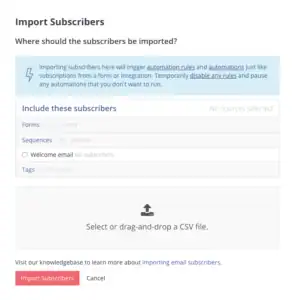
Kit also offers free migration on Creator and Creator Pro plans. If you’re switching from another email tool, Kit’s team will import your subscribers, rebuild your pages, and transfer your content for free. That’s a genuinely helpful service that removes one of the biggest barriers to switching.
“I’ve been using ConvertKit for a while now, and I can honestly say it’s one of the most creator-friendly email marketing tools out there. Everything from setting up forms to creating automations feels intuitive.” (G2)
“The interface is clean and straightforward, so even if you’re not super technical, you’ll find your way around quickly.” (G2)
Navigating the Dashboard
The Kit dashboard is clean and minimal. The left-side navigation shows the main sections — Grow, Send, Earn, and Automate — which tells you everything about how Kit thinks about email marketing.
Everything is organized around one goal: helping creators grow their audience and make money from it.
“ConvertKit is reliable, easy to use, and built with creators in mind. It’s not overloaded with unnecessary features — just the right balance of simplicity and power.” (G2)
Setup Rating: 4.5 / 5
Email Editor: Is It Actually Easy to Use?
Kit’s Text-First Philosophy
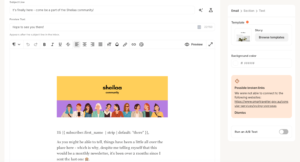
Kit’s email editor is intentionally minimal. It’s built on a simple belief: plain, personal-feeling emails get better results than flashy marketing emails. And for the creator audience Kit serves, that belief holds up.
When I opened the editor, it felt like writing in a clean notes app. Distraction-free. Simple. Fast.
What Kit’s Editor Supports
You can add these elements inside Kit emails:
- Text blocks with formatting (bold, italic, links, headings)
- Images
- Buttons with custom colors and links
- Product recommendation blocks (great for promoting your own products)
- Countdown timers
- Dividers
- Snippets — reusable content blocks you save once and drop into any email with one click. Great for standard sign-offs, calls to action, or sponsor messages you use regularly
- Dynamic content blocks — show different content to different subscriber groups inside the same email
The Real Limitations
Here’s where Kit’s editor falls short compared to most modern email tools:
- No true drag-and-drop — you can’t freely move elements anywhere on the page
- No multi-column layouts built in without HTML
- Moving blocks around is clunky and frustrating
- If you delete something by accident, getting it back requires manual undoing
For creators who want to write newsletters and stay text-focused, these limitations don’t matter much. But for anyone who wants branded, visually designed emails — Kit’s editor is a real frustration.
“The email template builder is pretty clunky — sometimes super hard to select the element you need.” (Capterra)
“Kit’s editor is great for writing, but not great if you want your emails to actually look like a real brand.” (G2)
“I’m quite surprised that Kit still lacks a true drag-and-drop editor. The block-style editor makes email creation feel clunky.” (EmailTooltester)
“I love how minimal and fast the editor is. I write newsletters, not marketing emails — and Kit nails that.” (G2)
Email Editor Rating: 3.5 / 5
Design & Templates: How Good Do Your Emails Look?
Kit’s Template Library
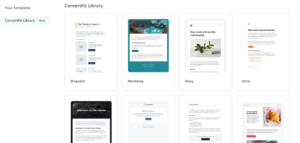
Kit gives you about 20 email templates on all plans. They’re clean and simple — and deliberately so. Kit’s design philosophy is that emails should feel like they come from a person, not a marketing department.
You can also use custom HTML if you know how to code — giving full control to developers who want a completely custom look.
Kit’s Snippets feature helps with consistency. You save a styled content block once — a header, a sign-off, a product promo section — and drop it into any email with one click. This keeps a consistent look across campaigns without rebuilding from scratch every time.
The Honest Truth About Kit’s Templates
20 templates is thin. If you compare this to MailerLite’s 100+ or Mailchimp’s 100+, Kit’s template library looks very limited. And the templates that do exist are minimalist by design — which means you won’t find anything flashy or highly branded.
For newsletter writers, this is fine. For businesses that want beautiful marketing emails, it’s a real gap.
“For the price, Kit lacks in design — it doesn’t offer a huge template library.” (Capterra)
“Compared to other tools, Kit’s templates feel dated and limited.” (G2)
“I wish there were a brand kit. Right now I can’t apply my colors and fonts consistently across everything.” (G2)
“The templates work well for basic newsletters. They’re clean and professional — just not visually exciting.” (Capterra)
Design & Templates Rating: 3.2 / 5
Email Automation: Can It Run Your Marketing on Autopilot?
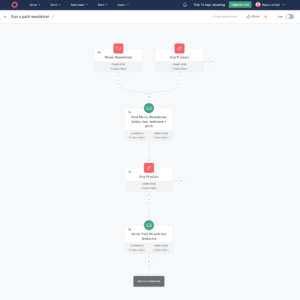
This is where Kit genuinely shines. Automation is Kit’s strongest feature — and one of the best in the creator email space.
How Kit’s Automation Works
Kit uses two main tools for automation:
- Sequences — a set of emails that go out automatically one by one over time. For example: a 5-email welcome series that goes out over 10 days when someone signs up
- Visual Automation Builder — a canvas where you map out your full subscriber journey. Triggers, actions, conditions, and steps all laid out on one screen so you can see exactly what happens at every stage
The Tag System — Kit’s Secret Weapon
Kit’s tag system is what makes the automation genuinely powerful. A tag is a label that gets added to a subscriber’s profile automatically when they do something:
- Click a specific link
- Buy a product
- Fill out a form
- Sign up through a specific landing page
- Answer a survey question
- Reach a certain engagement score
Once someone has a tag, you can use that tag to:
- Automatically start a new email sequence
- Show them different content inside the same email
- Add them to a specific group
- Trigger a product follow-up series
- Show them a different next step in the automation
This kind of behavior-based targeting is what separates Kit from simpler tools.
What Triggers an Automation in Kit
- Someone fills out a form or subscribes
- Someone clicks a specific link in an email
- A tag is added or removed
- Someone completes a purchase
- Someone completes a quiz or survey (added in 2025)
- A specific date arrives
- An integration event fires (like a new Teachable enrollment)
What You Can Do Inside an Automation
- Send an email from a sequence
- Add a time delay
- Add or remove a tag
- Move someone to a different sequence
- Split the flow based on conditions (if/else logic)
- Add someone to a different automation
- Send a webhook to an outside tool
- A/B test individual emails inside the automation (Creator Pro)
- Score subscribers based on behavior
Important Limit on the Free Plan
The free Newsletter plan only allows 1 automation. This is almost useless for anyone who wants to build a real email marketing system. To get unlimited automations, you need the Creator plan at $39/month.
“The tag-based automation is some of the most powerful I’ve used. I can do incredibly specific things with simple rules.” (G2)
“Sequences and tags work beautifully together. It’s my favorite email tool of all time.” (G2)
“The visual automations run your marketing while you create. Build a welcome sequence once and it greets every new subscriber.” (Kit.com)
“Kit prioritizes user experience, especially in its automation features.” (Capterra)
But beginners often struggle:
“It takes a while to understand when to use sequences vs workflows vs rules. It’s not beginner-friendly at all.” (G2)
“The free plan only allows one automation — which is very limiting for testing anything real.” (Capterra)
Automation Rating: 4.6 / 5
Segmentation & List Management: Can You Target the Right People?
How Kit Organizes Contacts
Kit uses a single-list model. Everyone goes into one list — and you organize them using tags and segments.
This is different from tools like MailerLite that use multiple groups. Kit’s approach keeps things clean. Instead of maintaining five separate lists, you have one list and different tags that tell you who’s who.
Tags
Tags are labels applied to subscribers automatically based on what they do. You can combine tags to build very precise segments.
For example:
- Tag: “bought-course-1” AND Tag: “interested-in-marketing” AND Tag: “joined-last-30-days”
- Result: A very specific group of recent buyers who are interested in your marketing content
Subscriber Scoring
Added in 2025, subscriber scoring lets you assign points to different actions — like opening an email, clicking a link, or making a purchase. Kit tracks these scores automatically. You can then use scores to find your most engaged subscribers, trigger automations for people hitting certain thresholds, and identify people who are losing interest before they unsubscribe.
Custom Fields
You can add custom fields to subscriber profiles — like their industry, what product they bought, their location, or any other information you’ve collected. These fields can be used in segmentation and in dynamic email content.
Dynamic Email Content
One of Kit’s most powerful features is showing different content inside the same email to different subscribers. You write one email, add a condition block, and Kit shows version A to subscribers with one tag and version B to subscribers with a different tag. This is genuinely useful for creators with multiple audience segments.
“Once I got the tagging system, it became incredibly powerful. I can do really specific things.” (G2)
“ConvertKit stands out for its tagging and segmentation features. That’s where it really shines.” (Multiple comparison reviews)
“I like that the audience can click a link within an email and be automatically grouped — it is so easy.” (Capterra)
Some beginners found it confusing:
“I’d love to see more documentation on the tagging system. It took me several days to fully understand how it all works.” (Capterra)
Segmentation Rating: 4.5 / 5
Forms & Landing Pages: Can You Grow Your List With It?
Form Types Available
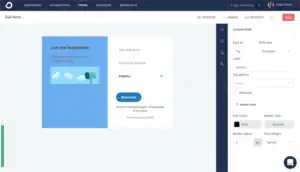
Kit gives you four types of forms for capturing email addresses:
- Inline forms — embed directly inside a blog post or webpage
- Pop-up forms — appear on top of page content
- Slide-in forms — slide in from the corner of the screen
- Sticky bar forms — sit at the top or bottom of the page and stay visible as the user scrolls
You can control when pop-ups appear — after a time delay, after scrolling a certain distance, on exit intent, or when someone clicks a button.
Automatic Lead Magnet Delivery
This is one of Kit’s best features and it’s unique to how Kit handles sign-ups. When someone subscribes, Kit can automatically send them a free gift — an ebook, checklist, PDF, or any digital file — right after they confirm their email. No extra automation setup needed. No Zapier connection. It works on its own.
For creators who build their lists by giving away free content, this saves a huge amount of time.
Landing Pages
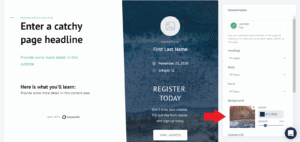
Kit gives you unlimited landing pages — even on the completely free plan. You can choose from about 40+ landing page templates, customize them with your text and images, and publish them on a Kit-hosted URL or your own custom domain.
All landing pages are mobile-responsive. And you can connect multiple opt-in forms to the same landing page.
Creator Profile
Kit gives you a Creator Profile — one shareable link that shows all your active newsletters, landing pages, and forms in one place. Perfect for putting in your Instagram or Twitter bio. When someone visits your Creator Profile, they can see everything you offer and sign up for what interests them.
What Kit’s Landing Pages Can’t Do
The landing page builder is pretty basic compared to dedicated tools. You can’t:
- Freely drag and drop elements anywhere
- Build multi-section pages with complex layouts without HTML
- A/B test two versions of a landing page (this is not a feature Kit offers)
- Create sales pages with full copywriting sections, testimonials, and FAQ blocks without workarounds
“The landing pages are clean and simple to set up. The automatic lead magnet delivery saved me so much time.” (G2)
“Unlimited landing pages even on the free plan. That’s remarkable value for creators just starting out.” (Capterra)
“The visual automation builder makes creating sequences simple. But the landing page builder is basic — creating anything beyond a simple signup page requires custom HTML.” (Software Advice)
“I wish there were more landing page design options. They all tend to look very similar.” (Capterra)
Forms & Landing Pages Rating: 4.1 / 5
A/B Testing: Can You Find What Actually Works?
What Kit Lets You Test
Kit’s A/B testing is available on the Creator Pro plan only. On the Creator plan and free plan, you get no A/B testing at all.
On Creator Pro, you can test:
- Email subject lines — send two different subject lines to a portion of your list and see which one gets more opens
- Email content — test two different body versions against each other
- Automation emails — A/B test individual emails inside automation sequences
How Kit’s A/B Testing Works
You define what percentage of your list gets each version. After a set period, Kit shows you the results — open rates and click rates for each version side by side. You then manually pick the winner or choose to send the winning version to the rest of your list.
What’s Missing
Kit does not offer:
- Multivariate testing (testing more than two versions at once)
- A/B testing for landing pages
- Automatic winner selection (you have to manually check results and decide)
- Send-time optimization testing
This is a notable gap compared to tools like MailerLite that include multivariate testing on paid plans.
“A/B testing on Creator Pro works well for subject lines. I’ve improved my open rates by 15% just from testing.” (G2)
“A/B testing being locked behind Creator Pro at $66/month is frustrating. Most tools include this on lower tiers.” (Capterra)
“I wish A/B testing was available on the Creator plan. It’s a basic feature that shouldn’t require the most expensive plan.” (G2)
A/B Testing Rating: 3.5 / 5
Deliverability: Will Your Emails Actually Land in the Inbox?
Deliverability is everything in email marketing. If your emails don’t reach the inbox, nothing else matters.
Kit’s Deliverability Reputation
Kit claims a 99.8% deliverability rate and has built a strong reputation over more than 10 years of sending creator-focused emails. Independent tests consistently put Kit near the top of the industry for inbox placement.
What Kit Does to Protect Deliverability
- SPF and DKIM authentication — verifies your emails are real
- Custom domain sending available on all plans
- DMARC setup checklists included
- Bounce handling — hard bounces are automatically removed
- Spam complaint tracking — Kit monitors your complaint rate
- Smart sending — Kit won’t send to subscribers who are very likely to mark you as spam
- Bot click filtering — added in October 2025, Kit now filters out bot clicks from your analytics so your click rate data is more accurate
Deliverability Reporting
Basic deliverability stats — bounce rates, open rates, spam complaints — are available on all plans.
However, advanced deliverability reporting — the kind that tells you specifically why emails are going to the Promotions tab instead of Primary inbox — is only available on the Creator Pro plan at $66/month+.
This means users on the Creator plan ($39/month) are flying somewhat blind when it comes to diagnosing deliverability problems.
“Kit’s deliverability has been one of its biggest strengths. Emails consistently land in the main inbox.” (G2)
“I’ve never had an issue with emails going to spam on Kit. Rock solid.” (Capterra)
“Users migrating away from Kit often cite its strong deliverability as one of the hardest things to replace.” (Multiple comparisons)
“Kit is tailormade for content creators, but it receives flak for poor deliverability insights on lower plans.” (Mailmodo comparison)
Deliverability Rating: 4.5 / 5
Reporting & Analytics: Does It Help You Make Better Decisions?
What Kit Tracks on All Plans
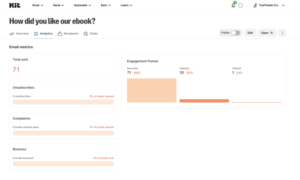
Kit’s basic reporting covers:
- Open rates
- Click rates
- Unsubscribes
- Subscriber growth over time
- Revenue tracking for digital product sales
Kitlytics — Kit’s AI Analytics Feature
In early 2026, Kit launched Kitlytics — an AI-powered analytics layer that goes beyond raw numbers. Instead of just showing you what happened, it tries to explain why.
Kitlytics identifies patterns in your own email history and gives you tips like:
- “Your audience opens more when your subject line is under 6 words”
- “Emails sent on Tuesday at 9 AM get 22% more opens for your list”
- “Your click rate drops when you include more than 3 links”
This is a genuinely interesting feature — especially for creators who don’t have a data science background but want to improve their results without guessing.
Advanced Reporting on Creator Pro
On Creator Pro, you get:
- More detailed campaign analytics
- Subscriber scoring breakdowns
- Advanced deliverability reports
- Facebook Custom Audiences sync — send your top subscribers directly to Facebook ads as a custom audience
What’s Missing from Kit’s Reporting
Compared to tools like Mailchimp or ActiveCampaign, Kit’s reporting has real gaps:
- No click heat maps showing where people clicked inside your email
- No real-time campaign stats as it goes out
- No location or device breakdown on Creator and free plans
- No custom report builder
- No revenue attribution across multi-step funnels
“The reporting tells me what happened but not really why or how to fix it.” (G2)
“I export my data to a spreadsheet to do any real analysis. Kit just doesn’t go deep enough.” (G2)
“Kitlytics is a cool new AI feature but it doesn’t make up for the thin core reporting.” (Capterra)
“I like that ConvertKit has easy to read data and stats.” (G2)
Reporting & Analytics Rating: 3.6 / 5
E-commerce Features: Can You Sell Directly From Kit?
Native Commerce in Kit
Kit has built-in e-commerce features for creators — not for big online stores, but for individual creators selling digital products directly through their email list.
What You Can Sell Through Kit
- Digital downloads — ebooks, templates, presets, spreadsheets, audio files
- Online courses (through integrations with Teachable, Thinkific, or Podia)
- Paid newsletter subscriptions
- Coaching packages and consulting slots
- Tip jars — let your audience support you financially without buying a specific product
- Physical products (via Shopify integration)
How Kit Handles Payments
Kit processes payments through Stripe. Kit charges a 3.5% + $0.30 transaction fee on every sale — which covers both Kit’s fee and Stripe’s processing. There’s no separate Stripe fee on top of this.
Product Blocks in Emails
You can add product recommendation blocks inside your emails — showing a product image, description, and buy button directly inside the newsletter. Subscribers can click and buy without ever leaving the email experience.
Automated Purchase Sequences
When someone buys a product through Kit, you can automatically:
- Send them a delivery email with their download
- Add a tag marking them as a customer
- Start a new post-purchase email sequence
- Remove them from a sales sequence (so they stop getting pitched for something they already bought)
“Selling digital products and running a paid newsletter in the same tool is seamless.” (Capterra)
“The combination of email marketing and digital product sales is powerful. When someone buys through Kit, everything triggers automatically.” (G2)
“Kit has allowed me to successfully upload my contacts and create beautiful templates for email marketing and product sales, all free and easy to do.” (Software Advice)
Some users noted the fee:
“The 3.5% transaction fee adds up on higher-value products. I’d rather pay a flat monthly fee.” (Capterra)
E-commerce Features Rating: 4.3 / 5
Monetization: Can You Make Money With Your Email List?
Kit has more built-in ways for creators to make money than almost any other email tool.
Paid Newsletter Subscriptions
You can charge subscribers a monthly or yearly fee to access your premium newsletter content. You set the price. Free subscribers see the public version. Paid subscribers see the full version — including content behind a paywall you set up inside the email itself.
Kit takes a 3.5% + $0.30 fee on every subscription payment — same as digital products.
Digital Product Sales
Sell ebooks, courses, templates, and any digital file directly through Kit. The checkout experience is clean and simple. Buyers get instant delivery through automated email. And every purchase automatically triggers follow-up sequences.
Tip Jar
Readers who love your work can support you with one-time payments — no product required. This is popular with newsletter writers who want to monetize their free list without pushing paid subscriptions.
Sponsor Network
Kit has a built-in sponsor marketplace where brands can discover your newsletter and pay to advertise in it. You set your rates. Sponsors find you and make an offer. You accept or decline. When you agree, Kit handles the payment and delivers the sponsored content.
This is a genuine differentiator — most email tools have no built-in way for creators to find sponsors. Kit connects you to a growing marketplace of brands that want to reach creator audiences.
“The combination of email marketing and sales of products and services is powerful. When you add the Creator Network for recommendations, you have a winning combination.” (G2)
“I love how much I can do with Kit. Since pricing is based on active subscribers and they have a very generous free plan, you can start simply and try advanced features when you’re ready.” (Capterra)
“Kit has processed over $2 billion in creator commerce — that tells you everything about how seriously they take monetization.” (Kit.com)
Monetization Rating: 4.6 / 5
Creator Network: Can It Help You Grow Faster?
What the Creator Network Is
The Creator Network is Kit’s answer to organic growth — a built-in system where creators recommend each other’s newsletters to their own audiences.
Here’s how it works: When a new subscriber confirms their email on your list, Kit can show them other newsletters to recommend on your thank-you page. If they sign up for one of those other newsletters, that creator’s new subscriber might see your newsletter recommended in return.
It’s a cross-promotion loop that, when done well, sends free subscribers to your list every single day without any extra work.
Paid Recommendations
You can also pay to be featured in other creators’ recommendation slots — and you can earn money by featuring other creators in yours. This turns the Creator Network into a real growth channel with a measurable cost-per-subscriber.
Kit acquired SparkLoop — the leading newsletter referral platform — to power this feature. SparkLoop has helped creators drive millions of newsletter referrals, and that technology now lives inside Kit.
What Users Say About the Creator Network
“The Creator Network is underrated. I’ve grown my list by thousands just from other creators recommending me.” (G2)
“The combination of email marketing and the Creator Network for recommendations is a winning combination.” (G2)
“I’ve been getting 20–50 new subscribers per week just from Creator Network recommendations — for free.” (Multiple creator testimonials)
Some users noted it works better for larger lists:
“The Creator Network works well once you have an audience. When you’re starting from scratch, it takes time to see results.” (Capterra)
Creator Network Rating: 4.4 / 5
AI Features: Is the AI Actually Useful?
Kitlytics (AI Analytics)
As covered in the reporting section, Kitlytics is Kit’s AI analytics layer. It analyzes your email history and gives you plain-language advice on how to improve your results. It’s one of the more practical AI features I’ve seen in any email tool.
AI Writing Assistant
Kit has a basic AI writing assistant that can:
- Generate email subject line suggestions
- Help you write or improve email body copy
- Suggest calls to action based on your audience type
It’s not the most powerful AI writing tool out there, but it gets the job done for creators who hit a blank page and need a starting point.
Bot Click Filtering (October 2025)
This is a newer AI-powered feature that filters out bot clicks from your analytics. Email security tools and link scanners often click links in emails automatically — which inflates your click rate data. Kit now uses AI to identify and remove these bot clicks from your reports, giving you more accurate data on actual human engagement.
“Kitlytics is a genuinely interesting addition. The AI doesn’t just show me data — it tells me what to do with it.” (G2)
“The AI writing assistant gives me a starting point when I’m stuck. It’s not perfect but it’s useful.” (Capterra)
“The bot click filtering has made my click rate data much more trustworthy. I finally know what real engagement looks like.” (G2)
AI Features Rating: 4.0 / 5
Integrations & App Store: Does It Connect With Your Other Tools?
Kit’s App Store
In 2025, Kit launched a proper App Store — one of the most significant upgrades since the rebrand from ConvertKit. The App Store is a centralized place to connect your favorite tools directly inside Kit, without digging through settings menus.
What Kit Connects With
Kit connects with 90+ tools across key categories:
- Online stores: Shopify, WooCommerce, Gumroad, Lemon Squeezy, Payhip
- Course platforms: Teachable, Thinkific, Podia, Kajabi, Circle
- Payments: Stripe
- Website builders: WordPress, Wix, Squarespace, Webflow
- Design tools: Canva (direct integration — design in Canva, insert right into Kit)
- Community platforms: Circle, Slack, Discord
- Analytics: Google Analytics, Facebook Pixel
- Membership tools: MemberPress, Memberful
- Zapier — connects Kit to 5,000+ additional tools
How Deep Are the Integrations?
This is where you need to be careful. Kit advertises 120+ integrations — but the actual number of native, direct integrations is closer to 30. Many of the listed “integrations” require Zapier or manual HTML setup to work.
The App Store integrations (about 30) are the genuinely native ones that work seamlessly. Everything else is either Zapier-powered or requires a developer to set up.
“Kit lets you connect to Stripe, WordPress, Canva and more without any hassle. The App Store makes everything feel organized.” (EmailTooltester)
“The Canva integration is brilliant. I design my newsletter banner in Canva and it’s right there in my email editor.” (G2)
“Some of the integrations listed on Kit’s website actually require Zapier or manual HTML setup — the effective native count is lower than advertised.” (StartupOwl)
“The Teachable integration is seamless. New course buyers are automatically tagged and added to the right sequence.” (Capterra)
Integrations Rating: 4.0 / 5
Mobile App: Can You Manage Campaigns on Your Phone?
Kit has a mobile app for both iOS and Android.
What You Can Do in the App
- View campaign performance — open rates, click rates, revenue
- Check subscriber growth in real time
- See recent subscribers and their activity
- Monitor automation performance
- Get notifications when milestones hit (like 1,000 subscribers or your first sale)
- View and manage individual subscriber profiles
- Check your Creator Network recommendations stats
What You Can’t Do in the App
Like most email tools, Kit’s mobile app is for monitoring — not building. You cannot:
- Write or send new email campaigns from the app
- Build or edit automation flows
- Create or edit landing pages
- Set up new forms
For full campaign management, you need to be on a desktop.
“The mobile app is great for checking on campaigns and seeing subscriber growth while I’m away from my desk.” (G2)
“I love getting the notification when I hit a new subscriber milestone. It’s a small thing but it keeps me motivated.” (Capterra)
“I wish the app let me write and send quick emails. Having to go to desktop for everything is a friction point.” (G2)
Mobile App Rating: 3.8 / 5
Team Collaboration & Multi-user Access: Can Your Team Work Together?
Team Access in Kit
Kit supports multiple user seats on paid plans. However, the team features are more limited than tools like MailerLite or ActiveCampaign:
- Newsletter plan (free): 1 user only
- Creator plan: Up to 2 users
- Creator Pro: Up to 5 users
You can add team members and assign them access to your Kit account. But the permission system is basic — there aren’t granular role-based controls that let you restrict what each person can or can’t see.
For Agencies and Multi-brand Teams
Kit is not really built for agencies managing multiple clients. If you manage email marketing for more than one brand, you’d need separate Kit accounts for each — there’s no agency dashboard or multi-account management built in.
“For a solo creator or small team, the user seats are fine. But for managing multiple client accounts, Kit is not set up for that workflow.” (G2)
“I manage two brands and have to log in and out of separate accounts. An agency-style dashboard would be a real upgrade.” (Capterra)
Team Collaboration Rating: 3.5 / 5
GDPR & Compliance: Is It Safe to Use in Your Country?
Where Kit Is Based
Kit (ConvertKit) is based in Boise, Idaho — a US-based company. This is worth knowing for EU-based businesses, because US companies face stricter requirements when handling EU personal data under GDPR.
What GDPR Tools Kit Provides
- Double opt-in — subscribers must confirm their email before being added
- Unsubscribe management — every email includes a legally required unsubscribe link
- Data Processing Addendum (DPA) — available on request for businesses that need it
- Data deletion — you can permanently delete a subscriber’s data from Kit
Honest GDPR Concerns
Some EU-based users have flagged GDPR compliance as a concern with Kit. Specifically:
- Kit’s default forms don’t always make consent checkboxes visible or mandatory
- As a US company, data may be processed on US servers — which requires additional legal agreements for EU businesses
- The DPA process requires manual request rather than being automatic
“Kit is great for US-based creators. For EU businesses, the GDPR situation requires extra attention.” (Multiple reviews)
“GDPR compliance has been flagged as a concern by some EU-based users — specifically around where data is stored.” (StartupOwl)
“Kit handles the basics well — unsubscribes, double opt-in — but EU creators should check the DPA situation carefully.” (G2)
GDPR & Compliance Rating: 3.8 / 5
Customer Support: Who Helps You When Things Go Wrong?
What Kit Offers
- Newsletter plan (free): Email support only
- Creator plan: Email + live chat support
- Creator Pro: Priority support + email + live chat
Kit also has a knowledge base, video tutorials, and a community forum where you can ask questions and get help from other Kit users.
The Honest Reality of Kit’s Support
Kit’s support quality is one of the most polarizing things about the platform. On review sites, you’ll find glowing reviews right next to absolute horror stories — often describing different experiences with the same feature.
Positive experiences:
“I’ve been using ConvertKit for a while now, and I can honestly say it’s one of the most creator-friendly email marketing tools out there.” (G2)
“Customer service is great, they reply quickly and are really helpful with step-by-step instructions.” (Capterra)
“Brilliant! I would highly recommend ConvertKit. Customer service is great — they are quick to reply and really helpful.” (Capterra)
Negative experiences:
“There’s literally no way to troubleshoot this stuff on your own. And if you’re looking for support… GOOD LUCK.” (Capterra)
“I’ve been bounced between agents for four days trying to fix a simple billing issue.” (Capterra)
“Their support is not helpful at all. After assuring me that moving from Mailchimp to Kit was ‘easy,’ they refused to help when I ran into problems.” (G2)
“I’ve raised the same questions multiple times and keep getting automated responses. Waiting days for a reply.” (Capterra)
“One Trustpilot reviewer waited six weeks for their account to be deleted.” (StartupOwl)
The AI chatbot handles simple questions reasonably well. But anything complex or account-specific often requires escalation to a human agent — where response quality and speed varies a lot depending on who you get.
Customer Support Rating: 3.6 / 5
Pricing: What Does It Actually Cost?
Newsletter Plan — Free Forever
- Up to 10,000 subscribers
- Unlimited email sends
- Unlimited landing pages
- Forms and pop-ups
- 1 automation only
- Digital product sales (with 3.5% + $0.30 fee)
- Creator Profile
- ⚠️ Kit shows other creators’ newsletter recommendations on your thank-you pages — that’s how they monetize the free plan
- ⚠️ Email support only
Creator Plan
| Subscribers | Monthly | Annual (saves ~16%) |
|---|---|---|
| 1,000 | $39/month | $33/month |
| 3,000 | $59/month | $49/month |
| 5,000 | $89/month | $75/month |
| 10,000 | $139/month | $117/month |
| 25,000 | $199/month | $167/month |
| 50,000 | $299/month | $251/month |
| 100,000 | $519/month | $436/month |
Includes: Unlimited automations, visual automation builder, live chat support, advanced segmentation, subscriber scoring, free migration from another tool.
Creator Pro
| Subscribers | Monthly | Annual (saves ~16%) |
|---|---|---|
| 1,000 | $66/month | $55/month |
| 3,000 | $108/month | $91/month |
| 5,000 | $166/month | $140/month |
| 10,000 | $257/month | $216/month |
| 25,000 | $340/month | $286/month |
Includes: Everything in Creator PLUS A/B testing, advanced deliverability reports, subscriber scoring, Facebook Custom Audiences sync, priority support, newsletter referral system (via SparkLoop).
The September 2025 Price Increase
This is a big deal and it’s worth addressing directly. In September 2025, Kit raised prices across all paid tiers significantly:
- Creator plan went from $29/month to $39/month for 1,000 subscribers
- Creator Pro went from $59/month to $66/month for 1,000 subscribers
- Some tiers effectively doubled in price
This has been the single biggest source of frustration among Kit users in recent reviews.
“Kit raised prices by 35% in September 2025. Now I’m paying $39 for 1,000 subscribers.” (G2)
“The free plan is great to start with, but once you begin scaling, it can get a bit pricey compared to other tools.” (G2)
“I’m on a $290/year plan for 1,000 contacts and it doesn’t even include deliverability reporting.” (G2)
“The cost. I don’t use all of the features but I feel like I’m paying for them all.” (G2)
“If I had to point out one thing that could be improved, it would be the pricing for smaller creators.” (G2)
14-Day Free Trial and 30-Day Money-Back Guarantee
Kit offers a 14-day free trial on paid plans and a 30-day money-back guarantee. This makes it genuinely risk-free to try the paid features before committing.
Is Kit Worth the Price?
The free plan is extraordinary — 10,000 subscribers with unlimited sends is the best free plan in email marketing, full stop.
But the paid plans are expensive. At $39/month for 1,000 subscribers on Creator, you’re paying significantly more than MailerLite ($15/month) and Brevo ($18/month) for a similar number of contacts.
The argument for paying that premium: if you’re a creator who actively uses the automation, monetization, and Creator Network features, the ROI can be very strong. Kit users who sell digital products often earn back their subscription cost many times over.
If you’re just sending a basic newsletter without selling anything? The pricing is hard to justify.
Pricing Rating: 3.7 / 5
What Real Users Say: Honest Reviews from G2, Capterra, and Trustpilot
I spent hours going through real reviews so you don’t have to. Here’s exactly what people are saying.
What People Love About Kit:
✅ “I’ve been using ConvertKit for a while now, and I can honestly say it’s one of the most creator-friendly email marketing tools out there.” (G2)
✅ “The tag-based automation is some of the most powerful I’ve used. I can do incredibly specific things with simple rules.” (G2)
✅ “Sequences and tags work beautifully together. It’s my favorite email tool of all time, and I’ve tried many.” (G2)
✅ “10,000 subscribers for free with unlimited emails. Nothing else comes close for new creators starting out.” (Capterra)
✅ “Selling digital products and running a paid newsletter in the same tool is seamless and powerful.” (Capterra)
✅ “The Creator Network is underrated. I’ve grown my list by thousands just from other creators recommending me.” (G2)
✅ “Kit is integral because it’s the hub of the entire business. Everything runs through it.” (G2)
✅ “ConvertKit is reliable, easy to use, and built with creators in mind. It’s not overloaded with unnecessary features.” (G2)
✅ “The visual automation builder makes creating email sequences simple. Welcome series, product launch funnels, and re-engagement campaigns are all built visually.” (Software Advice)
✅ “Kit has processed over $2 billion in creator commerce. That tells you everything about how seriously they take monetization.” (Kit.com)
What People Complain About Kit:
❌ “Kit raised prices by 35% in September 2025. Now I’m paying $39 for 1K subscribers and getting less than competitors charge half the price for.” (G2)
❌ “The email template builder is pretty clunky — sometimes super hard to select the element you need.” (Capterra)
❌ “There’s literally no way to troubleshoot this stuff on your own. And if you’re looking for support… GOOD LUCK.” (Capterra)
❌ “Reporting is way too basic. I have to export to spreadsheets to do any real analysis.” (G2)
❌ “The free plan only allows one automation — which is very limiting for testing anything real.” (Capterra)
❌ “I’ve been bounced between agents for four days trying to fix a simple billing issue.” (Capterra)
❌ “A/B testing being locked behind Creator Pro is frustrating — that’s a basic feature on most tools.” (G2)
❌ “I really wish I thought long and hard before signing up. It’s going to be a nightmare to switch away.” (Capterra)
❌ “Kit isn’t really suited for EU businesses. GDPR compliance requires extra manual steps.” (G2)
❌ “The landing page builder is basic. Creating anything beyond a simple signup page requires custom HTML.” (Software Advice)
Kit Pros and Cons
Pros:
✅ Most generous free plan in email marketing — 10,000 subscribers, unlimited sends ✅ Best-in-class tag-based automation for creator workflows ✅ Visual automation builder that’s genuinely easy to understand ✅ Subscriber scoring lets you identify your most engaged audience ✅ Built-in digital product sales — no Gumroad or Podia needed ✅ Paid newsletter subscriptions with automatic paywall content ✅ Tip jar feature — earn from your free list without a hard paywall ✅ Creator Network and SparkLoop integration for organic list growth ✅ Built-in sponsor marketplace to find brands without leaving Kit ✅ Dynamic email content — show different content to different subscribers in the same email ✅ Automatic lead magnet delivery — no extra automation step needed ✅ App Store with 30+ native integrations for creator tools ✅ Canva integration built right into the email editor ✅ Bot click filtering for more accurate engagement data ✅ Kitlytics AI analytics — explains results in plain language ✅ Free migration from other email tools on paid plans ✅ 14-day free trial + 30-day money-back guarantee on paid plans
Cons:
❌ Major price increase in September 2025 — Creator plan doubled from $29 to $39 for 1K subscribers ❌ Email editor is clunky — no true drag-and-drop ❌ Only about 20 email templates — very limited design library ❌ No multivariate testing ❌ A/B testing only on Creator Pro ($66/month+) ❌ Advanced deliverability reports only on Creator Pro ❌ Reporting is thin on all plans — no heat maps, no real-time stats, no custom reports ❌ Landing page builder is basic — limited to simple pages without HTML ❌ Free plan has only 1 automation allowed ❌ Support quality is very inconsistent — great sometimes, terrible other times ❌ GDPR compliance requires extra steps for EU-based businesses ❌ No SMS, WhatsApp, or live chat built in ❌ No built-in CRM or sales pipeline management ❌ Team access limited to 2 seats on Creator, 5 on Creator Pro ❌ No agency dashboard for managing multiple clients ❌ Many “integrations” listed on the website require Zapier or manual HTML
Final Verdict: Should You Use Kit?
After testing every single feature, reading hundreds of real reviews, and comparing it against every other major email tool — here’s my honest answer:
Kit is one of the best email marketing tools available in 2026 — but only if you’re the right kind of user.
If you are a creator building a business around your content and audience — a blogger, course creator, newsletter writer, coach, podcaster, or YouTuber who wants to grow a list, automate smartly, and actually make money — Kit is genuinely excellent. The automation depth, the monetization tools, the Creator Network, and the most generous free plan in the industry make it a very strong choice.
But if you’re not that specific kind of creator — if you need beautiful email design, deep analytics, built-in SMS, agency tools, or affordable pricing as you scale past 10,000 subscribers — Kit has real gaps that its competitors fill much better.
The September 2025 price increase hurt Kit’s value proposition significantly. At $39/month for 1,000 subscribers on the Creator plan, you’re paying a premium that’s only worth it if you’re actively using the automation, monetization, and network features.
Who should use Kit:
- Creators at any stage who want the most powerful automation in the creator email space
- Anyone who wants to start building for free (10,000 subscribers — truly unbeatable)
- Course creators and coaches who want to sell digital products without a separate platform
- Newsletter writers who want to charge for paid subscriptions
- Creators switching from Mailchimp who want something actually built for them
Who should look elsewhere:
- Small businesses that want beautiful email design and templates (try MailerLite)
- Businesses that need SMS, WhatsApp, and CRM in one platform (try Brevo)
- Anyone on a tight budget who will quickly outgrow the free plan (try MailerLite or Brevo)
- Agencies managing multiple client accounts (try ActiveCampaign)
- EU-based businesses with strict GDPR requirements (review the compliance situation carefully first)
Feature Ratings Summary
| Feature | Rating |
|---|---|
| Getting Started & Setup | 4.5 / 5 |
| Email Editor | 3.5 / 5 |
| Design & Templates | 3.2 / 5 |
| Email Automation | 4.6 / 5 |
| Segmentation & List Management | 4.5 / 5 |
| Forms & Landing Pages | 4.1 / 5 |
| A/B Testing | 3.5 / 5 |
| Deliverability | 4.5 / 5 |
| Reporting & Analytics | 3.6 / 5 |
| E-commerce Features | 4.3 / 5 |
| Monetization | 4.6 / 5 |
| Creator Network | 4.4 / 5 |
| AI Features | 4.0 / 5 |
| Integrations & App Store | 4.0 / 5 |
| Mobile App | 3.8 / 5 |
| Team Collaboration | 3.5 / 5 |
| GDPR & Compliance | 3.8 / 5 |
| Customer Support | 3.6 / 5 |
| Pricing | 3.7 / 5 |
Overall Rating: 4.3 / 5 ⭐
🏆 Verdict: Highly Recommended for creators — with reservations about the price increase and design limitations.
Ready to try Kit for yourself? Their free Newsletter plan gives you up to 10,000 subscribers with unlimited email sends — no credit card required. It’s the most generous free plan in all of email marketing and gives you more than enough room to test the platform properly before spending anything.
And if you want to try the paid features, Kit offers a 14-day free trial on Creator and Creator Pro — plus a 30-day money-back guarantee. You can literally try everything risk-free before committing to a monthly plan.
Have questions about Kit? Drop them in the comments below and I’ll answer from personal experience.
