

Last Updated: 09 May 2026
Two tools. Two very different philosophies. One decision that affects your entire email marketing strategy.
Kit (formerly ConvertKit) is built for creators — bloggers, course sellers, newsletter writers, and digital product sellers who want to grow an audience and turn it into a business.
Brevo (formerly Sendinblue) is built for businesses — teams that want to manage email, SMS, WhatsApp, live chat, and CRM all in one place, without paying a fortune for it.
On the surface, these two tools look like they serve different audiences entirely. But in reality, a huge number of people are trying to decide between them. Both have free plans. Both have automation. Both work for growing an email list and staying in touch with subscribers.
So which one should you actually use?
I signed up for both. I tested the editors. I set up automations. I built landing pages. I checked deliverability. I compared every pricing tier. And I read through hundreds of real reviews on G2, Capterra, and Trustpilot from people who use these tools every single day.
Here’s everything I found — no bias, no fluff, just the honest truth.
Let’s get into Brevo vs Kit 👇
We Keep Things Simple — We Only Review Tools We Actually Use
At Mailotrix, we don’t just look at a tool’s website and call it a review. I sign up and use every tool myself. I build real automations, run real campaigns, check if emails land in inboxes, and test everything until I know exactly what works and what doesn’t.
I also spend hours reading real reviews on G2, Capterra, Trustpilot, and Reddit. I want to know what real people think — not just what the company says about itself. Then I combine that with my own experience and give you a straight, honest answer.
Short on Time? Here’s My Quick Verdict
After testing both tools for weeks, here’s the simple truth:
Brevo wins on price, multi-channel marketing, and ease of use. It gives you email, SMS, WhatsApp, live chat, and a built-in CRM — all at a fraction of what Kit charges.
Kit wins on automation depth, segmentation power, and monetization tools. It’s the better choice for creators who sell digital products, run paid newsletters, and want to build a full business from their email list.
| Feature | Kit (ConvertKit) | Brevo | Winner |
|---|---|---|---|
| Email Editor | Text-first, limited drag-and-drop | Full drag-and-drop, clean and fast | Brevo |
| Design & Templates | About 20 basic templates | 48+ templates + Brand Library | Brevo |
| Automation | Tag-based, industry-leading for creators | Visual builder, included on free plan | Kit |
| Segmentation | Deep tag-based system, very powerful | Advanced segmentation on all plans | Kit |
| Forms & Landing Pages | Unlimited landing pages + lead magnet delivery | Landing pages locked to Business plan | Kit |
| Deliverability | Strong, 99.8% claimed rate | Good but some account suspensions reported | Tie |
| Reporting & Analytics | Basic, AI-powered Kitlytics added | Real-time stats, heatmaps, solid reports | Brevo |
| Customer Support | Mixed — great sometimes, terrible other times | Consistently good, even on free plan | Brevo |
| Integrations | 90+ integrations, great for creators | 150+ integrations, strong API | Kit |
| Pricing | Free: 10K subs / Paid: $39/month for 1K | Email-volume based, far cheaper overall | Brevo |
| Multi-Channel Marketing | Email only — no SMS, no WhatsApp, no CRM | Email + SMS + WhatsApp + live chat + CRM | Brevo |
| Monetization | Paid newsletters, digital products, tip jars | No built-in creator monetization | Kit |
Final Score: Kit 4 – Brevo 6
👉 My Final Take:
If you’re a creator, blogger, or digital product seller who needs powerful automation and built-in ways to make money from your audience — Kit is built for you.
👉 Get Kit for Free (Up to 10,000 Subscribers)
But if you’re a small business or growing team that wants email, SMS, WhatsApp, live chat, and a CRM all in one affordable platform — Brevo is the smarter choice.
Email Editor: Which One Makes Creating Emails Easier?
The email editor is where you spend most of your time. If it’s frustrating, you’ll dread every campaign. Let’s compare.
Kit’s Email Editor
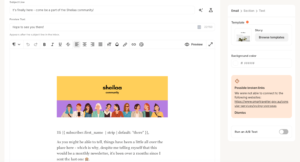
Kit’s editor is simple and text-first on purpose. It’s built for writers who want to type an email, add a link or two, and hit send. When I used it, it felt like writing in a clean notes app. You can add:
- Text blocks
- Images
- Buttons
- Product recommendation links
- Countdown timers (using / commands)
The editor is clean and distraction-free. But here’s the problem: you can’t freely drag and drop elements. Moving a block to a different spot is clunky. Making two-column layouts is unnecessarily difficult. And if you delete something by accident, getting it back is a pain.
Kit also added Snippets — reusable content blocks you save and drop into any email with one click. Great for calls to action and sign-offs you use in every newsletter.
Real users say the same things:
“The email template builder is pretty clunky — sometimes super hard to select the element you need.” (Capterra)
“Kit’s editor is great for writing, but not great if you want your emails to actually look like a real brand.” (G2)
“I love how minimal and fast the editor is. I write newsletters, not marketing emails — and Kit nails that.” (G2)
Brevo’s Email Editor
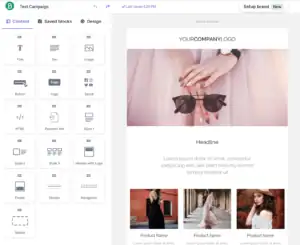
Brevo’s drag-and-drop editor is clean, fast, and easy to learn right away. The first time I opened it, everything made sense. The left-side panel is clearly labeled. Dragging blocks into place felt smooth. I built a professional-looking email in about 10 minutes without touching a line of code.
What you can do in Brevo’s editor:
- Drag any element anywhere on the page
- Add text, images, buttons, video thumbnails, dividers, and social links
- Edit images directly inside the tool — no need to open Canva or Photoshop for basic changes
- Apply your brand colors, fonts, and logo with one click using the Brand Library
- Preview on desktop and mobile before sending
- Use the AI writing assistant to write subject lines and email copy
And unlike some tools, Brevo has only one editor. No version confusion, no switching between builders, no losing your saved templates.
Real users love it:
“Brevo is easy to use and rather intuitive to get started with. It does not overwhelm you when it comes to sending out marketing emails.” (G2)
“The platform makes it easy to create email campaigns and basic automations without a steep learning curve.” (Capterra)
“The drag-and-drop email editor and automation workflow builder regularly get thumbs up from users.” (EmailVendorSelection)
Some users felt the design options could go deeper:
“The design editor works well for standard emails but can feel limiting when you’re trying to create more custom or highly branded layouts.” (G2)
My Verdict
Brevo wins. The drag-and-drop editor is smoother, faster, and more beginner-friendly. The Brand Library saves real time. And there’s no version confusion that wastes your time and loses your saved work.
Winner: Brevo (Kit 0 – Brevo 1)
Design & Templates: How Much Creative Freedom Do You Get?
Kit’s Templates
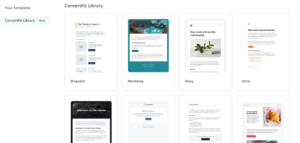
Kit gives you about 20 templates. They’re clean, simple, and text-focused — which matches Kit’s belief that personal-feeling emails perform better than flashy ones.
You can use custom HTML and CSS if you know how to code. Kit also has Snippets — reusable styled blocks you save once and drop into any email. This helps keep a consistent look without rebuilding from scratch every time.
But if you want a big library of professionally designed templates to choose from? Kit doesn’t have it.
“For the price, Kit lacks in design — it doesn’t offer a huge template library.” (Capterra)
“Kit offers fewer and less modern email templates than competitors.” (Multiple comparison reviews)
Brevo’s Templates
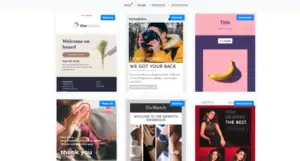
Brevo gives you 48+ pre-designed templates — more than double what Kit offers. They’re modern, mobile-responsive, and cover most common use cases: newsletters, promotions, welcome emails, events, and seasonal campaigns.
The biggest advantage is the Brand Library. You enter your brand colors, fonts, and logo once. Every template then automatically updates to match your brand style. You never have to manually re-apply your brand settings again.
Brevo also has a built-in image editor so you can crop, resize, and adjust photos without leaving the platform.
“The functionality and user-friendly interface in terms of email handling are wonderful. Our small team was able to design gorgeous newsletters in a very short time.” (Capterra)
“The Brand Library is a real time-saver. Set it once and every template matches your brand automatically.” (Brevo users)
Some users noted limits in variety:
“Some advanced customization options can be limited when trying to create more complex layouts.” (G2)
“48 pre-made templates — less than what some other providers have.” (EmailVendorSelection)
My Verdict
Brevo wins — more templates, more modern designs, and the Brand Library is a standout feature that Kit simply doesn’t have.
Winner: Brevo
Score: Kit 0 – Brevo 2
Email Automation: Who Makes It Easier (and Smarter)?
Automation is what makes email marketing work while you sleep. This is one of the biggest differences between these two tools — and it’s the area where Kit shines brightest.
Kit’s Automation
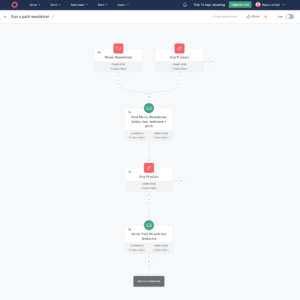
Kit’s automation is one of the most powerful in the creator email space. It uses Sequences (a set of emails that go out one by one) and Rules (if someone does X, do Y automatically).
Kit’s tag system is what makes it special. When someone clicks a link, buys a product, fills out a form, or signs up through a specific page — a tag gets added to their profile. That tag can then:
- Start a new email series automatically
- Show different content inside the same email to different people
- Add them to a specific group
- Trigger a product sales sequence
New features added in 2025-2026:
- A/B testing inside automation emails
- Automation based on quiz and survey answers
- Subscriber scoring — rank people by how engaged they are
- Visual automation builder — see your whole flow on one screen
Real users love the power:
“The tag-based automation is some of the most powerful I’ve used. I can do incredibly specific things with simple rules.” (G2)
“Sequences and tags work beautifully together. It’s my favorite email tool of all time.” (G2)
“Kit prioritizes user experience, especially in its automation features.” (Capterra)
The downside for beginners:
“It takes a while to understand when to use sequences vs workflows vs rules. Not beginner-friendly at all.” (G2)
“The free plan only lets you have one automation — that’s almost useless for testing anything real.” (Capterra)
Brevo’s Automation
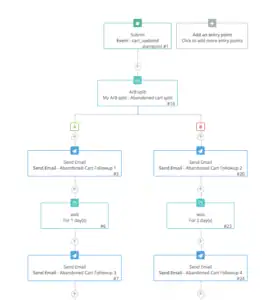
Brevo includes automation on every plan — including the completely free one. That’s a big deal. You can set up welcome sequences, drip emails, re-engagement flows, and abandoned cart reminders without paying anything.
The visual automation builder is clean and easy to understand. You place steps, delays, conditions, and actions on one screen. And Brevo does something Kit can’t — you can include SMS and WhatsApp messages inside the same automation flow as your emails. One welcome sequence can send an email, wait two days, then send an SMS follow-up — all without any extra tools.
What you can automate in Brevo:
- Welcome emails and onboarding sequences
- Emails triggered by website visits (using a tracking code)
- Abandoned cart recovery
- Re-engagement campaigns for cold contacts
- SMS or WhatsApp messages as part of an email flow
- Lead scoring triggers
“Drag-and-drop automations make setting up onboarding flows quick without any help from support.” (G2)
“You can build quite sophisticated workflows using if/else conditions and track contact behaviour.” (EmailVendorSelection)
“Speed and ease of use. The perfect automation for email campaigns to clients and leads.” (Capterra)
But Brevo’s automation has real limits at the complex end:
“Some advanced automation and segmentation features feel limited compared to more robust platforms.” (Capterra)
“Automation can feel rigid in some areas — not always as intuitive when building complex workflows.” (Software Advice)
My Verdict
Kit wins for automation depth. The tag-based system is more powerful, more flexible, and better built for creators who want to send very specific emails to very specific groups of people. Brevo’s automation is great for most needs and is available for free — but it hits a ceiling that Kit doesn’t.
Winner: Kit
Score: Kit 1 – Brevo 2
Segmentation & List Management: Who Handles It Better?
Segmentation means splitting your list into groups so you can send the right email to the right person at the right time.
Kit’s Segmentation
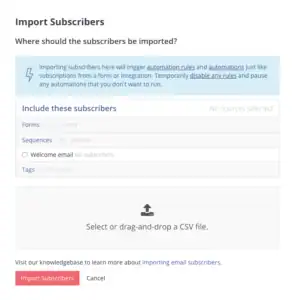
Kit uses one list and organizes everyone with tags. A tag is like a label that gets added to someone’s profile automatically when they do something — click a link, buy a product, fill out a form, sign up through a specific page.
With tags, you can:
- Send emails only to people with certain tags
- Show different content inside the same email to different groups
- Start new email series when someone gets or loses a tag
- Score subscribers based on how active they are
- Build very specific segments like “signed up in the last 30 days AND clicked this product link AND hasn’t bought yet”
The tag system is incredibly flexible once you understand it. For creators with multiple products, different audience segments, and complex sales funnels — there’s nothing better in the creator email space.
“Once I got the tagging system, it became incredibly powerful. I can do really specific things.” (G2)
“ConvertKit stands out for its tagging and segmentation features. That’s where it really shines.” (Multiple comparison reviews)
“I like that the audience can click a link within an email and be automatically grouped — it is so easy.” (Capterra)
Brevo’s Segmentation
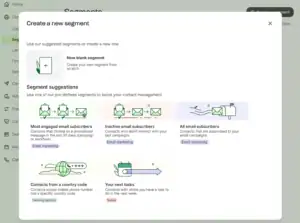
Brevo gives you advanced segmentation on every plan — including the free one. That’s a big advantage over a lot of tools.
You can build segments based on:
- Email behavior — who opened, who clicked, who didn’t open
- Contact data — location, language, custom fields
- Website activity — which pages they visited (using Brevo’s tracking code)
- Purchase history — what they bought, how much they spent
- Engagement level — how active or inactive a contact is
- SMS and WhatsApp interactions
Brevo also uses AND/OR logic for building segments — meaning you can combine multiple conditions to create precise groups. For example: “people who opened the last email AND clicked the product link AND live in the UK.”
“Segmentation in Brevo is quite impressive. Combine contact attributes with campaign engagement in your filters.” (EmailVendorSelection)
“It’s easy to launch campaigns quickly, yet it still offers the depth you need for segmentation and automation.” (G2)
But Brevo’s segmentation is not as deep as Kit’s tag system for creator-specific use cases:
“Some advanced automation and segmentation features feel limited compared to more robust platforms.” (Capterra)
My Verdict
Both tools have solid segmentation. Kit wins for depth and flexibility — especially for creators who need very specific behavioral targeting and dynamic content inside emails. Brevo’s segmentation covers what most small businesses need, but Kit’s tag system goes further.
Winner: Kit
Score: Kit 2 – Brevo 2
Forms & Landing Pages: Who Helps You Grow Your List Faster?
Forms and landing pages are how you turn website visitors and social media followers into email subscribers.
Kit’s Forms & Landing Pages
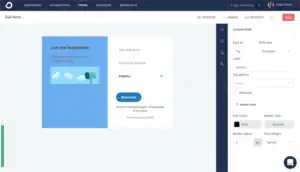
Kit gives you unlimited forms and landing pages — even on the completely free plan. You get:
- Inline forms (inside blog posts)
- Pop-up forms
- Slide-in forms
- Full landing pages with customizable templates
The best Kit feature here is automatic lead magnet delivery. When someone signs up, Kit automatically sends them a free gift — an ebook, checklist, or PDF — right after they confirm their email. No extra automation step. No Zapier. It just works on its own.
All your forms and pages also connect to a Creator Profile — one shareable link that shows all your sign-up pages and active newsletters at once. Perfect for putting in your social media bio.
“The landing pages are clean and simple to set up. The automatic lead magnet delivery saved me so much time.” (G2)
“Unlimited landing pages even on the free plan. Nothing else comes close for creators starting out.” (Capterra)
Brevo’s Forms & Landing Pages
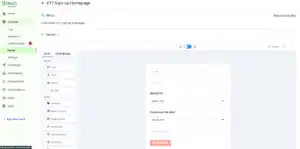
Brevo has a solid form builder. You can create embedded forms, pop-ups with exit-intent and scroll triggers, and standalone landing pages.
Forms in Brevo are GDPR-compliant with double opt-in built in. You connect them directly to your automations. And you can segment subscribers based on which form they signed up through — so different forms can add people to different groups automatically.
But here’s the important catch: After a 2025 pricing update, Brevo moved landing pages and pop-up forms to the Business plan — they’re no longer available on the entry-level Starter plan. If you want landing pages without paying for the Business plan, you’re out of luck.
Brevo also doesn’t offer pre-built form templates — you build them from scratch every time.
“Form creation is straightforward — you drag and drop the elements you want.” (Moosend comparison)
“The downside is that you don’t get form templates. And the landing page builder is only for more expensive plans.” (Moosend comparison)
My Verdict
Kit wins — unlimited landing pages and forms on the free plan, automatic lead magnet delivery, and the Creator Profile link. Brevo’s 2025 decision to move landing pages behind a higher-paid plan was a step in the wrong direction.
Winner: Kit
Score: Kit 3 – Brevo 2
Deliverability: Will Your Emails Actually Reach the Inbox?
Deliverability means: do your emails land in the main inbox, or do they go to spam?
Kit’s Deliverability
Kit claims a 99.8% deliverability rate and has a very strong reputation built over more than 10 years of sending emails for creators. The platform covers all the important technical stuff:
- SPF and DKIM authentication — so email apps know your emails are real
- Custom domain sending
- Bounce and spam complaint tracking
- DMARC setup checklists for every account
Real users back this up:
“Kit’s deliverability has been one of its biggest strengths. Emails consistently land in the main inbox.” (G2)
“I’ve never had an issue with emails going to spam on Kit. Rock solid.” (Capterra)
“Users migrating away from Kit often cite its strong deliverability as one of the hardest things to replace.” (Multiple comparisons)
One downside: advanced deliverability reports — the kind that tell you why emails might be going to Promotions instead of Primary inbox — are locked behind the Creator Pro plan at $139/month.
Brevo’s Deliverability
Brevo has invested heavily in deliverability tools. The platform includes:
- Full SPF, DKIM, and DMARC setup guidance
- A step-by-step authentication wizard that walks you through the whole process
- IP warmup support for new senders
- Automatic removal of hard bounces from your list
- Dedicated IP addresses available for high-volume senders
- A team of deliverability experts monitoring server reputation
Brevo’s free plan daily sending limit of 300 emails per day actually helps deliverability — it stops new users from blasting huge cold lists, which protects the shared IP reputation for everyone.
Real users generally report good inbox placement:
“High email deliverability — that’s one of the main reasons I recommend Brevo.” (Capterra)
“I switched from Mailchimp to Brevo and the deliverability is just as strong — at a much lower price.” (Capterra)
But some users have had account suspension problems:
“Brevo has an overly sensitive algorithm. My campaigns were suspended even though my open rate was between 25–41%.” (Capterra)
“Awful. Blocked my account for no reason and didn’t tell me why, just told me to go elsewhere.” (Trustpilot)
My Verdict
Both platforms have strong deliverability records when used correctly. Kit’s 99.8% claimed rate and long track record give it a slight edge. Brevo’s setup wizard and IP warmup are genuinely useful tools. But Brevo’s account suspension sensitivity is a recurring complaint that Kit doesn’t have at the same level.
Both are strong — this is a genuine tie.
Tie — no points awarded
Score: Kit 3 – Brevo 2
Reporting & Analytics: Who Gives You Better Insights?
Good data helps you understand what’s working and what you need to change.
Kit’s Reporting
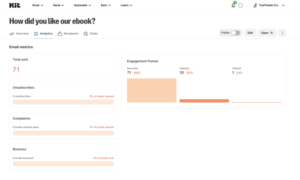
Kit gives you the basics:
- Open rates
- Click rates
- Unsubscribes
- Revenue tracking for digital product sales
In early 2026, Kit added Kitlytics — an AI feature that explains why certain emails did well. It spots patterns in your subject lines and send times and gives actionable tips like “your audience opens more when the subject is under 5 words.”
That’s a genuinely useful addition. But Kit’s core reporting screen is still thin. No click maps. No real-time stats. No location or device breakdown. No custom report builder.
“The reporting tells me what happened but not really why or how to fix it.” (G2)
“I export my data to a spreadsheet to do any real analysis. Kit just doesn’t go deep enough.” (G2)
“Kit lacks the detailed analytics capabilities of alternatives like Brevo.” (Multiple comparison reviews)
Brevo’s Reporting
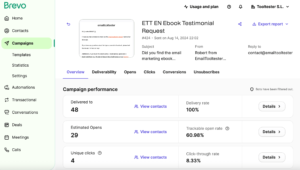
Brevo gives you more useful out-of-the-box data:
- Open rates, click rates, bounce rates, and unsubscribes
- Click heat maps — shows exactly where people clicked inside your email
- Real-time stats — see campaign performance as it happens, not hours later
- A/B test results for subject lines
- Send-time optimization recommendations
- Revenue tracking when connected to an e-commerce store
- Subscriber growth trends over time
Click heat maps and real-time stats are things Kit doesn’t give you at any plan level without an upgrade. And Brevo’s real-time view means you can see how a campaign is performing right after you send it — not the next morning.
“Brevo gives you real-time insights into open rates, clicks, and conversions.” (G2)
“The analytics dashboard is detailed and easy to interpret — click heatmaps are especially useful.” (Capterra)
Some users wanted more depth:
“Reporting is another area that could be stronger — the dashboards aren’t as visual or flexible as some other platforms.” (G2)
“I’d love more flexible filtering options and additional reporting choices.” (Capterra)
My Verdict
Brevo wins — click heat maps, real-time stats, and A/B test results are all available without needing to upgrade. Kit’s Kitlytics is interesting but doesn’t make up for the lack of basic reporting depth.
Winner: Brevo
Score: Kit 3 – Brevo 3
Customer Support: Who’s Got Your Back?
When something breaks right before you hit send, support is everything.
Kit’s Support
What Kit offers:
- Free plan: Email support only
- Creator plan: Email and live chat
- Creator Pro: Priority support
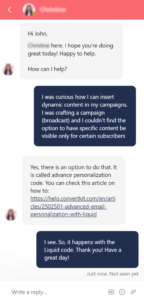
Kit’s support is very inconsistent. Some users get fast, detailed help. Others describe days of being bounced between agents with no real solution.
Good experiences:
“Customer service replied within a couple of hours and walked me through the fix step by step.” (G2)
“Support has always been helpful and friendly every time I’ve reached out.” (Capterra)
Bad experiences:
“There’s literally no way to troubleshoot this stuff on your own. And if you’re looking for support… GOOD LUCK.” (Capterra)
“I’ve been bounced between agents for four days trying to fix a simple billing issue.” (Capterra)
“Their support is not helpful at all. After telling me migration was easy, they refused to help when I ran into problems.” (G2)
“I’ve now raised the same questions again to Kit and I’m getting automated responses. Waiting another three days.” (Capterra)
Brevo’s Support
What Brevo offers:
- Free plan: Email support (typically responds within 24 hours)
- Starter plan: Email support
- Business plan: Priority email and phone support
- Enterprise: Dedicated account manager
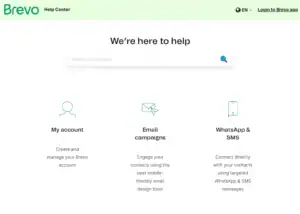
- Help center, tutorial videos, and multilingual support in six languages
Brevo’s support consistently gets praised across review platforms — and what stands out is that even free plan users report getting real, fast help.
“In spite of the fact that I have the Free account, the support staff responded to my issue in less than 24 hours and resolved it immediately.” (Trustpilot)
“Brevo has been a genuine lifesaver. When I had a question, the support was right there even on the free plan.” (Trustpilot)
“We had an issue on non-reception of mails from our website. Their help desk was efficient with clear explanations and methods to resolve quickly.” (Trustpilot)
“A responsive, knowledgeable, and helpful support team — that’s one of the main reasons I recommend Brevo.” (Capterra)
Some users had bad experiences:
“Awful. Blocked my account for no reason and didn’t tell me why.” (Trustpilot)
“Some documentation is unclear and could use a mild tune-up.” (Capterra)
My Verdict
Brevo wins. Consistently praised support even on the free plan. Kit’s support quality depends too much on which agent you get — and several users describe days of back-and-forth with no solution.
Winner: Brevo
Score: Kit 3 – Brevo 4
Integrations: Do They Play Nice With Your Tools?
Kit’s Integrations
Kit connects with 90+ tools including:
- Online stores: Shopify, WooCommerce, Gumroad, Lemon Squeezy
- Course platforms: Teachable, Thinkific, Podia, Kajabi
- Payments: Stripe
- Website builders: WordPress, Wix, Squarespace
- Design tools: Canva
- Zapier — connects to 5,000+ more tools
Kit’s integrations are carefully chosen for creators. If you sell courses through Teachable, sell products through Gumroad, or run a blog on WordPress — Kit connects with all of it natively. The integrations feel purposeful rather than random.
Kit also has a clean, well-documented API for custom connections.
“Kit lets you connect to Stripe, WordPress, Canva and more without any hassle. Having everything in one place makes it easier to manage day-to-day tasks.” (EmailTooltester)
Brevo’s Integrations
Brevo connects with 150+ tools — more than Kit. This includes:
- Online stores: Shopify, WooCommerce, Magento, PrestaShop, BigCommerce
- Website builders: WordPress, Wix, Webflow
- CRM tools: Salesforce, HubSpot, Pipedrive
- Payments: Stripe
- Analytics: Google Analytics, Facebook Pixel
- Zapier and Make for connecting to thousands more tools
Brevo also has a very strong API — especially for developers who want to send transactional emails (receipts, password resets, order confirmations) directly from their apps. This is something Kit doesn’t support at all.
“I primarily use Brevo for transactional emails through our WordPress sites — it’s outstanding for that.” (Capterra)
“Brevo connects seamlessly with 150+ leading digital tools. The API is excellent.” (Brevo)
My Verdict
Both tools cover the essentials well. Kit wins because its 90+ integrations are better chosen for the creator audience — tighter connections with course platforms, digital product stores, and creator tools. Brevo has more integrations in total and a stronger API for transactional email, but for pure creator-focused connections, Kit is more targeted.
Winner: Kit
Score: Kit 4 – Brevo 4
Pricing: Which One Gives You More for Your Money?
This is where Brevo has its strongest argument — and it’s a very good one.
Kit’s Pricing
Newsletter Plan (Free)
- Up to 10,000 subscribers
- Unlimited emails
- Unlimited landing pages and forms
- ⚠️ Only 1 automation allowed
- Kit shows other creators’ newsletter recommendations on your thank-you pages
Creator Plan: $39/month for 1,000 subscribers (went up from $29 in September 2025)
- Unlimited automations
- Visual automation builder
- Advanced segmentation
- Subscriber scoring
Creator Pro: $139/month for 1,000 subscribers
- Advanced deliverability reports
- Newsletter referral system
- Priority support
How prices grow with your list (Creator Plan):
| Subscribers | Kit (Creator) |
|---|---|
| 1,000 | $39/month |
| 2,500 | $49/month |
| 5,000 | $89/month |
| 10,000 | $139/month |
| 25,000 | $199/month |
Kit also charges 3.5% + $0.30 on every digital product sale — which includes payment processing.
Real users are frustrated with the pricing:
“Kit raised prices by 35% in September 2025. Now I’m paying $39 for 1,000 subscribers.” (G2)
“The free plan is great but once you start scaling it gets really expensive really fast.” (G2)
“I’m paying $290 per year for 1,000 contacts and it doesn’t even include deliverability reporting.” (G2)
“The cost. I don’t use all of the features but I feel like I’m paying for them all.” (G2)
Brevo’s Pricing
Brevo uses an email-volume pricing model — you pay based on how many emails you send per month, not how many contacts you have. This is a fundamentally better deal for most businesses.
Free Plan
- Unlimited contacts (up to 100,000 for campaigns)
- 300 emails per day (about 9,000/month)
- Drag-and-drop editor ✅
- Automation builder ✅
- Basic segmentation ✅
- Transactional emails ✅
- ⚠️ Brevo branding in footer
- ⚠️ No landing pages or pop-up forms
Starter Plan: $9/month
- 5,000 emails/month
- No daily sending limit
- Remove Brevo branding (extra $12/month)
Business Plan: $18/month
- Full automation
- A/B testing
- Landing pages and pop-ups
- Multi-user access
How prices grow with email volume (Business Plan):
| Emails per Month | Brevo (Business) |
|---|---|
| 20,000 | $25/month |
| 40,000 | $35/month |
| 60,000 | $49/month |
| 100,000 | $69/month |
| 250,000 | $152/month |
Real users love the pricing model:
“I switched to Brevo from Kit because Kit had become too expensive. Brevo’s pricing for the volume I needed was a fraction of the cost.” (Capterra)
“Attractive pricing compared to similar platforms — especially for large-scale email sending.” (Capterra)
“Brevo is 72% cheaper than many competitors, with unlimited contacts and no surprise bills.” (EmailVendorSelection)
Side-by-side comparison:
| List Size / Volume | Kit (Creator) | Brevo (Business) | Savings with Brevo |
|---|---|---|---|
| 1,000 subs / ~10K emails | $39/month | $18/month | $21/month ($252/year) |
| 5,000 subs / ~25K emails | $89/month | $25/month | $64/month ($768/year) |
| 10,000 subs / ~50K emails | $139/month | $35/month | $104/month ($1,248/year) |
| 25,000 subs / ~100K emails | $199/month | $69/month | $130/month ($1,560/year) |
My Verdict
Brevo wins by a wide margin. Email-volume pricing means your costs don’t spike every time your list grows. Unlimited contacts from day one. And you save anywhere from $252 to over $1,500 per year at the same scale.
Kit’s free plan is still incredibly generous — 10,000 subscribers for $0 is hard to beat. But for anyone paying monthly, Brevo is drastically cheaper.
Winner: Brevo
Score: Kit 4 – Brevo 5
Multi-Channel Marketing: Who Does More Than Just Email?
This is the category that makes Brevo a completely different kind of tool from Kit — and it’s a big reason so many businesses choose it.
Kit’s Multi-Channel Features
Kit is an email tool. Full stop.
It sends emails. It has a Creator Network for cross-promotion. It has a Creator Profile page. But outside of email, there’s nothing else built in.
No SMS. No WhatsApp. No live chat. No CRM. No phone marketing. If you want to send an SMS to a subscriber, you need a separate tool. If you want to manage customer conversations in live chat, you need a separate tool. If you want to track deals and sales pipeline, you need a separate tool.
For creators who just want to write and send emails, this is fine. But for businesses that need to communicate across multiple channels, Kit forces you to build and pay for a fragmented tool stack.
Brevo’s Multi-Channel Features
Brevo is not just an email tool. It’s a complete customer communication platform. In one dashboard, you manage:
- Email marketing — campaigns, automations, transactional emails
- SMS marketing — send text messages as part of campaigns or automation flows
- WhatsApp marketing — reach subscribers on WhatsApp (available as an add-on)
- Live chat — add a live chat widget to your website and reply from inside Brevo
- Chatbot — automate responses to common questions 24/7
- Transactional emails — receipts, order confirmations, password resets — all sent through the same platform
- Facebook Ads — create and manage Facebook ad campaigns from inside Brevo
- Built-in CRM — track deals, contacts, and pipeline, completely free
And all of these channels can work together inside one automation flow. Someone fills out a form → gets a welcome email → two days later gets an SMS → if they haven’t responded in five days, gets a WhatsApp message. All set up once. Runs on its own.
“I find Brevo to be the most complete product in the category. Even just the transactional email option solves a lot of problems — with API and quick domain validation it routes messages from any website.” (G2)
“Having email campaigns, SMS, and WhatsApp covers most of the channels my business needs.” (EmailVendorSelection)
“Brevo enables the management of email campaigns as well as consumer communication in the same place — streamlining tasks and facilitating connection with consumers.” (G2)
My Verdict
Brevo wins easily. Email + SMS + WhatsApp + live chat + transactional email + CRM + Facebook Ads — all in one place, most of it included in the base plans. Kit is email only. If you want a single platform to handle all your customer communication, Brevo is the only choice between these two.
Winner: Brevo
Score: Kit 4 – Brevo 6
My Personal Experience: Kit vs Brevo
Using Kit
Kit has a very clear purpose and it delivers on it well. From the moment I opened it, I could tell it was built by people who understand creators — bloggers, course sellers, newsletter writers.
The tag system impressed me once I spent time learning it. I built a conditional automation where people who clicked a specific product link were automatically tagged, added to a follow-up sequence, and shown different content in future emails. That level of personalization is genuinely powerful.
The lead magnet delivery feature saved me real time. I set up a new freebie, and every new subscriber automatically received it within minutes of signing up — no extra automation needed.
But frustration built up quickly:
- The email editor felt like trying to paint with one hand behind my back — clean but limited
- The $39/month price tag for just 1,000 subscribers felt hard to justify after the September 2025 price increase
- The free plan’s one-automation limit made real testing almost impossible
- The reporting left me wanting more — no heat maps, no real-time view, no device data
Kit is an excellent tool for the right person. If you’re a creator who sells digital products and treats your email list as your main revenue channel, it’s worth every cent. But if you’re a business that also needs SMS, chat, CRM, or just wants to pay less — you’ll keep hitting walls.
Using Brevo
Brevo surprised me with how fast I was up and running. The dashboard is organized. The editor is smooth. The Brand Library meant my first email already looked on-brand without any manual setup.
The multi-channel automation was what really impressed me. I built a welcome flow that sent an email, waited two days, then sent an SMS — all inside one automation builder, all for free. That’s something Kit simply can’t do without external tools.
The pricing was the other big win. I tested with a list of about 8,000 contacts who I email twice a month. On Kit’s Creator plan, that list would cost $119/month. On Brevo’s Business plan, sending 16,000 emails per month costs about $25/month. Same campaigns. Same audience. Less than a quarter of the price.
What frustrated me:
- Account suspension sensitivity is real — I had a campaign flagged with no warning
- Landing pages requiring the Business plan felt like a step back from where Brevo used to be
- The automation works well but hit limits when I tried to build more complex conditional flows
For a small business that needs more than just email? Brevo is genuinely hard to beat on value.
Who Should Use Kit — and Who Should Use Brevo?
You know the key differences now. Here’s the simple answer.
Choose Kit if:
✅ You’re a creator, blogger, course seller, or newsletter writer building a business from your email list
✅ You want a massive free plan (10,000 subscribers with unlimited emails)
✅ You need the most powerful tag-based automation in the creator space
✅ You plan to sell digital products, run paid newsletters, or charge for subscriptions
✅ You want deep, behavior-based segmentation to send very targeted emails
✅ You need unlimited landing pages and automatic lead magnet delivery — even on the free plan
✅ You want the Creator Network to help you grow through cross-promotion
✅ You’re building complex sales funnels around your content
👉 Best for creators who want to build a real business from their email list — with automation and monetization tools built in.
Choose Brevo if:
✅ You’re a small business, startup, or growing team that needs more than just email
✅ You want email, SMS, WhatsApp, live chat, and a CRM all in one platform
✅ You have a large contact list but don’t email everyone constantly — email-volume pricing saves you money
✅ You want automation and advanced segmentation on the free plan — no upgrade needed
✅ You need transactional emails (receipts, password resets) included in your plan
✅ You want reliable, friendly support even as a free user
✅ You want to save $250–$1,500+ per year compared to Kit at the same scale
👉 Best for small businesses and growing teams that want powerful multi-channel marketing at a price that makes sense.
Final Verdict: Kit vs Brevo — Which One Should You Choose?
After testing both tools, reading hundreds of real user reviews, and running real campaigns on both platforms — here’s my honest answer:
Brevo is the better tool for most businesses in 2026.
It’s more affordable. It covers more channels. It gives you automation on the free plan. The support is more consistent. The pricing model is fairer. And the ability to manage email, SMS, WhatsApp, live chat, and CRM in one place — for a fraction of what Kit charges — is a massive advantage.
But Kit is genuinely excellent for the right person.
Kit’s 10,000-subscriber free plan is one of the best deals in all of email marketing. Its tag-based automation is some of the most powerful in the creator space. And if you’re building a business around selling digital products, running paid newsletters, and building complex email funnels — Kit gives you tools that Brevo simply doesn’t have.
The honest truth is this: these two tools are built for different people.
If you’re a content creator building a business around your writing and products — Kit wins for you.
If you’re a small business that needs multi-channel communication, unlimited contacts, and a pricing model that actually makes sense — Brevo wins for you.
Here’s the Honest Truth from Someone Who’s Tested Both:
If you want email + SMS + WhatsApp + live chat + CRM in one platform at a fraction of the cost → Go with Brevo.
If you want the most powerful creator-focused automation, monetization tools, and a massive free plan → Kit is the right fit.
But if you’re a business that wants to grow without paying a fortune and doesn’t need creator-specific features?
👉 Brevo wins.
Final Score
| Platform | Score |
|---|---|
| Kit (ConvertKit) | 4 |
| Brevo | 6 |
🏆 Winner: Brevo
The best part? Brevo’s free plan lets you start right now — no credit card needed. You get the drag-and-drop editor, automation builder, advanced segmentation, and unlimited contacts (up to 100,000) completely free.
And if you’re already on Kit and thinking about switching? Brevo makes migration easy. Export your Kit subscriber list, import it into Brevo in minutes, and you’re up and running. Most users complete the switch in under an hour.
If you’re on the fence, just start with the free plan. Worst case? You learned what you need. Best case? You found a more affordable, more capable platform that handles every channel your business needs.
Have questions about Brevo vs Kit? Drop them in the comments below and I’ll answer from personal experience.
