

Last Updated: 09 May 2026
I’ve been doing email marketing for a long time. And I know that picking the wrong tool can really hurt you — not just with money, but with weeks of wasted time rebuilding everything from zero.
So when these two tools kept showing up in every “best email tool” list I read, I stopped guessing and just tried them both myself.
On one side: Kit (formerly ConvertKit) — the email tool that bloggers, newsletter writers, and online creators love.
On the other side: ActiveCampaign — the big, powerful tool that serious marketers and business owners talk about. It does email, sales tracking, customer management, and a whole lot more. All in one place.
Both have fans. Both have problems. And both say they’re the best choice.
I signed up for both. I built real email campaigns. I set up automations. I tested the editors. I checked how well emails reached inboxes. I looked at support. I compared prices.
Here’s what I found — no bias, no fluff. Just the truth.
Let’s get into it 👇
We Keep Things Simple — We Only Review Tools We Actually Use
At Mailotrix, we don’t look at a tool’s website and call it a review. I actually sign up and use every tool myself. I build automations, run real campaigns, check if emails land in inboxes, and test everything until I know exactly what works and what doesn’t.
I also spend hours reading real reviews on G2, Capterra, Trustpilot, and Reddit. I want to know what normal people think — not just what the company says about itself. Then I mix that with my own experience and give you an honest answer you can actually use.
Short on Time? Here’s My Quick Verdict
After testing both tools for weeks, here’s the simple truth:
ActiveCampaign is the most powerful email tool you can get — but it costs more and takes time to learn.
Kit is easier to use and free for up to 10,000 subscribers — but it can’t compete with ActiveCampaign when it comes to automation, sales tools, and customer tracking.
| Feature | Kit (ConvertKit) | ActiveCampaign | Winner |
|---|---|---|---|
| Email Editor | Simple, text-focused, basic design | Full drag-and-drop, clean and easy | ActiveCampaign |
| Design & Templates | About 20 basic templates | 250+ nice-looking templates | ActiveCampaign |
| Automation | Tag-based, good for creators | Best automation in the industry | ActiveCampaign |
| Segmentation | Good tagging system | Deep, detailed, connected to sales | ActiveCampaign |
| Forms & Landing Pages | Simple forms, good lead magnet delivery | More design control, A/B testing | Tie |
| Deliverability | Okay but not much detail | Strong, with better tools | ActiveCampaign |
| Reporting & Analytics | Basic, new AI feature added | Full reports, click maps, sales data | ActiveCampaign |
| Support | Mixed — some good, some bad | Better overall but slower on cheap plans | Tie |
| Integrations | 90+ tools | 900+ tools | ActiveCampaign |
| Pricing | Free: 10,000 subs / Paid: $39/month for 1K | No free plan / Starts at $15/month for 1K | Split |
| CRM (Sales tracker) | None | Full built-in sales tracker | ActiveCampaign |
| Monetization | Paid newsletters, digital products | None | Kit |
Final Score: Kit 2 – ActiveCampaign 9
👉 My Final Take:
If you’re a blogger, creator, or newsletter writer who wants a big free plan (10,000 subscribers), Kit is really hard to beat — especially for free.
But if you’re a small business or marketer who needs powerful tools, sales tracking, and lots of app connections — ActiveCampaign is on a whole different level.
👉 Try ActiveCampaign Free for 14 Days
Email Editor: Which One Makes Creating Emails Easier?
The email editor is where you’ll spend most of your time. If it’s slow or hard to use, every campaign will feel like a headache. Let’s compare.
Kit’s Email Editor
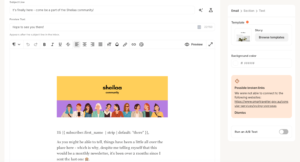
Kit’s editor is simple on purpose. It’s built for writing plain, text-based emails — because simple emails often feel more personal and get better results than fancy ones.
When I used it, it felt like typing in a basic Google Doc. You can add:
- Text blocks
- Images
- Buttons
- Product links
- Countdown timers (using / commands)
The editor is clean and easy to look at. But here’s the problem: you can’t move things around freely. If you want to drag a block to a different spot, it’s a pain. You also can’t make two-column layouts easily. And if you delete something by mistake, getting it back is really hard.
Real users say the same thing:
“The email builder is pretty clunky, sometimes super hard to select the element you need.” (Capterra)
“For the price, it doesn’t give you much in terms of design. The template choices are very small.” (Capterra)
“Kit’s editor is great for writing, but not great if you want your emails to look like a real brand.” (G2)
But some creators really like how simple it is:
“I love how fast and clean the editor is. I’m writing newsletters, not building websites — and Kit is perfect for that.” (G2)
ActiveCampaign’s Email Editor
ActiveCampaign’s editor lets you drag and drop anything, anywhere. It’s smooth, quick, and easy to use.
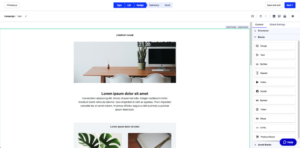
When I tested it, I could:
- Move any block to any spot on the page
- Show different content to different groups of subscribers
- Add text, images, buttons, product links, video previews, and social share buttons
- See how the email looks on phone and computer before sending
- Use an AI tool to write subject lines and email copy
Every template also works well on phones automatically. And if you know how to code, you can use custom HTML too.
Real users love it:
“The email builder is easy and powerful. I can make exactly what I want with no coding.” (G2)
“ActiveCampaign’s drag-and-drop editor is one of the best I’ve used on any tool.” (Capterra)
“I’ve tried at least six email tools and ActiveCampaign’s editor is the cleanest and most flexible.” (G2)
The only complaint? It can feel like a lot when you’re just starting:
“There’s a bit of a learning curve. The editor is great once you know it, but on day one it felt overwhelming.” (Capterra)
My Verdict
If you just want to write simple text emails and don’t care about how they look — Kit works fine.
If you want full control over your design and want emails that look really professional — ActiveCampaign is way better.
Winner: ActiveCampaign (Kit 0 – ActiveCampaign 1)
Design & Templates: How Much Creative Freedom Do You Get?
Kit’s Templates
Kit gives you about 20 templates. They’re plain and simple — which fits Kit’s whole idea of keeping emails feeling personal and not too “sales-y.”
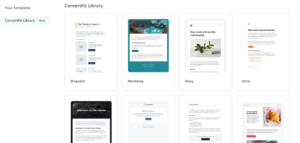
You can use custom code if you know HTML and CSS. But if you just want a nice-looking template without touching code? Kit doesn’t have much to offer.
“Compared to other tools, Kit’s templates feel old and very limited.” (G2)
“For what I pay, I expected more template choices. Very disappointed.” (Capterra)
ActiveCampaign’s Templates
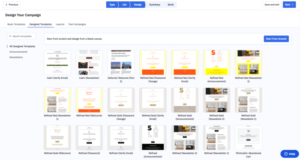
ActiveCampaign gives you 250+ ready-made templates that cover almost everything:
- Newsletters
- Product launches
- Abandoned cart emails (when someone leaves your store without buying)
- Events
- Seasonal sales
- Re-engagement emails (to bring back people who stopped opening)
Every template looks modern and professional. You can change them easily with the drag-and-drop editor. They all work well on phones. And they look right in Gmail, Outlook, and Apple Mail.
ActiveCampaign also lets you show different parts of the same email to different groups of people. That’s a really powerful feature.
“250+ templates and every single one looks professional. I’ve never had to start from scratch.” (G2)
“The template library is one of the best I’ve seen. I always find what I need.” (Capterra)
Some people want even more options:
“A few of the templates look too similar to each other. Would love more choices by industry.” (Capterra)
My Verdict
Kit works for writers who want simple emails.
ActiveCampaign wins for anyone who wants good-looking, professional emails with full control over the design.
Score: Kit 0 – ActiveCampaign 2
Email Automation: Who Makes It Easier (and Smarter)?
Automation means setting up emails that send themselves — no manual work needed. This is one of the most important parts of email marketing. And this is where the gap between these two tools is the biggest.
Kit’s Automation
Kit uses Sequences (a set of emails that go out one by one) and Rules (if someone does X, do Y). You write your emails right inside the sequence, which is smooth and easy once you get the hang of it.
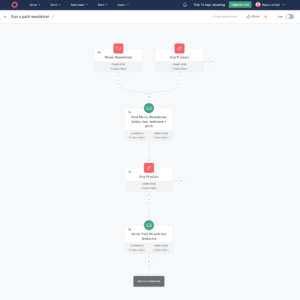
Kit also uses a “tag” system. When someone clicks a link, buys something, or fills out a form — they get a tag automatically. That tag can then start a new email series, change what they see, or add them to a certain group.
New features added in 2025-2026:
- A/B testing inside automations (send two versions and see which works better)
- More outside triggers from tools like Typeform
- Automation based on quiz answers
- Subscriber scoring (rank people by how active or interested they are)
Real users like the system a lot:
“The tag-based automation is powerful once you get it. I can do really specific things with simple rules.” (G2)
“Sequences are smooth to write and the tag logic makes sense once you spend some time with it.” (Capterra)
But there are clear limits:
“The free plan only lets you have one automation — that’s almost useless if you want to test anything.” (Capterra)
“It takes a while to understand when to use sequences vs workflows vs rules. Not beginner-friendly.” (G2)
ActiveCampaign’s Automation
ActiveCampaign’s automation builder is known as the best in the email marketing world. And after using it, I understand why.
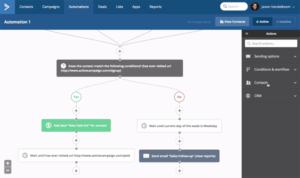
The builder lets you map out a whole customer journey on one screen. You can combine email, text messages, website tracking, sales updates, and outside app triggers — all in one connected flow.
What you get with ActiveCampaign:
- 850+ ready-made automation templates (called “recipes”)
- Email + text messages + push notifications all in one automation
- Goals — let people skip ahead in a series when they do something you want (like make a purchase)
- Split testing inside automations
- Smart send timing — AI picks the best time to send to each person
- Lead scoring that updates based on how people interact with your emails and website
When I built a welcome email series in ActiveCampaign, I could see the whole thing on one screen — from sign-up, to email, to website visit, to sale. It felt like drawing a map of your customer’s whole journey.
Real users are consistently impressed:
“ActiveCampaign’s automation is on a completely different level. I replaced a whole CRM and two other tools with it.” (G2)
“The automation builder is the reason I switched — and I’ve never looked back. Nothing else comes close.” (Capterra)
“850+ automation recipes. I’ve never needed to build from zero. Whatever I need, there’s a recipe for it.” (G2)
“The visual workflow builder changed how I think about my customers. It’s that good.” (Trustpilot)
The downside:
“The power is amazing but it is NOT easy to learn. Expect to spend real time with it.” (Capterra)
“If you just want to send a simple newsletter, ActiveCampaign is way more than you need.” (G2)
My Verdict
Kit’s automation is solid for creators doing simple email series and tag-based workflows.
ActiveCampaign’s automation is in a totally different class — it can handle your whole business once it’s set up right.
Winner: ActiveCampaign
Score: Kit 0 – ActiveCampaign 3
Segmentation & List Management: Who Handles It Better?
Segmentation means splitting your email list into smaller groups so you can send the right message to the right people.
Kit’s Segmentation
Kit keeps everyone on one list and uses tags to tell people apart. A tag is like a label. When someone buys something, clicks a link, or fills out a certain form — they get that label added to their profile automatically.
Using these tags, you can:
- Send emails only to people with certain tags
- Show different content inside the same email to different groups
- Start new automations when someone gets or loses a tag
- Score subscribers based on how active or interested they are
The tag system is very flexible. But it takes time to learn. If you’re new to email marketing, it can feel confusing at first.
“Once I got the tagging system, it became incredibly powerful. But it took me about a week to understand it.” (G2)
“I love how tagging works in Kit — it’s cleaner than managing five different lists.” (Capterra)
ActiveCampaign’s Segmentation
ActiveCampaign lets you break your list into groups based on almost anything:
- Which emails they opened or clicked
- Which pages they visited on your website
- What they bought and how much they spent
- Where they live
- What stage they’re at in your sales process
- How likely they are to buy (predicted by AI)
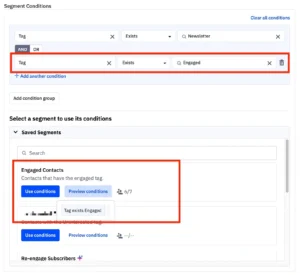
ActiveCampaign also scores each contact as they go. As someone opens emails, visits your site, and buys from you, their score goes up or down. You can use that score to find your best leads and reach out at the right time.
“The segmentation is incredible. I can get as detailed as I want.” (G2)
“Combining email data with website tracking gives me a complete picture of every person on my list.” (Capterra)
“ActiveCampaign treats every contact like an individual. The detail you can get is amazing.” (G2)
The catch:
“It’s very powerful but you need to set it up the right way first. Out of the box it can feel messy.” (Capterra)
My Verdict
Kit wins for being clean and simple — great for people who want a neat, easy-to-manage list.
ActiveCampaign wins for people who want serious detail — you can track every single thing a person does and use that to send smarter emails.
Winner: ActiveCampaign
Score: Kit 0 – ActiveCampaign 4
Forms & Landing Pages: Who Helps You Grow Your List Faster?
Forms and landing pages are how you get people to sign up for your email list. Let’s see how both tools handle this.
Kit’s Forms & Landing Pages
Kit gives you:
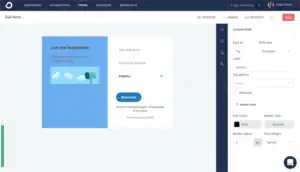
- Inline forms (inside blog posts)
- Pop-ups
- Slide-ins
- Landing pages (unlimited — even on the free plan)
The best thing Kit does here is automatic free gift delivery. When someone signs up, Kit can automatically send them a free gift (like an ebook or checklist) right after they confirm. You don’t need to set up a separate automation for this. It just works on its own.
All your forms and pages connect to a Creator Profile — one link you can share anywhere that shows all your sign-up pages at once.
The downside is that you can’t freely move things around in the design. You pick a template and make small changes, but you can’t fully build a custom layout.
“The landing pages are clean and simple to set up. Not super customizable, but they work.” (G2)
“I wish there were more design options. Right now all the landing pages look pretty much the same.” (Capterra)
ActiveCampaign’s Forms & Landing Pages
ActiveCampaign gives you a full drag-and-drop form builder. You can move things wherever you want, change fonts and colors, and really make it look like yours.
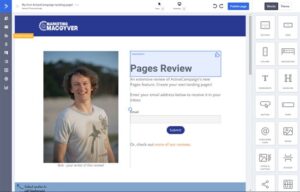
You can also:
- Build multi-step forms (break a long form into smaller steps — people finish these more often)
- Set up smart questions (ask different things based on what someone answered before)
- Control exactly when a pop-up shows up (when someone is about to leave, after they scroll halfway, after 30 seconds on the page)
- Test two versions of a form to see which one gets more sign-ups
- Connect forms directly to your automation and sales tracking
When someone signs up through an ActiveCampaign form, the whole system starts working — they get added to a list, an automation kicks off, and if you have a sales team, a deal can be created for them automatically.
“The forms feed right into my automations. The second someone signs up, everything starts working.” (G2)
“Multi-step forms are great. Shorter forms, more sign-ups, and I still get all the info I need.” (Capterra)
Some complaints:
“The landing page builder isn’t as good as tools built just for landing pages.” (G2)
“The forms work fine but the landing page designs could look a bit more up to date.” (Capterra)
My Verdict
Kit wins if you just need simple forms that automatically send a free gift to new subscribers. It’s faster to set up and easier to use.
ActiveCampaign wins if you want more design control, split testing, and forms that connect to your whole sales system.
Both are solid here. It’s a tie.
Score: Kit 1 – ActiveCampaign 5
Deliverability: Will Your Emails Actually Reach the Inbox?
Deliverability means: do your emails actually land in someone’s main inbox? Or do they end up in spam or the Promotions tab? This matters more than almost anything else.
Kit’s Deliverability
Kit covers the basics:
- Email authentication (SPF and DKIM) so email apps know your emails are real
- Custom domain sending
- Tracking bounced and reported emails
- Checklists to help you set up DMARC (another security setting)
Kit generally does okay here. But if you want to see why your emails are going to the Promotions tab instead of the main inbox, that information is locked behind the most expensive plan — Creator Pro at $139/month.
Real users have mixed feelings:
“Deliverability has been fine for me but I had to set everything up on my own. Not much help from the tool itself.” (Capterra)
“Had some issues with emails not landing in the main inbox. Kit’s support wasn’t helpful in figuring out why.” (G2)
“For what I pay, I expected better data about where my emails are landing.” (G2)
ActiveCampaign’s Deliverability
ActiveCampaign takes this more seriously — and gives you better tools no matter which plan you’re on:
- Full email authentication setup (SPF, DKIM, DMARC)
- A spam checker built right into the email builder — before you hit send, it shows you if your email might get flagged
- A preview of how your email looks in 90+ different email apps
- Smart list cleaning — it automatically stops sending to people who never open your emails, which keeps your account in good standing
- A deliverability tracking screen
That spam checker is a huge deal. You can catch problems before they cost you real money.
“Never had a deliverability problem in three years of using ActiveCampaign. The spam checker before sending is brilliant.” (G2)
“The email preview across different apps saved me from sending broken emails so many times.” (Capterra)
“ActiveCampaign’s automatic list cleaning keeps my sender score healthy without me doing anything.” (G2)
Some users had early problems:
“Deliverability dropped when I first started sending to a big cold list. Had to warm up my domain on my own.” (Capterra)
My Verdict
ActiveCampaign wins — better tools, more detail, and the spam checker alone makes it worth it.
Winner: ActiveCampaign
Score: Kit 1 – ActiveCampaign 6
Reporting & Analytics: Who Gives You Better Insights?
You need good data to know what’s working. Here’s how both tools handle reports.
Kit’s Reporting
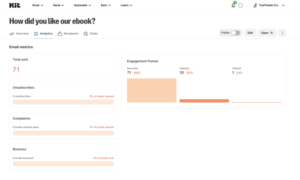
Kit shows you the basics:
- Open rates (how many people opened your email)
- Click rates (how many people clicked a link)
- Unsubscribes
- Sales tracking (if you sell things through Kit)
In early 2026, Kit added Kitlytics — an AI feature that tries to explain why certain emails did well. Instead of just showing numbers, it gives you tips like “your audience responds better to short subject lines.”
This is a nice addition. But the main reports screen is still very basic. There are no click maps, no location data, no breakdown by device type, and no custom reports.
“The reporting tells me what happened but not really why or how to fix it.” (G2)
“Kitlytics is a cool new feature but the basic stats are still too thin for real analysis.” (Capterra)
“I export my data to a spreadsheet to do any real digging. Kit’s built-in reporting just isn’t enough.” (G2)
ActiveCampaign’s Reporting
ActiveCampaign’s reporting is detailed and gives you the full picture:
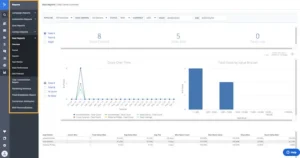
- Open rates, click rates, bounce rates, and unsubscribes
- Click maps — shows you exactly where people clicked inside your email (so you can see which parts get the most attention)
- How much money each email or automation brought in
- Website tracking — after someone clicks your email, you can see which pages they visit and what they buy
- Sales reports (which deals were won or lost, and why)
- Automation reports (where in your email series are people dropping off?)
- Custom reports with 50+ options
- Shareable report links so your whole team can see results without logging in
When I used ActiveCampaign’s reporting, I could follow one subscriber’s whole journey — from opening an email, to visiting a page on my site, to buying something — all in one place. Kit simply can’t do that.
“The reporting in ActiveCampaign is genuinely incredible. I can see exactly which automation step causes people to leave.” (G2)
“Click maps changed how I design emails. I could see nobody was clicking anything below the first section.” (Capterra)
“Knowing which emails actually drove sales told me which campaigns were worth running again. That alone paid for the tool.” (G2)
“Having website data connected to email reports gives me the full picture of every subscriber.” (Trustpilot)
Some users feel it’s almost too much:
“There’s so much data that it took me a while to figure out what to actually look at.” (Capterra)
My Verdict
Kit’s Kitlytics is a smart new feature, but it doesn’t make up for how basic the rest of the reporting is.
ActiveCampaign’s reporting helps you make better decisions — not just check numbers.
Winner: ActiveCampaign
Score: Kit 1 – ActiveCampaign 7
Customer Support: Who’s Got Your Back?
Good support matters a lot — especially when something breaks right before you need to send a campaign.
Kit’s Support
What Kit offers:
- Free plan: Email support only
- Creator plan: Email and live chat
- Creator Pro: Priority support
The experience is really hit or miss. Some users love it. Others had a really bad time.
Good experiences:
“Support replied within a couple of hours and walked me through the fix step by step.” (G2)
“Support has always been helpful and friendly every time I’ve reached out.” (Capterra)
Bad experiences:
“I got bounced between agents for four days trying to fix a simple billing problem.” (Capterra)
“They told me my issue was too complex and I should hire someone. Not what you want from a paid tool.” (G2)
“Live chat is available but agents often switch to email anyway — which makes the live chat pointless.” (Capterra)
The AI chatbot handles basic questions okay. But anything complicated needs a real person — and that’s where things get inconsistent.
ActiveCampaign’s Support
What ActiveCampaign offers:
- All paid plans: Email and live chat support
- Plus and above: One-on-one setup calls to help you get started
- Enterprise: A dedicated account manager, phone support, and custom setup help
- Free learning resources — a knowledge base, video tutorials, community forum, and ActiveCampaign University (a free training program with step-by-step courses)
ActiveCampaign University deserves special mention. It’s one of the best free learning programs in email marketing. You can go from knowing nothing about the tool to feeling fully confident in about a week.
Real users appreciate the support:
“The setup call was super helpful. They went through my specific needs and set things up with me.” (G2)
“ActiveCampaign University is worth so much. I went from confused to confident in about a week.” (Capterra)
“Live chat is quick and the agents actually know the tool. Every person I talked to was helpful.” (G2)
But some users on lower-cost plans felt left out:
“Support response times are slower on cheaper plans. Waiting a full day for a reply is not great when you’re in a rush.” (Capterra)
“Chat support can feel rushed. Harder problems usually need a follow-up email, which slows things down.” (G2)
“It’s hard to get to a real expert. The first responses often feel like copy-paste answers.” (Trustpilot)
My Verdict
Both tools have support problems. Kit’s is up and down — sometimes great, sometimes really bad. ActiveCampaign is more organized but slower on cheaper plans.
ActiveCampaign gets the edge because of better learning resources, setup help, and more steady quality overall. But neither is perfect.
It’s a tie.
Score: Kit 2 – ActiveCampaign 8
Integrations: Do They Play Nice With Your Tools?
Integrations mean: can this tool connect with the other apps and tools you already use?
Kit’s Integrations
Kit connects with 90+ tools including:
- Online stores: Shopify, WooCommerce, Gumroad, Lemon Squeezy
- Course platforms: Teachable, Thinkific, Podia, Kajabi
- Payments: Stripe
- Website builders: WordPress, Wix, Squarespace
- Zapier (which connects to 5,000+ more tools)
Kit also has an API for custom connections. The tools it connects with are mostly ones that creators and solo business owners use.
What’s missing? Connections to bigger business tools — like Salesforce, serious sales tracking systems, or large company software.
ActiveCampaign’s Integrations
ActiveCampaign connects with 900+ tools — more than almost any other email tool out there.
This includes:
- Online stores: Shopify, WooCommerce, BigCommerce, Magento, Squarespace
- Sales trackers: Salesforce, HubSpot, Pipedrive
- Payments: Stripe, PayPal, Square
- Course platforms: Teachable, Thinkific, Kajabi, MemberPress
- Analytics: Google Analytics, Facebook Pixel, Mixpanel
- Support tools: Zendesk, Intercom, Freshdesk
- Ad platforms: Facebook Custom Audiences, Google Ads (your email groups can sync directly to your ad audiences)
- Zapier and Make for anything not covered
The Facebook Custom Audiences sync is a standout feature. When you update a group in your email list, your Facebook ad audience updates automatically. Most tools charge extra for this — ActiveCampaign includes it.
“900 integrations. There’s not a single tool I’ve needed that ActiveCampaign couldn’t connect with.” (G2)
“The Salesforce connection is perfect. My sales team sees email data and I see their sales data. One place for everything.” (Capterra)
My Verdict
Kit covers the tools that most creators need. ActiveCampaign covers almost everything a growing business could ever want.
Not even close.
Winner: ActiveCampaign
Score: Kit 2 – ActiveCampaign 9
Pricing: Which One Gives You More for Your Money?
Let’s talk about what everyone really wants to know — how much does it cost?
Kit’s Pricing
Newsletter Plan (Free)
- Up to 10,000 subscribers
- Unlimited emails
- Unlimited landing pages
- Forms and pop-ups
- ⚠️ Only 1 automation allowed
- Kit shows other creators’ newsletters on your thank-you pages (that’s how they pay for the free plan)
Creator Plan: $39/month for 1,000 subscribers (went up from $29 in September 2025)
- Everything in the free plan
- Unlimited automations
- Visual automation builder
- Better list splitting
- Subscriber scoring
Creator Pro: $139/month for 1,000 subscribers
- Everything in Creator
- Detailed email delivery reports
- Newsletter referral program
- Priority support
How the price grows with your list (Creator Plan):
| Subscribers | Kit (Creator) |
|---|---|
| 1,000 | $39/month |
| 3,000 | $59/month |
| 5,000 | $89/month |
| 10,000 | $139/month |
| 25,000 | $199/month |
Real users are getting more upset with the pricing:
“Kit raised prices by 35% in September 2025 and I’m getting less than what competitors charge half the price for.” (G2)
“The free plan is unbeatable. But the jump from free to $39 for 1K subscribers really stings.” (Capterra)
“I’m paying $139/month for just 1,000 subscribers on Creator Pro. Hard to keep justifying that.” (G2)
ActiveCampaign’s Pricing
ActiveCampaign has four plans. There’s no free plan — only a 14-day free trial.
Starter Plan: $15/month for 1,000 contacts
- Email marketing and automation
- Website tracking
- Basic list splitting
- 24/7 chat and email support
Plus Plan: $49/month for 1,000 contacts
- Everything in Starter
- Landing pages
- Facebook ad audience sync
- Contact scoring
- Up to 25 team members
Professional Plan: $79/month for 1,000 contacts
- Everything in Plus
- AI-powered send time (it picks the best time for each person)
- Split testing inside automations
- Sales win tracking
Enterprise Plan: $145/month for 1,000 contacts
- Everything in Professional
- Custom reports
- Dedicated account manager
- Phone support
How prices compare side by side:
| Subscribers | ActiveCampaign (Starter) | Kit (Creator) | Money Saved with AC |
|---|---|---|---|
| 1,000 | $15/month | $39/month | $24/month ($288/year) |
| 2,500 | $29/month | $49/month | $20/month ($240/year) |
| 5,000 | $45/month | $89/month | $44/month ($528/year) |
| 10,000 | $69/month | $139/month | $70/month ($840/year) |
Real users see the value:
“For everything ActiveCampaign does — email, automation, CRM, site tracking — the price is very fair.” (G2)
“I was paying more for Kit and getting way fewer features. Switching to ActiveCampaign saved me money AND gave me more tools.” (Capterra)
But some people struggle with the cost as their list grows:
“ActiveCampaign gets expensive fast once your list gets large. At 50,000 subscribers the price is tough.” (G2)
“No free plan is a real problem for people who are just starting out with no money.” (Capterra)
My Verdict
Free plan: Kit wins — 10,000 subscribers for $0 is one of the best deals in all of email marketing. Nothing else is close.
Paid plans: ActiveCampaign wins — it’s cheaper than Kit at almost every list size, and you get way more for your money — automation, sales tracking, website tracking, and detailed reports.
If you have zero budget: Kit’s free plan is amazing.
If you’re paying monthly and want the most value: ActiveCampaign saves you $240–$840 per year compared to Kit.
Score: Kit 2 – ActiveCampaign 9 (Kit earns a point for the free plan)
What Real Users Say: Honest Reviews from G2, Capterra, and Trustpilot
I read through hundreds of real reviews so you don’t have to. Here’s the honest truth straight from real users.
What People Love About Kit:
✅ “I’ve been using ConvertKit for years. It’s the most creator-friendly email tool I’ve ever used.” (G2)
✅ “The tag system is really smart once you understand it. I can do very specific things with simple rules.” (G2)
✅ “The Creator Network is underrated. I’ve grown my list by thousands just from other creators recommending me.” (G2)
✅ “10,000 subscribers for free with unlimited emails. Nothing else comes close for new creators.” (Capterra)
✅ “Sequences and tags work really well together. Once it clicks, you don’t want to go back.” (G2)
✅ “Selling digital products and running a paid newsletter in the same tool is really smooth.” (Capterra)
What People Complain About Kit:
❌ “The price jump in September 2025 was brutal. I’m now paying $39 for 1K subscribers and getting less than what competitors charge half that for.” (G2)
❌ “The email editor is clunky. I deleted sections by accident and couldn’t undo it easily.” (Capterra)
❌ “Reporting is way too basic. I have to export to spreadsheets to do any real analysis.” (G2)
❌ “Support is hit or miss. Had a great experience once and a terrible one the next time.” (Capterra)
❌ “The free plan is great but the jump to paid once you need more automations is steep.” (G2)
❌ “I keep running into things I can’t do in Kit. It has real limits.” (Capterra)
What People Love About ActiveCampaign:
✅ “The automation builder is the best out there. I replaced a whole CRM and two other tools with it.” (G2)
✅ “850+ automation recipes. Whatever I want to build, there’s already a starting point.” (Capterra)
✅ “Website tracking connected to email reports completely changed how I understand my audience.” (G2)
✅ “ActiveCampaign University is one of the best free training programs I’ve ever used.” (Capterra)
✅ “900+ connections. My whole set of tools works together through ActiveCampaign.” (G2)
✅ “The sales tracker is actually useful. My sales team and marketing team finally see the same data.” (Trustpilot)
✅ “AI-powered send timing boosted my open rates without me changing anything.” (G2)
✅ “I’ve been using it for five years. It’s grown with my business the whole way.” (Capterra)
What People Complain About ActiveCampaign:
❌ “The learning curve is real. I spent two weeks just learning the tool before I sent my first campaign.” (G2)
❌ “It gets expensive fast as your list grows. The pricing steps feel aggressive.” (Capterra)
❌ “No free plan is a dealbreaker if you’re starting from zero.” (G2)
❌ “Support on the cheapest plan can be slow. If you’re in a rush, expect to wait.” (Capterra)
❌ “The screen feels packed with too much stuff. Especially when you’re new.” (G2)
❌ “Had billing problems that took multiple back-and-forth messages to fix.” (Trustpilot)
My Personal Experience: Kit vs ActiveCampaign
Using Kit
When I first opened Kit, I felt calm. It’s clean and simple. No confusing screens, no packed menus. For someone who just wants to write a newsletter and maybe sell a digital product, it gets out of your way and lets you work.
I really liked the automatic free gift delivery. I set up a new free guide in about ten minutes — and Kit sent it to every new subscriber without me needing to build a separate automation. That was really smart.
But I hit problems fast:
- The email editor felt like trying to paint with one hand behind my back
- I couldn’t make anything that looked different from every other Kit email
- The one-automation limit on the free plan made it impossible to test anything real
- When I did the math on cost as my list grew — $89/month for 5,000 subscribers — I started to question the value
The tag system took me about two hours to fully understand. Not impossible, but not beginner-friendly either. And the reporting? I kept staring at basic open and click numbers wishing there was more to look at.
Kit is a well-made tool for a very specific kind of person. If that’s you — a creator who writes content and sells digital products — you’ll love it. If that’s not you, you’ll keep hitting walls.
Using ActiveCampaign
My first hour with ActiveCampaign was a lot. There were menus and buttons everywhere. It took time to figure out where everything lived.
But after spending about a day with it — watching a few ActiveCampaign University videos and trying out the automation builder — things started to click.
The automation builder is impressive. I built a five-step welcome series with branching paths, a sales deal trigger, and a re-engagement path in about an hour. On almost any other tool, that would have taken half a day.
The biggest thing that stood out was seeing everything connected:
- Someone signs up → automation starts → website tracking turns on → I can see which pages they visit → their score updates → when they hit a certain score, a sales deal gets created → my team gets a notification
That whole loop runs on its own in the background. That’s not just an email tool — that’s a tool that handles a big part of your business automatically.
The learning curve is real, and the price adds up. But for anyone running a real business, you start seeing the results pretty fast.
Who Should Use Kit — and Who Should Use ActiveCampaign?
You know the big differences now. Here’s how to figure out which one fits you.
Choose Kit if:
✅ You’re a creator, blogger, podcaster, or newsletter writer building an audience
✅ You want a big free plan (10,000 subscribers with unlimited emails)
✅ You plan to sell digital products or run a paid newsletter through the tool
✅ You like simple, plain-text emails that feel personal and human
✅ You want the Creator Network to help grow your list through other creators
✅ You’re okay paying higher prices as your list gets bigger
✅ Your readers are fans of your content — not leads in a sales process
👉 Best for creators who want simple tools and built-in ways to make money from their audience.
Choose ActiveCampaign if:
✅ You’re a small business, online store, marketer, or agency
✅ You need the best automation tool in email marketing
✅ You want a built-in sales tracker that connects your marketing and sales in one place
✅ You want to send emails, text messages, and track website visits all from one tool
✅ You need 900+ connections to work with all your other apps
✅ You care about detailed reports — sales tracking, click maps, website data
✅ You’re willing to spend time learning a powerful tool
✅ You want to save $240–$840 per year compared to Kit
👉 Best for businesses and marketers who want real power without needing five different tools.
Final Verdict: Kit vs ActiveCampaign — Which One Should You Choose?
After weeks of testing both tools, reading hundreds of real user reviews, and running actual campaigns on both platforms — here’s my honest answer:
ActiveCampaign is the better tool for most people who are building a real business.
Better automation. Better reports. Better connections. Cheaper on paid plans. A full sales tracker built in. It wins almost everywhere when it comes to pure power.
But Kit isn’t trying to do all of that — and that’s on purpose, while you can also some other option as Activecampaign Alternatives.
Kit’s free plan with 10,000 subscribers is one of the best deals in all of email marketing. Its built-in ways to make money — paid newsletters, digital products, tip jars — are made specifically for creators. And its simplicity is a strength, not a weakness, here are some other option which can be better for you.
The real truth is this: these two tools are made for different people.
If you’re a creator who writes content and sells things to your audience — start with Kit. You can get everything you need for free until you’re actually making money.
If you’re building a real business with a sales process, a growing list, and a team — start with ActiveCampaign. You’ll pay less than Kit’s paid plans and get tools that can grow with your business for years.
Here’s the Honest Truth from Someone Who’s Tested Both:
If you want powerful automation, a built-in sales tracker, 900+ connections, and reports that show you exactly what’s driving sales — → Go with ActiveCampaign.
If you want a huge free plan, simple tools, and a platform made for content creators — → Kit is the right fit.
But if you’re a business serious about using email to grow? The answer is clear.
👉 ActiveCampaign wins.
Final Score
| Platform | Score |
|---|---|
| Kit (ConvertKit) | 2 |
| ActiveCampaign | 9 |
🏆 Winner: ActiveCampaign
The best part? ActiveCampaign gives you a 14-day free trial with full access to every feature — no credit card needed. You can build automations, try the sales tracker, test the reports, and see exactly what this tool can do before you spend anything.
If you’re not sure, just start there. Worst case? You learned a lot about what you need. Best case? You found the only email tool your business will ever need.
Have questions about Kit vs ActiveCampaign? Drop them in the comments below and I’ll answer from personal experience.
