

Last Updated: 18 Nov 2025
In this article, we’ll compare Omnisend and Mailchimp, two of the most popular email marketing tools that help you send campaigns, grow your list, and boost sales through automation.
Mailchimp, founded in Atlanta, has been the go-to choice for small businesses and creators for years. It’s simple, easy to use, and perfect if you just want to send newsletters or set up basic automations. Many beginners start their email marketing journey with Mailchimp — and for good reason.
But as your business grows, you might start wondering — is Mailchimp still powerful enough to handle advanced marketing needs, especially for eCommerce stores?
That’s when tools like Omnisend come into the picture. Built specifically for eCommerce brands, Omnisend goes beyond traditional email marketing.
It combines email, SMS, and push notifications into one platform and offers deep integrations with Shopify, WooCommerce, and BigCommerce. It’s designed to help online stores increase revenue through smarter automation and personalized omnichannel campaigns.
We’ve personally used both Omnisend and Mailchimp — either for our own projects or for client stores — so everything you’ll read here comes from real, hands-on experience. Our goal is to show you the real picture of how these platforms perform, not just what their marketing pages claim.
In this detailed comparison, we’ll break down Omnisend vs Mailchimp across all key areas — from email design and automation to deliverability, pricing, and customer support — so you can decide which platform truly fits your business needs.
How We Test Tools
“We test tools the hard way — by actually using them. At Mailotrix, every review comes from real campaigns, broken automations, and late-night experiments. We dig deep so you don’t have to waste time (or money) on tools that only look good in marketing.” for more info about our tools review process read here.
Short on Time? Here’s My Quick Verdict for Mailchimp vs Omnisend
After testing both tools in real campaigns, here’s the honest takeaway:
Mailchimp is better for beginners who want a simple, familiar email builder with polished templates and strong analytics.
Omnisend, however, is built for ecommerce growth — offering superior automation, SMS+email combos, and higher conversion-focused tools at a lower long-term cost.
If you run an online store or want powerful automation without overpaying, Omnisend is the smarter choice.
| Factor | Mailchimp | Omnisend | Winner |
|---|---|---|---|
| Ease of Use | Beginner-friendly, simple UI | Easy + ecommerce-focused workflow | Tie |
| Email Editor | Clean but limited flexibility | More modern, interactive blocks + undo | Omnisend |
| Automation | Basic on lower plans | Advanced, behavior-based, multichannel | Omnisend |
| Ecommerce Tools | Limited unless on higher plans | Product feeds, SMS, cart recovery built-in | Omnisend |
| List Management | Audiences can double-charge | Flexible, real-time segmentation | Omnisend |
| AI Features | AI writer + basic recommendations | AI copy + predictive targeting | Omnisend |
| Signup Forms | Multiple builders, limited polish | Unified builder + gamified forms | Omnisend |
| Deliverability | Good | Stronger for ecommerce flows | Omnisend |
| Pricing | Becomes expensive as you grow | More affordable long-term | Omnisend |
🏆 Final Score: Mailchimp 3 – Omnisend 8
Winner: Omnisend
Omnisend gives you stronger automation, better ecommerce tools, and more value for the price.
If you’re running a store or scaling fast, Omnisend beats Mailchimp in almost every area that matters.
If you prefer a polished UI and deeper analytics, Mailchimp is still a safe choice — but for conversions and ROI, Omnisend wins.
Ease of Use
Is Omnisend easy to use? Is Mailchimp more user-friendly?
Honestly, both tools are beginner-friendly and designed with simplicity in mind. Their interfaces are clean, intuitive, and well-organized, making it easy for new users to navigate without a steep learning curve.
However, both have their own quirks that you’ll likely notice once you start exploring.
Mailchimp’s navigation, for instance, isn’t always straightforward. The landing page builder is tucked away under the Campaigns section — not exactly where most people would expect it.
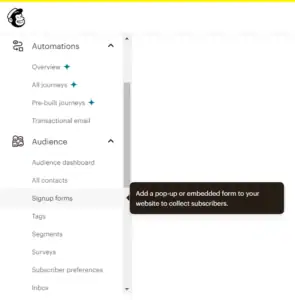
To make things trickier, the search bar can’t help you find it, since it’s designed to locate only specific campaigns, not features.
Omnisend, on the other hand, keeps most things simple, but its layout isn’t perfect either. The landing page builder is oddly placed under Forms, which might confuse first-time users.
And one small frustration with Omnisend is that you must connect your online store before you can start doing anything inside the platform. That’s not ideal if you’re just testing the waters or comparing tools before making a commitment.
Overall, both platforms score high on usability — you can easily create campaigns, set up automations, and check reports without much learning curve.
👉 Verdict: Ease of Use — Draw (1–1)
Both Omnisend and Mailchimp are simple and straightforward. Mailchimp is slightly better for beginners who want to start fast, while Omnisend feels smoother for eCommerce users who already have an online store.
Email Editor
Now let’s talk about something that matters most — the email editor. This is where you’ll spend most of your time designing newsletters, automations, and promotional campaigns.
Mailchimp’s email editor is reliable and easy to use. It offers a wide range of drag-and-drop content blocks like text, images, buttons, dividers, and social links.

You can also add dynamic product recommendations, which is great for sending more personalized emails.
However, one major frustration is that Mailchimp doesn’t have an undo button. Even simple keyboard shortcuts like CMD + Z or CTRL + Z don’t work — so if you make a quick mistake while editing,
you’ll have to manually fix it. That’s a small but annoying limitation, especially for designers who like to experiment.
Omnisend’s email editor, on the other hand, feels more modern and feature-rich — especially for eCommerce brands.
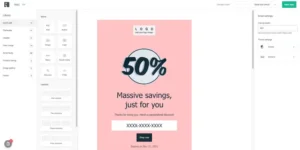
It offers all the standard drag-and-drop blocks, plus some unique content elements like scratch cards, gift boxes, and product pickers, which make your emails more interactive and sales-focused.
Omnisend also recently launched a new email editor with a “Quick Add” section — a smart shortcut that keeps your most-used content blocks just one click away.
It’s smoother, faster, and has an actual undo button, which makes the editing experience far less frustrating than Mailchimp’s.
👉 Verdict: Email Editor — Winner: Omnisend (2–1)
While Mailchimp’s editor is simple and dependable, Omnisend clearly wins for its flexibility, speed, and eCommerce-focused design. The inclusion of gamified blocks (like scratch cards) and the ability to quickly add products make Omnisend’s editor far more engaging for online stores.
Designs & Flexibility
Having a good range of professional, customizable templates is crucial for any email marketer. The right design not only saves time but also ensures your emails look polished and consistent across campaigns.
Mailchimp
Mailchimp has a long-standing reputation for offering a variety of newsletter templates — but here’s the catch:
If you’re on Mailchimp’s free plan, the templates you get are very limited and quite outdated.
Most designs feel a bit old-school and lack the modern touch you’d expect from a leading email marketing platform in 2025.
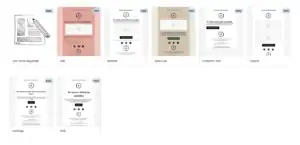
To unlock Mailchimp’s 100+ modern templates, you’ll need to upgrade to the Essentials plan or higher. And if you want the freedom to add or code your own HTML templates,
you’ll need to go one step further and subscribe to the Standard plan, which makes the feature quite expensive for small businesses or bloggers.
So, while Mailchimp does provide a large library, it’s a paywall-heavy experience — and that’s something worth keeping in mind if you’re running on a budget.
Omnisend
Omnisend, on the other hand, takes a different approach. It offers around 25 templates, which may sound fewer at first glance, but all of them are modern, visually appealing, and optimized for conversions.
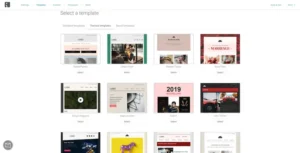
The best part? You get full access to all templates on every plan, including the free version. That’s a big plus for users who don’t want to upgrade just to get better design options.
Omnisend also allows me to import or code your own HTML templates on any plan — again, something Mailchimp only offers on paid tiers.
When it comes to editing flexibility, both platforms perform well. Omnisend makes it easier to adjust things like padding and spacing, while Mailchimp does a great job at letting you apply style changes (like fonts and sizes) across multiple content blocks at once — which saves a lot of time when maintaining design consistency.
Verdict: Omnisend Wins (3–1)
The fact that Omnisend gives you access to all modern-looking templates — plus the ability to import HTML templates for free — makes it the more flexible and cost-effective option.
Mailchimp still offers more templates in total, but locking the good ones behind higher-tier plans makes it less beginner-friendly.
👉 Winner: Omnisend — for its clean, modern templates and generous access across all plans.
Segmentation and List Management
Both Mailchimp and Omnisend help you organize and target your contacts — but they approach segmentation very differently.
Mailchimp uses “Audiences” to separate contacts, which sounds great until you realize one contact can exist in multiple lists — and you’ll pay for each duplicate. Moving subscribers between audiences can also get messy.

Segmentation is available, but limited on lower plans (only 5 conditions). You can group people by tags, location, engagement, or purchase history, but dynamic updates are missing unless you upgrade.
Overall, it’s fine for general marketing, but not ideal for ecommerce.
Omnisend is built for ecommerce — and it shows. You can create real-time, behavior-based segments like “viewed product but didn’t buy” or “repeat shoppers.”
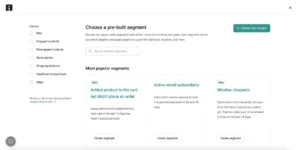
Segments update automatically, work across email, SMS, and push, and there’s even AI segmentation to build lists like “churn risks” or “VIP buyers.”
It’s smarter, faster, and requires zero manual cleanup.
Winner: Omnisend (4–1)
| Tool | Star Rating | Notes |
|---|---|---|
| Mailchimp | ⭐⭐⭐⭐ | Great for basic segmentation, but duplicates contacts and limits rules on lower plans. |
| Omnisend | ⭐⭐⭐⭐⭐ | Advanced real-time segmentation for ecommerce with AI and multichannel support. |
Email Automations
Whether you want to set up a welcome series, an abandoned cart reminder, or a complex customer journey, there’s no denying that email automation is one of the most powerful features of any email marketing tool. It’s what helps you turn subscribers into loyal customers — automatically.
Mailchimp offers a solid set of automation features, but there’s one big catch — they’re not available on the free plan. You’ll need to upgrade to at least the Essentials plan to unlock even basic automations like welcome emails or order confirmations.
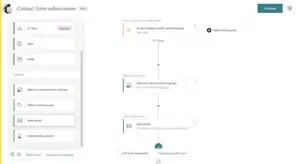
That’s a serious limitation considering how central automations are to modern email marketing.
Once unlocked, Mailchimp’s visual automation builder is quite polished. You can easily create workflows based on actions such as sign-ups, purchases, or specific subscriber behavior.
Mailchimp also includes pre-built automation templates for common use cases like birthday emails, product recommendations, and abandoned carts.
However, compared to eCommerce-focused tools like Omnisend, Mailchimp still feels a little restricted. You won’t find native SMS, push notifications, or multi-channel flows without relying on third-party integrations.
This is where Omnisend really shines. Its entire automation system is designed specifically for eCommerce brands.
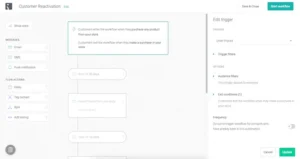
Omnisend provides a visual workflow builder that feels intuitive, powerful, and clean. You can easily combine email, SMS, Facebook Messenger, and push notifications all within the same automation flow — something Mailchimp simply doesn’t support natively.
You also get access to a large library of pre-built automation templates for welcome series, abandoned carts, cross-sell campaigns, reactivation flows, and more.
But what really stands out is how advanced Omnisend’s triggers are. You can create automations based on:
Order placed
Product viewed
Cart abandoned
Customer added to a segment
Page viewed
Plus, Omnisend supports A/B testing inside automations, so you can experiment and optimize every message in your customer journey.
And the best part? All these automation features are available even on Omnisend’s free plan. That’s a huge advantage for smaller stores or new marketers who want to use advanced workflows without paying a premium.
Verdict: Omnisend Wins (5–1)
👉 Winner: Omnisend — for its powerful eCommerce-focused automation, built-in SMS and push notifications, and unlimited workflow flexibility even on the free plan.
Registration Forms
Most modern email marketing tools make it simple to connect forms to your website or online store, and that’s true for both Omnisend and Mailchimp. But how they approach it is quite different.
Omnisend’s form builder feels modern, smooth, and purpose-built for eCommerce users. It offers four types of forms:
Signup bar
Popup form
Landing page
Wheel of Fortune (a gamified signup form that boosts engagement and conversions)
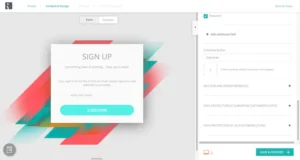
Each form type comes with a variety of clean, professional templates — all of which are fully customizable, even on the free plan. You can easily adjust the design, timing, behavior, and display rules (like exit intent or scroll triggers).
The entire process — from creation to integration — is intuitive and quick. You don’t have to jump between multiple editors or tools. Everything happens in one smooth workflow.
Overall, Omnisend’s form builder strikes a perfect balance between ease of use and creative flexibility, especially for online store owners who want to grow their list through high-converting, interactive forms.
Mailchimp gives you plenty of form options — embedded forms, pop-ups, standalone form builder, contact forms, and third-party integrations. However, each option uses a separate form builder, which makes the experience feel unnecessarily complicated.
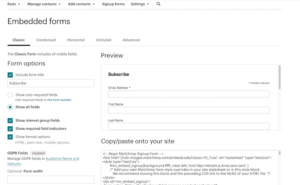
Instead of one unified editor, you’ll find yourself jumping between different menus and interfaces depending on the form type. It’s functional, but not very intuitive.
While Mailchimp does offer popup templates, they’re pretty basic and don’t offer the same design flexibility or behavior settings that Omnisend provides. The embedded and standalone forms, in particular, look outdated unless you manually customize them with CSS.
So while Mailchimp covers the basics, the overall experience is clunky and outdated compared to Omnisend’s seamless approach.
Verdict: Omnisend Wins (6–1)
You get access to attractive templates, advanced targeting options, and even a fun gamified Wheel of Fortune form — all in a single, streamlined builder.
👉 Winner: Omnisend (6–1) — for offering a much more user-friendly, creative, and conversion-focused form-building experience.
Spam & Design Testing
Before sending your email campaign to thousands of subscribers, it’s essential to test your design and deliverability. You want to make sure your email looks great across all devices — and, just as importantly, that it actually lands in the inbox instead of the spam folder.
Let’s see how Omnisend and Mailchimp handle this area.
Mailchimp offers a fairly robust design testing feature thanks to its partnership with Litmus, a well-known email testing platform. Through this integration, you can preview your email across different devices and email clients (like Gmail, Outlook, or Apple Mail) to ensure everything looks consistent before sending.
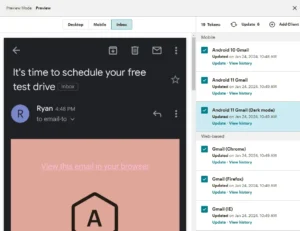
However, there’s a small catch — this feature isn’t free.
If you’re on a monthly paid Mailchimp plan, you’ll get 25 “Inbox Preview” tokens per month. Once you run out, you’ll need to purchase additional tokens directly from Litmus, which can quickly become expensive if you send campaigns regularly.
Unfortunately, Mailchimp doesn’t include built-in spam testing, so you won’t be able to check if your message is likely to land in spam folders. That’s a big omission for a tool that targets serious marketers.
Omnisend keeps things much simpler. You can preview your email on both desktop and mobile devices and send test emails to see how they look in your inbox. The preview is fast and reliable, ensuring your layouts display correctly on the most common screen sizes.
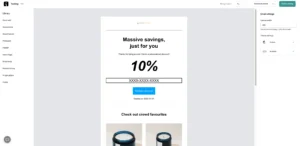
However, Omnisend doesn’t support client-specific previews (like Gmail vs. Outlook) and, just like Mailchimp, doesn’t include built-in spam testing either.
That means you won’t know exactly how your email might render across every client — or whether certain spam filters might flag it — unless you use third-party tools.
Verdict: Mailchimp Wins (6–2)
While neither tool offers full spam testing, Mailchimp takes a slight edge here thanks to its Litmus-powered design previews, which allow you to see how your emails appear on different clients and devices.
Reporting and Analytics
Both Omnisend and Mailchimp deliver strong reporting tools, but they shine in different areas.
Omnisend’s reports are clean, visual, and easy to interpret. You’ll see metrics like open and click rates, click maps, revenue, and unsubscribes — plus advanced ecommerce insights like lifecycle maps and customer retention reports.
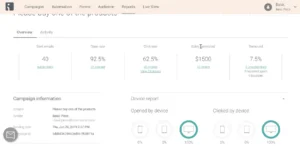
It also tracks performance across email, SMS, and push notifications, giving ecommerce stores a complete multichannel view. The only thing missing is geolocation tracking.
Mailchimp offers more advanced analytics overall. Along with campaign metrics, you get geolocation tracking and a Content Optimizer (AI feature) that suggests how to improve your emails.

You can also track social and ecommerce conversions, making Mailchimp ideal for data-focused marketers.
Winner: Mailchimp (6–3)
Both tools deliver solid reporting experiences, but Mailchimp edges out Omnisend thanks to its geolocation tracking, AI-powered content optimizer, and broader campaign tracking, including social and ecommerce insights.
Deliverability
Email deliverability is one of the most critical factors in determining whether your emails actually reach your subscribers’ inboxes or end up in spam. A reliable platform not only sends your emails but also helps you maintain a strong sender reputation through authentication, bounce management, and spam complaint tracking.
Let’s see how Omnisend and Mailchimp compare in this area.
Omnisend performs exceptionally well in terms of deliverability reliability. It includes all the core authentication protocols — SPF and DKIM — ensuring your emails are properly verified and trusted by ISPs.
The platform also provides:
Bounce and spam complaint tracking, allowing you to monitor how your emails are being received.
Sender reputation support, helping you maintain high inbox placement rates.
Detailed guidance on list hygiene and sending best practices, ensuring your campaigns remain compliant and consistent.
Although Omnisend doesn’t offer a dedicated deliverability dashboard or Feedback Loop (FBL) access, its overall performance and stability make it a very dependable option for ecommerce marketers.
✅ In short: Omnisend gives you all the necessary tools and guidance to maintain long-term deliverability success.
Mailchimp covers the basic deliverability essentials, including SPF/DKIM authentication and bounce handling. It also offers the option to use dedicated IPs (on higher-tier plans), which can help improve deliverability for larger senders.
However, Mailchimp lacks several advanced features that experienced senders often rely on, such as:
A dedicated deliverability dashboard for visibility into performance metrics.
Feedback loop (FBL) access to monitor spam complaints directly.
Built-in list hygiene tools that automatically clean and maintain contact quality.
Because of these missing elements, maintaining strong deliverability over time with Mailchimp can be more manual and limited, especially for ecommerce brands sending high volumes of email.
✅ In short: Mailchimp delivers the basics but doesn’t provide the deeper visibility or tools to proactively manage your sender reputation.
| Tool | Star Rating | Notes |
|---|---|---|
| Mailchimp | ⭐⭐⭐ | Covers the basics: authentication, bounce handling, and dedicated IP addresses. However, it lacks a deliverability dashboard, feedback loop access, and built-in list hygiene, making long-term deliverability management harder. |
| Omnisend | ⭐⭐⭐⭐ | Includes essential deliverability tools like SPF/DKIM authentication, bounce and spam complaint tracking, and sender reputation guidance. While it doesn’t offer a full dashboard or FBL access, it provides strong guidance and reliable inbox performance. |
Winner: Omnisend (7–3)
While both platforms handle fundamental deliverability needs, Omnisend clearly outperforms Mailchimp by offering stronger tools, detailed guidance, and better ongoing support for inbox performance.
Landing Pages
Both Omnisend and Mailchimp come with free landing page builders, and importantly, both allow you to create an unlimited number of landing pages, which is perfect for marketers running multiple campaigns.
Mailchimp’s landing page builder is easy to use and functional. You can:
Add tracking for Facebook Pixel, Google Analytics, or Mailchimp’s own analytics.
Use pre-built templates for newsletters, promotions, or lead capture.
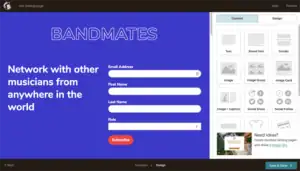
However, Mailchimp doesn’t allow customization of the thank you/confirmation page after someone signs up, which can be limiting if you want to create a fully branded experience or deliver a special offer immediately after signup.
Omnisend also offers a user-friendly landing page builder, and it does allow customization of the thank you/confirmation page, which is a big plus. This gives you more control over the subscriber experience and can help boost conversions.
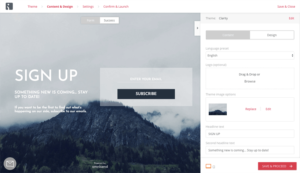
That said, Omnisend has fewer landing page templates, and the overall design customization options are limited compared to some dedicated landing page tools. You can still create functional, good-looking pages, but you won’t get as much creative freedom.
Verdict: Draw (7–3)
Both platforms provide solid free landing page builders, with unlimited pages and easy tracking options. Mailchimp offers slightly better tracking integrations, while Omnisend shines with customizable thank you pages.
✅ Winner: Tie — Both are sufficient for basic landing page needs, but neither platform fully replaces a dedicated landing page builder for highly customized campaigns.
Integrations & Extras
For most online store owners, integrations are a crucial factor when choosing an email marketing platform. Your tool needs to connect seamlessly with your eCommerce platform, CRM, or other apps you rely on daily.
If you’re a Shopify user, good news — Mailchimp’s Shopify integration is back after a brief hiatus. Beyond Shopify, Mailchimp offers a huge marketplace full of integrations with third-party apps.
From CRMs and social media platforms to analytics tools and webinar software, you’ll likely find the app you need.
This wide selection of native integrations is a major advantage for businesses that use multiple tools, as it allows you to automate workflows and keep everything connected without relying on third-party platforms.
Omnisend focuses heavily on eCommerce integrations. It connects seamlessly with popular platforms such as:
Shopify
BigCommerce
WooCommerce (WordPress)
Magento
OpenCart
Drupal Commerce
Volusion
For apps outside this list, you can rely on Zapier to bridge the gap, but that adds an extra step and occasionally a cost.
While Omnisend doesn’t have as many native integrations as Mailchimp, it covers all the major eCommerce platforms and includes built-in features like SMS, push notifications, and gamified forms, which reduces the need for external apps in many cases.
Verdict: Omnisend Wins (8–4)
Although Mailchimp has a larger marketplace of integrations, Omnisend takes the edge here for most eCommerce users because it natively integrates with all the major platforms and offers built-in multi-channel features. For online stores, these built-in tools often reduce reliance on additional apps, making Omnisend the more practical choice.
Support
Customer support can make or break your experience with an email marketing platform, especially if you run an online store and need quick solutions.
Mailchimp’s support options for free plan users are very limited. After the initial 30-day trial, free plan subscribers often find themselves on their own, relying mostly on the knowledge base and community forums.
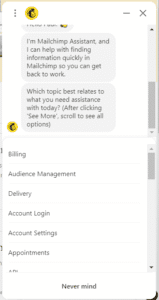
For paid plans, support improves, but many users report that response times can still be slower compared to competitors. While Mailchimp does offer a detailed knowledge base, live support isn’t as fast or accessible on lower-tier plans.
Omnisend, on the other hand, provides email support even for free plan users, which is a big advantage for smaller businesses or those just starting out.
For paid plans, Omnisend offers 24/7 email and live chat support, and in my experience, the support agents are friendly, responsive, and helpful, quickly resolving issues and providing guidance.
Like Mailchimp, Omnisend also maintains a comprehensive knowledge base with tutorials, guides, and troubleshooting articles.
Verdict: Omnisend Wins (9–4)
While both platforms offer detailed documentation, Omnisend clearly outshines Mailchimp in terms of accessible, responsive, and helpful support, especially for free plan users who might otherwise be left on their own.
✅ Winner: Omnisend (9–4)
Abandoned Cart Campaigns
When it comes to recovering lost sales, both Mailchimp and Omnisend offer abandoned cart campaigns — but Omnisend is miles ahead for ecommerce users.
Omnisend lets you create abandoned cart workflows that combine email, SMS, and push notifications — all in one place.
For example, you can send a reminder email first, and if the shopper doesn’t open it, automatically follow up with a text message a few hours later.
It also tracks behavior even for visitors who aren’t yet subscribed but have entered their email during checkout — helping you recover more lost sales.
You can customize messages based on cart value or product type, and use pre-built templates to launch campaigns quickly.
Plus, Omnisend gives detailed reports showing exactly how much revenue your abandoned cart emails bring back — super helpful for tracking ROI.
Mailchimp’s abandoned cart campaigns are mainly email-based. While SMS is available, it requires a separate add-on and doesn’t work in the same flow as emails.
Another downside — advanced automations (like multi-step cart reminders) are only available on higher-tier paid plans. Free and lower plans have very basic options.
Cart tracking also depends on shoppers entering their email during checkout, meaning you might miss carts from users who never reach that step.
Templates are clean and easy to use but lack Omnisend’s ecommerce-specific touches, like personalized product recommendations or dynamic discounts.
✅ Winner: Omnisend (10–4)
AI Features
AI can save a ton of time in email marketing — but Omnisend and Mailchimp use it in very different ways.
Omnisend’s AI feels built for eCommerce. You can type a short prompt, and it’ll write full emails — subject line, copy, and preheader — that actually match your brand tone. It also adds personalized product recommendations based on browsing and purchase behavior.

The best part? Its AI segmentation automatically groups customers into lists like “VIPs,” “churn risks,” or “frequent buyers,” based on real shopping data. Plus, it can even build multi-channel automation flows (email, SMS, and push) with smart timing and AI-generated content already set up.
Mailchimp’s AI (Intuit Assist) is more beginner-friendly. It helps you write subject lines, polish content, and create on-brand designs using your logos and colors. It’s quick and easy to use, perfect for simple email campaigns.
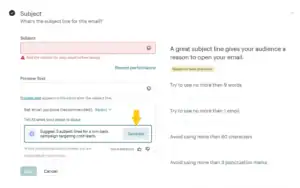
However, advanced AI tools like predictive segmentation and customer insights are limited to higher-tier plans, making it less powerful for serious eCommerce marketers.
✅ Winner: Omnisend (11–6 in favor of Omnisend)
SMS Marketing
SMS marketing is where Omnisend really shines — it’s built for eCommerce from the ground up. Mailchimp, on the other hand, treats SMS as more of an add-on feature rather than a core channel.
Omnisend makes SMS a seamless part of your marketing. You can add text messages directly into your automation workflows — like abandoned carts, welcome sequences, or post-purchase follow-ups — alongside email and push notifications. It all works together in one simple drag-and-drop builder.
You also get SMS credits included in Pro plans (and unused ones roll over), which keeps costs predictable. Plus, it supports two-way conversations, so you can chat with customers in real time. Omnisend even auto-handles compliance rules like quiet hours and opt-outs, saving you legal headaches.
Mailchimp, meanwhile, offers SMS only as a separate add-on for paid plans. You need to buy credits separately, and they don’t roll over. The setup is more manual, and you can’t easily combine SMS with email in a single automation — both run on separate workflows.
It’s fine for occasional text campaigns, but if you’re running an online store and want a truly connected experience, Omnisend is the clear winner.
✅ Winner: Omnisend (12–6 in favor of Omnisend)
Pricing
“We all know prices are rising, and email marketing tools aren’t any different. Both Mailchimp and Omnisend have increased their costs over time, and features that used to be free now often require a paid plan.”
Here’s a quick look at what both platforms charge at different contact levels:
| Contacts | Mailchimp | Omnisend |
|---|---|---|
| 500 | Free plan (limited features) | Free plan (all basic features, 500 emails/month, up to 250 contacts) |
| 5,000 | Essentials: $75/month Standard: $100/month | Standard: $81/month (60,000 emails included) |
| 10,000 | Essentials: $110/month Standard: $132/month | Standard/Pro: $132/month (120,000 emails included) |
| 50,000 | Essentials: $385/month Standard: $413/month | Pro: $413/month (600,000 emails included) |
| 100,000 | Premium: $800/month | Pro: $900/month (1,200,000 emails included) |
A few years ago, Omnisend’s free plan was fairly limited in reach, but today it’s more generous than Mailchimp’s free plan. You get access to most tools even on free, though the number of emails per month is capped. Mailchimp’s free plan, on the other hand, locks several basic features behind paid tiers, which can be frustrating.
For small senders, Mailchimp might look cheaper. But for eCommerce stores or growing lists, Omnisend provides a clearer value — you always know what you’re getting, and most features are available without paying extra.
✅ My Take: If you want transparency and full-feature access while scaling, Omnisend is the better choice. Mailchimp can be cheaper for very small lists, but you’ll likely hit paywalls fast.
Omnisend vs Mailchimp — Which One Should You Choose?
After trying both tools — sending campaigns, setting up automation, checking reports, and testing AI and SMS features — here’s my honest opinion:
Omnisend is the best choice for online stores. Its email, SMS, and push notifications work together in one system. You can easily create abandoned cart emails, welcome series, and personalized messages. The reports are clear and show exactly what your customers are doing.
Mailchimp is good if you are just starting out or only need simple email newsletters. It’s easy to use and connects with many apps. But if your business grows, its automation and customer targeting are more limited compared to Omnisend. You should have a look on these Mailchimp Alternatives.
You can learn using Mailchimp by using this tutorial
Here’s a simple breakdown 👇
✅ Choose Omnisend if:
You run or plan to run an online store.
You want emails, SMS, and push messages in one system.
You want to send personalized messages and use smart suggestions.
You want a tool that can grow with your business.
✅ Choose Mailchimp if:
You are a blogger, small business, or creator who mainly sends newsletters.
You want a simple tool that’s easy to use and connects with apps.
You don’t need advanced automation yet.
For me, Omnisend is the better long-term choice. It takes a little time to learn, but once set up, it helps grow your sales and email list. Mailchimp is easier at first, but Omnisend gives you more control and opportunities to grow.
👉 [Try Omnisend for free]
👉 [Try Mailchimp for free]
Have you tried either of these tools? Share your experience in the comments — I’d love to know which one worked best for you!
