


Last Updated: 30 Jan 2026
When I started comparing email marketing tools, two names kept coming up again and again — MailerLite and Mailchimp.
On one side, MailerLite felt lightweight, budget-friendly, and focused on giving creators and small businesses exactly what they need without overcomplicating things.
On the other side, Mailchimp looked like the established giant — packed with features, integrations, and a brand almost everyone recognizes.
But here’s the challenge I faced: I didn’t want to lock myself into a tool that was either too basic for long-term growth or too expensive for the stage I’m in right now.
That’s why I decided to test both platforms myself.
I created campaigns in both tools, explored automation workflows, tried building landing pages, and compared how easy it was to actually get things done. I even imported the same test list into both platforms to see how they handled subscriber management and deliverability.
This isn’t just a surface-level comparison based on feature lists. It’s a hands-on look at what MailerLite and Mailchimp are really like when you use them daily to grow an email list and run a business.
So, let’s jump into MailerLite vs Mailchimp and see which one is the better fit for you.
How We Test Email Marketing Tools
We keep things simple — we only review tools we actually use.
At Mailotrix, we believe you can’t judge an email marketing tool by its features page alone. So I test every tool myself — running real campaigns, building automations from scratch, checking deliverability rates, and seeing how each platform performs in day-to-day use.
I also dig through real user reviews on G2, Capterra, Trustpilot, and Reddit to understand what others are experiencing. Then I compare their feedback with my own results and share a straightforward, unbiased verdict you can trust.
If you want to see exactly how we test tools, read our full process here.
Short on Time? Here’s My Quick Verdict
I’ve tested both MailerLite and Mailchimp extensively — building campaigns, setting up automations, creating signup forms, and running real-world tests. If you don’t want to read the full breakdown, here’s the straight-to-the-point summary:
MailerLite vs Mailchimp – Quick Comparison
| Category | MailerLite | Mailchimp | Winner |
|---|---|---|---|
| Email Editor | Clean, beginner-friendly | Functional but cluttered | MailerLite |
| Design & Templates | Modern, easy to customize | More templates, some outdated | Tie |
| Automation | Simple, works on free plan | Advanced, can overwhelm | MailerLite |
| Forms & Lists | Easy & quick | More features, confusing | MailerLite |
| CRM & Reporting | Focused on email, clear stats | Stronger CRM, advanced analytics | Mailchimp |
| Deliverability | Solid & reliable | Inconsistent inbox placement | MailerLite |
| Integrations | Covers essentials (150+) | Hundreds of options (330+) | Mailchimp |
| Customer Support | 24/7 live chat, responsive | Limited on free, mixed reviews | MailerLite |
| Pricing | Affordable, unlimited emails | Expensive, caps on sends | MailerLite |
👉 My Final Take:
Choose MailerLite if you’re a beginner, creator, or small business owner who wants simplicity, ease of use, and affordability without sacrificing essential features.
Get Mailerlite for free
Choose Mailchimp if you need advanced automation, deeper analytics, extensive integrations, and don’t mind paying premium prices for them.
Overall Score: MailerLite 8 – Mailchimp 5
Email Editors
Let’s talk about the tools you’ll actually use every day—the email editors. I tested both extensively to see which one makes creating emails easier.
Mailchimp’s Email Editor
I started with Mailchimp mainly because it’s the most popular email tool out there. Honestly, setting up my first email wasn’t hard at all. The drag-and-drop editor is functional and gets the job done.
But here’s what I noticed after spending more time inside the editor: many useful options are surprisingly hard to find. Navigation feels clunky and inconsistent.
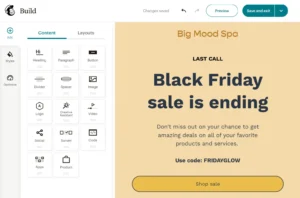
For example, adding your own HTML is buried under the “Code Your Own” option, and this feature is now only available on paid plans. Free users can’t add custom HTML anymore, which is frustrating if you want design control.
Mailchimp now runs two builders side by side — the New Builder and the Legacy Builder. And honestly? This dual-system thing created more headaches for me than I expected.
Here’s the problem: templates saved in one builder won’t work in the other. So if you create 10 perfect templates in the new builder, then switch to legacy for some specific feature, those 10 templates become useless. You’ll have to rebuild them from scratch. I learned this the hard way.
One G2 reviewer echoed my frustration: “The platform makes it easy to design visually appealing email campaigns with its drag-and-drop builder and numerous customizable templates.” But another Capterra user said, “I found it too difficult to use and I just couldn’t navigate it well enough to find or do what I wanted.”
Mailchimp’s AI (Intuit Assist) has improved a lot. It can write full emails, suggest subject lines, and even create images or social post content based on your goal. It’s helpful, but you still need to review and fix things to make it feel “human.”
What personally slowed me down: Mailchimp keeps updating its interface design. Many times, I found myself searching for basic settings instead of focusing on writing the actual email. It works, but it doesn’t always feel smooth.
MailerLite’s Email Editor
MailerLite felt simple and intuitive from the very first email I created.
The email editor is clean and easy to understand. You can choose between drag-and-drop and plain text. Everything feels placed where you expect it to be, which made my workflow so much faster.
What I really liked were the ready-made content blocks. Want to add blog posts, products, images, countdown timers, or even surveys? Just drag the block and you’re done. MailerLite now has 80+ smart content blocks, and they feel more modern than Mailchimp’s basic blocks.
MailerLite also offers 160+ templates for paid users, covering many industries — not just online stores. And unlike before, you can now change templates or move saved sections between designs, which saves a ton of time when you’re creating similar campaigns.
Their AI has also grown significantly. It’s not just a writing helper anymore. I can give it a single prompt, and it creates a full email campaign — layout + text. It also uses Smart Sending, which helps send emails at better times automatically based on subscriber behavior.
Overall, MailerLite made email creation feel fast and stress-free. I could focus on my message instead of fighting with the interface.
My Verdict
Mailchimp’s editor is powerful, but it feels heavy and confusing at times — especially with the dual-builder mess.
MailerLite is faster, simpler, and easier for daily email work — especially if you don’t want to waste time hunting for settings.
Winner: MailerLite (0–1)
Designs and Templates
Design is one of the first things I check when testing any email tool. My simple rule is this: templates should look modern, work well on mobile, and be easy to edit — even if you’re not a designer.
Mailchimp’s Designs
Mailchimp has a huge template library. In 2026, they now offer 260+ professionally designed templates in the new builder, plus 130+ in the legacy builder — over 390 templates total.
The templates are mobile-friendly, well organized by category, and easy to edit. I also liked that you can save a design and reuse it later — very helpful if you send similar emails often.

But here’s what I noticed after testing the free plan: Mailchimp doesn’t really give you “ready-made designs” for free anymore. Free users get access to a few basic and featured layouts, but most of them are just empty frames. You still have to design everything yourself.
Almost all the fully designed, good-looking templates are locked behind the Essentials plan ($13/month).
Also important to know: You cannot upload your own HTML design on the free plan anymore. The custom HTML editor is now only available on the Standard plan ($20/month).
So yes, Mailchimp has great designs — but most of the good ones require a paid subscription.
A Capterra reviewer confirmed this frustration: “Some of the templates aren’t very intuitive to use. I often have to upload images that I have created in other platforms in order to get the design that I want.”
MailerLite’s Designs
MailerLite has fewer templates than Mailchimp, but the quality really surprised me.
They now offer 160+ modern templates for paid users, and honestly, many of them look cleaner and more fresh than Mailchimp’s older designs.
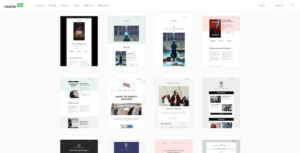
What I really appreciated is how MailerLite focuses on content blocks. If I wanted to add a blog post section, product showcase, image gallery, or countdown timer, I could do it in one click. This made designing emails feel fast and stress-free.
Now, a clear downside: On the free plan, you cannot access the template gallery. You have to start from scratch.
However — and this is important — free users can still use the drag-and-drop editor with all content blocks. So while you don’t get ready-made templates, you’re not completely stuck. You can still build professional-looking emails, it just takes a bit more effort.
Also worth noting: MailerLite does not allow custom HTML on the free plan. The HTML editor is only available on the Advanced plan ($18/month for 500 subscribers).
My Verdict
Mailchimp clearly wins when it comes to number of templates (390+ vs 160+), but most of the good designs are paid-only.
MailerLite offers fewer templates, but they look more modern and are easier to customize — even when starting from scratch using content blocks.
Both tools are good in their own way, so for design alone, I’d call this round a tie.
Winner: Tie (1–2)
Email Automation
Automation is where email marketing gets powerful. I wanted to build a simple welcome sequence — 3-4 emails that go out when someone subscribes — to see how each platform handles it.
MailerLite’s Automation
MailerLite made it incredibly easy.
The visual drag-and-drop builder is clean and intuitive. I clicked “Create Workflow,” chose my trigger (someone joins a group), and dragged email blocks onto the canvas. Adding delays was simple — just drop in a “Wait” block and set the time.
Even on the free plan, I built a 5-email welcome sequence with no issues. The only limit on the free plan? One trigger per workflow. For basic sequences, that’s totally fine and covers 90% of what most small businesses need.

MailerLite offers 18 pre-built automation recipes for common scenarios like welcome series, abandoned cart recovery, and re-engagement campaigns. These templates saved me a lot of time.
Users on G2 consistently praise this feature. One reviewer said, “MailerLite is easy to use and straightforward to implement, even for small teams. The interface is clean, and creating email campaigns, forms, and basic automations is simple.”
Mailchimp’s Automation
Mailchimp felt clunky in comparison.
First problem: no automations on the free plan anymore. Mailchimp removed this feature in late 2025. I had to upgrade to the Essentials plan ($13/month) just to test automation.
Once inside, the automation builder (called “Customer Journeys”) works, but it’s slower. More menus, more clicks, more confusion. It felt built for enterprise users with complex needs, not small creators like me.
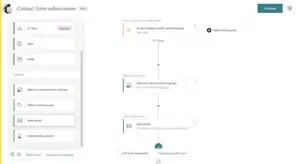
Mailchimp does have better advanced features like conditional logic (“if someone clicks this link, send that email”) and multivariate testing. But for a simple welcome series? Total overkill.
A Capterra reviewer summed it up well: “Mailchimp allows us to quickly create, automate, and analyze email campaigns, making it an excellent choice for both beginners and seasoned marketers.” But another user noted, “It became way too complicated and very non-intuitive. The free option is very limited, almost useless.”
My Verdict
MailerLite is faster, easier, and works on the free plan. Mailchimp is powerful for complex workflows but way more complicated than most people need — and costs money just to access basic automation.
Winner: MailerLite (1–3)
List Management
List management can make or break your email marketing experience. Let me show you why MailerLite handles this so much better than Mailchimp.
Mailchimp’s List Management
Mailchimp uses something called “Audiences,” which sounds simple — but it quickly becomes a problem.
Here’s the biggest issue I encountered: Mailchimp still treats each Audience as a separate list.
So if the same person is added to your “Newsletter” audience AND your “Customers” audience, Mailchimp counts them twice — and you pay twice for the same email address.
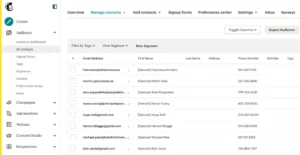
Yes, this is still true in 2026. I tested it myself.
Even worse, there’s an unsubscribe problem many people don’t notice until it’s too late. If someone is in two Audiences and unsubscribes from one, they stay subscribed to the other. This often leads to angry replies, spam complaints, and trust issues — a real compliance risk.
To clarify something important:
- Groups in Mailchimp are meant for subscriber choices (like “Weekly updates” or “Monthly updates” checkboxes)
- Tags are meant for your internal use (like labeling someone as “VIP” or “Customer”)
They sound similar, but serve very different purposes. This confused me at first.
One important update: On the free plan, Mailchimp now allows only one Audience. You can’t even create a second list unless you upgrade. This prevents accidental double billing, but also limits flexibility for beginners.
Multiple G2 reviewers complained about this. One said, “The cost is absurd. Small businesses are penalized for having a larger email list by way of HUGE cost.” Another added, “I don’t like that even though we do everything required to validate the domain URL, the emails can still end up in junk.”
MailerLite’s List Management
MailerLite handles subscribers in a much cleaner way, and I loved this immediately.
No matter how many groups someone joins, they are counted only once. One email address = one subscriber = one billable contact.
This alone is a huge reason why many creators (including me) prefer MailerLite.
MailerLite uses:
- Groups for organization (manual or form-based)
- Segments for smart filtering (automatic rules)
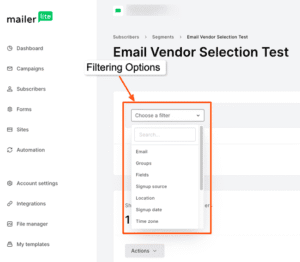
In 2026, Segments became even more powerful. I can now segment people based on email behavior, like:
- Subscribers who haven’t opened emails in 3 or 6 months
- People who clicked but didn’t buy
- Inactive subscribers for list cleaning
This makes list hygiene much faster and easier than in Mailchimp. MailerLite even has a built-in “Clean up inactive” feature right in the dashboard — I can remove people who haven’t opened any email in 6+ months with one click. Huge time-saver.
One important thing to note: MailerLite’s free plan is now capped at 500 subscribers (reduced from 1,000 in late 2025). So while list management is still easier and safer, the free growth limit is lower than before.
My Verdict
MailerLite clearly wins this round. It keeps list management simple, flexible, and budget-friendly — while Mailchimp can get messy and expensive fast due to double-counting and confusing audience structures.
Winner: MailerLite (1–4)
Registration Forms
Building forms to capture leads is essential for list growth. Let me show you how each platform handles this.
Mailchimp’s Forms
Building forms in Mailchimp gave me mixed feelings.
On paper, Mailchimp offers a lot — embedded forms, pop-ups, and landing pages. But when I actually tried setting them up, the experience felt messy and confusing.
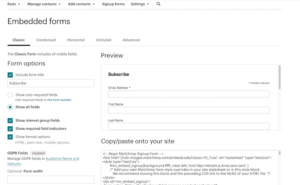
Mailchimp currently has three different form builders running at the same time:
- The New Form Builder (which Mailchimp is pushing now) — modern and mobile-friendly
- The Classic Form Builder — still exists and looks like it hasn’t changed in years
- The Pop-up builder — uses drag-and-drop and feels okay
The confusing part? If you don’t use the New Form Builder, your forms may not display properly on mobile. And Mailchimp doesn’t make this very clear upfront.
So yes — you can build forms, but you often have to stop and think: “Am I using the right builder for this?”
In 2026, when most signups happen on phones, that extra friction really matters. I wasted time switching between builders to figure out which one would work best.
MailerLite’s Forms
MailerLite made form building feel much smoother and faster.
I was able to create both pop-ups and embedded forms in just a few minutes, without guessing which tool to use. Everything’s in one place.
One thing I really liked: Every form is directly connected to a subscriber group, so new signups are automatically organized. No extra setup needed later.
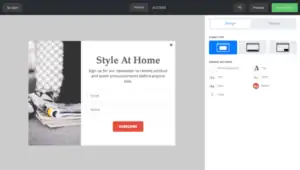
MailerLite has also expanded its pop-up templates significantly. They now offer 50+ ready-made pop-up templates, including:
- Simple email signups
- Countdown teasers
- Spin-to-win wheels (great for e-commerce)
They look modern, clean, and are easy to customize. I used a countdown pop-up for a limited-time offer and it converted really well.
One thing to know, though: While you can create regular pop-ups on the free plan, promotion pop-ups (like coupon or sale pop-ups that don’t just collect emails) are now limited to the Advanced plan.
Embedded forms are still a bit simple design-wise — not bad, just not flashy. But they’re functional and get the job done.
My Verdict
MailerLite wins for ease and clarity.
Mailchimp offers more form types, but the multiple builders and mobile confusion make it harder than it should be.
If you want to build forms quickly, have them look good on mobile, and avoid setup mistakes — MailerLite feels far more beginner-friendly.
Winner: MailerLite (1–5)
Reporting and Analytics
You need to know what’s working (and what’s not) to improve your campaigns. Let’s see how each platform handles reporting.
MailerLite’s Reporting
MailerLite covers all the important basics really well:
- Opens and clicks
- Unsubscribes
- Devices and browsers
- Real-time purchase tracking (if you connect Shopify or WooCommerce)
In 2026, this got much better. Now, when I send a sales email, I can see exactly how much money that email made almost instantly. Earlier, there used to be a delay — that’s gone now.
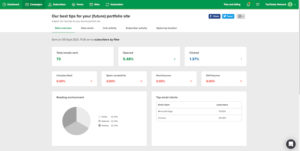
The dashboard is clean and easy to understand. I can quickly check:
- Which campaigns performed best
- Which forms brought the most signups
- How each email inside an automation is performing
MailerLite also added a very useful feature: “Clean up inactive.” Right from the dashboard, it shows people who haven’t opened any email in 6+ months — and I can remove them with one click. This is a huge time-saver for keeping my list healthy and engaged.
That said, reporting still feels a bit simple compared to enterprise tools. You don’t get deep details like social media stats, lifetime value tracking, or advanced email-client breakdowns.
Mailchimp’s Reporting
Mailchimp clearly goes deeper with data, and I appreciated this.
Along with opens and clicks, you get tools like:
- Send Time Optimization – predicts the best time to send emails to each contact
- Predictive Segments – tells you things like people who are likely to buy or people who are likely to unsubscribe (based on past behavior)
Mailchimp’s big win in 2026 is Predictive Segments. It’s surprisingly accurate and can help you target the right people at the right time. MailerLite doesn’t offer this yet.

Mailchimp also lets you:
- Compare multiple campaigns side by side
- Track full customer journeys
- See revenue reports in more detail
- Connect Google Analytics for deeper tracking
If you enjoy digging into numbers and making data-driven decisions, Mailchimp definitely gives you more to explore.
However, like most ESPs post-Apple Mail Privacy Protection, Mailchimp doesn’t filter out bot clicks or show accurate open rates for Apple Mail users — so your metrics might be slightly inflated.
My Verdict
MailerLite’s reports are clean, fast, and very practical — especially with real-time sales tracking and easy list cleanup.
Mailchimp wins if you want advanced insights, predictions, and deep data analysis.
👉 Simple and action-focused? MailerLite
👉 Data-heavy and insight-driven? Mailchimp
This round goes to Mailchimp — but only if you actually use those advanced reports. For most small businesses, MailerLite’s reporting is more than enough.
Winner: Mailchimp (2–5)
Deliverability
If your emails don’t reach the inbox, nothing else matters. Deliverability is critical, so I tested both platforms carefully.
MailerLite’s Deliverability
Before I could send my first campaign in MailerLite, my account went into manual review (took about 24 hours). Annoying at first, but smart — it keeps spammers off their servers and protects sender reputation.
I set up SPF and DKIM authentication in about 10 minutes using their step-by-step guide. Then I ran my list through their built-in Email Verifier tool — it caught 8 invalid emails before I sent anything. This saved me from bounces and potential spam complaints.
After sending multiple campaigns, I consistently hit 94-95% deliverability. Most emails landed in the primary inbox when I tested with my own Gmail and Outlook accounts.
According to EmailToolTester, MailerLite maintains a solid reputation for inbox placement. Users on G2 also praise this. One reviewer said, “MailerLite’s email deliverability contributed to an increase in open rates.”
However, I should mention that some Trustpilot reviewers reported account suspensions due to strict bounce-rate rules. One user with excellent engagement metrics (30% open rate, 18% click rate, 0 spam complaints) still got suspended for “Terms of Service violation” without warning. This shows MailerLite takes list quality very seriously — which is good for reputation, but can be harsh if you’re not careful.
Mailchimp’s Deliverability
Mailchimp’s Omnivore AI automatically scans your list and blocks risky emails. It works, but you can’t see why emails were flagged — just “blocked.” Less transparency than I’d like.
Mailchimp claims a 99%+ delivery rate, but that’s misleading. That means emails left their servers, not that they hit the inbox. Real inbox placement is closer to 77-81% based on independent tests — significantly lower than MailerLite.
When I sent the same campaign through both platforms, Mailchimp’s emails landed in Gmail Promotions more often than MailerLite’s. Multiple users echoed this in reviews.
One G2 reviewer said, “I don’t like that even though we do everything required to validate the domain URL, the emails can still end up in junk.”
Mailchimp provides SPF and DKIM authentication setup, but they don’t offer full SPF alignment, a deliverability dashboard, or list cleaning tools built-in. They also don’t show you feedback about spam complaints from subscribers.
Both platforms now require custom sending domains with DMARC authentication if you’re sending 5,000+ emails per day to Gmail or Yahoo (this became mandatory industry-wide in 2024).
My Verdict
MailerLite gives you more control, better inbox placement (94-95% vs 77-81%), and proactive tools like email verification.
Mailchimp works fine for basic needs, but I trust MailerLite more for keeping emails out of spam and maintaining a healthy sender reputation.
Winner: MailerLite (2–6)
Integrations
One thing I always check is how well a platform connects with other tools. After all, your email marketing rarely works in isolation.
Mailchimp’s Integrations
Mailchimp impressed me here — it integrates with 330+ apps covering:
- E-commerce (Shopify, WooCommerce, Magento, BigCommerce)
- CRM (Salesforce, HubSpot, Zoho)
- Social media (Facebook, Instagram, Twitter)
- Analytics (Google Analytics)
- Zapier for connecting to 5,000+ additional apps
The breadth is impressive. Whatever tool I needed, chances were I could connect it without trouble. This is one area where Mailchimp’s maturity really shows.
MailerLite’s Integrations
MailerLite offers 150+ native integrations covering:
- E-commerce (WooCommerce, Shopify via Zapier)
- CMS (WordPress, Drupal)
- CRM platforms
- List validation tools
- Lead generation platforms
The selection is smaller, but covers all the essentials. For anything not directly integrated, you can use Zapier or Make (formerly Integromat).
I had no trouble linking the tools I use regularly — WordPress, Stripe, Google Analytics, and WooCommerce. For most small businesses, MailerLite’s integrations cover what you actually need.
My Verdict
Mailchimp wins on numbers (330+ vs 150+), and if you need to connect with less common tools or want the most integration options, Mailchimp is the better choice.
MailerLite’s integrations are more focused, but they’re simpler to set up and cover the essentials.
Both get the job done — no clear winner here based on functionality alone, so I’m giving this to Mailchimp for sheer volume.
Winner: Mailchimp (3–6)
Customer Support
Getting help quickly is important, especially when you’re stuck on a campaign deadline. Here’s how these two platforms stack up.
MailerLite’s Customer Support
MailerLite’s support impressed me from the start.
All accounts get email ticket support and a solid knowledge base full of articles and videos. The help center is well-organized and easy to search.
During the free trial, I could also use live chat — the icon is right at the bottom corner, which made it super convenient. I tested it with a few questions, and I got responses within 5-10 minutes every time.
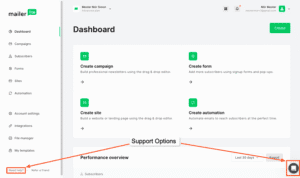
I really liked the small “Need help?” button on the main menu too; it made searching for solutions really quick and intuitive.
Users on G2 consistently praise MailerLite’s support. One reviewer said, “Customer support was outstanding—less than five minutes to get live online chat.” Another mentioned, “We’re so happy to hear that MailerLite has made your email marketing experience easier and more intuitive.”
The downside? Free plan users don’t get live chat access after the trial period ends — only email support. But responses are still fast, usually within 24 hours.
Mailchimp’s Customer Support
Mailchimp’s support is fine if you’re on a paid plan, but frustrating otherwise.
Free plan: Email support for the first 30 days only. After that, you’re completely on your own with self-service help docs.
Paid plans: 24/7 email and live chat support. Standard plans get one onboarding session. Premium customers ($350+/month) get four additional sessions plus phone support.
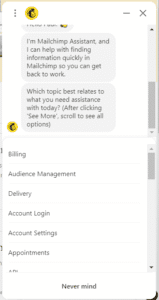
The problem? Users consistently complain about support quality in reviews.
Here’s what real users said on Trustpilot:
- “This may be the most unhelpful company I have ever dealt with — customer service is nonexistent and there is no phone number.”
- “Mailchimp reached out publicly with a generic invitation to ‘understand more’… The result has been another 48 hours of total silence.”
- “For a server-to-server API block, support suggests browser fixes like clearing cookies.”
I tried the Mailchimp Assistant bot myself, and honestly, it mostly just points you to the knowledge base. Not very helpful when you need real assistance.
Help documentation quality also varies wildly — some topics get detailed guides with screenshots, others get barely any explanation.
My Verdict
MailerLite’s 24/7 live chat (even during free trial), faster response times, and consistently positive reviews make it the clear winner.
Mailchimp’s support has too many complaints about slow or unhelpful responses, and cutting off free users after 30 days is a bad look.
Winner: MailerLite (3–7)
Pricing
Finally, let’s talk about what really matters—how much this is going to cost you. Pricing is one of the biggest differentiators between these two platforms.
Mailchimp’s Pricing
Mailchimp has four plans, but here’s the brutal truth: their free plan keeps shrinking.
Free Plan: $0/month
- 250 contacts (down from 500 in mid-2025, and 2,000 before that!)
- 500 monthly email sends (daily limit of 250)
- 1 audience
- No automation
- No A/B testing
- No scheduling
- Email support for first 30 days only
When I signed up for Mailchimp’s free plan in early 2026, I was shocked. I imported my test list of 180 subscribers, but my dashboard showed 213 contacts. Why?
Because Mailchimp counts unsubscribed and unconfirmed contacts toward your limit. I had to manually archive 30 dead emails just to free up space. Super annoying.
With only 500 sends per month, I sent 2 emails to my 180 subscribers and boom — already used 360 sends. One more campaign and I’d hit my cap. This is ridiculous for anyone trying to build an engaged list.
A Trustpilot reviewer perfectly summed it up: “MailChimp’s philosophy to users is simply to hold you hostage: ‘I am altering the deal—pray I don’t alter it any further.'”
Essentials Plan: $13/month for 500 contacts
- 10x your contact limit in monthly sends (5,000 sends for 500 contacts)
- Basic automation
- A/B testing (2 variants)
- Email scheduling
- 24/7 email and chat support
- 3 seats
Standard Plan: $20/month for 500 contacts
- 12x your contact limit in monthly sends
- Advanced automation
- Send time optimization
- Dynamic content
- 5 seats
Premium Plan: $350/month for 10,000 contacts
- 15x your contact limit in monthly sends
- Multivariate testing (up to 8 variants)
- Comparative reports
- Advanced segmentation
- Unlimited seats
- Phone support
Here’s the catch: As your list grows, costs escalate quickly:
- 5,000 contacts: $75/month (Essentials), $110/month (Standard)
- 10,000 contacts: $110/month (Essentials), $185/month (Standard)
- 50,000 contacts: $385/month (Essentials), $635/month (Standard)
And remember — Mailchimp counts unsubscribed and unconfirmed contacts toward your billing limit unless you archive them manually. This is a hidden cost that catches many people off guard.
MailerLite’s Pricing
MailerLite has a simpler, more transparent pricing structure:
Free Plan: $0/month
- 500 subscribers (reduced from 1,000 in late 2025)
- 12,000 monthly emails (unlimited sends within that limit)
- Full automation features (1 trigger per workflow)
- Landing pages
- Forms and pop-ups
- Basic reporting
- Email support
When I tested MailerLite’s free plan, it was completely different from Mailchimp. I imported the same 180 subscribers, and my dashboard showed exactly 180 contacts — no surprises.
MailerLite doesn’t count unsubscribed contacts. Once they’re gone, they’re gone from your billing. Way more fair.
With 12,000 monthly sends, I could email my 180 subscribers 66 times per month before hitting any limit. That’s more than twice per day if I wanted to. Of course, you shouldn’t email that often, but the point is: you have breathing room.
Growing Business Plan: $10/month for 500 subscribers (or $8/month billed annually)
- Unlimited emails
- Full automation features
- Landing pages
- Forms and pop-ups
- A/B testing
- 24/7 support
- 5 team members
- Newsletter templates
Advanced Plan: $18/month for 500 subscribers (or $14.40/month billed annually)
- Everything in Growing Business
- Facebook integration
- Custom HTML editor
- Promotion pop-ups
- Multi-trigger workflows
- Preference center
- AI writing assistant
- Unlimited team members
Pricing scales:
- 2,000 contacts: $24/month (Growing), $38/month (Advanced)
- 5,000 contacts: $39/month (Growing), $62/month (Advanced)
- 10,000 contacts: $73/month (Growing), $117/month (Advanced)
- 50,000 contacts: $289/month (Growing), Custom pricing (Advanced)
Discounts:
- 15% off bi-annual plans
- 20% off annual plans
- 30% nonprofit discount
Side-by-Side Comparison
| Subscribers | Mailchimp (Essentials) | MailerLite (Growing) | Winner |
|---|---|---|---|
| 500 | $13/month | $10/month | MailerLite |
| 5,000 | $75/month | $39/month | MailerLite (almost half price!) |
| 10,000 | $110/month | $73/month | MailerLite |
| 50,000 | $385/month | $289/month | MailerLite |
MailerLite is significantly cheaper at every tier, and you get unlimited emails on all paid plans. Mailchimp caps your sends based on a multiplier system.
My Verdict
MailerLite wins this round hands down.
You get all features from day one for $10/month, while Mailchimp charges $13+ and locks essential features behind higher tiers. Plus, MailerLite gives you unlimited emails on all paid plans — Mailchimp caps you.
The only downside is MailerLite doesn’t have a forever-free plan with 1,000 contacts anymore (just 500). But if you’re serious about email marketing, the Growing Business plan’s value is unbeatable.
I switched to MailerLite specifically because of the pricing difference, and I haven’t looked back.
Winner: MailerLite (3–8)
What Real People Say: User Reviews
I spent hours reading reviews on G2, Capterra, Trustpilot, Reddit, and Software Advice. Here’s what actual users are saying about both platforms:
What People Love About MailerLite:
- “Incredibly affordable with excellent features”
- “Customer support is outstanding — fast and helpful”
- “Easy to use, even for beginners”
- “Automation is powerful and accessible”
- “Unlimited emails on all paid plans”
- “Clean interface and intuitive design”
What People Complain About MailerLite:
- “Strict account approval process can be frustrating”
- “Free plan was reduced from 1,000 to 500 subscribers”
- “Templates could use a design refresh”
- “Not as many integrations as competitors”
- “Some users report unexpected account suspensions”
- “Reporting is simple — lacks deep analytics”
- “Learning curve when switching between email builder, forms, and website builder”
What People Love About Mailchimp:
- “Easy to use with a clean interface”
- “Great for scheduling campaigns way in advance”
- “Lots of templates and customization options”
- “AI features are helpful for improving campaigns”
- “Extensive integrations (330+)”
- “Advanced reporting and predictive segments”
What People Complain About Mailchimp:
- “Costs become absurd as your list grows — small businesses are penalized”
- “Customer service is nonexistent” / “Support is unhelpful”
- “Free plan is basically useless now with only 250 contacts and 500 sends”
- “They charge for unsubscribed contacts unless you archive them manually”
- “Navigation is clunky and inconsistent”
- “Emails keep going to spam despite domain authentication”
- “Dual builder system is confusing — templates don’t transfer”
- “No automation on free plan anymore”
Final Verdict: MailerLite vs Mailchimp
After weeks of hands-on testing, reading hundreds of user reviews, and running real campaigns on both platforms, here’s my honest take:
Choose Mailchimp if:
- You need extensive integrations (330+) with niche tools
- You want advanced reporting and predictive analytics
- You’re already invested in the Mailchimp ecosystem
- You need deeper CRM features and customer journey tracking
- You have a very small list (under 250 contacts) and can survive on the free plan
- Budget isn’t a concern and you value brand recognition
Choose MailerLite if:
- You’re looking for the best value for money
- You need powerful automation without breaking the bank
- You want 24/7 live chat support (even during free trial)
- You’re tired of confusing pricing and shrinking free plans
- You send a lot of emails and want unlimited sending on paid plans
- You prefer simplicity and ease of use over feature bloat
- You want fair subscriber counting (no double-charging)
My Personal Recommendation:
MailerLite wins for most small businesses, startups, creators, and budget-conscious marketers.
You get enterprise-level features (automation, landing pages, A/B testing, AI tools) for a fraction of Mailchimp’s cost, plus better support, clearer pricing, and fairer subscriber management.
Mailchimp isn’t a bad platform — it’s powerful and reliable with excellent integrations. But the constant price increases, shrinking free plan (now just 250 contacts), removed features from lower tiers, confusing navigation, and support issues make it hard to recommend in 2026.
Overall Winner: MailerLite
Here’s how they stacked up across all categories:
| Category | Winner | Score |
|---|---|---|
| Email Editor | MailerLite | 0–1 |
| Templates & Design | Tie | 1–2 |
| Automation | MailerLite | 1–3 |
| List Management | MailerLite | 1–4 |
| Registration Forms | MailerLite | 1–5 |
| Reporting & Analytics | Mailchimp | 2–5 |
| Deliverability | MailerLite | 2–6 |
| Integrations | Mailchimp | 3–6 |
| Customer Support | MailerLite | 3–7 |
| Pricing | MailerLite | 3–8 |
Final Score: Mailchimp 3 / MailerLite 8
The Best Part?
MailerLite offers a free plan with 500 subscribers and 12,000 monthly emails — no credit card required. You can literally try everything I’ve talked about here risk-free.
So if you’re on the fence, start with MailerLite’s free plan. Test the automation, play with the editor, send some campaigns, build a few forms. See if it works for your business.
Worst case? You learned what you need.
Best case? You found a powerful, affordable email marketing platform that actually helps you grow.
Have you used MailerLite or Mailchimp? What was your experience? Drop a comment below and let me know!
