

Last Updated: 30 Nov 2025
If you’ve spent any time in the email marketing world, you’ve definitely heard this line:
“Mailchimp is the biggest tool in the industry — you have to try it.”
Everyone around me said the same. Bloggers, YouTubers, Facebook groups, even marketers I look up to — all insisting Mailchimp was the “gold standard.”
So I decided to stop listening… and start testing.
I signed up for Mailchimp and used it for a full 6 months on my own email list. I built campaigns, automation workflows, signup forms, landing pages — the whole thing. Long enough to understand what Mailchimp truly excels at, and where it quietly struggles behind the scenes.
But I didn’t rely only on my own experience.
I dug through hundreds of reviews from real Mailchimp users, Reddit discussions, Capterra ratings, complaints, compliments, and long-term user feedback. Then I compared everything with what I personally experienced over those 6 months.
And that’s why this review is different.
This is the most honest, experience-backed Mailchimp review you’ll read — based on real usage, real data, and real user stories.
Let’s dive in.
Table of Contents
ToggleMailchimp review – In short
Mailchimp is a powerful email tool with a flexible editor, 225+ templates, and AI tools. Paid templates look good, but free ones feel old.
Automation is strong, but free users don’t get it, and beginners might find it confusing.
Managing contacts can be tricky. Multiple lists can cause double charges, and unsubscribed contacts still count toward your limit.
Forms and landing pages are easy to make, but some don’t look good on phones. Reports show opens, clicks, and revenue.
Deliverability works, but no dashboard or list-cleaning tools.
Mailchimp has lots of integrations and good support for paid users. Pricing can get high as your list grows.
Overall, Mailchimp is strong, but beginners and free users may face limits.
| Feature | Rating (out of 5) | Notes |
|---|---|---|
| Email Editor | ⭐⭐⭐⭐☆ | Flexible but slightly confusing UI |
| Designs | ⭐⭐⭐⭐☆ | Plenty of templates, free ones are basic |
| Email Automation | ⭐⭐⭐⭐☆ | Powerful but not free, overwhelming for beginners |
| List Management | ⭐⭐⭐☆ | Confusing, can get expensive due to duplicate contacts |
| Registration Forms | ⭐⭐⭐☆ | Multiple builders, some forms not mobile-friendly |
| Reporting | ⭐⭐⭐⭐☆ | Advanced, actionable, Google Analytics integration |
Mailchimp’s Email Editor: Easy Start, But Not Always Smooth
When I started my 6-month test with Mailchimp, the email editor was the first thing I explored — because if a tool can’t make writing and designing emails easy, nothing else matters.
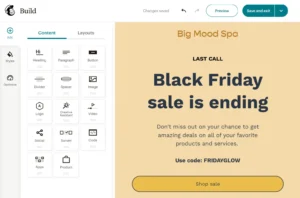
Setting up my first email wasn’t difficult at all. Mailchimp’s drag-and-drop builder is beginner-friendly, clean, and familiar.
But the more I used it, the more I realized something: some important options are tucked away in strange corners.
For example, if you want to add your own custom HTML (which I often do), it’s hidden under a small “Code Your Own” section. Not impossible to find — but not intuitive either.
Mailchimp gives you 80+ templates, which sounds great on paper. The problem?
A lot of them feel a little outdated, especially compared to modern email tools. I found myself switching templates frequently, and thankfully Mailchimp lets you change templates mid-editing without breaking your layout — a small but useful feature.
Mailchimp has also added a new AI-powered email builder that pulls your brand colors and fonts directly from your website. It’s a cool concept, and it does save time. But in my experience, the output still needed manual fixing — spacing issues, font mismatches, and alignment tweaks.
And here’s the part I didn’t enjoy during all six months:
Mailchimp keeps changing its interface.
New designs, new layout adjustments, new placements for old settings. Instead of speeding up my workflow, it slowed me down because I kept searching for basic options I already knew existed somewhere.
Overall, Mailchimp’s editor is solid and capable — but it’s not the fastest or the most modern experience compared to newer email tools.
Mailchimp’s Email Designs: Big Library, Mixed Quality
Mailchimp gives you access to a huge library of around 225 templates — all neatly organized by category and fully mobile-responsive. Editing them is straightforward, and I really liked that you can save your favorite design and reuse it anytime. If you send regular newsletters, this saves a ton of time.
You also get the option to upload your own HTML template, which is great if you want full design control or use a custom-made layout.
But here’s the part many beginners don’t realize:

On the free plan, you only get 8 basic templates, and they honestly look outdated. Simple, plain, and nowhere close to the more polished templates available in the paid tiers. If strong visual branding matters to you, the free plan will feel very limiting.
Mailchimp’s design library is big — but the best stuff sits behind a paywall.
Mailchimp Email Automation: Powerful, But Locked Behind a Paywall
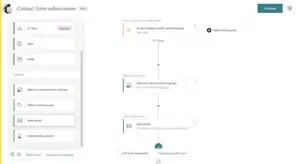
When I tested Mailchimp’s automation for 6 months, I was genuinely impressed by how deep the system goes. You get triggers for almost everything — link clicks, abandoned carts, page views, subscriber actions — the kind of options serious marketers rely on.
Mailchimp also gives you 70+ pre-built automation templates, which makes starting easier if you don’t want to build workflows from scratch.
But here’s the catch:
None of this is available on the free plan.
As of June 1, 2025, Mailchimp retired its Classic Automation Builder — and with that update, free users lost all automation features.
Not even a simple welcome email.
If you want to automate anything, you must upgrade. No exceptions.
Once you’re on a paid plan, the new automation builder is powerful… but also overwhelming. There are so many triggers, branches, and paths that beginners will absolutely feel lost at first. During my testing, I often had to double-check where automation steps were connecting because things get messy fast.
So the truth is:
Mailchimp’s automation is strong, but it’s not beginner-friendly — and it’s definitely not free.
If automation is the main reason you’re choosing an email tool, it’s worth mentioning that ActiveCampaign offers the most powerful and advanced automation system in the entire industry.
Mailchimp List Management: Functional, But Confusing and Surprisingly Expensive
One of the biggest problems I ran into during my Mailchimp test was how it handles lists. Mailchimp calls them “audiences,” and each audience works completely separately — which sounds harmless, but creates real issues quickly.
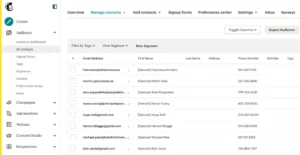
For example, you can’t send one campaign to subscribers across multiple audiences. If you have your contacts split even slightly, you’ll end up duplicating campaigns or manually merging lists — neither is fun.
But here’s the part that hurts your wallet:
Mailchimp charges you for the same subscriber if they exist in multiple audiences.
So if one person signs up twice in two places, Mailchimp counts them twice… and bills you twice.
And it doesn’t stop there.
Mailchimp also charges you for unverified, unsubscribed, and even cleaned contacts (until you manually delete them).
This means you’re often paying for people who can’t even receive your emails.
Mailchimp does give you tags, groups, and segments to manage contacts:
Tags = simple labels
Segments = filters based on data or behavior
Groups = categories inside a single list
But honestly, tags and groups overlap so much that the system ends up feeling confusing and outdated. Managing contacts becomes more work than it should be.
If list management is a top priority, here’s the truth:
GetResponse and MailerLite offer far cleaner, simpler, and more cost-efficient list management than Mailchimp.
Mailchimp Registration Forms: Lots of Options, But Not a Smooth Experience
When I tested Mailchimp’s form builder, my experience was pretty mixed.
On the surface, it sounds great — you get embedded forms, pop-up forms, and even full landing pages. But once you actually start setting them up, things don’t feel as smooth as they should.
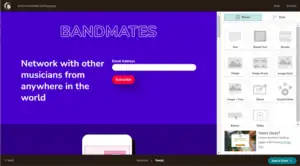
Mailchimp has three different form builders, and that alone creates confusion.
The pop-up builder uses a drag-and-drop editor, which is simple enough. But the other two builders feel outdated, clunky, and harder to customize.
While building forms, one issue kept bothering me:
Not all Mailchimp forms are mobile-friendly.
And in 2025, when most sign-ups happen on mobile, that’s a huge problem. A form that doesn’t look good or load properly on a phone can easily kill conversions.
Mailchimp gives you options — no doubt. But the overall experience feels fragmented and inconsistent, especially compared to modern form builders that offer a single, clean editor.
Mailchimp Reporting: Beyond the Basics
One thing I really liked about Mailchimp was how it takes reporting a step further. Sure, you get the usual open rates and click stats, but Mailchimp goes beyond that with features that actually help improve your campaigns.
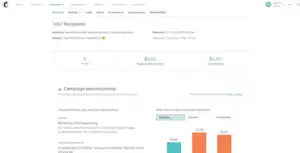
One standout is Send Time Optimization — it analyzes your subscribers’ activity and suggests the best time to send your emails for maximum engagement. It’s a small feature, but it can make a big difference over time.
Mailchimp also offers advanced reporting tools. You can compare multiple campaigns side by side, track customer journeys, and even see how much revenue your emails are generating. For deeper insights, you can connect Google Analytics, which lets you understand exactly how your email campaigns are impacting website traffic and conversions.
In my opinion, Mailchimp’s reporting isn’t just functional — it’s actionable. It gives you the data you need to make smarter decisions, which is why I found this feature particularly valuable during my campaigns.
Mailchimp Deliverability: Solid, But Not the Most Transparent
During my 6-month test, I noticed that Mailchimp handles the basics of deliverability pretty well. You get essential tools like email authentication (SPF, DKIM), bounce tracking,
and even the option for a dedicated IP if you’re sending large volumes of email. These features help ensure that your messages land in subscribers’ inboxes rather than spam folders.
However, Mailchimp leaves some gaps that can make managing deliverability a bit tricky. For instance, there’s no dedicated deliverability dashboard showing your inbox placement or engagement trends.
You also won’t find built-in list-cleaning tools to remove inactive or problematic subscribers automatically. This means if you want to monitor your inbox rates closely or improve deliverability over time,
you’ll need to rely on external services — which adds complexity and extra cost.
In practice, this means that while your emails will generally reach inboxes, you don’t get full visibility or control over deliverability health.
In comparison, platforms like MailerLite and Kit (formerly ConvertKit) offer cleaner sending practices and better inbox placement right out of the box.
Their systems handle engagement monitoring, list hygiene, and deliverability optimization more seamlessly, making them a stronger choice if reaching your subscribers consistently is a top priority.
Mailchimp Integrations and Extras: Hundreds of Options
One thing I always check in an email platform is how well it connects with other tools. Email marketing rarely works in isolation — whether it’s e-commerce platforms, CRMs, landing pages, or analytics tools, everything needs to work together smoothly.
On this front, Mailchimp really impressed me. It offers over 250 pre-built integrations with popular business tools, plus more than 300 integrations developed by partners and developers. Whatever tool I needed to connect — Shopify, WooCommerce, WordPress, Zapier, Google Analytics — chances are it was already supported.
For custom needs, Mailchimp also provides a flexible API and Mobile SDK, allowing developers to build custom integrations or connect to almost any software. This makes it easy to sync customer data, automate workflows, and track results across platforms.
For creators and businesses juggling multiple tools, Mailchimp’s breadth and flexibility of integrations is a major advantage and one of the reasons it remains a top choice for marketers of all levels.
Mailchimp Support: Good, But Mostly for Paid Users
Support is always a big factor when choosing an email platform, and during my 6-month test, Mailchimp’s support left me with mixed feelings.
If you’re on a paid plan, support is solid. You get 24/7 email support, live chat with a real agent, and the Mailchimp Assistant bot. I tried the bot, and honestly, it mostly just points you to the knowledge base rather than solving problems directly. Still, having live agents available when needed is a big help.
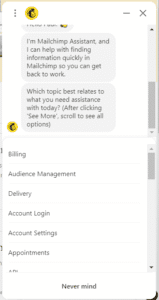
The downside is the free plan: email support lasts only 30 days, and after that, you’re completely on your own. If you run into issues or need guidance beyond basic tutorials, free users are left relying on forums, guides, and trial-and-error.
So, while Mailchimp support is decent for paying customers, free users will find themselves largely unsupported once the initial month ends.
Mailchimp Pricing: Free Plan Shrinks, Paid Plans Remain Steep
Finally, let’s talk about Mailchimp pricing — a major factor for small businesses and creators trying to stretch every dollar.
Mailchimp made a major update in September 2025 that affects all free-plan users. Before this change, you could store more contacts and send more emails each month. But now, the limits have been reduced significantly.
Here’s the new free plan rule:
Up to 500 contacts total
Up to 1,000 emails per month
In practical terms, that means if you have the full 500 subscribers, you can send roughly 2 emails per subscriber each month before hitting the limit — not exactly enough for consistent engagement.
And here’s the kicker: Mailchimp counts unsubscribed and unverified contacts toward your 500-contact limit. Even people who didn’t confirm their email or unsubscribed still take up space, which makes the free plan feel even smaller and more restrictive.
For anyone serious about growing a list, the free plan is now extremely limited, and you’ll likely need to upgrade to a paid plan sooner than you might expect.
Here’s how Mailchimp’s paid Essentials plan scales as your list grows:
| Subscribers | Mailchimp (Essentials) | Emails per Month |
|---|---|---|
| 500 | Free | 1,000 |
| 5,000 | $75 | 50,000 |
| 10,000 | $110 | 100,000 |
| 50,000 | $385 | 500,000 |
| 100,000 | $800 | 1,200,000 |
A few things stand out:
The free plan is extremely limited, both in contacts and monthly emails.
Paid plans scale quickly in cost — especially once your list exceeds 5,000 subscribers.
As your list grows, Mailchimp becomes a significant monthly investment, so it’s important to factor this into your budget.
Overall, Mailchimp works well, but its pricing can get steep quickly, especially for creators or small businesses with growing audiences.
Mailchimp AI Features: Smart, But Mostly for Paid Plans
Mailchimp has clearly embraced AI, and it shows in several areas. During my testing, I found the AI tools genuinely helpful for saving time and improving email performance.
1. Creative Assistant
I was struggling to design a fresh newsletter for my audience. I uploaded my logo, and the Creative Assistant automatically suggested layouts with my brand colors and fonts. Within minutes, I had a polished design ready — no manual tweaking required. It saved me hours of trial and error.
2. AI Writing Assistant
One morning, I stared at a blank email draft for 30 minutes, unable to find the right words. I typed a few bullet points into the AI Writing Assistant, and it generated a subject line and email copy that sounded natural and engaging. I just tweaked a few phrases, hit send, and my open rates improved noticeably.
3. AI-Powered Customer Journeys
I wanted to set up a “welcome new subscribers” series but didn’t have time to write multiple emails. Mailchimp’s AI suggested the steps, generated draft emails for each step, and even personalized content for new subscribers. It felt like having a mini marketing team on autopilot.
4. Predictive Analytics
I had a campaign that underperformed last month, and I couldn’t figure out why. Predictive Analytics analyzed past subscriber behavior and predicted which segments were likely to engage. Using this data, I adjusted my audience targeting and saw higher opens and clicks in my next campaign.
5. Content Optimizer
After creating my first newsletter, I ran it through Content Optimizer. It suggested small wording changes and formatting tweaks to make it more readable and appealing. I implemented them, and the email performed better than my previous campaigns — all thanks to AI guidance.
The catch? Most of these AI features are locked to higher-tier plans (Standard or Premium) and may only be available in select regions, like the U.S. So while the AI tools are powerful, they’re not accessible to free or lower-tier users.
In short, Mailchimp’s AI features are impressive, but you’ll need to invest in a higher plan to truly take advantage of them.
Final Verdict: Is Mailchimp Worth It?
After 6 months of testing Mailchimp personally, plus reviewing countless real user experiences, here’s my honest take:
Mailchimp is a solid, feature-rich email marketing platform. It excels in reporting, AI-powered tools, automation, and integrations, making it a strong choice for businesses that need advanced functionality. Its AI features, creative assistant, and predictive analytics can save time and improve campaign performance — especially for those on higher-tier plans.
But it’s not perfect. The list management system is confusing and can get expensive, the free plan is extremely limited, and some features are locked behind higher plans. Beginners may feel overwhelmed by the automation builder, and support for free users is minimal. Deliverability works, but other tools like MailerLite or Kit can sometimes perform better in this area.
So who is Mailchimp best for?
Good fit: Businesses and creators ready to invest in a paid plan, looking for advanced features, AI tools, and integrations.
Not ideal for: Beginners on a tight budget, or anyone who wants simple list management and free automation.
Overall Star Rating: ⭐⭐⭐½ (3.5/5)
Mailchimp is reliable and feature-packed, but its pricing, free plan limitations, and occasional usability quirks keep it from a higher rating. You can learn using Mailchimp by using this tutorial
Some Mailchimp Alternatives
While Mailchimp is powerful, it’s not always the best fit for everyone. Here are a few alternatives I’ve explored and why they might be better depending on your needs:
1. MailerLite
MailerLite is simple, clean, and affordable. The editor is easy to use, and even on free or low-tier plans, you get more flexibility than Mailchimp’s free plan. If you’re a blogger or small business starting out, MailerLite lets you grow without paying extra for unsubscribed or duplicate contacts.
2. Moosend
Moosend offers strong automation features and segmentation, all at a lower cost than Mailchimp. It’s great for small businesses or freelancers who want automation, analytics, and decent deliverability without the higher monthly fees.
3. ActiveCampaign
For serious marketers, ActiveCampaign is unmatched in automation and deliverability. Its advanced workflows, behavioral triggers, and CRM integration make it far more powerful than Mailchimp, especially if you’re building complex email campaigns or funnels.
4. GetResponse
GetResponse is a true all-in-one marketing platform — email, landing pages, webinars, and conversion funnels. If you want more than just newsletters and plan to run sales or lead-generation campaigns, GetResponse can outperform Mailchimp in both features and flexibility.
