

Last Updated: 09 May 2026
Let me be straight with you from the very first line.
Mailchimp used to be great. When I first started with email marketing, it was the obvious answer. Everyone recommended it. The free plan was generous. The tool was simple. It just worked.
That Mailchimp is gone.
Since Intuit bought Mailchimp for $12 billion in 2021, something has changed. Prices have gone up — not once, not twice, but multiple times. The free plan has been cut again and again. Features that used to be free are now locked behind paid tiers. And the billing system charges you for contacts who already left your list.
I’ve tested Mailchimp thoroughly. I’ve read through hundreds of real reviews on G2, Capterra, and Trustpilot. And I’m going to tell you exactly what I found — the good, the bad, and the genuinely frustrating.
This review is not a fluffy overview. It’s the truth.
Let’s get into it 👇
Table of Contents
ToggleWho Is Mailchimp For?
Before we get into the details, let’s be honest about who Mailchimp actually serves well in 2026.
Mailchimp might still work for you if:
- You’re a larger e-commerce business that needs deep purchase tracking connected to your email reports
- You have a dedicated marketing team and a budget that can absorb the cost
- You need native Facebook and Instagram ad management alongside email
- You run a Shopify or WooCommerce store and want everything connected in one dashboard
- You need 300+ app integrations
Mailchimp is NOT a good fit if:
- You’re a small business or creator on a tight budget
- You want a genuinely useful free plan — 250 contacts is almost nothing
- You want automation without paying $20/month minimum
- You want to pay only for subscribers who are actually on your list
- You want fast, reliable customer support at every plan level
- You want simple, affordable pricing that doesn’t surprise you every few months
Quick Verdict: Is Mailchimp Worth It?
No — for most small businesses, creators, and bloggers in 2026, Mailchimp is not worth it.
The price has grown faster than the features. The free plan is now almost useless. The billing system is designed in a way that costs you more than you expect. And better, cheaper tools exist for almost every use case Mailchimp covers.
If you’re a large e-commerce business with a real marketing team? Mailchimp has tools worth paying for. For everyone else? You can do better.
Overall Rating: 3.2 / 5
Getting Started: How Easy Is the Setup?
Signing Up
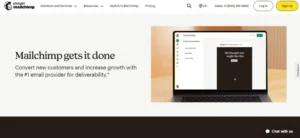
Signing up for Mailchimp is quick and painless. Go to mailchimp.com, click “Sign Up Free,” enter your email and a password, and verify your account. No manual approval needed — you’re in immediately.
The onboarding wizard asks about your business and walks you through the basics. It’s clean and easy to follow.
The Dashboard
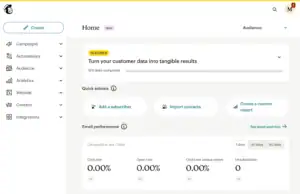
Mailchimp’s dashboard has gotten more complex over the years. When you first log in, you see campaigns, audience, automations (now called “Flows”), and reports. There’s a lot on the screen — more than most beginners need.
The learning curve is noticeable. New users often describe feeling like they’re looking for features that should be obvious but aren’t.
“It became way too complicated and very non-intuitive.” (Capterra)
“I just couldn’t navigate it well enough to find or do what I wanted.” (Capterra)
But for users who invest time in learning the platform, it does become more manageable:
“Once you learn where everything lives, day to day usage is smooth and marketing teams rarely need help for basic tasks.” (Capterra)
You can learn using Mailchimp by using this tutorial
Setup Rating: 3.8 / 5
Email Editor: Is It Actually Easy to Use?
Mailchimp’s Two-Editor Problem
Mailchimp has two email editors — the newer drag-and-drop builder and the old legacy builder. This is one of Mailchimp’s most frustrating ongoing problems.
Templates made in the new builder don’t work in the old one. If you start building in one editor, switch to the other, and try to use your saved templates — they don’t appear. You have to rebuild from scratch.
Many users don’t realize this until they’ve already built a library of templates in one editor and then accidentally opened the other.
The New Drag-and-Drop Editor
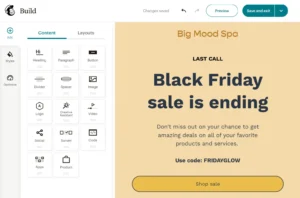
The newer editor itself is clean and works well for basic emails. You can:
- Add text, images, buttons, and product blocks
- Preview on desktop and mobile before sending
- Use an AI content generator to write subject lines and email copy
- Use the AI Creative Assistant to match your brand colors and fonts automatically
The AI tools are genuinely useful — especially the Creative Assistant that looks at your website and generates email layouts that match your branding.
The Problems
- Two-editor confusion wastes real time for users who don’t know about the split
- Some content blocks can’t be resized exactly the way you want them
- Inner padding and spacing settings are harder to control than they should be
“The drag-and-drop builder makes it easy to create professional-looking campaigns quickly.” (Capterra)
“Creating our newsletters can be frustrating. There are built-in pads that are hard to reduce in size.” (G2)
“Some newsletter templates are too rigid in design. If I want something truly unique, I have to resort to blank creation forms.” (Capterra)
💡 Better option for ease of use: MailerLite gives you one clean drag-and-drop editor with no version confusion, won the “Easiest to Use” award on G2 from 2023 to 2026, and its Brand Library automatically applies your colors and fonts to every template. No rebuilding from scratch. No switching between editors.
Email Editor Rating: 3.5 / 5
Design & Templates: How Good Do Your Emails Look?
Mailchimp’s Template Library
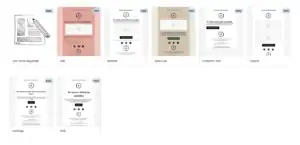
Mailchimp gives you 100+ email templates — a solid library that covers newsletters, product promotions, seasonal campaigns, re-engagement emails, and event announcements. Most of them look professional and polished out of the box.
The AI Creative Assistant is a genuine standout. You give it your website URL, and it automatically generates email designs that match your brand colors, fonts, and style. For businesses that want consistent branding without a designer, this is impressive.
On higher plans, Mailchimp also supports multivariate testing — testing up to eight different email designs at the same time. That’s an advanced capability you don’t often see at this price point.
The Problems
Some templates feel rigid. Customizing them to look truly unique — beyond changing text and swapping images — often requires knowledge of HTML. Out of the box customization has real limits.
“Mailchimp provides many ready-to-use templates and its drag-and-drop editor is very easy to use.” (G2)
“Some of the templates aren’t very intuitive to use.” (Capterra)
“I want to create something truly unique, but I have to resort to blank templates to get there.” (Capterra)
💡 Better option for templates: MailerLite gives you 100+ equally polished templates with a more flexible editor and the Brand Library that saves your styling automatically. And unlike Mailchimp, MailerLite’s templates work in one editor — not two separate ones that don’t share files.
Design & Templates Rating: 3.8 / 5
Email Automation: Can It Run Your Marketing on Autopilot?
What Mailchimp’s Automation Looks Like Now
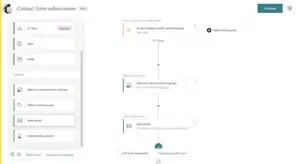
Mailchimp rebranded its automation feature to “Flows” in mid-2025. The concept is the same — automated email sequences triggered by subscriber actions. You get 115+ pre-built workflow templates covering welcome emails, abandoned cart recovery, re-engagement, birthday emails, and post-purchase follow-ups.
On higher plans, Mailchimp’s automation genuinely goes deep. You can build flows with up to 200 steps, connect them to purchase behavior from your Shopify or WooCommerce store, and trigger automations based on website activity through a tracking pixel.
The Big Problem: Automation Was Removed From the Free Plan
In June 2025, Mailchimp completely removed automation from its free plan.
Not reduced. Not limited. Removed.
You can’t set up even a basic welcome email on the free plan anymore. Want to automatically say “hello” to a new subscriber? That’ll cost you $20/month minimum.
This is one of the biggest disappointments in Mailchimp’s recent history. Tools like MailerLite, Brevo, and Moosend all include automation on their free plans. Mailchimp took it away entirely.
“Automation was removed from the free tier in June 2025 — pushing multi-step automations exclusively into the Standard plan at $20/month minimum.” (EmailTooltester)
“Some automation tools feel a bit limited compared to other platforms.” (Trustpilot)
“Some advanced features such as automation and segmentation are only available in higher plans.” (G2)
“It feels deliberately frustrating — like a free trial that never actually lets you try the good stuff.” (Sender review)
💡 Better option for automation power: Moosend gives you a visual automation builder with 18 pre-built automation recipes covering welcome sequences, abandoned cart recovery, re-engagement, lead scoring, and more — all starting at just $9/month. It covers everything most small businesses need without the Mailchimp price tag.
💡 Better option for free automation: Brevo includes full automation on its free plan with unlimited contacts. MailerLite also includes automation on its free plan. Both give you what Mailchimp takes away unless you pay.
Automation Rating: 3.4 / 5
Segmentation & List Management: Can You Target the Right People?
What Mailchimp Offers
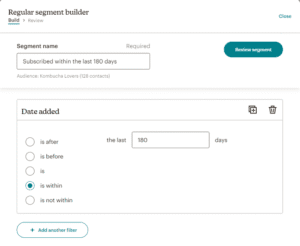
When you have access to Mailchimp’s full segmentation toolkit — on Standard plan and above — it’s genuinely powerful. You can segment by:
- Email behavior — opens, clicks, non-openers
- Purchase history from your connected store
- Predictive behavior — AI-predicted likelihood to buy again or churn
- Customer lifetime value
- Geographic location
- Website activity via tracking pixel
The predictive segmentation powered by Intuit’s data science team is impressive. It can identify “at-risk” customers before they leave — like someone who hasn’t opened in 60 days or visited your unsubscribe page.
The Big Problem: Mailchimp Charges You for Dead Contacts
Here’s the most infuriating thing about Mailchimp’s billing system — and it directly affects segmentation and list management.
Mailchimp counts unsubscribed contacts toward your paid plan limit.
This is written directly in Mailchimp’s own documentation: “Subscribed, unsubscribed, and non-subscribed contacts are included in your contact count.”
That means someone who left your list two years ago and can never receive another email from you is still eating up a paid slot in your account — unless you manually find and archive each one.
And it gets worse. If the same contact appears in two different Mailchimp audiences, they count as two separate billable contacts.
So if you have 1,000 active subscribers, 300 people who unsubscribed last year, and 100 duplicates across two audiences — Mailchimp charges you for 1,400 contacts. Even though only 1,000 of them will ever hear from you again.
“According to Mailchimp’s own documentation, unsubscribed contacts count toward your plan limit — even if they opted out years ago.” (Retainful)
“For businesses that have been on Mailchimp for a while, 20–40% of the contact list is often dead weight inflating the monthly bill.” (Retainful)
“I would import new subscribers, having archived enough to be under the limit, but then face top-up charges for reasons I never fully understood.” (Capterra)
“Advanced segmentation is only available in higher plans — that’s a real limitation for smaller budgets.” (G2)
💡 Better option for segmentation: Moosend gives you advanced segmentation based on email behavior, purchase history, and custom fields — and only charges for active subscribers, never ghost contacts. Brevo offers advanced segmentation with AND/OR logic on all plans including free, with unlimited contacts and no charges for people who unsubscribed.
Segmentation Rating: 3.3 / 5
Forms & Landing Pages: Can You Grow Your List With It?
What Mailchimp Offers
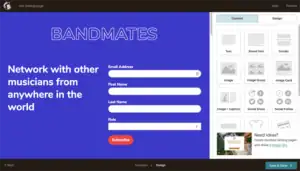
Mailchimp offers embedded forms, pop-up forms, and landing pages across all paid plans. The landing page builder covers the basics — you can add text, images, and a sign-up button, then publish on a Mailchimp-hosted URL.
Some things work well:
- You can publish landing pages without buying your own domain
- Forms sync automatically with your Mailchimp audience
- Multi-step pop-up forms are available
The Problems
The landing page builder is more limited than most tools at this price point. Mailchimp’s “by audience” structure means each landing page is tied to a specific audience in your account. If you want one page to feed into multiple audiences, you have to clone the page multiple times — which gets messy fast.
And on the free plan? You get basic embedded forms only. No pop-ups. No landing pages worth using.
“Building landing pages was a real pain, and the template customisation is really limited. They don’t look great.” (Trustpilot)
“The ‘by audience’ setup is particularly problematic when working with landing pages that serve multiple lists.” (G2)
💡 Better option for forms and landing pages: MailerLite has a full drag-and-drop landing page builder with an AI page creator, A/B testing, and 150+ templates — all more powerful and flexible than Mailchimp’s offering. Even the free plan includes up to 10 landing pages.
Forms & Landing Pages Rating: 3.5 / 5
Deliverability: Will Your Emails Actually Land in the Inbox?
What Mailchimp Does Well
Mailchimp has one of the largest email sending networks in the world — built over more than two decades. That size and history gives it strong relationships with major inbox providers like Gmail, Outlook, and Yahoo.
Independent tests put Mailchimp’s inbox placement in the low-to-mid 90% range — competitive with the best tools in the industry.
What Mailchimp includes for deliverability:
- Full SPF, DKIM, and DMARC authentication
- Engagement-based sending — automatically suppresses unengaged contacts
- Pre-send spam check inside the campaign builder
- Email preview across 90+ email clients before sending
- Dedicated IP addresses on Standard plans and above
The Hidden Deliverability Problem
Here’s something most Mailchimp users don’t realize until it’s too late.
Because Mailchimp charges you for unsubscribed and inactive contacts — and because many users keep those contacts in their account to avoid going over their plan limit — those dead contacts eventually hurt your deliverability.
When you keep old, unengaged contacts in your list and they stop opening your emails, your open rate drops. A falling open rate tells inbox providers like Gmail that your emails are not interesting or welcome. Gmail starts routing your emails to the Promotions tab — or worse, spam.
This is a slow, quiet problem that builds up over months. And Mailchimp’s billing structure accidentally encourages it.
“Good for starters, but we switched after open rates dropped once we hit 20,000 contacts.” (Reddit)
“Delivery is reliable. I’ve never had major inbox placement problems.” (Capterra)
💡 Better option for deliverability tools: Brevo and Moosend both automatically remove inactive contacts and give you deliverability consultation tools on paid plans. Brevo even includes a built-in email verification tool at import to catch bad addresses before they hurt your sender score.
Deliverability Rating: 3.8 / 5
Reporting & Analytics: Does It Help You Make Better Decisions?
What Mailchimp Does Well
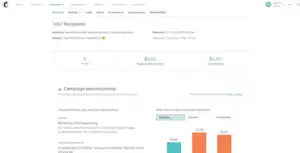
Mailchimp’s reporting is one of its strongest features — especially for e-commerce businesses. On Standard plans and above, you get:
- Open rates, click rates, bounce rates, and unsubscribes
- Click maps showing exactly where subscribers clicked inside your email
- Revenue attribution — which emails drove which sales and how much
- Comparative reports — compare multiple campaigns side by side
- AI Smart Recommendations — Mailchimp analyzes your data and tells you what to send, who to target, and when
- Purchase tracking connected to Shopify and WooCommerce
- Social ad reporting for Facebook and Instagram campaigns
This is the area where Mailchimp genuinely justifies its price for e-commerce businesses. The revenue attribution — seeing which emails drove specific sales — is very useful.
The Problems
Most of the best reporting features are locked behind the Standard plan at $45/month for just 500 contacts. On the Essentials plan ($20/month), you get basic stats only — no click maps, no revenue attribution, no comparative reports.
G2 users rate Mailchimp 4.3/5 for ease of use but only 3.6/5 for value — the reports are good but they feel overpriced for what you get.
“Robust analytics and segmentation tools that integrate smoothly with other platforms.” (Capterra)
“The reporting capabilities are solid but locked behind expensive plans.” (G2)
“Pricing that outgrows small teams.” (Capterra summary)
💡 Better option for reporting: Moosend gives you click maps, real-time stats, revenue tracking, and detailed campaign reports starting at just $9/month — a fraction of what Mailchimp charges to unlock the same level of data.
Reporting Rating: 3.9 / 5
E-commerce Features: Can You Sell Through Mailchimp?
What Mailchimp Offers
Mailchimp’s e-commerce features are genuinely strong for larger online stores. The Shopify and WooCommerce integrations go deep — syncing products, customers, purchase history, and order data directly into your email campaigns.
You can:
- Add live product blocks to emails (pulling real product images and prices from your store)
- Trigger abandoned cart recovery emails automatically
- Send post-purchase follow-up sequences
- Segment customers by what they bought and how much they spent
- Run retargeting ads on Facebook and Instagram alongside email
The predictive analytics — which customer is likely to buy again, which is about to churn — are powered by Intuit’s data science team and are genuinely impressive at scale.
The Honest Limitation
Most of these e-commerce features are only available on Standard plan and above. For a small store just getting started, the price-to-feature ratio doesn’t make sense — especially when Mailchimp’s per-contact pricing means your bill grows fast as your customer list grows.
“The integration with our Shopify store is seamless. Email and purchase data in one place.” (G2)
“It gets pricey as the number of contacts in your account increases.” (Capterra)
💡 Better option for e-commerce on a budget: Moosend offers abandoned cart recovery, product recommendation emails, and e-commerce automation starting at just $9/month for 500 contacts — a fraction of Mailchimp’s cost for the same features.
E-commerce Features Rating: 4.0 / 5
AI Features: Is the AI Actually Useful?
What Mailchimp’s AI Does
Mailchimp has added several AI features since the Intuit acquisition:
- AI Creative Assistant — scans your website and generates email layouts matching your brand. This is genuinely impressive and saves real design time
- AI content generator — writes email subject lines and body copy from a prompt
- Predictive send time — AI picks the best time to send to each subscriber based on their past engagement
- Predictive segmentation — AI identifies which customers are likely to buy, churn, or re-engage
- Smart Recommendations — analyzes your campaign history and suggests next steps
These are real, useful AI features — not just marketing buzzwords. The Creative Assistant in particular is one of the best brand-matching tools in email marketing.
The Problem
Predictive segmentation and Smart Recommendations are locked behind the Standard and Premium plans. Small businesses paying Essentials prices don’t get the most valuable AI features.
“The AI Creative Assistant matched our brand perfectly without us needing a designer.” (G2)
“Mailchimp gives you pointers on what to improve for your next campaign. It reminds you when best to send your next communication.” (G2)
💡 Better option for AI features: Moosend includes AI-powered send time optimization and audience discovery features on all paid plans — helping you find the best time to send and automatically surface new segments based on subscriber behavior, all starting at $9/month.
AI Features Rating: 4.0 / 5
Integrations: Does It Connect With Your Other Tools?
What Mailchimp Offers
Mailchimp’s integration library is one of its genuine strengths. It connects with 300+ tools natively — more than almost any other email platform outside of enterprise software.
Notable connections:
- Online stores: Shopify, WooCommerce, BigCommerce, Magento, Squarespace Commerce
- CRM tools: Salesforce, HubSpot, Pipedrive, Zoho
- Social ads: Facebook Ads, Instagram Ads, Google Ads (native — not just through Zapier)
- Analytics: Google Analytics, Mixpanel
- Customer support: Zendesk, Freshdesk, Intercom
- Social media: TikTok, Snapchat, Google Leads (added in 2025)
- Zapier for anything not natively covered
The native Facebook and Google Ads integration is a real standout. You can manage email campaigns and social ads together in one dashboard and sync your email segments directly to ad audiences. Most tools charge extra for this or don’t offer it at all.
This is one of the few areas where Mailchimp is still genuinely hard to beat.
“Mailchimp integrates smoothly with other platforms — WordPress, Shopify, Gmail, Google Analytics.” (Capterra)
“300+ integrations. I’ve found a connection for every tool I use.” (G2)
Integrations Rating: 4.4 / 5
Mobile App: Can You Manage Campaigns on Your Phone?
What Mailchimp’s App Does
Mailchimp has a reasonably capable mobile app for iOS and Android. You can:
- View campaign stats — open rates, click rates, revenue
- See audience growth in real time
- Pause or archive campaigns
- Basic audience management
- Get notifications when milestones hit
Unlike most email tools, Mailchimp’s mobile app lets you do slightly more than just view stats — but full campaign building and automation setup still require desktop.
“The mobile app is handy for checking on campaigns when I’m away from my desk.” (G2)
“I wish more of the features were accessible on mobile.” (Capterra)
Mobile App Rating: 3.9 / 5
Team Collaboration: Can Your Team Work Together?
What Mailchimp Offers
- Essentials and Standard plans: Multiple user seats (limited)
- Premium plan: Unlimited users with advanced role-based permissions
Mailchimp allows different permission levels — admin, author, viewer — so you can control who can send campaigns, who can only view reports, and who can manage billing.
For larger teams with multiple people working on the same account, these controls are useful.
The Problem
Meaningful role-based access — where you can really customize what each team member can and can’t touch — is mostly locked behind the Premium plan at $350/month for 10,000 contacts. For small teams that just need two or three users, that’s an expensive barrier.
“My overall experience is that Mailchimp works well for most SMB needs as long as you accept that it still requires some IT oversight.” (Capterra)
Team Collaboration Rating: 3.7 / 5
GDPR & Compliance: Is It Safe to Use in Your Country?
What Mailchimp Provides
Mailchimp is a US company (owned by Intuit, headquartered in Atlanta). It has GDPR tools available:
- Double opt-in available on all plans
- Unsubscribe management with legally required links
- Data Processing Addendum (DPA) available on request
- GDPR-friendly form consent options
Important Concerns for EU Users
Because Mailchimp is a US company processing EU personal data, EU-based businesses face extra legal obligations under GDPR — specifically around data transfers outside the EU.
In 2023, a German court ruled that using Mailchimp was a GDPR violation for certain EU businesses because of how data was transferred to US servers. While Mailchimp has since made some changes, EU-based businesses should carefully review the DPA situation before committing.
“EU businesses using Mailchimp should carefully check their data processing agreements. US-based data processing has caused compliance concerns.” (Multiple EU law sources)
💡 Better option for EU compliance: Brevo is based in the European Union and stores all data on EU servers — making GDPR compliance simpler and more straightforward for EU businesses.
GDPR & Compliance Rating: 3.5 / 5
Customer Support: Who Helps You When Things Go Wrong?
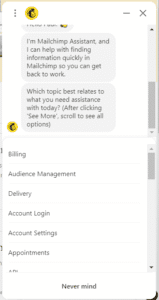
This is the area where Mailchimp has let the most people down. And the reviews are genuinely alarming.
What Mailchimp Offers
- Free plan: No support at all after 30 days — not email, not chat, nothing
- Essentials plan: 24/7 email and chat support
- Standard plan: 24/7 email and chat support
- Premium plan: Phone support + priority access
The free plan support situation is not just disappointing — it’s a trap. You sign up for free, build your list, set up your campaigns, learn the interface. Then after 30 days, Mailchimp withdraws all support. If you hit a problem, you’re on your own with the knowledge base.
Real User Experiences
The Trustpilot reviews for Mailchimp are genuinely shocking for a company of its size and name recognition.
“There is an error with my login. Contacting them is not an option. I am paying a monthly fee without being able to cancel since I cannot login.” (Trustpilot)
“We have been having difficulty accessing key data in our account since September 2025 — for three months now. Endless discussions with support. They have no idea.” (Trustpilot)
“This may be the most unhelpful company I have ever dealt with — customer service is nonexistent and there is no phone number.” (Trustpilot, August 2025)
“Worst experience ever. We requested cancellation and they didn’t process it — now I’m fighting their billing team.” (Trustpilot)
“After completing hours of work building campaigns, on the initial send of your very first email, your account could be suspended indefinitely for no given reason.” (Capterra)
Some users on paid plans had better experiences:
“KeeAnna was nothing short of amazing — warm, welcoming, and incredibly effective at helping me feel comfortable on the platform.” (G2)
“Mailchimp’s support team is helpful and responsive on the paid plan.” (G2)
But the inconsistency — and the complete withdrawal of support after 30 days on the free plan — is indefensible for a platform this widely used.
💡 Better option for support: MailerLite offers 24/7 support even on the free plan and has some of the most consistently praised support in the email marketing industry. Brevo also offers responsive support on every plan including free. Moosend offers live chat even on the trial.
Customer Support Rating: 2.9 / 5
Pricing: What Does It Actually Cost? (This Section Will Shock You)
Let me walk you through the Mailchimp pricing reality step by step — because the number on the pricing page is almost never what you actually pay.
The Four Plans
Free Plan
- 250 contacts (down from 2,000 in 2022, then 500 in 2023, now 250 in 2026)
- 500 emails per month
- Daily send limit of 250 emails
- ⚠️ No automation whatsoever
- ⚠️ No email scheduling
- ⚠️ No A/B testing
- ⚠️ No landing pages
- ⚠️ Customer support for 30 days only — then nothing
Essentials Plan: $20/month for 500 contacts
- 10x contact email sends per month
- Email templates
- A/B testing
- 24/7 live chat and email support
- ⚠️ Limited automation
- ⚠️ No advanced segmentation
Standard Plan: $45/month for 500 contacts
- Full automation (called “Flows”)
- Advanced segmentation
- Customer journey builder
- Send time optimization
- Behavioral targeting
Premium Plan: $350/month for 10,000 contacts
- Everything in Standard
- Advanced multivariate testing
- Unlimited seats and role-based access
- Phone support
- Priority customer support
Pricing as list grows (Standard Plan):
| Contacts | Mailchimp (Standard) |
|---|---|
| 500 | $45/month |
| 1,000 | $75/month |
| 2,500 | $100/month |
| 5,000 | $130/month |
| 10,000 | $175/month |
| 25,000 | $270/month |
The April 2026 Price Increase
Mailchimp raised prices again in April 2026 — targeting legacy account holders who were grandfathered into old pricing. This is the second price change in 2026 alone, following January’s free plan cuts.
Since Intuit acquired Mailchimp in 2021, the platform has raised prices or cut free plan limits almost every single year.
“Mailchimp has raised prices or reduced free plan limits almost every year since the Intuit acquisition.” (EmailTooltester)
“Expensive is flagged in 81 reviews on G2. Limited features in 58. Missing features in 55.” (G2 analysis)
The Free Plan Problem: A 96% Cut in Four Years
Let’s talk about the free plan — because this is the most important thing to understand about Mailchimp in 2026.
Free Plan History:
| Year | Free Plan Contacts |
|---|---|
| 2022 | 2,000 contacts |
| Early 2023 | 500 contacts |
| June 2025 | 500 contacts, automation removed |
| January 2026 | 250 contacts, 500 sends/month |
| April 2026 | Still 250 contacts — prices raised elsewhere |
That’s a 96% reduction in four years.
In 2022, you could build a list of 2,000 real subscribers on the free plan. Today, you get 250. That’s not enough to test your strategy. That’s barely enough to email your personal contacts.
To put that in context — here’s what competitors offer for free right now:
| Tool | Free Plan Subscribers |
|---|---|
| Kit | 10,000 subscribers |
| MailerLite | 500 subscribers + automation |
| Brevo | Unlimited contacts, 9,000 emails/month |
| Moosend | 30-day full-feature trial |
| Mailchimp | 250 contacts, no automation, no support after 30 days |
Mailchimp’s free plan is now essentially just a way to look at the interface before you buy. It’s not a usable product.
“At 250 contacts with no automation, you can’t even send two emails per month to your full list. Any real business will outgrow this in weeks.” (Retainful)
“Mailchimp’s free plan is now nearly unusable for most organizations.” (Groupmail)
“The free option is very limited — almost useless.” (Capterra)
The Unsubscribed Contact Billing Trap
Here’s the other pricing problem that costs Mailchimp users real money.
Mailchimp charges you for unsubscribed contacts. This is written directly in their own documentation.
That means:
- Someone who left your list 2 years ago? Still counts.
- A duplicate who appears in two audiences? Counts twice.
- A contact who never confirmed their email? Still counts.
For a business that’s been on Mailchimp for 3 or 4 years, it’s common for 20–40% of the billable contacts in your account to be people who can never receive another email from you. You’re paying for ghosts.
The fix is to manually archive unsubscribed contacts regularly. But Mailchimp doesn’t automate this — and doesn’t warn you about it. Most users discover this after months of paying inflated bills.
“You’re paying for stale contacts who will never receive an email or generate revenue for your business.” (Retainful)
“It’s not unusual for your actual monthly spend to run 20–40% above the plan’s starting price.” (Retainful)
“I faced top-up charges for reasons I never fully understood — it seemed like certain contacts were taking longer to archive.” (Capterra)
Side-by-side comparison:
| Contacts | Mailchimp (Standard) | MailerLite | Brevo (Business) | Moosend |
|---|---|---|---|---|
| 500 | $45/month | $10/month | $18/month | $9/month |
| 1,000 | $75/month | $15/month | $18/month | $16/month |
| 5,000 | $130/month | $39/month | $25/month | $48/month |
| 10,000 | $175/month | $73/month | $35/month | $88/month |
Mailchimp is the most expensive option in almost every comparison — and that’s before you factor in the unsubscribed contacts that inflate your bill further.
Pricing Rating: 2.2 / 5
What Real Users Say: Honest Reviews from G2, Capterra, and Trustpilot
What People Love About Mailchimp:
✅ “Mailchimp is a dependable, well-designed platform that works especially well for small businesses.” (Capterra)
✅ “The drag-and-drop builder makes it easy to create professional-looking campaigns quickly.” (Capterra)
✅ “It makes designing emails and automations quick and easy, with robust analytics and segmentation tools.” (Capterra)
✅ “Mailchimp provides many ready-to-use templates and its drag-and-drop editor is very easy to use.” (G2)
✅ “The AI Creative Assistant matched our brand perfectly without us needing a designer.” (G2)
✅ “The integration with our Shopify store is seamless. Email and purchase data all in one place.” (G2)
✅ “Delivery is reliable. I’ve never had major inbox placement problems.” (Capterra)
What People Complain About Mailchimp:
❌ “The free contact limit dropped from 2,000 to 500 to now just 250. It’s barely usable.” (Multiple reviews)
❌ “It became way too complicated and very non-intuitive. The free option is very limited, almost useless.” (Capterra)
❌ “There is an error with my login. Contacting them is not an option. I am paying a monthly fee without being able to cancel since I cannot login.” (Trustpilot)
❌ “We have been having difficulty accessing key data since September 2025 — for three months. Endless discussions with support. They have no idea how to fix it.” (Trustpilot)
❌ “This may be the most unhelpful company I have ever dealt with — customer service is nonexistent and there is no phone number.” (Trustpilot)
❌ “Worst experience ever. We requested cancellation and they didn’t process it — now I’m fighting their billing team.” (Trustpilot)
❌ “Some of the most useful features, such as advanced automation, A/B testing, and multichannel campaigns, are only available in higher-tier plans.” (G2)
❌ “Costs can rise quickly as your audience grows. Pricing outgrows small teams.” (Capterra)
❌ “After completing hours of work building campaigns, on the initial send of your very first email, your account could be suspended indefinitely for no given reason.” (Capterra)
❌ “Good for starters, but we switched after open rates dropped once we hit 20,000 contacts.” (Reddit)
Mailchimp Pros and Cons
Pros:
✅ 100+ email templates including polished, professional designs
✅ AI Creative Assistant that matches your brand style automatically
✅ 300+ native integrations — the best library in the industry
✅ Deep Shopify and WooCommerce integration for e-commerce businesses
✅ Native Facebook, Instagram, and Google ad management
✅ Predictive segmentation powered by Intuit’s data science team
✅ Click maps and revenue attribution on Standard plans
✅ Multivariate testing on Premium plans
✅ Competitive inbox placement rates
✅ Clean, well-designed interface that most users can navigate
Cons:
❌ Free plan is now 250 contacts — down 96% from 2022
❌ Automation completely removed from free plan in June 2025
❌ Charges you for unsubscribed contacts — you pay for people who left your list
❌ Duplicate contacts across audiences count as two billable contacts
❌ Two-editor problem — templates don’t transfer between the new and legacy builders
❌ Advanced segmentation only on Standard plan ($45/month minimum)
❌ Customer support completely withdrawn after 30 days on free plan
❌ Paid plan support is inconsistent — many users describe serious unresolved problems
❌ Prices raised multiple times since Intuit acquisition in 2021
❌ Second price increase in 2026 (January + April)
❌ Transactional emails are a separate paid add-on — not included in any plan
❌ SMS marketing is a paid add-on on top of your email plan
❌ GDPR concerns for EU businesses due to US-based data processing
❌ Most expensive option compared to MailerLite, Brevo, and Moosend at every list size
Final Verdict: Should You Use Mailchimp in 2026?
After testing everything, reading hundreds of real reviews, and looking honestly at where the platform stands today — here’s my verdict:
For most people reading this: No. Mailchimp is not the right choice in 2026.
The free plan is a shadow of what it used to be. 250 contacts with no automation is not a tool — it’s a demo. The billing system that charges you for unsubscribed contacts is unfair and genuinely costly. The price increases since the Intuit acquisition have made the paid plans hard to justify when cheaper, more generous alternatives exist.
The support failures documented on Trustpilot are alarming. People locked out of accounts they’re paying for. Cancellations not processed. Data issues unresolved for months. These are not small complaints from impatient users — these are serious failures from a company charging premium prices.
Mailchimp still has genuine strengths. The AI Creative Assistant is impressive. The 300+ integrations are unmatched. The Shopify connection is genuinely deep. And if you’re a large e-commerce business with a real marketing team and a budget that matches, those strengths might justify the cost.
But for small businesses, creators, bloggers, nonprofits, and anyone on a budget? Better tools exist — and they treat you better.
Here’s Where to Go Instead:
For ease of use, affordability, and great support → MailerLite Almost half the price of Mailchimp at every list size. 100+ templates. Automation on the free plan. 24/7 support even for free users. And the Brand Library that Mailchimp doesn’t have.
For multi-channel marketing and unlimited contacts → Brevo Email-volume pricing means you pay based on what you send — not how many contacts you have. Unlimited contacts. Email + SMS + WhatsApp + live chat + CRM in one tool. Automation on the free plan. No charges for unsubscribed contacts.
For powerful automation on a budget → Moosend Abandoned cart recovery, e-commerce automation, and detailed reports starting at just $9/month. No hidden contact counting tricks. Full automation included.
For the most powerful automation on a budget → Moosend Visual automation builder with 18 pre-built recipes, click maps, real-time reporting, abandoned cart recovery, and AI-powered send time optimization — all starting at $9/month. No contact counting tricks. No ghost billing. Just a solid tool at a honest price.
Feature Ratings Summary
| Feature | Rating |
|---|---|
| Getting Started & Setup | 3.8 / 5 |
| Email Editor | 3.5 / 5 |
| Design & Templates | 3.8 / 5 |
| Email Automation | 3.4 / 5 |
| Segmentation & List Management | 3.3 / 5 |
| Forms & Landing Pages | 3.5 / 5 |
| Deliverability | 3.8 / 5 |
| Reporting & Analytics | 3.9 / 5 |
| E-commerce Features | 4.0 / 5 |
| AI Features | 4.0 / 5 |
| Integrations | 4.4 / 5 |
| Mobile App | 3.9 / 5 |
| Team Collaboration | 3.7 / 5 |
| GDPR & Compliance | 3.5 / 5 |
| Customer Support | 2.9 / 5 |
| Pricing | 2.2 / 5 |
Overall Rating: 3.2 / 5 ⭐
Verdict: Not recommended for most users. The pricing model, the free plan cuts, and the support failures make better alternatives the obvious choice for small businesses and creators.
Have you been burned by Mailchimp’s pricing changes or support issues? Or do you disagree with this review? Drop your experience in the comments below — I read every single one.
