
Last Updated: 20 Aug 2026
I have been sending real emails to my own list on Brevo, not a test account, not a demo. So this review is not going to be a soft, safe piece that just repeats what Brevo’s own website says. I’m going to tell you what’s actually good, what’s actually annoying, and what I wish someone had told me before I moved my list over.
Most reviews you’ll find online either read like an ad for Brevo, or read like a copy-paste of the pricing page. I want to do something different here. I’ll walk through every part of the tool, share the things that genuinely surprised me, both good and bad, and point out a few real risks that other reviews barely mention.
Short Summary: Should You Use Brevo?
If you want a low cost tool for sending email, and maybe SMS and WhatsApp too, with a simple CRM added on, Brevo is genuinely good value. It’s easy to learn, it’s cheap at the start, and it covers what most small businesses need.
But it’s not perfect, and I’ll be honest about the parts that bothered me. The biggest one, by far, is how quick Brevo can be to suspend an account, sometimes with very little warning and a vague reason. There’s also a big jump in price once you outgrow the entry level plans, and a few small daily habits that are more annoying than they should be. None of these are deal breakers on their own, but you should know about them before you build your whole business around this tool.
Ease of Use
First Impressions
Logging in for the first time, I found the menu simple and clear. Contacts, Campaigns, Automation, and a few more sections, all named in plain words. I sent my first real test email within an hour, without reading a single help page.
Where It Stays Simple
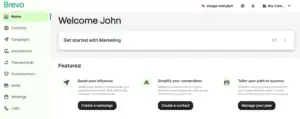
Adding contacts, building a list, and writing a basic email all feel natural. If you’ve never used an email tool before, Brevo won’t scare you off.
Where It Gets Annoying
Here’s something I didn’t expect. A few times, I wanted to send an email to everyone on a list except a small group of people, like contacts who’d already bought something. Doing this cleanly took more clicks and more fiddling than it should have. I’m not the only one who’s run into this. Other users report the exact same issue, saying it’s oddly hard to pick out and exclude a specific group of contacts, even though most of the tool feels easy.
My honest take: Easy for 90 percent of daily tasks, but a few small jobs are more fiddly than a tool this simple should allow.
Email Editor
Building an Email
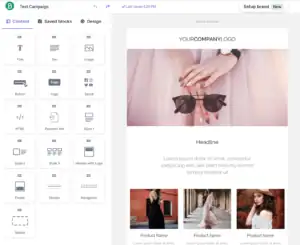
The drag and drop editor is quick. You click a block, like text or a picture, drop it where you want, and the layout adjusts on its own. I could build a normal newsletter in under fifteen minutes once I got used to where things live.
The Brand Kit
One thing I actually like a lot: you can save your logo, your brand colors, and your fonts once, and every new email you build afterward already looks like your brand, without picking colors again each time. This saved me real time.
The Part Other Reviews Don’t Mention Enough
If your business sends emails in more than one language, get ready for some extra work. Setting up and managing multilingual emails inside Brevo is clunky, and more than one long-time user has flagged this as a real weak spot, not a minor quirk. If your audience speaks more than one language, plan for this ahead of time, don’t find out the hard way.
My honest take: Great for a normal, single-language newsletter. A genuine headache if you need to send the same email in two or three languages.
Templates: Design and Quality

Brevo’s templates are clean and modern looking, and they cover the basics well: newsletters, promos, and welcome emails. But the library is on the smaller side, and a few users, including me, feel like the options for changing small design details are more limited than expected. You can make an email look like your brand, but if you want a highly custom design with unusual layouts, you’ll spend more time working around the editor than working with it.
My honest take: Good enough for most small businesses. Not the tool to pick if custom design freedom is your top priority.
List Management
The Good Part
Sorting contacts into lists, tagging them, and building a simple segment, like “people who opened my last email,” is quick and mostly painless.
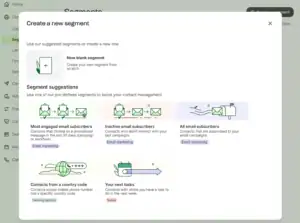
A Risk Most Reviews Skip
Here’s something worth knowing plainly: some users have reported losing contact data after an accidental wipe, with no easy way to recover it. Brevo doesn’t give you a simple built-in backup or “undo” for a big accidental deletion. If your list is valuable to your business, and it probably is, export a fresh copy of your contacts regularly yourself. Don’t assume the platform is quietly backing it up for you.
My honest take: Fine for everyday use, but treat your contact list the way you’d treat any important file. Back it up yourself.
Automation
Brevo’s automation builder is genuinely one of its strongest features for the price. You can build a flow with real branching logic, meaning “if this person clicks, send email A, if not, send email B,” and you can mix email, SMS, and WhatsApp inside one single flow. I had a basic welcome series with a branch point running within an afternoon.
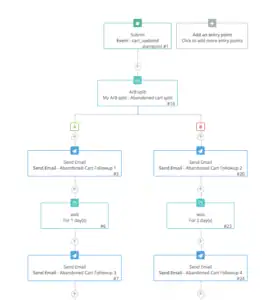
The one catch worth knowing: on the free plan, automation only works for the first 2,000 contacts, so if your list grows past that while you’re still on free, your automation quietly stops covering everyone.
My honest take: Strong automation for the price, as long as you know the free plan’s limit and plan your upgrade around it.
Deliverability
The Genuinely Good Part
When properly set up, with your domain verified, Brevo lands in the inbox well. It also gives you real tools to check your sender health before things go wrong.
The Part I Need to Be Brutally Honest About
This is the biggest issue with Brevo, and I think every review should say it plainly instead of tucking it away in a small paragraph: Brevo suspends accounts fast, and sometimes for reasons it won’t fully explain.
This isn’t just one unlucky user. It’s a pattern that shows up again and again in real reviews. People have had accounts suspended on their very first campaign, sometimes before they even finished testing the platform, with support only offering a vague explanation like “our systems flagged your account” and no clear path to a fix. Brevo’s own help pages confirm this is intentional: their system watches a small sample of your campaign’s early results, and if bounce rates or complaint rates look bad within the first one to three hours, it can pause your whole account automatically, not just the one campaign.
To be fair to Brevo, this system exists to protect their sending reputation for everyone on the platform, and once you understand the rules, like keeping your bounce rate low and never emailing an old, unclean list all at once, it becomes much less likely to happen to you. But if you’re new to email marketing and you upload an old, unverified list on day one, there’s a real chance your account gets paused before you even get going, and it can feel confusing and frustrating while it’s happening.
My honest take: Clean, warmed-up lists do fine here. But go in knowing this risk is real, not rare, and plan your first few sends carefully, especially if your list has any old or unconfirmed contacts.
Integrations
Brevo connects to the tools most small businesses already use, like Shopify, WooCommerce, and WordPress, plus Zapier for almost everything else, and it has a solid, well documented option for developers who want to send email straight from their own website or app.
My honest take: Covers what a small business actually needs. Not as deep as a tool built only for big online stores, but that’s not really what Brevo is trying to be.
CRM
Brevo includes a real, simple sales CRM, free on every plan, with basic deal tracking. It’s genuinely useful for a small team that just wants to remember who to follow up with, and it doesn’t cost extra like it would on a lot of other tools.
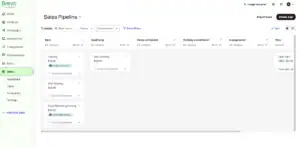
It won’t replace a full sales system for a bigger team, and full sales features, like more advanced pipelines, sit behind a separate paid add-on rather than being part of your main plan.
My honest take: A nice, free bonus for a small team. Don’t expect it to run a whole sales department.
Customer Support
The Good Side
When support does respond well, it’s genuinely good. I’ve seen real cases, including some tied to the suspension issue above, where a support agent walked a user through exactly what to fix, step by step, and got their account back up quickly.
The Other Side
Support quality seems to swing a lot depending on your case and your plan. Some users report fast, helpful replies. Others, especially around account suspensions, describe long waits and unclear answers, with one common complaint being that the reason for a suspension isn’t shared clearly, which leaves people guessing what to fix.
My honest take: Support can be genuinely excellent, but it’s not consistent. If you’re on a paid plan, expect a better experience than on the free one.
Reports and Analytics
Brevo’s reports are simple and clear: opens, clicks, bounces, and a heat map showing exactly where inside the email people clicked. Good enough to answer “did this email work” at a glance, without digging through menus. If you want deep revenue attribution or a full sales funnel report, this isn’t the tool for that, but that’s not really the job Brevo is trying to do.
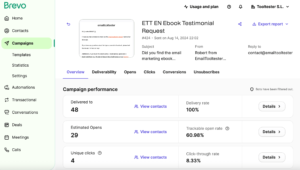
My honest take: Simple, clear, and enough for most small businesses. Not built for deep, sales-focused reporting.
Pricing
The Free Plan
Brevo’s free plan gives you 300 emails a day, which works out to roughly 9,000 emails a month if you send every single day, plus a generous amount of contact storage. The catch most people miss: it’s a daily cap, not a monthly pool. Send to a list of 500 people, and you’ve used up over half your day’s limit in one send, whatever else you had planned for that day. Extra sends don’t roll over to tomorrow either.
Where the Price Really Jumps
Here’s the part I think every honest review needs to say clearly: Brevo’s pricing looks smooth and cheap, going from Free, to a Starter plan around $9 a month, up to a Standard plan around $18 a month. Then there’s a massive jump straight up to a Professional plan, priced in the hundreds of dollars a month, not a gentle step up. If your business grows past what Standard offers and you need what’s inside Professional, be ready for that price to jump a lot faster than the earlier plans suggested it would.
The Small Extra Costs
A few other things worth knowing before you commit: removing the “Sent with Brevo” branding from your emails costs extra, even once you’re already on a paid plan. And on the lower plans, you’re limited to a single user seat, so if more than one person on your team needs to log in and work inside the account, that’s another cost to plan for.
My honest take: Genuinely cheap to start, and a great deal if your list is big but you don’t email every day. Just don’t assume the price stays this friendly forever, plan ahead for the jump to the higher tier.
What Brevo Is Actually Best At
Brevo’s real specialty is being one affordable home for talking to your audience across email, SMS, and WhatsApp, with a free CRM thrown in, at a price that doesn’t punish you for having a big list you don’t email every day.
There’s also one genuinely underrated feature I haven’t seen many reviews talk about: Brevo lets you give delegated access to other accounts, which is a real time saver if you manage email for more than one business or client. You can jump between accounts without juggling separate logins for each one, something that’s easy to overlook until you actually need it.
My Honest Verdict
I’ll be straight with you. Brevo has earned a real place in how I send email to my own list, mainly because it’s cheap, it’s fast to learn, and the automation punches well above its price. But I went in with my eyes open about the suspension risk, and I made sure my list was clean before my first real send. I’d tell anyone thinking about switching over to do the same.
If you want a tool that’s simple, affordable, and covers email, SMS, WhatsApp, and a light CRM in one place, Brevo is a genuinely smart pick. Just go in knowing the real risks, not just the highlight reel, so nothing about your experience catches you off guard.
FAQs
Is Brevo actually free to use? Yes, the free plan is real and usable, not just a trial. You get 300 emails a day and a generous amount of contact storage, with no time limit on how long you can stay on it. The tradeoffs are Brevo’s branding on your emails and a lower daily sending cap than some competitors.
Why do so many people mention Brevo suspending accounts? Because it happens, and it’s not just bad luck for a few unlucky users. Brevo automatically checks the early results of your campaigns, and if bounce rates or spam complaints look bad, it can pause your whole account, sometimes with a vague explanation. Keeping a clean, opted-in list lowers this risk a lot.
Is Brevo good for beginners? Yes, for day to day use. The menu is simple, and you can send a real campaign in your first sitting. Just take the time to understand list hygiene and the suspension rules before your first big send, so you don’t get caught off guard.
Does Brevo charge based on contacts or emails sent? Emails sent, not contacts stored. This is a big advantage if your list is large but you only send occasionally, since you’re not paying more just for having more people saved in your account.
Is Brevo worth it for a growing business? For most small to mid-size needs, yes. Just plan ahead for the price jump once you outgrow the Standard plan, since the next tier up costs a lot more, not a small step up like the earlier plans.
What’s the biggest thing I should know before switching to Brevo? Clean your list before your first send. Remove old, unconfirmed, or clearly fake email addresses first. This one habit is the single best way to avoid the account suspension issue that catches so many new users off guard.
