

Last Updated: 28 Jun 2026
If you are trying to pick between ActiveCampaign and GetResponse, you are probably tired of reading the same list of features copied from one blog to another. I get it. I felt the same way when I had to choose one for my own email list.
So I did not just read about these tools. I used both of them, on real lists, with real emails going out to real people. This ActiveCampaign vs GetResponse post is what I learned from that. No hype. No hard words. Just plain talk about what works, what does not, and which one may be right for you.
Let’s get into it.
Short on Time? Read This First
GetResponse is the easier and more budget-friendly choice. If you are new to email marketing, want a simple email editor, and like having extras such as landing pages and webinars in one place, GetResponse gives you more without making you spend weeks learning the platform.
ActiveCampaign is the better choice for serious automation and sales. Its automation builder is more powerful, its CRM is built for managing leads and deals, and its reporting goes deeper. If you want your emails to react to what subscribers actually do, ActiveCampaign is the stronger tool.
The trade-off is simple: GetResponse is easier to learn, while ActiveCampaign gives you more control. GetResponse is a great fit for beginners and small businesses that want to get started quickly. ActiveCampaign makes more sense when you are ready to build complex automations and connect email marketing with your sales process.
| Feature | GetResponse | ActiveCampaign |
|---|---|---|
| Free plan | Yes, limited | No, free trial available |
| Ease of use | Easier for beginners | Steeper learning curve |
| Email editor | Smooth drag-and-drop editor | Powerful but slightly less beginner-friendly |
| Templates | More variety and modern designs | Fewer, clean and professional |
| Automation | Great for common workflows | Deep, advanced automation |
| CRM | No full sales CRM | Built-in CRM with deal pipelines |
| Integrations | Many popular integrations + built-in tools | Huge number of integrations |
| Reporting | Simple and easy to understand | Deeper and more detailed |
| Best for | Beginners, small businesses, all-in-one marketing | Advanced automation, lead management, sales teams |
| My overall pick | Best for simplicity and value | Best for automation and sales |
Best for beginners and businesses that want an easy all-in-one email marketing platform.
GET STARTED WITH ACTIVECAMPAIGN
Best for businesses that want powerful automation, CRM, and advanced customer journeys.
Ease of Use: Which One Is Easier to Learn?
GetResponse feels friendly from day one. When I logged in the first time, I did not feel lost. The menu is simple. The steps are clear. If you have never used an email tool before, you will feel at home fast.

ActiveCampaign is a bit different. It is powerful, but that power comes with more buttons, more settings, and more choices. In my first week, I had to pause a few times and think, “wait, where do I find that?” It is not hard once you learn it. But the learning curve is real, especially if you want to use automation the right way.
My honest take: If you are new to email marketing, GetResponse will feel calmer. If you don’t mind spending a little time learning, ActiveCampaign pays you back later with more control.
Email Editor: Building the Actual Email
This is where I noticed a real difference.
GetResponse’s editor is smooth and modern. Dragging blocks around feels natural. Adding images, buttons, or text sections is fast. It also snaps things into place nicely, so your email does not look messy by accident.
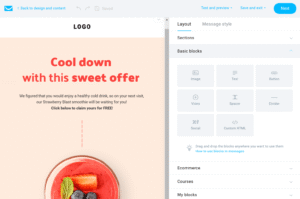
ActiveCampaign’s editor is solid too, but it feels a bit more old-school in places. It does the job well, and once you get used to it, building emails is quick. But a few times I had to use a bit of code to get the exact look I wanted, which some beginners may not enjoy.
My honest take: For pure ease and speed while building an email, GetResponse wins this round. ActiveCampaign is close behind, but you may need a little more patience.
Templates: Design and Quality
Both tools give you ready-made templates, so you don’t have to start from a blank page every time.
GetResponse has more templates, and they look fresh and modern right out of the box. If you run an online store or a creative brand, you will likely find something close to what you need fast.

ActiveCampaign has fewer templates, but they look clean, simple, and professional. They work great if you run a business-to-business brand or a service where trust and simplicity matter more than flashy design.
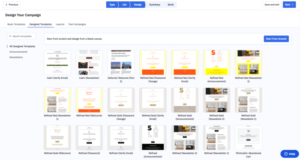
My honest take: GetResponse wins on variety and modern style. ActiveCampaign wins on clean, professional looks. Pick based on your brand style, not just the number of templates.
List Management and Automation
This is the heart of email marketing, and honestly, this is where ActiveCampaign shines the brightest.
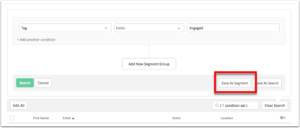
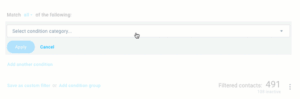
With ActiveCampaign, I could build automation that reacted to what people actually did. Someone clicked a link? Send them down one path. Someone ignored three emails? Send them down a different path. It felt like the tool was thinking along with me. Tagging contacts, splitting lists, and building smart paths felt deep and flexible.
GetResponse also has automation, and it works well for common needs like welcome emails, abandoned cart emails, and simple follow-ups. But when I tried to build something more detailed, with many branches and conditions, it felt a bit more limited compared to ActiveCampaign.
My honest take: If automation is your main goal, ActiveCampaign is built for it. GetResponse is good enough for most small businesses, but it does not go as deep.
Automation
This is where the biggest difference lives.
GetResponse: Good, but not great
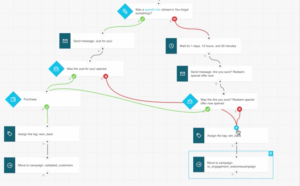
GetResponse has a visual automation builder. You can set up welcome sequences, tag contacts, send emails based on behavior, and create basic workflows.
For most small businesses and creators, that is more than enough.
But it is not the most powerful system. The automation is simpler. There is less branching logic. Fewer conditions. Less ability to create complex, multi-step journeys based on very specific subscriber actions.
GetResponse also does not include automation in its cheapest Starter plan. You have to step up to the Marketer plan at $59 a month to unlock proper automation workflows.
Some users on G2 mention this as a surprise. They sign up for the cheap plan, then realize they need to upgrade almost immediately to get the features they actually wanted.
ActiveCampaign: Best-in-class
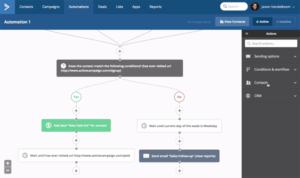
ActiveCampaign’s automation builder is in a different league.
You can build workflows based on email opens, clicks, web page visits, purchases, form fills, tags, custom fields, CRM updates, and actions in third-party tools. You can branch automations based on dozens of conditions. You can move subscribers between sequences automatically based on what they do.
I tested a multi-step sequence that sent different emails based on whether someone clicked a link, visited a product page, or did nothing — and the whole thing worked exactly as I set it up.
G2 scores ActiveCampaign’s automation at 8.8 out of 10. GetResponse scores 7.6. That 1.2 gap is noticeable when you actually use both.
One G2 reviewer described it as the automation builder that is unmatched — they had not found anything close after testing multiple platforms.
If automation is the reason you are buying this tool, ActiveCampaign is the clear answer.
Winner: ActiveCampaign — and it is not close
Deliverability: Do Your Emails Actually Land in the Inbox?
This matters more than almost anything else, because a beautiful email means nothing if it lands in spam.
In my own sending, both tools performed well overall. ActiveCampaign has a strong reputation for keeping sender scores healthy, especially if you follow their list-cleaning advice. GetResponse also does a solid job, and I did not notice major spam issues during my time using it.
That said, deliverability also depends on you. Clean lists, real engagement, and proper setup (like verifying your domain) matter just as much as the tool itself.
My honest take: Both are dependable. Neither gave me serious trouble. Slight edge to ActiveCampaign for larger, more active lists, but it’s close.
Integrations: Connecting to Other Tools You Use
ActiveCampaign connects to a huge number of other apps and tools. If you use many different platforms for your store, forms, or ads, chances are ActiveCampaign already has a direct connection ready for you.
GetResponse also connects to many popular tools, and it also comes with its own built-in extras like landing pages, forms, and webinars, so you may need fewer outside tools in the first place.
My honest take: ActiveCampaign wins on raw number of connections. GetResponse wins by giving you more built-in tools so you need fewer outside connections at all.
CRM: Managing Your Contacts Like a Sales Team
ActiveCampaign includes a real CRM built right in. You can track deals, see where a lead is in your sales process, and follow up at the right time. For anyone doing sales calls or managing leads by hand, this is a big plus.

GetResponse does not offer a full CRM in the same way. It is more focused on marketing and less on sales tracking.
My honest take: If you need to manage a sales pipeline, ActiveCampaign is the clear winner here. GetResponse simply was not built for this job.
Customer Support: Getting Help When You Are Stuck
Both companies offer chat and email support, and both were fairly quick to respond when I reached out.
GetResponse support felt friendly and fast for simple questions. ActiveCampaign support was also helpful, though on more complex automation questions, I sometimes had to explain my issue in more detail before getting a clear answer.
My honest take: Both are decent. Neither left me waiting for days. Slight edge to GetResponse for how simple and fast the help felt.
Reports and Analytics: Understanding What Is Working
ActiveCampaign gives deep reports. You can see how contacts move through automation, which emails perform best, and how your sales pipeline is doing, all in one place. It takes a little time to understand all the data, but once you do, it is very useful.
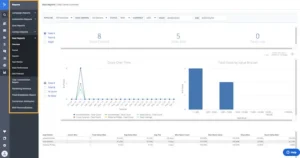
GetResponse gives clear and simple reports too. Opens, clicks, and basic automation performance are easy to read at a glance. It may not go as deep as ActiveCampaign, but for most small business needs, it covers what you actually need to know.
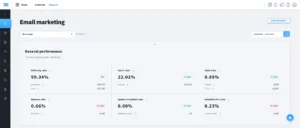
My honest take: ActiveCampaign gives you more detail. GetResponse gives you clarity without extra effort. Choose based on how deep you like to dig into numbers.
Pricing: What You Actually Pay
Pricing changes often, so always check the official pricing pages before you decide. But here is the general shape of it, based on what I have seen and used.
GetResponse tends to be more budget-friendly at the start. It also offers a free plan for a small number of contacts, so you can test it before spending anything. As your list grows, the cost rises, but it stays fairly reasonable for most small businesses.
ActiveCampaign does not offer a free plan, only a free trial. Its starting price looks similar to GetResponse, but once you want deeper automation, a CRM, or more advanced features, the cost rises faster. It is a bigger investment, but for many businesses, the extra automation and sales tools are worth the price.
| Plan Level | GetResponse | ActiveCampaign |
|---|---|---|
| Entry-level | $19 (Starter) | $15 (Starter) |
| Real starting point | $59 (Marketer) | $49 (Plus) |
| Mid-tier | $69 (Creator) | $79 (Pro) |
| Enterprise | Custom | $145+ |
My honest take: If budget is tight and your needs are simple, GetResponse is easier on your wallet. If you plan to grow, sell more, and automate deeply, ActiveCampaign’s higher price can pay for itself.
So, Which One Should You Pick?
Here is how I would sum it up in plain words, based on actually running my own list on both tools:
Pick GetResponse if:
- You are new to email marketing
- You want an easy, friendly tool from day one
- You want landing pages, webinars, and email all in one place
- You want a lower cost to start, or a free plan to test things
Pick ActiveCampaign if:
- You want deep, smart automation that reacts to what people do
- You need a real CRM to manage leads and sales
- You are willing to spend a bit more time learning the tool
- You are ready to invest more money for more power as you grow
There is no single “best” tool here. There is only the best tool for where you are right now. I have used both, and both did their job well. The real question is not which tool is better overall — it’s which one matches how you work, how big your list is, and how deep you want your automation to go.
Whichever one you pick, the most important thing is this: start sending, keep your list clean, and always give your readers a reason to open your next email.
ActiveCampaign vs GetResponse – FAQs
Q.1 Which platform has better email deliverability?
ActiveCampaign consistently outperforms GetResponse in independent deliverability tests, maintaining a mid-90% inbox placement rate compared to GetResponse’s high-80% average.
Q.2 Do they offer free account migration?
ActiveCampaign provides free, full-service expert migration on all paid plans, moving your lists, automation workflows, forms, and templates. GetResponse offers self-service migration tools, with white-glove migration reserved for high-volume enterprise accounts.
Q.3 Which is better for Shopify or WooCommerce stores?
ActiveCampaign is better for deep data analysis, revenue tracking, and sending targeted SMS based on purchase history. GetResponse is better for quickly building automated checkout funnels, upselling products, and driving traffic via web push notifications.
Q.4 Can I replace my sales CRM with either platform?
ActiveCampaign can entirely replace tools like Pipedrive or HubSpot for mid-market teams via its native Sales CRM. GetResponse cannot replace a true CRM; it lacks pipeline visual tracking, lead scoring matrices, and deal management stages.
Q.5 How do they calculate contact limits?
ActiveCampaign counts a contact once, regardless of how many lists or tags they have. GetResponse counts a contact multiple times if they appear on separate lists, which can accidentally duplicate your billing metrics.
Q.6 Is there a limit on how many emails I can send?
GetResponse offers unlimited email sending on all core paid plans. ActiveCampaign enforces a monthly sending cap that is typically 10 to 15 times your total subscriber contact limit.
