Last Updated: 28 Jun 2026
I have tested both ActiveCampaign vs GetResponse with a real email list.
Not a demo account. Not a free trial with five contacts. A real, live list — with real subscribers, real automations, and real money on the line.
And here is what I found: these two tools are not really competing with each other. They are built for completely different types of marketers.
One wants to give you everything in one place. The other wants to give you the most powerful automation engine on the market.
In this comparison, I will break down which one is actually worth your money — and which one will frustrate you within 30 days if you pick the wrong one.
Let me start with the part most people skip to first.
Short on Time? Read This First
I know most people will not read this entire post.
So here is the short version.
The biggest difference between these two tools is simple:
GetResponse focuses on giving you more tools in one place.
ActiveCampaign focuses on giving you more powerful automation.
Neither one is better for everyone. The right choice depends on what you actually need.
Quick Comparison
| If You Want… | Choose |
|---|---|
| Email marketing, webinars, and landing pages in one place | GetResponse |
| Online courses and memberships | GetResponse |
| More built-in tools for your money | GetResponse |
| An all-in-one marketing platform | GetResponse |
| Powerful automation workflows | ActiveCampaign |
| Advanced customer journeys | ActiveCampaign |
| Email marketing and CRM together | ActiveCampaign |
| A platform built around automation | ActiveCampaign |
Who Should Choose GetResponse?
GetResponse is built for people who want to grow and market their business without paying for a dozen different tools.
Besides email marketing, you get webinars, landing pages, sales funnels, online courses, memberships, forms, and SMS — all under one roof. For many small businesses, that means fewer subscriptions and lower overall costs every month.
It is especially good for bloggers, creators, coaches, course sellers, and small business owners. If your goal is to attract leads, grow an audience, sell products, and run your whole marketing operation from one dashboard — GetResponse was built for you.
Get started with Getresponse for free now
Who Should Choose ActiveCampaign?
ActiveCampaign is built for businesses that want their email marketing to react to customer behavior in very specific, detailed ways.
It does not try to be your webinar tool or your course platform. What it focuses on is automation — and it does that better than almost any other tool in this space.
You can build advanced workflows, move subscribers between campaigns automatically, and create highly personal customer journeys based on what people actually do.
It is a strong fit for SaaS companies, agencies, sales teams, and businesses with more complex marketing setups. If automation is the main reason you are buying an email platform, ActiveCampaign is where it shines.
Get started with Activecampaign free trial
One Important Difference
ActiveCampaign started charging for unsubscribed contacts in late 2025.
In simple terms, you may still pay for people who already left your list.
GetResponse only charges for active subscribers — which can make a real difference in cost as your list grows.
My Final Take
Both tools are excellent. But they solve different problems.
Choose GetResponse if you want an all-in-one platform with email, webinars, funnels, landing pages, and course tools.
Choose ActiveCampaign if your top priority is building advanced automations and personal customer journeys.
The best choice is not the one with the longest feature list. It is the one that matches how you actually run your business.
What I Tested and How
I signed up for both tools using a real email list.
I built automations, sent campaigns, checked deliverability, and tried to break things on purpose.
I also went through hundreds of real user reviews on G2, Capterra, and Trustpilot to see what people love, what frustrates them, and what nobody talks about until it is too late.
Here is what I found across every area that actually matters.
Ease of Use
GetResponse: Built for people who want to move fast
When I logged into GetResponse for the first time, I was up and running in about 20 minutes.
The dashboard is clean. Everything is where you expect it to be. The drag-and-drop email editor is simple enough that you can build a nice-looking email without any design skills.
New users mostly say the same thing. People who switch from tools like Mailchimp or MailerLite say GetResponse feels immediately familiar. The onboarding process walks you through the most important setup steps without overwhelming you.
One Capterra reviewer who came from a different platform said something that stuck with me: they were shocked by how little time it took to set up their first automation compared to what they had used before.
For beginners, or anyone who wants to spend less time learning a tool and more time using it — GetResponse wins here.
ActiveCampaign: More powerful, steeper learning curve
ActiveCampaign is not hard to use. But it is not simple either.
The first time I opened the automation builder, I had to sit with it for a couple of hours before things clicked. There are a lot of options. A lot of conditions. A lot of ways to slice and dice subscriber behavior.
That depth is exactly what power users love. But it can feel like a lot if you just want to send a welcome email.
Most users report needing two to three hours to feel comfortable with the basics, and several sessions before they can use the advanced features confidently.
A G2 reviewer with a large SaaS company said the automation builder is unlike anything they have used — that no other tool comes close. But they also said it took their team time to figure out how to get the most out of it.
That is the honest trade-off. You get more power, but you have to invest time to unlock it.
Winner: GetResponse for beginners. ActiveCampaign for users who are willing to climb the learning curve for a more powerful system.
Email Builder
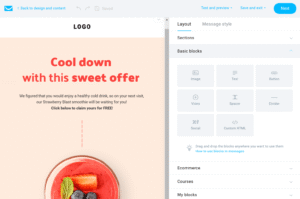
Both tools have solid drag-and-drop email editors. You can build clean, professional-looking emails without touching any code.

GetResponse gives you a flexible editor with blocks you can adjust individually — spacing, padding, background colors, visibility rules. You can even preview your email in dark mode, which ActiveCampaign does not offer. They also added an AI email generator that can build a full email from a single prompt.

ActiveCampaign has a great builder too. It added a strong AI feature that pulls your brand assets directly from your website and auto-generates emails that match your colors and style. That is genuinely useful when you need to spin up campaigns fast.
Both editors do the job well. Neither will leave you frustrated.
Users who care mostly about design tend to rate GetResponse slightly higher here — they like the individual block controls. Users who care more about speed and AI assistance tend to prefer ActiveCampaign’s brand kit feature.
Honestly, this one is close to a tie.
Winner: Tie, with a slight edge to GetResponse for design control and dark mode preview.
Design & Templates
Both tools give you a drag-and-drop email editor. You can build good-looking emails without touching any code. But the experience inside each editor is different enough that it is worth breaking down.
GetResponse: More templates, more interactive

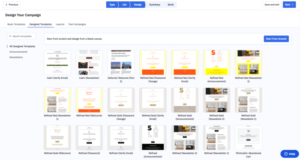
GetResponse gives you 150+ pre-designed email templates. Business, education, events, holidays, sales — there is a starting point for almost any campaign type.
What I liked about the editor is the little things. You can adjust spacing, padding, and background colors on individual blocks without affecting the rest of the email. There is also a dark mode preview — something ActiveCampaign does not have. And you can drop in interactive elements like countdown timers and video modules directly from the editor.
The biggest practical advantage is how easy it is to show different content blocks to different segments without leaving the email builder. If you run personalized campaigns, that matters.
Multiple G2 users mention that GetResponse emails look great on mobile without any extra effort. The templates resize themselves without needing manual adjustments.
ActiveCampaign: Fewer templates, more design control

ActiveCampaign gives you around 250 templates — more than GetResponse. The editor is fast and modern, with saveable content blocks you can reuse across campaigns.
The standout feature here is the AI Brand Kit. You paste in your website URL and ActiveCampaign pulls your colors, fonts, and logo and applies them to your templates automatically. If you send emails frequently and want to stay on brand without setting things up from scratch every time — this is a genuine time-saver.
ActiveCampaign also supports conditional content inside emails. You can show one block to subscribers who bought something and a completely different block to people who never clicked anything. GetResponse does not do this at the same level.
A Capterra reviewer who manages email for a mid-size ecommerce brand said the conditional content blocks alone were worth the switch — they could send one campaign that felt like five different emails to five different audiences.
Winner: GetResponse for template variety and interactive elements. ActiveCampaign for conditional content and AI brand matching. If design control matters more to you than quantity — ActiveCampaign. If you want more ready-to-go options and dark mode preview — GetResponse.
Automation
This is where the biggest difference lives.
GetResponse: Good, but not great
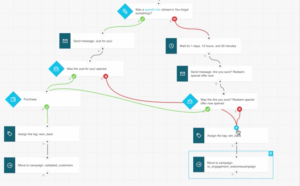
GetResponse has a visual automation builder. You can set up welcome sequences, tag contacts, send emails based on behavior, and create basic workflows.
For most small businesses and creators, that is more than enough.
But it is not the most powerful system. The automation is simpler. There is less branching logic. Fewer conditions. Less ability to create complex, multi-step journeys based on very specific subscriber actions.
GetResponse also does not include automation in its cheapest Starter plan. You have to step up to the Marketer plan at $59 a month to unlock proper automation workflows.
Some users on G2 mention this as a surprise. They sign up for the cheap plan, then realize they need to upgrade almost immediately to get the features they actually wanted.
ActiveCampaign: Best-in-class
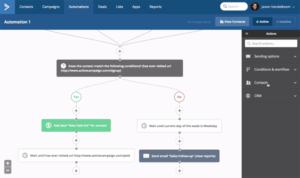
ActiveCampaign’s automation builder is in a different league.
You can build workflows based on email opens, clicks, web page visits, purchases, form fills, tags, custom fields, CRM updates, and actions in third-party tools. You can branch automations based on dozens of conditions. You can move subscribers between sequences automatically based on what they do.
I tested a multi-step sequence that sent different emails based on whether someone clicked a link, visited a product page, or did nothing — and the whole thing worked exactly as I set it up.
G2 scores ActiveCampaign’s automation at 8.8 out of 10. GetResponse scores 7.6. That 1.2 gap is noticeable when you actually use both.
One G2 reviewer described it as the automation builder that is unmatched — they had not found anything close after testing multiple platforms.
If automation is the reason you are buying this tool, ActiveCampaign is the clear answer.
Winner: ActiveCampaign — and it is not close.
Segmentation & List Management
Segmentation is how you stop sending the same email to everyone and start sending the right email to the right person. This is one area where the gap between these two tools is very real.
GetResponse: Simple, intuitive, and smart out of the box

GetResponse lets you segment contacts by tags, custom fields, purchase history, website visits, email engagement, and more. Nothing unusual there — most email tools do this.
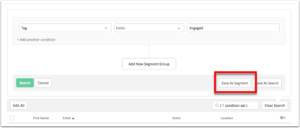
What sets it apart is the automatic engagement detection. GetResponse automatically identifies your most engaged contacts without you having to build a scoring system from scratch. It just does it. For a small business owner who does not want to spend hours setting up complex rules, that is genuinely useful.
List management is also very clean. You can merge lists, import contacts in bulk, and organize everything from one dashboard without it feeling like work.
One Capterra reviewer mentioned that moving 15,000 contacts from another platform and reorganizing them inside GetResponse took less than an hour. That kind of thing usually takes a full day on other tools.
ActiveCampaign: The deepest segmentation you will find at this price

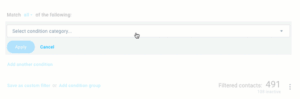
ActiveCampaign lets you segment based on opens, clicks, website pages visited, purchase history, custom fields, tags, lead scores, CRM deal data, and actions taken inside third-party tools. You can stack multiple conditions to create very specific groups.
The AI-Suggested Segments feature is worth mentioning. You type what you are looking for in plain language — something like “contacts who visited the pricing page but did not buy in the last 30 days” — and ActiveCampaign builds the segment for you. That used to take a lot of manual setup.
I tested this myself. I described a segment in three sentences and had a working, accurate list ready in under two minutes.
A G2 reviewer who runs marketing for a SaaS company said the ability to segment based on in-app behavior and CRM data at the same time — inside the same tool — was the main reason they chose ActiveCampaign over everything else they tested.
Winner: ActiveCampaign — not even close for depth. If you need to get precise about who receives what, nothing in this price range matches it. GetResponse wins for ease of use and the out-of-the-box engagement detection that just works.
Forms & Landing Pages
You need forms and landing pages to get people onto your list in the first place. Both tools have them. But they are built differently — and the differences matter depending on how you plan to use them.
GetResponse: The stronger landing page builder

GetResponse gives you 180+ landing page templates. You get unlimited landing pages on all paid plans. And the builder lets you move elements freely anywhere on the page — no grid, no restrictions. If you want the button three pixels to the left of where it defaults, you can put it there.
A/B testing is also built in. You can test up to 10 different versions of the same page, all running under the same URL. That is a lot of testing flexibility for a tool at this price. GetResponse also includes SEO settings on landing pages — title tags, meta descriptions, the basics — which ActiveCampaign’s landing page builder does not offer.
The form builder is solid too. You get multiple templates, embedded and pop-up options, and you can customize the “Thank You” page that appears after someone submits. That last part sounds small. But if you are delivering a lead magnet or redirecting someone to a sales page — a customizable confirmation page matters.
A G2 reviewer who manages landing pages for multiple client accounts said GetResponse saved them hours per project because they could drag everything exactly where they wanted it rather than fighting a grid system.
ActiveCampaign: Fewer templates, but more personalization power

ActiveCampaign gives you 56 landing page templates. The builder works inside a predefined grid, which means you cannot move elements as freely as you can in GetResponse. Some users find this frustrating. I found it slightly limiting myself when I wanted a layout that did not fit the default structure.
Where ActiveCampaign makes up ground is on the Pro plan and above. You can add dynamic content to landing pages — meaning different visitors see different things based on who they are and what they have done. Someone who already bought sees one version of your page. A cold visitor sees another. That kind of personalization on a landing page is rare at this price point.
Winner: GetResponse for most people — more templates, free element placement, A/B testing on landing pages, and SEO settings. ActiveCampaign only pulls ahead if dynamic content on landing pages is something your business actually needs.
CRM and Sales Tools
ActiveCampaign has a built-in CRM. You can track deals, manage pipelines, and connect your email marketing directly to your sales process. It is not a replacement for Salesforce, but for small and mid-size teams it is genuinely useful.
The CRM features are available as add-ons starting on the Plus plan. The Pipelines add-on starts at $49 a month, and Sales Engagement starts at $85 a month. That is on top of your base plan cost — something worth knowing before you budget.
GetResponse does not have a built-in CRM in the traditional sense. You would need to connect a third-party CRM through an integration if you want pipeline and deal tracking.
If CRM is important to your business, ActiveCampaign is the clear winner. If it is not something you need, you are not missing much with GetResponse.
Winner: ActiveCampaign
Features Unique to Each Tool
GetResponse extras you will not find in ActiveCampaign:
Webinar hosting. GetResponse has a built-in webinar tool that lets you host live and on-demand webinars directly inside the platform. This starts on the Marketer plan. If you are buying a separate webinar tool like WebinarJam or Demio, GetResponse could replace that cost entirely.
Online courses and memberships. The Creator plan lets you build and sell courses directly through GetResponse. It is not as advanced as a dedicated platform, but it works for basic courses. If you are paying for Kajabi ($149 a month) or Teachable ($39 a month), this could simplify things a lot.
Website builder. GetResponse has a drag-and-drop website builder included in all paid plans. It is basic, but it is there.
Sales funnels. GetResponse has pre-built conversion funnels for lead generation and product sales. You set up the pages, the email sequence, and the upsell — and the funnel manages itself.
ActiveCampaign extras you will not find in GetResponse:
Multi-channel messaging. ActiveCampaign lets you reach subscribers by email, SMS, Facebook Audiences, and live chat. GetResponse is limited to email and live chat.
Predictive sending. ActiveCampaign uses AI to figure out the best time to send each email to each individual contact. Not just the best time for your whole list — for each person specifically.
Dynamic website content. ActiveCampaign can show different content on your website or landing pages based on who is visiting. That level of personalization is rare at this price point.
MCP integration. ActiveCampaign became the first email marketing platform in Claude’s official MCP partner directory, which means it can connect with external AI tools in ways other platforms cannot yet.
Email Deliverability
This matters more than most people realize.
If your emails are landing in spam folders instead of inboxes, open rates drop, revenue drops, and your list slowly stops working.
EmailTooltester ran deliverability tests across major email platforms. ActiveCampaign scored 93.4%. GetResponse scored 89.7%. The industry average across tested platforms was 83.1%.
Both tools beat the average by a comfortable margin. But ActiveCampaign’s edge here is real — it has ranked first across multiple rounds of testing.
If deliverability is a concern for you, ActiveCampaign has a track record that is hard to argue with.
Winner: ActiveCampaign
Integrations
No email tool lives alone. You are connecting it to your store, your CRM, your payment processor, or your webinar software. This is one area where the gap between GetResponse and ActiveCampaign is harder to ignore.
ActiveCampaign: 900+ integrations
ActiveCampaign connects to over 900 apps. Salesforce, Shopify, WooCommerce, BigCommerce, Magento, Stripe, PayPal, Calendly, Typeform — the list is long. If you already have a marketing stack and need your email tool to plug into all of it cleanly, ActiveCampaign was built for that.
Even when a native integration does not exist, the Zapier and Make connections mean you can almost always build one without writing any code.
A G2 reviewer who manages marketing for a mid-size agency said they had tried to make GetResponse work for two clients whose tech stacks included niche tools — and ended up switching to ActiveCampaign because the native integrations were just there, no workarounds needed.
GetResponse: 170+ integrations
GetResponse covers the most popular tools well. Shopify, WooCommerce, PayPal, Stripe, Google Analytics, Facebook, Salesforce, WordPress — the essentials are all there.
But if you use something less common, you are more likely to hit a gap. The integration library is solid for straightforward setups. It starts showing limits when your stack gets more specialized.
One thing worth knowing: GetResponse has native payment processing built directly into its sales funnels via PayPal and Stripe. You do not need a separate integration to take payments inside a GetResponse funnel. For coaches and creators who sell directly through their email platform, that is a real convenience.
Winner: ActiveCampaign — 900+ vs 170+ is a meaningful gap. GetResponse covers the basics well, but if your tools are even slightly outside the mainstream, ActiveCampaign is the safer bet.
Multi-Channel Marketing
Email is the core of both platforms. But what happens when you want to reach the same person across more than one channel?
ActiveCampaign: Email, SMS, Facebook Audiences, and live chat
ActiveCampaign lets you contact subscribers through four channels: email, SMS, Facebook Custom Audiences, and live chat through its site messaging tool.
The SMS integration means you can trigger a text message as part of an automation — after a form fill, after a purchase, after someone hits a specific step in a sequence. The Facebook Audiences sync means you can automatically add or remove contacts from Facebook ad audiences based on what they do in your email platform. Someone clicks your pricing page email — they get added to a retargeting audience. Someone converts — they get removed so you stop spending money showing them ads for something they already bought.
I tested this with a simple abandoned cart sequence. Email on day one. SMS on day two. Facebook retargeting ad triggered automatically on day three. The whole thing ran without me doing anything after the initial setup.
A G2 reviewer at a direct-to-consumer brand said combining the email sequence with Facebook Audiences sync increased their abandoned cart recovery rate by a meaningful amount — and the workflow took about 45 minutes to build.
GetResponse: Email and live chat — with an ads management tool
GetResponse is primarily email. It does have a live chat tool. And it does connect with Facebook and Google — but in a different way. Rather than syncing audiences for retargeting, GetResponse lets you create and manage Facebook and Google Ads directly from the platform.
That is useful if you want to run ads from the same dashboard as your email campaigns. But it is not the same as the subscriber-level audience syncing that ActiveCampaign does.
GetResponse does not have built-in SMS. If text messages are part of your marketing strategy, you will need a third-party integration.
Winner: ActiveCampaign — four channels vs two, and the Facebook Audiences sync is a genuinely useful tool that GetResponse cannot replicate without outside help.
Pricing: What You Actually Pay
This is the section most comparison posts get wrong. They list the starting price and move on. But the starting price almost never reflects what you will actually pay.
Let me break this down properly.
GetResponse Pricing
GetResponse has four main plans: Starter, Marketer, Creator, and Enterprise.
The Starter plan starts at $19 a month for up to 1,000 subscribers. You get unlimited emails, basic automations, landing pages, and a website builder. This is good for someone just getting started who wants to build a list and send newsletters.
But here is what to know: the Starter plan does not include full automation workflows or webinars. If you need those — and most growing businesses do — you are not really on the right plan.
The Marketer plan starts at $59 a month for 1,000 subscribers. This is where GetResponse becomes genuinely useful for most businesses. You get full automation workflows, webinar hosting for up to 100 people, event-based automations, contact scoring, and multi-user access. This is the plan I would actually recommend to most people considering GetResponse.
The Creator plan starts at $69 a month for 1,000 subscribers. This adds online courses, paid newsletters, and content monetization tools. If you are a creator who wants to sell courses or memberships, this is the one to look at.
The Enterprise (MAX) plan is custom-priced and requires talking to sales. It is for large organizations with over 100,000 subscribers and complex needs.
How costs scale by subscriber count on the Marketer plan:
- 1,000 subscribers: $59 a month
- 2,500 subscribers: $69 a month
- 10,000 subscribers: $139 a month
- 25,000 subscribers: $299 a month
One thing to know: GetResponse only charges for active subscribers. Unsubscribes, bounces, and deleted contacts do not count toward your limit. That is a meaningful benefit as your list grows and people cycle off.
Also worth knowing: if you get a duplicate subscriber across two lists, GetResponse counts them twice. I have seen this catch people by surprise when they hit a pricing tier they were not expecting.
Annual billing saves you 18%, and a two-year plan saves 30%.
ActiveCampaign Pricing
ActiveCampaign also has four plans: Starter, Plus, Pro, and Enterprise.
The Starter plan starts at $15 a month for 1,000 contacts on annual billing. It includes email marketing, basic automations, and 870+ integrations. But the automations are limited — only 5 actions per workflow, no branching, no conditional logic. If you want to build real customer journeys, this plan will frustrate you fast.
The Plus plan starts at $49 a month for 1,000 contacts. This is where ActiveCampaign starts to feel like the tool people describe when they rave about it. You get full automation workflows, SMS marketing, landing pages, and basic CRM functionality. I would say this is the true starting point for most serious users.
The Pro plan starts at $79 a month for 1,000 contacts. This adds predictive sending, conditional content, conversion attribution, and deeper ecommerce integrations with Shopify Plus, BigCommerce, and Magento.
The Enterprise plan starts at $145 a month for 1,000 contacts. This is for teams that need Salesforce or Microsoft Dynamics CRM integration, custom objects, HIPAA compliance, and a dedicated account team.
How costs scale by subscriber count on the Plus plan:
- 1,000 contacts: $49 a month
- 2,500 contacts: $95 a month
- 5,000 contacts: $145 a month
- 10,000 contacts: $189 a month
- 25,000 contacts: $369 a month
- 50,000 contacts: $469 a month
The big pricing warning with ActiveCampaign:
In November 2025, ActiveCampaign changed how they count contacts. They now charge based on your total contact count — including unsubscribed contacts, bounces, and unconfirmed contacts.
In practical terms, that means you could be paying for people who are no longer on your list. For businesses with high churn or large lists with lots of inactive contacts, this can add real money to your monthly bill.
GetResponse does not do this. You only pay for active subscribers.
If you have a large, messy list with lots of old contacts, this difference matters.
Side-by-Side at 1,000 Contacts:
| Plan Level | GetResponse | ActiveCampaign |
|---|---|---|
| Entry-level | $19 (Starter) | $15 (Starter) |
| Real starting point | $59 (Marketer) | $49 (Plus) |
| Mid-tier | $69 (Creator) | $79 (Pro) |
| Enterprise | Custom | $145+ |
At the entry point where both tools are actually useful, GetResponse costs a bit more per month — but it also includes more built-in tools. ActiveCampaign is cheaper if you just want automation without the webinar and course features.
At higher subscriber counts, ActiveCampaign gets expensive fast — especially when you factor in the add-ons for CRM, SMS, and transactional email, which cost extra on top of the base plan.
Customer Support
GetResponse scores 8.8 out of 10 for support quality on G2. They offer 24/7 live chat on all paid plans, plus email support. Multiple users mention the support team is responsive and genuinely helpful — especially for beginners who run into setup issues.
ActiveCampaign scores 8.6 on G2 for support. That is still very good, but GetResponse edges it out here. ActiveCampaign’s support quality tends to get more praise at higher plan levels. Starter plan users sometimes report slower response times.
One thing I noticed: for a tool this complex, good support matters. The number of features in ActiveCampaign means there are more things that can go wrong — or more places where you just need help figuring something out.
Winner: GetResponse — slightly better support, especially for newer users.
What Real Users Are Saying
I went through hundreds of reviews across G2, Capterra, and Trustpilot to find the patterns that show up again and again.
Here is what people actually say.
On GetResponse’s all-in-one value:
A lot of small business owners and creators talk about how much money GetResponse saves them by replacing multiple tools. One Capterra reviewer mentioned they had been paying separately for an email tool, a webinar platform, and a landing page builder — and GetResponse let them cancel all three. The savings more than covered the cost of the platform.
That review stuck with me because it is not about a single feature. It is about what the tool actually costs in real life after you add everything up.
On ActiveCampaign’s automation power:
G2 reviewers consistently describe ActiveCampaign’s automation builder as the most powerful they have used. The ability to build complex sequences that react to very specific subscriber behavior — not just opens and clicks, but website visits, purchases, support tickets — is something people say they cannot find anywhere else at this price.
One reviewer said it changed how their team thinks about email marketing. Instead of sending campaigns to everyone, they now send the right message to the right person at the right moment automatically.
On ActiveCampaign’s cost and complexity:
A Software Advice reviewer made a point worth sharing: they said it took a lot of work to configure, cost more than other platforms they had tried, and did not deliver the results they needed to justify the cost.
That is an honest take. ActiveCampaign is not the right tool for everyone. If you are not going to use the automation depth, you are paying for something you will never touch.
On GetResponse’s automation limitation:
Several G2 users mention being surprised that the cheapest GetResponse plan does not include proper marketing automation. They signed up for $19 a month and quickly realized they needed the $59 plan to get what they actually wanted.
It is not a dealbreaker, but it is something to know before you sign up.
My Honest Take After Testing Both
I have used both tools. I have built real automations in both. I have sent real campaigns and watched the results.
Here is where I land.
GetResponse is the better choice if you are a creator, blogger, coach, or small business owner who wants to do a lot from one place. The fact that you get webinars, course creation, landing pages, funnels, and email marketing in one tool — and only charge for active subscribers — makes it genuinely good value.
The automation is good enough for most businesses. It is not the most powerful, but for welcome sequences, lead nurturing, and basic customer journeys, it gets the job done.
ActiveCampaign is the better choice if automation is the core of your business. If you are running complex sequences, scoring leads, managing a sales pipeline, and sending personalized messages based on very specific behavior — ActiveCampaign will do things that GetResponse simply cannot.
The learning curve is real. The cost at scale is real. The new policy on charging for unsubscribed contacts is a real issue for businesses with large lists.
But if you need the depth, nothing in this price range comes close.
One last thing I want to be honest about: both tools have raised their prices over the past two years. If you are on a tight budget and just starting out, there are more affordable options like MailerLite or Kit that might serve you better in the early stages.
But if you are ready to invest in a serious email marketing platform, both GetResponse and ActiveCampaign are worth it — as long as you pick the right one for how you actually work.
Frequently Asked Questions
Is GetResponse better than ActiveCampaign?
It depends on what you need. GetResponse is better if you want more tools in one place — webinars, courses, funnels, and email marketing together. ActiveCampaign is better if you want the most powerful automation engine available. Neither is better for everyone.
Does ActiveCampaign charge for unsubscribed contacts?
Yes, as of late 2025, ActiveCampaign charges based on total contacts in your account — including people who have unsubscribed. GetResponse only charges for active subscribers.
Which is cheaper: GetResponse or ActiveCampaign?
At the entry level, both platforms start around $15-19 a month. But for plans that are actually useful, GetResponse’s Marketer plan starts at $59 and ActiveCampaign’s Plus plan starts at $49. At higher subscriber counts, costs on both platforms rise significantly — and ActiveCampaign’s add-ons for CRM and SMS push the total cost higher.
Does GetResponse have webinars?
Yes. GetResponse includes built-in webinar hosting starting on the Marketer plan. ActiveCampaign does not have a webinar feature.
Does ActiveCampaign have a free plan?
No. ActiveCampaign offers a 14-day free trial, but it is limited to 100 subscribers and 100 emails. GetResponse also does not have a permanent free plan, but it does offer a free-forever tier with up to 500 contacts and basic features.
Which has better email deliverability?
ActiveCampaign scored 93.4% in independent deliverability testing, compared to GetResponse at 89.7%. Both beat the industry average of 83.1%, but ActiveCampaign has a measurable edge.