

Last Updated: 29 Jan 2026
Choosing an email marketing platform can feel overwhelming, especially when both options seem solid on paper. I’ve personally used both Mailchimp and Moosend for my own email campaigns, and I’m here to give you the honest breakdown of which tool actually delivers.
Both platforms have their fans, but after using them extensively, digging into real user reviews, and comparing actual costs, some clear winners emerged. Let’s dive in Mailchimp vs Moosend.
Email Editor
First up, let’s talk about the tools you’ll actually use every day—the email editors. I tested both extensively to see which one makes creating emails easier.
Mailchimp’s Editor
Mailchimp has two builders running side by side right now: the new builder and the legacy (classic) builder. And honestly? This dual-system thing created more headaches for me than I expected.
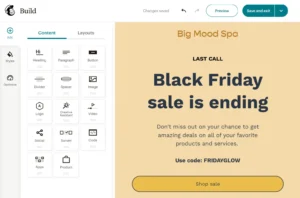
The new builder has a drag-and-drop interface that’s pretty polished. You get 260+ templates to choose from, which sounds great until you realize that templates saved in one builder won’t work in the other. So if you create 10 perfect templates in the new builder, then switch to legacy for some specific feature, those templates are basically useless.
The drag-and-drop functionality itself is solid—you can add content blocks, adjust padding for mobile vs. desktop separately, and customize layouts without touching code. But users consistently complain about the learning curve and navigation being “clunky.”
From the reviews I read, people either love it or find it frustratingly complicated. One Capterra reviewer said, “I found it too difficult to use and I just couldn’t navigate it well enough to find or do what I wanted.”
Moosend’s Editor
Moosend keeps things much simpler. You get one drag-and-drop editor that works the same way across emails, landing pages, and forms. No switching between builders, no confusion.
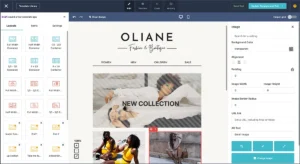
They offer 115+ email templates that are clean and professional. The interface is straightforward—add text blocks, images, buttons, and you’re done. Users on G2 consistently praise how “exceptionally easy to use” it is.
The editor lets you save blocks you like (headers, footers, banners) and reuse them across campaigns. You can also set default fonts and colors, which Mailchimp doesn’t make as easy.
One thing I really liked: Moosend has a collaboration feature where team members can leave comments directly in the email editor. This is huge if you’re working with a team and need quick feedback.
The Downside? Moosend’s templates could use a design refresh. They’re functional but not as modern-looking as some competitors.
Winner for Email Editor: Moosend (0–1)
Why? Because simplicity wins. Mailchimp’s dual-builder mess and navigation issues make it harder to use, while Moosend gets you creating emails faster with less friction.
Templates and Design
Templates save you time, but only if they’re actually good and easy to customize.
Mailchimp’s Templates
Mailchimp gives you 260+ templates in the new builder and 130+ in the legacy builder. That’s a lot of options. The templates cover everything from newsletters to promotions to event invitations.

The design quality is generally solid—modern, clean, and professional. But here’s the catch: customization can be tricky. Several reviewers mentioned templates that “aren’t very intuitive to use” and having to create images in other platforms because the in-editor customization wasn’t flexible enough.
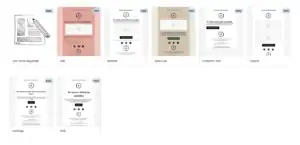
Mailchimp also offers a Creative Assistant (AI tool) that can help generate designs, though it’s only available on higher-tier plans.
Moosend’s Templates
Moosend has 115+ templates. Not as many as Mailchimp, but still a decent variety covering newsletters, e-commerce, events, and more.
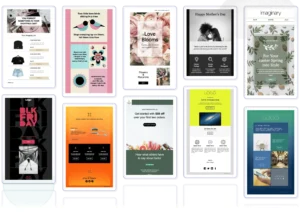
The templates are clean and work well for their intended purpose—they’re tested for mobile responsiveness and dark mode compatibility. You can import your own HTML templates too, which gives you more control.
The downside? Several reviewers noted that Moosend’s template designs feel a bit dated compared to competitors. They work fine, but they don’t have that “wow” factor.
Winner for Templates and Design: Mailchimp (1–1)
Mailchimp wins here purely on volume and design polish. The templates look more modern, and you have way more options to choose from. However, if you value ease of customization over quantity, Moosend’s simpler approach might actually serve you better.
List Building and Segmentation
Building your list and targeting the right people is crucial for email success.
Mailchimp’s List Management
Mailchimp calls email lists “Audiences” and puts a cap on how many you can create—just one on the free plan. This gets frustrating fast if you’re managing multiple campaigns or client accounts.
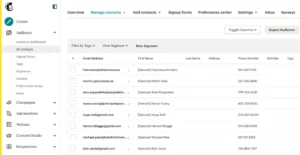
Here’s something sneaky: Mailchimp counts unsubscribed and unconfirmed contacts toward your billing limit unless you manually archive them. So you could end up paying for people who can’t even receive your emails.
For segmentation, Mailchimp offers solid options. You can create segments based on subscriber behavior, demographics, engagement, and more. They also have “Predictive Segmentation” on higher-tier plans that uses AI to forecast what customers might do next.
The CRM features are decent—you can track customer interactions and create profiles. But if you need a full CRM, Mailchimp isn’t a replacement for something like Salesforce or HubSpot.
Moosend’s List Management
Moosend handles contact management more straightforwardly. You can create multiple lists and segment based on behavior, demographics, and custom fields.
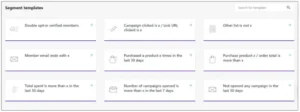
One nice touch: Moosend has a “one email address, one contact” policy. So if the same email appears on multiple lists, you only get charged once. That’s fairer than Mailchimp’s approach.
Moosend’s segmentation tools are strong. You can build segments using tags, custom fields, behavior tracking, and even website activity. They also have an AI-powered “Audience Discovery” feature (on Enterprise or Moosend+ plans) that automatically identifies audience segments based on behavior and predicts their next move.
At import, Moosend automatically removes duplicates and unsubscribed contacts, keeping your list clean without manual work.
Winner for List Building and Segmentation: Moosend (1–2)
Moosend’s fairer contact counting, automatic list cleaning, and simpler segmentation tools make it the better choice. Mailchimp’s habit of charging for unsubscribed contacts is a dealbreaker for many users.
Automation
Email automation is where the real power lies—set it up once, and it works for you 24/7.
Mailchimp’s Automation
Mailchimp offers automation on all paid plans (it used to be on the free plan but was removed in late 2025). You get pre-built automation templates for common scenarios: welcome emails, abandoned carts, birthday campaigns, and more.
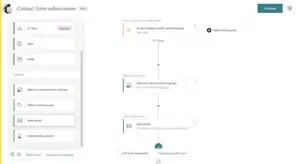
The automation builder is visual, so you can see your workflow as you build it. You can set triggers, add delays, and create conditional splits. On Standard and Premium plans, you get access to “Customer Journey” features that let you build more complex, multi-step campaigns.
Mailchimp also has AI-generated “Marketing Flows” that automatically create multi-step campaigns for you. These include AI-written content and smart delays between sends.
The Problem? Users on lower-tier plans find automation pretty limited. Advanced features like multivariate testing and complex branching workflows are locked behind the Premium plan, which starts at $350/month.
Moosend’s Automation
This is where Moosend really shines, and honestly, it’s one of my favorite things about the platform. You get access to full automation features starting at $9/month. That includes the visual workflow builder, 18 pre-built automation recipes, and the ability to create custom workflows from scratch.
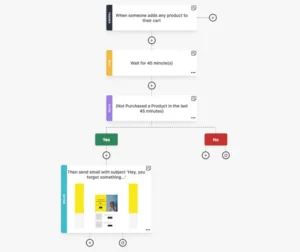
The automation builder is drag-and-drop and super intuitive. You can set triggers based on:
- Subscriber actions (clicks, opens, form submissions)
- Website behavior (page visits, product views, cart abandonment)
- Date-based events (birthdays, anniversaries)
- Custom field changes
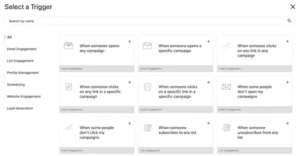
You can also create conditional branches, time delays, and complex sequences. For e-commerce users, Moosend includes automations for abandoned cart recovery, product recommendations, and order follow-ups.
Users consistently praise Moosend’s automation as easy to use yet powerful. One G2 reviewer said it has a “super clean automation builder (drag-and-drop easy!) and smart segmentation.”
Winner for Automation: Moosend (1–3)
Moosend gives you enterprise-level automation at budget-friendly prices. Mailchimp locks its best automation features behind expensive plans, making Moosend the clear winner for anyone serious about automated campaigns.
Landing Pages
Landing pages help you capture leads and grow your list. Let’s see how both platforms handle them.
Mailchimp’s Landing Pages
Mailchimp includes a landing page builder on all plans, including the free one. You get templates for lead capture, accepting payments, list growth, and product promotion.
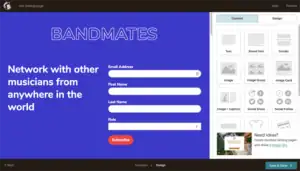
The builder is drag-and-drop, and it integrates with your email campaigns so new subscribers automatically go to your lists. You can connect a custom domain and track performance through analytics.
The landing pages look professional, and you can customize them fairly well. However, the navigation to find the landing page builder is a bit hidden—it’s not under “Campaigns” where you’d expect it.
Moosend’s Landing Pages
Moosend’s landing page builder is available on paid plans (not the free trial). You get a drag-and-drop editor with templates for different use cases.
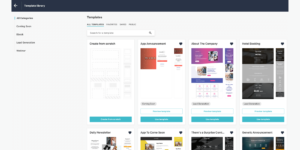
The builder is clean and simple to use—consistent with Moosend’s overall approach. You can add forms, images, videos, buttons, and customize styling. There’s also a “Wheel of Fortune” gamification option for interactive lead capture, which is a fun touch.
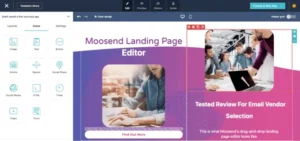
Like emails, you can have team members leave comments on landing pages for collaboration.
The Downside: Some users noted that Moosend’s landing pages had occasional technical issues. One Capterra reviewer mentioned their landing page wouldn’t work because of an apostrophe in the title, and support took a while to fix it.
Winner for Landing Pages: Mailchimp (2–3)
Both platforms offer solid landing page builders, but Mailchimp edges out Moosend with better template variety and availability on the free plan. That said, Moosend’s collaboration features are a nice bonus if you’re working with a team.
Deliverability
Your emails are useless if they don’t reach inboxes. Deliverability is critical.
Mailchimp’s Deliverability
According to the 2022 Email Deliverability Report, Mailchimp has an 81% inbox placement rate and a 14% spam rate. That’s… not great, honestly. And I noticed this issue myself—even after setting up proper domain authentication, some of my emails still ended up in spam folders.
Multiple users in reviews complained that their emails land in spam even after proper domain authentication. One G2 reviewer said, “I don’t like that even though we do everything required to validate the domain URL, the emails can still end up in junk.”
Mailchimp provides SPF and DKIM authentication setup, but they don’t offer full SPF alignment, a deliverability dashboard, or list cleaning tools. They also don’t show you feedback about spam complaints from subscribers.
Recent changes require custom sending domains with DMARC authentication if you’re sending 5,000+ emails per day to Gmail or Yahoo (this became mandatory industry-wide in 2024).
Moosend’s Deliverability
Moosend takes deliverability more seriously. They offer full SPF alignment, DMARC setup guidance, and hands-on deliverability support including consultation calls.
At import, Moosend automatically filters out bad data and integrates with email verification services. They also provide IP warmup guidance and have a recommended daily sending volume for new accounts to protect sender reputation.
According to EmailToolTester, Moosend has a 98% deliverability rate—significantly better than Mailchimp.
However, some users reported issues. A few reviewers mentioned emails going to spam, and one Trustpilot review noted that Moosend has “massive and severe technical bugs” including data deletion without warning.
Winner for Deliverability: Moosend (2–4)
Despite a few concerning user reports, Moosend’s 98% deliverability rate and proactive support give it the edge. Mailchimp’s 81% inbox rate and lack of advanced deliverability tools make it harder to consistently reach inboxes.
Reporting and Analytics
You need to know what’s working (and what’s not) to improve your campaigns.
Mailchimp’s Reporting
Mailchimp provides solid reporting. You get standard metrics like open rates, click rates, bounces, unsubscribes, and revenue tracking. There’s also Google Analytics integration for conversion tracking.
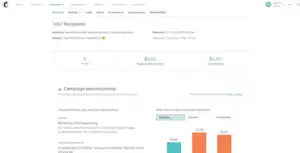
On higher-tier plans, you get:
- Click maps showing where people clicked
- Geo-tracking to see where your audience is
- Comparative reports that compile data for presentations
- Industry benchmark comparisons
The dashboard shows your top email stats for recent campaigns, and you can customize which metrics to display. Reports can be exported easily.
The Downside: Mailchimp doesn’t filter out bot clicks or Apple Mail Privacy Protection (MPP) opens, which can inflate your metrics and give you inaccurate data.
Moosend’s Reporting
Moosend’s reports are comprehensive. You get all the basics—opens, clicks, bounces, unsubscribes—plus deeper data on:
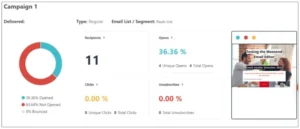
- Click maps
- Device and browser information
- Geolocation
- Revenue generated by campaigns
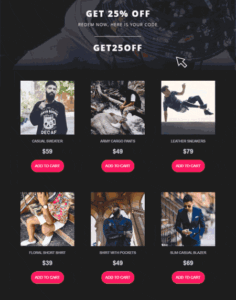
You can customize your reporting dashboard with around 50 widgets and easily share reports with your team via no-password-needed links. Reports can be exported and downloaded.
Like Mailchimp, Moosend doesn’t filter out bot clicks or Apple MPP opens, so your numbers might be inflated.
Winner for Reporting: Tie (3–5)
Both platforms offer strong reporting features with similar capabilities. Mailchimp’s industry benchmarks are nice, but Moosend’s easier report sharing balances that out. It’s essentially a draw.
AI Features
AI tools can save you tons of time. Let’s see what each platform offers.
Mailchimp’s AI Features
Mailchimp has invested heavily in AI. They offer 20+ AI-powered features including:
Content Creation:
- “Write with AI” – generates email copy, subject lines, and CTAs based on your prompts
- “Content Optimizer” (Standard/Premium plans only) – analyzes your emails against millions of top-performing campaigns and suggests improvements for copy, imagery, layout, readability, and more
- “Creative Assistant” – creates and resizes designs automatically
Optimization:
- Send Time Optimization – predicts the best time to send emails to each contact
- Send Day Optimization – recommends the best day to send within a date range
- Predictive Segmentation – forecasts customer behavior and recommends segments
- Subject Line Helper – real-time feedback on subject line effectiveness
Mailchimp’s AI tools are powerful, but most are locked behind Standard and Premium plans. The free and Essentials plans get very limited AI access.
Moosend’s AI Features
Moosend’s AI toolkit includes:
Content Creation:
- “AI Writer” – generates text for subject lines, preview text, email body copy, landing pages, and forms
- You can specify content type (announcement, promotion, newsletter), tone (professional, casual, enthusiastic, etc.), and word limits
- The AI can improve writing, fix spelling/grammar, shorten or lengthen text, and summarize content
I used the AI Writer a few times for subject lines and found it surprisingly helpful for getting past writer’s block.
Optimization:
- “Refine” – a subject line optimizer that uses machine learning to suggest improvements and predict open rates
- “Audience Discovery” (Enterprise/Moosend+ only) – AI-powered segmentation that identifies audiences based on behavior and predicts their next actions
- Product recommendations powered by AI
The AI Writer is included on all plans (even the 30-day trial), which is a huge advantage over Mailchimp.
Winner for AI Features: Mailchimp (4–5)
Mailchimp has more AI features overall, especially with Content Optimizer analyzing campaigns against millions of data points. However, Moosend’s approach of making AI tools available on all plans makes them more accessible to smaller businesses.
Customer Support
When things go wrong, you need help fast.
Mailchimp’s Support
Mailchimp’s support is… inconsistent, to put it nicely.
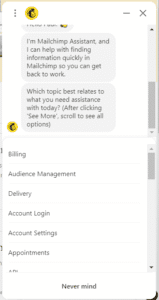
Free Plan: Email support for the first 30 days only. After that, you’re on your own with self-service help docs.
Paid Plans: 24/7 email and chat support. Standard plans get one onboarding session. Premium customers get four additional sessions plus phone support.
The problem? Users consistently complain about support quality. Here’s what reviewers said:
- “This may be the most unhelpful company I have ever dealt with—customer service is nonexistent and there is no phone number.” (Trustpilot)
- “Mailchimp reached out publicly with a generic invitation to ‘understand more’ by emailing their social reviews team… The result has been another 48 hours of total silence.” (Trustpilot)
- “Their support suggests browser fixes like clearing cookies” for server-to-server API issues (Trustpilot)
The help documentation quality varies wildly—some topics get detailed guides, others get barely any explanation.
Moosend’s Support
Moosend’s support gets consistently better reviews, and I have to agree based on my experience:
Free Trial: 24/7 live chat and email support (yes, even on the trial!)
All Paid Plans: Live chat and email support included. Enterprise customers get priority support and dedicated account managers.
I loved the live chat—whenever I had a question, I got responses within 5-10 minutes. One G2 reviewer said, “Customer support was outstanding—less than five minutes to get live online chat.”
The downside? No phone support, and some users mentioned email support could feel “condescending” at times.
Winner for Customer Support: Moosend (4–6)
Moosend’s 24/7 live chat (even on free trial), faster response times, and consistently positive reviews make it the clear winner. Mailchimp’s support has too many complaints about slow or unhelpful responses.
Integrations
Integrations connect your email marketing to the rest of your business tools.
Mailchimp’s Integrations
Mailchimp boasts 300+ integrations covering:
- E-commerce (Shopify, WooCommerce, Magento, BigCommerce)
- CRM (Salesforce, HubSpot, Zoho)
- Social media (Facebook, Instagram, Twitter)
- Analytics (Google Analytics)
- Zapier for connecting to 5,000+ additional apps
The breadth is impressive. Whatever tool you’re using, Mailchimp probably has a direct integration or can connect via Zapier.
Moosend’s Integrations
Moosend offers 80+ native integrations covering:
- E-commerce (WooCommerce, Magento, Shopify via Zapier)
- CMS (WordPress, Drupal)
- CRM platforms
- List validation tools
- Lead generation platforms
The selection is smaller, but covers the essentials. For anything not directly integrated, you can use Zapier or Integromat.
Winner for Integrations: Mailchimp (5–6)
Mailchimp’s 300+ integrations dwarf Moosend’s 80+. If you need to connect with less common tools or want the most integration options, Mailchimp wins. But for most small businesses, Moosend’s integrations cover what you actually need.
Pricing
Now let’s talk about what really matters—how much this is going to cost you.
Mailchimp’s Pricing
Mailchimp has four plans:
Free Plan: $0/month
- 250 contacts (down from 500 in mid-2025, and 2,000 before that!)
- 500 monthly email sends (daily limit of 250)
- 1 audience
- No automation
- No A/B testing
- No scheduling
- Email support for first 30 days only
The free plan keeps shrinking. As one Trustpilot reviewer put it: “MailChimp’s philosophy to users is simply to hold you hostage: ‘I am altering the deal—pray I don’t alter it any further.'”
Essentials Plan: $13/month for 500 contacts
- 10x your contact limit in monthly sends
- Basic automation
- A/B testing (2 variants)
- Email scheduling
- 24/7 email and chat support
- 3 seats
Standard Plan: $20/month for 500 contacts
- 12x your contact limit in monthly sends
- Advanced automation
- Send time optimization
- Dynamic content
- 5 seats
Premium Plan: $350/month for 10,000 contacts
- 15x your contact limit in monthly sends
- Multivariate testing (up to 8 variants)
- Comparative reports
- Advanced segmentation
- Unlimited seats
- Phone support
Here’s the catch: As your list grows, costs escalate quickly:
- 5,000 contacts: $75/month (Essentials), $110/month (Standard)
- 10,000 contacts: $110/month (Essentials), $185/month (Standard)
- 50,000 contacts: $385/month (Essentials), $635/month (Standard)
And remember—Mailchimp counts unsubscribed and unconfirmed contacts toward your billing limit unless you archive them manually.
Moosend’s Pricing
Moosend has a simpler structure:
Free Trial:
- 30 days free
- 1,000 contacts
- Unlimited emails
- Full access to all Pro features
- No credit card required
Pro Plan: $9/month for 500 contacts (or $7/month billed annually)
- Unlimited emails
- Full automation features
- Landing pages
- Forms
- A/B testing
- AI Writer included
- 24/7 support
- 5 team members
Pricing scales:
- 2,000 contacts: $24/month
- 5,000 contacts: $48/month
- 10,000 contacts: $88/month
- 50,000 contacts: Not listed (custom pricing)
Discounts:
- 15% off bi-annual plans
- 20% off annual plans
- 25% nonprofit discount (stacks with annual discount)
Moosend+ Plan: Custom pricing with Enterprise add-ons like transactional emails, dedicated IP, SSO, and more.
Pay-as-you-go credits: Available starting at $350 (not very accessible for small businesses).
Winner for Pricing: Moosend (5–7)
Moosend is significantly cheaper, especially as your list grows. You get all features from day one for $9/month, while Mailchimp charges $20+ and locks features behind higher tiers. Plus, Moosend gives you unlimited emails on all plans—Mailchimp caps you.
The only downside is Moosend doesn’t have a forever-free plan (just a 30-day trial). But if you’re serious about email marketing, the Pro plan’s value is unbeatable. I switched to Moosend specifically because of the pricing difference, and I haven’t looked back.
User Reviews: What Real People Say
I spent hours reading reviews on G2, Capterra, Trustpilot, and Software Advice. Here’s what actual users are saying:
What People Love About Mailchimp:
- “Easy to use with a clean interface”
- “Great for scheduling campaigns way in advance”
- “Lots of templates and customization options”
- “AI features are helpful for improving campaigns”
What People Hate About Mailchimp:
- “Costs become absurd as your list grows—small businesses are penalized”
- “Customer service is nonexistent” / “Support is unhelpful”
- “My emails keep going to spam despite domain authentication”
- “Free plan is basically useless now with only 250 contacts”
- “They charge for unsubscribed contacts unless you archive them manually”
- “Navigation is clunky and inconsistent”
What People Love About Moosend:
- “Incredibly affordable with excellent features”
- “Customer support is outstanding—fast and helpful”
- “Easy to use, even for beginners”
- “Automation is powerful and accessible”
- “Unlimited emails on all plans”
What People Hate About Moosend:
- “No mobile app yet” (note: a mobile app was recently launched)
- “Templates could use a design refresh”
- “Not as many integrations as competitors”
- “Some technical bugs occasionally”
- “Landing pages sometimes have issues”
- “No forever-free plan (just a trial)”
Final Verdict: Mailchimp vs Moosend
After weeks of testing and research, here’s my honest take:
Choose Mailchimp if:
- You need extensive integrations (300+) with niche tools
- You want the most polished templates and design options
- You’re already invested in the Mailchimp ecosystem
- You have a very small list (under 250 contacts) and can use the free plan
- You need phone support and are willing to pay for Premium
Choose Moosend if:
- You’re looking for the best value for money
- You need powerful automation without breaking the bank
- You want 24/7 live chat support (even on free trial)
- You’re tired of Mailchimp’s rising prices and shrinking free plan
- You send a lot of emails and want unlimited sending
- You prefer simplicity and ease of use over feature bloat
My Personal Recommendation: Moosend wins for most small businesses, startups, and budget-conscious marketers. You get enterprise-level features for a fraction of Mailchimp’s cost, plus better support and unlimited sending.
Mailchimp isn’t a bad platform—it’s powerful and reliable. But the constant price increases, shrinking free plan, feature limitations on lower tiers, and support issues make it hard to recommend in 2026. and I tested 10 of the top Mailchimp Alternatives head-to-head.
Overall Winner: Moosend
Here’s how they stacked up across all categories:
| Category | Winner |
|---|---|
| Email Editor | Moosend (0–1) |
| Templates & Design | Mailchimp (1–1) |
| List Building & Segmentation | Moosend (1–2) |
| Automation | Moosend (1–3) |
| Landing Pages | Mailchimp (2–3) |
| Deliverability | Moosend (2–4) |
| Reporting | Tie (3–5) |
| AI Features | Mailchimp (4–5) |
| Customer Support | Moosend (4–6) |
| Integrations | Mailchimp (5–6) |
| Pricing | Moosend (5–7) |
Final Score: Mailchimp 5 / Moosend 7
The best part? Moosend offers a 30-day free trial with full Pro features and no credit card required. You can literally try everything I’ve talked about here risk-free.
So if you’re on the fence, start with Moosend’s trial. Test the automation, play with the editor, send some campaigns. See if it works for your business. Worst case? You learned what you need. Best case? You found a powerful, affordable email marketing platform that actually helps you grow.
Have you used Mailchimp or Moosend? What was your experience? Drop a comment below and let me know!
