

Last Updated: 14 Feb 2026
Last Updated: February 14, 2026
I remember staring at my screen trying to decide between two email tools that couldn’t be more different.
On one side: Kit (formerly ConvertKit) — the creator-focused platform everyone in the newsletter space was raving about.
On the other side: Moosend — the affordable, feature-packed underdog that promised enterprise-level automation without the enterprise price tag.
Both claimed to be perfect for growing an audience. Both had their loyal fans. But which one actually delivered when you’re sending real campaigns, building automations, and trying to make money from your list?
I couldn’t decide based on marketing pages alone. So I did what I always do: I signed up for both and tested them myself.
I created campaigns. Built automations. Designed forms. Tracked deliverability. Compared pricing as my lists grew.
And now, I’m breaking it all down for you — no fluff, no affiliate bias, just honest insights from someone who’s actually used both platforms for real email marketing.
Let’s dive into Kit vs Moosend 👇
We Keep Things Simple — We Only Review Tools We Actually Use
At Mailotrix, we believe you can’t judge an email marketing tool by its features page. So I test every tool myself — running real campaigns, building automations from scratch, checking deliverability rates, and seeing how each platform performs in day-to-day use.
I also dig through real user reviews on G2, Capterra, Trustpilot, and Reddit to understand what others are experiencing. Then I compare their feedback with my own results and share a straightforward, unbiased verdict you can trust.
If you want to see exactly how we test tools, read our full process here.
Short on Time? Here’s My Quick Verdict
After testing both Kit and Moosend for weeks, here’s my honest takeaway:
Moosend offers way more features for way less money, making it the smarter choice for most small businesses and budget-conscious marketers.
Kit shines for creators who want simplicity, a generous free plan (10,000 subscribers!), and built-in monetization tools — but you pay a premium once you outgrow the free tier.
| Feature | Kit (ConvertKit) | Moosend | Winner |
|---|---|---|---|
| Email Editor | Simple, text-first, minimal design | Full drag-and-drop with 115+ templates | Moosend |
| Design & Templates | ~20 basic templates | 115+ modern templates | Moosend |
| Automation | Tag-based, creator-focused | Visual workflows, 18 pre-built recipes | Tie |
| Segmentation | Advanced tagging system | Groups + AI-powered discovery | Tie |
| Deliverability | Strong but basic reporting | 98% rate + better tools | Moosend |
| Support | Mixed reviews, slow responses | Fast live chat, positive reviews | Moosend |
| Integrations | 90+ integrations | 80+ integrations | Tie |
| Pricing | Free: 10,000 subs / Paid: $39/month for 1K | Trial only / Paid: $9/month for 500 | Split (Free: Kit / Paid: Moosend) |
| Monetization | Paid newsletters, tip jars, commerce | None | Kit |
Final Score: Kit 4 – Moosend 7
👉 My Final Take:
If you’re a creator who wants a huge free plan (10,000 subscribers) and plans to sell digital products or run paid newsletters, Kit is worth considering.
But if you’re a small business or marketer who wants powerful automation, better design tools, and way more affordable pricing as you grow, Moosend wins hands down.
Email Editor: Which One Makes Creating Emails Easier?
Let’s start with the basics — the email editor. This is where you’ll spend most of your time, so it needs to feel good.
Kit’s Email Editor
Kit’s email editor is intentionally minimal and text-first. It’s built on the philosophy that plain-text emails feel more personal and get better engagement than heavily designed marketing emails.
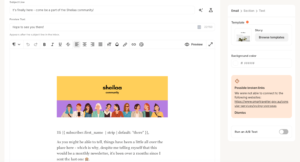
When I used Kit’s editor, it felt like writing in a simple text document. You can add:
- Text blocks
- Images
- Buttons
- Product recommendations
- Countdown timers (using
/commands)
The interface is clean and distraction-free, which I liked. But here’s the catch: you can’t freely drag-and-drop elements like you can in most modern email tools.
Once you add a block, moving it around is clunky. If you accidentally delete a layout, you can’t bring it back easily. And creating multi-column designs? Forget about it — it’s unnecessarily difficult.
Real users echo this frustration:
- “The UX can be frustrating. The email template builder is pretty clunky, e.g. sometimes super hard to select the element you need.” (Capterra)
- “For the price I think it lacks in design and it doesn’t offer a huge template library.” (Capterra)
- “Kit offers fewer and less sleek email templates than Moosend does.” (Brevo comparison)
However, many creators love the simplicity:
- “I’ve been using ConvertKit for a while now, and I can honestly say it’s one of the most creator-friendly email marketing tools out there.” (G2)
Moosend’s Email Editor
Moosend takes a completely different approach. You get a full drag-and-drop editor with 115+ professional templates.
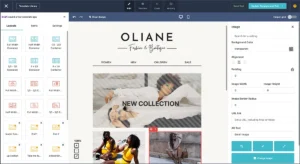
When I used Moosend’s editor, I could:
- Freely move blocks around
- Add text, images, buttons, product blocks, countdown timers
- Save blocks (headers, footers, banners) and reuse them
- Set default fonts and colors
- Use AI to generate email copy and subject lines
The editor is intuitive and fast. I could build a professional-looking newsletter in 10-15 minutes without any design skills.
Real users love this:
- “Moosend is exceptionally easy to use.” (G2)
- “The drag-and-drop editor was my favorite feature because it made it possible for even the intern to create a newsletter that looked professional in fifteen minutes.” (Capterra)
- “Thanks to our brilliant friend Moosend, we can develop professional email campaigns without going crazy trying.” (Capterra)
The downside? Some users wish there were more modern templates:
- “Could add a few modern templates for emails (although this is not a complaint as much as preference).” (Capterra)
- “While Moosend’s templates are alright, I sometimes wished there were a few more options to choose from.” (Capterra)
My Verdict
If you want simple, text-first emails and don’t care about design flexibility, Kit works fine.
But if you want professional-looking emails with full design control and don’t want to fight with your editor, Moosend is way better.
Winner: Moosend (0–1)
Design & Templates: How Much Creative Freedom Do You Get?
This is where the difference becomes stark.
Kit’s Templates
Kit offers around 20 basic templates. They’re minimal, clean, and text-focused — which matches Kit’s philosophy of keeping emails simple and personal.
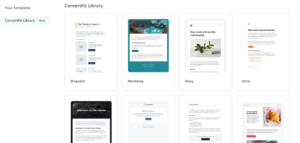
You can use custom HTML/CSS if you know how to code, and Kit supports dynamic content through Variables (conditional content based on subscriber data).
But if you want pre-designed, visually appealing templates? Kit doesn’t prioritize that. The templates are functional, not flashy.
As one comparison article noted: “ConvertKit intentionally keeps emails minimal and text-focused for better deliverability… If you want designed emails, Moosend is better.“
Moosend’s Templates
Moosend gives you 115+ customizable email templates covering:
- Newsletters
- E-commerce (product launches, sales, abandoned carts)
- Events
- Seasonal campaigns
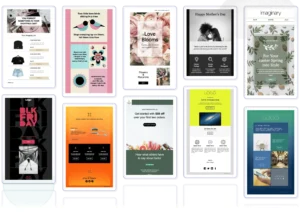
The templates look modern and professional. You can customize them easily using the drag-and-drop editor, and they’re all mobile-responsive and tested for dark mode compatibility.
Moosend also supports:
- HTML creation for custom designs
- Visual elements like CTA buttons, product blocks, countdown timers, media integration
- Reusable content blocks you can save and use across campaigns
According to a comparison review: “Moosend offers 40+ customizable templates and a user-friendly drag-and-drop editor… It supports a wide range of templates, especially catered towards e-commerce owners.“
My Verdict
Kit: Best for writers and creators who want simple, text-first emails
Moosend: Best for marketers and businesses who want visually appealing, professional designs
For most people, Moosend wins here because design flexibility matters.
Score: Kit 0 – Moosend 2
Email Automation: Who Makes It Easier (and Smarter)?
Automation is where email marketing gets powerful. Let’s see how both platforms handle it.
Kit’s Automation
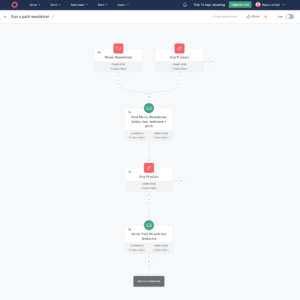
Kit’s automation is built around Sequences (email series) and Rules (if-this-then-that logic).
You write emails directly inside a sequence, which feels smooth once you get used to it. Kit’s tag-based system is sophisticated — you can segment subscribers based on interests, behavior, clicks, and purchases.
In 2025-2026, Kit added features like:
- More triggers from tools like Thinkific and Typeform
- Automation based on survey answers
- Built-in tools for selling products and subscriptions
- A/B testing inside automation emails
Kit also has quick Rules for simple tasks without opening the full automation builder.
Real users love the power:
- “This is my favorite email tool of all time, and I’ve tried many. The customizable templates, audience tags, and sequences by action all work together beautifully.” (G2)
- “I like that the audience can click a link within an email and be automatically segmented. It is also easy to create new broadcasts (emails).” (Capterra)
But there’s a learning curve:
- “It takes a while to get your head around when to use different options e.g. sequences vs workflows.” (Capterra)
- “The free plan only allows one automation, which is very limiting.
Moosend’s Automation
Moosend offers a visual automation builder with 18 pre-built “Recipes” — tried and tested workflow automations you can customize.
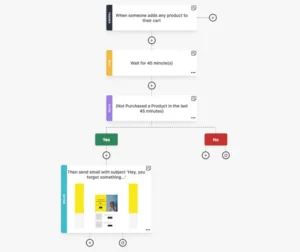
These cover:
- Onboarding sequences
- Abandoned cart recovery
- Lead scoring
- Anniversary/birthday reminders
- Re-engagement campaigns
- E-commerce product recommendations
When I tested Moosend’s automation, I loved how visual and intuitive it felt. I could see the entire workflow on one screen, drag-and-drop steps, and test everything before going live.
Moosend also includes:
- AI-powered Audience Discovery (automatically creates smart segments based on behavior)
- Conditional logic and branching
- Time delays and triggers
- Behavior-based segmentation
Real users praise this:
- “The best thing about Moosend is the ability to easily create and customise your own templates and then set them up with automation triggers.” (Capterra)
- “The automation flows provided by Moosend are state of the art and very purposeful in sending email campaigns.” (Capterra)
- “By cutting down on campaign production time by at least 30%, we were able to devote more resources to strategy and less to technical concerns.” (Capterra)
My Verdict
Kit wins for advanced tagging and creator-focused workflows (selling digital products, paid newsletters).
Moosend wins for visual simplicity, pre-built recipes, and e-commerce automation.
Both are strong — just built for different needs. This one’s a tie.
Score: Kit 1 – Moosend 3
Segmentation & List Management: Who Handles It Better?
Both platforms offer solid list management, but they approach it differently.
Kit’s Segmentation
Kit uses one main list and organizes people using tags. Tags are added or removed automatically based on what subscribers do — signing up for a lead magnet, clicking links, buying products, etc.
Kit’s tagging system is powerful and flexible. You can:
- Change email content based on tags (dynamic content)
- Segment by interests, behavior, purchase history
- Use tags to trigger specific automations
Kit has also improved how it handles purchase data, making it easier to group subscribers based on customer lifetime value.
However, the tag-based system has a learning curve. If you’re new to email marketing, it can feel confusing at first.
Moosend’s Segmentation
Moosend uses Groups (manual lists) and Segments (automated lists based on rules).
This setup is easier to understand for beginners. You can build segments based on:
- Email engagement (opens, clicks)
- Website behavior (page visits, product views)
- Purchase history
- Custom fields
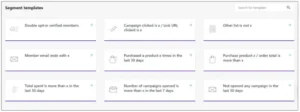
Moosend’s standout feature is AI-powered Audience Discovery, which automatically identifies audience segments based on behavior and predicts their next actions. This is only available on higher-tier plans but it’s incredibly useful.
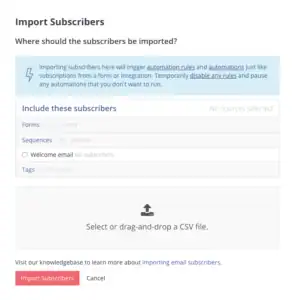
At import, Moosend automatically removes duplicates and unsubscribed contacts, keeping your list clean without manual work.
My Verdict
Kit: Better for advanced users who want deep behavioral targeting and dynamic content.
Moosend: Better for beginners who want simple, clean list management with powerful segments.
Both offer excellent segmentation — it just depends on your experience level and needs.
Score: Kit 2 – Moosend 4
Forms & Landing Pages: Who Helps You Grow Your List Faster?
Both platforms offer forms and landing pages to capture leads. Let’s see how they compare.
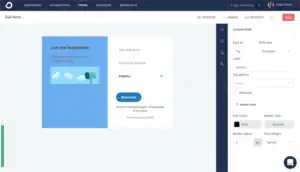
Kit’s Forms & Landing Pages
Kit provides:
- Inline forms
- Pop-ups
- Slide-ins
- Landing pages (unlimited on free plan)
One standout feature is incentive delivery. When someone signs up, Kit can automatically send them a download (like an ebook or checklist) right after email confirmation — no extra automation needed.
All forms and landing pages connect to your Creator Profile, so you can share one link that shows all your active pages and forms.
However, design customization is limited. You choose from ready-made templates, but you can’t freely drag-and-drop elements or create unique layouts.
Moosend’s Forms & Landing Pages
Moosend’s form and landing page builder feels like a website builder. You can:
- Freely move blocks and change layouts
- Adjust colors, fonts, images, countdown timers
- Control when pop-ups appear (exit intent, scroll %, time on page)
- A/B test forms to see which designs convert better
- Create multi-step forms (split long forms into smaller steps for higher conversions)
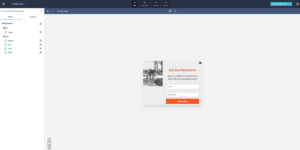
Moosend also includes a “Wheel of Fortune” gamification option for interactive lead capture, which is a fun touch for e-commerce stores.
The downside? Some users reported occasional technical issues:
- “My landing page wouldn’t work because there was an ‘ (apostrophe) in the title. That took several days for support to figure out.” (Capterra)
- “The forms aren’t as responsive as they claim. Things look good on their page and then on preview, but when published, you really have to tinker with them to make them work.” (Alternatives.co)
My Verdict
Kit wins for speed and simplicity — especially if you just need basic forms with instant lead magnet delivery.
Moosend wins for design control, A/B testing, and conversion optimization.
Score: Kit 3 – Moosend 5
Deliverability: Will Your Emails Actually Reach the Inbox?
Deliverability is everything. Let’s see how both platforms perform.
Kit’s Deliverability
Kit covers the basics well:
- SPF and DKIM authentication
- Bounce handling
- Spam complaint tracking
- Custom domain setup
Kit also provides deliverability checklists to help you set up DMARC correctly.
However, real user experiences are mixed:
- “ConvertKit is tailormade for content creators, but it receives a lot of flak for poor deliverability and lack of advanced insights.” (Mailmodo comparison)
- “If you’ve faced a low inbox placement rate recently, you can consider switching to a ConvertKit alternative.” (Mailmodo)
Kit’s Deliverability Reporting (available on Creator Pro plan at $139/month+) helps you understand why emails land in Promotions instead of Primary inbox. But this feature is locked behind the most expensive tier.
Moosend’s Deliverability
Moosend takes deliverability more seriously and offers better tools:
- Full SPF alignment
- DMARC setup guidance
- Deliverability consultation calls
- IP warmup guidance
- Email verification at import
According to independent tests, Moosend achieves a 98% deliverability rate — significantly better than many competitors.
At import, Moosend automatically filters out bad data and integrates with email verification services to keep your list clean.
However, some users still reported issues:
- “Sometimes emails could be flagged as spam, but that’s an issue that could be fixed with time (we’ve only been using the platform for the past 6 months).” (Capterra)
My Verdict
Moosend wins for better deliverability tools, 98% inbox placement, and proactive support.
Kit’s deliverability is decent, but the lack of advanced tools on lower tiers and user complaints about inbox placement give Moosend the edge.
Score: Kit 3 – Moosend 6
Reporting & Analytics: Who Gives You Better Insights?
Let’s talk about data — because you need to know what’s working.
Kit’s Reporting
Kit provides basic reporting:
- Open rates
- Click rates
- Unsubscribes
- Revenue tracking (if you sell through Kit)
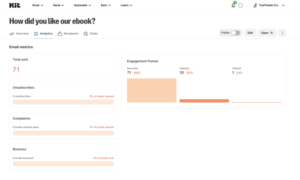
In 2026, Kit introduced Kitlytics — an AI-powered analytics feature that explains why something worked. Instead of just showing numbers, it tells you what kind of subject lines your audience likes and gives actionable advice.
However, users consistently complain that reporting is too basic:
- “The reporting and analytics capabilities of Kit are far behind those of similar alternatives like Moosend and Aweber.” (Moosend review of Kit)
- “Kit lacks advanced insights.” (Multiple comparison articles)
There’s no visual dashboard, no heat maps, no detailed engagement breakdowns. For data-driven marketers, this feels limiting.
Moosend’s Reporting
Moosend offers comprehensive reporting:
- Opens, clicks, bounces, unsubscribes
- Click maps (shows exactly where people clicked)
- Device and browser information
- Geolocation
- Revenue tracking
- Custom reports with 50+ widgets
You can customize your reporting dashboard and share reports with your team via no-password-needed links. Reports can be exported easily.
Real users praise this:
- “Moosend provides advanced email automation and personalization features.” (Multiple reviews)
- “The analytics were sufficient to track opens, clicks, and conversions like a hawk, optimizing multiple campaigns very well.” (Capterra)
My Verdict
Moosend wins for more detailed reporting, visual dashboards, and custom analytics.
Kit’s AI-powered insights are interesting, but they don’t make up for the lack of comprehensive data visualization.
Score: Kit 3 – Moosend 7
Customer Support: Who’s Got Your Back?
Support matters when you’re stuck on a deadline or facing technical issues.
Kit’s Support
Kit offers:
- Free plan: Email support only
- Paid plans: Email and live chat support
Real user experiences are extremely mixed:
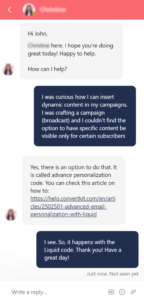
Positive reviews:
- “Brilliant! I would highly recommend ConvertKit. Customer service is great, they are quick to reply and really helpful.” (Capterra)
- “The technical help is the most accommodating aspect. I send an email expressing my concern/question, and they respond with step-by-step instructions. The response time is really fast, typically within a couple of hours.” (G2)
Negative reviews:
- “This is the worst support I’ve had. They have a chat and you get switched from person to person over the course of multiple days.” (Capterra)
- “Their support is not helpful at all. After assuring me that moving from Mailchimp to ConvertKit was ‘easy,’ they refused to help when I ran into problems.” (G2)
- “WORST CUSTOMER SERVICE EVER! You have to prove to them when you have a bigger list that you have at least 20% open rate which is impossible and unrealistic.” (G2)
The AI chatbot handles simple queries but struggles with complex issues. Technical problems often require escalation to human support — where the real wait begins.
Moosend’s Support
Moosend offers:
- Free trial: Email and live chat support (yes, even during trial!)
- All paid plans: Email and live chat support included
- Enterprise: Priority support and dedicated account managers
Real users consistently praise Moosend’s support:
Positive reviews:
- “Customer Service is always super responsive.” (Capterra)
- “Customer support was outstanding — less than five minutes to get live online chat and even scheduled a live onboarding call.” (G2)
- “The customer support via live chat is incredibly fast and helpful.” (Capterra)
- “Their real-time live chat support is fantastic.” (G2)
- “Customer support is unmatched, from day zero when I emailed them asking about their services and all. They were straight forward and the packages are fairly priced.” (Capterra)
Negative reviews:
- One user found email support responses “a little more on the condescending side” (G2)
- Some users reported slow response times for technical issues:
- “My landing page wouldn’t work because there was an ‘ (apostrophe) in the title. That took several days for support to figure out.” (Capterra)
- “The last time I spoke to them, my landing page was not tracking Facebook conversions. They tried to tell me to contact Facebook.” (Capterra)
My Verdict
Moosend wins for consistently positive support experiences, 24/7 live chat (even on free trial), and faster response times.
Kit’s support is hit-or-miss — some users love it, others had terrible experiences with multi-day waits and unhelpful responses.
Score: Kit 3 – Moosend 8
Integrations: Do They Play Nice With Your Tools?
Let’s see how well each platform connects with other software.
Kit’s Integrations
Kit offers 90+ integrations including:
- E-commerce: Shopify, WooCommerce, Gumroad
- Course platforms: Teachable, Thinkific, Podia
- Payment: Stripe
- Website builders: WordPress, Wix, Squarespace
- Zapier for 5,000+ additional apps
Kit also has a well-documented API for custom integrations.
However, some of the “integrations” aren’t actually native — you’ll need to copy and paste HTML or use code to make them work, which feels outdated.
Moosend’s Integrations
Moosend provides 80+ native integrations covering:
- E-commerce: Shopify, WooCommerce, Magento
- CMS: WordPress, Drupal
- CRM: Salesforce
- Payment: Stripe
- Zapier and Make (Integromat) for extended connectivity
Moosend also offers a well-documented API for developers.
The main complaint? Fewer integrations than competitors:
- According to one analysis: “Limited integration options with only around 42 direct integrations, restricting connectivity with many external apps and CRM systems.” (Campaign Monitor comparison)
My Verdict
Kit has slightly more integrations (90+ vs 80+), but both cover the essentials.
For most small businesses, both platforms offer enough to connect with your main tools. Neither goes super deep with CRM or advanced integrations.
This one’s a tie.
Score: Kit 4 – Moosend 8
Pricing: Which One Gives You More for Your Money?
Let’s talk about what really matters — cost.
Kit’s Pricing
Kit has simplified its pricing structure:
Newsletter Plan (Free):
- Up to 10,000 subscribers
- Unlimited email sends
- Unlimited landing pages
- Forms and pop-ups
- BUT: Only 1 automation allowed
- Kit shows creator recommendations on thank-you pages (how they monetize the free plan)
Creator Plan: $39/month for 1,000 subscribers
- Everything in Newsletter
- Unlimited automations
- Visual automation builder
- Advanced segmentation
- Subscriber scoring
- Creator Pro features available at higher tiers
Creator Pro: $139/month for 1,000 subscribers
- Everything in Creator
- Advanced reporting
- Newsletter referral system
- Subscriber scoring
- Priority support
Pricing scales:
- 3,000 subscribers: $59/month (Creator), $199/month (Pro)
- 5,000 subscribers: $89/month (Creator), $299/month (Pro)
- 10,000 subscribers: $139/month (Creator), $479/month (Pro)
Real users complain about the steep pricing:
- “I don’t like how ConvertKit pricing is so high. It’s hard to justify with competitors.” (Capterra)
- “If I had to point out one thing that could be improved, it would be the pricing for smaller creators. The free plan is great to start with, but once you begin scaling, it can get a bit pricey.” (G2)
- “The cost. I don’t use all of the features but I feel like I’m paying for them all.” (G2)
- “I’m on a $290/yr plan for 1,000 contacts and this doesn’t even include deliverability reporting.” (G2)
And remember: Kit increased its prices in September 2025 — the Creator plan went from $29/month to $39/month.
Moosend’s Pricing
Moosend has simpler, more affordable pricing:
Free Trial: 30 days
- 1,000 contacts
- Unlimited emails
- Full access to all Pro features
- No credit card required
Pro Plan: $9/month for 500 contacts (or $7/month billed annually)
- Unlimited emails
- Full automation features
- Landing pages & forms
- A/B testing
- AI Writer included
- 24/7 support
- 5 team members
Pricing scales:
- 1,000 contacts: $16/month
- 2,500 contacts: $32/month
- 5,000 contacts: $48/month
- 10,000 contacts: $88/month
Moosend+ Plan: Custom pricing with Enterprise add-ons
Discounts:
- 15% off bi-annual plans
- 20% off annual plans
- 25% nonprofit discount
| Subscribers | Kit (Creator Plan) | Moosend (Pro Plan) | Savings with Moosend |
|---|---|---|---|
| 500 | N/A | $9/month | N/A |
| 1,000 | $39/month | $16/month | $23/month ($276/year) |
| 3,000 | $59/month | $32/month | $27/month ($324/year) |
| 5,000 | $89/month | $48/month | $41/month ($492/year) |
| 10,000 | $139/month | $88/month | $51/month ($612/year) |
As one comparison article noted: “Moosend costs $32/month for 10,000 subscribers. ConvertKit costs $119/month. Moosend offers more features for less money but targets general businesses. ConvertKit focuses on creators with monetization tools.“
My Verdict
If you’re a new creator and want maximum reach for $0, Kit wins with its generous 10,000-subscriber free plan.
If you’re building a business and care about long-term value, Moosend is drastically cheaper — saving you $276-$612/year depending on your list size.
For this category:
- Free plan: Kit wins (10,000 subs vs 30-day trial)
- Paid plans: Moosend wins (way cheaper, unlimited sends, all features unlocked)
Score: Kit 4 – Moosend 8
What Real Users Say: Honest Reviews from G2, Capterra, and Trustpilot
I spent hours reading reviews to understand what actual users are experiencing. Here’s what real people are saying:
What People Love About Kit:
✅ “I’ve been using ConvertKit for a while now, and I can honestly say it’s one of the most creator-friendly email marketing tools out there.” (G2)
✅ “This is my favorite email tool of all time, and I’ve tried many. The customizable templates, audience tags, and sequences by action all work together beautifully.” (G2)
✅ “ConvertKit is reliable, easy to use, and built with creators in mind. It’s not overloaded with unnecessary features — just the right balance of simplicity and power.” (G2)
✅ “I like that the audience can click a link within an email and be automatically segmented.” (Capterra)
✅ “The combination of email marketing and sales of products and services is powerful, and when you add the Creator Network for recommendations you have a winning combination.” (G2)
✅ “I love that there is so much I can do with ConvertKit. Since their pricing is based on active subscribers (not emails sent) and they have a VERY generous free plan, you can start simply and try their more advanced features when you’re ready.” (Capterra)
What People Complain About Kit:
❌ “The UX can be frustrating. The email template builder is pretty clunky, e.g. sometimes super hard to select the element you need.” (Capterra)
❌ “For the price I think it lacks in design and it doesn’t offer a huge template library.” (Capterra)
❌ “I don’t like how ConvertKit pricing is so high. It’s hard to justify with competitors.” (Capterra)
❌ “The cost. I don’t use all of the features but I feel like I’m paying for them all.” (G2)
❌ “This is the worst support I’ve had. They have a chat and you get switched from person to person over the course of multiple days.” (Capterra)
❌ “Their support is not helpful at all.” (G2)
❌ “The reporting and analytics capabilities of Kit are far behind those of similar alternatives like Moosend.” (Review comparison)
❌ “Recently, there was a price increase but I understand with the number of features it now offers.” (G2)
What People Love About Moosend:
✅ “Moosend is exceptionally easy to use.” (G2)
✅ “Customer support was outstanding — less than five minutes to get live online chat and even scheduled a live onboarding call.” (G2)
✅ “The customer support via live chat is incredibly fast and helpful.” (Capterra)
✅ “Customer support is unmatched, from day zero when I emailed them asking about their services and all.” (Capterra)
✅ “Thanks to our brilliant friend Moosend, we can develop professional email campaigns without going crazy trying. The drag-and-drop editor was my favorite feature.” (Capterra)
✅ “By cutting down on campaign production time by at least 30%, we were able to devote more resources to strategy and less to technical concerns.” (Capterra)
✅ “I’ve been using Moosend for 8 years. Very reliable and excellent tool which is easy to use for a great price.” (G2)
✅ “Moosend offers the same exact experience, features, and support as the ‘big guys’ for a fraction of the price.” (Capterra)
What People Complain About Moosend:
❌ “Could add a few modern templates for emails (although this is not a complaint as much as preference).” (Capterra)
❌ “While Moosend’s templates are alright, I sometimes wished there were a few more options to choose from.” (Capterra)
❌ “My landing page wouldn’t work because there was an ‘ (apostrophe) in the title. That took several days for support to figure out.” (Capterra)
❌ “The last time I spoke to them, my landing page was not tracking Facebook conversions. They tried to tell me to contact Facebook.” (Capterra)
❌ “Sometimes emails could be flagged as spam.” (Capterra)
❌ “Namely the lack of a dedicated mobile app and a less than ideal mobile friendly website.” (Capterra)
❌ “Limited integration options with only around 42 direct integrations.” (Campaign Monitor analysis)
❌ “None of the advanced features actually work. Support takes ages to get back to you.” (Capterra – negative outlier)
My Takeaway from Real User Reviews:
Kit gets love for its creator-focused approach and powerful tagging — BUT users are frustrated with rising prices, limited design options, basic analytics, and inconsistent customer support.
Moosend gets consistently high praise for ease of use, affordability, fast support, and powerful automation — BUT some users wish there were more modern templates and better mobile app support.
My Personal Experience: Kit vs Moosend
Using Kit
When I first tested Kit, I appreciated how clean and simple everything felt. The interface is minimal and distraction-free, which makes writing emails feel natural.
However, I quickly hit friction points:
- The email editor felt restrictive — I couldn’t freely move elements around
- Creating visually appealing emails was harder than it should be
- The one-automation limit on the free plan made testing workflows impossible
- Once I needed to upgrade, $39/month for 1,000 subscribers felt steep
The Creator Network is interesting — having other creators recommend your newsletter can help you grow. But it also means Kit shows other people’s newsletters on your thank-you pages, which can feel like you’re losing control of your subscriber experience.
The tag-based system is powerful, but it took me about 1-2 hours to fully understand how sequences, rules, and tags work together. Not beginner-friendly.
Using Moosend
Moosend felt easier to use from day one. The drag-and-drop editor just worked — I could build professional emails in 10-15 minutes without any design experience.
The 18 pre-built automation recipes were a lifesaver. Instead of building workflows from scratch, I could pick “abandoned cart recovery” or “welcome series” and customize them in minutes.
What I really loved:
- Live chat support responded in under 5 minutes every time
- Unlimited emails on all paid plans meant no send caps
- $9/month for 500 subscribers felt fair for what you get
- The visual automation builder made complex workflows easy to understand
The only downside? The templates could be more modern. They’re functional and professional, but not as visually stunning as some competitors.
Kit is built for creators who want simplicity and plan to monetize through paid newsletters or digital products.
Moosend is built for marketers and businesses who want powerful automation, better design tools, and affordability as they scale.
I personally found Moosend easier to use and better value for money.
Who Should Use Kit — and Who Should Use Moosend?
By now, you know the key differences. Let’s match you with the right tool.
Choose Kit (ConvertKit) if:
✅ You’re a creator, blogger, or newsletter writer focused on building an audience
✅ You want a huge free plan (10,000 subscribers, unlimited sends)
✅ You plan to sell digital products or run paid newsletters directly through the platform
✅ You prefer simple, text-first emails over heavily designed marketing emails
✅ You’re willing to pay premium prices once you outgrow the free tier
✅ You value advanced tagging and behavioral segmentation
✅ The Creator Network appeals to you for audience growth
👉 Best for content creators who want simplicity and built-in monetization tools.
Choose Moosend if:
✅ You’re a small business, marketer, or e-commerce store focused on email campaigns
✅ You want powerful automation at an affordable price ($9/month vs Kit’s $39/month)
✅ You need professional-looking emails with full design control
✅ You value unlimited email sends on all paid plans
✅ You want better reporting and analytics than Kit offers
✅ You need fast, responsive support (24/7 live chat even on free trial)
✅ You’re budget-conscious and want to save $276-$612/year compared to Kit
👉 Best for businesses and marketers who want powerful features without breaking the bank.
Final Verdict: Kit vs Moosend — Which One Should You Choose?
After weeks of hands-on testing, reading hundreds of user reviews, and running real campaigns on both platforms, here’s my honest take:
👉 Moosend is the better overall tool for most people.
It’s more affordable, more flexible, easier to design with, has better reporting, faster support, and unlimited email sends. You get enterprise-level features for a fraction of Kit’s cost.
That said, Kit isn’t a bad platform — it’s just built for a specific audience.
If you’re a content creator who wants a huge free plan (10,000 subscribers) and plans to sell digital products or run paid newsletters, Kit is worth considering.
But if you’re building a real business and care about design, automation, affordability, and long-term value, Moosend wins in almost every category.
Here’s the Honest Truth from Someone Who’s Tested Both:
If you want powerful automation, better design tools, comprehensive reporting, and way better pricing, → Go with Moosend.
If you want simplicity, a generous free plan, and built-in creator monetization, → Kit could work.
But if you’re serious about email marketing and want the most value for your money, I’d say:
👉 Start with Moosend. You’ll save hundreds of dollars per year and get more features.
Final Score
Kit (ConvertKit): 4
Moosend: 8
Winner: Moosend 🏆
The best part? Moosend offers a 30-day free trial with full Pro features and no credit card required. You can literally try everything I’ve talked about here risk-free.
So if you’re on the fence, start with Moosend’s trial. Test the automation, play with the editor, send some campaigns. See if it works for your business.
Worst case? You learned what you need.
Best case? You found a powerful, affordable email marketing platform that saves you money and helps you grow.
Related Comparisons:
