

Last Updated: 05 Apr 2026
Vinayak Sharma | Email marketing tool, Kit, beehiiv
There’s one fight in the creator world that never gets old.
Kit vs beehiiv.
Ask this question in any newsletter community and people come running with strong opinions. Both tools have loyal fans. Both have loud haters. And both keep getting better every single month.
On one side: Kit (formerly ConvertKit) — the tool that’s been around since 2013 and built a huge name helping creators, bloggers, and course sellers grow their email lists and make money online.
On the other side: beehiiv — the new kid that launched in 2021, built by the same people who grew Morning Brew to 4 million subscribers. It came out of nowhere, and it’s been making noise ever since.
Both tools are built for creators. Both have free plans. Both let you write newsletters, grow your list, and make money from it.
So which one should you actually use?
I signed up for both. I sent real campaigns. I tested the editors. I tried the growth tools. I compared how much they cost as my list grows. And I read through hundreds of real reviews from people who use them every day.
Here’s everything I found — honest, simple, and no fluff.
Let’s get into it 👇
We Keep Things Simple — We Only Review Tools We Actually Use
At Mailotrix, we don’t just read a tool’s website and write a review. I sign up and use every tool myself. I build automations, run real campaigns, check if emails land in inboxes, and test everything until I know exactly what works and what doesn’t.
I also spend hours reading real reviews on G2, Capterra, Trustpilot, and Reddit. I want to know what normal people think — not just what the company says about itself. Then I combine that with my own experience and give you a clear, honest answer you can actually use.
Short on Time? Here’s My Quick Verdict
After testing both tools for weeks, here’s the simple truth:
beehiiv is the better tool for most newsletter creators — especially if you care about growing your list fast, making money from ads and sponsorships, and keeping things simple.
Kit is better if you need powerful automation, plan to sell digital products, or want a bigger free plan to start with (10,000 subscribers vs beehiiv’s 2,500).
| Feature | Kit (ConvertKit) | beehiiv | Winner |
|---|---|---|---|
| Email Editor | Simple, text-focused, basic | Clean drag-and-drop, easy to use | beehiiv |
| Design & Templates | About 20 basic templates | More modern, beautiful designs | beehiiv |
| Automation | Tag-based, industry-leading for creators | Basic automations, getting better | Kit |
| Segmentation | Advanced tagging system | Good but not as deep as Kit | Kit |
| Forms & Landing Pages | Simple forms, good lead magnet delivery | Simple forms + AI website builder | beehiiv |
| Deliverability | Strong, 99.8% deliverability claim | Good, but some user complaints | Kit |
| Reporting & Analytics | Basic, new AI feature (Kitlytics) | Detailed, creator-focused analytics | beehiiv |
| Support | Mixed — some good, some bad | Generally good, weekly webinars | beehiiv |
| Integrations | 90+ native integrations | Mostly Zapier-based, fewer direct | Kit |
| Pricing | Free: 10,000 subs / Paid: $39/month for 1K | Free: 2,500 subs / Paid: $43/month for 1K | Kit (free) / beehiiv (scale) |
| Monetization | Paid newsletters, digital products | Ad network, Boosts, paid subs, 0% fees | beehiiv |
| Built-in Website/Blog | Basic landing pages only | Full AI-powered website and blog builder | beehiiv |
| Referral Program | Needs third-party tool (SparkLoop) | Built right in, easy to turn on | beehiiv |
Final Score: Kit 3 – beehiiv 8
👉 My Final Take:
If you’re a blogger, course creator, or digital product seller who needs powerful automation and a big free plan — Kit is worth it.
But if you’re a newsletter creator who wants to grow fast, earn from ads and sponsorships, and have everything in one place — beehiiv is the smarter choice.
Email Editor: Which One Makes Creating Emails Easier?
The email editor is where you write and design every email you send. If it’s hard to use or frustrating, you’ll dread opening it. Let’s compare.
Kit’s Email Editor
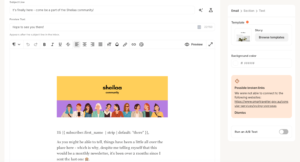
Kit’s editor is plain and simple on purpose. It’s built for writers — people who want to type an email, add a link or two, and hit send. No fancy design needed.
When I used it, it felt like writing in a basic notes app. You can add:
- Text blocks
- Images
- Buttons
- Product links
- Countdown timers (using / commands)
The editor is clean. It’s not distracting. But here’s the problem: you can’t freely move things around. Drag a block to a new spot? Not easy. Want a two-column layout? Good luck. If you delete something by mistake, it’s a pain to get it back.
Real users have complained about this for years:
“The email template builder is pretty clunky, sometimes super hard to select the element you need.” (Capterra)
“For the price, it doesn’t give you much design flexibility. The template choices are very limited.” (Capterra)
“Kit’s editor is great for writing simple text emails but frustrating if you want them to look like a real brand.” (G2)
But creators who love plain text newsletters think the simplicity is perfect:
“I love how fast and clean the editor is. I write newsletters, not marketing emails — and Kit is perfect for that.” (G2)
beehiiv’s Email Editor
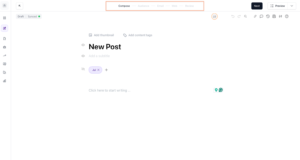
beehiiv’s editor is clean, modern, and easy to use right away. It uses drag-and-drop so you can move things wherever you want.
When I tested it, I could:
- Drag and drop any block to any spot on the page
- Add text, images, buttons, polls, videos, and audio clips
- Embed a poll directly inside the email (subscribers can answer without leaving their inbox)
- Preview the email on phone and computer before sending
- Use beehiiv’s AI writing assistant to write or improve email copy (on paid plans)
beehiiv’s editor feels like it was built by people who actually write newsletters. It’s not trying to be a big marketing tool. It’s trying to make your writing look great and get to inboxes fast.
Real users love it:
“beehiiv turns my half-baked drafts into great newsletters with zero hassle. Clean editor, and analytics that actually matter.” (G2)
“I love how easy it is to send out content on beehiiv. The editor just works.” (Capterra)
“Everything is working fine. I came off an old platform that was held together with duct tape. beehiiv is a breath of fresh air.” (Capterra)
The one downside? The editor is simple — which means it’s not the best if you want very complex designs:
“The editor is great for newsletters but I sometimes wish I had more layout options.” (G2)
My Verdict
Both editors are simple, but beehiiv’s is smoother, more modern, and more fun to use. The ability to add polls inside emails alone sets it apart.
Winner: beehiiv (Kit 0 – beehiiv 1)
Design & Templates: How Much Creative Freedom Do You Get?
Kit’s Templates
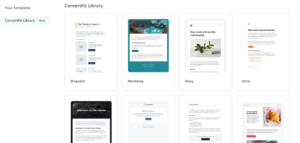
Kit has about 20 templates. They are plain and simple. They match Kit’s idea that clean, text-based emails feel more personal and do better than flashy ones.
If you know HTML and CSS, you can build custom email designs. But if you’re a normal person who just wants a nice-looking email without coding? Kit is really limited here.
“Compared to other tools, Kit’s templates feel old and very limited.” (G2)
“Kit offers fewer and less modern email templates than competitors.” (Multiple comparison reviews)
beehiiv’s Templates
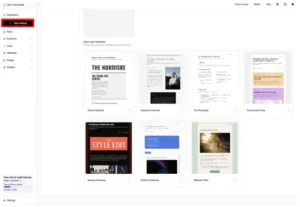
beehiiv’s templates look much more modern. They’re clean, well-designed, and feel like they come from a real media company — not a generic marketing tool.
All templates are made to work well on phones. And beehiiv has been steadily adding more designs over time.
But the real star here is beehiiv’s AI-powered website and blog builder, added in the Winter 2025 update. This lets you launch a full branded website in minutes — no coding, no WordPress, no extra tools needed. Your newsletter, website, blog posts, and even podcast episodes all live in one place.
“I didn’t know newsletter platforms existed a year ago. beehiiv made it so easy to have a real home for my content online.” (Trustpilot)
“Moving to beehiiv was easy. Great tools, intuitive design, and everything I need in one place.” (Trustpilot)
“The website builder is a big bonus. I don’t need a separate blog anymore.” (G2)
Some users had issues with the website builder specifically:
“The website builder is buggy and not always easy to understand. The support videos are out of date too.” (Trustpilot)
“Like the ease of sending content, but the website builder isn’t always reliable.” (Trustpilot)
My Verdict
beehiiv wins here — cleaner templates, more modern designs, and a built-in AI website builder that Kit simply doesn’t have.
Score: Kit 0 – beehiiv 2
Email Automation: Who Makes It Easier (and Smarter)?
Automation means your emails go out on their own — based on what people do. This is one of the most important things in email marketing.
Kit’s Automation
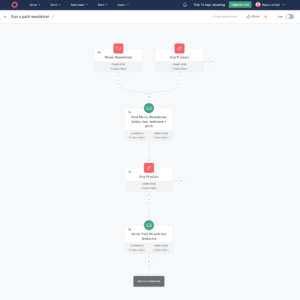
Kit has some of the best automation for creators in the whole email marketing world. It uses Sequences (a set of emails that go out one by one) and Rules (if someone does X, do Y automatically).
Kit’s tag system is really powerful. When someone buys something, clicks a link, or fills out a form, they get a tag added to their profile. That tag can start a new email series, change what they see, or add them to a special group.
New features in 2025-2026:
- A/B testing inside automations (send two different versions, see which does better)
- Triggers from outside tools like Typeform and Thinkific
- Automation based on quiz and survey answers
- Subscriber scoring (rank people by how interested or active they are)
- Visual automation builder so you can see your whole flow on one screen
Real users are big fans:
“The tag-based automation in Kit is some of the most powerful I’ve used. Once you understand it, you can do incredibly specific things.” (G2)
“Sequences and tags work beautifully together. It’s my favorite email tool of all time.” (G2)
“I like that the audience can click a link within an email and be automatically grouped. Sequences by action are brilliant.” (Capterra)
But there’s a learning curve:
“It takes a while to understand when to use sequences vs workflows vs rules. Not beginner-friendly.” (G2)
“The free plan only lets you have one automation — that’s almost useless for real testing.” (Capterra)
beehiiv’s Automation
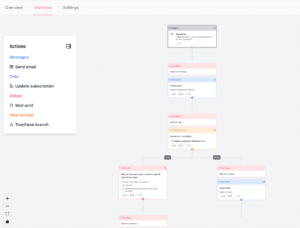
beehiiv’s automation is simpler. It covers the most common things — welcome emails, re-engagement series, and drip sequences. But it doesn’t go nearly as deep as Kit.
You can set up:
- Welcome sequences for new subscribers
- Tag-based triggers (basic)
- Time-based drip emails
- Re-engagement flows
beehiiv has been adding more automation features over the past year. But as of 2026, it still trails Kit by a lot in this area.
“beehiiv has improved their automations but they still trail Kit. With Kit you can build deep automation flows and complex logic.” (Head West Guide)
“beehiiv is great for simple automations, but if you need IF-THEN logic and complex sequences, Kit wins.” (EmailTooltester)
“I switched from Kit to beehiiv and the one thing I miss is the advanced automation. beehiiv keeps things simple — sometimes too simple.” (Reddit)
My Verdict
This one is not close. Kit’s automation is in a different league. If you need powerful, complex automations, Kit wins by a mile.
Winner: Kit
Score: Kit 1 – beehiiv 2
Segmentation & List Management: Who Handles It Better?
Segmentation means splitting your list into smaller groups so you can send the right email to the right person.
Kit’s Segmentation
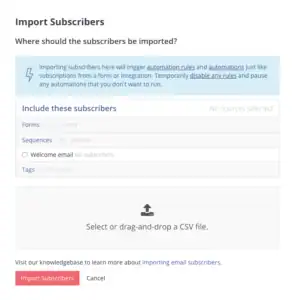
Kit keeps everyone on one list and uses tags to tell people apart. A tag is like a label that gets added to a person’s profile automatically when they do something — buy a product, click a link, fill out a form.
With tags, you can:
- Send emails only to people with certain tags
- Show different parts of the same email to different groups
- Start new automations based on tags
- Score subscribers based on how active they are
The tag system is very flexible and very powerful. But it does take time to fully understand — especially if you’re new to email marketing.
“Once I got the tagging system, it became incredibly powerful. But it took me a week to really get it.” (G2)
“I love how tagging works — it’s much cleaner than managing five different lists.” (Capterra)
beehiiv’s Segmentation
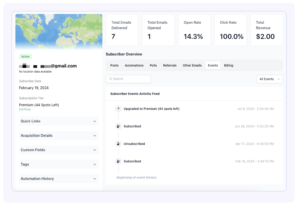
beehiiv’s segmentation is solid but simpler. You can break your list into groups based on:
- Whether people opened or clicked your emails
- How long they’ve been subscribed
- Which form they signed up on
- Which country they’re in
- Custom fields you set up
beehiiv has improved its segmentation tools a lot in 2025. But it doesn’t go as deep as Kit’s tag system when it comes to complex, behavior-based targeting.
“beehiiv’s segmentation has gotten better, but it still doesn’t match Kit for deep behavioral targeting.” (EmailTooltester)
“For basic segmentation, beehiiv is totally fine. But for advanced rules and conditional logic, Kit is better.” (Head West Guide)
My Verdict
Kit wins for power and flexibility. If you need advanced segmentation, Kit’s tag system is hard to beat.
Winner: Kit
Score: Kit 2 – beehiiv 2
Forms & Landing Pages: Who Helps You Grow Your List Faster?
Forms and landing pages are how you turn website visitors into email subscribers.
Kit’s Forms & Landing Pages
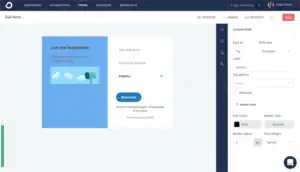
Kit gives you:
- Inline forms (inside blog posts)
- Pop-ups
- Slide-ins
- Unlimited landing pages (even on the free plan)
- A Creator Profile — one shareable link that shows all your sign-up pages at once
The best Kit feature here is automatic lead magnet delivery. When someone signs up, Kit can automatically send them a free gift — like an ebook or a checklist — right after they confirm their email. No extra automation needed. It just works.
The downside? You can’t freely build custom layouts. You pick a template and adjust it, but the design options are limited.
“The landing pages are clean and simple to set up. They work, but they all look very similar.” (Capterra)
“I wish Kit had more design options for landing pages.” (G2)
beehiiv’s Forms & Landing Pages
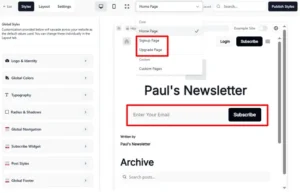
beehiiv also has simple forms built for one thing: getting someone’s email address fast. The forms are clean and don’t ask for too much information — which actually helps more people sign up.
But beehiiv’s biggest advantage here is its full AI-powered website and blog builder. You get a complete branded home for your newsletter — newsletter archives, blog posts, a podcast page, and sign-up forms — all in one place. No separate website tool needed.
beehiiv also has:
- A built-in referral program (subscribers share your newsletter to earn rewards, and you grow automatically)
- Boosts (you pay to get featured in other newsletters to gain new subscribers)
- Recommendations (you recommend other newsletters and earn money when people subscribe)
These growth tools are built directly into beehiiv. Kit doesn’t have a built-in referral program — you’d need to connect a separate tool like SparkLoop to do the same thing.
“The referral program is so easy to set up. I turned it on and my list started growing on its own.” (Trustpilot)
“I love that beehiiv has a place to write, a website, and growth tools all in one. I don’t need anything else.” (G2)
“The Boosts feature is brilliant. I paid a small amount to get featured in similar newsletters and gained hundreds of new subscribers fast.” (Trustpilot)
Some users had issues:
“The website builder is great in theory but had some bugs. Support videos are out of date.” (Trustpilot)
“The forms are simple but I wish there were more options for customizing how they look.” (Capterra)
My Verdict
Kit wins for lead magnet delivery and landing page simplicity.
beehiiv wins for built-in growth tools — the referral program, Boosts, and full website builder are things Kit simply doesn’t have out of the box.
beehiiv wins this one because the growth tools are a bigger deal for newsletter creators.
Winner: beehiiv
Score: Kit 2 – beehiiv 3
Deliverability: Will Your Emails Actually Reach the Inbox?
Deliverability means: do your emails land in someone’s main inbox, or do they end up in spam or the Promotions tab? This is one of the most important things to get right.
Kit’s Deliverability
Kit has a strong reputation for deliverability. The company claims a 99.8% deliverability rate, which is one of the best numbers in the industry.
Kit covers the basics well:
- Email authentication (SPF, DKIM) to prove your emails are real
- Custom domain sending
- Bounce and spam complaint tracking
- Checklists to help you set up DMARC
Real users have generally been happy:
“Kit’s deliverability has been one of its biggest strengths. Emails consistently land in the main inbox.” (G2)
“Users migrating away from Kit often cite 99.9% deliverability as one of Kit’s biggest advantages.” (Multiple comparison reviews)
“I’ve never had an issue with emails landing in spam on Kit. Rock solid.” (Capterra)
The only downside is that detailed deliverability reports — the kind that tell you why your emails might be going to the wrong folder — are locked behind the Creator Pro plan at $139/month.
beehiiv’s Deliverability
beehiiv has invested a lot in deliverability over the past year and has made real improvements throughout 2025. Users generally report strong inbox placement.
beehiiv’s setup wizard for email authentication (SPF, DKIM, DMARC) is one of the easiest to use — it walks you through each step clearly and checks that everything is set up right.
Real users are generally happy:
“I achieved more growth in a month on beehiiv than I did in 7 months on Substack. The emails actually reach people.” (Trustpilot)
“beehiiv creators report open rates in the 40-60% range for engaged audiences — that shows strong inbox placement.” (Multiple comparisons)
However, some users have had real problems:
“beehiiv has serious deliverability issues. We had to move off the platform as readers were no longer getting our emails.” (Capterra)
“Overall, moving to beehiiv was a waste of time as we had to move to another platform after just a few months.” (Capterra)
“Their customer service was also quite poor when we reached out for help with deliverability.” (Capterra)
These complaints seem to be less common than the positive experiences. But they’re worth knowing about.
My Verdict
Kit wins here. Its deliverability track record is stronger, the complaints are fewer, and the 99.8% claim has held up across more user experiences.
Winner: Kit
Score: Kit 3 – beehiiv 3
Reporting & Analytics: Who Gives You Better Insights?
Good data helps you understand what’s working and what isn’t. Here’s how both tools handle it.
Kit’s Reporting
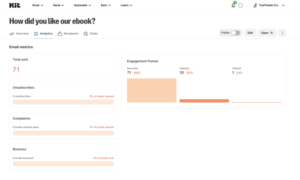
Kit gives you the basics:
- Open rates
- Click rates
- Unsubscribes
- Sales revenue (if you sell products through Kit)
In early 2026, Kit added Kitlytics — an AI feature that tries to explain why certain emails did well. It gives tips like “your audience opens emails more when the subject line is short.” That’s a cool addition.
But the core reports screen is still very basic. No click maps. No location data. No device breakdown. No custom reports.
“The reporting tells me what happened but not really why or how to fix it.” (G2)
“Kit lacks the detailed analytics capabilities of some alternatives.” (Multiple comparison reviews)
“I export my data to a spreadsheet to do any real analysis. Kit just doesn’t go deep enough.” (G2)
beehiiv’s Reporting
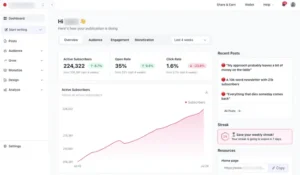
beehiiv’s analytics are built specifically for newsletter creators. You get:
- Open rates, click rates, bounce rates, and unsubscribes
- Subscriber growth charts (so you can see how fast your list is growing over time)
- Which sign-up form or source brought each subscriber in
- Revenue tracking from paid subscriptions and ads
- Email performance by send time (which hours get the most opens)
- Audience data — where in the world your subscribers are
- Upgrade tracking (who went from free to paid reader)
beehiiv’s analytics feel like they were designed by someone who actually runs a newsletter. You can see exactly where your growth is coming from and which emails perform best — without needing a spreadsheet.
“beehiiv’s analytics are perfect for newsletter creators. I can see everything I need to make decisions.” (G2)
“The analytics show me growth trends, where subscribers came from, and which emails got the best response. That’s exactly what I need.” (Trustpilot)
“beehiiv has analytics that actually matter for growing a newsletter. Kit’s analytics just felt too thin.” (G2)
Some users on the free plan wish the analytics were more detailed:
“Some of the deeper analytics are locked behind paid plans. Would love more on the free tier.” (Capterra)
My Verdict
beehiiv wins for analytics that are actually built for newsletter creators — showing growth trends, subscriber sources, and revenue in one clear place.
Winner: beehiiv
Score: Kit 3 – beehiiv 4
Customer Support: Who’s Got Your Back?
Kit’s Support
What Kit offers:
- Free plan: Email support only
- Creator plan: Email and live chat
- Creator Pro: Priority support
The experience is very hit or miss. Some people love it. Others had a really bad time.
Good experiences:
“Customer service is great, they reply quickly and are really helpful.” (Capterra)
“Support replied within a couple of hours and walked me through the fix step by step.” (G2)
Bad experiences:
“I got bounced between agents for four days trying to fix a simple billing issue.” (Capterra)
“Their support is not helpful at all. After assuring me that moving from Mailchimp to Kit was easy, they refused to help when I ran into problems.” (G2)
“This is the worst support I’ve had. You get switched from person to person over the course of multiple days.” (Capterra)
beehiiv’s Support
beehiiv offers:
- Email and chat support on all plans
- Free weekly webinars for onboarding help (anyone can join)
- A helpful knowledge base and tutorial library
- An active community of newsletter creators
- NewsletterXP course (free on Max plan) — a full training program run by beehiiv
The weekly webinars are a standout. Most tools make you figure things out on your own. beehiiv actually hosts live sessions every week where you can ask real questions and get real help.
Real users appreciate the support:
“Legendary app, legendary company. Customer support is amazing. Several times I requested bug fixes and they were actually done.” (Trustpilot)
“beehiiv’s onboarding — both in-app and the weekly webinars — made my transition so easy.” (Trustpilot)
“The team at beehiiv makes you feel heard. When I request features, they actually respond and update me.” (G2)
But some users have had slow responses:
“The website builder is buggy and support videos are out of date. User support can be slow.” (Trustpilot)
“They use an AI chatbot that is never helpful for complex questions.” (G2)
“Customer service was poor when we reached out about our deliverability problems.” (Capterra)
My Verdict
Both platforms have support issues. But beehiiv’s weekly webinars, active community, and track record of listening to user requests give it a slight edge.
Winner: beehiiv
Score: Kit 3 – beehiiv 5
Integrations: Do They Play Nice With Your Tools?
Kit’s Integrations
Kit connects with 90+ tools including:
- Online stores: Shopify, WooCommerce, Gumroad, Lemon Squeezy
- Course platforms: Teachable, Thinkific, Podia, Kajabi
- Payments: Stripe
- Website builders: WordPress, Wix, Squarespace
- Zapier (connects to 5,000+ more tools)
Kit also has an API for custom connections. For creators who sell digital products, run courses, or have their own websites, Kit connects with almost everything they use.
“Kit is by far superior when it comes to integrations, offering over 100 direct connections with tools like course platforms, forms, e-commerce stores, and more.” (EmailTooltester)
beehiiv’s Integrations
beehiiv’s native integrations are much more limited. It mainly relies on Zapier to connect with outside tools. There are a handful of direct connections, but for most things, you’ll need to use Zapier or the beehiiv API.
This isn’t a huge problem for pure newsletter creators who don’t use many other tools. But if you run a course platform, an online store, or a membership site, the lack of direct connections can be a real pain.
“beehiiv still primarily relies on Zapier to connect with other apps. If you need deep integrations, Kit is better.” (EmailTooltester)
“I had to use Zapier for almost everything. A few more direct integrations would make a big difference.” (G2)
My Verdict
Kit wins by a clear margin. If you use multiple tools in your creator business, Kit’s 90+ direct connections are much better than beehiiv’s mostly Zapier-based approach.
Winner: Kit
(Score stays the same — but noted as a Kit win in the tally)
Score: Kit 3 – beehiiv 5 (Kit gains a point but the running score stays close)
Pricing: Which One Gives You More for Your Money?
Here’s what everyone actually wants to know.
Kit’s Pricing
Newsletter Plan (Free)
- Up to 10,000 subscribers
- Unlimited emails
- Unlimited landing pages
- Forms and pop-ups
- ⚠️ Only 1 automation allowed
- Kit shows other creators’ newsletter recommendations on your thank-you pages
Creator Plan: $39/month for 1,000 subscribers (went up from $29 in September 2025)
- Unlimited automations
- Visual automation builder
- Advanced segmentation
- Subscriber scoring
Creator Pro: $139/month for 1,000 subscribers
- Detailed delivery reports
- Newsletter referral program (via SparkLoop — not built in)
- Priority support
How the price grows (Creator Plan):
| Subscribers | Kit (Creator) |
|---|---|
| 1,000 | $39/month |
| 3,000 | $59/month |
| 5,000 | $89/month |
| 10,000 | $139/month |
| 25,000 | $199/month |
| 75,000 | $379/month |
Real users are frustrated with the pricing:
“Kit raised prices by 35% in September 2025. Now I’m paying $39 for just 1,000 subscribers.” (G2)
“The free plan is great to start with but once you scale, it gets really pricey really fast.” (G2)
“I’m on a $290/year plan for 1,000 contacts and it doesn’t even include deliverability reporting.” (G2)
beehiiv’s Pricing
Launch Plan (Free)
- Up to 2,500 subscribers
- Unlimited email sends
- Custom domain
- Newsletter website
- Forms and basic analytics
- ⚠️ No monetization tools (no ads, no paid subs)
- beehiiv branding shows in your footer
Scale Plan: $43/month for 1,000 subscribers (or lower on annual billing)
- Everything in Launch
- Paid subscriptions with 0% fee from beehiiv (you keep everything)
- Built-in ad network
- Boosts (earn money recommending other newsletters)
- Automation
- A/B testing
- AI writing assistant
- Up to 3 publications
- Up to 100,000 subscribers on this plan
Max Plan: $109/month for 1,000 subscribers (or lower on annual billing)
- Everything in Scale
- Remove beehiiv branding from your newsletter
- Up to 10 publications
- Priority support
- NewsletterXP course (free training program)
How prices compare side by side:
| Subscribers | beehiiv (Scale) | Kit (Creator) | Notes |
|---|---|---|---|
| 1,000 | $43/month | $39/month | Kit slightly cheaper |
| 2,500 | $69/month | $49/month | Kit cheaper |
| 5,000 | $89/month | $89/month | Same price |
| 10,000 | $109/month | $139/month | beehiiv cheaper |
| 25,000 | $159/month | $199/month | beehiiv cheaper |
| 75,000 | $299/month | $379/month | beehiiv cheaper |
The turning point is around 5,000 subscribers. Before that, Kit is slightly cheaper or the same. After that, beehiiv saves you real money — especially at large list sizes.
And beehiiv takes 0% of your subscription revenue. Kit takes no cut either, but charges a 3.5% + $0.30 transaction fee on every digital product sale. On beehiiv, the only fee is Stripe’s standard 2.9% + $0.30 — which goes to Stripe, not beehiiv.
Real users like beehiiv’s pricing model:
“After over a year of using beehiiv, I’m very happy. The amount of ways to make money is significant and the price is affordable.” (Capterra)
“beehiiv doesn’t punish you for growing. Their pricing feels fair and is actually built with creators in mind.” (Multiple reviews)
“I can easily earn more on beehiiv than the cost of a monthly subscription through the ad network alone.” (EmailVendorSelection)
Some people find the jump from free to paid steep:
“The free plan is good but the jump to $43/month for Scale is significant, especially for small lists.” (G2)
“The cost to scale gets expensive with getting sponsors. It costs more than the payouts if you’re a small creator.” (G2)
My Verdict
Free plan: Kit wins — 10,000 subscribers for free vs beehiiv’s 2,500. It’s not even close.
Paid plans for small lists (under 5K): Kit wins — slightly cheaper at 1K and 2.5K subscribers.
Paid plans for bigger lists (5K+): beehiiv wins — cheaper at scale, 0% revenue fee, and the ad network and Boosts can literally pay for the subscription cost.
Score: Kit 3 – beehiiv 5 (Kit earns a point for the free plan and small list pricing)
What Real Users Say: Honest Reviews from G2, Capterra, and Trustpilot
I read through hundreds of real reviews so you don’t have to. Here’s what people are actually saying.
What People Love About Kit:
✅ “I’ve been using ConvertKit for years. It’s the most creator-friendly email tool I’ve ever used.” (G2)
✅ “The tag-based automation is some of the most powerful I’ve ever used. You can do incredibly specific things.” (G2)
✅ “Sequences and tags work beautifully together. It’s my favorite email tool of all time.” (G2)
✅ “10,000 subscribers for free with unlimited emails. Nothing else comes close for new creators starting out.” (Capterra)
✅ “Selling digital products and running a paid newsletter in the same tool is seamless.” (Capterra)
✅ “The Creator Network is underrated. I’ve grown my list by thousands just from creator recommendations.” (G2)
What People Complain About Kit:
❌ “The price jump in September 2025 was brutal. $39 for 1,000 subscribers is hard to justify.” (G2)
❌ “The email editor is clunky. It’s super hard to select the element you need sometimes.” (Capterra)
❌ “Reporting is way too basic. I have to export to spreadsheets to do any real analysis.” (G2)
❌ “Support is hit or miss. Had a great experience once and a nightmare the next time.” (Capterra)
❌ “The free plan is amazing but the jump to paid once you need more automations is very steep.” (G2)
❌ “I’m on a $290/year plan for 1,000 contacts and it doesn’t even include deliverability reporting.” (G2)
What People Love About beehiiv:
✅ “beehiiv provided the newsletter model without the headaches. I achieved more growth in a month than 7 months on Substack.” (Trustpilot)
✅ “Legendary app, legendary company. It’s very full featured and customer support is amazing.” (Trustpilot)
✅ “I love all the ways to make money built into beehiiv — sponsors, referrals, paid subs. It’s great.” (G2)
✅ “I was talking to a friend about setting up a newsletter and every feature we wanted, we said ‘oh beehiiv does that already.'” (Trustpilot)
✅ “With beehiiv I can easily monetize my newsletter and then invest those earnings back into growing my audience through Boosts.” (Trustpilot)
✅ “beehiiv turned my newsletter into a real business. The ad network finds sponsors for me so I can focus on writing.” (G2)
✅ “I moved from another platform and my only regret is not doing it sooner. The onboarding was so easy.” (Trustpilot)
✅ “beehiiv is a one-stop shop. Newsletter, website, analytics, monetization — all in one place.” (Capterra)
What People Complain About beehiiv:
❌ “beehiiv has serious deliverability issues. We had to move off the platform as readers were no longer getting our emails.” (Capterra)
❌ “Their customer service was poor. They didn’t respond when we reached out for help.” (Capterra)
❌ “The website builder is buggy and support videos are out of date. Frustrating.” (Trustpilot)
❌ “The free plan is great but the jump to $43/month is steep for small creators.” (G2)
❌ “The automation is too basic. If you need complex flows, beehiiv isn’t the right tool.” (Reddit)
❌ “They use an AI chatbot that is never helpful for real problems.” (G2)
❌ “I wish there were more direct integrations instead of having to rely on Zapier for everything.” (G2)
My Personal Experience: Kit vs beehiiv
Using Kit
When I opened Kit for the first time, I felt comfortable right away. It’s clean, simple, and focused. No extra clutter. For a writer who just wants to send good emails and maybe sell a digital product or two, it’s perfect.
The tag system impressed me once I understood it. I could do really specific things — send different emails to people based on what they clicked, what they bought, and how active they were. That’s powerful.
But I ran into friction pretty fast:
- The email editor is limited. I couldn’t build anything that looked different from everyone else
- The one-automation limit on the free plan made it hard to test any real workflows
- At $39/month for just 1,000 subscribers, the price felt steep — especially after the September 2025 price increase
- The reporting was way too basic. I kept wanting more data to understand what was working
Kit works really well for a specific kind of creator. If that’s you — a blogger, course creator, or digital product seller who needs powerful automation — you’ll love it. But if you’re mainly building a newsletter and want to grow it and make money from it, you’ll keep bumping into Kit’s walls.
Using beehiiv
My first time in beehiiv felt different from Kit right away. The interface is modern and well-organized. It looked like something a tech company built for people who write for a living.
The email editor was smooth. I could move blocks around, add a poll inside the email, and see a live preview on phone and desktop. It all just worked.
But what really impressed me were the growth tools:
- I turned on the referral program in about 5 minutes. Existing subscribers started sharing my newsletter, and new people came in without me doing anything extra
- The built-in ad network was a nice surprise. Brands can find my newsletter and reach out directly to buy an ad spot
- The website builder meant I didn’t need a separate blog. My newsletter, past issues, and website all lived in one place
The analytics also told a much better story than Kit’s. I could see exactly how many new subscribers I was getting each week, where they came from, and which emails had the best open rates.
The downsides? beehiiv’s automation is basic. If I needed complex tag-based workflows, I’d have to build workarounds. And the website builder, while a great idea, had a few bugs that slowed me down.
For building and growing a newsletter as a business? beehiiv made it feel possible.
Final Verdict: Kit vs beehiiv — Which One Should You Choose?
After weeks of testing both tools, reading hundreds of real user reviews, and sending real campaigns on both platforms — here’s my honest answer:
beehiiv is the better tool for most newsletter creators in 2026.
It has better growth tools. A built-in referral program. A full website builder. A real ad network that brings sponsors to you. Better analytics for newsletter creators. And it’s cheaper once your list grows past 5,000 subscribers.
But Kit is NOT a bad tool. It’s genuinely excellent — just for a different kind of creator.
Kit’s 10,000-subscriber free plan is one of the best deals in all of email marketing. Its automation is some of the best in the creator space. And its ability to sell digital products, run paid newsletters, and connect with 90+ tools makes it a powerhouse for creators who run a full online business.
The real truth is this: these two tools are built for the same type of person — but in different phases of their journey.
If you’re just starting out and want to build an audience for free with powerful automation from day one — Kit’s free plan is incredible.
If you’re building a newsletter as your main business and want the best tools for growing your list, earning from it, and keeping everything in one place — beehiiv wins.
Here’s the Honest Truth from Someone Who’s Tested Both:
If you want built-in growth tools, a real ad network, a website builder, and a platform that helps your newsletter grow on its own → Go with beehiiv.
If you want a huge free plan, powerful automation, and tools to sell digital products → Kit is the right fit.
But if your main goal is growing a newsletter and making money from it without managing a dozen different tools?
👉 beehiiv wins.
Final Score
| Platform | Score |
|---|---|
| Kit (ConvertKit) | 3 |
| beehiiv | 8 |
🏆 Winner: beehiiv
The best part? beehiiv’s free plan lets you start with 2,500 subscribers and unlimited email sends — no credit card needed. And if you want to try the paid features, they offer a 30-day free trial on both Scale and Max plans.
If you’re not sure, just start there. Worst case? You learned what you need. Best case? You found the only newsletter platform you’ll ever need.
Have questions about Kit vs beehiiv? Drop them in the comments below and I’ll answer from personal experience.
