


Last Updated: 29 Dec 2025
If you’re familiar with email marketing, MailerLite and Flodesk are two tools you’ve almost certainly come across.
But which one actually makes sense for you?
Flodesk, launched in 2019, has gained attention for its beautiful, design-first emails and creator-friendly approach.
MailerLite, with 1 million+ users, takes a different route — focusing on simplicity, affordability, and powerful features hidden behind its “lite” branding.
So instead of choosing based on hype, I tested both tools myself.
Not just clicking around dashboards —
but sending real emails, managing real subscribers, and using both platforms in real-world scenarios.
In this comparison, we’ll look at pricing, ease of use, design, editors, and overall experience, and I’ll share which tool I personally prefer for my own newsletter — and why.
Let’s dive into this Flodesk vs MailerLite breakdown and see which platform truly fits your needs best.
Table of Contents
ToggleMailerLite vs Flodesk: TL;DR
Both MailerLite and Flodesk are excellent email marketing tools, but they serve slightly different needs.
Flodesk shines with:
Minimalist, easy-to-use interface
Stunning, creative templates for emails, forms, and landing pages
Flodesk Checkout for selling digital products
MailerLite, on the other hand, offers:
Beginner-friendly, intuitive tools
Flexible design options with interactive content blocks
AI-powered features for email copy, subject lines, and landing pages
Automation, advanced reporting, and e-commerce integrations
Website and landing page builder
Bottom line:
Flodesk is perfect for creatives and solo entrepreneurs who value aesthetics and simplicity.
MailerLite is the better choice for businesses that want a complete, flexible, and scalable email marketing platform.
✅ Score: MailerLite 1️⃣0️⃣ – Flodesk 3️⃣
Ease of Use
This round is very simple — there is a clear winner.
Getting started with Flodesk is extremely easy, especially if you are new to email marketing.
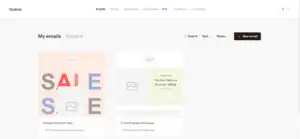
The signup process is quick and smooth.
You can enter your account and start working without confusion or stress.
Flodesk keeps things very simple.
There are not too many settings or options on the screen, which makes it easy to understand from the first day.
Everything feels clean and calm.
You won’t feel lost or overwhelmed while moving around the dashboard.
MailerLite, on the other hand, takes more time to get started.
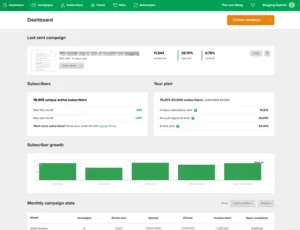
Before you can create your first email, MailerLite asks you to complete many account settings.
This part honestly feels a bit slow if you just want to start sending emails quickly.
You need to set up things like:
Account details
Website information
Sending preferences
Once the setup is done, MailerLite becomes easy to use.
The dashboard is clean, and all features are placed properly.
But for beginners, this extra setup step can feel annoying at the start.
Winner:
If ease of use and quick setup are important, Flodesk clearly offers a smoother and faster experience.
One point to Flodesk.
✅ Score: MailerLite 0️⃣ – Flodesk 1️⃣
Email Editor
This round is closer — but there is still a clear difference.
Flodesk’s email editor is very simple and clean.
Flodesk email editor
The editor focuses on ready-made designs.
You get beautiful layouts that already look good, and you can easily change:
Text
Images
Colors
Fonts
With a little practice, you can create very attractive emails.
However, Flodesk’s editor has some limits.
It does not offer:
Surveys
Image carousels
Custom HTML editing
This means you cannot fully change the structure of your emails.
It looks great — but you don’t get full control.
MailerLite’s email editor is more flexible.
MailerLite email editor

It may not look as stylish as Flodesk at first, but it gives you more tools to work with.
MailerLite allows:
Surveys
Image carousels
Custom HTML
Another big plus is that it saves your changes.
You can test different things and undo them easily, which makes experimenting stress-free.
Winner:
If you want beautiful, ready-made designs, Flodesk is a great choice.
If you want more control and more features, MailerLite clearly does better.
One point to MailerLite.
✅ Score: MailerLite 1️⃣ – Flodesk 1️⃣
Design & Flexibility
This round is interesting — both tools look great, but they focus on design in very different ways.
MailerLite comes with a strong collection of good-looking, mobile-friendly email templates.
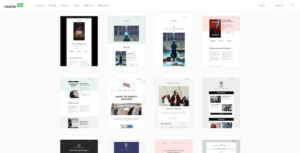
You can filter templates by industry, which makes it easy to find a layout that fits your business type.
Changing the templates is very simple.
MailerLite gives you many content blocks and easy controls to adjust:
Text
Colors
Fonts
Images
Layout spacing
Honestly, the design options and flexibility are one of the main reasons MailerLite is rated so highly.
It’s important to know that premium templates are not available on the free plan.
However, even the basic templates can be easily customized to match your brand using the built-in editor.
If you know HTML or CSS, MailerLite also allows deeper customization.
That said, most users won’t need this, because the drag-and-drop editor already makes email design very easy for everyone.
Flodesk, on the other hand, is a true design-first tool.
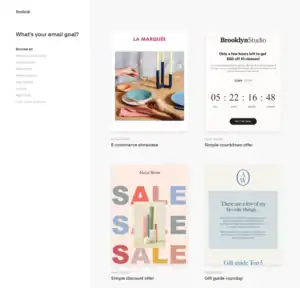
Instead of industries, Flodesk organizes templates by themes like:
Welcome
Say Thanks
Share News
Make Money
The designs feel original and premium.
They look different from the usual email templates you see everywhere.
You can customize each template with:
Special fonts
Graphics
Brand colors
This helps your newsletters stand out clearly in your subscribers’ inbox.
Here’s an example of a newsletter I created using Flodesk’s layouts:
Flodesk email newsletter example
Newsletter created with Flodesk
At this point, I’ll be honest — I personally use Flodesk, and overall, I’m quite happy with it.
More on that later.
That said, Flodesk does have limits.
While Flodesk talks about full creative freedom, that’s not completely true.
The tool focuses heavily on clean design, so it controls how much you can change.
Just like mentioned earlier:
You cannot add custom HTML
You cannot fully change the email structure
Flodesk does this to protect its clean and beautiful layouts.
Still, for most users, the design freedom Flodesk offers is more than enough — and the experience is genuinely enjoyable.
Winner:
If you want more flexibility, deeper control, and customization options, MailerLite wins.
If you want beautiful, premium-looking designs with less effort, Flodesk shines.
This round goes to Flodesk for design quality.
One point to Flodesk.
✅ Score: MailerLite 1️⃣ – Flodesk 2️⃣
Email Automations
This round is important if you want your emails to work on autopilot.
If you have a good automation setup, email marketing becomes much easier and more effective.
So let’s see how MailerLite and Flodesk handle email automation.
MailerLite offers solid automation features.
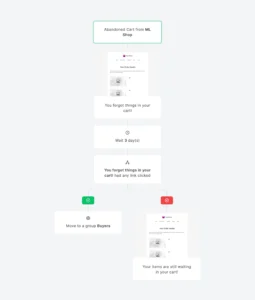
You can create automated emails based on things like:
When someone opens an email
When someone clicks a link
When a subscriber joins a specific group
Custom subscriber details
You can also run A/B tests on your emails.
This means you can test different subject lines or email content to see what works better.
A big plus is that MailerLite offers automation even on the free plan.
This makes it very useful for beginners and small businesses.
That said, MailerLite’s automation can feel a bit basic if you need advanced e-commerce actions.
For very complex automation setups, some users may want more options.
Flodesk, honestly, is weaker in this area.
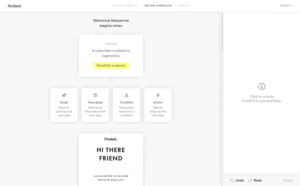
Flodesk’s workflows are very simple.
They mostly rely on one main trigger:
A subscriber is added to a segment
Flodesk does offer basic flows like:
Welcome emails
Simple sales sequences
But the automation options stop there.
You don’t get:
Multiple trigger choices
Advanced actions
Subscriber detail updates
Compared to other email tools, this feels limiting — especially if you want more control over how and when emails are sent.
Winner:
Even though MailerLite is not the most advanced automation tool on the market, it clearly performs better than Flodesk.
One point to MailerLite.
✅ Score: MailerLite 2️⃣ – Flodesk 2️⃣
List Management
This round is very important because your email list is the heart of your email marketing.
Managing subscribers the right way helps you send the right message to the right people.
MailerLite gives you two ways to manage your subscribers:
Segments
Groups
Segments are automatic.
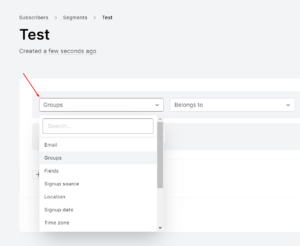
Subscribers are added when they match certain rules, which is perfect for sending targeted emails.
Groups are manual.
You can create interest-based groups, and subscribers can join more than one group at the same time.
This setup gives you strong control over your list.
MailerLite also lets you manage lists using automation.
For example:
Remove a subscriber from one group when they join another
Add subscribers to a segment when they take an action, like making a purchase
The only downside is that MailerLite does not use traditional tags.
Instead, it calls groups “tags,” which can be confusing at first.
Subscribers groups MailerLite
Flodesk keeps list management simpler — but also more limited.
With Flodesk segments, you can:
Upload subscriber details manually
Select subscribers from the “All Subscribers” list
Automatically add subscribers when they sign up through forms

However, removing subscribers from a segment is not very smooth.
To do that, you must add them to another segment first.
Personally, I find this a bit confusing and unnecessary.
List management is not Flodesk’s strongest feature.
One thing both tools do very well is subscriber counting.
No matter how many groups or segments a subscriber belongs to, they are counted as one subscriber only.
This is a fair pricing method and much better than tools that charge you multiple times for the same contact.
Winner:
If list control and segmentation matter to you, MailerLite clearly offers more power and flexibility.
One point to MailerLite.
✅ Score: MailerLite 3️⃣ – Flodesk 2️⃣
Forms & Landing Pages
This round is all about collecting emails and turning visitors into subscribers.
MailerLite makes creating forms very easy.
You get many options, including:
Pop-ups
Embedded forms
A free landing page builder
Free users get one landing page template.
When you upgrade to a paid plan, you unlock 200+ modern landing page templates, which is more than enough for most users.
MailerLite also lets you build a full website and connect forms to it — something very few email tools offer.
Setting up landing pages feels just like creating an email.
The process is simple, clean, and beginner-friendly.
Another big plus is Stripe integration.
You can sell digital products directly through MailerLite without using extra tools.

MailerLite also offers a custom unsubscribe page.
You can add a short survey to ask people why they’re leaving, which helps you learn and improve your emails.
Flodesk also offers a good variety of form options.
Flodesk forms
You can create:
Pop-ups
Inline forms
Landing pages
Link in Bio forms
All forms are easy to customize.
After creating them, you copy the HTML code and embed it on your website.

If your site is on WordPress, MailerLite has an advantage here.
It offers a direct plugin, so you can add forms without touching any code.
Flodesk takes a more manual approach.
One standout feature from Flodesk is the Link in Bio form.
This form is made for social media users who want to collect emails from Instagram or other platforms.
It allows:
Logo and bio sections
Unlimited links
A personal signature
Automatic subscriber segmentation
Clean analytics to track performance
This makes it easy to create a page that truly shows your brand’s personality.
Winner:
If you want more tools, more templates, and deeper features, MailerLite clearly wins this round.
If your main focus is social media and Link in Bio pages, Flodesk does a great job.
One point to MailerLite.
✅ Score: MailerLite 4️⃣ – Flodesk 2️⃣
Ecommerce
This round looks at how well each tool helps you sell products.
Flodesk offers Flodesk Checkout, made only for selling digital products and services.
It’s available on the Pro and Everything plans (Pro allows one checkout).
Designing checkout pages feels just like creating emails — simple and beautiful.
You can:
Customize checkout pages
Create discount codes
Add buyers to email segments after purchase
Flodesk ecommerce
Setting up a checkout with Flodesk
Payments run through Stripe, with no extra fees from Flodesk.
However, Flodesk Checkout works in limited countries and offers very basic automation.
Shopify integration is easy, but other platforms require Zapier.
MailerLite provides a more complete ecommerce setup.
It integrates directly with:
Shopify
WooCommerce
BigCommerce
Prestashop
You can create:
Cart abandonment emails
Product follow-ups
Personalized offers
MailerLite also lets you sell digital products using landing pages with Stripe, and even build a simple ecommerce site if you don’t have one yet.
Winner:
Flodesk is great for selling digital products with beautiful checkout pages.
But overall, MailerLite offers stronger ecommerce features and flexibility.
One point to MailerLite.
✅ Score: MailerLite 5️⃣ – Flodesk 2️⃣
Deliverability
This round is about how well your emails reach the inbox instead of spam.
Flodesk offers some basic tools to help with deliverability.
It helps you with:
Email authentication
Automatic removal of bounced emails
Automatic unsubscribe handling
Domain warming tips
Cleaning inactive subscribers
Flodesk also shows a deliverability chart, but this only shows how many emails were sent and not bounced.
It does not show how many emails actually landed in inboxes.
Flodesk also lacks:
Feedback loop (FBL) data
A dedicated deliverability support team
So while it covers the basics, it doesn’t go very deep in this area.
MailerLite takes deliverability more seriously.
Its strict account approval and verification process helps protect sending quality.
Based on multiple tests from 2017 to 2023, MailerLite has consistently kept delivery rates high.
In 2023, MailerLite recorded a deliverability score of 91.7.
This is slightly lower than its 98 score in 2022, but still stronger than many other tools.
MailerLite deliverability score
Overall, MailerLite clearly pays attention to email deliverability and performs better than most tools in the same category.
Winner:
If inbox placement and long-term sending quality matter to you, MailerLite is the safer choice.
One point to MailerLite.
✅ Score: MailerLite 6️⃣ – Flodesk 2️⃣
Integrations
This round is about how easily each tool connects with other platforms.
Flodesk offers a small number of direct integrations.
It has around 13 native integrations, including tools like:
Shopify
Squarespace
Instagram
For other tools, Flodesk relies on Zapier and Pabbly Connect.
Flodesk also offers an API, which lets you connect apps using code.
If you’re not comfortable with coding, you may need a developer to set this up.
Because of this, Flodesk’s integration options can feel limited for growing businesses.
MailerLite performs much better in this area.
MailerLite offers around 150 direct integrations, covering:
Website builders
Ecommerce platforms
Social media tools
CRMs
It also supports Zapier and LeadsBridge, which further expand what you can connect.
For most small and medium businesses, MailerLite covers everything you’ll need without extra effort.
Winner:
If integrations are important for your workflow, MailerLite is the clear winner.
One point to MailerLite.
✅ Score: MailerLite 7️⃣ – Flodesk 2️⃣
Customer Support
This round looks at how easy it is to get help when you need it.
Flodesk offers a detailed and helpful knowledge base.
Most common questions are already answered clearly.
When it comes to personal support, Flodesk provides email support only, and that too during weekday hours.
From my experience, their email support is fairly quick.
I received a reply on the same day when I needed help.
However, Flodesk does not offer live chat or phone support.
So if you need instant help, you may feel limited.
MailerLite’s support team is known to be fast and reliable.
MailerLite customer support
Based on personal experience and many user reviews, responses are usually helpful and clear.
MailerLite offers:
A detailed knowledge base
MailerLite Academy
A user community
That said, there are some downsides.
Live chat support is only available on Advanced plans.
For free and Growing Business users, support is limited to:
Help articles
Email support
Another issue is that free users only get 30 days of personal support, which feels restrictive for a tool that promotes a free plan.
MailerLite also does not offer phone support, even on higher plans.
Winner:
Both tools provide decent support, but MailerLite offers more learning resources and overall reliability.
One point to MailerLite.
✅ Score: MailerLite 8️⃣ – Flodesk 2️⃣
Reports & Analytics
This round is about tracking performance and understanding what’s working.
Both Flodesk and MailerLite offer easy-to-use reporting tools that are more than enough for most users.
MailerLite gives you a detailed performance dashboard.
MailerLite reports: stats overview
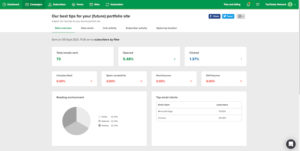
You can see important data like:
Email opens and clicks
Unsubscribes and spam complaints
Bounces and link activity
MailerLite also lets you compare data across different time periods.
This helps you track how your emails, forms, pages, and automations are performing over time.
It shows useful insights such as:
Top-performing automations
Page conversions
Form signups
You also get some advanced stats like:
Click maps
Location-based data
Ecommerce tracking is available, but only for Shopify and WooCommerce.
Flodesk focuses more on visual reporting.
Flodesk analytics email reports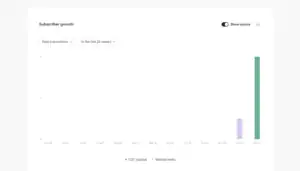
Reports are shown using clean charts, graphs, and tables, making them easy to understand at a glance.
You can track:
Subscriber growth
Email engagement
Form performance
Workflow results
Checkout performance
Flodesk covers all the basic metrics like sends, delivery, opens, and clicks.
It also shows helpful insights such as average conversion rate, which is useful for creators selling products.
One thing to note: neither tool offers social media reporting.
Winner:
Neither tool is extremely advanced here, but both do a solid job.
This round ends in a tie.
One point to each.
✅ Score: MailerLite 9️⃣ – Flodesk 3️⃣
AI Features
AI is becoming a big part of email marketing, and MailerLite and Flodesk approach it very differently.
MailerLite
MailerLite comes loaded with AI tools to make your work faster and easier:
Email Copywriting: AI drafts body text, headlines, and CTAs in multiple tones.
Subject Lines: AI suggests high-converting subject lines based on your content.
Landing Pages: AI can generate multiple landing page designs from just a text prompt.
Send-Time Optimization: “Smart Sending” predicts the best time to send emails for each subscriber.
Third-Party AI Integration: Connect external AI tools like Claude or Gemini directly.
MailerLite’s AI speeds up content creation, automates send times, and helps you build landing pages efficiently.
Flodesk
Flodesk focuses more on design and manual control:
Email Copywriting & Subject Lines: Everything is manual.
Landing Pages: Customize beautiful templates yourself.
Send-Time: Schedule by time zones, but no predictive AI.
Third-Party AI: Limited; mostly relies on Zapier with no built-in AI support.
Flodesk is perfect for creatives who want full control over design and aesthetics without AI automation.
Winner:
If you want AI to speed up your workflow, MailerLite wins.
If you prefer manual design control, Flodesk is better.
✅ Score Update: MailerLite 1️⃣0️⃣ – Flodesk 3️⃣
MailerLite vs Flodesk — Final Verdict
After testing both platforms side by side, here’s the real takeaway:
👉 Flodesk shines with its beautiful, creative designs and easy-to-use templates. If you love aesthetic newsletters, simple workflows, and manual control over layouts, Flodesk is a pleasure to use.
But here’s the more all-around truth:
👉 MailerLite is simple, beginner-friendly, and packed with powerful features. From an intuitive email editor and flexible templates to landing pages, forms, e-commerce integrations, and AI tools — MailerLite makes email marketing efficient without feeling overwhelming.
So here’s the simple rule:
Want gorgeous, design-focused emails with manual control? → Flodesk.
Want a complete, cost-effective platform with AI, automation, and flexibility? → MailerLite is your daily driver.
If your goal is to send emails consistently, grow your list, and manage campaigns smoothly…
👉 MailerLite is the platform you’ll enjoy using every day.
✅ Final Score: MailerLite 1️⃣0️⃣ – Flodesk 3️⃣
