

Last Updated: 16 Jan 2026
If you know a little about email marketing, MailerLite and AWeber are two tools you’ve probably heard of.
But picking the right one is not as easy as choosing the oldest or most well-known name.
AWeber has been around for a long time and is known as one of the most reliable email marketing tools in the industry. It focuses mainly on email campaigns, autoresponders, list management, and strong customer support.
MailerLite takes a different path. It focuses on simplicity, modern design, affordable pricing, and useful features — all packed inside a clean and easy-to-use dashboard.
On the surface, both tools look solid.
So instead of trusting feature lists or marketing claims, I decided to test both tools myself.
Not just signing up and clicking buttons —
but sending real emails, building basic automations, managing real subscribers, and using both tools in real-life email marketing work.
In this MailerLite vs AWeber comparison, we’ll look at pricing, ease of use, email editors, automations, templates, deliverability, and overall experience — and I’ll share which tool I personally prefer for my own email marketing, and why.
Let’s jump into this MailerLite vs AWeber comparison and see which tool is actually worth your money.
MailerLite vs AWeber: TL;DR
Both MailerLite and AWeber are solid email marketing tools, but they focus on slightly different needs.
AWeber shines with:
Wide range of native integrations (PayPal, ClickFunnels, Stripe, WordPress, Jotform, and more)
Phone support and 7-day live chat availability
Strong deliverability enforcement (SPF, DKIM, DMARC)
Helpful ecommerce tracking for sales campaigns
MailerLite, on the other hand, offers:
Beginner-friendly, clean, and easy-to-use tools
Flexible drag-and-drop email editor and landing page builder
Affordable pricing and a free plan for small lists
Automation, forms, subscriber management, and website builder
A/B testing for emails and forms, plus clean reporting
Bottom line:
AWeber is great if you need strong integrations, phone support, and technical deliverability features.
MailerLite is better for creators, small businesses, and anyone looking for a flexible, easy-to-use, and budget-friendly platform with room to grow.
✅ Score: MailerLite 6️⃣ – AWeber 5️⃣
Ease of Use and Email editor
This is an interesting round, because both tools are easy to use, but they feel easy in different ways.
AWeber: Clean, fast, and beginner-friendly from day one
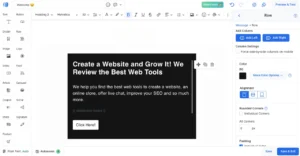
Starting with AWeber, the drag-and-drop email builder feels cleaner and faster right from the start.
The interface is simple, responsive, and doesn’t overwhelm you when you log in for the first time.
AWeber’s email editor gives you access to 700+ responsive templates, all of which are customizable. You can easily:
Change colors and fonts
Add your logo
Insert images
Use free stock photos directly from Unsplash
There’s also Canva integration, which makes creating visuals effortless — especially useful if you don’t want to design graphics outside the platform.
For more advanced users, AWeber includes Markdown support, which helps format text quickly and saves a lot of time when writing longer emails.
Overall, AWeber is very easy to use.
The dashboard is clean, performance is fast, and onboarding guidance is clear. Help is easy to find, and most features — including automations and segmentation — are straightforward to set up without confusion.
MailerLite: Flexible and feature-rich, with a small learning curve
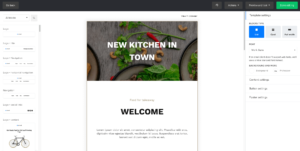
MailerLite’s email editor is flexible and packed with useful features.
You’ll find the editor under the Campaigns section, where you can create different types of campaigns such as:
Regular email campaigns
A/B tests
RSS emails
Auto-resend campaigns
The drag-and-drop editor is smooth and easy to use, and content blocks are neatly organized.
You can quickly add:
Text
Images
Buttons
Countdown timers
Product blocks
Surveys and quizzes
One unique feature is that MailerLite lets you add Instagram and Facebook posts directly inside your emails. This is especially useful if you promote products and social content together.
MailerLite also tracks recent changes in your email design, making it easy to undo edits. This is very helpful when more than one person is working on the same campaign.
That said, there are a few small quirks.
Sometimes the editor doesn’t behave exactly as expected — but with a little practice, everything starts to feel natural.
Verdict: Tie
Both tools are easy to use, but they shine in different ways.
AWeber feels faster and cleaner for beginners who want a smooth start.
MailerLite offers more flexibility and creative options once you get familiar with the editor.
Because neither tool clearly outperforms the other in overall ease of use, this round ends in a tie.
✅ Score: MailerLite 1️⃣ – AWeber 1️⃣
Design & Templates
Both MailerLite and AWeber offer strong template systems — but they approach design in very different ways.
MailerLite: Modern templates with clean customization
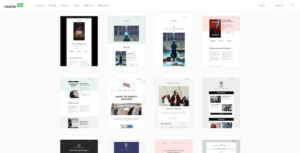
MailerLite’s templates feel modern, minimal, and easy to work with.
MailerLite offers around 90 ready-made email templates, neatly organized into 12 categories, which makes it easy to quickly find a layout that fits your campaign.
You’ll find templates for:
Newsletters
Holidays
Events
RSS campaigns
Notifications
And more
Most of the newsletter templates look clean and contemporary, and customizing them is straightforward. You can easily change:
Text
Images
Colors
Layout
The variety of designs is a big plus.
It saves a lot of time — especially if you don’t want to design emails from scratch.
MailerLite also includes a “My Templates” section where you can:
Create and save your own templates
Import templates in
.zipor.gzformat
This gives you more freedom and control over your email designs.
One thing to be aware of is that while MailerLite has close to 100 modern-looking templates, they’re locked behind paid plans — which is something most email service providers don’t usually do. If you’re on the free plan, you’ll need to start from a blank layout.
On the flexibility side, MailerLite does a very good job.
You can:
Save and reuse content blocks
Control styles globally, so fonts and colors automatically apply to all new templates
This makes it much easier to keep branding consistent across campaigns.
AWeber: Massive template library with smart automation
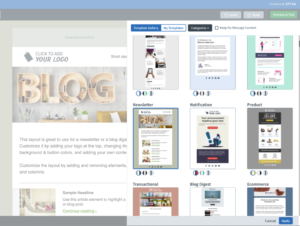
AWeber takes a more volume-and-automation-driven approach to email design.
It offers 600+ email templates across 17 categories, giving you a huge range of layouts for different campaign types — from product launches to regular newsletters.
Most of the templates look decent, though a few do feel slightly dated. Still, the sheer variety means you’ll almost always find something usable.
The real standout feature here is AWeber’s Smart Designer.
You simply paste in your website URL, and AWeber automatically generates an email template that matches your site’s:
Colors
Fonts
Layout style
Within seconds, you have a branded email design without touching any design settings.
This is especially useful if you:
Want to turn a blog post into a newsletter
Need on-brand emails quickly
Don’t want to manually set up styles
AWeber also offers excellent flexibility for advanced users:
Upload custom HTML templates
Choose templates with multiple color schemes
Save blocks or full emails for reuse
Use global style controls for consistent branding
Recent integrations add even more flexibility.
The Canva partnership makes creating visuals inside the platform easier, while the Unsplash integration gives you access to thousands of stock photos without leaving the editor.
Combined with Smart Designer, AWeber offers a very automation-friendly and scalable design system.
Verdict
MailerLite wins on modern aesthetics and clean, minimal templates.
AWeber wins on template variety, automation, and overall design flexibility.
Because of that broader flexibility, AWeber takes this round by a small margin.
Score: MailerLite 1️⃣ – AWeber 2️⃣
Email Automations
AWeber: Simple campaigns with useful triggers, but plan limitations
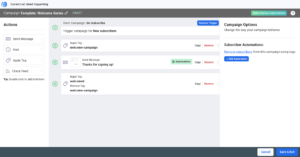
AWeber’s automation system is called Campaigns, and it’s designed to be simple and easy to use.
You can start automations based on:
Tags being applied
A new subscriber signing up
From there, you can set actions like:
Sending an email
Applying or removing tags
The automation builder is visual and easy to understand, and AWeber also supports useful triggers based on:
Email opens
Link clicks
Web visits
For ecommerce users, AWeber includes support for:
Abandoned cart automations
A/B test automations
That said, AWeber’s automation feels limited for more advanced workflows.
If you want more complex automation sequences, you often need to import workflows from AWeber’s marketplace, which feels like extra effort rather than a native experience.
It’s also important to note that automation is heavily restricted on the Free and Lite plans.
If you’re not on a higher-tier plan, the number of automations you can create is very limited.
AWeber’s automation tools are robust and reliable for basic and mid-level use cases, but they lack:
Lead scoring
Advanced CRM-style automations
MailerLite: Beginner-friendly automation with free-plan access

MailerLite’s automation tools are clearly designed with beginners and small businesses in mind.
The automation builder is simple, clean, and easy to understand — even if you’ve never built an automation before.
You can trigger automations based on:
A subscriber filling out a form
Someone joining a group
A subscriber clicking a link
A product being left in the cart
MailerLite also offers pre-made automation templates, which make setup much faster. These include:
Welcome email sequences
Promotional campaigns
Abandoned cart emails
Webinar invitations
You can also run A/B tests inside automations, which helps you test subject lines or email content and see what performs better.
One big advantage is that MailerLite offers automation even on the free plan.
This makes it a strong option for beginners who want to start using automation without upgrading immediately.
MailerLite provides around 15 automation templates and a workflow editor that helps you launch campaigns quickly. You can create workflows based on email opens and link clicks, and automatically move subscribers between groups.
However, MailerLite’s automation does have limitations.
You can’t drag and drop steps to rearrange workflows
Advanced triggers are limited to higher plans
There’s no website tracking or lead scoring
CRM-related automations (like deal stages or owners) are missing
For simple automation, MailerLite works very well.
For complex automation setups, some users may want more control.
Verdict
Both tools handle basic automation well, but they prioritize different things.
Because automation access and ease of use matter more for most users, and MailerLite includes automation without forcing an upgrade, MailerLite takes this round by a small margin.
✅ Score: MailerLite 2️⃣ – AWeber 2️⃣
List Management
Good list management is what keeps your email marketing organized, targeted, and cost-efficient as your list grows.
Both MailerLite and AWeber handle subscriber management well — but they use very different systems.
MailerLite: Simple, flexible, and cost-friendly
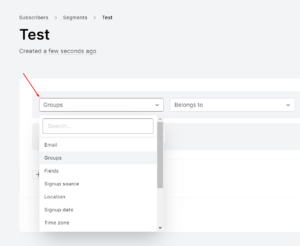
MailerLite keeps list management simple and affordable, without unnecessary complexity.
MailerLite gives you two main ways to manage subscribers:
Segments
Groups
Segments are automatic.
Subscribers are added to segments automatically when they match specific rules, such as:
Email engagement
Subscriber details
Actions they take
This makes it easy to send targeted emails without manually moving subscribers around.
Groups, on the other hand, are manual.
You can create interest-based groups, and subscribers can belong to multiple groups at the same time. This gives you good control over your audience without making list management complicated.
MailerLite also allows list management through automations.
For example, you can:
Remove a subscriber from one group when they join another
Add subscribers to a group when they click a link or complete an action
One small downside is that MailerLite doesn’t use traditional tags.
Instead, groups act like tags, which can feel slightly confusing at first — especially if you’re coming from another email platform.
Once you get used to it, though, the system feels clean and efficient.
AWeber: Tag-based control with plan limitations
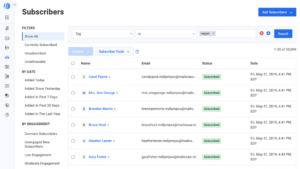
AWeber manages subscribers primarily through tags and automation rules.
You can:
Apply tags based on signups, email opens, or link clicks
Unsubscribe someone from one list when they join another
Use automation rules to manage audience movement
For basic audience management, this system works well and feels familiar to many users.
The main drawback comes down to plan limitations.
On the Lite plan, you can only create 3 segments, which is quite restrictive if you want:
Deeper targeting
Multiple campaigns running at the same time
More advanced audience filtering
This limitation can become frustrating as your list grows and your campaigns become more complex.
Verdict
MailerLite’s segments + groups system offers more flexibility for targeting, while also keeping costs under control.
AWeber’s tagging system works well, but the strict segment limits on lower plans hold it back.
Because MailerLite makes list management simpler, more flexible, and less restrictive, MailerLite takes this round.
✅ Score: MailerLite 3️⃣ – AWeber 2️⃣
Forms & Landing Pages
Both MailerLite and AWeber offer form builders and landing pages — but the overall experience is quite different.
MailerLite: Powerful, beginner-friendly, and conversion-focused
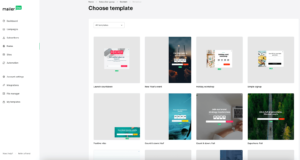
MailerLite makes building forms and landing pages very easy, even if you have no technical background.
MailerLite offers several types of forms, including:
Pop-up forms
Embedded forms
Unsubscribe forms
Subscribe buttons
A free landing page builder
The form templates look modern and clean, and customization is simple. You can quickly change:
Text
Colors
Layout
without touching any code.
One big advantage is that MailerLite allows A/B testing for forms.
This makes it easy to test different designs or messages and improve conversion rates over time — something many email tools don’t offer.
MailerLite also lets you:
Enable double opt-in
Add reCAPTCHA verification
Creating landing pages feels very similar to building emails.
The editor is clean, simple, and beginner-friendly, so there’s almost no learning curve.
Another strong point is that MailerLite lets you build a full website and connect forms directly to it — which is a rare feature among email marketing platforms.
There are a few downsides.
Adding custom fields and dropdown options isn’t always smooth, and it can feel slightly limited compared to more advanced tools.
AWeber: Simple forms with solid integrations

AWeber keeps things simple but effective when it comes to forms and landing pages.
You can choose from:
Pop-up forms
In-line forms
Lightbox forms
All of them are easy to customize and quick to set up.
One thing I liked is that you can automatically apply tags when someone signs up, which helps with list organization right from the start.
AWeber also integrates well with platforms like:
WordPress
Facebook
Wix
PayPal
You can place forms directly on AWeber landing pages, making the overall process smooth and connected.
That said, AWeber’s landing pages and forms feel more basic compared to MailerLite, especially when it comes to design flexibility and testing options.
Verdict
Because forms and landing pages are such a critical part of list building — and MailerLite clearly offers more tools to improve conversions — MailerLite takes this round.
✅ Score: MailerLite 4️⃣ – AWeber 2️⃣
Deliverability
Deliverability is one of those things you don’t notice when it’s working — but when it’s not, everything else becomes useless.
Both MailerLite and AWeber take deliverability seriously, but they focus on slightly different areas.
MailerLite: Strong inbox performance with strict quality control
MailerLite delivers strong inbox performance and puts a lot of emphasis on keeping sender reputation clean.
MailerLite offers full email authentication and makes the setup process easy with:
Auto domain authentication
Step-by-step setup guides
While its DMARC documentation could be clearer, most users can still complete the setup without much trouble.
One thing MailerLite is very strict about is email quality.
It clearly blocks purchased email lists and actively discourages poor list practices.
MailerLite also partners with MailerCheck to help users clean their lists and remove low-quality or inactive contacts.
Even though there’s no built-in deliverability dashboard, MailerLite still covers the most important deliverability basics, including:
IP warm-up guidance
Bounce protection
Spam complaint handling
Helpful deliverability support when needed
Overall, MailerLite focuses on preventing problems before they happen by maintaining clean lists and healthy sender reputations.
AWeber: Strong technical enforcement and deliverability support
AWeber takes deliverability very seriously on the technical side.
It enforces:
SPF
DKIM
DMARC
automatically, which reduces the risk of misconfiguration.
AWeber also:
Automatically suppresses spam complaints and hard bounces
Filters out low-quality signups to protect your list health
Like MailerLite, AWeber doesn’t offer a dedicated deliverability dashboard.
However, one advantage is access to AWeber’s deliverability team, which can be helpful if you need hands-on support or troubleshooting help.
This makes AWeber feel slightly more proactive when it comes to technical deliverability issues.
Verdict
MailerLite focuses on list quality, sender reputation, and prevention.
AWeber focuses more on technical enforcement and hands-on deliverability support.
Because they approach deliverability from different angles — and both do a solid job — this round ends in a tie.
✅ Score: MailerLite 4️⃣ – AWeber 2️⃣
Integrations
MailerLite integrates with popular platforms like Shopify, WooCommerce, and WordPress, making it a solid choice for basic ecommerce workflows.
It also supports Zapier, which lets you connect hundreds of additional tools. However, its native integrations may feel limited if you need deep CRM or advanced analytics connections.
AWeber offers a wider range of direct integrations, including PayPal, ClickFunnels, WordPress, Stripe, Payhip, and Jotform.
Most integrations work out of the box, making it easy to connect AWeber with existing marketing and sales tools.
Winner: AWeber
✅ Score: MailerLite 4️⃣ – AWeber 3️⃣
Support
Reliable customer support can make or break your experience with an email marketing platform — especially if you run into issues while launching campaigns.
AWeber: Fast, friendly, and available daily
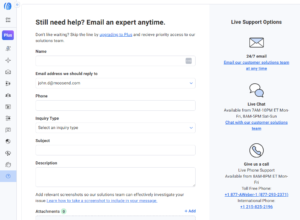
AWeber’s support team really stands out for being quick, friendly, and available 7 days a week.
You can reach them via:
Email
Live chat
Phone ✅ (rare among email tools today)
The knowledge base is solid, though sometimes you may need to dig a little to find exactly what you need.
If you get stuck, contacting the team directly is usually the fastest way to get things sorted — which is a big plus for beginners and busy marketers alike.
MailerLite: Friendly, personal, but limited on free plan

MailerLite provides:
Email support
Live chat
Response times are generally fast, and support agents are friendly. In many cases, you’ll interact with the same agents repeatedly, creating a more personal support experience.
There are a few limitations:
The free plan includes only 14 days of personal support. After that, you need to upgrade to continue direct access.
No phone support is offered.
On the positive side, MailerLite offers a thorough knowledge base and free online courses, packed with practical, beginner-friendly information.
Verdict
Both tools offer friendly and responsive support, but their strengths differ.
AWeber wins on availability and phone support, which is rare and very helpful.
MailerLite shines in personalized support and educational resources, but its free-plan support limitations hold it back.
Overall, AWeber takes this round for providing more consistent and accessible support.
✅ Score: MailerLite 4️⃣ – AWeber 4️⃣
Reports & Analytics
Analytics are crucial for improving campaigns and making smarter email marketing decisions. Both MailerLite and AWeber offer reporting tools, but they differ in depth and presentation.
MailerLite: Simple, clean, and beginner-friendly
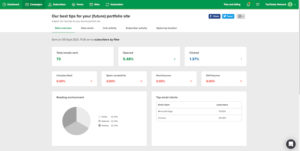
MailerLite keeps reports straightforward and easy to read.
You can track:
Email opens
Link clicks
Unsubscribes and spam reports
Bounced emails
It also allows comparison over different time periods, so you can monitor campaign improvements.
Additional insights include:
Click maps
Location data
Form and landing page results
Automation performance
Google Analytics integration
Limitations: Reports are basic. You can’t remove bot clicks or Apple Mail privacy opens, and there’s no device-specific tracking or custom reports.
AWeber: All essentials with a few ecommerce extras
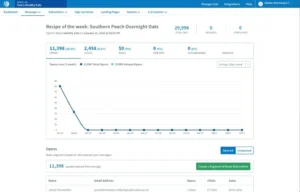
AWeber provides all the core metrics:
Open rates
Click rates
Bounces
Geo-tracking
It also offers handy ecommerce data if you run sales campaigns.
The main drawback is presentation — reports feel a bit dated, and finding specific metrics may take extra clicks.
Still, all the essential data is available, letting you effectively measure campaign performance.
Verdict
MailerLite wins on simplicity and clean presentation, while AWeber wins on extra ecommerce metrics.
For most users, either platform provides everything needed to track campaign success, making this round a tie.
✅ Score: MailerLite 5️⃣ – AWeber 5️⃣
Pricing
Pricing can be a deal-breaker, especially for small businesses or creators just starting with email marketing. Let’s see how MailerLite and AWeber compare.
AWeber: Simple but a bit pricey
AWeber keeps pricing straightforward, but it isn’t the cheapest option.
It starts at $15/month for 500 subscribers, which feels steep considering the included features.
Here’s how it scales:
5,000 subscribers → $60/month
10,000 subscribers → $100/month
50,000 subscribers → $375/month
The pricing includes all the core features, but the cost can add up quickly as your list grows.
MailerLite: Affordable and scalable
MailerLite is cheaper long-term, especially for growing lists.
Free plan: 500 subscribers, 12,000 emails/month
$10/month → 500 subscribers
$25/month → 2,500 subscribers
$39/month → 5,000 subscribers
MailerLite’s free plan and lower starting prices make it more accessible for beginners and small businesses.
Verdict
MailerLite clearly wins on affordability, especially for small lists and long-term growth.
AWeber offers simplicity, but its pricing ramps up faster as your subscriber count grows.
✅ Score: MailerLite 6️⃣ – AWeber 5️⃣
✅ MailerLite vs AWeber — Which One Should You Choose?
After spending real time inside both platforms, testing campaigns, automations, forms, and landing pages — here’s what I found:
👉 MailerLite is the better all-around tool for most people.
It’s flexible, easy to design with, and gives you more control over automations, landing pages, and subscriber management — all while staying more affordable as your list grows.
That said, AWeber isn’t a bad tool. If you want stronger integrations, phone support, and slightly more technical deliverability features, it can work — but you’ll pay more as your list grows.
Here’s the honest truth:
If you want more control, better templates, easy editing, and affordable growth…
→ Go with MailerLite.If you want ready-made integrations, solid support, and don’t mind paying more…
→ AWeber can be fine for starting out.
But if your goal is to grow your email marketing seriously, test strategies, and scale your business…
👉 Start with MailerLite. You’ll have more room to grow — and fewer limits.
Final Score:
✅ Score: MailerLite 6️⃣ – AWeber 5️⃣
