

Last Updated: 11 Jan 2026
If you know a little about email marketing, MailerLite and GetResponse are two tools you’ve probably heard of.
But picking the right one is not as easy as choosing the most famous name.
GetResponse has been around for a long time and tries to be an all-in-one marketing tool. It offers email marketing, automation, funnels, webinars, and many other features in one place.
MailerLite takes a different path. It focuses on simplicity, low cost, and useful features, all packed inside a clean and easy dashboard.
On the surface, both tools look good.
So instead of trusting feature lists or sales pages, I decided to test both tools myself.
Not just signing up and clicking buttons —
but sending real emails, building simple automations, managing real subscribers, and using both tools in real-life email marketing work.
In this MailerLite vs GetResponse comparison, we’ll look at pricing, ease of use, email editors, automations, deliverability, and overall experience — and I’ll share which tool I personally like more for my own email marketing, and why.
Let’s jump into this MailerLite vs GetResponse comparison and see which tool is actually worth your money.
MailerLite vs GetResponse: TL;DR
Both MailerLite and GetResponse are solid email marketing tools, but they serve slightly different needs.
GetResponse shines with:
Free plan for small lists
Advanced automation workflows
Ecommerce tracking and product recommendations
Strong integrations with Shopify, Magento, WordPress, and more
MailerLite, on the other hand, offers:
Beginner-friendly, easy-to-use tools
Flexible design options with drag-and-drop editor
Affordable pricing and unlimited emails on paid plans
Automation, landing pages, forms, and website builder
Ecommerce features with Stripe integration
Bottom line:
GetResponse is great for small businesses or beginners who want slightly more advanced tracking and integrations.
MailerLite is better for creators, small businesses, and anyone who wants a flexible, easy-to-use, and budget-friendly platform with room to grow.
✅ Score: MailerLite 1️⃣0️⃣ – GetResponse 7️⃣
Ease of Use
MailerLite: Clean, calm, and beginner-friendly
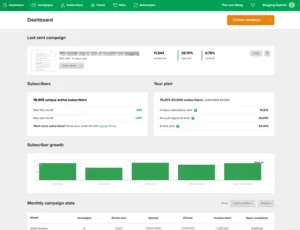
Starting with MailerLite, the first thing you notice is how clean and simple the dashboard feels.
MailerLite user interface
Everything you need is easy to find.
The left-side menu takes you to apps, builders, and main features
Account settings, templates, and other options are all in one place
One thing I really liked is that you can customize the dashboard.
MailerLite lets you choose:
Light mode
Dark mode
Auto mode (matches your system settings)
You can change this from your profile section, where you can also:
Turn on two-factor authentication
Change your profile photo
Reset your password
Subscribe to MailerLite’s newsletter
Moving around the dashboard feels fast and smooth.
Nothing feels confusing or overwhelming.
Overall, MailerLite feels modern, simple, and very easy to use — even if you are new to email marketing.
GetResponse: Powerful, but a bit busy
GetResponse takes a different approach.
When you first log in, you see an “Explore GetResponse” dashboard with guides and tutorials to help you get started.
GetResponse dashboard
GetResponse offers a lot of features, and to be fair, they are well organized.
You can:
Choose which widgets appear on your dashboard
Get help from a Virtual Assistant available on every screen
Most features are easy to understand, but some things — like creating segments — can feel a bit complicated, especially for beginners.
So while GetResponse is powerful, it can feel slightly heavy and busy at the start if you just want to do simple email marketing.
Winner
If you want a clean dashboard, fast navigation, and a stress-free experience, MailerLite clearly does better.
GetResponse is great for advanced users, but for ease of use, MailerLite feels simpler and more comfortable.
One point to MailerLite.
✅ Score: MailerLite 1️⃣ – GetResponse 0️⃣
Email Editor
This round is closer — but there is still a clear difference.
MailerLite’s email editor is flexible and feature-rich.
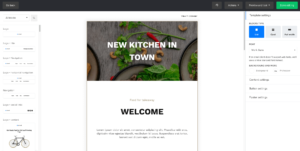
MailerLite’s email editor is found under the Campaigns section.
You can create different types of campaigns, like regular emails, A/B tests, RSS emails, and auto-resend campaigns.
The drag-and-drop editor is smooth and easy to use.
Content blocks are neatly organized, and you can easily add:
Text
Images
Buttons
Countdown timers
Product blocks
Surveys and quizzes
One unique feature is that MailerLite lets you add Instagram and Facebook posts directly into your emails.
This is very useful for promoting products and social content together.
MailerLite also tracks recent changes in your email design.
This makes it easy to undo edits and is very helpful when more than one person is working on the same email.
However, there are a few small quirks.
Sometimes the editor doesn’t behave exactly as expected — but with a little practice, it feels natural.
GetResponse’s email editor is powerful and polished.

GetResponse’s editor offers a lot of features, but it never feels overwhelming.
All editing options appear only when needed, which makes everything feel clean and intuitive.
GetResponse allows:
Drag-and-drop editing
Custom HTML blocks
Full HTML templates
Video blocks (just paste a YouTube link)
Saved blocks and sections
One standout feature is the ability to save blocks and reuse them.
If you use the same headers, footers, or layouts again and again, this saves a lot of time.
Adding images is also very easy.
You can upload your own images or use GetResponse’s free stock images.
For eCommerce users, GetResponse goes even further.
You can add products directly from your online store and even show recommended products inside emails.
Winner:
If you want more creative blocks and social content options, MailerLite is the better choice.
If you want a polished editor with strong eCommerce tools, GetResponse does a great job.
But overall, for flexibility and everyday use, MailerLite wins this round.
One point to MailerLite.
✅ Score: MailerLite 2️⃣ – GetResponse 0️⃣
Design & Flexibility
This round is close — but flexibility makes the difference.
MailerLite’s templates are modern and easy to customize.

MailerLite offers around 90 ready-made email templates, neatly organized into 12 categories.
This makes it easy to find the right design for your needs.
You’ll find templates for:
Newsletters
Holidays
Events
RSS campaigns
Notifications
And more
The newsletter templates look modern and clean, and they are easy to customize.
You can change text, images, colors, and layout without much effort.
The variety of designs is a big plus.
It saves a lot of time, especially if you don’t want to design emails from scratch.
MailerLite also includes a “My Templates” section.
Here, you can:
Create and save your own templates
Import templates in
.zipor.gzformat
This gives you more freedom and control over your email designs.
GetResponse offers more templates, but less design freedom.

GetResponse comes with over 240 email templates, which sounds impressive.
The templates are organized by goals, such as:
Welcome
Educate
Sell
This makes it easy to pick a template based on what you want to achieve.
Editing the templates is simple, and you can also save blocks to reuse later.
However, many templates feel a bit outdated compared to MailerLite’s designs.
Another downside is that you cannot control fonts and colors globally.
This means you have to update styles inside each template one by one, which can be frustrating if you want consistent branding.
Winner:
If you want clean, modern-looking templates with good customization, MailerLite has the edge.
If you want a large template library and goal-based designs, GetResponse does a better job.
and Flodesk can be the best Mailerlite Alternative in the term of Templates and Design flexibility.
Because both tools shine in different ways, this round is a draw.
✅ Score: MailerLite 3️⃣ – GetResponse 1️⃣
Email Automations
This round is important if you want your emails to work on autopilot.
If you have a good automation setup, email marketing becomes much easier and more effective.
So let’s see how MailerLite and GetResponse handle email automation.
MailerLite offers simple and easy-to-use automations.

MailerLite’s automation tools are designed for beginners and simple use cases.
You can create automated emails based on things like:
When a subscriber fills out a form
When someone joins a group
When a subscriber clicks a link
When a product is left in the cart
MailerLite also lets you use pre-made automation templates for:
Welcome emails
Promotions
Abandoned cart emails
Webinar invitations
You can also run A/B tests inside automations.
This helps you test subject lines or email content to see what performs better.
A big plus is that MailerLite offers automation even on the free plan.
This makes it a great option for beginners and small businesses.
That said, MailerLite’s automation can feel basic.
You can’t drag and drop steps to rearrange workflows, and advanced triggers are limited to higher plans.
For simple automation, it works well.
For complex automation setups, some users may want more control.
GetResponse is stronger and more advanced in automation.
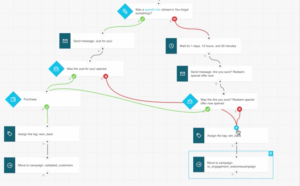
GetResponse’s automation workflows are much more powerful.
You can build advanced automations based on:
Email opens and clicks
Website visits
Custom events
Subscriber behavior
GetResponse also supports:
Lead scoring
Moving subscribers between lists
Abandoned cart automation
Web event tracking
This gives you far more control over when and how emails are sent.
The only thing missing is full sales automation, like changing deal stages.
But for email and marketing automation, GetResponse is clearly more flexible.
Winner:
Even though MailerLite is easier and more beginner-friendly, GetResponse clearly performs better when it comes to automation power and flexibility. Well if you want powerful automation then you should checkout Activecampaign
One point to GetResponse.
✅ Score: MailerLite 2️⃣ – GetResponse 2️⃣
List Management
This round is very important because your email list is the heart of your email marketing.
Managing subscribers the right way helps you send the right message to the right people.
MailerLite keeps list management simple and cost-friendly.

MailerLite gives you two main ways to manage subscribers:
Segments
Groups
Segments are automatic.
mailerlite segments
Subscribers are added automatically when they match certain rules, like:
Email engagement
Subscriber details
Actions they take
This is great for sending targeted emails without manual work.
Groups are manual.
You can create interest-based groups, and subscribers can belong to multiple groups at the same time.
This gives you good control over your list without making things complicated.
MailerLite also allows list management through automation.
For example:
Remove a subscriber from one group when they join another
Add subscribers to a group when they take an action
One small downside is that MailerLite does not use traditional “tags.”
Instead, groups work like tags, which can feel confusing at first.
GetResponse offers deeper segmentation and list control.

GetResponse takes list management a step further.
You can create segments based on:
Contact field data
Email engagement
Lead scores
Webinar or course activity
Tagging is also available and can be applied:
Manually
Through forms
Through automation workflows
GetResponse lets you import contacts from:
CSV files
Shopify
Magento
WooCommerce
There’s also a list hygiene section, where you can:
Remove duplicate contacts
Blocklist subscribers automatically
One thing to note: GetResponse charges for duplicate contacts.
So if the same subscriber exists twice, it can increase your cost.
Winner:
If you want simple, flexible, and budget-friendly list management, MailerLite is the better choice.
If you need advanced segmentation and deep control, GetResponse does a stronger job.
Because both tools serve different needs well, this round is a tie.
✅ Score: MailerLite 3️⃣ – GetResponse 3️⃣
Forms & Landing Pages
This round is all about collecting emails and turning visitors into subscribers.
MailerLite makes forms and landing pages very easy to build.
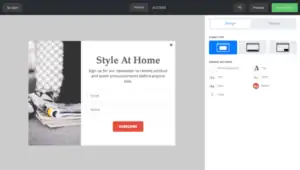
MailerLite forms & landing pages
MailerLite offers several types of forms, including:
Pop-up forms
Embedded forms
Unsubscribe forms
Subscribe buttons
A free landing page builder
The form templates look modern and are easy to customize.
You can quickly change text, colors, and layout without any technical skills.
One big advantage is that MailerLite allows A/B testing for forms.
This helps you test different designs and messages to improve your conversion rates.
MailerLite also lets you:
Enable double opt-in
Add reCAPTCHA verification
Creating landing pages feels very similar to building emails.
The editor is clean, simple, and beginner-friendly.
Another strong point is that MailerLite lets you build a full website and connect forms directly to it — something very few email tools offer.
There are a few downsides.
Adding custom fields and dropdown options is not very smooth, and it can feel a bit limited compared to other tools.
GetResponse offers solid forms and flexible landing pages.

GetResponse also provides many form and landing page options.
You can create:
Pop-up forms
Embedded forms
Landing pages
There are many templates available, and you can also create your own designs.
Forms are easy to use, and you can:
Enable double opt-in
Use reCAPTCHA for spam protection
However, GetResponse is missing a few things.
You:
Cannot add custom fields directly inside the form editor
Cannot edit the form’s CSS
No longer get A/B testing for forms
Embedding forms is also more limited.
You can only embed them using Web Connect or Form Snippet, which gives you fewer placement options.
Winner:
If you want more form types, A/B testing, and beginner-friendly tools, MailerLite clearly wins this round.
GetResponse works well, but it lacks flexibility in form customization and testing.
One point to MailerLite.
✅ Score: MailerLite 4️⃣ – GetResponse 3️⃣
Ecommerce
This round looks at how well each tool helps you sell products.
Selling online is not just about sending emails — it’s about tracking orders, sending the right messages, and increasing sales.
So let’s see how MailerLite and GetResponse handle ecommerce.
MailerLite offers a simple but solid ecommerce setup.

MailerLite ecommerce
MailerLite integrates directly with major ecommerce platforms, including:
Shopify
WooCommerce
BigCommerce
PrestaShop
With these integrations, you can create:
Cart abandonment emails
Product follow-up emails
Personalized offers based on purchases
MailerLite also allows you to sell digital products using landing pages connected to Stripe.
If you don’t already have a store, you can even build a simple ecommerce site inside MailerLite.
This makes MailerLite a good option for creators, bloggers, and small businesses who want a clean and easy ecommerce setup.
That said, MailerLite’s ecommerce features are straightforward, not deeply advanced.
It covers the basics well, but larger stores may want more automation options.
GetResponse offers advanced and powerful ecommerce tools.
GetResponse provides direct integrations with popular ecommerce platforms, including:
Shopify
Magento
PrestaShop
It also has a dedicated ecommerce section, where you can manage:
Online stores
Orders
Transactional emails
Promo codes
One strong feature is promo code support.
You can use the same promo codes from your ecommerce platform and insert them directly into:
Newsletters
Automation emails
GetResponse also shines in segmentation.
You can create highly targeted campaigns based on:
Purchase history
Order value
Customer behavior
Geolocation
Tags and lead scoring
Another standout feature is the Product Recommender.
This lets you show products to subscribers based on:
Their past purchases
Overall store purchase data
It works very well for cross-selling and upselling and is easy to set up.
Winner:
If you want a simple, beginner-friendly ecommerce setup, MailerLite does a great job.
But if you need advanced ecommerce tools, deep segmentation, and product recommendations, GetResponse is clearly stronger.
One point to GetResponse.
✅ Score: MailerLite 4️⃣ – GetResponse 4️⃣
Deliverability
This round looks at how well each tool helps your emails land in the inbox instead of spam.
Even the best emails are useless if they don’t get delivered, so deliverability matters a lot.
MailerLite delivers strong inbox performance.
MailerLite deliverability
MailerLite offers full email authentication and makes the setup easy with:
Auto domain authentication
Step-by-step guides
While its DMARC documentation could be clearer, most users can still set things up without much trouble.
MailerLite is very strict about email quality.
It clearly blocks purchased email lists and partners with MailerCheck to help clean your list and remove bad contacts.
Although there’s no built-in deliverability dashboard, MailerLite still covers the most important things, including:
IP warm-up guidance
Bounce and spam protection
Helpful deliverability support when needed
Overall, MailerLite focuses on keeping sender reputation clean and healthy.
GetResponse offers reliable and professional deliverability tools.
GetResponse deliverability
GetResponse also provides a strong deliverability system with:
Proper email authentication
Automatic blocking of hard bounces and spam complaints
Clear rules for list hygiene
You can set up domain authentication using:
Automatic setup
Guided manual setup
One big advantage is GetResponse’s dedicated deliverability team, available through chat and email to help with inbox issues.
While inbox results always depend on how you send emails, GetResponse gives you the tools and support needed to maintain a good sender reputation.
Winner:
Both tools take deliverability seriously and offer strong protection against spam and poor practices.
MailerLite is excellent for beginners and keeps things clean and simple.
GetResponse stands out slightly due to its dedicated deliverability team and clearer support system.
One point to GetResponse.
✅ Score: MailerLite 4️⃣ – GetResponse 5️⃣
Integrations
This round looks at how easily each tool connects with other platforms you already use.
Good integrations save time, reduce manual work, and help your marketing stack run smoothly.
GetResponse offers a wide range of native integrations.
GetResponse integrates with many popular tools across different categories, including:
Ecommerce: Shopify, Magento
CRM: Salesforce
CMS: WordPress
Social platforms: Facebook and more
These integrations make it easier to sync contacts, track customer activity, and run advanced campaigns across multiple platforms.
One important thing to note:
No integrations are available on the Free plan.
You’ll need a paid plan to access them.
That said, once you’re on a paid plan, GetResponse provides one of the most complete integration ecosystems among email marketing tools.
MailerLite keeps integrations simple and practical.
MailerLite integrates directly with:
Shopify
WooCommerce
WordPress
This makes it a solid choice for bloggers, creators, and small ecommerce businesses.
MailerLite also connects to hundreds of additional tools via Zapier, which adds flexibility for automation and workflows.
However, compared to GetResponse, MailerLite’s native integrations are more limited.
Users who need:
Deep CRM features
Advanced analytics integrations
may find MailerLite slightly restrictive without relying heavily on Zapier.
Winner:
GetResponse clearly offers a broader and more advanced integration ecosystem, especially for businesses using CRMs and complex marketing stacks.
MailerLite still covers the basics very well, but GetResponse takes the lead here.
One point to GetResponse.
✅ Score: MailerLite 4️⃣ – GetResponse 6️⃣
Customer Support
Good customer support matters — especially when something breaks or you’re stuck during setup.
Let’s see how GetResponse and MailerLite handle support.
GetResponse Customer Support
GetResponse offers support via:
Live chat
Email
In practice, responses are quick, friendly, and helpful.
The support team seems well-trained and capable of handling both basic and technical questions.
GetResponse also has a large, well-organized knowledge base.
It’s easy to navigate and covers most features in detail, which is helpful if you prefer self-service support.
Phone support is not available, but for most users, chat and email are more than enough.
MailerLite Customer Support

MailerLite also provides:
Email support
Live chat
Response times are generally very fast, and the support agents are friendly.
In many cases, you’ll notice the same agents replying, which creates a more personal support experience.
However, there’s an important limitation:
The free plan includes only 14 days of personal support.
After that, you’ll need to upgrade to continue receiving direct support.
On the positive side, MailerLite has:
A thorough knowledge base
Free online courses packed with practical, beginner-friendly information
Like GetResponse, MailerLite does not offer phone support.
Winner:
Both tools provide fast and helpful customer support. Tie 🤝
No points awarded.
✅ Score remains: MailerLite 4️⃣ – GetResponse 6️⃣
Reports & Analytics
This round is about checking results and understanding what is working.
Both MailerLite and GetResponse offer good reporting tools that are easy to use.
MailerLite Reports
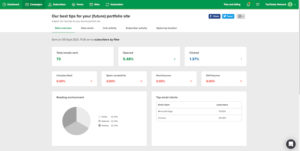
MailerLite keeps reports simple and clean.
You can see things like:
How many people opened your emails
How many people clicked links
Unsubscribes and spam reports
Bounced emails
MailerLite also lets you compare results from different time periods.
This helps you see if your emails are improving or not.
You also get:
Click maps (to see where people click)
Location data
Form and landing page results
Automation performance
You can connect Google Analytics for better tracking.
However, MailerLite reports are basic.
You cannot remove bot clicks or Apple Mail privacy opens, which can make open rates look higher than they really are.
You also don’t get custom reports or device details.
GetResponse Reports

GetResponse offers more detailed reports.
You can track:
Opens and clicks
Who clicked your links
Visual click maps
Conversions and sales
GetResponse also works with Google Analytics and supports ecommerce tracking.
On higher plans, you can create custom reports, which is helpful for advanced users.
Still, GetResponse also has limits:
No device or email provider breakdown
No way to remove bot clicks or Apple Mail privacy opens
Winner
MailerLite is easier and better for beginners.
GetResponse gives more data and better tracking for advanced users.
Both tools do a good job, but neither is perfect.
🤝 This round is a tie.
✅ Score remains: MailerLite 4️⃣ – GetResponse 6️⃣
Pricing
Let’s talk money — your email tool has to fit your budget and your goals.
GetResponse Free Plan
500 subscribers
2,500 emails
Good for very small lists, but the email limit is low. Paid plans start at $19/month for 1,000 subscribers.
MailerLite Free Plan
500 subscribers
12,000 emails per month
You can send more emails than GetResponse for free, which is better if you send newsletters often.
Paid Plans
MailerLite is cheaper long-term:
$10/month → 500 subscribers
$25/month → 2,500 subscribers
$39/month → 5,000 subscribers
GetResponse costs more as your list grows:
$19/month → 1,000 subscribers
$29/month → 2,500 subscribers
$54/month → 5,000 subscribers
Verdict:
MailerLite is better for long-term growth and saving money, while GetResponse works if you only want a small free plan.
✅ Score remains: MailerLite 5️⃣ – GetResponse 6️⃣
✅ MailerLite vs GetResponse — Which One Should You Choose?
After spending real time inside both platforms, testing campaigns, automations, forms, and landing pages — here’s what I found:
👉 MailerLite is the better all-around tool for most people.
It’s flexible, easy to design with, and gives you more control over automations, landing pages, and subscriber management — all while staying more affordable as your list grows.
That said, GetResponse isn’t a bad tool. If you want a slightly bigger free plan to test emails and you don’t mind spending more as your list grows, it can work.
Here’s the honest truth:
If you want more control, better templates, easy editing, and strong automation…
→ Go with MailerLite.If you want something simple, beginner-friendly, and you’re okay with fewer design options…
→ GetResponse can be fine for starting out.
But if your goal is to grow your email marketing seriously, test strategies, and scale your business…
👉 Start with MailerLite. You’ll have more room to grow — and fewer limits.
Final Score:
✅ Score remains: MailerLite 5️⃣ – GetResponse 6️⃣
If this helped you decide, I’d love to hear what you choose — or if you’re still unsure, drop a comment or send a message. I’ll guide you based on your goals.
Here’s to sending better emails 🚀
