

Last Updated: 24 Jan 2026
I was stuck.
MailerLite looked simple and affordable — perfect for creators and small businesses.
Klaviyo looked powerful — built for ecommerce and deep personalization.
But choosing between them wasn’t easy. I didn’t want to outgrow my tool too soon… or pay for features I’d never use.
So I decided to try both.
I ran real campaigns, tested automations, built landing pages — and tracked what actually worked.
This isn’t just a feature list. It’s my honest breakdown of how each platform performs when you’re building a business.
Let’s get into Mailerlite vs Klaviyo 👇
We keep things simple — we only review tools we actually use.
At Mailotrix, we believe you can’t judge an email marketing tool by its features page. So we test every tool ourselves — running real campaigns, breaking automations, checking deliverability, and seeing how it performs in day-to-day use.
We also dig through real user reviews to understand what others are experiencing, compare it with our own results, and then share a straightforward, unbiased verdict you can trust.
If you want to see exactly how we test tools, read our full process here.
Here’s My Quick Mailerlite vs Klaviyo Verdict
I’ve tested both MailerLite and Klaviyo inside out — building campaigns, automations, signup forms, and running real deliverability checks. If you don’t have time for the full detailed breakdown, here’s my straight-to-the-point summary:
| Category | MailerLite | Klaviyo | Winner |
|---|---|---|---|
| Email Editor | Clean and easy to use | Advanced ecommerce blocks | MailerLite (beginners) / Klaviyo (ecommerce) |
| Design | Simple, modern templates | Ecommerce-focused, highly personalized | Depends |
| Automation | Easy and visual | Powerful, AI-driven | Both |
| Forms | Quick, beginner-friendly | Advanced targeting and gamified forms | MailerLite (ease) / Klaviyo (features) |
| Segmentation | Simple and practical | Deep, data-driven | Draw |
| Reporting | Clear and straightforward | Detailed ecommerce analytics | MailerLite (simplicity) / Klaviyo (depth) |
| Deliverability | Reliable and easy setup | Reliable with advanced monitoring | Draw |
| Integrations | 140+ tools + website builder | Best ecommerce integrations | Both strong |
| Pricing | Affordable for small teams | Pricier, built for ecommerce | MailerLite (budget) / Klaviyo (ecommerce) |
| Overall | Best for simplicity and value | Best for advanced ecommerce marketing | 🏆 Depends on needs |
👉 My Final Take:
Choose MailerLite if you’re a beginner, creator, or small business owner who values ease of use, simplicity, and affordability.
Choose Klaviyo if you’re an ecommerce brand that needs deep automation, segmentation, and advanced analytics to drive sales.
Email Editor: Which One Makes Email Marketing Easier?
Both MailerLite and Klaviyo promise easy-to-use editors — but when I actually created emails with them, the experience felt quite different.
MailerLite’s interface is one of the cleanest and simplest you’ll find. The dashboard isn’t cluttered at all. It’s easy to find what you need with clear sections for campaigns, subscribers, forms, automations, and websites.

The drag-and-drop editor is fast and simple to use. You get lots of blocks to add — like images, text, buttons, countdown timers, and videos.
Moving things around feels smooth, and you’re not overwhelmed by too many choices.
Even setting up automation is straightforward. You pick a trigger, like a new subscriber joining, then add emails, delays, and conditions.
For beginners, this makes automation easy to start without feeling confused.
Klaviyo’s dashboard also looks modern and sleek but feels way busier. Right away, you see lots of ecommerce data — revenue numbers, customer stats, and predictive insights.
This is great if you’re a serious ecommerce marketer but can be a lot for someone new.

The email editor is also drag-and-drop, similar to MailerLite’s. But Klaviyo adds ecommerce-specific blocks like product feeds, recommended items,
and content that changes automatically for each customer. These features are powerful but make the editor feel more complex.
Who Wins?
MailerLite wins here for ease of use. Its clean design and simple editor make it perfect for beginners or small businesses just starting out. (Fun fact: MailerLite has won “Ease of Use” awards two years in a row!)
Klaviyo is more advanced and powerful, especially if you want to send product recommendations and personalized emails based on shopping behavior. But the learning curve is steeper.
Score: MailerLite 1️⃣ – Klaviyo 0️⃣
Design & Flexibility: How Creative Can You Get?
When you send emails regularly, design isn’t just about looking nice — it’s about building trust and keeping people interested.
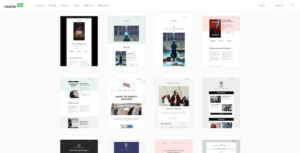
MailerLite gives you access to around 100 professionally designed, modern-looking email templates. The catch?
These templates are only available on paid plans. If you’re using the free plan, you’ll have to create your emails from scratch with the drag-and-drop editor.
But don’t worry — the editor itself makes up for this. You can save and reuse custom content blocks,
like headers, banners, or product showcases. This saves a lot of time if you send emails often.
Another cool feature is the ability to set global styles — meaning your fonts, colors, and design rules automatically apply across your templates. This helps you keep your brand consistent without extra work.
MailerLite also offers landing page and website templates, so you can keep your look professional beyond just emails.
Klaviyo has over 100 campaign templates, many made especially for ecommerce promotions and product showcases. But that’s not all.
It also includes a wide range of transactional email templates — like order confirmations, shipping updates, refunds, cancellations, password resets, and back-in-stock alerts.
For Shopify, WooCommerce, or other online store owners, this means you don’t have to build these important emails yourself — Klaviyo has them ready to use.
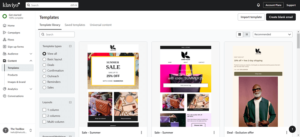
On top of that, Klaviyo offers 70+ automation (flow) templates and about 70 signup form templates, so you get a head start on almost every part of your email marketing.
Its editor is highly customizable too. You can reorder sections, add ecommerce product blocks, or personalize templates with customer names and shopping history.
Verdict:
Klaviyo wins this round for sheer choice and ready-made options, especially if you run an ecommerce business.
MailerLite has a simple, versatile editor that’s great if you want to design emails, landing pages, or even a simple website with ease.
Score: MailerLite 2️⃣ – Klaviyo 1️⃣
Email Automation: How Smart Can Your Emails Get?
MailerLite is simple and beginner-friendly.
It offers around 15 ready-made automation templates, like welcome emails, birthday emails, and re-engagement emails.
You also get a drag-and-drop builder, so you can create automations without coding.

Mailerlite Automation builder
MailerLite automations can start when someone:
joins your email list
clicks a link in your email
interacts with your messages
In 2026, MailerLite added a new feature called multi-trigger automation.
This means one automation can start from more than one action, like “joins a group OR clicks a link.”
But this feature is only available in the Advanced plan.
If you run an online store, MailerLite connects with Shopify, WooCommerce, BigCommerce, and more.
This helps you send abandoned cart emails and recover lost sales automatically.
Another useful feature is split testing inside automations, You can test two versions of an email and see which one works better, However, MailerLite is not very advanced.
It does not track website activity deeply, It does not offer lead scoring or advanced AI predictions, It also does not have a built-in CRM to manage sales.
In simple words, MailerLite is great for beginners and small businesses, but it is not very powerful.
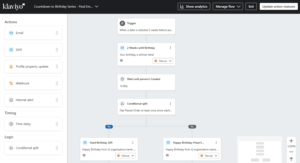
Klaviyo calls its automations “flows.”
It offers 60+ ready-made automation flows, like abandoned cart emails, birthday messages, VIP rewards, and emails for inactive users.
Klaviyo is much more powerful because it uses deep customer data.
In 2026, Klaviyo works like a customer data system.
It tracks what each customer does on your website.
You can send emails based on:
what people buy
what pages they visit
how they behave on your store
AI predictions about what they may buy next
Klaviyo also has smart AI features like:
Smart Send Time (sends emails at the best time)
Predictive Churn (finds customers who may stop buying)
You can also show product suggestions in emails, so each customer sees products they may like.
Klaviyo also helps you group customers based on how often they buy and how much they spend.
Some advanced features may cost extra money.
Verdict
👉 Choose MailerLite if you want simple and easy automation for beginners and small businesses.
👉 Choose Klaviyo if you run an online store and want powerful automation based on customer behavior and data.
Winner: Klaviyo wins this point because it offers deeper and smarter automation.
MailerLite 3️⃣ – Klaviyo 3️⃣
Registration Forms: Who Makes List Building Easier?
If you’re serious about email marketing, your forms matter — they’re how people join your list. Whether it’s a pop-up on your site or a full landing page, a smooth form builder can make (or break) your sign-up flow.
Both MailerLite and Klaviyo let you create different types of forms — pop-ups, embedded forms, slide-ins, and landing pages.
They also cover the essentials like GDPR compliance, custom fields, and integrations. So on paper, both tools get the job done.
Now, here’s how MailerLite and Klaviyo stack up.
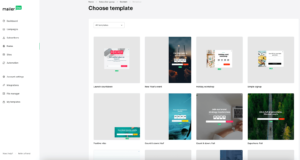
👉 MailerLite makes life so much easier. You can pick from 24 pre-designed templates (pop-ups, slide-ins, full screens, you name it) and fully customize fonts, colors, backgrounds, and buttons.
It feels more like designing a mini landing page than just “dropping a form.” I even tested different button texts and layouts, and small tweaks helped boost sign-ups.
👉 Klaviyo goes all in on advanced forms. They offer 70+ templates with targeting options based on visitor behavior, location, and even cart contents.
You can run A/B tests, show customer reviews, or use fun gamified forms like “Spin the Wheel” to grab attention.
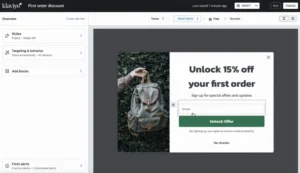
But Klaviyo’s embedding options are limited, and you can’t manually turn on CAPTCHA, which can be a problem for spam.
So for me, it was clear. With MailerLite, I created forms fast that look great and match my brand. Klaviyo has more features, but MailerLite’s forms are easier and quicker to set up — perfect for most small businesses.
My verdict?
For fast, easy, and effective forms, MailerLite wins this one.
MailerLite 4️⃣ – Klaviyo 4️⃣
Segmentation: Who Gives You More Control Over Your Audience?
Both MailerLite and Klaviyo let you slice and dice your email list — but the way they handle segmentation feels quite different.
MailerLite keeps things refreshingly simple. You can import contacts via CSV or sync from other platforms like Mailchimp. One feature I really like: subscribers can appear in multiple lists without being counted twice — a small but important detail that saves money.

Tags can be added manually, through signup forms, or even automatically via workflows, so you can start segmenting your audience from day one. Another neat touch is the dedicated “inactive subscribers” tab, which makes it easy to spot people who stopped engaging. For small to mid-sized businesses, it’s clean, practical, and doesn’t overcomplicate things.
Klaviyo, on the other hand, takes segmentation to a whole new level. You can build advanced groups based on purchase history, browsing behavior, or even predictive data like estimated next order date. There’s no real limit to how many conditions you can add — which makes it incredibly powerful if you want laser-focused targeting.
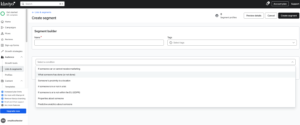
The trade-off? The interface throws in some technical terms (think Boolean logic), which can feel overwhelming if you’re new. But if you’re running a serious ecommerce store, the depth of segmentation here is unmatched.
Who Wins?
This one’s a draw. MailerLite wins for its ease of use and practicality — perfect for businesses that want simple, effective segmentation without the extra learning curve. But if you’re data-driven and need ultra-precise targeting, Klaviyo’s segmentation engine is the clear winner.
Reporting & Analytics: Who Gives You the Real Picture?
Email marketing without good analytics is like driving blindfolded. You might send campaigns, but if you don’t know what’s working, you’ll never improve.
When I first looked into MailerLite’s reporting dashboard, I was actually impressed.
It’s simple, clean, and shows exactly what you need: open rates, click rates, bounces, unsubscribes, and even link performance — all laid out clearly. ✅
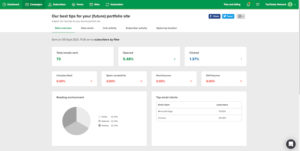
But it doesn’t stop at the basics. MailerLite also includes click heatmaps, device and location tracking, and subscriber activity timelines.
That last one helped me figure out when people actually opened my emails — super helpful for timing future sends.
For example, I once sent a campaign with multiple CTAs. Using the click heatmap, I saw that the second button — not the first — got most of the clicks.
I swapped their positions in the next campaign, and click-through rates went up by 18%. That’s the kind of insight that makes a real difference.
Now let’s talk about Klaviyo.
Klaviyo’s reporting is on another level — especially for ecommerce. You can see revenue per campaign, customer lifetime value, predicted churn, product-level click rates, and advanced segment-based performance.

You can even tie email performance directly to real sales, making it easy to track ROI. For Shopify and WooCommerce store owners, this is gold.
Plus, Klaviyo lets you build custom dashboards to track exactly what matters most to your business.
👉 My verdict:
MailerLite is great for beginners and creators who want clarity without overwhelm.
Klaviyo is the go-to for ecommerce brands that need deep, sales-focused insights.
Winner: Klaviyo
Score: MailerLite  – Klaviyo
Deliverability: Can Your Emails Actually Reach the Inbox?
Here’s the thing most beginners overlook: it doesn’t matter how beautiful or persuasive your email is if it never lands in the inbox. Deliverability is everything — and it’s about more than just hitting “send.”
When I tested both MailerLite and Klaviyo with real campaigns, I was happy to see both take deliverability seriously. But the setup experience and features differ quite a bit.
With MailerLite, it honestly felt like the platform was holding my hand.
✅ SPF, DKIM, and DMARC authentication are ready to go
✅ Bounce handling and spam complaint suppression are automatic
✅ A step-by-step onboarding wizard guides you through best practices
I remember sending my first campaign through MailerLite — within minutes, authentication was sorted, my list cleaned, and test emails landed right in Gmail’s Primary tab. No confusing jargon or guesswork — just smooth and beginner-friendly.
Klaviyo, on the other hand, also nails deliverability — but takes it a step further.
✅ Easy-to-set-up authentication (SPF, DKIM, DMARC)
✅ Automatic handling of bounces and spam complaints
✅ Dedicated deliverability team offering expert support when needed
✅ Shared IP pool monitoring plus optional dedicated IPs with warmup assistance
What really sets Klaviyo apart is its deliverability dashboard and health score, which help you proactively monitor and optimize inbox placement — especially important for ecommerce businesses sending high volumes.
My verdict?
Both platforms deliver (pun intended) solid inbox placement.
👉 MailerLite is perfect for beginners who want a hassle-free setup and reliable results.
👉 Klaviyo offers advanced deliverability tools and expert support — ideal if you want to stay on top of your email health and scale confidently.
Winner: Klaviyo
Score: MailerLite – Klaviyo 
Integrations & Extras: How Well Does Your Email Tool Play with Others?
Email marketing doesn’t exist in a bubble. The real power comes when your email tool plays nicely with the other apps in your business stack — your CRM, eCommerce platform, website, and even payment gateways.
When I tested MailerLite, I was pleasantly surprised by how flexible it was.
✅ 140+ native integrations (Shopify, WooCommerce, WordPress, Zapier, Stripe, PayPal, etc.)
✅ API access for custom builds
✅ Extras like a built-in landing page builder, pop-up forms, and even a lightweight website builder
I still remember hooking MailerLite up with my WooCommerce store — within minutes, I could segment customers based on purchases and spending, and trigger automated follow-ups.
It felt like running a mini-CRM without extra cost. Plus, having a landing page and website builder in one tool was a lifesaver for beginners juggling too many subscriptions.
Klaviyo takes integrations seriously, especially for ecommerce.
✅ Deep, real-time integrations with Shopify, WooCommerce, BigCommerce, Magento, and more
✅ Predictive analytics and AI-powered recommendations built in
✅ SMS marketing fully integrated alongside email campaigns
Klaviyo’s strength is how seamlessly it connects to your store and CRM, ensuring your product and customer data is always fresh. This enables powerful automation and personalized campaigns that really move the needle.
My verdict?
Both tools offer solid integrations, but with different focuses:
👉 MailerLite wins for beginner-friendly extras and flexibility — great if you want an all-in-one tool with website and landing pages included.
👉 Klaviyo wins for deep ecommerce connections and powerful data-driven marketing features.
Winner: Klaviyo — for ecommerce businesses, its integrations and extras are simply next-level.
Score: MailerLite – Klaviyo 
Pricing: MailerLite vs Klaviyo (2026)
When it comes to pricing, MailerLite is cheaper and easier to use, so it is great for creators and small businesses. Klaviyo is a powerful tool for online stores, but it is much more expensive.
MailerLite has a strong free plan. It lets you have up to 500 subscribers and send 12,000 emails per month. This is very helpful for beginners. On the other hand, Klaviyo’s free plan is limited. It allows only 250 contacts and 500 emails per month. This means you may need to upgrade very quickly.
When you move to paid plans, MailerLite stays affordable.
Its Growing Business plan starts at $10 per month, and the Advanced plan starts at $20 per month. These plans include unlimited emails and more users, so they are good for growing businesses.
Klaviyo’s paid plans start at $20 per month, but the price increases fast because it charges based on active profiles, not just subscribers. This makes Klaviyo expensive as your list grows.
For example, with 5,000 contacts, MailerLite costs around $50 per month, while Klaviyo can cost $100 per month or more. With 50,000 contacts, MailerLite costs about $340 per month, but Klaviyo can reach $720 per month.
Another big difference is extra costs. MailerLite includes most features in its plans. But Klaviyo charges extra for some tools, like reviews and advanced data features. These extra costs can make Klaviyo even more expensive.
In simple words, Klaviyo is strong for online stores, but it is not cheap. MailerLite is simpler, cheaper, and better for most creators and small businesses.
Final Verdict
👉 Choose MailerLite if you want a cheap and simple tool to grow your email list.
👉 Choose Klaviyo if you run an online store and need advanced features, and you are ready to pay more money.
Winner: MailerLite wins because it gives more value at a lower price.
Score: MailerLite – Klaviyo
Final Verdict: MailerLite vs Klaviyo
If I had to sum it up in one line — MailerLite is the better choice for simplicity and affordability, while Klaviyo dominates in advanced ecommerce capabilities.
Throughout this comparison, it became clear that MailerLite is ideal for creators, freelancers, and small businesses who want powerful tools without the complexity or high cost.
It offers one of the best free plans, a smooth user experience, and all the essentials — from landing pages to automation — without feeling overwhelming.
Klaviyo, on the other hand, is built for serious ecommerce brands. Its data-rich automation, deep store integrations, and advanced segmentation give it an edge if you’re selling products online and want to push personalization to the next level. But that power comes with higher pricing and a steeper learning curve.
👉 My advice?
Choose MailerLite if you want to get started fast, stay on budget, and still run high-quality campaigns.
(Explore more Mailerlite alternatives)
Choose Klaviyo if you run an ecommerce store and are ready to invest in advanced, revenue-focused automation.
No outright winner — just two strong platforms designed for different needs.
