

Last Updated: 12 Oct 2025
Subject lines are the only thing that can either skyrocket or sink your email marketing efforts.
Here’s the harsh reality: you can spend hours writing the perfect email with valuable tips, beautiful design, and even a killer offer. But if your subject line fails, nobody will ever see it. Your emails will just sit there, gathering dust in inboxes, or worse—getting buried in spam folders.
I learned this the hard way.
When I started email marketing, I used to write long, detailed emails with so much value inside. But my open rates were terrible. I kept wondering, “Why don’t people even care to open it?” The truth hit me later: it wasn’t about the content inside—it was the subject line that was killing me.
Once I started testing, tweaking, and learning what actually makes people click, everything changed. My open rates jumped. Suddenly, people who used to ignore my emails were not just opening them, but replying, engaging, and even buying.
That’s why I’m writing this blog post—because I don’t want you to waste your effort the way I did. In this guide, I’ll personally share the exact tips, tricks, and subject line formulas I use to boost my open rates dramatically. Plus, I’ll give you 100+ examples you can steal and start using right away.
So let’s dive in.
25 Tips for Writing Email Subject Lines (With Examples)
1. Personalize the Subject Line

When I used to send generic subject lines like “Weekly Newsletter,” my open rates were terrible. Then I started adding simple personalization—like the subscriber’s name or city—and my open rates jumped by almost 20%.
I usually personalize my subject lines in three simple ways:
- Add their first name → “Kartik, here’s your free guide.”
- Mention their location → “Special offer for Los Angeles readers.”
- Reference their action → “Your SEO checklist is ready.”
Some subject lines I’ve used successfully:
“Adam, your traffic report is ready 🚀”
“Special offer for Los Angeles readers”
“Hey Sarah, this one’s just for you”
2. Consider Your Tone
After trying multiple approaches, I found that, I never really thought about the tone of my subject lines. I just wrote whatever came to mind. Sometimes it sounded too formal, other times too casual—and the result was inconsistent open rates.
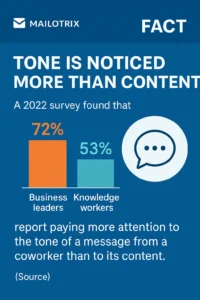
FACT – Tone is noticed more than content: A 2022 survey found that 72% of business leaders and 53% of knowledge workers report paying more attention to the tone of a message from a coworker than to its content. (Source)
Later, I realized the tone of the subject line sets the mood before someone even clicks. If my email was a professional update, but the subject line felt playful, people got confused. When I aligned the tone with my message and audience, engagement went up noticeably.
Now, I always check:
Casual/friendly when I want to connect on a personal level → “Hey, quick update for you.”
Formal/professional when it’s serious info → “Important: Your account statement.”
Playful/creative when I want to grab attention → “Donut miss this 🍩.”
⚠️ Common Mistakes to Avoid:
Mixing the wrong tone with the wrong audience (e.g., using jokes in a corporate update).
Sounding too robotic or stiff when your audience expects warmth.
Overusing emojis or slang, which can feel unprofessional in the wrong context.
Examples I use depending on tone:
“Hey, quick update for you” (Casual)
“Important: Your account statement” (Formal)
“Donut miss this 🍩” (Playful)
3. Be Clear and Concise
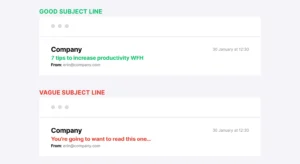
I remember when I tried to be “too clever” with my subject lines. I’d write things like “Guess what’s waiting for you?” thinking it would create curiosity. The reality? Hardly anyone opened those emails because they had no idea what they’d get inside.
(Source Mailerlite)
The breakthrough came when I started writing clear, straight-to-the-point subject lines. Something as simple as “Free template inside” performed way better than my clever riddles. Why? Because people only spend 1–2 seconds scanning their inbox, and clarity always wins.
Now, I follow two simple rules:
Keep subject lines under 50 characters so they don’t get cut off.
State the main benefit or hook right upfront.
⚠️ Common Mistakes to Avoid:
Writing vague subject lines that leave readers confused.
Using too many words—long subjects often get truncated on mobile.
Trying to be overly smart or witty, which sacrifices clarity.
Examples that work well:
“Boost your open rates in 3 steps”
“Free template inside”
“Join us live at 7 PM”
4. Don’t Yell (Avoid ALL CAPS)
In my early days, I thought using ALL CAPS would make my subject lines stand out. I sent things like “OPEN THIS NOW!!!” thinking people would feel urgency. Instead, it backfired—my emails looked spammy, and open rates dropped.
What I learned is that ALL CAPS feels aggressive and makes readers instantly suspicious. Instead, using sentence case or title case looks more professional and trustworthy. When I switched to softer tones like “Read this before midnight,” my emails performed much better.
⚠️ Common Mistakes to Avoid:
Writing the entire subject line in ALL CAPS.
Adding too many exclamation marks (!!!).
Mixing caps + emojis which screams “spam.”
Examples:
❌ “READ THIS NOW!!!”
✅ “Read this before midnight”
5. Think Twice Before Using Emoji
I used to throw emojis in almost every subject line thinking it would make my emails “fun.” For a while, it worked—my emails did stand out. But soon I noticed open rates dropping. Why? Because too many emojis looked unprofessional, and some even landed in the spam folder.
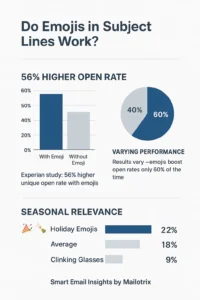
That’s when I realized: emojis are like spices—a little adds flavor, too much ruins the dish. Now I only use an emoji when it’s relevant to the message and stop at one. For example, a clock emoji when talking about deadlines or a gift emoji when sending a bonus.
⚠️ Common Mistakes to Avoid:
Stuffing multiple emojis in one subject line.
Using irrelevant emojis just for decoration.
Replacing important words with emojis (confuses readers).
Examples that worked for me:
“Save your spot ⏰”
“Your gift is waiting 🎁”
“New tricks for 2025 🚀”
6. Only Use Strong Language to Convey Urgency
Early on, I used words like “Urgent” and “Now” in almost every subject line, thinking it would push people to open my emails. At first, it worked a bit, but soon readers started ignoring them. The words lost their impact because urgency is powerful only when it’s real.
Now, I only use strong language when there’s a genuine deadline or limited-time offer. This keeps my emails credible and makes the reader take action when it truly matters.
⚠️ Common Mistakes to Avoid:
Overusing urgency words in every email.
Creating fake urgency—people notice and lose trust.
Using aggressive words that feel pushy rather than helpful.
Examples I’ve used successfully:
“Final reminder: Doors close tonight”
“Only 2 hours left to save”
“Last chance: 30% off ends soon”
7. Consider the Audience
When I first started writing subject lines, I used the same style for everyone—students, business owners, and bloggers alike. The result? Some emails got ignored completely because the message didn’t feel relevant to the reader.
I quickly learned that one-size-fits-all rarely works. Now, I always segment my audience and tailor subject lines to their needs. Writing for your audience makes emails feel personal and increases engagement.
⚠️ Common Mistakes to Avoid:
Using the same subject line for all types of subscribers.
Assuming one tone or benefit fits everyone.
Ignoring the reader’s context, which reduces curiosity to open.
Examples I’ve used:
“Bloggers: 7 ways to grow your list”
“Coaches: How to fill your calendar”
“Ecom stores: Boost holiday sales fast”
8. Avoid Spam Trigger Words
I noticed something surprising in my email reports, I thought words like “FREE $$$” or “100% GUARANTEED” would grab attention. At first, it did get some clicks—but most of my emails ended up in spam folders. My open rates tanked, and I realized I was shooting myself in the foot.
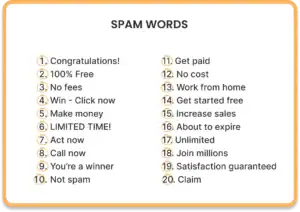
Now, I focus on value-based language instead of spammy hype. I highlight the benefit or solution rather than shouting for attention. This keeps my emails professional and actually improves engagement.
⚠️ Common Mistakes to Avoid:
Using all caps + spammy words together.
Over-promising with unrealistic claims.
Thinking that spammy language is a shortcut to better opens—it backfires.
Examples I now use:
❌ “BUY NOW!!! Limited FREE $$$”
✅ “Get your free checklist today”
✅ “Exclusive bonus for subscribers”
9. Learn From Successful Examples
In the beginning, I tried creating every subject line from scratch. Some worked, many didn’t. Then I realized the smartest way to improve was to study what already works. Top brands A/B test millions of subject lines every year, and their results reveal patterns we can learn from.
Now, I spend time analyzing competitor campaigns and successful emails in my niche. I don’t copy word-for-word, but I borrow structures, formulas, and hooks that are proven to get opens.
Examples I’ve learned from:
“We miss you—come back today” (Re-engagement)
“Don’t open this email (unless you want 2x traffic)” (Curiosity)
“Your order has shipped” (Transactional)
10. Use a Familiar Sender Name (Avoid “No-Reply”)
I ran a small test and realized that, I used to send emails from just my brand name—or worse, “no-reply@domain.com”. The result? Many subscribers ignored my emails because they felt faceless and impersonal. People trust real people, not anonymous addresses.

Once I switched to recognizable names—like “Kartik Sharma” or “Emma at Mailotrix”—open rates improved immediately. Subscribers felt like they were getting a personal message, not a generic broadcast.
⚠️ Common Mistakes to Avoid:
Using generic or faceless sender names like “Newsletter Team” or “no-reply@domain.com.”
Changing the sender name too often, which confuses subscribers.
Making the sender name too long or complicated—it should be instantly recognizable.
Examples I use:
From: “Kartik Sharma”
From: “Emma at Mailotrix”
11. Segment Your Lists
I remember sending an email that almost nobody opened, and it taught me…, I sent the same subject line to my entire email list. Some emails got opens, but many were ignored. I realized quickly that not all subscribers care about the same content. Sending generic emails wasted both my time and theirs.
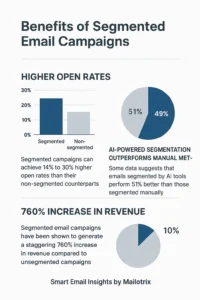
Once I started segmenting my lists by interest, job role, or behavior, I could write subject lines that spoke directly to each group. Open rates and engagement went up noticeably.
Examples I use:
“For students: 50% off your first course”
“Freelancers: New project ideas this week”
“Marketing pros: Boost your client conversions”
Use AI to Get Personal
When I started experimenting with AI tools, I realized they could do something I couldn’t at scale—analyze subscriber behavior, location, and preferences to suggest personalized subject lines. At first, I was skeptical, but testing AI-generated variations showed me subject lines that consistently boosted open rates.
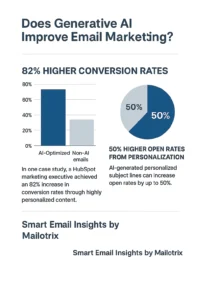
Now, I use AI to create multiple personalized options for each segment and test which one works best. It saves time and helps me reach more subscribers with relevant messages.
⚠️ Common Mistakes to Avoid:
Relying entirely on AI without reviewing—it can generate irrelevant or awkward lines.
Over-personalizing or using data that feels intrusive.
Ignoring real-world testing—always A/B test AI suggestions.
Examples I’ve used successfully:
“Kartik, ready to 2x your subscribers this week?”
“Hey Sarah, here’s your custom SEO report”
13. Don’t Make False Promises
In my early days, I sometimes used clickbait-y subject lines like “Make $10,000 overnight” thinking it would boost opens. Sure, some people clicked—but when the content didn’t deliver, trust was lost. Subscribers unsubscribed, and engagement dropped.
I quickly learned that honesty matters more than a quick open-rate spike. Now, I make sure every subject line accurately reflects the email content. This builds credibility and long-term engagement.
Examples I use:
❌ “Make $10,000 overnight”
✅ “How I grew my email list in 30 days”
14. Use Numbers and Lists
I noticed something surprising in my email reports, I wrote subject lines like “Tips to grow your email list”. Generic, right? I noticed that emails with numbers in the subject line—like “7 ways to grow your email list”—always got more opens. Numbers give readers a clear idea of what to expect and make the email feel actionable.
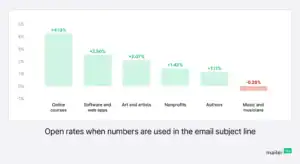
Now, I try to include numbers or lists whenever possible. It creates a sense of structure and quick wins, which people love.
⚠️ Common Mistakes to Avoid:
Using numbers randomly without real content to back it up.
Writing too long numbers or complicated lists—it confuses readers.
Overusing “Top 10” or “5 ways” in every email, which loses impact.
Examples I use:
“7 subject line hacks to boost opens”
“5 email mistakes to avoid this week”
“3 quick tips for better click rates”
15. Time It Right
At one point, my open rates were tanking because, I used to send emails whenever I finished writing them, without thinking about timing. Some subject lines performed okay, but many got ignored. I realized quickly that the same subject line can get very different results depending on when it’s sent.
Now, I match my subject line and email content with the right timing. Morning emails get a friendly start like “Good morning, here’s your daily update”, while evening emails might have a softer tone like “Before you log off today…”. Timing combined with tone makes subscribers more likely to open.
Examples I use:
“Good morning, here’s your daily update”
“Before you log off today…”
“Weekend deal: Ends Sunday night”
16. Make People Feel Special
Through trial and error, I found that…, I treated every subscriber the same. My subject lines were generic, and open rates were average. Then I realized that people love feeling exclusive—like they’re getting something others aren’t. Once I started using words like “exclusive,” “invite-only,” or “just for you,” engagement went up noticeably.
Now, I craft subject lines that make subscribers feel valued and part of a special group. It creates a VIP experience that encourages opens.
⚠️ Common Mistakes to Avoid:
Overusing exclusivity words when the offer isn’t truly exclusive.
Promising VIP treatment but delivering generic content.
Making the subject line too long with extra hype—keeps it simple.
Examples I use:
“You’re invited 🎉”
“For our top subscribers only”
“Exclusive access unlocked”
17. Create a Sense of Importance
After testing different subject lines, I discovered that…, I sometimes treated all emails equally, with casual subject lines like “Check this out”. The problem? Critical emails got lost in the inbox. I realized that important messages demand attention and need to feel urgent and relevant.
Now, I combine urgency and importance in my subject lines so subscribers know they can’t ignore the email. It improves opens for high-priority messages without feeling spammy.
⚠️ Common Mistakes to Avoid:
Using urgent words for trivial updates—it annoys subscribers.
Overusing “important” in every email, which loses impact.
Making the subject line too long or confusing the reader.
Examples I use:
“Action required: Confirm your account”
“Don’t miss this update”
“Important: Policy changes effective today”
18. Pose a Compelling Question
I noticed that many of my emails were ignored until I realized, most of my subject lines were statements like “Boost your traffic today”. They were fine, but engagement felt flat. Then I tried asking questions—and the difference was huge. Questions trigger curiosity and make readers mentally answer before even opening the email, which naturally increases open rates.
Now, I craft subject lines as relevant, open-ended questions that resonate with my audience’s needs or pain points.
⚠️ Common Mistakes to Avoid:
Asking vague or irrelevant questions that don’t connect to the content.
Making the question too long or complicated.
Overusing questions in every email, which can feel gimmicky.
Examples I use:
“Are you making these subject line mistakes?”
“Want more traffic without ads?”
“Ready to double your list?”
19. Don’t Be Afraid to Get Punny
At one point, I noticed that some of my emails were getting lost in crowded inboxes. I decided to experiment with wordplay and puns—and it worked surprisingly well. A clever pun can entertain, grab attention, and make your email feel more memorable, especially in lifestyle or ecom niches.
Now, I only use puns when they match my brand personality and feel natural. If done right, they make the reader smile and click.
⚠️ Common Mistakes to Avoid:
Forcing puns that don’t fit your brand—it feels awkward.
Overusing puns in every email, which can be distracting.
Using puns that confuse the reader instead of creating curiosity.
Examples I use:
“Donut miss out on this 🍩”
“Let’s taco ‘bout your marketing 🌮”
“Keep calm and email on”
20. Don’t Combine ? and ! in the Same Line
I used to think that combining question marks and exclamation points—like “Want this now? Get it free!”—would make my subject lines more exciting. In reality, it came across as gimmicky and desperate, and readers often ignored those emails.
Now, I stick to using one punctuation mark per subject line. This keeps the message clear, professional, and still engaging.
⚠️ Common Mistakes to Avoid:
Using multiple punctuation marks to force urgency—it feels spammy.
Overloading the subject line with symbols for attention.
Confusing the reader with mixed tones in the same line.
Examples I use:
❌ “Want this now? Get it free!”
✅ “Want this now? It’s free today”
21. Use Engaging Preview Text
I used to focus only on the subject line, ignoring the preview text that shows right after it in the inbox. Then I realized it acts like a second subject line—a chance to grab attention or add context.
Now, I always craft preview text to either extend curiosity or clarify the subject line. It’s amazing how a small line can boost open rates when it complements the subject.
⚠️ Common Mistakes to Avoid:
Leaving preview text blank or repeating the subject line.
Writing too long text that gets cut off on mobile.
Making it vague or irrelevant to the email content.
Examples I use:
Subject: “Boost your open rates today”
Preview: “These 3 tricks doubled mine last week”
Subject: “Your free checklist inside”
Preview: “Step-by-step guide to skyrocket your clicks”
22. A/B Test and Reach Out Again
Early on, I used to send one version of every email and hope for the best. Sometimes it worked, sometimes it didn’t. Then I learned the power of A/B testing—trying two variations to see what my audience actually responds to.
Even better, I started resending emails to those who didn’t open the first time. This simple tactic captured subscribers I would have otherwise missed and boosted overall engagement.
⚠️ Common Mistakes to Avoid:
Testing too many changes at once—it’s hard to know what worked.
Resending emails without tweaking the subject line or timing.
Ignoring audience behavior—A/B tests should be data-driven.
Examples I use:
A/B Test:
A: “Your free guide is inside”
B: “[Free Guide] Boost your open rate today”
Resend Variation:
“Still waiting? Your free guide is here”
23. Reach Out Again
Sometimes, even your best subject line gets ignored. I used to assume that once an email went unopened, it was lost. Then I started resending emails to those who didn’t open the first time, often with a slightly tweaked subject line. The results were surprising—many subscribers who missed it the first time opened it on the second try.
⚠️ Common Mistakes to Avoid:
Resending the same email with the exact same subject line—it rarely works.
Sending too soon or too often, which annoys subscribers.
Ignoring segmentation; some emails may need different messaging for different groups.
Examples I use:
Original: “Your free guide is inside”
Resend: “Still waiting? Your free guide is here”
Original: “Don’t miss our webinar today”
Resend: “Last chance: Join our webinar now”
📬 100+ Email Subject Line Examples
1. Curiosity-Driven
- Can I ask you a quick question?
- You won’t believe what happened this week
- The secret to doubling your open rates
- Are you making these mistakes?
- What everyone gets wrong about email marketing
- Here’s something most marketers overlook
- The trick I wish I knew sooner
- A surprising way to grow your list
- I tested this, and the results shocked me
- Do you know this about your emails?
- Something’s missing in your strategy
- This one tweak increased my open rates
- Curious why your emails aren’t opened?
- What happens if you ignore this?
- A quick tip you probably didn’t try
- Are your subject lines costing you clicks?
- One small change, big results
- The subject line formula that works
- This email strategy blew my mind
- Have you tried this approach yet?
2. Urgency & Scarcity
- Final hours: Claim your bonus now
- Only 2 spots left—register today
- Sale ends tonight at midnight
- Last chance: 50% off expires
- Don’t miss out—doors close soon
- Hurry! Offer ends in 3 hours
- Limited seats available—join now
- Act fast: Exclusive deal expires
- Last call for this week’s special
- Time-sensitive: Don’t miss this
- Offer vanishes at midnight
- Only today: Free resource inside
- Ends soon: Claim your bonus guide
- Final reminder: Last chance to register
- Limited-time access: Sign up now
- Urgent: Your free spot is waiting
- Almost gone: Don’t miss this deal
- Deadline approaching—act now
- Only a few left—grab yours
- Time is running out: Open now
3. Value-Packed
- 10 hacks to double your open rate
- Step-by-step guide to boost clicks
- Your free checklist is ready
- How I grew my email list in 30 days
- Free template: Write subject lines that convert
- The ultimate guide to higher engagement
- Proven strategies for more opens
- 5 tips to increase conversions
- Boost your list with these tricks
- Everything you need to improve email performance
- Quick tips for faster growth
- The tool that changed my email game
- How to get better results in 7 days
- Checklist: 10 things to improve today
- Step-by-step: Write better emails fast
- The easiest way to boost clicks
- Guide: Secrets to irresistible subject lines
- Get more opens without spending extra
- Simple hacks for email success
- Top tips from experts for higher engagement
4. Conversational & Friendly
- Thought of you when I saw this
- Hey, quick tip for you
- You need to see this
- I wanted to share this with you
- Just for you: my latest find
- Quick heads up about something cool
- This might help you today
- Can’t wait to show you this
- I think you’ll love this
- Wanted to make sure you saw this
- Here’s a little something for you
- I found this helpful—hope you do too
- Hey, check this out
- A tip you’ll actually use
- Sharing this because I care
- You asked for it—here it is
- Friendly reminder: Don’t miss this
- Thought this could help you
- Hey, got a minute?
- Look what I found for you
5. Seasonal & Holiday-Specific
- Black Friday starts now 🎉
- New Year, new strategies for your list
- Valentine’s Day special: Exclusive offer
- Back-to-school email marketing tips
- Cyber Monday deals you can’t miss
- Holiday email hacks for 2025
- Summer sale: Limited time only
- End-of-year checklist inside
- Halloween special: Spooky email tips
- Thanksgiving deals just for you
- Spring cleaning your email list?
- Holiday season boost: Free guide
- Countdown to Christmas offers
- Valentine’s gift for our subscribers
- Seasonal strategy: Maximize opens
- Festive hacks for higher engagement
- Holiday bonus inside: Don’t miss it
- Celebrate the season with these tips
- Winter email marketing tricks
- Exclusive New Year freebies inside
Conclusion
At the end of the day, your subject line is the first impression your email makes. No matter how amazing your content is, if your subject line fails, most people will never even see it.
Throughout this guide, we covered 23 actionable tips that I personally use to boost my open rates—everything from personalization, tone, clarity, urgency, and curiosity to AI personalization, segmentation, and A/B testing.
Here’s the takeaway:
Keep it personal: Make the reader feel like the email is written just for them.
Be clear and concise: Don’t make them guess what’s inside.
Match the tone: Friendly, professional, or playful—whatever fits your audience.
Use curiosity, urgency, and value: Give them a reason to click.
Test and iterate: Learn from your audience and improve continuously.
Remember, your subject line can skyrocket or sink your email campaign. Apply these tips consistently, and you’ll see your open rates climb while building trust and engagement with your readers.
Now it’s your turn—start experimenting with your subject lines, and watch your emails get the attention they deserve!
