
Last Updated: 15 Aug 2026
Here’s a hard truth about email marketing: you can write the perfect subject line, spend three hours picking the right button color, and add the reader’s first name to every line — and none of it matters if the email never shows up in the inbox.
That’s deliverability. It’s the boring, behind-the-scenes part of email marketing that decides whether anyone ever gets the chance to read what you wrote. And in 2026, it’s a lot less forgiving than it used to be.
Below is every important deliverability number you need to know, explained in plain words, plus a few stat lines you can copy straight into your own blog post if they’re useful.
The Big Number: 1 in 6 Emails Just Disappears
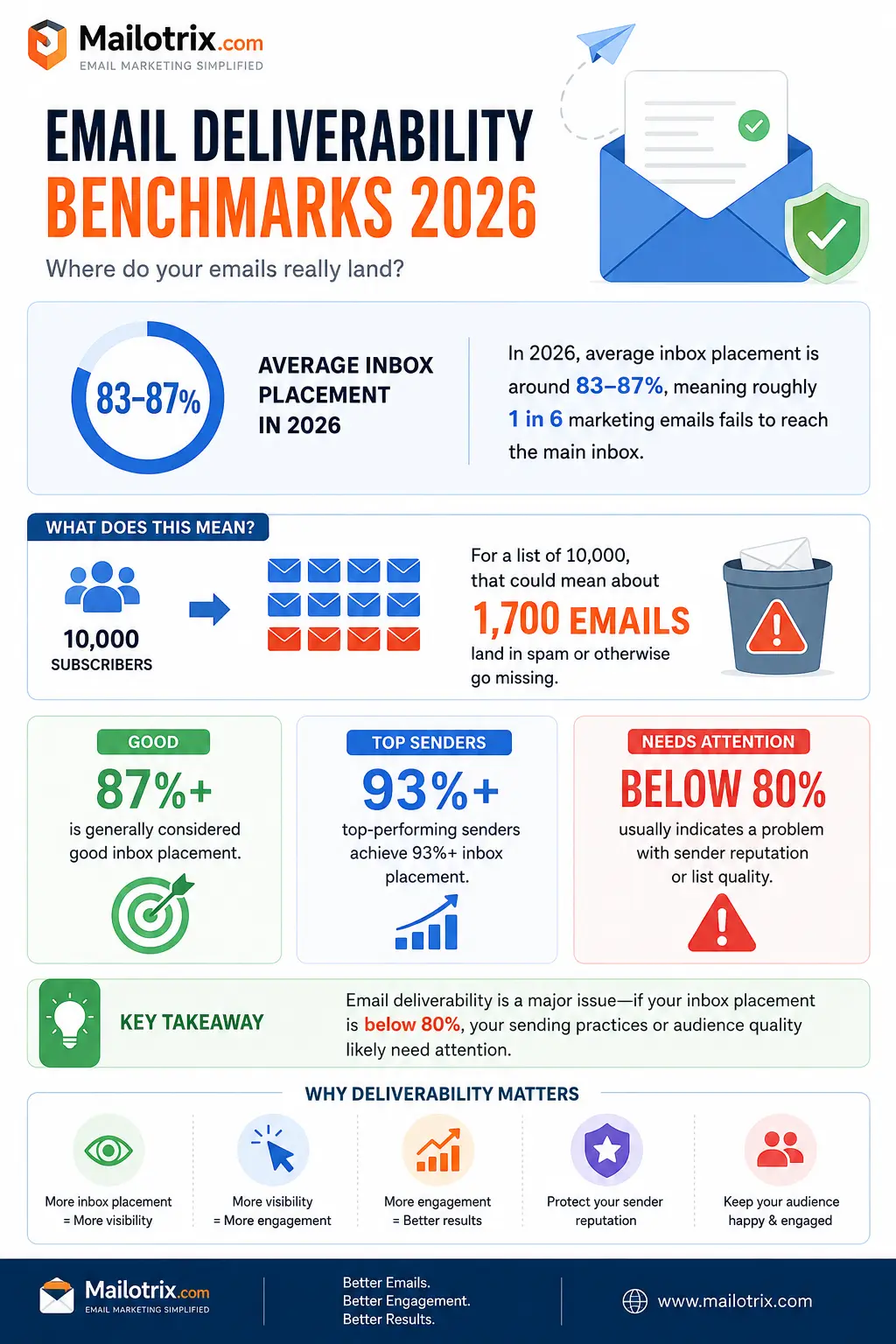
The average inbox placement rate in 2026 sits somewhere around 83% to 87%, depending on which report you look at. Flip that number around, and it means about 1 out of every 6 marketing emails never lands in the main inbox at all. It either gets pushed to spam or vanishes somewhere in between.
If you send to a list of 10,000 people, that means roughly 1,700 emails go missing before a single person even sees your subject line.
📋 Copy this line for your own post: “About 1 in 6 marketing emails never reaches the inbox — the average global inbox placement rate in 2026 is around 83–87%.”
A “good” inbox placement rate today is generally seen as 87% or higher. The best senders hit 93% or more. If your number is under 80%, that’s a sign of a real problem with your sending reputation or list quality — not bad luck.
Delivery Rate and Deliverability Are Not the Same Thing
A lot of people mix these two up, so let’s clear it up.
Delivery rate just means the receiving mail server accepted your email. It didn’t bounce. That’s it — the server said “okay, I’ll take this,” nothing more.
Deliverability (also called inbox placement rate) tells you whether the email actually reached the main inbox, instead of getting filtered into spam, promotions, or another folder nobody checks.
Here’s why the difference matters: you can have a 99% delivery rate and still only get 65% inbox placement. That means a third of your “successfully sent” emails are actually just sitting in spam, doing nothing. One study found that only about 12% of senders actually understand this difference. So if this is news to you, you’re in good company.
📋 Copy this line for your own post: “A 99% delivery rate can still hide a 65% inbox placement rate — meaning a third of your ‘delivered’ emails may never be seen.”
Not Every Inbox Treats You the Same Way
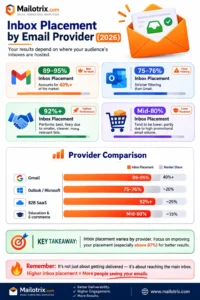
Where your email lands also depends on who owns the inbox. Different mail providers use different rules:
- Gmail is the most forgiving of the big providers, with inbox placement often reported between 89% and 95%. Gmail also holds the biggest share of the market — over 40% — so staying on Gmail’s good side matters more than almost anything else you do.
- Outlook and Microsoft are stricter. Their inbox placement rate is often reported around 75% to 76%, which means a good chunk of normal, wanted emails still get pushed into junk.
- B2B SaaS companies tend to do the best overall, often hitting 92% or higher in inbox placement. This is likely because they send fewer, more relevant emails to smaller, cleaner lists.
- Education and retail/e-commerce brands land near the bottom of the list, often in the mid-80s, mostly because they send a high volume of promotional emails.
So if most of your list uses Outlook, don’t be surprised if your numbers look worse than someone whose list is mostly on Gmail. You may not be doing anything wrong. You might just be playing on harder ground.
📋 Copy this line for your own post: “Gmail’s average inbox placement rate is around 89–95%, while Outlook trails behind at roughly 75–76%.”
The Spam Ocean You’re Swimming In
Here’s a number that puts things in perspective: nearly 45% of all email sent worldwide is spam — around 188 billion junk emails every single day.
Your newsletter is floating in a genuinely massive sea of junk mail, which is exactly why mail providers have gotten so strict about filtering. Gmail alone reportedly blocks about 15 billion unwanted emails a day. That’s an enormous number, and the filters doing that work don’t always tell the difference between “obvious scam” and “your slightly too-frequent sale emails.”
This is part of why even honest, well-meaning senders sometimes get caught in the spam net. The filters are built for war, and your email has to prove it’s not the enemy every single time it’s sent.
The 2024 Rules Are Still Running the Show in 2026
If you haven’t touched your email setup since before February 2024, this is your reminder. Gmail and Yahoo rolled out new rules for bulk senders that changed the whole game, and enforcement has only gotten tighter since then. Here’s what you need to know, in plain terms.
What counts as a “bulk sender”? Any domain sending 5,000 or more emails a day to Gmail addresses gets labeled as a bulk sender. And once you get that label, it doesn’t go away — even if you later send less.
Spam complaints have a hard limit. Your spam complaint rate must stay under 0.3%. Google actually wants it even lower — under 0.1% for the safest results. Here’s the part that stings: if you send 10,000 emails, it only takes 30 people clicking “report spam” to break that limit. Thirty people. Out of ten thousand. That’s not a lot of room for error.
Authentication is no longer optional. Three technical records now matter a lot:
- SPF proves your email is coming from a server allowed to send on your behalf.
- DKIM adds a kind of digital signature that proves the email wasn’t changed along the way.
- DMARC ties the two together and tells mail providers what to do if a message fails the check.
Bulk senders without a properly set up DMARC record risk having their email rejected outright, not just pushed to spam. This isn’t a “nice to have” anymore. It’s the price of entry.
One-click unsubscribe is required. If you send marketing or promotional email, people need to be able to leave your list in one click, with no extra steps. Password resets and other must-have emails are not affected by this rule.
📋 Copy this line for your own post: “It only takes 30 spam complaints out of 10,000 emails sent to break Gmail’s 0.3% complaint threshold.”
Why does this matter so much? Because breaking these rules doesn’t just get your email marked as spam — in the worst cases, it gets your email rejected before it even arrives. That’s a much bigger problem than a bad open rate. It means the message never had a chance at all.
Cold Email Has It Even Harder
If you send cold outreach — emails to people who never signed up for anything from you — the numbers get rougher. Cold campaigns often see spam complaint rates of 0.5% to 1%, well past that 0.3% limit, simply because the people receiving them never asked to hear from you in the first place.
This is why relevance matters so much. It’s not just a nice idea — it’s part of the actual math that decides whether your email gets delivered at all.
Bounce Rates and List Hygiene: The Boring Stuff That Actually Works
Nobody gets excited about cleaning an email list. It’s a lot like flossing — everyone knows they should do it, almost nobody keeps up with it, and it works surprisingly well when you actually bother.
- A healthy bounce rate across most industries sits around 1% to 2%. Go above 2% regularly, and you’re sending a warning signal to every mail provider watching your account.
- Senders who check and clean their list in real time report bounce rates as low as 0.3%, along with inbox placement above 95%.
- Senders who never clean their list see bounce rates of 6.5% or higher, with almost a third of their emails landing in spam.
- B2B lists go stale fast — data shows about 22.5% of B2B contacts become invalid each year, and that number can climb as high as 70% a year at fast-growing startups, simply because people change jobs so often.
📋 Copy this line for your own post: “Senders who verify their list in real time average a 0.3% bounce rate — senders who never clean their list average 6.5% or higher.”
If you haven’t checked your list in the last few months, there’s a real chance you’re mailing a lot of addresses that no longer exist. And mail providers notice when you keep sending to dead addresses. It hurts your reputation, even if the person never did anything wrong.
What’s Inside the Email Matters Too
Deliverability isn’t only about your sending setup. What’s actually written inside the email can trip filters as well.
- Emails with a poor balance of images to text — think one huge image and almost no words — can get flagged, since that pattern is common in spam.
- Certain words and phrases (all caps, too many exclamation points, aggressive sales language) can raise red flags with spam filters, even from a fully legitimate sender.
- Broken or shortened links, especially from unfamiliar link-shortening services, can also lower trust with filters.
- Emails that get ignored, deleted without opening, or marked as “not interested” repeatedly by the same group of people send a signal that this content isn’t wanted — even without a formal spam complaint.
That last point is a big one, and it connects directly to something called engagement-based filtering.
Mail Providers Are Watching How People Treat Your Email
Modern spam filters don’t just look at your technical setup. They also watch how real people behave when your email lands in their inbox.
If a large share of your list never opens your emails, deletes them without reading, or moves them straight to spam without even opening them, mail providers treat that as a bad sign — even if nobody formally complained. Over time, this quietly lowers your reputation and pushes future emails toward spam, even for people who do want to hear from you.
This is part of why sending to your entire list every time, including people who haven’t opened an email from you in a year, can actually hurt your deliverability. Removing or re-engaging inactive subscribers isn’t just good practice — it protects everyone else on your list from also being pushed into spam by association.
Warming Up New Domains: Slow and Steady Wins
If you’re setting up a brand-new sending domain or a fresh IP address, do not blast your whole list on day one. Mail providers don’t yet know who you are, and a sudden spike in volume from a brand-new sender looks exactly like what a spammer would do.
Instead, sending reputation is usually built gradually — starting with small volumes to your most engaged subscribers, then slowly increasing over days and weeks. This process is often called warming up, and skipping it is one of the fastest ways to land in spam right out of the gate, even with a perfectly clean list and good intentions.
How Do You Actually Know Your Real Inbox Placement Rate?
Here’s a problem: your email platform can tell you the delivery rate, but it usually can’t tell you the true inbox placement rate on its own. Remember, those are two different things. So how do people actually measure the number everyone keeps quoting?
Most of the big benchmark reports use something called a seed list test. This means sending a test email to a large group of dummy inboxes spread across every major provider — Gmail, Outlook, Yahoo, and others — and then checking exactly where each copy landed: inbox, promotions, or spam. Run this across thousands or millions of real sends, and you get a fairly accurate picture of how a sender is actually doing.
If you run your own campaigns regularly, there are a few practical ways to get a rough sense of your own placement without expensive tools:
- Check your Google Postmaster Tools dashboard, if you send meaningful volume to Gmail. It’s free, and it shows your spam rate and domain reputation directly from Google’s side.
- Ask a few real subscribers on different providers to check which folder your last few emails landed in. It’s not scientific, but it’s a fast gut check.
- Watch your open rate trend over time, not just one campaign. A sudden, unexplained drop across an entire send — especially to one provider like Outlook — is often a deliverability problem, not a content problem.
- Track your bounce and complaint numbers every single send, not just once a month. Since these thresholds are checked daily by providers like Gmail, a single bad campaign can do real damage before you even notice it in a monthly report.
A Simple Checklist That Actually Moves the Needle
If you want the short version of everything above, here’s the list of things that genuinely help:
- Set up SPF, DKIM, and DMARC properly. These aren’t optional extras anymore — they’re the baseline.
- Warm up any new sending domain or IP slowly. Don’t blast your full list from day one.
- Make unsubscribing painless. A clean, easy exit reduces spam complaints far more than making it hard to leave. Annoyed people who can’t unsubscribe just hit “report spam” instead.
- Clean your list on a regular schedule. Every few months at minimum. Old, invalid, or completely inactive addresses drag down your reputation.
- Watch your spam complaint rate closely. Most mail providers offer free tools (like Google’s Postmaster Tools) that show this daily — and remember, that 0.3% limit is checked daily, not averaged monthly.
- Send things people actually want to read. This sounds obvious, but it’s the single biggest lever you have. Relevant email gets fewer complaints and better engagement, and mail providers reward that with better placement over time.
- Remove or re-engage inactive subscribers. People who haven’t opened anything from you in six months to a year are quietly hurting your reputation with everyone else.
A Quick Word on Transactional vs Marketing Email
Not every email you send follows the same rules, and mixing them up can cause confusion.
Transactional emails — password resets, order confirmations, receipts, shipping updates — are usually exempt from the one-click unsubscribe rule, since the person needs that information for something they already did. These emails also tend to have much higher open rates, often 55% to 70%+, because people genuinely want to see them right away.
Marketing and promotional emails — newsletters, sales, product announcements — are the ones that fall under the strict bulk sender rules, including the spam complaint limit and the mandatory one-click unsubscribe.
Here’s the catch: if you send both types of email from the same domain, poor behavior on your marketing side can drag down deliverability for your transactional emails too, since mail providers often judge reputation at the domain level, not just per campaign type. This is why many companies use a separate subdomain for transactional email (something like mail.yourcompany.com instead of yourcompany.com), so a rough newsletter campaign doesn’t accidentally tank the deliverability of a password-reset email someone is waiting on right now.
Quick Answers to Common Questions
What’s a good bounce rate? Under 2% is healthy. Under 1% is excellent.
What’s a good spam complaint rate? Under 0.3% is the hard limit set by Gmail and Yahoo. Under 0.1% is the safer target.
How often should I clean my email list? At least once a quarter. More often if you send frequently or have a fast-growing list.
Does deliverability affect my open rate? Yes, directly. If an email lands in spam, it usually isn’t counted as delivered to the inbox at all, which quietly deflates every other number you track, including opens and clicks.
Can one bad email campaign hurt my reputation? Yes. Spam complaint rates are often checked daily, not averaged over weeks, so a single poorly-targeted send can cause a real, immediate dip in your inbox placement.
The Bottom Line
Deliverability doesn’t get the attention that clever subject lines and AI writing tools get, but it’s the floor everything else stands on. You can have the best-looking email in the world, and it won’t matter if 17% of your list never even sees it land. Fix the boring stuff first — clean authentication, a clean list, and content people actually want — and every other number in your email marketing dashboard will start telling you the truth.
Sources
This post pulls from the following 2025–2026 industry reports and guides. Click through for the full data and methodology behind each figure:
- SendX — Email Deliverability in 2026
- Saleshandy — Email Deliverability Statistics 2026
- Warmforge — Email Deliverability Statistics
- DigitalApplied — Email Deliverability Benchmarks 2026
- InboxWarm — Email Deliverability Statistics 2026
- Cleanlist — Email Deliverability Benchmarks 2026
- Chronos Agency — Gmail & Yahoo Sender Requirements 2026
- Mailgun — Yahoogle: New Bulk Sender Requirements
- AWS — An Overview of Bulk Sender Changes at Yahoo/Gmail
- Google — Email Sender Guidelines FAQ
Deliverability rules and thresholds can change as mail providers update their policies, so it’s worth checking the source links above for the latest details before making changes to your sending setup.
