
Last Updated: 13 Aug 2026
I have used Brevo and HubSpot on my own work, not just for a quick look around. Real emails, real contacts, real time spent inside both dashboards. And after all that, here is the one thing I want you to know before you read any further: these two tools are not really fighting for the same job.
Brevo is built to be a simple, low cost home for email, SMS, WhatsApp, and live chat, with a light CRM added on top. HubSpot is built the other way around. It starts as a full CRM, the place where your sales team tracks every deal and every contact, and marketing is one part of a much bigger system.
So this is not really an “either or” Brevo vs HubSpot comparison in the normal sense. It’s more like comparing a well packed van to a full moving truck. One is easy to drive and cheap to run. The other can carry a lot more, but it costs more and takes more time to learn.
In this post I’m not just going to give you a list of good points and bad points. I want to walk you through how each tool actually behaves once you’re using it every day, so you know what you’re really signing up for.
Brevo vs HubSpot – Short Summary
Brevo is the cheaper, faster, easier tool if your main job is sending email, SMS, and WhatsApp, and you only need a light CRM to keep track of leads. Small teams and small budgets tend to feel at home here fast.
HubSpot is the bigger, deeper tool if your business runs on a real sales pipeline, with deals, stages, and a sales team that needs to see everything about a contact in one place. It costs a lot more once you move past the free plan, but it gives you a full system, not just an email tool.
One thing most comparisons don’t say clearly enough: HubSpot’s cheapest paid plan has weak automation. You get a small number of steps per workflow and no real branching logic, so a smart, “if this then that” email journey needs a much pricier plan. Brevo gives you real branching automation at a fraction of that cost.
| Feature | Brevo | HubSpot |
|---|---|---|
| Free plan | Up to 9,000 emails a month, generous contact storage | 2,000 emails a month, up to 1 million stored contacts |
| Cheapest paid marketing plan | Around $9-$17/month | Around $15-$20/month, then jumps fast |
| Pricing model | Based on emails sent | Based on contacts stored, plus seats |
| Automation on entry plan | Real branching logic included | Very limited, no real branching |
| CRM depth | Light, good for small teams | Deep, built for full sales pipelines |
| SMS and WhatsApp | Built in | Not built in |
| Best for | Small teams, email and multichannel sending | Sales-led teams, full pipeline tracking |
How I Tested Both Tools
I set up a real contact list on both platforms, sent the same welcome email and one follow up campaign on each, and built one automation flow with a couple of decision points to see how each tool handled it. I also went through a stack of outside reviews and buyer comparisons, because my own experience is only one data point. Looking at what many other users report tells me if what I saw is common or just my own case.
To keep things fair, I also tracked small details that most reviews skip, like how long each save or send action actually took, how many clicks it took to do a normal task, and what happened when I made a mistake, like adding a contact to the wrong list.
Ease of Use
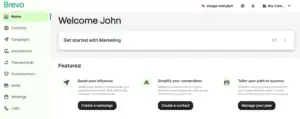
Brevo felt simple from the start. When I logged in, the main menu had four or five clear sections: contacts, campaigns, automation, and a couple more.
Nothing was hidden behind a strange name. I created a contact list, wrote an email, and sent a real test in my first sitting, without opening a single help page. If I made a mistake, like adding the wrong image, undoing it took one click.
HubSpot is not hard exactly, but it is a much bigger house, because it’s not just an email tool. When you log in, you’re looking at a system that also handles sales deals, support tickets, and website tools, all connected to the same contact record.
That’s powerful, but it also means more menus, more settings, and more decisions before you send your first email. In my early sessions, I found myself clicking into the wrong hub a few times just trying to find the campaign builder. Once I learned where things lived, it moved much faster, but that learning stage is real and it takes a few sessions, not a few minutes.
Winner: Brevo, for a fast, simple start, especially if you’ve never used a marketing tool before.
Email Editor
Both tools use a drag and drop editor, where you click a block, like text or image, and drop it where you want, with no code needed. But the way they feel to actually work in is different.
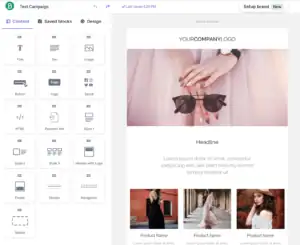
Brevo’s editor is quick and clean. You drag a block, type your text, and the layout adjusts on its own. Its brand kit saves your logo, fonts, and brand colors once, so every new email you build afterward already looks like you, without picking colors again each time. I could build a full newsletter, from blank page to ready to send, in under fifteen minutes once I got used to it.

HubSpot’s editor is solid too, and its biggest strength is how it pulls in real contact data while you build. You can drop in a person’s first name, their deal stage, or even content that changes based on what list they’re on, right inside the email, without leaving the editor.
That’s genuinely useful for a sales-driven email. The tradeoff is that building a simple, plain newsletter takes a few more clicks than it does in Brevo, since the editor is built to handle more complex, data-driven emails, not just quick sends.
Winner: Brevo, for speed and simplicity on a normal email. HubSpot pulls ahead the moment you want your email to change based on who’s reading it.
Templates, Design, and Quality
Brevo’s templates are clean and cover the basics well: newsletters, promotions, welcome emails, and simple announcements. The library is on the smaller side, so if you send a lot of different types of campaigns, you may end up reusing and tweaking the same few designs rather than starting fresh each time.

HubSpot’s templates lean toward business communication, like newsletters and updates that pull from your CRM data, and they look professional and modern out of the box.
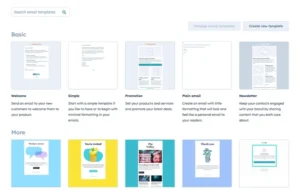
Some users find the design options feel a bit boxed in compared to a dedicated email tool, since HubSpot’s templates are built to stay consistent with your wider CRM branding rather than to be highly customized art pieces.
In real use, neither tool will leave you stuck. Both let you swap colors, fonts, and images enough to make an email that looks like your brand, just through slightly different editing paths.
Winner: Tie. Both cover normal business needs fine, and neither pulls far ahead here.
List Management
List management just means how well a tool lets you sort, group, and keep your contacts clean and organized. This sounds simple, but it’s one of those things you don’t notice until it’s messy.
In Brevo, contacts sit in lists, and you can build segments on top of them using simple rules, like “people who opened the last three emails” or “people who clicked a link but haven’t bought anything.”
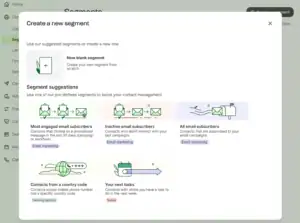
Adding someone to a list, moving them, or removing them is a quick, direct action, and you can bulk edit a group of contacts in a few clicks. I found it easy to keep my list clean, tag people by interest, and pull a fresh segment right before sending a campaign.
One small catch some reviewers mention, and I noticed it too, is that removing large batches of contacts at once isn’t always as smooth as it should be, so big cleanups can take a bit more patience.
In HubSpot, list management is tied to the full contact record, so a “list” isn’t just a group of email addresses, it’s a live view built from anything in that contact’s history: emails, form fills, deal stage, website visits, or support tickets.
This makes segmentation genuinely powerful. You can build a list like “contacts in the negotiation stage of a deal who haven’t opened an email in two weeks,” something Brevo simply doesn’t have the sales data to do. The tradeoff is that building these smarter lists takes more setup and a better understanding of how HubSpot’s properties and filters work, so it’s not as instantly simple as Brevo’s list view.
Winner: HubSpot, for how deep and smart your segments can get, since they’re built on full CRM data. Brevo wins for how fast and simple everyday list cleanup feels for a smaller, email-focused list.
Automation
Automation is about setting up a flow once, so it keeps working for you without you sending each email by hand.
In Brevo, building an automation means opening the workflow builder and dragging steps onto a visual flow. Say you want to send a welcome email, wait two days, then check if the person clicked a link, and send a different follow up depending on what they did.
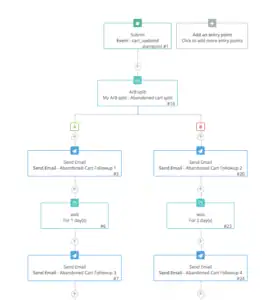
In Brevo, this kind of branching, the “if this happened, do A, if not, do B” logic, is available right from the entry level paid plan. You can also mix channels inside one flow, so step one might be an email, step two an SMS, and step three a WhatsApp message, all triggered by the same automation. In real use, I had a basic welcome series with a branch point running within an afternoon, without needing any outside help.
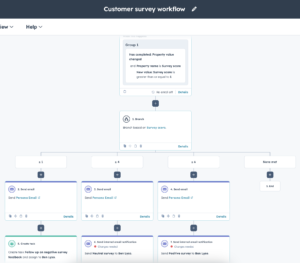
HubSpot’s automation builder looks just as good, maybe better, on the surface, with a clean flowchart view and a long list of possible triggers. But here is the part that most comparisons skip over, and it matters a lot in real use: on HubSpot’s cheapest paid Marketing Hub plan, a workflow is capped at a small number of steps, and there’s no real branching logic available.
That means the “if this, then that” flow I just described, which Brevo lets you build on a low cost plan, is simply not possible on HubSpot’s entry tier. To unlock real conditional branching, lead scoring, and deal-based triggers, you need to move up to a much higher, more expensive plan.
Once you’re there, HubSpot’s automation becomes genuinely powerful, because it can trigger off sales activity too, like a deal moving to a new stage, not just an email click, and it can hand a contact straight to a salesperson’s task list at the right moment.
Winner: Brevo, for real, usable automation at a low price. HubSpot only pulls ahead once you’re paying for its higher tiers, so budget for that if branching automation is a must-have for you.
Deliverability
A good looking email means nothing if it lands in spam, so this part deserves more than a one-line answer.
Both tools ask you to verify your sending domain using standard records like SPF and DKIM, which basically tell inbox providers that the email really came from you and wasn’t faked. I set both up the same way, and once verified, both tools delivered well to Gmail, Outlook, and Yahoo inboxes in my testing.
Where I noticed a difference was with newer accounts. Brevo gives you built in tools to check your sender score and warm up a new sending domain slowly, which matters if you’re just starting to build a sending history. A few outside reviews mention Brevo accounts on lower plans occasionally getting flagged or paused for review, especially if a lot of emails go out very fast on a brand new account, but this usually gets resolved within a day or two through support.
HubSpot’s deliverability is solid too, and because every email ties back to a full contact record, it’s easier to spot and avoid emailing contacts who’ve bounced before or gone completely inactive, which helps protect your sender reputation over time without you having to think about it.
Winner: Tie. In real use, the biggest factor for both tools isn’t the platform, it’s how clean your list is and how properly you set up your sending domain.
Integrations
Brevo connects to the tools small businesses already use day to day, like Shopify and WooCommerce for online stores, WordPress for website forms, and Zapier for almost everything else. It also has a well documented API, so a developer can wire up custom sends, like an order confirmation email, straight from your own app.
HubSpot has one of the largest integration libraries in the business software world, because so many other tools, from accounting software to support desks to ad platforms, are built to plug directly into its CRM. In real use, this means a sales team’s whole toolkit, calendars, proposal software, calling tools, and more, can often show up right inside a HubSpot contact record, instead of living in five separate tabs.
Winner: HubSpot, for the size and depth of its integration ecosystem, especially for sales and support tools.
CRM
This is HubSpot’s home turf, and it’s worth explaining why in real terms.
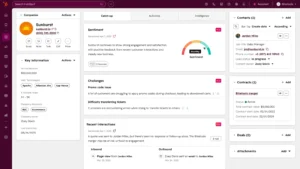
Open any contact in HubSpot and you’ll typically see their full history in one place: every email they’ve opened, every form they’ve filled out, every deal they’re part of, which stage that deal is in, and any support ticket they’ve raised. A salesperson can look at one screen and know exactly where things stand with that person. You can set reminders, log calls, and move a deal from one stage to the next with a simple drag, and the whole team sees the update right away.
Brevo’s CRM is lighter, and it’s honest about that. You get contacts, a simple deal pipeline, and basic task tracking, which is genuinely useful for a small team that just wants to remember who to follow up with and when. But it doesn’t have the same depth of deal stages, team-wide visibility, or built-in sales reporting that HubSpot offers. It’s built to support your marketing and light sales tracking, not to run a company’s entire sales process.
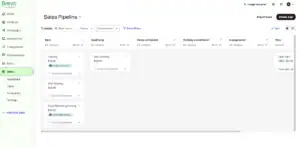
Winner: HubSpot, clearly, for anyone who needs a real, team-wide sales pipeline and not just a simple to-do list of deals.
Customer Support
Brevo’s support answers over chat and email. In my real tickets, replies usually came back within a few hours during business hours, though I did wait longer once on a lower plan for a more technical question.
HubSpot’s support quality tends to match your plan closely. On the free and lower tiers, you mostly rely on a large help center and an active community forum, which is genuinely well stocked with answers, but direct replies from a person can take a while. On higher paid plans, you get faster, more hands-on support, including options like phone support and a dedicated contact for bigger accounts.
Winner: Tie, since both tools give noticeably better, faster support the more you pay, and neither stands out clearly on the free or entry tiers.
Reports and Analytics
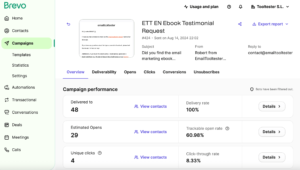
Brevo’s reports are simple and clear: opens, clicks, bounces, unsubscribes, and a heat map that shows exactly where inside the email people clicked. This is enough to answer the everyday question of “did this email work,” and you can see it at a glance without digging through menus.
HubSpot’s reporting goes a lot deeper, because it can connect an email campaign all the way to a closed deal. In real use, that means you can ask a bigger question, not just “did people click this email,” but “did this campaign actually bring in paying customers, and how much revenue did it lead to.” That kind of attribution reporting is something Brevo’s simpler reports aren’t built to answer, since Brevo doesn’t track a full sales pipeline behind the scenes.
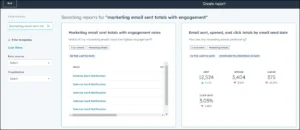
Winner: HubSpot, for going deeper, especially around tying marketing directly to revenue and sales outcomes.
Pricing
This is where the biggest gap between these two tools shows up, so let’s walk through the real numbers and what they mean for you.
Brevo charges by how many emails you send, not by how many contacts you store. The free plan gives a generous amount of sending, up to a few thousand emails a month, with no real limit on how many contacts you can keep in your account.
Paid plans start low, around nine to seventeen dollars a month, and the price only climbs as your actual sending volume grows. This means a business with a big list that only emails once or twice a month can stay on a cheap plan for a long time.
HubSpot charges differently, and it’s worth understanding both sides of it. The free plan looks generous on contact storage, letting you keep a huge number of contacts for free, but actual email sending is capped fairly low.
Once you move to a paid Marketing Hub plan, you pay for two things at once: a monthly fee per seat, and an extra charge for every batch of contacts you store, whether you email them often or rarely. The tier where HubSpot’s real automation and deep reporting live is significantly more expensive, and can include a required setup or onboarding fee on top of the monthly cost.
Here’s a simple way to think about what that means for your wallet. If you mostly want to send newsletters and simple follow ups to a decent sized list, Brevo will very likely cost you a small fraction of what HubSpot charges for the same basic job. If you need a full sales team working inside a shared CRM with deal tracking, and you’re planning to invest properly in that system, HubSpot’s higher cost is buying you a genuinely bigger, more connected tool, not just a bigger bill for no reason.
What Each Tool Is Actually Best At
Brevo’s specialty is being an affordable, easy home for sending email, SMS, WhatsApp, and chat messages, with just enough CRM to track a lead, without a big monthly bill. It’s built for someone who mostly needs to send well, often, and cheaply.
HubSpot’s specialty is being a true CRM at the center of your whole business, connecting marketing, sales, and support into one system with deep reporting. It’s built for a team that needs everyone, from marketing to sales to support, looking at the same live picture of every customer.
My Honest Take
If I’m being straight with you, Brevo felt like the right tool for someone who mostly needs to talk to their list well, without spending a lot or learning a big system. Sending, automating, and tracking simple leads all felt fast and natural.
HubSpot felt like the right tool for a business that has grown past “just sending emails” and now needs one system to run sales, marketing, and support together. It took longer to feel comfortable in, and it costs more once you’re serious about it, but the depth is real once you get there.
I wouldn’t call one tool better than the other in a flat sense. I’d call them built for two different stages of a business. Pick based on whether your biggest daily need is sending well, or running a full sales pipeline.
Before You Commit to Either Platform
Pick Brevo if you’re a small team or solo business that mainly needs email, SMS, and WhatsApp on a low budget. Pick Brevo if you want real branching automation without paying for an expensive plan. Pick Brevo if a simple pipeline is enough for your sales tracking, and you don’t need a team of salespeople working inside the same deal records.
Pick HubSpot if you have a sales team that needs a full CRM with deal stages and shared pipeline tracking. Pick HubSpot if you want marketing, sales, and support connected in one system, all looking at the same contact record. Pick HubSpot if you’re ready to invest in the higher plans where its automation and reporting really shine, and you’ve budgeted for the jump in cost.
FAQs
Is Brevo or HubSpot cheaper? Brevo is cheaper for most small businesses, since it charges by emails sent rather than by contacts stored plus seats. HubSpot’s cost climbs fast once you add contacts, seats, and move into higher tiers, and its most powerful plans can include a required setup fee.
Which one is easier for a beginner? Brevo. It’s built around a smaller set of tools, so the menu is simple and you can send a real campaign in your first sitting. HubSpot takes longer to feel natural, since it’s a much bigger, more connected system with more places to look.
Does HubSpot’s cheap plan really have weak automation? Yes, and it’s one of the most overlooked facts in this comparison. HubSpot’s entry paid plan caps how many steps a workflow can have and doesn’t support real “if this, then that” branching logic. You need a much higher, pricier plan to unlock that kind of smart automation.
Does Brevo have a real CRM? It has a light CRM with a simple sales pipeline and basic task tracking, which works well for a small team keeping track of leads. It’s not built to replace a full, team-wide sales CRM like HubSpot’s, with deep deal stages and sales reporting.
Which tool has better customer support? It’s close. Both tools give faster, more hands-on support as you move up their plans, and neither stands out clearly on the free tier, where you’ll mostly lean on help articles and community forums.
Which one should I pick if I only send newsletters and don’t have a sales team? In most cases, Brevo, since you’ll get real automation and messaging tools at a much lower cost, without paying for CRM depth and sales features you won’t actually use.
Which one should I pick if my business runs on a sales pipeline? In most cases, HubSpot, since its CRM, deal tracking, and reporting are built exactly for that kind of work, and the higher cost buys real, connected functionality across your whole team.
Can I use both tools together? Some small businesses do exactly that in the early stages, using HubSpot’s CRM as the central place for contacts and deals, while using Brevo for the actual email and SMS sending, since it’s cheaper for high volume messaging. It adds some setup work to keep both in sync, so it’s usually a step businesses take once they’ve outgrown a single simple tool, not a starting point.
