

Last Updated: 06 Jul 2026
I have tested both Flodesk vs Mailerlite on real email lists.
Not a demo. Not a five-minute feature tour. Real campaigns, real automation sequences, and real money going to one platform every month.
And here is what I want to say before we get into anything else: this is one of the most genuinely one-sided comparisons I have written.
Not because one tool is broken. Flodesk is not broken. It is actually beautiful — and if beautiful emails are the only thing you care about, it delivers on that promise better than almost any other platform at this price.
But Flodesk has made several decisions over the past year that have seriously hurt its value proposition. The flat-rate pricing that used to be its biggest selling point is gone. The automation is still stuck at a level that was considered basic two years ago. The integrations are thin. The reporting is shallow. And the account suspension stories showing up in recent reviews are a pattern that cannot be ignored.
MailerLite is not perfect either. But in 2026, the gap between these two tools is wider than most comparisons admit.
Let me break it all down honestly.
Table of Contents
ToggleShort on Time? Read This Flodesk vs Mailerlite Quick summary
MailerLite gives you more features, better automation, a free plan, and lower prices at almost every list size.
Flodesk gives you better-looking email templates and a simpler experience — at a price that used to be fixed but no longer is.
Quick Comparison
| If You Want… | Choose |
|---|---|
| A genuinely useful free plan | MailerLite |
| Full automation included without upgrading | MailerLite |
| A/B testing on subject lines and content | MailerLite |
| Unlimited landing pages on all paid plans | MailerLite |
| A website builder included | MailerLite |
| Selling digital products with no extra platform | MailerLite |
| Better reporting and analytics | MailerLite |
| The most visually stunning email templates | Flodesk |
| Custom font uploads for brand consistency | Flodesk |
| An Instagram feed embedded directly in emails | Flodesk |
| A simpler, faster onboarding experience | Flodesk |
The Big Warning About Flodesk That Most Posts Are Not Telling You
Flodesk removed its flat-rate pricing in December 2025.
For years, Flodesk’s biggest selling point was simple: $38 a month for unlimited subscribers, no matter how big your list grew. That model is gone for new customers. Flodesk now charges based on subscriber count — the same model as everyone else.
The Lite plan starts at $25 a month for 1,000 subscribers. The Everything plan (which includes digital product selling and checkout pages) starts at $54 a month for 1,000 subscribers.
If you are a new customer in 2026, the flat-rate advantage is gone. And without it, Flodesk is harder to justify against MailerLite at most list sizes.
My Final Take
For most people reading this clear winner is MailerLite.
For visual-first brands where design is genuinely core to the business identity – Flodesk, with the understanding that you are paying a premium specifically for the design experience and not much else.
What I Tested and How
I signed up for both platforms and used them on real lists.
I built campaigns, tested the editors, set up automation workflows, went through the reporting, and tested the onboarding experience from a fresh account. I also went through hundreds of verified reviews on G2, Capterra, and Software Advice — specifically looking at recent reviews from 2025 and 2026, because both platforms have changed significantly in the past twelve months.
Here is everything I found.
Ease of Use
Flodesk: The fastest and most enjoyable onboarding experience
The first thing you notice when you log into Flodesk is how clean it feels. The interface looks like Squarespace — minimal navigation, everything in its place, nothing demanding your attention. Multiple independent reviewers describe the onboarding as fantastic — webinars, tutorials, a help function that actually works, and a dashboard that makes sense on day one.
You can build your first email and have it ready to send in under 20 minutes. The editor is intuitive in a way that makes most other email builders feel clunky by comparison.
For a creative entrepreneur who finds the setup process of email marketing tools overwhelming — Flodesk removes that barrier more effectively than any other platform at this price.
The honest trade-off: Flodesk’s simplicity is partly because there is less to learn. The automation is basic. The segmentation has limited conditions. The reporting is thin. The experience is fast and enjoyable because the tool is intentionally limited in depth.
MailerLite: More setup upfront, more capability once you are in
MailerLite’s onboarding takes longer. Multiple reviewers mention being surprised by how many account settings need to be configured before you can build your first campaign. Email authentication, sender details, account verification — it is more involved than Flodesk.
Once you are through setup, the platform is well-organised and logical. The dashboard shows campaigns, subscribers, automation, forms, and sites in a clear layout. The editor is fast and the blocks work cleanly.
One honest complaint from multiple Software Advice reviewers: MailerLite has applied account restrictions and suspensions without clear warning in some cases, withholding prepaid funds without a transparent appeal process. This shows up in enough recent reviews to be worth flagging. It is not the majority experience — but it is a real pattern that deserves mention.
Winner: Flodesk for the initial experience and onboarding speed. MailerLite once you are past setup and want a platform with actual depth to grow into.
Email Builder
Flodesk: The most beautiful email editor in this price range

Flodesk’s drag-and-drop editor is genuinely in a different visual league from most email tools. The layouts are modern and polished. The design blocks look professional without requiring design experience. You can build an email that looks like it came from a premium brand in 15 to 20 minutes.
Custom font uploads are available — a feature multiple Capterra reviewers specifically call out as a favourite. Being able to use your actual brand fonts rather than a generic web-safe option is a meaningful design detail that most platforms do not offer.
The Instagram feed embed is one of Flodesk’s most distinctive features. You can pull your latest Instagram posts directly into your email — in the header, footer, or body. For photographers, designers, and visual brands where your Instagram is part of your identity, this is genuinely useful.
The honest limitations: the editor does not allow custom HTML code. There are no survey or carousel content blocks that MailerLite has. You cannot structurally alter the layouts — you can change the content within a block, but you cannot fundamentally reshape the structure of a template. Multiple Capterra reviewers describe wishing they could do more than simply adding an image as-is.
MailerLite: Not as beautiful, but more flexible and more functional
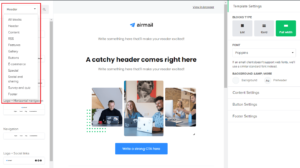
MailerLite’s editor is not as visually impressive as Flodesk’s out of the box. The templates are clean and modern, but they do not have the same premium aesthetic that Flodesk produces almost automatically.
What MailerLite’s editor has that Flodesk’s does not: survey blocks, image carousels, interactive content elements, custom HTML editing, and full structural flexibility. You can move any element anywhere, reshape layouts, and build genuinely custom designs if you have the patience for it.
The editor also tracks every change you make, so you can try things out and undo mistakes without losing work. That small detail saves real time during longer editing sessions.
Winner: Flodesk for visual quality and ease of creating beautiful emails. MailerLite for flexibility, interactive content blocks, and the ability to do more than a Flodesk template structure will allow.
Template Library
Flodesk: Fewer templates, all consistently stunning
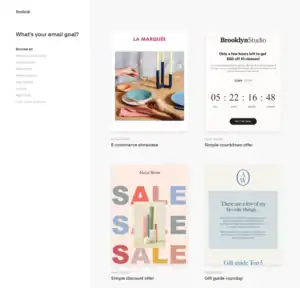
Flodesk’s template library is smaller in total number than MailerLite’s. But every template is built with the same design-first philosophy — they all look polished, modern, and consistent with the premium brand identity Flodesk cultivates.
You do not get a huge variety of layout styles or industry categories. What you get is a set of beautiful starting points that all work and all look good. For a brand that wants visual consistency across every email it sends — Flodesk’s library gives you that without requiring design skills.
The limitation: the templates are not structurally flexible. You can change the content, swap images, and adjust colours — but you cannot fundamentally reorganize the layout. If you want a template that looks different from what Flodesk provides, you are building from one of the existing structural options and working within its constraints.
MailerLite: 100+ templates across every campaign type
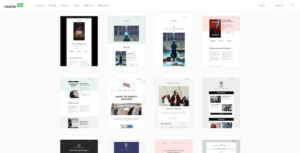
MailerLite gives you over 100 professionally designed email templates sorted by industry and use case. Newsletters, promotions, welcome emails, event announcements, product launches, holiday campaigns — there is a starting point for almost anything you need to send.
The templates are mobile-responsive and well-designed. Not as visually dramatic as Flodesk’s, but clean, modern, and versatile across a much wider range of campaign types.
You can filter by industry, which saves time when you need something specific. You can also save your own branded layouts as reusable templates, so your best designs are one click away the next time you sit down to write.
Free plan users do not get premium templates — only basic ones. That is a real limitation for anyone testing MailerLite before committing to a paid plan.
Winner: MailerLite for variety and range. Flodesk if visual impact is more important to you than having a large library to choose from.
Automation
This is the category where the gap between these two platforms is most honest — and most important to know before you commit.
MailerLite: Capable, included on every plan
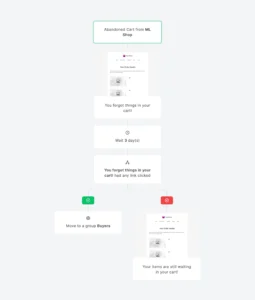
MailerLite’s automation builder is visual and straightforward. You set up triggers, conditions, and actions with a drag-and-drop interface that makes sense on the first session.
You can build welcome sequences, re-engagement campaigns, post-purchase follow-ups, abandoned cart flows, and conditional logic that branches based on what subscribers do. The trigger library covers a solid range — form submissions, link clicks, date-based triggers, ecommerce events, and more.
Full automation is included on the free plan. That is genuinely unusual. Most platforms gate multi-step automation behind paid tiers. MailerLite gives it to you from the start — though advanced triggers like ecommerce events require paid plans.
The honest limitation: MailerLite’s automation is capable for most small businesses but not deep enough for complex multi-branch logic or advanced ecommerce journeys. It is not ActiveCampaign. But for welcome sequences, nurture flows, and standard ecommerce triggers — it does the job cleanly.
Flodesk: Just relaunched its workflow system — still catching up
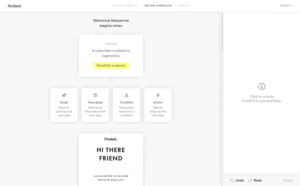
In January 2026, Flodesk relaunched its workflow system with multiple triggers for the first time. You can now trigger automations based on form submissions, segment joins, purchases, and abandoned carts. That is a meaningful improvement from the previous version, which only had one trigger type.
But here is the honest context: Flodesk is only now reaching a level of automation capability that other platforms have had for years. The workflow logic is still straightforward. There is no multi-branch IF-THEN logic. There is no contact scoring. There is no way to build complex sequences that react to multiple overlapping subscriber behaviours simultaneously.
A reviewer on Software Advice noted there is also no public API and the only automation option beyond Flodesk’s own workflows is Zapier — which adds cost on top of an already-premium platform price.
When you pause a workflow in Flodesk to make edits, multiple Capterra reviewers describe something going wrong with subscribers who are in the middle of the sequence at that moment. That is a real operational risk for anyone running active workflows with live subscribers.
For simple automations — a welcome email, a short nurture sequence, a post-purchase thank you — Flodesk now handles these. For anything more complex, it will hold you back.
Winner: MailerLite — by a clear margin and at a better price. Flodesk’s January 2026 relaunch was a step forward, but it is still behind where MailerLite has been for years.
Segmentation and List Management
MailerLite: Simple, clean, and works well
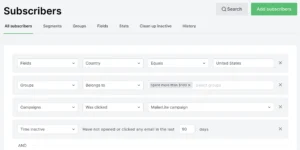
MailerLite uses a single master list with groups and segments to organize contacts. Groups are manual categories you create. Segments are dynamic filters that update automatically based on contact behaviour and data.
You can segment by signup source, location, email engagement, tags, custom fields, and more. The segments update automatically — you do not need to manually refresh anything. There is also an automation rule that moves subscribers from one group to another automatically, which is useful for moving someone from a prospect group to a customer group after a purchase.
For most small businesses and newsletter operators, this is more than enough.
Flodesk: One level of segmentation, intentionally kept simple

Flodesk’s list management is built around segments — but the segmentation options are limited. You can organize contacts into segments and send to or exclude specific segments. You can choose who receives an email and who does not.
What you cannot do: build complex multi-condition segments, filter by detailed behavioural data across multiple criteria, or create the kind of precise audience targeting that MailerLite’s group-and-segment combination allows.
A reviewer on the EmailTooltester comparison noted Flodesk allows one level of segmenting. That is accurate. For simple lists where you want to divide subscribers into a few clear groups, it works. For any business that needs more granular targeting — it is a real constraint.
Winner: MailerLite for flexibility and depth. Flodesk for simplicity if your list management needs are basic and you never need more than one level of sorting.
Forms and Landing Pages
MailerLite: Generous and well-connected
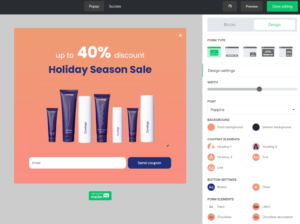
MailerLite gives you unlimited landing pages on every paid plan — including the $10 a month entry plan. You also get a full website builder included, which means you can build landing pages, a blog, and a basic business website inside MailerLite without paying for a separate tool.
The landing page builder recently got a full relaunch with better templates, drag-and-drop sections, and an AI-generated page option for when you want a fast starting point. The form builder covers embedded forms, pop-ups, and a link-based pop-up that can redirect visitors to any page instead of collecting a signup.
Everything connects directly to automation — a form submission immediately triggers whatever sequence you set up.
Flodesk: Checkout pages as a standout feature

Flodesk’s form builder is clean and easy to use. The checkout pages are genuinely useful — you can sell digital products and collect payments directly through Flodesk without connecting a separate tool. The checkout experience is visually polished, which matters for premium brands where the buying experience is part of the brand identity.
The limitation: landing pages in Flodesk are more basic than MailerLite’s. And checkout pages — one of Flodesk’s best features — are only available on the Everything plan at $54 a month, not the Lite plan at $25 a month. That is a meaningful feature gate that pushes the cost up for anyone who wants the full product.
Winner: MailerLite for landing page depth and the included website builder. Flodesk if polished checkout pages for digital products are central to your business and you are on the Everything plan.
Selling Digital Products
Both tools let you sell digital products directly without connecting a separate platform. But they work differently and cost differently.
MailerLite: Included on Growing Business and above
MailerLite’s digital product selling is available from the $10 a month Growing Business plan. You can sell ebooks, templates, files, and other digital downloads through a Stripe integration directly inside MailerLite. No transaction fees from MailerLite — you only pay Stripe’s standard processing rate.
The checkout experience is functional. It is not as visually polished as Flodesk’s, but it works and it is included at a significantly lower price point.
Flodesk: More beautiful, but locked behind the higher plan
Flodesk’s checkout and product selling features are genuinely well-designed. The buying experience looks premium and consistent with the Flodesk brand aesthetic. If visual design is central to your product presentation, Flodesk’s checkout pages look better than MailerLite’s.
The catch: digital product selling is only available on the Everything plan at $54 a month for 1,000 subscribers. On the Lite plan at $25 a month, you cannot sell products at all.
Flodesk also takes a transaction fee on sales made through its checkout — 0.5% plus standard payment processing. That is not enormous, but it is a cost on top of an already-premium plan price.
Winner: MailerLite for price accessibility. Flodesk wins on checkout design quality — but only if you are on the $54 a month plan and the visual experience of the buying process is worth the premium.
Integrations
MailerLite: 130+ integrations covering everyday tools
MailerLite connects to over 130 apps. Shopify, WooCommerce, WordPress, Stripe, Zapier, Make, Canva, and most tools small businesses and creators rely on daily are covered. The Shopify and WordPress plugins are native and easy to activate without technical knowledge.
For most small businesses, 130+ integrations covers everything they will ever need. The gaps show up when your tech stack includes less common or more specialised tools.
Flodesk: Very thin integration library — the most honest weakness
Flodesk’s integration options are genuinely limited. The native connections cover Shopify and Squarespace — two platforms that work well with Flodesk’s visual-first approach. Beyond those, Zapier is the primary route to connecting Flodesk to almost anything else.
Multiple Capterra reviewers call this out directly. One specifically described discovering there is no public API and that Zapier is the only automation option beyond Flodesk’s own workflows — describing Zapier as a very pricey addition to an already-premium platform.
For a business that uses a wider range of tools and expects its email platform to connect to them natively — Flodesk will disappoint. For a photographer or designer who is entirely in Shopify or Squarespace, the limitation is less painful.
Winner: MailerLite — clearly. 130+ native integrations vs a handful plus Zapier is a meaningful gap for anyone with any complexity in their tech stack.
Reporting and Analytics
MailerLite: Clear, practical, and covers what most businesses actually need
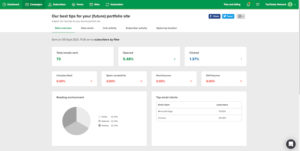
MailerLite gives you opens, clicks, unsubscribes, bounce rates, device breakdowns, and location-based open data. The dashboard is clean and the most important numbers are easy to find.
For Shopify and WooCommerce users, you get revenue attribution per campaign — which emails actually drove sales, not just clicks. The A/B testing tool lets you test subject lines, send times, and content, with the winning version automatically sent to the rest of your list.
The honest limitation: no email client breakdown (Gmail vs Apple Mail vs Outlook), no social reporting, and no deep attribution modeling. For most small businesses, what MailerLite gives you is more than enough. For data-driven teams who want to dig deeper — there are gaps.
Flodesk: Shallow reporting that has not kept up
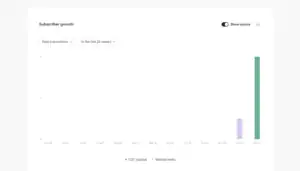
Flodesk’s reporting covers the basics — open rates, click rates, unsubscribes, and revenue from checkout sales. The dashboard is clean and easy to read at a glance.
What is missing is significant: no A/B testing on subject lines or content (Flodesk only added basic subject line A/B testing in June 2026), no automation performance reports, no detailed click maps, and no way to understand which parts of your emails are driving the most engagement beyond top-level metrics.
Multiple reviewers mention being unable to find out who the unsent emails were going to without manually going through contacts one by one. That is a real operational frustration for anyone managing a larger list.
For a creative entrepreneur who sends weekly newsletters and checks that people are opening them — Flodesk’s reporting is enough. For any business trying to optimize seriously — it falls short.
Winner: MailerLite — stronger reporting at every level, including A/B testing that Flodesk only very recently added in a limited form.
Pricing: The Full Honest Picture
This is where the most important story of 2026 lives for this comparison.
MailerLite Pricing
MailerLite has three main plans: Free, Growing Business, and Advanced.
The Mailerlite’s Free plan gives you up to 1,000 subscribers and 12,000 monthly email sends. Basic automation, landing pages, a website builder, and embedded forms are all included. MailerLite branding appears on your emails. For a creator or small business owner just starting out — this is a genuinely useful plan, not a demo.
The Growing Business plan starts at $10 a month for 500 subscribers. It removes MailerLite branding, adds unlimited email sends, multivariate testing, and the ability to sell digital products. This is the plan most small businesses actually run on.
The Advanced plan starts at $20 a month for 500 subscribers. It adds multiple automation triggers, Facebook audience syncing, a custom HTML editor, an AI writing assistant, and live chat support.
How costs scale on Growing Business:
- 500 subscribers: $10 a month
- 1,000 subscribers: $15 a month
- 2,500 subscribers: $25 a month
- 5,000 subscribers: $35 a month
- 10,000 subscribers: $65 a month
- 25,000 subscribers: $115 a month
- 50,000 subscribers: $139 a month
MailerLite only charges for active subscribers. Bounces and unsubscribes do not count toward your limit.
Flodesk Pricing — and the story of December 2025
This is the section that matters most for anyone who has been following Flodesk.
For years, Flodesk’s pricing was its biggest selling point: $38 a month for unlimited subscribers regardless of list size. It was genuinely revolutionary — a business with 100,000 subscribers paid the same as a business with 100 subscribers.
In December 2025, Flodesk removed this flat-rate model for new customers.
New subscribers now pay based on their list size — the same model as everyone else. The flat-rate advantage that made Flodesk compelling for growing lists is no longer available if you are signing up today.
The Lite plan starts at $25 a month for 1,000 subscribers. It includes email marketing, basic automation, forms, and the core email editor. Digital product selling and checkout pages are not included.
The Everything plan starts at $54 a month for 1,000 subscribers. This adds checkout pages, digital product selling, and the full feature set. This is the plan you need if you want to sell products through Flodesk.
How costs scale on the Lite plan:
- 1,000 subscribers: $25 a month
- 5,000 subscribers: $35 a month
- 10,000 subscribers: $55 a month
- 25,000 subscribers: $85 a month
- 50,000 subscribers: $145 a month
How costs scale on Everything:
- 1,000 subscribers: $54 a month
- 5,000 subscribers: $74 a month
- 10,000 subscribers: $94 a month
- 25,000 subscribers: $124 a month
- 50,000 subscribers: $184 a month
Side-by-Side Pricing at Common List Sizes:
| List Size | MailerLite Growing Business | Flodesk Lite | Flodesk Everything |
|---|---|---|---|
| 1,000 subscribers | $15 a month | $25 a month | $54 a month |
| 5,000 subscribers | $35 a month | $35 a month | $74 a month |
| 10,000 subscribers | $65 a month | $55 a month | $94 a month |
| 25,000 subscribers | $115 a month | $85 a month | $124 a month |
| 50,000 subscribers | $139 a month | $145 a month | $184 a month |
At small list sizes — under 5,000 subscribers — MailerLite is cheaper. Around 10,000 subscribers, Flodesk Lite becomes slightly cheaper. At 50,000 subscribers, the costs are essentially the same on the Lite plan — but MailerLite includes significantly more features for the same money.
The honest pricing reality: Flodesk used to be a genuinely better deal for large, fast-growing lists because of the flat-rate model. That advantage is gone for new customers. What remains is a tool that costs about the same as MailerLite at scale — but offers fewer features, weaker automation, thinner integrations, and shallower reporting.
The only honest reason to pay Flodesk’s price over MailerLite’s is if the design quality is genuinely worth it for your specific brand — and you have a list large enough that the per-subscriber pricing evens out.
Customer Support
MailerLite: 24/7 support on paid plans, with a caveat
MailerLite offers 24/7 email support on Growing Business and 24/7 live chat on Advanced. Response times are generally rated well across G2 and Capterra. Most common issues can be resolved quickly.
The honest caveat: MailerLite has a strict compliance team that has suspended accounts without clear warning in some recent cases, withholding prepaid funds without a transparent appeal process. This comes up in enough 2025 and 2026 reviews to warrant mentioning. The majority of users never encounter this — but for a small business where email is a key channel, knowing the risk exists matters.
Flodesk: Warm and responsive — until you need urgent help
Flodesk’s support is generally described warmly by users who have had positive experiences. Multiple Capterra reviewers mention talking to a real person who took time to understand their question, helped them through it, and even followed up afterward. That kind of human support experience is rare in email marketing tools at this price.
But there is a serious pattern in Trustpilot and Capterra reviews from 2025 and 2026 that cannot be ignored.
Multiple users describe having their accounts suspended without notice or warning. After suspension, Flodesk did not initiate refunds for the remaining days in a billing cycle. Multiple users describe sending emails to Flodesk’s entire support team — marketing, CEO, all departments — and receiving no response at all. One reviewer described trying to contact Flodesk through social media and getting no reply.
For a business running active campaigns where email is tied to revenue — an unannounced account suspension with no refund and no responsive support is a serious operational risk. This is not an isolated complaint. It is a documented pattern across multiple review platforms.
Winner: MailerLite overall on support reliability. Flodesk’s best-case support experience is warmer and more personal — but the worst-case scenarios documented in recent reviews are severe enough that they cannot be dismissed.
What Real Users Are Actually Saying
I went through hundreds of reviews across G2, Capterra, Software Advice, and Trustpilot — specifically looking at reviews from the past twelve months.
On Flodesk’s design quality:
The most consistent praise Flodesk receives is about how its emails look. Multiple Capterra reviewers describe spending hours comparing platforms and choosing Flodesk specifically for its ability to create beautiful, elegant emails. One reviewer said they genuinely enjoy doing their email marketing now in a way they never did before. The design experience is real and it resonates deeply with the brands Flodesk is built for.
On Flodesk’s flat-rate pricing removal:
Existing customers with grandfathered flat-rate plans are not affected — they can keep their pricing as long as they stay. But new customers are understandably frustrated that the flat-rate model — the thing that made Flodesk uniquely positioned in the market — is no longer available. This shows up in discussions across creator communities and in the tone of recent reviews from people who evaluated Flodesk specifically for its pricing structure.
On Flodesk’s account suspension pattern:
This deserves direct mention because it is documented clearly across multiple independent review platforms. The pattern is: account suspended without warning, no refund for unused paid time, no meaningful response to support requests. For a platform serving small creative businesses that depend on their email list — this is the kind of failure that damages trust in a serious way. It is not something that happens to most users. But it has happened to enough people to show up as a consistent complaint across platforms.
On MailerLite’s value:
The most consistent theme in positive MailerLite reviews is relief — people who switched from Mailchimp, Kit, or ActiveCampaign describe getting more for less money with less complexity. A Software Advice reviewer in December 2025 described it as great value for money, easy to use, clean interface, quick setup, reliable deliverability, and sensible pricing that does not push you into higher tiers too fast.
On MailerLite’s account restriction issues:
The compliance-related account restriction problem also shows up in recent MailerLite reviews. One Software Advice reviewer in January 2026 described MailerLite applying aggressive and opaque compliance actions, restricting accounts without real warning, and withholding prepaid funds with no transparent appeal or recovery path. This mirrors the Flodesk pattern closely enough that both platforms deserve the same honest caveat.
Who Should Choose MailerLite?
MailerLite is the right choice for almost everyone who is comparing these two tools based on actual value.
You get a free plan for up to 1,000 subscribers, full automation on all paid plans, unlimited landing pages, a website builder, A/B testing, solid reporting, and the ability to sell digital products — all starting at $10 a month. The features-to-price ratio is genuinely hard to argue with.
It is the best fit for bloggers, small business owners, newsletter operators, coaches, and anyone who wants a capable email platform without paying a premium for things they will rarely use.
Who Should Choose Flodesk?
Flodesk is the right choice for a very specific type of creator — someone whose brand is built around visual aesthetics, whose audience expects beautiful, design-forward emails, and who has a larger list where the pricing now works in their favour.
Photographers, interior designers, fashion brands, wedding professionals, and lifestyle creators are the people Flodesk serves best. If your emails need to look like they came from a premium brand and your competitors are sending plain MailChimp newsletters — Flodesk’s design tools will genuinely set you apart.
My Honest Take After Testing Both
Here is where I land after testing both tools properly.
MailerLite is the right choice for the vast majority of people comparing these two platforms. The automation is better. The integrations are better. The reporting is better. The landing pages are more capable. The free plan is genuinely useful. And the price is equal to or lower than Flodesk’s at most list sizes — without the flat-rate advantage that used to tilt the equation.
The account suspension issue is worth knowing about and worth taking seriously. Back up your subscriber list regularly. Understand MailerLite’s compliance requirements before you start sending. Do not treat your email list as something that only exists inside the platform.
Flodesk is the right choice for a very specific person — a visual-first creator or brand where the design quality of every email genuinely matters, who has a list large enough that Flodesk’s pricing now makes sense, and who does not need complex automation, deep integrations, or detailed analytics. Photographers, visual artists, premium lifestyle brands, and wedding professionals keep coming back to Flodesk because nothing else in this price range makes their emails look this good.
But after December 2025, Flodesk’s biggest competitive advantage is no longer price. It is design. And if design alone is worth the premium to you — that is a completely valid reason to choose it. Just go in knowing exactly what you are and are not getting for the money.
Frequently Asked Questions
Is MailerLite better than Flodesk?
For most businesses — yes. MailerLite offers more features, better automation, stronger integrations, a free plan, and pricing that is equal to or lower than Flodesk at most list sizes after Flodesk removed its flat-rate model in December 2025. Flodesk is better if visual email design is the most important factor and you do not need advanced automation or integrations.
Did Flodesk remove its flat-rate pricing?
Yes. In December 2025, Flodesk discontinued its flat-rate pricing model for new customers. New users now pay based on subscriber count, similar to most other email platforms. Existing customers who signed up under the flat-rate model are grandfathered on their pricing as long as they stay.
What is Flodesk’s new pricing?
The Lite plan starts at $25 a month for 1,000 subscribers. The Everything plan — which includes checkout pages and digital product selling — starts at $54 a month for 1,000 subscribers.
Does MailerLite have a free plan?
Yes. MailerLite’s free plan supports up to 1,000 subscribers and 12,000 monthly email sends. It includes basic automation, landing pages, a website builder, and embedded forms. Flodesk only offers a 30-day free trial with no permanent free option.
Can Flodesk sell digital products?
Yes — but only on the Everything plan at $54 a month and above. The Lite plan at $25 a month does not include checkout pages or digital product selling. MailerLite includes digital product selling from the Growing Business plan at $10 a month.
Does Flodesk have good automation?
Flodesk relaunched its workflow system in January 2026 with multiple triggers including form submissions, segment joins, purchases, and abandoned carts. For simple automations — welcome sequences and basic nurture flows — it now handles the essentials. For complex multi-branch logic, contact scoring, or advanced conditional sequences — it is still significantly behind MailerLite.
Which has better email design — MailerLite or Flodesk?
Flodesk — clearly. The template quality, design consistency, custom font uploads, and Instagram feed embedding make Flodesk produce visually superior emails for brand-forward creators. MailerLite’s editor is more flexible and functional, but the design output is not at the same visual level as Flodesk’s.
Is Flodesk safe to use for my business?
The account suspension pattern documented across Capterra and Trustpilot reviews from 2025 and 2026 is worth knowing about. Multiple users describe accounts being suspended without warning, with no refund and no meaningful response from support. This does not happen to most users — but it has happened to enough people to be a documented risk. If Flodesk is your primary email platform, export and back up your subscriber list regularly as a precaution.
