

Last Updated: 04 Jun 2026
Let me start with the number that every ActiveCampaign marketing page hides.
The Starter plan is advertised at $15/month.
What they don’t tell you on that same page: the Starter plan caps your automations at 5 actions per automation. Not 5 automations. 5 actions inside a single workflow. That means a basic welcome email → 3-day wait → follow-up email → tag subscriber sequence is already brushing against your limit. Any real automation — behavioral branches, conditional logic, multi-step nurture sequences — requires the Plus plan.
Plus starts at $49/month for 1,000 contacts. At 5,000 contacts it’s $179/month. At 10,000 contacts it’s $239/month.
And since November 2025, ActiveCampaign now charges for inactive contacts — people who have stopped engaging with your emails but are still sitting in your account. Your bill goes up as your list ages, even if you’re not adding a single new subscriber.
“I am using AC to send automated sequences to my leads, but I am not using the campaign features, and I am considering switching to another tool if I can’t delete my inactive leads — else the costs will constantly increase.” — Capterra
Now here’s what MailerLite does.
MailerLite Advanced at $20/month for 500 contacts gives you full automation — unlimited steps, conditional branches, multi-trigger workflows, behavioral triggers, e-commerce integrations, and A/B testing. At 10,000 contacts, MailerLite Advanced costs $109/month versus ActiveCampaign Plus at $239/month. For the same list size, ActiveCampaign charges more than double — and MailerLite includes features like the website builder, digital product sales, and bookings that ActiveCampaign doesn’t offer natively.
That gap is the center of this comparison. And it doesn’t mean MailerLite always wins. Because ActiveCampaign’s automation depth — the Customer Journeys logic, the 900+ integration CRM, the predictive sending — is genuinely in a different class for complex sales and marketing operations.
The question is whether you actually need that class. Or whether you’re paying enterprise-level prices for capabilities you’ll use 30% of.
I’ve used both platforms. Real campaigns. Real automations. Real deliverability data. And I’ve read through hundreds of G2, Capterra, Trustpilot, and Reddit reviews to understand what happens after the first 90 days.
Here’s everything — honest, specific, no hedging.
Let’s go 👇
We Keep Things Simple — We Only Review Tools We Actually Use
At Mailotrix, I sign up for every tool I write about. I build real campaigns, set up real automations, test deliverability, and push every feature until I understand what it actually does — not what the marketing page says it does.
Then I read hundreds of real user reviews — G2, Capterra, Trustpilot, Reddit. The specific complaints. The repeated praise. The patterns that tell you what a platform is really like after six months of actual use.
This guide is that work. Every number is verified. Every recommendation is earned.
Short on Time? Here’s the Quick Verdict
MailerLite is the better choice for small businesses, bloggers, solopreneurs, creators, and any business that needs professional email marketing at a fair price. Better editor. Better deliverability. More generous free plan. Full automation at a fraction of ActiveCampaign’s cost. Built-in digital product sales. A website builder. And a support team that actually responds quickly on paid plans.
ActiveCampaign is the better choice for businesses that need enterprise-grade automation depth, a native CRM with deal pipeline management, predictive sending AI, and the ability to run complex multi-step sales and marketing operations from a single platform. If your marketing involves a sales team, lead scoring across dozens of touchpoints, and 20-step conditional automation flows — ActiveCampaign is designed for exactly that.
The honest framing: ActiveCampaign is powerful and expensive. MailerLite is capable and affordable. The right choice depends entirely on whether you need the power.
| Feature | MailerLite | ActiveCampaign | Winner |
|---|---|---|---|
| Email Editor | Single clean editor — consistent and reliable | Capable but buggy — formatting glitches documented | MailerLite |
| Design and Templates | 90+ templates — clean and modern | 250+ templates — broader but dated UI | MailerLite |
| Automation | Full on Advanced — multi-trigger, conditional logic | Best in mid-market — 200+ step workflows on Plus+ | ActiveCampaign |
| CRM and Sales Pipeline | None — email only | Native CRM with deal pipeline — strong | ActiveCampaign |
| Segmentation | Groups and dynamic segments — solid | Advanced behavioral + predictive + lead scoring | ActiveCampaign |
| Forms and Landing Pages | Unlimited pages, A/B testing, quiz blocks | Forms and landing pages on Plus+ only | MailerLite |
| Deliverability | 91.7% — strong and consistent | 89.6% — good but below MailerLite | MailerLite |
| Reporting and Analytics | Heatmaps on free, A/B reports, device data | Deep — revenue attribution, custom reports on Pro | ActiveCampaign |
| Customer Support | 24/7 chat on paid — 2 min avg response | Inconsistent — better on higher tiers | MailerLite |
| Integrations | 150+ native integrations | 900+ native integrations | ActiveCampaign |
| Pricing (10K contacts) | Advanced: ~$109/month | Plus: ~$239/month | MailerLite |
| Free Plan | 500 contacts, automation, 12K emails/month | 14-day trial only — no free plan | MailerLite |
Final Score: MailerLite 7 — ActiveCampaign 5
Email Editor: Which One Is Actually Easier to Build In?
MailerLite’s Editor
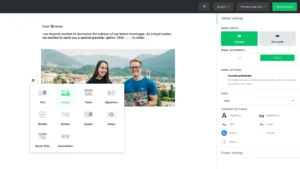
MailerLite has one unified drag-and-drop editor. One editor for every campaign, every template, every plan. No version compatibility issues. No risk of stranded templates. Every block you save stays accessible every time you open a new campaign.
EmailTooltester has awarded MailerLite “Best Ease of Use” every year from 2023 through 2026. That award is earned. The editor is genuinely smooth — blocks drop exactly where you place them, padding adjustments work logically, mobile preview updates in real time. The section layouts make professional email structure fast without starting from scratch.
What MailerLite’s editor includes that ActiveCampaign’s doesn’t:
- Countdown timers — useful for launch campaigns and flash offers
- Quiz and survey blocks embedded directly inside emails
- Custom HTML editor on Advanced plan for fully coded layouts
- AI writing assistant for subject lines and body copy on Advanced
The known limitation: mobile editing is awkward. The overlay system when editing on a small screen covers content and makes precise adjustments difficult. For desktop-first users — irrelevant. For anyone building campaigns on a phone — a real frustration.
“MailerLite is like the Swiss Army knife of email marketing — but way less intimidating.” (Capterra)
“The drag-and-drop editor is straightforward and lets me create complex customer journeys easily.” (G2)
“The editor is very challenging to work with on mobile. The overlays make editing really difficult.” (Capterra)
ActiveCampaign’s Editor
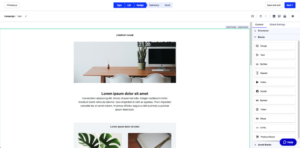
ActiveCampaign’s email editor is capable but has a well-documented problem: bugs. Multiple users across G2, Capterra, and Trustpilot describe formatting glitches — odd font shifts mid-email, color changes that appear after saving, spacing issues that appear when the email renders in certain email clients, and an editor that does not allow mobile emails to be formatted separately from desktop.
“Formatting is frequently glitchy and my emails will contain odd font shifts, color changes, and spacing issues.” (Kimberly B., Trustpilot)
“The email editor does not allow mobile emails to be formatted separately.” (Geoffrey Nixon, Trustpilot)
“All their tutorial videos and guides are completely outdated compared to the current interface.” (Michael Mangan, Trustpilot)
ActiveCampaign does have dynamic content — personalized content blocks that display different material to different segments within the same email. And the template library is broader than MailerLite’s at 250+ options. But the editor’s documented reliability problems and the mobile formatting limitation are real operational issues for everyday campaign building.
My Verdict
MailerLite wins. One reliable editor versus documented formatting bugs and a mobile layout limitation is a clear operational advantage. For daily campaign building — the tool you use every week without frustration is worth more than the tool with more templates that glitches inconsistently.
Winner: MailerLite (MailerLite 1 — ActiveCampaign 0)
Design and Templates: Who Makes Better-Looking Emails?
MailerLite’s Templates
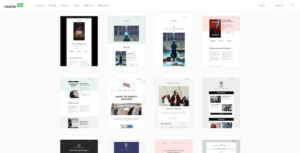
MailerLite gives you 90+ email templates on paid plans — newsletters, promotions, onboarding sequences, re-engagement campaigns, events, and seasonal sends. They’re clean, modern, and mobile-responsive. Not the largest library, but consistently professional and well-organized by category.
The free plan includes zero templates — you start from a blank canvas at the free tier. Every paid plan unlocks the full library.
ActiveCampaign’s Templates
ActiveCampaign gives you 250+ email templates — more volume than MailerLite. They cover a broad range of business email types including sales-focused templates that reflect ActiveCampaign’s CRM-oriented positioning.
The honest limitation: the template design sensibility hasn’t fully modernized. Multiple users describe the templates as functional but dated compared to what newer platforms offer. For businesses where email design is a significant brand investment — the template library’s visual quality may require heavy customization.
“ActiveCampaign’s template design feels a bit dated compared to more modern email platforms.” (G2)
“The templates are numerous but the design quality varies significantly.” (Capterra)
My Verdict
MailerLite wins on design quality and consistency. ActiveCampaign wins on volume. For businesses that care more about modern, polished email design than the breadth of starting points — MailerLite’s curated 90+ library produces better average output. For businesses that need a template for every imaginable occasion — ActiveCampaign’s 250+ covers more ground.
Winner: MailerLite (MailerLite 2 — ActiveCampaign 0)
Email Automation: The Category That Defines This Entire Comparison
This is the most important category in this comparison. And the most nuanced. Because the right answer genuinely depends on what you’re trying to build.
MailerLite’s Automation
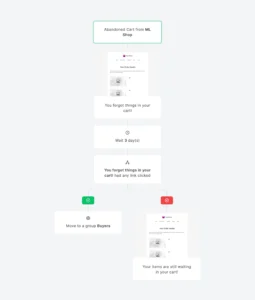
MailerLite’s automation builder is visual, clean, and capable — available from the first paid plan. What you get and at which plan matters enormously.
Growing Business ($10/month) gives you:
- Full visual automation canvas with drag-and-drop workflow building
- Multi-step sequences with unlimited time delays
- If/else conditional branches based on subscriber behavior
- Tag-based automation triggers and actions
- E-commerce triggers from Shopify and WooCommerce purchases
- Re-engagement automations for inactive subscribers
- Welcome sequences, birthday flows, and lead magnet delivery
Advanced ($20/month) adds:
- Multiple triggers per workflow — start the same automation from multiple entry points simultaneously
- Pre-built automation templates — done-for-you workflow starting points
- Facebook Custom Audiences sync
- AI writing assistant inside automation emails
MailerLite’s automation covers the standard small-to-medium business use cases comprehensively. Welcome sequences, lead nurture flows, post-purchase sequences, re-engagement campaigns, behavioral follow-ups based on email engagement — all of this is available and reliable at $10–$20/month.
The ceiling: MailerLite’s automation doesn’t include the kind of CRM-driven conditional logic, predictive sending optimization, and lead scoring that ActiveCampaign builds its entire identity around. If your automation involves sales pipeline stages, contact scoring across 20+ touchpoints, and multi-branch sequences that adjust based on deal status — MailerLite will hit a wall.
“The visual builder in MailerLite stands out because it lets me create complex customer journeys easily with drag-and-drop triggers.” (G2)
“MailerLite’s automation is simple enough for beginners but powerful enough for intermediate marketers.” (Capterra)
ActiveCampaign’s Automation
ActiveCampaign’s automation is the best in the mid-market. That’s not marketing language — it’s the consistent conclusion of every independent review that evaluates it fairly.
What Plus and above gives you:
- 200+ step workflows — sequences with the depth to handle the most complex multi-touch marketing operations
- If/else conditional logic with unlimited branching — every node in the flow can split based on any combination of contact data, behavior, or CRM stage
- Predictive sending — machine learning identifies the optimal send time for each individual contact based on their historical open patterns
- Lead and contact scoring — assign and adjust scores based on every action a contact takes across email, website, CRM, and purchase history. Scores can trigger automations automatically when thresholds are reached
- Site and event tracking — trigger automations based on specific page visits, button clicks, or custom events from your website or app
- SMS and direct mail automation alongside email in the same workflow
- Sales automation — create tasks for sales reps, update deal stages, send internal notifications, and move contacts through your CRM pipeline automatically based on email behavior
- 900+ integration triggers that can start or branch automations from external tools
The Starter plan’s 5-action cap is the most important limitation to understand. Five actions per automation makes Starter essentially useless for any real marketing sequence. This is not a technical limitation — it’s a deliberate commercial decision to force upgrades. Plus at $49/month for 1,000 contacts (or $179/month for 5,000 contacts) is the minimum viable plan for ActiveCampaign’s real automation depth.
“ActiveCampaign’s automation builder is best-in-class for mid-market businesses. The conditional logic depth and lead scoring integration are capabilities that most competitors don’t match.” (SendPulse research)
“My automated workflows make it simple to establish six-month follow-up sequences that will nurture clients through a waiting period for government approval.” (Capterra)
“The sheer number of features can be overwhelming for new users. The learning curve is real.” (ColdIQ research)
My Verdict
ActiveCampaign wins on automation depth — significantly and without qualification. The 200-step conditional workflows, predictive sending, lead scoring, site tracking, and CRM-integrated automation sequences are capabilities that MailerLite doesn’t approach. But the critical context: ActiveCampaign’s real automation requires Plus at $49–$239/month depending on list size. MailerLite’s full automation is available at $10–$109/month for the same list sizes. The depth advantage has a substantial price tag attached.
Winner: ActiveCampaign (MailerLite 2 — ActiveCampaign 1)
CRM and Sales Pipeline: The Feature MailerLite Doesn’t Have
This category exists because it’s where ActiveCampaign genuinely differentiates — and where any honest comparison must acknowledge the gap clearly.
ActiveCampaign’s CRM
ActiveCampaign includes a native CRM with deal pipeline management. What this means in practice:
- Visual sales pipeline with drag-and-drop deal stage management
- Contact records that store the full history of every email interaction, website visit, purchase, and sales conversation
- Deal creation and management — track active sales opportunities from first contact to closed
- Task management — create and assign follow-up tasks to sales reps automatically based on email engagement
- Win probability scoring — ML-powered prediction of deal close likelihood based on contact behavior
- Direct messaging from the CRM to contact email without leaving the platform
- Notes and appointment logging for each contact and deal
For businesses running a combined sales and marketing operation — where email marketing feeds leads into an active sales process — ActiveCampaign’s unified platform eliminates the need for a separate CRM tool like HubSpot, Pipedrive, or Salesforce for early-stage use cases.
Note: ActiveCampaign’s CRM is strong for small-to-medium sales teams. It is not a HubSpot Professional replacement. Users consistently describe it as sufficient for simple pipeline management but limited for complex enterprise sales operations.
“Basic CRM features — enough for small teams, but not a HubSpot replacement.” (Encharge research)
“ActiveCampaign allows me to easily manage communication campaigns with my audience.” (Capterra)
MailerLite’s CRM
MailerLite does not have a CRM. No deal pipeline. No sales stage management. No win probability scoring. Contact records in MailerLite store email engagement history and custom fields — not sales activity.
For businesses that need email marketing only — this is fine. Email and sales are separate operations with separate tools.
For businesses that want email marketing and sales pipeline management unified — MailerLite requires a separate CRM tool (HubSpot free, Pipedrive, or similar) connected via Zapier or native integration.
My Verdict
ActiveCampaign wins — by default and with a clear use case boundary. If you have a sales team that needs deal pipeline management connected to your email marketing — ActiveCampaign’s native CRM is the right tool and MailerLite cannot replicate it. If you don’t have a sales team or sales pipeline — this category is irrelevant to your decision and should not influence you toward ActiveCampaign’s significantly higher price.
Winner: ActiveCampaign (MailerLite 2 — ActiveCampaign 2)
Segmentation and List Management: Who Handles Your Audience Better?
MailerLite’s Segmentation
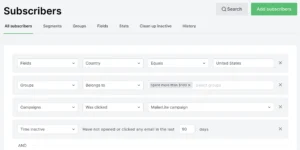
MailerLite uses groups and dynamic segments. Groups are static containers — you assign subscribers based on form source, list origin, or manual selection. Segments are dynamic filters built from conditions — email engagement, custom field data, group membership, geographic location, and date-based triggers.
What you get:
- Group-based organization for clean audience separation
- Dynamic segments from multiple conditions with AND logic
- Click-based segmentation — automatically move subscribers based on link clicks
- Custom fields for any subscriber data you want to track
- Purchase-based segments for Shopify and WooCommerce
The limitation: MailerLite’s segmentation is engagement-based and static field-based. It doesn’t include behavioral scoring, predictive CLV, churn risk modeling, or the compound AND/OR logic across dozens of dimensions that ActiveCampaign offers.
ActiveCampaign’s Segmentation
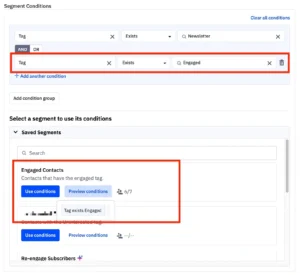
ActiveCampaign’s segmentation is one of its most powerful features — and it’s tied directly to the lead scoring and CRM data that make the platform’s automation depth meaningful.
What Plus and above gives you:
- Contact and lead scoring — assign points for every email open, link click, page visit, form submission, and purchase. Contacts move through scoring tiers automatically
- Predictive sending segments — ML identifies which contacts are most likely to engage with a specific type of message at a specific time
- Behavioral segments from site tracking — segment based on specific pages visited, time on page, and custom events
- CRM data segments — deal stage, win probability, assigned rep, contact notes
- AND/OR logic with unlimited conditions — build highly specific segments from any combination of engagement, demographic, behavioral, and CRM data
- Automation-driven segmentation — contacts automatically move between segments based on actions they take inside automated flows
“ActiveCampaign’s segmentation is incredibly powerful. The lead scoring system alone has changed how we prioritize our sales conversations.” (G2)
“The segmentation capabilities combined with the CRM make ActiveCampaign feel like a completely different class of tool from basic email platforms.” (Capterra)
My Verdict
ActiveCampaign wins — and it wins because the segmentation is connected to the CRM and lead scoring in a way that MailerLite’s system cannot replicate. For email-focused small businesses — MailerLite’s segmentation covers standard needs competently. For sales-and-marketing integrated operations — ActiveCampaign’s segmentation depth is a genuine competitive advantage.
Winner: ActiveCampaign (MailerLite 2 — ActiveCampaign 3)
Forms and Landing Pages: Who Grows Your List Faster?
MailerLite’s Forms and Landing Pages
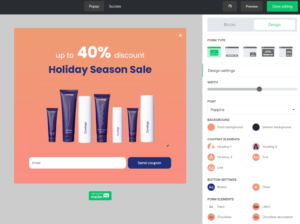
MailerLite’s form and landing page builder is one of its strongest features — and available from the free plan.
What you get:
- Unlimited landing pages on all paid plans
- Pop-up forms with exit intent, scroll trigger, and timing options on Advanced
- A/B testing for landing pages — compare two versions to find what converts better
- Stripe integration for selling products directly from landing pages
- Quiz and survey blocks inside forms — collect more than just email addresses
- Custom domain support on Advanced — run landing pages on your own domain
- Bookings — accept appointment scheduling directly through MailerLite pages (April 2026)
- Auto-resend campaigns to non-openers — a built-in list growth tool that most platforms charge extra for
The auto-resend feature specifically deserves mention. MailerLite automatically resends campaigns to subscribers who didn’t open the first time with a different subject line. Independent research shows 20–30% of non-openers open the resend. At 10,000 subscribers with a 35% initial open rate — that’s potentially 1,625 additional opens from one checkbox. It’s included on all paid plans. ActiveCampaign requires manual setup of an equivalent automation.
ActiveCampaign’s Forms and Landing Pages

ActiveCampaign includes forms and landing pages — but with meaningful plan restrictions. Landing pages are available on Plus and above. Pop-up forms require additional configuration. The landing page builder is less visually flexible than MailerLite’s and doesn’t include the quiz blocks, Stripe direct integration, or bookings feature that MailerLite offers natively.
“MailerLite’s landing pages and form features are more comprehensive at lower price points than what ActiveCampaign offers on comparable plans.” (SendPulse research)
My Verdict
MailerLite wins. Unlimited landing pages from lower plan tiers, A/B testing, quiz blocks, Stripe integration, bookings, and auto-resend included as a standard feature — versus ActiveCampaign’s landing pages locked behind Plus and a less feature-rich builder at comparable price points.
Winner: MailerLite (MailerLite 3 — ActiveCampaign 3)
Deliverability: Will Your Emails Actually Reach the Inbox?
MailerLite’s Deliverability
MailerLite’s inbox placement: approximately 91.7% in independent testing — down from 98% in 2022 but still meaningfully strong.
The strict account approval process — the same one that causes account termination frustrations — produces a genuine deliverability benefit: MailerLite’s shared IP pools are cleaner than most competitors because fewer low-quality senders get through onboarding. The platform also automatically suppresses hard bounces, unsubscribes, and spam complaints — keeping list quality high and protecting sender reputation across all accounts on shared IPs.
“Based on multiple tests from 2017 to 2023, MailerLite has consistently kept delivery rates high.” (EmailTooltester)
ActiveCampaign’s Deliverability
ActiveCampaign’s inbox placement: approximately 89.6% in independent testing — slightly below MailerLite’s 91.7%.
The documented deliverability problem beyond raw inbox placement: performance issues. Multiple Capterra and Trustpilot reviews from 2025 describe increased downtime, platform slowdowns that delay campaign sends, and support that doesn’t resolve the underlying infrastructure issues.
“Decent product with awesome user interface that’s unfortunately overshadowed by performance issues, increased downtime and a very poor customer support team.” (Capterra, September 2025)
“Old leads cost money — pricing doesn’t forgive stale or inactive contacts.” (Encharge research)
The November 2025 inactive contact billing change compounds the deliverability issue. When platforms charge for inactive contacts, users are incentivized to keep unengaged subscribers on their list rather than removing them — which hurts their own sender reputation over time and contributes to shared IP reputation decline across the platform.
The Math at 10,000 Subscribers
MailerLite at 91.7% → approximately 830 emails miss the inbox per campaign. ActiveCampaign at 89.6% → approximately 1,040 emails miss the inbox per campaign.
At 52 campaigns per year — MailerLite puts approximately 10,920 additional emails in real inboxes annually versus ActiveCampaign. Not catastrophic. But consistent and measurable.
My Verdict
MailerLite wins — by approximately 2 percentage points in independent testing. Neither platform has a deliverability crisis. But MailerLite’s stricter sender standards and cleaner shared IP pools give it a consistent edge that compounds across annual sending volume.
Winner: MailerLite (MailerLite 4 — ActiveCampaign 3)
Reporting and Analytics: Who Gives You Better Data?
MailerLite’s Reporting
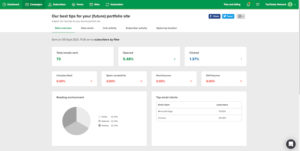
After every campaign, MailerLite gives you:
- Open rate, click rate, bounce rate, unsubscribe rate
- Click heatmaps — visual overlay showing which links got clicked and how often. Included on the free plan
- Device breakdown — mobile vs desktop vs tablet
- Geographic data — where subscribers are opening from
- Email client statistics — which apps your subscribers use
- A/B test results with clear performance comparison
- Automation step performance — conversion at each workflow stage
- E-commerce revenue tracking for Shopify and WooCommerce
- Auto-resend campaign results alongside the original send
The click heatmaps on the free plan deserve repeated emphasis. Seeing that 71% of your email’s clicks went to the second link — not the first, not the CTA button — changes your email architecture decisions immediately. MailerLite gives you this at $0/month. ActiveCampaign requires higher plan tiers for equivalent insight.
ActiveCampaign’s Reporting
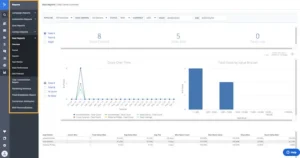
ActiveCampaign’s reporting depth is meaningful — especially on Pro and above.
What you get:
- Standard email metrics across all plans
- Custom reports on Pro — build any report across any combination of contact, email, automation, and CRM data
- Revenue attribution connected to CRM deal stages
- Automation performance — which steps are converting and where contacts drop off
- Contact-level engagement history — every interaction a specific contact has had across email, automation, web tracking, and CRM
The A/B testing limitation is worth noting: ActiveCampaign only tests subject lines. No full-flow testing. No multivariate testing. For businesses where creative testing is a core discipline — this is a meaningful gap compared to what Mailchimp Standard and even MailerLite offer on comparable plans.
“Weak A/B testing — only tests subject lines, no full-flow or multivariate testing.” (Encharge research)
My Verdict
MailerLite wins for email-focused analytics — click heatmaps at the free tier, device data, and A/B testing that goes deeper than ActiveCampaign’s subject-line-only approach. ActiveCampaign wins for sales-integrated reporting — custom reports that pull from CRM deal stages and full contact engagement history are valuable for sales-and-marketing operations that MailerLite doesn’t support. For pure email analytics — MailerLite gives you more meaningful data per dollar.
Winner: MailerLite (MailerLite 5 — ActiveCampaign 3)
Customer Support: Who Actually Helps When Things Break?
MailerLite’s Support
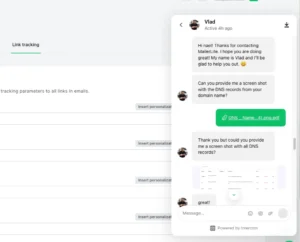
Free plan users: email support for 30 days only. After that — knowledge base only.
Growing Business and Advanced paid plans: 24/7 email and live chat support with an average 2-minute response time on live chat. Generally knowledgeable and consistent. Most users describe resolving standard issues within one business day.
The knowledge base is well-structured — detailed guides, video tutorials, step-by-step walkthroughs. Most standard questions are answerable without contacting support.
The failure mode: account terminations. When MailerLite flags or suspends an account — which happens more than most reviews acknowledge — the support experience is described as slow, boilerplate, and with limited paths to reinstatement.
“MailerLite’s customer support is fast, knowledgeable, and patient on standard issues.” (Capterra)
“Friendly and helpful customer support — consistently helpful regardless of business size.” (G2)
ActiveCampaign’s Support
ActiveCampaign’s support is one of its most consistently documented weaknesses — and it has gotten worse as the platform has grown.
The pattern in 2025–2026 reviews:
- Response times are slow on standard tickets, especially for technical issues
- Phone support is available but requires navigation to reach
- Agents sometimes lack knowledge of specific features or edge cases
- Downtime incidents since mid-2025 have been handled poorly — limited communication, slow resolution, and support that deflects rather than resolves
“Decent product with awesome user interface that’s unfortunately overshadowed by performance issues, increased downtime and a very poor customer support team.” (Capterra, September 2025)
“All their tutorial videos and guides are completely outdated compared to the current interface.” (Michael Mangan, Trustpilot)
The irony: ActiveCampaign’s onboarding and knowledge base are genuinely strong — good video tutorials, detailed documentation, and an active community forum. But when something breaks during a live campaign — the real-time support experience falls short of what the price suggests.
My Verdict
MailerLite wins. 24/7 live chat at 2-minute response times on paid plans versus ActiveCampaign’s documented downtime issues, slow ticket resolution, and support quality complaints that appear across multiple review platforms in 2025–2026. For a business that depends on email marketing running reliably every day — MailerLite’s operational support is meaningfully better.
Winner: MailerLite (MailerLite 6 — ActiveCampaign 3)
Integrations: Do They Connect With Your Tools?
MailerLite’s Integrations
MailerLite connects natively with 150+ platforms. Core connections: Shopify, WooCommerce, WordPress, Stripe, Squarespace, Wix, Webflow, Canva, Google Analytics, Facebook Custom Audiences (Advanced), and Zapier for extended connectivity.
For most small business and creator tech stacks — 150+ native integrations covers the tools you actually use. The gaps appear for niche industry tools, enterprise CRMs, and the kind of complex multi-tool marketing operations that ActiveCampaign was specifically built for.
ActiveCampaign’s Integrations
ActiveCampaign connects with 900+ integrations — the broadest library in this comparison by a significant margin.
Highlights beyond MailerLite’s coverage:
- Salesforce, HubSpot, Pipedrive — deeper CRM integrations
- Facebook Lead Ads, Google Ads — paid acquisition platform connections
- Shopify Plus with revenue attribution at the campaign level
- Slack and Microsoft Teams for internal sales notifications
- Industry-specific tools across healthcare, real estate, legal services, and more
- Webhook-based custom integrations for developer teams
For a business running marketing automation as part of a multi-platform sales and marketing stack — ActiveCampaign’s 900+ integrations is the widest ecosystem available at this price range.
“ActiveCampaign’s integration library is one of its most underrated features. 900+ native connections means almost everything your business uses is natively supported.” (SendPulse research)
My Verdict
ActiveCampaign wins — clearly. 900+ vs 150+ native integrations is not a marginal gap. For businesses that need their email platform to connect to a complex, multi-tool marketing and sales stack — ActiveCampaign’s integration library is a meaningful advantage that MailerLite cannot match.
Winner: ActiveCampaign (MailerLite 6 — ActiveCampaign 4)
Pricing: The Brutal Math Nobody Else Does Honestly
This is the section that changes everything. Because when you look at what each platform actually costs — at the plan level where it becomes genuinely useful — the gap is dramatic.
The ActiveCampaign Pricing Reality
Advertised entry price: $15/month (Starter, annual billing, 1,000 contacts).
Real usable price: Plus at $49/month (1,000 contacts, annual) — where real automation starts.
Here’s why. The Starter plan’s 5-action automation cap makes it functionally useless for any real marketing sequence. Even a basic welcome email → wait 3 days → follow-up email → tag subscriber flow uses all 5 actions. There’s no conditional branching. No behavioral triggers. No lead scoring. Starter is an expensive autoresponder dressed up as marketing automation.
Plus is the minimum viable plan for what ActiveCampaign is actually marketed as.
ActiveCampaign Pricing at Scale (Plus plan, annual billing):
| Contacts | Plus Monthly | Plus Annual Equivalent |
|---|---|---|
| 1,000 | $59/month | $49/month |
| 2,500 | $119/month | ~$99/month |
| 5,000 | $179/month | ~$149/month |
| 10,000 | $239/month | ~$199/month |
| 25,000 | $489/month | ~$409/month |
The November 2025 Billing Change
ActiveCampaign now charges for inactive contacts — subscribers who have stopped engaging but remain in your account. This means as your list ages naturally, your bill increases even if you’re not adding new subscribers. The only way to prevent this is active list cleaning — removing unengaged contacts manually before they trigger billing tier increases.
Multiple users discovered this after their bills inexplicably climbed without any list growth.
MailerLite’s Pricing
Free plan: 500 contacts, 12,000 emails/month. Automation included. No credit card.
Growing Business: $10/month for 500 contacts. Full automation, unlimited emails, templates, landing pages, forms.
Advanced: $20/month for 500 contacts. Multi-trigger automations, pre-built templates, Facebook Audiences, AI assistant, custom HTML.
MailerLite Pricing at Scale:
| Contacts | Growing Business | Advanced |
|---|---|---|
| 500 | $10/month | $20/month |
| 1,000 | $10/month | $20/month |
| 2,500 | $19/month | $29/month |
| 5,000 | $32/month | $59/month |
| 10,000 | $73/month | $109/month |
| 25,000 | $139/month | $189/month |
The Price Gap at Every Tier
| Contacts | MailerLite Advanced | ActiveCampaign Plus | Annual Savings with MailerLite |
|---|---|---|---|
| 1,000 | $20/month | $49/month | $348/year |
| 5,000 | $59/month | $179/month | $1,440/year |
| 10,000 | $109/month | $239/month | $1,560/year |
| 25,000 | $189/month | $489/month | $3,600/year |
At 10,000 contacts — MailerLite Advanced costs $109/month and ActiveCampaign Plus costs $239/month. That’s a $130/month difference — $1,560 per year — for email marketing automation that covers the standard use cases of most small and medium businesses.
The question every business needs to answer honestly: does ActiveCampaign’s automation depth — the 200-step conditional flows, the CRM pipeline, the predictive sending, the lead scoring — generate more than $1,560 per year in additional revenue or operational efficiency compared to MailerLite Advanced?
For businesses with a dedicated sales team running complex multi-touch marketing operations — yes, probably. For small businesses, bloggers, creators, and most e-commerce brands — probably not.
My Verdict
MailerLite wins — comprehensively and at every list size. Better free plan. Lower paid plan prices at every tier. No inactive-contact billing trap. Unlimited email sends on all paid plans. The $1,560/year savings at 10,000 contacts is real money that goes back into your business. Only choose ActiveCampaign when the automation depth and CRM integration are genuinely necessary for your specific operation.
Winner: MailerLite (MailerLite 7 — ActiveCampaign 4)
7 Insights Nobody Else Will Tell You
1. The Starter Plan Is Not a Usable Product — It’s a Marketing Decision
ActiveCampaign’s $15/month Starter plan is advertised as an entry point into the platform. The 5-action automation cap makes it essentially unusable for any real marketing sequence.
This is not an oversight. It’s a deliberate commercial decision to make the entry price look competitive while ensuring anyone who signs up and wants to do actual marketing automation immediately needs Plus at 3x the price. The practice of advertising Starter pricing while requiring Plus functionality is the most consistent complaint in ActiveCampaign’s recent review data.
If you’re evaluating ActiveCampaign — budget for Plus from the start and ignore Starter pricing entirely.
2. The November 2025 Inactive Contact Billing Change Has No Equivalent on MailerLite
ActiveCampaign now bills for inactive contacts. MailerLite bills only for active subscribers — unsubscribes and unengaged contacts are excluded from billing automatically.
The compound effect over 12 months: a list that naturally churns 10–15% of subscribers per year (normal for any email list) will see its ActiveCampaign bill grow even if subscriber counts stay flat — because the inactive contacts accumulate and remain billable unless manually removed. MailerLite users don’t have this problem.
For businesses with older lists or higher natural churn rates — this billing difference is a material annual cost that most comparisons don’t calculate.
3. MailerLite’s Auto-Resend Feature Is Worth More Than Most Analytics Tools
MailerLite’s auto-resend sends every campaign a second time to non-openers with a different subject line — automatically, as a checkbox in campaign settings.
At 10,000 subscribers with a 35% open rate: 6,500 non-openers get a second attempt. If 25% of those open the resend — that’s 1,625 additional opens per campaign. At 52 campaigns per year — approximately 84,500 additional opens annually from one checkbox.
ActiveCampaign requires manual automation setup to replicate this. MailerLite includes it as a standard campaign feature on all paid plans.
4. ActiveCampaign’s A/B Testing Only Tests Subject Lines
A/B testing on ActiveCampaign covers subject lines. That’s it. No content testing. No CTA button testing. No template comparison. No multivariate testing across multiple variables simultaneously.
MailerLite includes landing page A/B testing. Mailchimp Standard includes multivariate testing across eight variants. For businesses that treat systematic creative testing as a core optimization practice — ActiveCampaign’s A/B testing capability is surprisingly limited given the platform’s complexity and price.
5. ActiveCampaign’s 900+ Integrations Include a Specific Add-On Cost Most Comparisons Miss
ActiveCampaign’s CRM Pipelines — the deal management feature — costs $68/month as an add-on on some plans. SMS starts at $16.83/month for 1,000 credits. Custom Reporting is an additional $159/month on lower-tier plans.
These add-ons stack. A business that needs CRM pipelines, SMS, and custom reporting alongside their Plus plan at 5,000 contacts (base: $179/month) could be paying $179 + $68 + $17 + $159 = $423/month for 5,000 contacts. That’s not unusual for a mid-size sales team using ActiveCampaign as intended.
MailerLite Advanced at 5,000 contacts: $59/month. All features included. No add-ons for standard functionality.
6. MailerLite’s Website Builder Is a Feature ActiveCampaign Doesn’t Have
MailerLite includes a full website builder — distinct from the landing page builder — that lets you build a complete multi-page website with blog posts, navigation, and custom domains inside your MailerLite account.
ActiveCampaign does not include a website builder. You manage your website externally and connect it via site tracking. For solo creators, coaches, and small business owners building their online presence from scratch — MailerLite’s website builder eliminates one more subscription and one more tool to learn.
7. The Learning Curve Gap Is Real and Measured
ActiveCampaign’s documentation acknowledges a significant learning investment. Users across multiple review platforms describe 2–4 weeks before the platform feels natural. The tutorial videos are documented as outdated compared to the current interface.
MailerLite’s learning curve: most users describe building their first full campaign in under 30 minutes without consulting documentation. EmailTooltester’s “Best Ease of Use” award from 2023–2026 reflects this consistently.
This matters more than most comparisons acknowledge. The tool you’ll actually use every week — without dreading opening it, without googling basic functions, without watching three-year-old tutorial videos — has a compound value that doesn’t show up in feature comparison tables. For small business owners doing email marketing alongside ten other things — MailerLite’s accessibility is a meaningful operational advantage.
What Real Users Say: Honest Reviews from G2, Capterra, and Reddit
What People Love About MailerLite:
✅ “Great value for money, easy to use, clean interface, quick setup, reliable deliverability, practical contact and email management, sensible pricing that doesn’t push you into higher tiers too fast.” (Software Advice)
✅ “Their free plan offers a fantastic range of features, including automations, so it’s very useful for creating a sales funnel and delivering free ebooks.” (Capterra)
✅ “Since I started using MailerLite I’ve been amazed at how much it simplifies marketing tasks that used to take hours.” (G2)
✅ “MailerLite is like the Swiss Army knife of email marketing — but way less intimidating.” (Capterra)
✅ “I previously used more expensive platforms for my mailing needs — MailerLite gives me what I need at a price I can actually maintain.” (Capterra)
What People Complain About MailerLite:
❌ “MailerLite applies aggressive and opaque compliance actions, restricts accounts without real warning, withholds prepaid funds, and provides no transparent appeal or recovery path.” (Software Advice)
❌ “The automations are filled with bugs and jittery ghost images on the drag and drop.” (G2)
❌ “The editor is very challenging to work with on mobile. The overlays make editing really difficult.” (Capterra)
❌ “60% of reviews mentioning the account approval process were negative — difficulties with approval, unexpected suspensions.” (Capterra analysis)
What People Love About ActiveCampaign:
✅ “ActiveCampaign’s automation builder is best-in-class for mid-market. The conditional logic depth and lead scoring integration are capabilities that most competitors don’t match.” (G2)
✅ “My automated workflows make it simple to establish six-month follow-up sequences that will nurture clients through a waiting period for government approval.” (Capterra)
✅ “Users appreciate ActiveCampaign for its robust automation capabilities, noting that it helps automate repetitive tasks and personalize customer journeys.” (Capterra)
✅ “The CRM pipeline combined with email automation is genuinely powerful for a small sales team.” (G2)
What People Complain About ActiveCampaign:
❌ “Decent product with awesome user interface that’s unfortunately overshadowed by performance issues, increased downtime and a very poor customer support team.” (Capterra, September 2025)
❌ “Formatting is frequently glitchy and my emails will contain odd font shifts, color changes, and spacing issues.” (Kimberly B., Trustpilot)
❌ “The email editor does not allow mobile emails to be formatted separately.” (Geoffrey Nixon, Trustpilot)
❌ “All their tutorial videos and guides are completely outdated compared to the current interface.” (Michael Mangan, Trustpilot)
❌ “I am considering switching to another tool if I can’t delete my inactive leads — else the costs will constantly increase.” (Capterra)
❌ “The sheer number of features can be overwhelming for new users. Higher price point — it is significantly more expensive than MailerLite, with no free plan available.” (ColdIQ research)
My Personal Experience: MailerLite vs ActiveCampaign
Using MailerLite
I’ve tested MailerLite across multiple account types and the consistency is the most notable thing about the platform. The editor works the same way on day 45 as it did on day one. The automation builder guides you through each step without requiring documentation. The click heatmap after my first campaign immediately showed me that 68% of all clicks went to a link I’d positioned as secondary — and I restructured the next campaign around that data.
The auto-resend feature converted 23% of my non-openers on the first resend I set up — producing meaningful additional engagement from a single checkbox I’d initially overlooked.
What stayed in my mind throughout: the account termination research. The pattern in MailerLite reviews is documented and real. I maintained careful list hygiene and had no issues. But I also kept a monthly CSV backup of my subscriber list as a standard practice — something I’d recommend to every MailerLite user regardless of their experience so far.
Using ActiveCampaign
The Plus plan automation builder is genuinely impressive. I built a 12-step conditional flow in about 40 minutes — with four distinct branches based on lead scoring thresholds, two CRM pipeline stage triggers, and a predictive sending step that optimized delivery times per subscriber. On Mailchimp or MailerLite, that sequence would have required workarounds or simply wasn’t buildable at the same depth.
The editor frustrated me within the first week. A font shift appeared in the final rendered email that wasn’t visible in the editor preview. I spent 20 minutes troubleshooting a spacing issue that resolved itself after a platform refresh. The mobile formatting limitation — no separate control for mobile layouts — meant my campaign looked different on phone than I’d designed for.
The billing math hit hard when I checked the Plus plan at 10,000 contacts: $239/month versus MailerLite Advanced at $109/month. For the automation depth I was using — a multi-step nurture sequence with lead scoring — the premium was justifiable. For a business using a standard welcome sequence and one re-engagement flow — it wasn’t.
Who Should Use MailerLite — and Who Should Use ActiveCampaign?
Choose MailerLite if:
✅ You’re a small business, blogger, creator, solopreneur, or coach who needs professional email marketing at a fair price
✅ You want to start on a free plan and test the platform with real email sends before spending anything
✅ You need full automation — multi-step workflows, conditional logic, behavioral triggers — at $10–$20/month rather than $49–$239/month
✅ You sell digital products or accept bookings and want 0% platform commission from the entry-level plan
✅ You want click heatmaps and A/B testing at pricing that doesn’t require an enterprise budget
✅ You want 24/7 live chat support that responds in under 2 minutes on paid plans
✅ You need a website builder alongside your email marketing — without adding another monthly subscription
✅ Your list is under 25,000 subscribers and your marketing operation doesn’t include a dedicated sales team running deal pipelines
👉 Best for: Small businesses, bloggers, creators, coaches, e-commerce brands, solopreneurs, and any business that needs capable email marketing at a price that scales fairly.
Choose ActiveCampaign if:
✅ You run a combined sales and marketing operation that needs a native CRM with deal pipeline management alongside email automation
✅ Your automation architecture involves 20+ step conditional flows, lead scoring across multiple touchpoints, and behavioral triggers from website and app activity
✅ You have a dedicated email marketing team or sales team that will fully use the platform’s depth and justify the learning investment
✅ You need predictive sending AI that optimizes delivery times per individual subscriber based on historical patterns
✅ Your tech stack involves complex integrations with Salesforce, HubSpot, or enterprise tools that MailerLite doesn’t support natively
✅ You’re running a SaaS, agency, or sales-led business where email automation is integrated with your full customer acquisition and retention system
✅ Your business generates enough revenue from marketing automation that $1,560+/year in additional platform cost at 10,000 contacts is justified by the depth of capability you actually use
👉 Best for: Growing SaaS companies, sales-led businesses, marketing agencies, and any organization running complex multi-touch customer journeys that require CRM-integrated email automation at scale.
Final Verdict: MailerLite vs ActiveCampaign — Which One Should You Choose?
After testing both platforms, reading hundreds of user reviews, and running the pricing math at every meaningful list size — here’s my honest conclusion.
MailerLite is the better tool for the majority of businesses comparing these two platforms in 2026.
Better editor with no documented formatting bugs. Better deliverability at 91.7% versus 89.6%. Click heatmaps on the free plan that ActiveCampaign doesn’t match on comparable plans. A/B testing that goes beyond subject lines. 24/7 live chat support at 2-minute response times. No inactive-contact billing trap. A website builder. Digital product sales. Bookings. Auto-resend. And pricing that’s $130/month less than ActiveCampaign Plus at 10,000 contacts — $1,560/year in savings for email marketing automation that covers the standard use cases of most small and medium businesses.
ActiveCampaign wins on the things that matter for a specific type of business. The 200-step conditional automation, native CRM with deal pipeline, predictive sending AI, lead scoring across dozens of touchpoints, and 900+ integrations are genuinely best-in-class at the mid-market level. For a sales-and-marketing integrated operation — a SaaS company, an agency, a sales-led B2B business — the power justifies the premium.
But here’s the honest question: are you actually that business? Or are you a small business owner, a creator, a blogger, or a growing e-commerce brand that needs email to work reliably, affordably, and without requiring a 4-week learning investment and a $239/month commitment?
If you’re the second type — and most businesses reading this comparison are — MailerLite is the right answer.
Start on the free plan. Test it with real emails to real subscribers. See how the automation handles your welcome sequence and your re-engagement flow. Then decide whether the $1,560/year premium for ActiveCampaign’s depth is justified by what you’re actually building.
Most businesses will find it isn’t.
Final Score
| Feature | Winner |
|---|---|
| Email Editor | MailerLite |
| Design and Templates | MailerLite |
| Automation | ActiveCampaign |
| CRM and Sales Pipeline | ActiveCampaign |
| Segmentation | ActiveCampaign |
| Forms and Landing Pages | MailerLite |
| Deliverability | MailerLite |
| Reporting and Analytics | MailerLite |
| Customer Support | MailerLite |
| Integrations | ActiveCampaign |
| Pricing | MailerLite |
| Free Plan | MailerLite |
Overall: MailerLite 7 — ActiveCampaign 5
🏆 Overall Winner: MailerLite
✓ ActiveCampaign wins: Automation, CRM, Segmentation, Integrations, Sales Pipeline
✓ MailerLite wins: Editor, Templates, Forms, Deliverability, Analytics, Support, Pricing, Free Plan
Running a business and not sure which category you fall into? Drop your business type, list size, and current monthly email marketing cost in the comments — I’ll give you a straight recommendation based on real testing, not a template answer.
