

Last Updated: 16 Dec 2025
In this article, we’re going to compare Brevo and MailerLite — two popular email marketing tools used by small businesses, creators, and online entrepreneurs.
MailerLite is well-known for being simple, clean, and easy to use. Many beginners and creators like it because it doesn’t feel confusing. But after using email tools for years, I’ve often felt that MailerLite’s simple design sometimes means fewer advanced features for people who want to grow fast.
Brevo, on the other hand, is growing very quickly and is used in more than 180 countries. It offers stronger automation, more integrations, and a pricing model that does not charge extra just for having many contacts on your list. This makes it a good choice for people who want more control at a lower cost.
And here’s the important part — we didn’t rely only on what these companies say. We used both tools ourselves for our own email campaigns. We also checked many user reviews from other platforms to see what people like or dislike about Brevo and MailerLite. Then we compared their experiences with our own so we can give you the most honest and helpful comparison.
So let’s take a clear, simple look at Brevo vs MailerLite — their features, ease of use, automation, deliverability, pricing, and what it’s really like to work with each tool in real life.
Table of Contents
ToggleShort on Time? Here’s My Quick Verdict for Brevo vs MailerLite
After testing both tools for automation, CRM, AI, deliverability, forms, templates, monetization, pricing, and overall user experience — here’s the simple, straight-to-the-point verdict:
Brevo is the more powerful, all-in-one platform with CRM, multi-channel messaging, stronger automation, and flexible pricing.
It’s built for businesses that want sales + email + automation inside one system.
MailerLite, on the other hand, is simpler, cleaner, and perfect for creators.
It shines with its easy editor, beautiful templates, monetization features, and an AI writing assistant that helps you create emails faster.
| Feature | Brevo | MailerLite | Winner |
|---|---|---|---|
| Ease of Use | More options, slightly heavier | Simple, clean, beginner-friendly | 🏆 MailerLite |
| Automation | Advanced, behavior-based triggers | Basic but easy templates | 🏆 Brevo |
| CRM | Built-in CRM + deals + chat | Very basic contact storage | 🏆 Brevo |
| Templates & Design | Business-style, brand library | Modern, creator-friendly | 🏆 MailerLite |
| Monetization | None | Paid newsletters + digital product sales | 🏆 MailerLite |
| AI Tools | AI subject lines + send-time optimization | AI writing assistant for full email content | 🏆 MailerLite |
| Pricing | Flexible, email-based | Subscriber-based | 🏆 Brevo |
Final Score: Brevo – 4 | MailerLite – 4
🥇 Winner: Tie — depends on your needs
Choose Brevo if you want strong automation, CRM, and flexible pricing for growing businesses.
Choose MailerLite if you want simplicity, modern templates, AI content help, and monetization for creators or small businesses.
Ease of Use & Email Editor
When I started using both tools, I had one simple question in mind:
Which one actually feels easier to use on a daily basis?
Not on the pricing page.
Not in demos.
But while sending real campaigns and working inside the dashboard every day.
Brevo
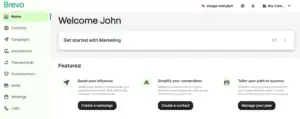
Brevo felt straightforward from the moment I logged in.
The dashboard is clean and logically organized. Everything sits where you expect it to be:
Contacts are under Contacts
Campaigns, templates, and reports are under Campaigns
Nothing feels hidden, and you don’t need to hunt around to find basic features.
Creating emails is also fairly simple.
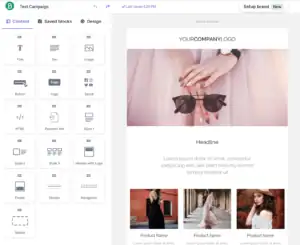
The drag-and-drop editor lets you add text, images, buttons, product blocks, and other elements without any technical effort. One feature I genuinely liked was Brevo’s brand setup tool — it can automatically generate a branded template using your website’s colors, which saves a lot of setup time.
Brevo also includes an AI assistant to help generate subject lines and email copy when you’re short on ideas.
That said, there are a few downsides:
Some advanced features aren’t easy to find at first
The editor works well, but it doesn’t feel as smooth or visual as MailerLite’s
Because Brevo offers so many tools, it can feel slightly overwhelming for complete beginners
Overall, Brevo is easy to use — but the extra features add a bit of weight to the experience.
MailerLite
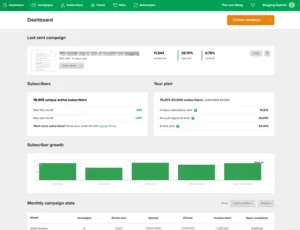
MailerLite felt calm, clean, and extremely beginner-friendly.
The dashboard isn’t crowded, and all the core options are visible immediately. Nothing feels noisy or complicated.
When it comes to email creation, MailerLite’s editor feels more visual than Brevo’s.
You get plenty of ready-made content blocks and layouts, and you can preview each block before adding it to your email. This makes designing emails fast and frustration-free.

MailerLite also includes AI tools for subject lines and email writing, which helps speed things up when you’re stuck.
There are a few drawbacks though:
The account approval process is strict
You can’t start sending emails immediately after signing up
Some useful features are locked behind higher-tier plans
Still, once you’re approved and inside the platform, everything feels simple and easy to learn.
My Verdict
After using both platforms in real-world scenarios:
MailerLite is slightly easier and cleaner for beginners.
Brevo is also user-friendly, but it feels heavier because of its wider feature set.
Score:
Brevo – 0
MailerLite – 1
Design & Flexibility
I’ve used both Brevo and MailerLite for real email campaigns, and the difference becomes clear once you start designing emails regularly.
Brevo
Brevo offers around 50 mobile-responsive templates that look clean and modern. You can easily customize layouts, colors, images, and sections without breaking anything.

Brevo’s templates Library
I really liked Brevo’s Brand Library — once you add your logo, colors, and fonts, Brevo automatically applies them to your emails. This makes it easy to keep everything on-brand.
You can also use HTML blocks or the full HTML editor if you want more control.
The only downside is that automation emails don’t always update automatically when you change your main template.
MailerLite
MailerLite’s design experience feels simpler and more visual.
It offers nearly 100 clean, mobile-friendly templates, and the editor makes it easy to adjust layouts, colors, and fonts quickly. For basic newsletters, this works really well.
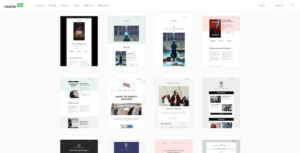
However, most templates and HTML uploads are locked behind paid plans. On the free plan, design flexibility feels limited.
Winner
Both tools are good, but Brevo wins this round because it offers solid templates on all plans and makes branding much easier.
Score:
Brevo – 1
MailerLite – 1
Landing Pages & Forms
Forms and landing pages are essential for list growth, and I’ve used both Brevo and MailerLite for real signup campaigns. Both tools do a good job — but they focus on different strengths.
Brevo
Brevo’s form builder is surprisingly advanced.
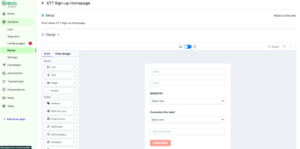
You can let subscribers choose which list they want to join, add CAPTCHA to reduce spam, and even auto-fill user details when they come from an email. The visual editor is clean and easy to follow.
Landing pages, however, are where Brevo feels weaker.

Although it offers a modern landing page builder (on Standard plans and above), it takes more effort to create a clean, professional page — especially when optimizing for mobile.
MailerLite
MailerLite’s form builder is simpler and more beginner-friendly.
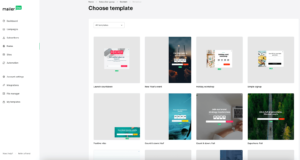
You get pop-ups, embedded forms, and ready-made layouts, with extras like “Spin the Wheel” available on paid plans. Forms connect smoothly with lists and automations.
MailerLite really shines with landing pages.
Its drag-and-drop builder is easy to use and packed with features like videos, testimonials, quizzes, image sliders, SEO tools, and even an AI landing page generator. You can also build full websites inside MailerLite.
Winner
Brevo offers stronger form controls, but MailerLite wins overall thanks to its easier, more flexible, and feature-rich landing page and form tools.
Score:
Brevo – 1
MailerLite – 2
List Management
Good list management leads to better targeting — and better results. I’ve used both Brevo and MailerLite to manage real subscriber lists, and they take very different approaches.
Brevo
Brevo offers a strong and detailed list management system.
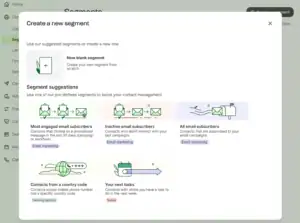
You can segment contacts based on email actions like opens and clicks, as well as website behavior such as page visits. It also includes lead scoring, so you can easily identify your most engaged subscribers.
Brevo supports automated workflows that update lists automatically based on behavior, demographics, or scores, which helps keep everything organized and up to date.
There are a couple of limitations:
No native tagging system
No country-based segmentation
MailerLite
MailerLite keeps things simple and beginner-friendly.
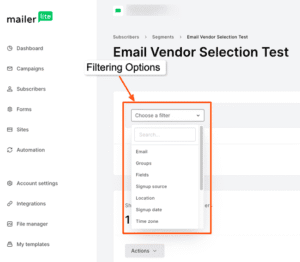
You can segment contacts using signup source, location, custom fields, Tags, and Interest Groups. This makes basic list organization easy.
However, segmentation is more limited. There’s no advanced behavioral tracking and no lead scoring, so it’s harder to identify high-value subscribers.
Winner
Brevo wins this round with deeper segmentation, behavioral tracking, and lead scoring — ideal for smarter targeting and advanced campaigns.
Score:
Brevo – 2
MailerLite – 2
Marketing Automation
Automation is where email marketing really saves time — and after using both tools, one clearly goes deeper.
Brevo
Brevo is very strong when it comes to automation.
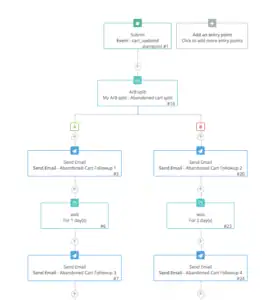
The visual workflow builder is clean and easy to follow, even for complex setups. You can test automations before turning them live, which helps avoid mistakes.
Brevo supports a wide range of triggers, including:
Email opens and clicks
Website visits
Ecommerce actions
SMS, WhatsApp, and push notifications
It also offers ready-made ecommerce automation templates like cart abandonment and purchase follow-ups.
Another big advantage is lead scoring, which lets you trigger automations based on subscriber engagement. Brevo also includes built-in transactional emails, which MailerLite requires an add-on for.
MailerLite
MailerLite’s automation builder is simple and beginner-friendly.

Mailerlite Automation builder
You can create workflows based on email activity, group changes, and custom fields. For basic automations, it works well.
However, it lacks advanced triggers like website visits, lead scoring, and multi-channel automation. Deep ecommerce tracking and advanced features are mostly locked behind higher-tier plans.
Winner
Brevo wins this round.
It offers deeper automation, more triggers, multi-channel workflows, built-in transactional emails, and lead scoring — making it the better choice for advanced and scalable automation.
Score:
Brevo – 3
MailerLite – 2
Deliverability
Deliverability is one of the most important parts of email marketing.
Because honestly… what’s the point of writing great emails if they land in the spam folder?
Here’s how both tools performed.
MailerLite
MailerLite does a solid job with deliverability basics.
You get domain authentication, feedback loop access, third-party list-cleaning integrations, and IP warmup guidance — all useful for keeping your sending reputation clean.
However, it lacks a dedicated deliverability dashboard or a sender health score, and its DMARC documentation can be confusing for beginners.
Rating: ⭐⭐⭐⭐☆ (3.5/5)
Brevo
Brevo also offers strong deliverability protections.
It includes an authentication setup wizard, bounce and complaint handling, IP warmup resources, deliverability support, and a dedicated dashboard to monitor issues.
That said, it doesn’t provide full SPF alignment, a deliverability health score, or built-in list cleaning.
Rating: ⭐⭐⭐⭐☆ (3.5/5)
Winner
This round ends in a tie.
Both Brevo and MailerLite provide reliable tools to help emails reach the inbox, and neither clearly outperforms the other.
Score:
Brevo – 4
MailerLite – 3
Customer Relationship Management (CRM)
If you want an email tool that also helps manage sales, this round is very easy to judge.
Brevo
Brevo includes a built-in CRM, and it works surprisingly well for small businesses.
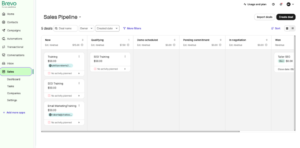
You get a clean deal pipeline, easy deal movement, and simple customization. I especially liked that live chat connects directly with the CRM, so every conversation is saved inside the contact record — giving you a full customer history in one place.
Brevo also lets you assign contacts to team members and automate basic sales tasks without needing another tool.
There are some limits:
Only one deal currency
Very basic sales reports
Manual setup for linking contacts to companies
Still, for small teams and simple sales workflows, it does the job well.
MailerLite
MailerLite offers very basic CRM features.
You can store contact details, add notes, and view simple interaction history — but that’s it. There are no deal pipelines, forecasting, or real sales management tools.
If you need a proper CRM, you’ll have to integrate MailerLite with another platform.
Winner
Brevo wins this round easily.
Its built-in CRM is simple, connected, and actually useful for managing sales, while MailerLite is focused almost entirely on email marketing.
Score:
Brevo – 5
MailerLite – 3
Monetization Features
If your goal is to make money from your email list, this round has a very clear winner.
MailerLite
MailerLite makes monetization simple and creator-friendly.

You can sell digital products, create product pages, collect payments via Stripe, deliver files automatically, and even run paid newsletter subscriptions with recurring payments — all inside MailerLite.
No extra tools. No complex setups.
This makes it ideal for creators, writers, and educators.
One small thing to note: MailerLite’s affiliate marketing rules can feel a bit unclear. While affiliate links are allowed, they don’t want businesses built only on affiliate commissions. In real use, this hasn’t been an issue — but beginners should still be mindful.
Brevo
Brevo offers no built-in monetization tools.
There are no paid newsletters, digital product sales, or payment pages. Brevo is designed for businesses focused on email, CRM, and automation — not content monetization.
Winner
MailerLite wins this round easily.
It gives creators everything they need to monetize their audience, while Brevo doesn’t compete here.
Score:
Brevo – 5
MailerLite – 4
Integrations
Integrations matter because they decide how easily your email tool fits into your existing workflow.
MailerLite
MailerLite offers 150+ integrations, covering most popular tools.
You can connect it with ecommerce platforms like Shopify and WooCommerce, CRM tools like HubSpot and Salesforce, and website builders such as WordPress, Wix, and Squarespace. This makes it easy to plug MailerLite into almost any setup.
Brevo
Brevo provides around 120 integrations, covering CRMs, email tools, and lead generation platforms.
It also offers plugins for WordPress, Wix, Jimdo, and more. Like MailerLite, Brevo integrates with Zapier, letting you connect hundreds of additional apps when needed.
Winner
This round ends in a tie.
Both Brevo and MailerLite offer strong integration ecosystems that work well with most business tools.
Score:
Brevo – 6
MailerLite – 5
Reporting
MailerLite gives you the standard metrics: opens, clicks, and unsubscribes. That’s fine for beginners, but if you want deeper insights like heatmaps or advanced filtering, it falls short.
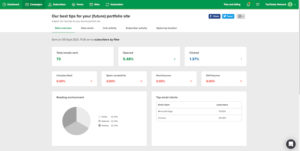
You get the usual numbers — opens, clicks, unsubscribes — but that’s pretty much it.
It also can’t properly filter bot clicks or Apple Mail Privacy opens, which can make reports feel inflated or confusing. Connecting Google Analytics helps, but overall the reporting remains fairly simple.
Then I switched to Brevo’s analytics — and honestly, the difference shows right away.
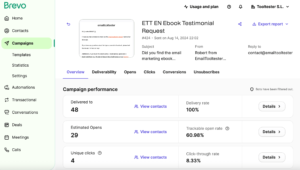
Brevo’s reporting feels more detailed and more useful right away.
The dashboard gives a clear overview of sends, opens, clicks, unsubscribes, and percentage breakdowns — with email and SMS stats shown separately.
At the campaign level, Brevo goes deeper with A/B test results, subject line performance, and detailed summaries. On higher plans, you also get heatmaps that show exactly where readers click inside your emails.
Winner
Brevo wins this round.
MailerLite is fine for basic tracking, but Brevo offers clearer, deeper reporting that actually helps you improve performance.
Updated Score:
Brevo – 7
MailerLite – 5
Pricing
Pricing is one of the biggest differences between Brevo and MailerLite — and honestly, the way both tools charge can completely change which one is better for you.
Brevo
Brevo offers one of the best free plans available.
You get automation, CRM, and support, with the ability to send 300 emails per day to up to 100,000 contacts — far more flexible than MailerLite’s free plan.
The biggest advantage is Brevo’s pricing model.
Instead of charging based on subscribers, Brevo mainly charges based on email volume. This means you can have a large list and still pay less if you don’t email frequently. There’s also a pay-as-you-go option, which is great for occasional senders.
This makes Brevo ideal for:
Large email lists
Infrequent campaigns
Businesses that want predictable costs
MailerLite
MailerLite uses the traditional subscriber-based pricing model.
As your list grows, your costs increase — even if you don’t send emails often. The free plan is limited to 500 subscribers, and many useful features like templates and landing pages are locked behind paid plans.
To get unlimited emails and full functionality, you’ll need a paid plan. MailerLite also doesn’t include transactional emails, which require a separate tool (MailerSend).
| Feature | Brevo | MailerLite |
|---|---|---|
| Free plan sending limits | 100,000 contacts, 300 emails/day | 500 contacts, 12,000 emails/month |
| Cheapest paid plan | $9/mo for 500 contacts + 5,000 emails | $10/mo for 500 contacts + unlimited emails |
| Most popular plan | $18/mo for 500 contacts + 5,000 emails + advanced features | $20/mo for 500 contacts + unlimited emails + advanced features |
So who wins?
While both seem close on paper, Brevo gives more flexibility, especially if you have a big list or don’t send emails often.
MailerLite can get expensive once your list grows or when you start adding extra services.
Winner: Brevo
Updated Score:
Brevo – 8
MailerLite – 5
AI Features
AI is now a common part of email marketing, but Brevo and MailerLite use it differently.
Brevo
Brevo focuses AI on optimization and automation:
AI-generated subject lines to boost opens
Best-time sending for peak engagement
Website behavior tracking to trigger smart automations
It’s designed for performance across email, SMS, and CRM.
MailerLite
MailerLite keeps AI simple and creator-friendly:
AI Writing Assistant for fast email content
Auto re-send to non-openers
AI-powered suggestions in reports and segmentation
Perfect for beginners and creators who need help writing emails quickly.
Winner
MailerLite wins this round. Its AI writing assistant is easier to use and immediately helpful for most users.
Updated Score:
Brevo – 8
MailerLite – 6
Which One Should You Choose?
After testing both tools ourselves, reading hundreds of user reviews, and comparing every major feature side by side, one thing is clear:
Brevo and MailerLite are built for two very different types of users.
Choose Brevo if you want an all-in-one platform with powerful automation, CRM, multi-channel messaging, and a flexible pricing model that doesn’t punish you for having a large list. It’s perfect for businesses that want advanced workflows, sales tools, and deep control.
Choose MailerLite if you’re a creator, blogger, or small business owner who wants something simple, clean, and easy to use — with beautiful templates, built-in monetization, and AI that helps you write emails faster.
Overall, Brevo wins the comparison with a final score of 8–6, mainly because of its stronger automation, CRM features, and smarter pricing.
But MailerLite still remains one of the best tools for creators who value simplicity and monetization.
At the end of the day, the right choice depends on your goals — power and depth (Brevo) or simplicity and creator-friendly features (MailerLite).
MailerLite vs Kit (ConvertKit)
