

Last Updated: 21 Nov 2025
When most people think about email marketing, the first thought that comes to mind is: “I need a website before I can even start.”
But here’s the truth—you don’t need a website to start building your list.
In fact, I’ve seen creators, coaches, and even small businesses grow thousands of subscribers without ever touching WordPress or buying a domain.
For example, one solo creator I worked with managed to grow over 5,000 subscribers in just a few months—all without a website.
Now, if you’ve been following along, you’ll remember that in our last guide we broke down how to build an email list in the traditional way (with a website, landing pages, and all the moving parts).
But I also know not everyone can afford hosting, design, or simply doesn’t want the hassle of running a site.
👉 That’s exactly why I’m writing this guide—to show you my proven, step-by-step methods to build an email list without a website.
Whether you’re a coach, a freelancer, or just starting out as a creator, you’ll be able to launch your email list today—with zero web design skills or technical headaches.
Let’s dive in.
Why You Don’t Need a Website to Start Building an Email List
Let’s get one thing straight: having a website is great. It gives you control, a home for your brand, and the long-term SEO benefits that can compound over time.
But here’s the catch—a website is not the entry ticket to email marketing.
The truth is, many creators get so caught up in building the “perfect site” that they delay the most important part: actually collecting emails. I’ve seen people spend months tweaking fonts, layouts, and logos… while someone else with no website at all is already growing their list and talking to subscribers daily.
At the very beginning, you only need three things:
A valuable offer (lead magnet): Something people actually want to sign up for. This could be a free guide, a template, a checklist, or even exclusive content.
A place to collect emails: This can be as simple as a free landing page from your email marketing tool or even a Google Form connected to your email list.
A channel to promote it: Whether it’s social media, YouTube, LinkedIn, or communities you’re active in—you just need one place to share your offer and drive people to sign up.
That’s it. No code, no hosting bill, no stressing over website themes.
👉 For beginners, this takes away the overwhelm. For intermediate readers, this is a reminder that speed matters—getting in front of your audience and building your list today beats waiting months for your “perfect” website to be ready.
Step 1: Choose the Right Email Marketing Tool (Your Foundation)
If you want to build an email list without a website, your email marketing tool becomes your “home base.” It’s where you’ll create landing pages, collect subscribers, and send your first emails.
Here’s what the right tool should do for you:
Landing pages without a site: So you can start today, no domain or hosting needed.
Secure email collection: Everything legally compliant (GDPR, CAN-SPAM, etc.).
Automated emails: A simple welcome sequence that nurtures new subscribers while you sleep.
Now, let’s look at a few beginner-friendly options that won’t overwhelm you:
ConvertKit – Built for creators and coaches. Super clean forms and automation, with a free plan for up to 10,000 subscribers.
MailerLite – Easy drag-and-drop builder with surprisingly powerful automation features.
- AWeber – Solid choice for beginners. Their landing page builder is straightforward, and they’ve been around forever.
ActiveCampaign – More advanced, but unbeatable if you want serious automation and CRM tools later down the line.
👉 Pro tip: Don’t get stuck comparing tools for days. Just pick one, launch your first landing page, and start collecting subscribers. You can always switch or upgrade as you grow.
Step 3: Quick-Launch Plan (Using Your Email Tool)
Here’s exactly how to go from zero to a live signup page — even if you’ve never done it before.
Step 1: Create a Landing Page
Log into your chosen tool (AWeber, ConvertKit, MailerLite, Brevo, or ActiveCampaign).
Go to Landing Pages → Create New.
Pick a simple template (don’t waste time on design).
Add:
Headline: Tell them what they’re getting.
Example: “Free Guide: 5 Email Templates That Book More Clients.”
Form field: Just ask for name + email.
Submit button: Use action words.
Example: “Send Me the Guide” instead of “Subscribe.”
👉 In less than 15 minutes, you’ll have a live page hosted by your tool (no website needed).
Step 2: Add Your Link Everywhere
Copy your landing page URL.
Paste it in your Instagram bio, LinkedIn profile, and X bio.
Add it to your email signature:
Example: “PS: Want my free cold email checklist? Grab it here.”
- Share it in communities (Facebook groups, LinkedIn groups, or forums) — but frame it as helpful, not spammy.
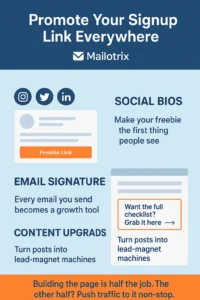
👉 The more places your link lives, the more chances people have to join your list.
Step 3: Write a Strong Call-to-Action (CTA)
Don’t just say “Join my newsletter.” Nobody wants another newsletter. Instead, make the benefit clear:
Example for coaches: “Want more paying clients? Download my free Email Script Pack.”
Example for creators: “Get my free 30-day content calendar template here.”
Example for freelancers: “Grab my proven cold outreach checklist.”
👉 Always lead with the result they want, not the process.
Step 4: Automate Your First Email
In your tool, set up a welcome email.
Keep it short: thank them for joining + deliver the freebie.
Example:
Subject: “Here’s your free guide 🎁”
Body: “Thanks for signing up! Click here to download your [guide]. More tips coming your way soon.”
⚡ Quick Tip: Most tools (like MailerLite and ActiveCampaign) have pre-built welcome email automations you can activate in just a few clicks. This saves you time and ensures every new subscriber gets your freebie instantly. (ConvertKit and Brevo also offer simple automation workflows.)
👉 This ensures new subscribers get instant value — and you start building trust right away.
Step 4: Leverage Social Platforms to Capture Emails
Social media isn’t just for likes and followers — it’s one of the fastest ways to grow your email list without a website. Here’s how to do it platform by platform:

Instagram & TikTok
Your bio is prime real estate. Every visitor should immediately see the value you’re offering. Pin your lead magnet in your story highlights to keep it visible at all times. Short, visual content like templates, swipe files, or checklists works best here.
Think of it this way: a casual viewer might scroll past your post, but when they visit your profile and see a free resource ready to download, it becomes irresistible. Over time, this simple approach can turn followers into active subscribers without spending a dime on ads.
Add your landing page link to your bio
Go to your profile → Edit Bio → add the URL to your freebie landing page.
Make it clear what they’ll get:
Example: “Download my free 7-day content planner → link in bio.”
Create a Story Highlight for your freebie
Record 2–3 stories explaining the benefit of your lead magnet.
Save them as a Highlight called “Free Guide” or “Start Here.”
This keeps your offer visible 24/7 for new visitors.
Promote your lead magnet in posts & Reels
Add a short CTA: “Swipe up or check my bio to grab your free template.”
Repeat in multiple posts — subtle, value-first promotion works best.
YouTube
YouTube viewers come for your content but often leave without taking action. To turn them into subscribers:
Place your landing page link in the video description.
Pin a comment with the same link at the top of the comment section.
Mention your freebie in the video itself, connecting it directly to the content value.
For example, if your video teaches cold emailing tips, your CTA could be: “Download my free cold email checklist in the description.” This gives viewers a clear next step, increasing the likelihood they’ll join your list.
Add your landing page link in the video description
Every video should have a clear CTA in the first 2 lines.
Example: “Download my free cold email checklist → [landing page link].”
Pin a comment with your lead magnet
Create a comment with the same link and pin it to the top.
Example: “Want my free checklist? Click here → [link].”
Mention your lead magnet in your video content
Speak naturally: “I’ve created a free guide to help you do this faster. Download it in the description below.”
This links the value of your content directly to subscribing.
LinkedIn is ideal for professionals looking for insight and actionable strategies. Use the Newsletter feature to grow subscribers automatically—anyone who signs up gets notified when you publish new content.
If you’re running LinkedIn ads, Lead Gen Forms are a frictionless way to capture emails without forcing users to leave the platform. Always frame your lead magnet as a solution to an immediate problem—checklists, reports, or case studies work best for this audience.
Use LinkedIn Newsletter
Go to Write an Article → Create Newsletter.
Each post automatically invites subscribers, growing your list passively.
Promote your lead magnet in posts
Example CTA: “I put together a free client acquisition checklist. Sign up here → [landing page link].”
Frame it as solving an immediate problem your audience has.
Run Lead Gen Forms (optional for ads)
If using LinkedIn Ads, choose Lead Gen Forms to collect emails without leaving the platform.
Facebook Groups
If you run a Facebook group, every new member is a potential subscriber. Use the membership questions or pinned posts to offer your lead magnet immediately.
For instance, when someone joins your group, you could ask: “Want my free client onboarding checklist? Drop your email below and I’ll send it to you.” This approach doesn’t just collect emails—it starts building a community where members feel valued from day one.
Use membership questions to capture emails
Go to Group Settings → Membership Questions.
Add a question like: “Want my free client onboarding checklist? Drop your email below.”
Pin posts promoting your lead magnet
Create a post with your offer and pin it to the top of the group.
Example CTA: “Download my free 5-step onboarding template here → [landing page link].”
Collect and import emails into your tool
Export responses or manually add to your email marketing platform (AWeber, ConvertKit, MailerLite, Brevo, or ActiveCampaign).
⚡ Pro Tip Across All Platforms:
The lead magnet must match the audience. Instagram/TikTok → visual, quick-win freebies. YouTube → actionable, step-by-step guides. LinkedIn → professional insights and reports. Facebook Groups → community-driven resources.
When your offer feels natural for the platform and audience, joining your list becomes an easy, obvious next step—not a pushy sales pitch.
Step 5: Use Events & Community Engagement to Capture Emails
Building an email list isn’t just about posting content—it’s about creating experiences and interactions that make people want to give you their email. Events and community engagement let you do this while providing real value upfront.
Webinars & Workshops
Webinars are one of the fastest ways to grow your list because people register before they attend.
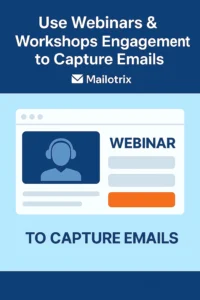
Pick a topic your audience cares about and can get immediate value from.
Use free tools like Zoom or Google Meet to host your session.
During registration, collect their email (most tools integrate directly with AWeber, ConvertKit, MailerLite, Brevo, or ActiveCampaign).
Example: “Run a free 30-minute cold email workshop — easily collect 200+ signups.”
Tip: Make your CTA irresistible. Instead of “Join my webinar,” try: “Learn 5 proven cold email templates in 30 minutes — reserve your spot!”
5-Day Challenges or Free Cohorts
Challenges give people a taste of your expertise while committing to a short-term program.
Create a simple 5-day challenge (e.g., “5-Day Email Growth Challenge”).
Use your email tool to deliver daily tasks, templates, or tips.
Promote it on social media, LinkedIn, and YouTube.
Benefit: People engage deeply, see results quickly, and are far more likely to remain on your list after the challenge.
Community Participation (Reddit, Quora, Forums)
You don’t always need to create events yourself. Engaging in existing communities can grow your list:
Find subreddits, Quora topics, or forums where your target audience hangs out.
Answer questions value-first — give actionable advice, not just links.
Add a subtle lead magnet CTA at the end, like:
“If you want a step-by-step template to do this faster, grab my free guide here → [landing page link].”
Tip: Focus on genuinely helping first. People will subscribe because they trust your expertise, not because you spam them.
⚡ Pro Tip: Events and community engagement work best when combined with your lead magnet. Always give something tangible during or after the event — a guide, checklist, template, or access to exclusive content. The more value upfront, the faster your list grows.
Step 6: Grow Faster with Referrals & Collaborations
Once you’ve started collecting subscribers, the fastest way to accelerate growth is to leverage your existing audience and other creators’ audiences. This isn’t about cold outreach — it’s about creating opportunities for people to share your content naturally.
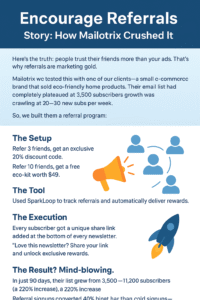
Set Up a Referral Program
Here’s the truth: your first subscribers are your best growth engine. A referral program turns them into promoters who bring in more subscribers effortlessly.
Step 1: Pick Your System
MailerLite or ActiveCampaign can automate referral tracking and reward delivery.
Small list? No problem — a manual system works too. Assign unique codes or links and track in a simple spreadsheet.
Step 2: Decide the Reward
Make it valuable but simple: templates, checklists, or exclusive guides.
Example: “Bring 3 friends → unlock an exclusive 10-page template pack.”
Remember: people share when the reward feels worth their effort.
Step 3: Create Referral Links or Codes
Automated tools generate links instantly.
Manual system? Assign a unique code per subscriber.
Step 4: Promote It Everywhere
Email your list: explain the reward and how to participate.
Include it in welcome emails. Share it in your social posts and communities.
The more visibility, the more shares.
Step 5: Track, Test, and Optimize
Watch who brings in new subscribers.
Tweak rewards or messaging if participation is low.
Pro Tip: Start simple. Complicated programs scare people off. Make it frictionless, and your subscribers will do the marketing for you.
Giveaway Bundles or Swaps with Other Creators
Want to reach new audiences fast? Collaborating with other creators is the hack. Done right, it’s exponential growth without cold outreach.
Step 1: Find the Right Partner
Look for creators in your niche whose audience overlaps but isn’t direct competition.
Alignment beats size — a small, engaged audience is gold.
Step 2: Decide on the Giveaway Format
Bundle freebies: Each creator contributes something valuable.
Resource swaps: Each promotes the other’s lead magnet.
Step 3: Set Clear Rules
Define duration, target number of subscribers, and participation method.
Example: “Sign up for both of our lists → get all 5 templates.”
Step 4: Promote Together
Each creator promotes via email, social media, or communities.
Use punchy CTAs highlighting the value: “Get these 5 tools free — sign up now.”
Step 5: Deliver & Track
Ensure participants get the promised resources.
Track signups from each partner to see who drives the best results.
Pro Tip: Make it feel like a win-win. When both audiences benefit, your growth multiplies naturally.
Partner with Influencers (Shoutouts & Collabs)
Influencers can be shortcuts to highly targeted audiences — but only if you do it smart.
Step 1: Find Micro-Influencers
2k–50k followers is ideal. Engagement matters more than size.
Check comments, likes, and genuine interaction.
Step 2: Craft Your Offer
Give them free access to your lead magnet or co-branded resources.
Example: “Share my 7-day email growth guide → their followers get bonus templates.”
Step 3: Reach Out with Value
Keep your pitch clear and benefit-driven.
Explain what’s in it for them and how simple it is to share.
Step 4: Run the Campaign
Decide format: shoutout post, story, live collab, or joint giveaway.
Track signups via unique links or UTM parameters.
Step 5: Measure and Scale
See which influencer drove the most subscribers.
Double down on what works and repeat.
Pro Tip: Micro-influencers convert better than big names because trust is higher. Track results — don’t guess.
Step 7: Paid Ads Without a Website (Optional but Scalable)
Most beginners think running ads requires a website. That’s a myth. You can drive traffic straight to your landing page and start collecting emails — no domain required.
Step 1: Choose Your Landing Page Tool
Use your MailerLite or ActiveCampaign landing page.
Make sure the page is simple, fast-loading, and focused on one action: email signup.
Include your lead magnet and a clear CTA: “Grab your free guide now.”
Step 2: Pick the Right Platform
Meta Ads (Facebook & Instagram): Great for highly targeted audiences.
TikTok Ads: Works well for engaging, visual content.
Google Ads (Search & Display): Targets people actively searching for solutions.
Pro Tip: Start with one platform first to avoid spreading your budget thin.
Step 3: Budget-Friendly Testing
Start small: $50–$100 for your first test campaign.
Test different ad creatives, headlines, and audience segments.
Example: Run 3 ads with slightly different copy to see which performs best.
Step 4: Craft Ads That Convert
Focus on value, not features.
Example CTA: “Download my free 5-day email growth challenge and get your first 500 subscribers fast.”
Avoid vague messages like “Sign up now” — people need to see what’s in it for them.
Step 5: Track Results & Optimize
Use landing page analytics to see which ads are driving signups.
Adjust targeting, creative, or messaging based on performance.
Scale the ads that work — increase the budget gradually.
⚡ Pro Tip: Ads without a website are fast, scalable, and beginner-friendly, but only if your landing page delivers clear value. Your goal is to turn cold traffic into subscribers efficiently — not just clicks.
Step 8: Swipeable Copy & Templates (Extra Value)
Sometimes, the biggest blocker isn’t tools or strategy — it’s knowing exactly what to write. That’s why swipeable copy and templates are a game-changer. Here’s how you can use them to get results fast.
1. Sample CTA for Social Bios
Your bio is prime real estate. Use it to convert profile visits into subscribers instantly.
Example CTA Templates:
“Grab my free 5-day email growth challenge → link in bio!”
“Download my 10-page content planner to grow your list faster → free guide here.”
“Sign up for my free toolkit and start collecting emails today → link below.”
Pro Tip: Keep it short, benefit-driven, and action-oriented. People should immediately know what they get and why it matters.
2. Sample Welcome Email
Your welcome email sets the tone for your relationship. Make it personal, clear, and valuable.
Template:
Subject: Your free [Lead Magnet Name] is here!
Hi [First Name],
Thanks for signing up! Here’s your [Lead Magnet Name]: [Download Link]
I’ll also be sending you [type of content or tips] every week to help you [benefit].
Can’t wait to see your results!
Cheers,
[Your Name]
Pro Tip: Keep it short and deliver value immediately. This builds trust and ensures they open future emails.
3. Sample Referral Email Copy
A simple referral email encourages subscribers to bring in their friends, boosting growth naturally.
Template:
Subject: Share & Get Your Bonus!
Hi [First Name],
Love what you’re getting from my [Lead Magnet/Newsletter]? Share it with 3 friends and unlock an exclusive [bonus resource]!
Here’s your unique link to share: [Referral Link]
The more friends you bring, the more goodies you unlock. Start sharing today!
Cheers,
[Your Name]
Pro Tip: Make it easy to share. The simpler the process, the higher the referral rate.
Conclusion: Your Website Can Come Later
Here’s the reality: you don’t need a website to start building an email list. Every successful creator, coach, or entrepreneur started somewhere — often without a fancy domain or blog.
The most important step is taking action today. Launch your landing page, share your lead magnet, test your strategies, and start collecting subscribers. Every referral, collaboration, and sign-up moves you closer to a thriving list — and eventually, your website will only amplify what you’ve already built.
Remember: “Don’t wait to launch a website. Start building your list today — your future self will thank you.”
Take the first step now. Even small actions compound over time, and by the time your website is ready, you’ll already have an engaged audience waiting for it.
