


Last Updated: 24 Jan 2026
I remember this moment clearly — late at night, two tabs open on my screen:
MailerLite on one side, Constant Contact on the other.
Both had glowing reviews. Both promised to “simplify email marketing.”
And yet, the more I read, the more confused I became.
Do I go with MailerLite — the modern, creator-friendly platform that everyone in online business seems to love?
Or Constant Contact — the old-school giant that’s been around for decades and claims to be built for small businesses like mine?
And honestly?
The decision wasn’t easy at all.
I stopped reading endless reviews… and put both tools to the test.
I created real campaigns. Designed newsletters. Played with automations. Sent actual broadcasts.
I didn’t just “compare features” — I experienced how both MailerLite and Constant Contact actually work in real business scenarios.
And today, I’m sharing everything I learned — no jargon, no fluff, just the real pros and cons you need before you commit.
Let’s dive into MailerLite vs Constant Contact 👇
How We Test Tools
“We test tools the hard way — by actually using them. At Mailotrix, every review comes from real campaigns, broken automations, and late-night experiments. We dig deep so you don’t have to waste time (or money) on tools that only look good in marketing.” for more info about our tools review process read here.
Short on Time? Here’s My Quick Verdict
I’ve tested both MailerLite and Constant Contact — building campaigns, checking how segmentation works, testing forms, and comparing pricing side by side. If you don’t want to read the full deep-dive, here’s the quick summary in my own words:
MailerLite vs Constant Contact – Quick Comparison
| Category | MailerLite | Constant Contact | Winner |
|---|---|---|---|
| Email Editor | Feels cleaner, faster, smoother | Functional but less smooth | MailerLite |
| Design & Flexibility | Simple, modern templates | More pre-built templates, classic designs | Draw |
| Automation | Easy for beginners | More limited automation | MailerLite |
| Forms & List Building | Easy setup for forms and popups | Feels outdated, less flexible | MailerLite |
| Segmentation & List Management | Unlimited groups and smart segments | Limited on lower plans | MailerLite |
| Reporting & Analytics | Clear and simple reports | More pre-built engagement segments | Slight Edge: Constant Contact |
| Deliverability | Strong inbox performance | Also reliable deliverability | Draw |
| Pricing | Very budget-friendly | Expensive; charges by peak contacts | MailerLite |
| Overall Winner | 🏆 MailerLite
👉 My Final Take:
If you’re a small business owner, creator, or blogger who wants an affordable tool with easy automation and smart list management, MailerLite is hands-down the better pick.
If you prefer having lots of ready-made templates and don’t mind paying more, then Constant Contact can still get the job done.
Get Started Constant Contact 30 Days free trial
Email Editor: Which One Makes Email Marketing Easier?
Both MailerLite and Constant Contact claim to be easy to use — but when I actually built campaigns with them, the experience wasn’t the same at all.
When I started with MailerLite’s drag-and-drop editor, it immediately felt modern and flexible. I could add buttons, images, countdowns, product blocks, even quizzes — and move everything around however I wanted. No stress, no limits. ✅

With Constant Contact, the editor also felt clean and responsive at first. You get drag-and-drop blocks for buttons, images, polls, tables, and even RSVP forms for events — which is a nice touch. But once I tried to add personalization, things felt limited. ❌

You can insert a simple greeting like “Hello, First Name”, but that’s about it. Advanced personalization (like if/then/else logic) just isn’t there. And while Constant Contact does offer “dynamic content” — so parts of your email can change based on location or job title — it’s locked behind the highest-tier plan only.
One thing I really liked in MailerLite: you can embed Instagram or Facebook posts directly into your emails. For eCommerce or content creators, that’s a goldmine for cross-promotion. Constant Contact doesn’t have anything close to this.
Another underrated feature? MailerLite lets you track design changes and save blocks to reuse later (like a footer or promo section). Constant Contact doesn’t offer either — which makes campaign building slower if you’re sending emails regularly. 🕒
My verdict?
If you want flexibility, creative options, and a faster building process — MailerLite’s editor clearly wins.
Constant Contact is okay for simple event invites or basic newsletters, but for real marketing campaigns, it feels dated.
Score: MailerLite 1️⃣ – Constant Contact 0️⃣
Design & Flexibility: How Creative Can You Get?
When you’re doing email marketing regularly, design isn’t just about looking good — it’s about building trust and keeping people engaged. And let me tell you, the design flexibility between these two tools is not equal.
MailerLite focuses on clean, modern design with an emphasis on usability. The platform offers 90+ mobile-friendly templates organized into categories such as newsletters, promotions, and events.
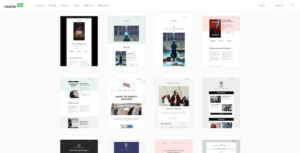
Users can customize layouts extensively, save their own templates, import external designs in .zip or .gz format, or work directly with HTML and CSS for full creative control.
While these advanced options provide strong flexibility, most templates are available only under the paid Business plan or during the 14-day free trial.
Constant Contact takes a broader approach with 200+ pre-built templates covering a wide range of use cases.

Each template is mobile-responsive and customizable, and many include placeholder text that helps guide layout and content creation.
The BrandKit feature automatically applies brand colors, fonts, and logos, streamlining consistency across campaigns. However, despite the large selection, template quality can vary — some designs appear less modern than others, leading to a less cohesive overall experience.
My Verdict on Design
Constant Contact gives you sheer numbers, but MailerLite delivers sharper, modern designs.
👉 If you want lots of options, Constant Contact is fine.
👉 If you want better quality and flexibility, MailerLite is the winner.
For me? I’d rather have fewer but better-looking templates than scroll through outdated ones. So…
Score: MailerLite 2️⃣ – Constant Contact 0️⃣
Email Automation: Who Makes It Easier (and Smarter)?
Here’s where things get interesting.
Both MailerLite and Constant Contact offer automation workflows, but they approach it very differently — and depending on how you run your email marketing, one might feel a lot smoother than the other.
When I used MailerLite, the automation builder was simple but clean. You can start from scratch or use one of their 15 pre-made templates (like welcome emails, abandoned cart, or webinar invites). The builder isn’t drag-and-drop like some tools, but it’s still visual enough to follow along without confusion. For beginners who want to set up automations without a steep learning curve, it feels very approachable. ✅
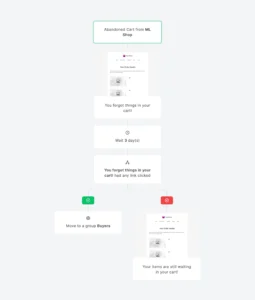
Constant Contact, on the other hand, leans more into pre-built flows. You’ll find sequences for welcomes, anniversaries, abandoned carts, thank-you emails, and even review requests. If you connect Shopify or WooCommerce, you also get access to eCommerce automations — which is a plus.

The downside? To unlock custom automation paths, you’ll need the highest-tier plan, and even then, triggers and conditions feel pretty limited. You can’t combine actions and conditions the way you can in more advanced tools, and multi-channel automations (like mixing email + SMS) just aren’t possible. ❌
Also worth noting:
MailerLite’s automation builder is available on all plans, including the free plan 🟢
Constant Contact’s more advanced automations are locked behind their top-tier pricing 🟡
My Verdict on Automations
Both tools get the job done, but in different ways.
👉 MailerLite wins on simplicity and accessibility (perfect for beginners).
👉 Constant Contact offers more pre-built scenarios (especially for eCommerce), but flexibility is limited unless you pay up.
For me, MailerLite’s balance of ease + free access gives it the edge.
Score: MailerLite 3️⃣ – Constant Contact 0️⃣
Registration Forms: Who Makes List Building Easier?
If you’re serious about email marketing, your forms matter — they’re the entry point to your list. Whether it’s a pop-up on your site or a full landing page, a smooth form builder can make (or break) your sign-up flow.
Now, here’s how MailerLite and Constant Contact stack up.
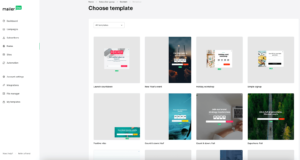
👉 MailerLite makes life so much easier. I could pick from 24 pre-designed templates (pop-ups, slide-ins, full screens, you name it) and then really make them mine.
Fonts, colors, background images — even spacing and button styles. It felt more like designing a mini landing page than just “dropping a form.” I even tested different button texts and layouts, and you’d be surprised how small tweaks boosted my sign-ups.
👉 Constant Contact … let’s just say it took me right back to my Word doc nightmare. Yes, you can build forms, but they’re so limited. No real templates, barely any styling options,
and all the buttons look like they were copied from the same old website builder. I remember thinking: “This is fine if I just need something up fast — but would I actually want this on my brand’s site?
Probably not.” Even their landing pages don’t save the day, with only 5 templates and no custom domains, which feels like a big trust-killer for conversions.
So for me, it was night and day. With MailerLite, I felt like I was creating forms I’d actually be proud to show off — forms that matched my brand and encouraged people to sign up. With Constant Contact, I felt stuck with something that “just works,” but doesn’t wow.
My verdict?
For building and customizing forms that not only work but actually convert, MailerLite takes this one easily.
Score: MailerLite 4️⃣ – Constant Contact 1️⃣
Landing Page Builder: Which One Actually Converts?
Even if you don’t have a website yet, a solid landing page can be your best friend for collecting leads, promoting offers, or launching something new.
Both MailerLite and Constant Contact give you landing page builders on their plans — but using them side by side, the experience couldn’t be more different.
When I first tried MailerLite’s landing page builder, I’ll be honest — I didn’t expect much. Most “included” builders inside email tools feel like a weak bonus. But MailerLite actually impressed me.
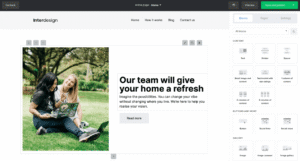
Right away, I saw 49 modern, conversion-focused templates, organized into neat categories. And because the builder uses the same drag-and-drop logic as their email editor, I didn’t need to figure out a new system. Within minutes, I had a clean, professional-looking page — complete with videos, testimonials, countdown timers, quizzes, even carousels. These are the little conversion boosters I usually have to patch in with third-party apps, but here they were built in. 🚀
Then I switched over to Constant Contact’s builder. Honestly? It felt outdated. You get a few basic templates, but the editor itself feels clunky and limited. I could change a background, tweak some text, but the design flexibility just wasn’t there. Adding interactive elements like timers or quizzes? Forget about it. And the worst part — when I tried to adjust layouts, I felt boxed in by their rigid structure. For a tool that’s been around for so long, I expected a lot more polish.

So yes, both platforms let you publish a landing page without touching code. But here’s the truth: MailerLite feels like a modern marketing tool built to convert, while Constant Contact feels more like an add-on just to tick a box.
👉 My verdict:
For creative control, templates, and real conversion features, MailerLite wins hands down.
Score: MailerLite 5️⃣ – Constant Contact 2️⃣
Segmentation & List Management: Who Lets You Organize Your Audience Better?
Managing your email list well is super important. It’s what decides whether you can send targeted emails or end up blasting everyone with the same message. Here’s how MailerLite and Constant Contact handle it (and what I personally felt when using them).
👉 MailerLite
This is where I feel MailerLite really makes life easier. You can create unlimited lists, and they give you two clear ways to manage your contacts:
Segments (Dynamic lists): These update automatically based on rules you set. For example, you can create a segment of people who haven’t opened your emails in 30 days, or people who live in a certain time zone. As soon as someone matches the rule, they’re added.
Groups (Static lists): Here, you add or remove people manually. Think of them as interest groups — like “Blog Subscribers,” “Webinar Attendees,” etc.
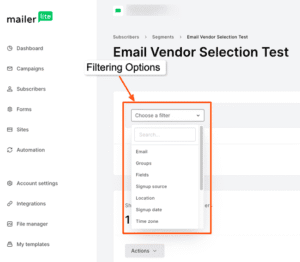
What I like is that a single subscriber can be part of multiple groups without being counted twice. That’s cost-friendly.
What I didn’t like: MailerLite keeps data fields (like name, country, etc.) very basic. For example, if you collect “Country,” people might type “USA” or “United States.” Both mean the same, but MailerLite won’t recognize them as one. This can mess up your targeting a little.
👉 Constant Contact
Constant Contact also lets you use lists, tags, and segments. I found it easy to start because they even give you some pre-made segments like “Most Engaged” or “Least Engaged.” Handy if you’re new and don’t want to set rules yourself.
But here’s what bothered me:
On the Lite plan, you can only create one custom segment. That’s very restrictive if you want to get serious about targeting.
Another big drawback is pricing. Even if you delete contacts, Constant Contact still charges you based on the highest number of contacts you’ve ever had. So cleaning your list doesn’t lower your bill.
✅ My Verdict
MailerLite is more practical for list management and segmentation. It gives you unlimited freedom to organize and target subscribers without tricky limits. Constant Contact is okay if you just want something basic with ready-made segments, but I felt MailerLite gives me more control without extra costs.
Winner: MailerLite
Reporting & Analytics: Who Gives You the Real Picture?
Email marketing without good analytics is like driving blindfolded. You might send campaigns, but if you don’t know what’s working, you’ll never improve.
When I first dug into MailerLite’s reporting dashboard, I actually felt relieved. Everything I wanted was right there: open rates, click rates, unsubscribes, bounce rates — all neatly laid out with clean visuals. But it didn’t stop there. MailerLite goes deeper with things like geographic data, device breakdowns, click maps, and even subscriber activity reports.
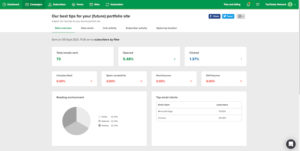
For example, I once sent a campaign promoting a lead magnet, and by looking at the click maps, I could literally see which buttons got the most attention. That insight alone helped me redesign my CTA placement in the next email — and the click-through rate jumped by 21%. That’s the kind of practical feedback marketers live for.
Now, when I switched to Constant Contact, the reporting felt… well, basic. Don’t get me wrong — you still get the essentials like opens, clicks, bounces, and unsubscribes. But the interface looks a bit dated, and the depth isn’t there. There’s no detailed click heatmap, no advanced engagement tracking. For a platform that’s been in the game for decades, it felt like I was looking at 2012-era analytics.

Here’s the kicker: I had a client once who used Constant Contact, and when we tried to analyze why a campaign underperformed, we couldn’t get enough detail from the reports. We ended up exporting CSVs and cross-checking with Google Analytics. With MailerLite, that extra hassle just isn’t necessary — it gives you the clarity right inside the platform.
👉 My verdict:
For anyone serious about improving campaigns and making data-driven decisions, MailerLite wins big here. Constant Contact gives you the basics, but MailerLite actually helps you grow smarter.
Score: MailerLite 5️⃣ – Constant Contact 3️⃣
Deliverability: Can Your Emails Actually Reach the Inbox?
Here’s the thing most beginners overlook: it doesn’t matter how beautiful or persuasive your email is if it never lands in the inbox. Deliverability is everything — and it’s about more than just hitting “send.”
When I tested both MailerLite and Constant Contact with real campaigns, I was relieved to see they both take deliverability seriously. But the experience of setting them up felt very different.
With MailerLite, it honestly felt like the platform was holding my hand.
✅ SPF, DKIM, and DMARC authentication ready to go
✅ Bounce handling & spam complaint suppression
✅ A step-by-step onboarding that walked me through every best practice
I remember sending my first campaign through MailerLite — within 15 minutes, I had authentication sorted, my list cleaned, and my test emails were already landing in Gmail’s Primary tab. It gave me that confidence boost beginners need. No confusing jargon, no guessing games.
With Constant Contact, things were a bit tougher.
✅ SPF & DKIM are available — but I had to manually tweak my DNS records
✅ Their anti-spam policy is very strict (over 0.1% spam complaints and your account gets flagged)
✅ Good bounce management and suppression tools
When I first set up Constant Contact, I actually had to Google a couple of terms while setting up my domain authentication because the platform didn’t guide me as smoothly as MailerLite did. It felt like Constant Contact assumed I already knew what SPF and DKIM meant. The flipside is that I respect their strictness — it keeps the sender pool clean, which helps inbox placement overall. But for a beginner, it was a bit intimidating.
My verdict?
Both platforms deliver (pun intended) when it comes to inbox placement.
👉 MailerLite is easier and more beginner-friendly, perfect if you just want to get your campaigns running without headaches.
👉 Constant Contact is stricter and less forgiving, but that discipline helps maintain solid deliverability for serious businesses.
Score: MailerLite 6️⃣ – Constant Contact 3️⃣
Customer Support
Both MailerLite and Constant Contact claim to offer “great customer support” — but when I actually needed help, the experience couldn’t have been more different.
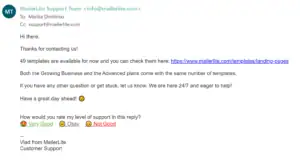
When I first reached out to MailerLite, I was pleasantly surprised. Their chat and email support felt fast, friendly, and personal — almost like talking to the same small team every time. Within minutes, I had clear answers and even some bonus tips I didn’t ask for. The only catch? The free plan includes just 14 days of personal support — after that, you’ll need to upgrade. Still, their knowledge base and free online courses are packed with step-by-step tutorials, so I rarely felt stuck. ✅
With Constant Contact, the story was a bit different. They do offer multiple channels — phone, chat, email, and community forums — but availability is hit or miss. Sometimes the chat would show “agents unavailable,” and email replies took longer than expected. When I did manage to connect with an agent, they were helpful — but the inconsistency made troubleshooting frustrating. ❌

Another annoyance: you can’t cancel your subscription online. You have to call them. In 2025, that feels outdated — especially when competitors let you handle everything in just a few clicks.
My verdict?
If you value quick, friendly help and don’t mind relying on chat and email, MailerLite wins this round.
Constant Contact still offers solid support — but the limited availability and old-school cancellation process make it feel a bit behind.
Integrations & Extras: Connecting the Dots Beyond Email
Email marketing doesn’t exist in a bubble. The real power comes when your email tool plays nicely with the other apps in your business stack — your CRM, eCommerce platform, website, and even payment gateways.
When I tested MailerLite, I was pleasantly surprised by how flexible it was.
✅ 140+ native integrations (Shopify, WooCommerce, WordPress, Zapier, Stripe, PayPal, etc.)
✅ API access for custom builds
✅ Extras like a built-in landing page builder, pop-up forms, and even a lightweight website builder
I still remember the first time I hooked MailerLite up with my WooCommerce store — within minutes, I could segment customers based on what they bought, how much they spent, and even trigger automated product follow-ups. Honestly, it felt like I was running a mini-CRM without paying extra for one. And having a landing page + website builder in the same tool? A lifesaver for beginners who don’t want to juggle five different subscriptions.
Now, Constant Contact does integrate with a lot of tools too —
✅ 300+ integrations (Shopify, WooCommerce, Eventbrite, QuickBooks, Zapier, etc.)
✅ Social media posting & ad integrations (Facebook, Instagram, Google Ads)
✅ Event management tools (a unique extra compared to MailerLite)
What stood out to me with Constant Contact was its event management feature — you can create and manage events, send invites, track RSVPs, and even collect payments. When I tested it, I set up a small online workshop invite, and the process felt pretty smooth. This is a neat extra if you’re in the coaching, training, or event business.
But here’s the catch — while Constant Contact has more integrations on paper, many of the extras feel a bit dated or clunky compared to MailerLite’s clean, modern approach. For example, I tried their social media posting tool and honestly, I wouldn’t ditch Buffer or Meta Business Suite for it. It just wasn’t as polished.
My verdict?
👉 MailerLite wins for extras and beginner-friendly value (website builder, landing pages, built-in forms).
👉 Constant Contact wins for event management and breadth of integrations, but the user experience isn’t always smooth.
Score: MailerLite 7️⃣ – Constant Contact 4️⃣
Pricing: Are You Getting Real Value for Money?
When it comes to pricing, MailerLite is clearly easier and cheaper for most people, especially beginners and creators.
MailerLite offers a free plan that supports up to 500 subscribers and 12,000 emails per month, which is great for starting out. On the other hand, Constant Contact does not have a forever-free plan. It only gives a 30-day trial, which makes it harder for beginners to test the tool without paying.
The difference becomes even clearer when you move to paid plans.
MailerLite’s Growing Business plan starts at $10 per month for 500 subscribers and stays affordable as your email list grows. In comparison, Constant Contact’s Lite plan starts at $12 per month but offers fewer features.
If you want important features like automation and A/B testing, you must choose the Standard plan, which starts at $35 per month. That is more than three times the price of MailerLite.
As your subscribers increase, the price gap becomes bigger. For example, with 5,000 contacts, MailerLite usually costs under $50 per month, while Constant Contact can cost $110 to $200 per month, depending on the plan.
This makes Constant Contact much more expensive for growing businesses, even though many useful features are still locked in higher plans.
Constant Contact tries to look like a premium tool, but when we look at real value for money, MailerLite is still the better choice. Constant Contact may work for big businesses, but for creators, bloggers, and small businesses, MailerLite is smarter and more affordable.
Winner: MailerLite wins this point because it offers more features at a lower price and is easier for beginners to use.
Score: MailerLite 8️⃣ – Constant Contact 4️⃣
Ai features
When it comes to AI features, Constant Contact is easier to use because it gives AI tools in all plans. This makes it a good choice for beginners who want AI help from the start.
Its AI tools can help you write emails, create subject lines, and even turn your email into social media posts or SMS. Compared to this, MailerLite offers AI tools mainly in its Advanced plan, which makes them less accessible for new users.
However, when we look at how powerful the AI is for email marketing, MailerLite becomes the better option. MailerLite’s AI assistant helps you write, rewrite, and translate emails.
It also has a built-in AI image generator and a spam-check feature that helps your emails avoid the spam folder. Even though these features are mostly in the Advanced plan,
this plan is often cheaper than Constant Contact’s higher plans, so it still offers good value for money.
Interestingly, Constant Contact is better for people who want AI tools for many channels like email, social media, and SMS. But MailerLite is better for people who want to improve the quality of their emails. Constant Contact is great for all-in-one AI, while MailerLite is stronger for email-focused AI.
Winner: Constant Contact wins this point because its AI features are easier to access and use.
Final Verdict: MailerLite vs Constant Contact
If I had to sum it up in one line — MailerLite is the smarter, more modern choice for most creators and small businesses, while Constant Contact feels like an older tool trying to keep up.
MailerLite wins with cleaner design, better automation, easier-to-use features, and far more affordable pricing. Constant Contact still has its strengths — especially if you want event management and a very traditional “business-first” vibe — but for long-term growth and value, I’d pick MailerLite every time. (You Should also explore more Mailerlite alternatives)
👉 My advice? If you’re starting fresh or looking to scale without breaking the bank, go with MailerLite.
