
Last Updated: 15 Jul 2026
I want to be honest with you before we get into anything.
Constant Contact has been around since 1995. That is older than Google. Older than most social media platforms. Older than the concept of a smartphone.
There is something almost impressive about a tool that has survived that long in a space that moves as fast as email marketing. But longevity is not the same as relevance. And in 2026, the honest question is not whether Constant Contact is trustworthy — it is whether it has kept up.
I tested it properly. Real campaigns, real lists, real time spent inside the platform. I also went through thousands of verified reviews on G2, Capterra, Trustpilot, and the BBB — specifically looking at what long-term users say after the honeymoon phase wears off.
Here is everything I found. The good, the bad, and the parts that made me genuinely frustrated on behalf of the people paying for this.
My Overall Rating on Constant Contact Review
Constant Contact: 3.2 out of 5
It earns that score because the deliverability is genuinely good, the support is better than most platforms at this price, and the event management tools are useful for a specific type of organisation. It loses points for pricing that has become difficult to justify, automation that feels stuck in 2016, templates that look dated, cancellation practices that are borderline hostile, and a feature set that has not meaningfully evolved while competitors have lapped it twice.
Who Is Constant Contact For?
Before anything else — let me be direct about who this tool actually serves well in 2026.
Constant Contact is best for:
Local small businesses that want to send a newsletter once a week without learning a complicated platform. Nonprofits and community organisations that run regular events and need RSVP management without a separate tool. Real estate agents, churches, and local service providers who have been using it for years and are not broken enough to want to switch.
Get started with Constant contact
Constant Contact is not right for:
Anyone who needs real marketing automation. Growing businesses where the contact count is climbing fast. Any business that has compared the pricing to MailerLite or Brevo and done the math. Teams that need A/B testing, advanced segmentation, or any kind of behavioural triggering beyond the most basic welcome email.
If you are just starting your email marketing journey and you are comparing this to three or four other platforms — I would encourage you to finish this review before deciding.
Ease of Use
Rating: 4 out of 5
This is the one category where Constant Contact earns its reputation without debate.
The interface is clean and simple in a way that feels almost reassuring. The dashboard puts everything in front of you. Creating a campaign takes about five clicks. The drag-and-drop editor loads fast and behaves predictably. Nothing hides behind menus you did not know existed.
Multiple reviewers on G2 and Capterra describe getting a professional-looking campaign out the door in under 20 minutes on their very first login. That is not an exaggeration. The onboarding experience is genuinely the friendliest I have tested at this price point.
For a business owner who is already stretched thin managing everything else — Constant Contact removes email marketing as a thing to think about. You sit down, you build an email, you send it. That is the whole experience.
The honest limitation: the simplicity is partly because the tool is not doing much. The interface is not complex because it has been designed beautifully — it is simple because there is less inside it than most modern platforms.
Email Builder
Rating: 3 out of 5
The drag-and-drop builder works. It is reliable, it does not crash, the blocks move where you put them, and the mobile preview is built in.

But multiple Capterra reviewers in 2025 and 2026 describe the templates as having an outdated style — and they are right. The design language inside the editor feels like it was last refreshed several years ago. The blocks are slightly clunky. The customisation options are limited. You can change the content of a layout, but fundamentally restructuring it is harder than it should be.
A graphic designer reviewed Constant Contact on Capterra and described the formatting as outdated and said they would like to see more trendy design coming through. That is a polite way of saying the editor looks like it belongs in 2015.
The AI writing assistant inside the builder can suggest subject line variations and draft basic email copy. In practice, the output is generic and needs heavy editing to sound like a real person. It is useful for getting past a blank page. It is not useful for much beyond that.
For a local business sending simple newsletters with text and a few images — the editor is enough. For anyone trying to produce visually distinctive, brand-forward emails — it will frustrate you.
Template Library
Rating: 3 out of 5
Constant Contact gives you over 200 email templates. That sounds impressive until you start scrolling through them.
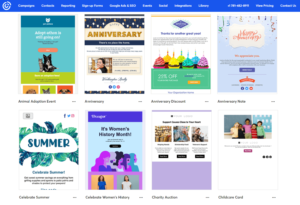
The variety covers common campaign types — newsletters, promotions, events, holidays. The templates are clean and functional. But the design aesthetic is dated. Multiple independent reviewers use the phrase “looks like it’s from 2010” — which is harsh but not entirely unfair.
The more specific frustration from real users: customisation beyond swapping content is limited. You can change text, images, and colours, but the underlying structure of a template is harder to fundamentally alter than it should be.
The library is also large enough to be slightly overwhelming without strong filtering. Finding the right starting point takes longer than it should.
Automation
Rating: 2 out of 5
This is where Constant Contact’s age shows most clearly — and where the gap between what it charges and what it delivers is hardest to defend.

The automation is limited to linear sequences. Welcome email when someone subscribes. Birthday email on a date. Anniversary email. A basic drip sequence that sends email one, waits a few days, sends email two.
That is it. There is no conditional branching. No IF-THEN logic that sends different emails based on what a subscriber does. No behaviour-based triggering from link clicks, page visits, or purchase history. If someone opens your email and clicks a link showing real buying intent — Constant Contact cannot respond differently to that person than it does to someone who ignored the email entirely.
Multiple review sources describe the automation as “great for linear communication but lacking depth for complex workflows.” An independent tester on a major review site described it as essentially unusable unless you are ready to spend $80 or more a month — because meaningful automation requires the Premium plan.
On the Lite plan at $12 a month, you get one automation template. On Standard at $35 a month, you get three. Unlimited automation templates require Premium at $80 a month — and even then, the logic is still basic compared to what competing platforms offer at half the price.
A business trying to build any kind of real sales funnel, lead nurture sequence, or behavioural email workflow will hit a ceiling within days and start looking at alternatives.
💡 MailerLite includes full multi-step automation with conditional logic from its free plan. Moosend includes 32 automation triggers and 18 pre-built recipes from $9 a month — more depth than Constant Contact’s Premium tier at a fraction of the cost.
Segmentation and Contact Management
Rating: 2.5 out of 5
Contact management inside Constant Contact is straightforward. You import a CSV, contacts appear in your list, you can tag them and organise them into lists. For a small, simple operation — this works.
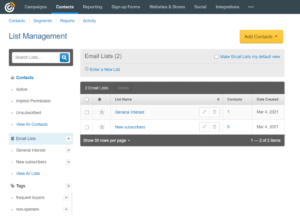
The honest problems show up at two points.
First — segmentation conditions are shallow. On Lite you get one custom segment. On Standard you get ten. The conditions you can build are basic compared to modern platforms. Behavioural segmentation — filtering by who clicked what, who visited which page, who bought a specific product — is either unavailable or requires Premium pricing and integrations that add complexity.
Second — list cleaning. There are no built-in list cleaning tools. If your list has accumulated old, inactive contacts over years, Constant Contact does not help you identify and remove them. You do that manually. For a platform that charges based on how many contacts you store — the lack of list cleaning tools is a genuine conflict of interest.
Multiple reviewers describe mass unsubscribing contacts as difficult. The platform does not make it easy to bulk-remove inactive contacts, which means your bill climbs whether those contacts are engaging or not.
Forms and Landing Pages
Rating: 3 out of 5
Forms work. They connect to your contact lists, they are easy to embed on a website, and the basic opt-in flow functions reliably.

The landing page builder is functional but limited in design flexibility. You can create a clean opt-in page or a simple promotion page. You cannot build the kind of sophisticated, highly customised landing pages that dedicated tools or even MailerLite’s updated builder produce.
The event management tools are where this section gets genuinely interesting. Constant Contact lets you build event pages, collect RSVPs, sell tickets, send automated event reminders, and manage attendee lists from inside the platform. For nonprofits, churches, and community organisations running regular events — this feature is legitimately useful and can replace a separate Eventbrite subscription that costs $50 to $200 a month. That saving is real and worth acknowledging.
If events are not part of your operation, the landing pages and forms are adequate but not impressive.
Deliverability
Rating: 3.5 out of 5
Constant Contact claims an inbox delivery rate of over 95 percent on its website. The honest independent picture is different.
Independent testing consistently puts the real inbox placement rate between 82 and 92 percent — with some sources citing it as low as 78 percent in specific test rounds. That gap between what the platform claims and what independent testing shows is significant and worth calling out directly.
What Constant Contact does well on deliverability: full SPF, DKIM, and DMARC authentication support with a step-by-step setup guide inside the platform. Automatic handling of bounces, unsubscribes, and spam complaints to protect sender reputation. Strict policies against purchased lists.
What it does not offer that more advanced senders expect: no access to Feedback Loop data, no dedicated deliverability dashboard, no option for dedicated IP addresses, and no warm-up guidance for new senders with large lists.
For a small business sending permission-based emails to an engaged list — the deliverability is reliable enough. For high-volume senders or businesses where inbox placement is business-critical — the lack of advanced deliverability tools is a real gap.
Integrations
Rating: 3 out of 5
Constant Contact connects to over 300 apps natively. The Canva integration is a genuine highlight — pulling designs directly from Canva into the editor without downloading and re-uploading. Shopify, WordPress, Salesforce, and most mainstream small business tools are there.
The honest limitation: anything beyond the mainstream requires Zapier. Multiple reviewers specifically describe wishing the platform did not rely so heavily on Zapier for less common connections. Zapier adds cost and complexity on top of an already-expensive base plan.
The API is available but limited in scope compared to more developer-friendly platforms. For businesses with custom integration needs or technical teams building on top of email APIs — Constant Contact is not the right infrastructure.
Reporting and Analytics
Rating: 2.5 out of 5
Constant Contact gives you opens, clicks, bounces, unsubscribes, and some useful overview reports — opens by device, contact engagement trends, and a basic heat map showing which links got clicked.
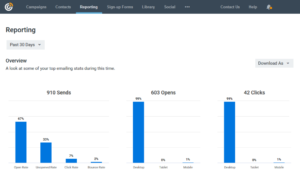
For a business that just wants to know whether people opened the email — this is enough.
For any business trying to actually optimise its email marketing — it is not. There is no revenue attribution connecting email sends to purchases. No detailed automation performance reports showing where contacts drop off in sequences. No cross-campaign trend analysis. No segmented reporting by contact attribute or list.
A/B testing is only available on Standard and Premium plans — and even then, it is limited to subject lines and basic variables. You cannot test automation paths, landing page variations, or email designs against each other.
One reviewer on G2 said it plainly: they felt expensive while offering limited analytical depth compared to newer tools at lower price points. That is an accurate summary.
Customer Support
Rating: 4 out of 5
This is Constant Contact’s most consistent genuine advantage — and one of the few areas where it clearly beats most competitors at this price.
Phone support is available on all paid plans. Not just the expensive tiers — all of them. Live chat is also available. The support team is consistently described as warm, responsive, and genuinely helpful in real conversations.
A reviewer on Capterra described talking to a real person who understood their question, helped them through it, and followed up afterward. That kind of experience is rare in email marketing software at any price.
The knowledge base, tutorials, and learning centre are well-maintained. In-person seminars and webinars are available in some regions — an unusual level of support commitment for a software company.
The honest caveat: some long-term Capterra reviewers note that online chat does not always work and that phone transfers happen more than they should. One reviewer described being transferred three or more times on a single call. The support is better than most — but not flawless.
The bigger support problem is completely separate from the quality of the support team — and that is the cancellation experience.
Cancellation: The Section Every Review Should Include But Most Skip
I am including this because it shows up in enough documented complaints that ignoring it would be dishonest.
Cancelling Constant Contact is not self-service. You cannot cancel from the dashboard. You must call customer service during specific business hours — Monday through Thursday 6am to 8pm, Friday 6am to 7pm, and Saturday 8am to 6pm Mountain Time.
Multiple users describe needing to “schedule an appointment” just to cancel a fully digital service. Several BBB filings describe auto-renewals happening before the contract end date, credit cards charged without consent, and accounts reactivating after cancellation.
One BBB complaint described attempting to cancel for three months through the website, being charged repeatedly, and being unable to get the account actually terminated. Another described being told no refunds were possible after an auto-renewal that happened before the paid period ended.
A Trustpilot analysis tracking reviews from 2025 to 2026 showed the platform’s score dropped from 4.4 to 3.7 in just five months — coinciding with the June 2025 pricing restructure. The most common complaints in that period: unexpected price increases on existing contracts and aggressive auto-renewal practices.
This is not a minor operational detail. It is a documented pattern that affects real people and real money. Know it before you sign up.
Pricing: The Full Honest Picture
Rating: 2 out of 5
Constant Contact eliminated its free plan in June 2025. Before that, you could have up to 500 contacts free indefinitely. That option is gone.
There are now three plans: Lite, Standard, and Premium.
The Lite plan starts at $12 a month for up to 500 contacts. You get email marketing, basic templates, simple automations, and the event management tools. What you do not get: A/B testing, more than one custom segment, more than one automation template, or most of the features that make email marketing actually work for a growing business.
The Standard plan starts at $35 a month for up to 500 contacts. This is where Constant Contact becomes genuinely functional — A/B testing, up to ten segments, three automation templates, and better reporting. For most small businesses, this is the realistic minimum.
The Premium plan starts at $80 a month for up to 500 contacts. Unlimited automation templates, advanced reporting, and Google Ads integration. For most small businesses, this is a lot of money for features that competing platforms offer at a fraction of the price.
How Standard plan costs scale:
| Contacts | Standard plan |
|---|---|
| 500 | $35/month |
| 1,000 | $55/month |
| 2,500 | $70/month |
| 5,000 | $80/month |
| 10,000 | $110/month |
| 25,000 | $175/month |
| 50,000 | $295/month |
At 10,000 contacts on Standard, you are paying $110 a month for automation that has no conditional logic, reporting that stops at opens and clicks, and a template library that looks dated.
That is the honest picture.
MailerLite at the same list size costs $65 a month and includes unlimited automation with conditional branching, a cleaner editor, better templates, and digital product selling. Moosend costs $64 a month for 10,000 contacts with unlimited email sends, 32 automation triggers, and a more capable segmentation system. Neither of them requires you to call a phone number to cancel.
The pricing model also charges for every contact in your account whether you email them or not. Old contacts, inactive subscribers, people who have not opened an email in two years — they all count toward your billing tier. There are no built-in tools to help you clean your list. The result is that your bill climbs regardless of your actual engagement rate.
What Real Users Are Actually Saying
I tracked patterns across thousands of reviews on G2, Capterra, Trustpilot, and BBB complaints.
What long-term users praise:
Phone support is the most consistent positive across every platform and every user type. Ease of use comes second. Event management tools get specific praise from nonprofits and community organisations. Multiple G2 reviewers describe the platform as reliable and consistent for basic campaigns — exactly what it promises to be.
What long-term users complain about:
Pricing is the dominant complaint. Multiple G2 reviewers explicitly say they feel the platform is expensive relative to what it delivers. A reviewer who had been a customer for 14 years described eventually leaving due to policy changes and the feeling that the value proposition had eroded. A separate reviewer described looking into alternatives because the price kept feeling like too much — but not finding a direct replacement that had the same specific features they relied on.
The cancellation experience generates the most emotionally charged reviews. People describe feeling trapped. BBB filings describe charges continuing after cancellation. This pattern has been documented consistently enough across enough platforms that it cannot be dismissed as a few bad experiences.
Limited features at the price point come up repeatedly from businesses that tried to grow within Constant Contact and hit ceilings they did not expect.
My Honest Take
Here is where I land.
Constant Contact is not broken. It is not a scam. It is not failing to deliver what it promises.
The problem is that what it promises in 2026 is not very much — and it charges as if it were still 2015, when the competition was far less capable.
The deliverability is solid. The support is genuinely good. The ease of use is the best in the category. For a local nonprofit running monthly events and a simple newsletter — it still works. The event management tools have real value for that type of organisation.
But for anyone comparing email marketing platforms in 2026 with fresh eyes — the pricing does not hold up. The automation is a generation behind. The templates look dated. And the cancellation practices are a serious red flag that deserves to be mentioned before any recommendation.
The businesses that should consider Constant Contact in 2026 are a smaller group than they were five years ago. If you run events, need phone support, and have a simple list that grows slowly — it might still be right for you.
Everyone else should run the numbers against more modern alternatives before committing.
Frequently Asked Questions
Is Constant Contact worth it in 2026?
For a narrow use case — local businesses, nonprofits running events, and very simple operations — yes. For growing businesses that need real automation, decent pricing at scale, and modern templates — it is hard to justify compared to alternatives like MailerLite or Brevo that cost significantly less and offer meaningfully more.
Does Constant Contact have a free plan?
No. Constant Contact eliminated its free plan in June 2025. There is a 30-day free trial. After that, the Lite plan starts at $12 a month.
Is Constant Contact easy to cancel?
No — and this deserves a direct answer. Cancellation requires a phone call during specific business hours. There is no self-service cancellation option. Multiple documented complaints describe auto-renewals continuing after cancellation attempts and charges appearing without consent. Know this before you commit to an annual plan.
What is the best alternative to Constant Contact?
MailerLite for general email marketing at a lower price with better automation. Brevo if you need multi-channel marketing including SMS, WhatsApp, and a basic CRM. ActiveCampaign if you need serious automation depth and a built-in CRM for a sales-focused operation.
How is Constant Contact’s deliverability?
The platform claims over 95 percent inbox placement. Independent testing consistently puts the real rate between 82 and 92 percent. Both are reasonable for most small business use cases, but the gap between the claimed and tested rates is worth knowing.
Does Constant Contact do SMS?
Yes — as a paid add-on. SMS is not included in any base plan. The add-on costs $10 for up to 500 messages and is only available in the US.
