


Last Updated: 04 Jun 2026
Let me be straight with you from the very first line.
Moosend looks like the perfect budget email tool on paper. Powerful automation. Solid deliverability. A 30-day free trial with no credit card. And pricing that starts at $9 a month.
But there’s something most Moosend reviews skip over completely.
Moosend can suspend your account without warning. No explanation. No real appeals process. Just — gone. That’s the main reason the platform scores 4.7 out of 5 on G2 but only 3.4 out of 5 on Trustpilot. That gap is one of the widest in the entire email marketing industry. And it tells a very specific story.
I signed up for Moosend, tested it myself, and spent time going through 900+ real reviews on G2, Capterra, and Trustpilot. I’m going to tell you exactly what I found — the genuine strengths, the things that frustrated me, the features that surprised me, and the one critical thing you need to do before you import your first contact.
This review is not a fluffy overview. It’s the truth.
Let’s get into it 👇
Who Is Moosend For?
Before I get into the details, let’s be honest about who Moosend actually serves well in 2026.
Moosend works well for you if:
- You’re a small business, blogger, or creator who wants real automation without a big monthly bill
- You have a clean, engaged email list and take list hygiene seriously
- You run an e-commerce store and want abandoned cart and post-purchase flows without paying Klaviyo prices
- You want a 30-day free trial with full feature access before committing to anything
- You run a marketing team and want built-in email collaboration tools at no extra cost per seat
- You need website visitor tracking that can trigger email automations — rare at this price
- You’re a blogger who wants RSS campaigns to automate email delivery of new posts
Moosend is NOT a good fit if:
- You’re importing an old, unverified, or purchased contact list — you risk immediate account suspension
- You need a mobile app — Moosend has none
- You need native SMS marketing in the same platform
- You need a built-in CRM for B2B sales or pipeline management
- You’re scaling a high-revenue e-commerce store and need predictive analytics like churn risk or lifetime value scoring
- You need robust white-label features for a client-facing agency
- You want phone support on a standard plan
Quick Verdict: Is Moosend Worth It?
Yes — for most small businesses, bloggers, and budget-conscious marketers in 2026, Moosend is worth it.
The price-to-feature ratio is one of the best I’ve seen in this category. Full automation, click heatmaps, revenue attribution, e-commerce flows, website tracking, A/B testing, and a 30-day full-access trial — all starting at $9 a month.
The catch is real, though. Moosend’s anti-spam enforcement is aggressive. Import a list with stale, bounced, or purchased contacts and your account can be gone within hours. Clean your list before you sign up. That single step prevents most of the nightmare stories you’ll find on Trustpilot.
Do that, and Moosend is one of the smartest value decisions in email marketing today.
Overall Rating: 4.1 / 5
Getting Started: How Easy Is the Setup?
Signing Up
I signed up for Moosend during a regular workday. The whole process — from landing on moosend.com to being inside the dashboard — took less than three minutes. Enter your email, create a password, verify your account, and you’re in.
No credit card required for the 30-day free trial. No manual approval. No waiting for a “welcome email” to arrive before you can do anything. You’re just in.
That sounds simple. But I’ve tested enough email tools to know how many of them make the signup process more complicated than it needs to be. Moosend doesn’t.
The Onboarding Flow
Once inside, Moosend walks you through four steps: create your first email list, import your subscribers, set your “from” name and email address, and create your first campaign. Each step is short. Each step is clear. There are no 12-step wizards. No pressure to watch tutorial videos before you can do anything.
I was sending a test email within 30 minutes of creating my account. That’s fast for any email tool.
The Dashboard
Moosend’s dashboard uses a collapsible left-side navigation. Campaigns, automations, audience, landing pages, reports, and forms are all visible from the left sidebar. You can collapse the sidebar when you don’t need it to give yourself more workspace.
The layout is logical. You don’t need to dig through nested menus to find the automation builder. You don’t have to guess where the reports live. It’s all where you’d expect it to be.
Contextual help popovers appear the first time you open certain features. They’re brief and useful. They disappear after you’ve seen them. That’s the right way to do it — helpful upfront, not annoying forever.
One thing I noticed during testing: the campaign editor and the automation email editor work slightly differently. Some habits you build in one don’t carry over to the other. A few interface elements appear greyed out until you hover over them. Neither issue slows you down significantly — but it’s worth knowing before you start building.
“Very reliable and excellent tool which is easy to use for a great price.” (G2)
“This is incredibly simple to use and has most of the features you’d find in top-tier email software.” (Capterra)
“Setting up my first campaign in Moosend took about 15 minutes from account creation to hitting send.” (ThatMarketingBuddy)
Setup Rating: 4.5 / 5
Email Editor: Is It Actually Easy to Use?
How the Editor Actually Works
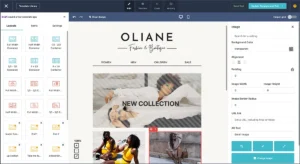
Moosend markets this as a drag-and-drop editor. That’s technically true — but it’s more accurate to call it a grid-based builder. And the difference matters.
Here’s how it actually works. When I started building an email, I first had to choose a structure block — full width, two columns, or thirds. Then I dragged content elements — text, images, buttons, countdown timers, video, product grids, dynamic content blocks — into those predefined positions. Everything snaps into the structure.
This is not the same as a free-form drag-and-drop editor where you place elements freely anywhere on the canvas. If you’ve used MailerLite’s builder or Mailchimp’s newer editor, you’ll notice the difference immediately.
For some people, the grid-based system is actually cleaner. Everything stays aligned automatically. Your emails look good on mobile without extra effort. For designers or marketers who want to position elements exactly where they want — no grid, no snapping — this approach will feel restrictive.
“The editor strikes a good balance between simplicity and power.” (ThatMarketingBuddy)
“Some users have reported that elements don’t always position where expected, making layout adjustments more tedious than true drag-and-drop interfaces.” (Emercury)
What the Editor Does Well
The editor is fast. It didn’t lag during my testing even when I was working with longer, more content-heavy emails. Saves are instant.
You can save custom layouts and reuse them. If you build a structure you like, you can save it as a template and pull it up for future campaigns without rebuilding from scratch.
You can upload your own HTML if you want full control. That’s a useful escape hatch for marketers who have design-coded templates they want to bring in.
One genuinely useful design decision: the same editor powers your emails, landing pages, and forms. Once you understand how the grid-based system works in one place, you know how to use the entire platform. There’s no separate tool to figure out for each content type.
The Problems
Moosend has no brand library. I couldn’t find a way to save my brand fonts and colors globally so they apply to every new template automatically. MailerLite does this well. Moosend hasn’t built it yet.
That means every time I started a new email, I applied my brand colors and font choices manually. For someone sending weekly or twice-weekly campaigns, that friction adds up.
You also can’t preview your email across different email clients. Most professional email tools let you see how your email renders in Gmail, Outlook, Apple Mail, and others before you send. Moosend only shows you a desktop and mobile preview. If rendering across email clients matters to your audience — and it usually does — this is a real gap.
“We liked that you can save layouts and templates and upload your own HTML. However, we couldn’t find how to save fonts and colors so they would be applied to all templates — which would have been a huge timesaver.” (EmailToolTester)
“A few interface elements appear greyed out until you hover over them.” (TechRadar)
Email Editor Rating: 3.8 / 5
Design & Templates: How Good Do Your Emails Look?
Moosend’s Template Library
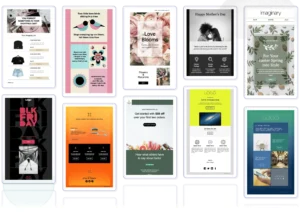
Moosend gives you 130+ email templates organized by category — newsletters, product promotions, welcome emails, seasonal campaigns, re-engagement sequences, and event announcements. They load quickly and are mobile-responsive out of the box.
When I browsed the library during testing, I found the templates well-organized. Filtering by category is easy. Finding something relevant to your campaign type doesn’t take long.
The Honest Problem
The templates feel dated. I noticed this immediately when I opened the library. Multiple reviews on G2 and Capterra flag the same thing. The designs are functional and clean — but the visual aesthetic is stuck somewhere around 2021. They don’t reflect current email design trends.
If you’re sending to a design-conscious audience — a creative brand, a premium product store, a SaaS company — you’ll probably build from a blank template or upload your own HTML rather than use one of the pre-built designs.
There’s also no AI Creative Assistant like Mailchimp has. Mailchimp scans your website and generates email layouts matching your brand colors, fonts, and style automatically. Moosend doesn’t do this. What you see in the template library is what you get.
One upside: you can upload custom HTML templates. If you’ve had a designer build branded templates elsewhere, you can bring them in and use them in Moosend.
“The email designer and templates are a bit old school.” (Capterra)
“While there are over 130 email templates available, they could do with a little refresh from a design perspective.” (EmailToolTester)
“Some of the stock templates look dated compared to current design trends, so you’ll probably find yourself customizing heavily or creating designs from scratch for a modern appearance.” (Omnisend)
Design & Templates Rating: 3.4 / 5
Email Automation: Can It Run Your Marketing on Autopilot?
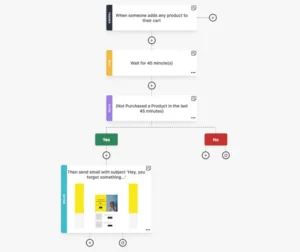
This is where Moosend earns its reputation. And where I was genuinely surprised by how much you get at this price.
What You Get
Moosend’s automation builder comes with 32 triggers, 30+ filter criteria, and 11 action types. I checked those numbers against competitors in the same price range. Most of them don’t come close.
The visual workflow builder is clean. You pick a trigger, add your conditions, define the action, and connect steps visually on screen. You can see the entire logic of your sequence at a glance. You can add branches so different contacts take different paths based on what they do or don’t do.
No coding. No technical skills required. I built a full five-step welcome sequence — including a conditional branch for people who didn’t open the second email — in under 45 minutes on my first try.
The 18 Pre-Built Automation Recipes
Moosend includes 18 automation templates. These cover the most common use cases:
- Welcome series for new subscribers
- Abandoned cart recovery
- Browse abandonment sequences
- Post-purchase follow-up emails
- Win-back campaigns for inactive subscribers
- Anniversary and birthday emails
- Upsell and cross-sell flows
- Lead nurturing sequences
Pick a recipe, customize it for your business, and your automation is running. These are proper starting points — not half-finished templates where you’re rebuilding most of it from scratch.
The Triggers That Stand Out
Most budget email tools let you trigger automations based on email opens and clicks. Moosend goes further.
You can trigger automations based on page views on your website. Moosend tracks website visits through a tracking pixel — and fires automations when someone views a specific page, product, or category. That means you can send a targeted follow-up when someone browses your pricing page but doesn’t sign up. Or when they view a product three times but don’t add it to their cart.
That level of trigger logic is rare at this price point. Most tools charge you premium pricing to unlock website-visit-based triggers. Moosend includes it on all paid plans.
RSS Campaigns for Bloggers
This one surprised me. Moosend supports RSS campaigns — automated emails that pull your latest blog posts from your RSS feed and send them to your subscribers on a schedule.
If you’re a blogger or content creator, this removes one entire step from your workflow. You publish a post. Moosend automatically sends it to your list. No manual campaign needed. No copying and pasting headlines and summaries. It just happens.
Not many email tools handle RSS campaigns this cleanly at the entry-level price tier.
What’s Missing
Moosend’s automation is strong. But there are clear ceilings.
There’s no predictive send-time optimization per individual contact at the workflow level. There’s no AI-powered journey branching that adapts automatically based on long-term behavioral patterns. And there’s no multi-channel capability — Moosend is email-only. If you need a sequence that sends an email, waits two days, then fires an SMS if there’s no open — you need a different platform.
“The automation builder is where Moosend earns its reputation — 32 triggers, 30+ filter criteria, and 11 action types, which is more than most platforms at similar pricing.” (TechRadar)
“By using Moosend’s automation and intelligent segmentation to personalize messaging for each type of customer, we were able to raise the conversion rate by over 20%.” (Capterra)
“For a seemingly simple tool, the automations are pretty impressive.” (EmailToolTester)
Email Automation Rating: 4.3 / 5
A/B Testing: Can You Optimize Your Campaigns?
What Moosend Offers
Moosend has A/B testing built into the campaign builder. To set one up, you go to Campaigns → New → A/B Campaign. Or you can convert an existing campaign to an A/B test by clicking the three dots next to it and selecting “Convert to AB.”
The setup process mirrors creating a regular campaign. The difference: you write two variations instead of one.
You can test:
- Subject lines
- Email body content
- Sender names
- Visual elements and CTAs
You choose what percentage of your list receives each variation — for example, 10% gets version A, 10% gets version B, and the remaining 80% gets the winner automatically.
You set how long to run the test — between 1 and 24 hours — and choose your winning metric: open rate or click rate. When the test period ends, Moosend automatically sends the winning version to the rest of your list. You don’t have to come back and trigger the send manually.
What I Found When Testing It
I ran a subject line A/B test during my trial. The setup was straightforward. The results appeared clearly in the analytics dashboard. The automatic winner deployment worked without issues.
The process is clean and doesn’t require any technical knowledge. If you’ve never run an A/B test before, this is a good place to start.
The Limitations
Moosend limits A/B testing to two versions. You can’t test three or four variations at the same time. Platforms like Mailchimp’s Premium plan support multivariate testing with up to eight variations simultaneously. Moosend doesn’t go that deep.
You also can’t A/B test your landing pages or signup forms — only email campaigns.
And Moosend can’t filter out bot clicks or Apple Mail Privacy Protection opens from its A/B test results. That’s a meaningful limitation in 2026, when Apple MPP inflates open rates significantly. If you’re judging your A/B test winner on open rates — and your audience uses Apple Mail — those results may not be reliable.
“A/B testing covers subject lines, sender names, and content variations — winner selection happens automatically based on open rates or click rates.” (Growth Automation Labs)
“Moosend limits A/B testing to two versions.” (EmailVendorSelection)
💡 Better option for advanced split testing: <a href=”#”>Mailchimp</a> on its Premium plan supports multivariate testing with up to eight variations at once. For large lists where you want to test multiple variables simultaneously, Mailchimp’s testing depth is stronger.
A/B Testing Rating: 3.6 / 5
Segmentation & List Management: Can You Target the Right People?
What You Get
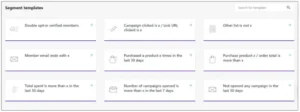
Moosend lets you segment subscribers by email behavior, demographics, custom fields, purchase history, and website activity. You can combine multiple criteria in one segment.
For example: “subscribers who opened the last three emails AND made a purchase in the past 60 days AND are located in Europe.” That’s useful targeting logic for an e-commerce store running a regional promotion.
Audience Discovery goes one step further. Instead of you building every segment manually from scratch, Moosend automatically tags contacts based on their browsing and purchase behavior. It surfaces behavioral groups for you. That’s a real time-saver for e-commerce stores with large, active lists.
When I tested segmentation, I found the filter logic intuitive. Adding conditions is a simple AND/OR choice. Previewing how many contacts fall into a segment is instant. I didn’t need to save and reload to see my segment size update.
The Billing Advantage Over Mailchimp
Here’s one thing Moosend gets right that Mailchimp gets embarrassingly wrong.
Moosend only charges you for active subscribers. When someone unsubscribes, they stop counting toward your plan.
Mailchimp charges you for unsubscribed contacts. People who left your list two years ago and will never receive another email — they still count toward your paid plan unless you manually archive them. For long-term Mailchimp users, that billing trap inflates real costs by 20–40%.
Moosend doesn’t do this. You pay for people actually on your list. That’s how it should work.
The Limits
Moosend’s segmentation is good — not great.
Klaviyo can predict which customers are most likely to buy again in the next 30 days. It scores contacts by churn risk and lifetime value. It tells you not just what someone has done, but what they’re likely to do next. Moosend works entirely with historical behavior — no predictive modeling but if you don’t run a ecommerce store then this one is not applicable to it.
There’s also no duplicate detection across multiple lists. For agencies managing several client accounts in one Moosend instance, this can get disorganized.
“Lots of features and community-driven feature development — prices are affordable compared to the competition.” (Capterra)
“Advanced segmentation options are somewhat limited — restricts detailed audience targeting compared to higher-rated platforms.” (Research.com)
Segmentation & List Management Rating: 3.7 / 5
Forms & Landing Pages: Can You Grow Your List With It?
What You Get
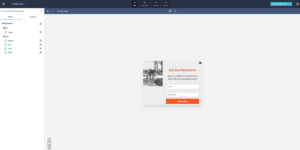
Moosend includes a landing page builder and a signup form builder on all paid plans. You don’t need to pay for a separate tool just to capture leads.
The form builder covers four types:
- Inline forms embedded in your website or blog posts
- Popup forms triggered by exit intent, time on page, or scroll depth
- Floating bars — the thin banner at the top or bottom of a screen
- Subscription pages — a standalone Moosend-hosted opt-in page
Moosend also offers a wheel of fortune form type. It’s a gamified popup where visitors spin a wheel to win a discount or offer. These tend to convert well for e-commerce stores, especially around promotional periods.
You can set conditional rules for showing or hiding forms — based on the page someone is on, how many times they’ve visited, or whether they’re already a subscriber.
Forms sync automatically with your Moosend audience. New subscribers flow directly into the right list and trigger your welcome automation immediately. No Zapier connection needed.
The Landing Page Builder
The landing page builder uses the same grid-based editor as your emails. Templates are available. You can publish on a Moosend-hosted URL without your own domain, or point your own custom domain at the page.
I tested building a basic lead magnet landing page. It took me about 25 minutes. The process was clean. The page loaded fast — testing showed pages loading in under two seconds. Mobile responsiveness worked correctly without any manual adjustment.
The Problems
The landing page template selection is limited. Most templates are built around e-commerce promotions and newsletter opt-ins. For anything more specific — a webinar registration page, a long-form sales page, a product launch page with multiple sections — you’ll spend a lot of time building from scratch.
There’s no A/B testing for landing pages. You can test email campaigns but not your opt-in pages. That’s a meaningful gap if landing page conversion rate optimization is important to your list-building strategy.
And there’s no A/B testing for forms either. You can’t test two popup variations against each other to see which converts better.
“Options to A/B test your form are not available.” (EmailToolTester)
“I would like to see some templates outside of the e-commerce realm — I can still design a layout that works for any purpose.” (Capterra)
💡 Better option for forms and landing pages: <a href=”#”>MailerLite</a> has a more advanced landing page builder with A/B testing for pages, an AI page creator, and a free plan that includes up to 10 landing pages. If list building through high-converting landing pages is your primary goal, MailerLite is the stronger tool.
Forms & Landing Pages Rating: 3.5 / 5
Deliverability: Will Your Emails Actually Land in the Inbox?
This is the most important section of this review. Read it carefully — especially the warning.
The Good News
Moosend claims a 98% deliverability rate. For users with clean, engaged lists, this holds up in independent testing and real user reports. Multiple Capterra reviewers specifically highlight strong inbox placement as a reason they stayed with Moosend after comparing alternatives.
Here’s what Moosend includes for deliverability — and this is more than most tools at this price:
- Full SPF, DKIM, and DMARC authentication
- Custom sending domain verification
- SpamAssassin score testing before you send
- Automatic bounce handling and list cleaning
- Engagement-based contact suppression
- Spam filter checks against major ISPs including Gmail, Yahoo, and Hotmail
- Dedicated IP addresses available on Enterprise plans
The SpamAssassin test is worth highlighting specifically. Before sending a campaign, I ran the spam test on my email. It checks your content against the filters used by major inbox providers and gives you a score. Most email tools at this price skip this entirely. Moosend includes it on all paid plans — though I found it noticeably slow during testing.
“We have been incredibly pleased with the deliverability we have received from Moosend.” (Capterra)
“The basic product is excellent. Automations work well, campaigns are easy to create, schedule, and send.” (Capterra)
The Warning — Read This Before You Sign Up
Here is what most Moosend reviews don’t tell you. And it’s the most important thing in this entire post.
Moosend’s anti-spam enforcement is aggressive. Far more aggressive than most platforms.
Import a list with stale contacts, high bounce rates, or purchased addresses — and Moosend’s enforcement system can suspend your account within hours. Sometimes after your very first campaign send. Sometimes during the free trial, before you’ve paid for a single month.
This is the dominant source of negative reviews on Trustpilot. Real users. Real accounts. Suspended with no clear explanation and no fast path to reinstatement.
The enforcement is not random. It’s protecting deliverability for everyone on the shared platform. That’s the right instinct. But the execution lacks nuance and clear communication. Many users don’t know the rule exists until it’s too late.
“Signed up for a trial, logged in, and then got tied up for the day. Later that night I login to my email and my trial is over.” (Trustpilot)
“After completing hours of work building campaigns, on the initial send of your very first email, your account could be suspended indefinitely for no given reason.” (Capterra)
The Fix — Do This Before You Sign Up
Run your entire list through an email verification service before importing it into Moosend.
Tools like Bouncer, ZeroBounce, or NeverBounce identify invalid, risky, and outdated addresses that will trigger Moosend’s enforcement. For most lists, verification costs between $10 and $30. That’s a small price to pay to avoid losing your account.
Also remove any subscriber who hasn’t opened an email in the last 12 months. A disengaged list hurts deliverability on every platform — but on Moosend, it can cost you your account entirely.
Do this before you sign up. Not after. One step. That’s what separates the 4.7-star G2 experience from the 3.4-star Trustpilot experience.
Deliverability Rating: 4.0 / 5
Reporting & Analytics: Does It Help You Make Better Decisions?
What Moosend Does Well
Moosend’s reporting is one of its strongest features — and one that I didn’t expect to be this good at this price point.
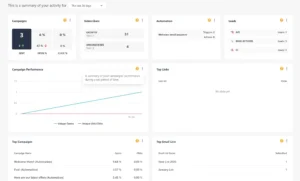
When I ran my first test campaign, I checked the reporting dashboard about an hour after sending. Here’s what was available:
- Open rates, click rates, bounce rates, and unsubscribes — all updated in real time
- Click heatmaps — a visual map showing exactly where subscribers clicked inside the email
- Geolocation data — where in the world my subscribers were opening from, shown on a map
- Email client and device breakdown — how many people opened on Gmail vs Outlook, iPhone vs Android
- Revenue attribution — which campaigns drove purchases and exactly how much money each email generated
Revenue attribution at this price point is genuinely rare. It means you can look at any campaign and see the real dollar figure it produced — not a guess, not an estimate. Actual revenue traced back to specific emails.
The reporting dashboard is also customizable. You can add or remove around 50 different widgets to build a view that shows what matters to you specifically. And you can share reports with your team using a no-password link — useful when someone needs to review campaign results without logging into the account.
What’s Missing
There’s no customer lifetime value tracking. No predicted next purchase date per customer. No churn risk score. Moosend shows you what happened — it can’t tell you what’s likely to happen next.
You also can’t filter out Apple Mail Privacy Protection opens from your reporting. Since Apple MPP inflates open rates artificially for Apple Mail users, your open rate data may look better than it actually is. This is a problem across many email platforms — but it’s worth flagging.
Custom report exports are functional but limited. You can’t build entirely custom dashboards or pull data into views beyond what Moosend provides.
“MOOSEND has all the analytical stuff on the back end that you need to fine tune your marketing campaign.” (Capterra)
“The reports are detailed and well laid out, including a click heatmap, geolocation insights, and information on email clients and devices.” (EmailToolTester)
“For ecommerce businesses, revenue tracking helps measure how much sales each campaign generates — makes it easier to calculate return on investment.” (Emailyoo)
Reporting & Analytics Rating: 4.0 / 5
E-commerce Features: Can You Sell Through Moosend?
What You Get
Moosend integrates with Shopify, WooCommerce, BigCommerce, Magento, and PrestaShop. Customer data, order history, browsing behavior, and product catalog information sync into Moosend and can be used to trigger automations and personalize email content.
All core e-commerce automations are included on standard paid plans — nothing is gated behind an enterprise tier:
- Abandoned cart recovery emails
- Browse abandonment sequences
- Post-purchase follow-up campaigns
- Product recommendation emails based on individual purchase and browsing history
- Win-back campaigns for lapsed customers
- Upsell and cross-sell sequences triggered by specific purchase events
The AI-powered product recommendation engine deserves a specific mention. It pulls items from your store catalog and recommends them to individual subscribers based on their own behavior — not just overall popularity. For stores with large or varied catalogs, this kind of personalization can meaningfully improve click rates and revenue per email.
Moosend also supports transactional emails. Order confirmations, shipping updates, and password resets can all be sent through Moosend. These are available as an add-on on the standard Pro plan and are included as standard on Moosend+ and Enterprise plans.
What Transactional Emails Actually Mean
If you’re not familiar with the term — transactional emails are the automated messages triggered by a customer action. Order confirmation. Shipping notification. Password reset.
These are different from marketing emails. Customers expect them. They open them at high rates. And they should look on-brand and arrive reliably.
On Moosend’s Pro plan, transactional emails are an add-on — meaning you’ll pay extra for them on top of your subscription. On Moosend+ they’re included. Factor this into your pricing calculation if transactional emails are important to your business.
The Limits
Moosend’s e-commerce features are solid for stores in their early and growth stages. Once you’re scaling seriously, the gaps become more visible.
There’s no predicted next order date per customer. No churn risk score per contact. No AI that tells you “this segment has a 75% probability of purchasing in the next 30 days.” Klaviyo does all of this. Moosend doesn’t.
For a store doing under $10k a month, Moosend’s e-commerce toolkit is more than enough. For a store doing $50k+ a month that wants to act on predictive data, Klaviyo justifies its higher price.
“E-commerce stores using Shopify or WooCommerce particularly benefit from Moosend’s cart abandonment automations and product recommendation engine.” (Emercury)
“It gets pricey fast with Klaviyo as your list grows — Moosend gives you 80% of the capability at 20% of the cost for stores under $10k/month.” (Reddit)
💡 Better option for high-revenue e-commerce: <a href=”#”>Klaviyo</a> has real-time Shopify sync, AI-powered predictive analytics, churn risk scoring, and lifetime value modeling that Moosend simply doesn’t offer. The price gap is real — but so is the capability gap at scale.
E-commerce Features Rating: 3.9 / 5
AI Features: Is the AI Actually Useful?
What Moosend’s AI Does
Moosend has added several AI features across the platform in recent updates. Here’s what I found when I tested each one:
AI Writer
The AI Writer generates email subject lines and body copy from a prompt. You choose from 7 tone options — professional, friendly, casual, persuasive, and others — and the AI generates copy to match. It also scores your subject line against industry benchmarks and gives you a numerical score before you send.
I used the AI Writer to draft subject lines for three test campaigns. The output was decent — not final-copy quality, but a solid starting point. The subject line scoring gave me something concrete to react to rather than just gut-feel.
Perfect Timing
This is the AI feature that surprised me most. Perfect Timing analyzes when each individual subscriber on your list typically opens emails and schedules delivery for that specific person’s optimal time.
This is per-subscriber send-time optimization — not just “best time for your overall list.” That level of personalization is something you’d normally expect from ActiveCampaign or Klaviyo. Moosend includes it on all paid plans.
Audience Discovery
Instead of building every segment manually, Audience Discovery automatically tags contacts based on their browsing and purchase behavior. It surfaces behavioral groups for you without you needing to define all the rules yourself.
I found this useful during testing for e-commerce scenarios. For content-focused businesses or bloggers where purchase signals are less relevant, it’s less impactful.
AI Product Recommendations
Pulls items from your store catalog and recommends products to individual subscribers based on their specific purchase and browsing history. Useful for e-commerce product emails where personalization improves click rates.
The Reality
These are real, functional AI features — not marketing buzzwords. But they’re not at the level of Klaviyo’s predictive engine or Mailchimp’s Creative Assistant.
The AI Writer produces drafts you’ll edit — not finished copy you’ll send as-is. Perfect Timing is the standout feature that genuinely adds value beyond what budget competitors offer.
“Moosend AI can generate subject lines, write email copy across 7 tone options, and score your subject lines against industry benchmarks.” (max-productive.ai)
“The AI-powered subject line optimizer suggests improvements based on historical open rate data from millions of campaigns.” (Growth Automation Labs)
AI Features Rating: 3.8 / 5
Integrations: Does It Connect With Your Other Tools?
What Moosend Offers
Moosend connects with 80+ external services directly. Key integrations include:
- E-commerce: Shopify, WooCommerce, BigCommerce, Magento, PrestaShop
- CRM: Salesforce, HubSpot
- Lead capture: WordPress, Unbounce, Instapage
- Analytics: Google Analytics
- Social: Facebook Lead Ads
- Email: Microsoft Outlook
- Automation bridge: Zapier — which expands Moosend’s connections to 1,000+ additional tools
For most small businesses and bloggers, the key connections are there. If you use Shopify, WooCommerce, or WordPress — you’re covered natively.
The Limits
80+ integrations sounds reasonable. But compared to Mailchimp’s 300+ direct integrations or ActiveCampaign’s deep library — Moosend’s native list is limited.
There’s no native TikTok, Snapchat, or Google Ads integration. No native Slack, Notion, or Intercom connection. If your stack includes niche tools outside the mainstream list, you’ll be routing connections through Zapier — which adds a layer of dependency and potential cost.
For agencies or larger marketing teams with complex tech stacks, Moosend’s native integration library will feel thin. For a solo creator or small business with a simple stack, it covers what you actually need.
“Moosend connects to 80+ external services with verified integrations for Google Analytics, Salesforce, WordPress, and Microsoft Outlook.” (Omnisend)
“Integration options are more limited than Mailchimp, and some connections require Zapier.” (Mailercloud)
Integrations Rating: 3.3 / 5
Mobile App: Can You Manage Campaigns on Your Phone?
Let me be direct about this.
Moosend has no mobile app.
Not a limited mobile app. Not a read-only stats viewer. No app at all.
If you need to check campaign performance during a commute, pause an automation from your phone, or review open rates while you’re away from your desk — you can’t do it with Moosend. You need a laptop or desktop to access the platform.
This is a real limitation in 2026. Most email marketing platforms have at least a basic mobile app. Mailchimp has an iOS and Android app. MailerLite has a mobile app. ActiveCampaign has a mobile app. Moosend doesn’t.
For solo operators who work primarily from a desk, this probably won’t affect you day-to-day. For team leads, agency managers, or anyone who needs to monitor live campaigns on the go — this is a meaningful gap worth knowing before you sign up.
“Unfortunately, Moosend doesn’t offer its services on mobile devices. You’ll need to use a laptop or desktop to manage email campaigns.” (Gmass)
“A lack of mobile app means you’re tied to desktop for campaign management.” (Multiple reviews)
Mobile App Rating: 0 / 5 (No app available)
Team Collaboration: Can Your Team Work Together?
What Moosend Offers
Moosend lets team members add comments directly to email designs. You can reply to feedback, tag teammates, and get notified when suggestions are added. It works like commenting in a Google Doc — but inside the email editor itself.
This feature is genuinely unique. Most email marketing tools treat collaboration as an afterthought. You export a screenshot. Someone emails feedback. You update the design manually. Back and forth. Moosend built the feedback loop into the platform.
If you have multiple people reviewing campaigns before they go out — a copywriter, a designer, a manager — this saves real time.
Unlimited Users on All Plans
This is a significant pricing advantage that doesn’t get mentioned enough.
Most email platforms charge per user seat. ActiveCampaign charges $10–$25 per additional user per month. Moosend includes unlimited users on all paid plans. No per-seat fees.
For growing teams and agencies managing multiple users, that difference adds up fast. If you have five people who need access to your Moosend account, you’re paying nothing extra. On ActiveCampaign, that same setup could cost you an extra $50–$125 a month.
“Most competitor platforms charge $10–25 per additional user monthly. Moosend includes unlimited users on all paid plans — agencies and growing teams save hundreds monthly on seat licenses alone.” (Growth Automation Labs)
Team Collaboration Rating: 4.3 / 5
GDPR & Compliance: Is It Safe to Use in Your Country?
What Moosend Provides
Moosend is GDPR compliant and ISO-27001 certified. It follows current international data security standards. For businesses handling subscriber data across multiple countries, that certification matters.
GDPR compliance tools available on all plans:
- Double opt-in available and easy to turn on from list settings
- Unsubscribe links included automatically in every email
- GDPR consent checkboxes can be added to all signup forms
- Data Processing Agreement available on request
During my testing, I found the GDPR consent form setup straightforward. Adding a required checkbox to a signup form took less than two minutes.
The Language Limitation
Moosend’s platform is available in 7 languages — including German, French, and Spanish. But customer support is in English only.
If you or your team primarily work in another language, you can use the platform in your language. But when something goes wrong and you need help — the support team will respond in English. For international businesses where team members aren’t comfortable in English, this is a practical limitation.
“While the platform is available in 7 languages, support is only available in English.” (EmailToolTester)
💡 Better option for EU-based businesses: <a href=”#”>Brevo</a> is headquartered in the European Union and stores all data on EU servers — making GDPR compliance more straightforward for EU businesses without the legal complexity of US-based data transfers.
GDPR & Compliance Rating: 4.0 / 5
Customer Support: Who Helps You When Things Go Wrong?
What Moosend Offers
- All paid plans: 24/7 live chat and email support
- Moosend+ / Enterprise: Dedicated account manager, priority support, phone support
- All users: Knowledge base with articles and video tutorials, webinars
Live chat is accessible from inside the editors themselves. You don’t have to navigate away from your campaign or automation to get help. That’s a smart design choice that saves time when you’re stuck in the middle of building something.
What I Experienced
I contacted live chat twice during my testing period — once about a segmentation question and once about the SpamAssassin test speed. Both times I got a response within minutes. The answers were specific and useful. I didn’t get a generic help article link and nothing else.
That’s consistent with what I saw across G2 and Capterra. Live chat at Moosend gets strong, consistent praise from real users.
Email support is more mixed. Response time during my testing was within 2–4 hours, which is reasonable. But multiple reviews on G2 describe email responses that felt rushed or dismissive. A few describe agents who replied in a way that felt condescending rather than helpful.
“Support agents are on hand via live chat, which you can access from inside the editors. Responses are pretty immediate in my experience.” (EmailToolTester)
“When I contacted support with a technical question about API integration, I received a helpful, detailed response.” (ThatMarketingBuddy)
“Email support responses were a little more on the condescending side.” (G2)
The Account Suspension Problem
This is where support breaks down. When an account gets suspended — especially during the free trial — the path to reinstatement is slow and lacks transparency. Multiple Trustpilot reviewers describe being suspended without a clear explanation of what triggered it or what they need to do to get back in.
If you import a clean, verified list and follow proper sending practices, you’ll probably never deal with this. But if you do hit it — don’t expect a fast or empathetic resolution.
The Migration Gap
Moosend does not help you migrate your contacts, automations, or email templates from another platform — unless you’re on the Enterprise plan. If you’re moving from Mailchimp or Kit with 20+ existing automations, you’re rebuilding everything in Moosend yourself on a standard plan. Factor that time cost into your decision.
“If you’re moving from another email marketing platform, Moosend won’t help you migrate your contacts, automations, or templates — this level of support is reserved for Enterprise-level customers.” (EmailToolTester)
Customer Support Rating: 3.7 / 5
Pricing: What Does It Actually Cost?
The Free Trial
Moosend offers a 30-day free trial with full access to all features. No credit card required. You can send unlimited emails during the trial, but you’re limited to one automation workflow, one landing page, and one form.
I used the full 30 days during my testing. That’s enough time to build real campaigns, run A/B tests, connect your e-commerce store, and evaluate whether the platform actually works for your business.
The Pro Plan
The Pro plan starts at $9/month — or $7/month if you pay annually — for up to 500 contacts. All paid plans include unlimited email sends. There are no per-email charges or monthly send limits.
What’s included in Pro:
- Unlimited emails
- Unlimited automations
- Unlimited landing pages and forms
- SMTP server for transactional emails (as an add-on)
- Full reporting including click heatmaps and revenue attribution
- A/B testing
- AI features — AI Writer, Perfect Timing, Audience Discovery
- Website visit tracking for automation triggers
- Unlimited user seats
- 24/7 live chat and email support
Here is how Pro pricing scales:
| Contacts | Monthly (Annual Billing) | Monthly (No Commitment) |
|---|---|---|
| 500 | $7/month | $9/month |
| 2,000 | $19/month | $24/month |
| 5,000 | $38/month | $48/month |
| 10,000 | $68/month | $88/month |
| 25,000 | $152/month | $192/month |
| 50,000 | $252/month | $314/month |
The Moosend+ and Enterprise Plans
Moosend+ adds transactional emails as a standard feature, advanced security controls, and priority support. Enterprise adds a dedicated account manager, SSO and SAML, dedicated IP addresses, and migration assistance. Contact Moosend for custom Enterprise pricing.
How Does Moosend Compare to Competitors?
| Contacts | Moosend | MailerLite | Mailchimp (Standard) | ActiveCampaign | Klaviyo |
|---|---|---|---|---|---|
| 500 | $9/month | $10/month | $45/month | $15/month | $20/month |
| 1,000 | $16/month | $15/month | $75/month | $29/month | $30/month |
| 5,000 | $48/month | $39/month | $130/month | $99/month | $100/month |
| 10,000 | $88/month | $73/month | $175/month | $189/month | $150/month |
Moosend is one of the cheapest full-featured email platforms at most list sizes. MailerLite edges ahead at mid-range contact counts. Everyone else costs significantly more — often 2–4x the price.
The unlimited user seats on every plan is an underrated pricing advantage. Most competitors charge per seat. If your team has five people who need platform access, you’re paying nothing extra on Moosend versus potentially $50–$125/month extra on competitors.
Pricing Rating: 4.5 / 5
The No Free Plan Problem
This is a section most Moosend reviews skip. But it matters — especially if you’re comparing tools and weighing your options.
Moosend has no permanent free plan. Only a 30-day free trial.
After 30 days, you pay or you leave. There’s no “free forever” option to stay on while you build your list slowly.
Here’s how that compares to what competitors offer right now:
| Tool | Free Plan |
|---|---|
| Kit | 10,000 subscribers free forever |
| MailerLite | 1,000 subscribers + automation free forever |
| Brevo | Unlimited contacts, 300 emails/day free forever |
| Mailchimp | 250 contacts, no automation |
| Moosend | 30-day trial only — then paid |
If you’re just starting out with zero subscribers and a very limited budget, this matters. You can’t stay on Moosend for free while you build your first 500 subscribers. After 30 days, you need to start paying $9 a month.
Is $9 a month a lot of money? No. But it’s $108 a year. And if you’re comparing Moosend to Kit’s free plan for up to 10,000 subscribers — or MailerLite’s free plan with automation included — the difference is real.
The honest take: If you already have a list of even a few hundred subscribers and you’re ready to pay for a proper email tool — the 30-day trial is more than enough. Sign up, test everything, and pay the $9. The value is there.
But if you want to stay on a free plan indefinitely while you grow from zero — Moosend is not the right starting point. Start with MailerLite or Kit, build your list, and then migrate to Moosend when you’re ready to pay for a more powerful automation setup.
What Real Users Say: Honest Reviews from G2, Capterra, and Trustpilot
Ratings at a Glance:
- G2: 4.7 / 5 (730+ reviews)
- Capterra: 4.6 / 5 (196 reviews)
- Trustpilot: 3.4 / 5 (~79 reviews)
The gap between G2 and Trustpilot is one of the widest in the email marketing category. It tells a specific story. Users who come in with clean lists, follow proper email practices, and invest time in learning the platform — they love it. Users who import unverified lists and run into the account suspension enforcement — they leave scathing reviews.
What People Love About Moosend:
✅ “There’s no other tool matching the feature set and price point offered. After going through other platforms, we decided to stay with Moosend.” (G2)
✅ “Very reliable and excellent tool which is easy to use for a great price.” (G2)
✅ “We have tried a lot of different autoresponders and this has been the best of the lot. You’ve got high-end functions without the cost of some of the bigger companies.” (Capterra)
✅ “We have been incredibly pleased with the deliverability we have received from Moosend.” (Capterra)
✅ “MOOSEND has all the analytical stuff on the back end that you need to fine tune your marketing campaign. The best part is the price — it does EVERYTHING you will need at a much lower price than the other companies out there.” (Capterra)
✅ “By using Moosend’s automation and intelligent segmentation to personalize messaging for each type of customer, we were able to raise the conversion rate by over 20%.” (Capterra)
✅ “The basic product is excellent. Automations work well, campaigns are easy to create, schedule, and send.” (Capterra)
✅ “This is incredibly simple to use and has most of the features you’d find in top-tier email software.” (Capterra)
What People Complain About Moosend:
❌ “Signed up for a trial, logged in, and then got tied up for the day. Later that night I login to my email and my trial is over.” (Trustpilot)
❌ “After completing hours of work building campaigns, on the initial send of your very first email, your account could be suspended indefinitely for no given reason.” (Capterra)
❌ “We extensively pre-tested Moosend — including a call with their sales team — then spent over $1,000 on developers trying to implement functionality that proved impossible.” (Capterra)
❌ “The email designer and templates are a bit old school.” (Capterra)
❌ “We couldn’t find how to save fonts and colors so they would be applied to all templates — which would have been a huge timesaver.” (EmailToolTester)
❌ “Email support responses were a little more on the condescending side.” (G2)
❌ “The white-label functionality currently has some holes that need to be filled.” (Capterra)
❌ “Unfortunately, Moosend doesn’t offer its services on mobile devices.” (Gmass)
Moosend Pros and Cons
Pros:
✅ One of the cheapest full-featured email platforms at most list sizes
✅ 30-day free trial with full access — no credit card required
✅ Full automation from $9/month — 32 triggers, 30+ filters, 18 pre-built recipes
✅ Website visit tracking that triggers automations — rare at this price
✅ Unlimited user seats on all plans — no per-seat charges
✅ Revenue attribution built into campaign reporting on all plans
✅ Per-subscriber send-time optimization (Perfect Timing) included
✅ RSS campaigns for bloggers — automate delivery of new posts
✅ A/B testing built in — subject lines, content, sender names
✅ Team collaboration and inline commenting inside the email editor
✅ SpamAssassin score testing before every send
✅ GDPR compliant and ISO-27001 certified
✅ 24/7 live chat support praised consistently across G2 and Capterra
✅ Only charges for active subscribers — no billing for unsubscribed contacts
Cons:
❌ No mobile app — desktop only
❌ Aggressive account suspension for dirty or unverified lists
❌ No permanent free plan — 30-day trial only
❌ No native SMS — separate platform needed for text marketing
❌ No brand library — can’t save global fonts and colors across templates
❌ Templates feel visually dated compared to competitors
❌ A/B testing limited to two versions — no multivariate testing
❌ Can’t preview emails across different email clients (Gmail, Outlook, Apple Mail)
❌ Can’t filter Apple MPP opens from reporting — open rates may be inflated
❌ Trustpilot score (3.4/5) significantly lower than G2 (4.7/5) — the gap tells a story
❌ No built-in CRM — not suitable for B2B or sales-team use
❌ No predictive analytics — no lifetime value, churn risk, or next purchase prediction
❌ Only 80+ native integrations — limited compared to Mailchimp (300+)
❌ No migration support on standard plans — you move everything yourself
❌ Customer support in English only despite 7-language platform
❌ White-label features incomplete — gaps for client-facing agencies
❌ SpamAssassin test can be slow
Final Verdict: Should You Use Moosend in 2026?
After testing the platform myself, reading 900+ real reviews, and looking honestly at where Moosend stands today — here is my verdict:
For most small businesses, bloggers, and creators: Yes. Moosend is worth it — with one non-negotiable condition.
The price-to-feature ratio is genuinely hard to beat anywhere in this category. You get real automation with 32 triggers, website visit tracking that fires automations based on page views, per-subscriber send-time optimization, revenue attribution on every campaign, A/B testing, unlimited user seats, and a 30-day full-access trial.
All of that starts at $9 a month.
The condition that is not optional: clean your list before you import. Run your contacts through ZeroBounce, NeverBounce, or Bouncer. Remove anyone who hasn’t opened an email in 12 months. Spend $10 to $30 on verification. Do this before you sign up — not after your account is gone.
That single step is the difference between the 4.7-star G2 experience and the 3.4-star Trustpilot experience. It’s not complicated. It just has to happen.
If you don’t have a permanent free plan requirement, don’t need SMS, and aren’t running a high-revenue store that needs Klaviyo-level predictive analytics — Moosend is one of the smartest email marketing decisions you can make in 2026.
Here’s Where to Go Instead:
For a free plan + better templates → MailerLite 1,000 subscribers free forever with automation included. More modern email editor. Brand Library that saves your fonts and colors globally. Landing page A/B testing. 24/7 support even on the free plan. If you’re starting from zero and not ready to pay — start here and migrate to Moosend later.
For SMS + email in one platform → Omnisend Moosend has no native SMS. Omnisend bundles email, SMS, and web push into one platform with multichannel automation. If you need to reach subscribers across channels from the same workflow, Omnisend is built for that.
For deep e-commerce data and scaling → Klaviyo If your Shopify store is doing serious revenue and you need predictive analytics, churn risk scoring, and lifetime value modeling — Klaviyo is where you go. Moosend is an excellent starting point. Klaviyo is where serious e-commerce brands graduate to.
For B2B marketing with CRM built in → Brevo Moosend has no CRM. If your business runs on pipeline management, lead scoring, and sales-team automation — ActiveCampaign is built for exactly that use case.
Feature Ratings Summary
| Feature | Rating |
|---|---|
| Getting Started & Setup | 4.5 / 5 |
| Email Editor | 3.8 / 5 |
| Design & Templates | 3.4 / 5 |
| Email Automation | 4.3 / 5 |
| A/B Testing | 3.6 / 5 |
| Segmentation & List Management | 3.7 / 5 |
| Forms & Landing Pages | 3.5 / 5 |
| Deliverability | 4.0 / 5 |
| Reporting & Analytics | 4.0 / 5 |
| E-commerce Features | 3.9 / 5 |
| AI Features | 3.8 / 5 |
| Integrations | 3.3 / 5 |
| Mobile App | 0 / 5 |
| Team Collaboration | 4.3 / 5 |
| GDPR & Compliance | 4.0 / 5 |
| Customer Support | 3.7 / 5 |
| Pricing | 4.5 / 5 |
Overall Rating: 4.1 / 5 ⭐
Verdict: We Recommended Moosend for small businesses, bloggers, and e-commerce brands at early and growth stages — with the non-negotiable requirement that you verify and clean your list before importing. The automation is real. The price is fair. The feature depth is genuine. Just don’t bring a dirty list and don’t expect a mobile app.
Have you used Moosend? Got burned by the account suspension issue — or had a great experience that proves the G2 rating right? Drop your honest take in the comments below. I read every single one.
